ad blue MAZDA MODEL CX-5 2018 (in English) Owner's Guide
[x] Cancel search | Manufacturer: MAZDA, Model Year: 2018, Model line: MODEL CX-5, Model: MAZDA MODEL CX-5 2018Pages: 628, PDF Size: 82.38 MB
Page 373 of 628
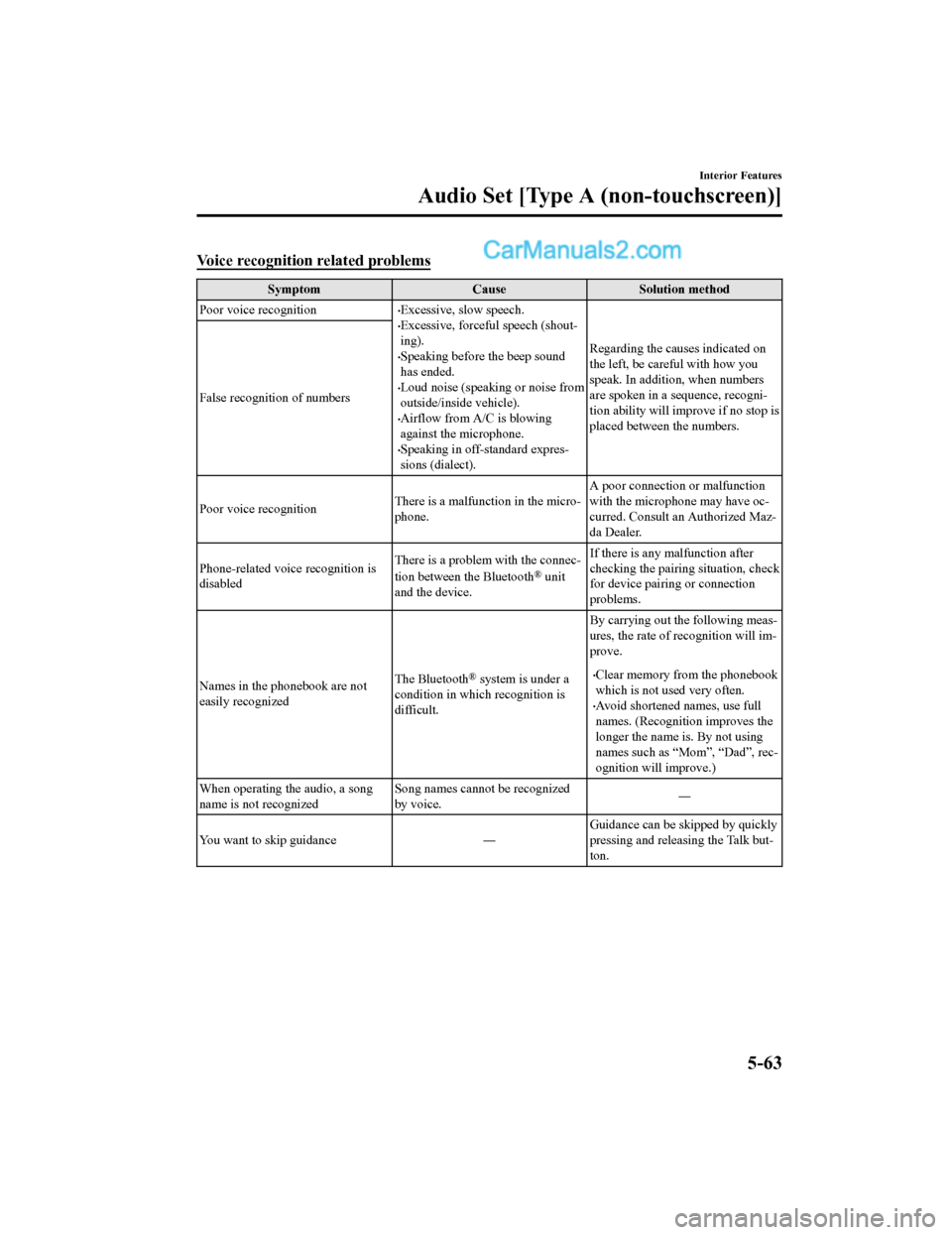
Voice recognition related problems
SymptomCauseSolution method
Poor voice recognition
•Excessive, slow speech.•Excessive, forceful speech (shout-
ing).
•Speaking before the beep sound
has ended.
•Loud noise (speaking or noise from
outside/inside vehicle).
•Airflow from A/C is blowing
against the microphone.
•Speaking in off-standard expres-
sions (dialect). Regarding the causes indicated on
the left, be careful with how you
speak. In addition,
when numbers
are spoken in a sequence, recogni-
tion ability will improve if no stop is
placed between the numbers.
False recognition of numbers
Poor voice recognition
There is a malfunction in the micro-
phone.A poor connection or malfunction
with the microphone may have oc-
curred. Consult an Authorized Maz-
da Dealer.
Phone-related voice recognition is
disabled There is a problem with the connec-
tion between the Bluetooth
® unit
and the device. If there is any malfunction after
checking the pairin
g situation, check
for device pairing or connection
problems.
Names in the phonebook are not
easily recognized The Bluetooth
® system is under a
condition in which recognition is
difficult. By carrying out the following meas-
ures, the rate of recognition will im-
prove.•Clear memory from the phonebook
which is not used very often.
•Avoid shortened names, use full
names. (Recognitio
n improves the
longer the name is. By not using
names such as “Mom”, “Dad”, rec-
ognition will improve.)
When operating the audio, a song
name is not recognized Song names cannot be recognized
by voice.
―
You want to skip guidance ― Guidance can be skipped by quickly
pressing and releasing the Talk but-
ton.
Interior Features
Audio Set [Type A (non-touchscreen)]
5-63
CX-5_8GN5-EA-17J_Edition1
2017-8-18 12:58:27
Page 374 of 628

Regarding problems with calls
SymptomCauseSolution method
When starting a call, vehicle noise
from the other party can be heard For about three seconds after start-
ing a call, the Bluetooth
® unit's
Noise Suppression function requires
time to adapt to the call environ-
ment. This does not indicate a problem
with the device.
The other party cannot be heard or
the speaker's voice is quiet The volume is set at zero or low. Increase the volume.
Other problems
Symptom
CauseSolution method
The indication for the remaining
battery is different between the ve-
hicle and the device The indication method is different
between the vehicle and the device.
―
When a call is made from the vehi-
cle, the telephone number is updated
in the incoming/outgoing call record
but the name does not appear The number has not
been registered
into the phonebook. If the number has been registered
into the phonebook, the incoming/
outgoing call record is updated by
the name in the phonebook when
the engine is restarted.
The cell phone does not synchronize
with the vehicle regarding the in-
coming/outgoing call record Some types of cell phones do not
synchronize automatically.
Operate the cell p
hone for synchro-
nization.
It takes a long time to complete the
function for changing the language A maximum of 60 seconds is re-
quired.
―
Interior Features
Audio Set [Type A (non-touchscreen)]
5-64
CX-5_8GN5-EA-17J_Edition1
2017-8-18 12:58:27
Page 379 of 628

Home screen
IconFunction
Applications
Information such as average fuel economy, maintenance, and warn ings can be verified.
Depending on the grade and specification, the screen display ma y differ.
Entertainment
Operates audio such as the radio. The audio source most recentl y used is displayed. An
audio source which cannot be used at that time is skipped and t he previous audio source is
displayed.
To change the audio source, select the
icon displayed at the bottom of the screen.
Communication
Bluetooth® related functions are available.
Navigation
Navigation screen is displayed (v ehicles with navigation system).
If the SD card for the navigation system is not inserted, the compass indicating the direc-
tion in which the vehicle is moving is displayed.
The compass may not indicate th e correct bearing when the vehicle is stopped or traveling
at a slow speed.
Settings
Overall setting menu (Such a s display, sound, Bluetooth® and Language).
Depending on the grade and specification, the screen display ma y differ.
Interior Features
Audio Set [Type B (touchscreen)]
5-69
CX-5_8GN5-EA-17J_Edition1 2017-8-18 12:58:27
Page 396 of 628
Bluetooth®
▼Introduction
Bluetooth® Hands-Free outline
When a Bluetooth® device (mobile phone) is connected to the vehicle's Bluetooth® unit via
radio wave transmission, a call can be made or received by pres sing the talk button, pick-up
button, or hang-up button on the audio remote control switch, o r by operating the center
display. For example, even if a device (mobile phone) is in you r coat pocket, a call can be
made without taking the device (mobile phone) out and operating it directly.
Bluetooth
® audio outline
When a portable audio unit equipped with the Bluetooth® communication function is paired
to the vehicle, you can listen to music stored on the paired po rtable audio device from the
vehicle's speakers. It is not necessary to connect the portable audio device to the vehicle's
external input terminal. After p rogramming, operate the vehicle audio control panel to play/
stop the audio.
NOTE
•For your safety, a device can be paired only when the vehicle is parked. If the vehicle
starts to move, the pairing procedure will end. Park the vehicle in a safe place before
pairing.
•The communication range of a Bluetooth® equipped device is about 10 meters (32 ft) or
less.
•Basic audio operation is av ailable using voice commands even if Bluetooth® is not
connected.
•For safety reasons, operation of the center display is disabled while the vehicle is being
driven. However, items not displayed in gray can be operated using the commander
switch while the vehicle is being driven.
Interior Features
Audio Set [Type B (touchscreen)]
5-86
CX-5_8GN5-EA-17J_Edition1 2017-8-18 12:58:27
Page 397 of 628

CAUTION
Some Bluetooth® mobile devices are not compatible with the vehicle. Consult an Authorized
Mazda Dealer, Mazda's call center or Web support center for information regarding
Bluetooth
® mobile device compatibility:
U.S.A.
Phone: 800-430-0153
Web: www.mazdausa.com/mazdaconnect
Canada
Phone: 800-430-0153
Web: www.mazdahandsfree.ca
Applicable Bluetooth
® specification (Recommended)
Ver. 1.1/1.2/2.0
EDR/2.1 EDR/3.0 (conformity)
▼ Component Parts
Microphone
Talk button, Pick-up button and Hang-up button
Microphone Audio unit
Talk button
Hang-up button Pick-up button
Microphone (hands-free)
The microphone is used for speaking voice commands or when maki
ng a Hands-free call.
Interior Features
Audio Set [Type B (touchscreen)]
5-87
CX-5_8GN5-EA-17J_Edition1 2017-8-18 12:58:27
Page 399 of 628

Bluetooth® Preparation
▼Device pairing
To use Bluetooth® audio and Hands-Free,
the device equipped with Bluetooth
® has
to be paired to the un it using the following
procedure. A maximum of seven devices
including Bluetooth
® audio devices and
hands-free mobile phones can be paired.
NOTE
•The Bluetooth® system may not operate
for 1 or 2 minutes after the ignition is
switched to ACC or ON. However, this
does not indicate a problem. If the
Bluetooth
® system does not connect
automatically after 1 or 2 minutes have
elapsed, make sure that the Bluetooth
®
setting on the device is normal and
attempt to reconn ect the Bluetooth
®
device from the vehicle side.
•If Bluetooth®-enabled devices are used
in the following locations or conditions,
connection via Bluetooth
® may not be
possible.
•The device is in a location hidden
from the center display such as behind
or under a seat, or inside the glove
compartment.
•The device contacts or is covered by a
metal object or body.
•The device is set to power-saving
mode.
Pairing Procedure
1. Select the
icon on the home screen
to display the Settings screen.
2. Select the
tab.
3. Select
.
4. Turn the Bluetooth® setting on.
5. Select
to display the
message and switch to the device
operation.
6. Using your device, perform a search
for the Bluetooth
® device (Peripheral
device).
7. Select “Mazda” from the device list searched by the device.
8. (Device with Bluetooth
® version 2.0)
Input the displayed 4-digit pairing
code into the device.
(Device with Bluetooth
® version 2.1
or higher)
Make sure the disp layed 6-digit code
on the audio is also displayed on the
device, and touch the
.
Connection permission and phonebook
access permission for your mobile
device may be required depending on
the mobile device.
9. If pairing is successful, the functions
of the device connected to Bluetooth
®
are displayed.
10. (Devices compatible with Mazda
E-mail / SMS function)
SMS (Short Message Service)
messages, and E-mail for the device
are downloaded automatically. A
download permission operation for
your device may be required
depending on the device.
NOTE
When Call history and messages are
downloaded automatical ly, each automatic
download setting must be on.
Refer to Communication Settings on page
5-111.
Interior Features
Audio Set [Type B (touchscreen)]
5-89
CX-5_8GN5-EA-17J_Edition1 2017-8-18 12:58:27
Page 400 of 628

After a device is registered, the system
automatically identifies the device. By
activating Bluetooth
® Hands-Free again,
or by activating Bluetooth
® Hands-Free
first after switching t he ignition from OFF
to ACC, the device c onnection condition
is indicated in the center display.
IMPORTANT note about pairing and
automatic reconnection:
•If pairing is redone on the same
mobile phone device, first clear
“Mazda” displayed on the Bluetooth
®
setting screen of the mobile device.
•When the OS of the device is updated,
the pairing information may be deleted.
If this happens, reprogram the pairing
information to the Bluetooth
® unit.
•Before you pair your device, make sure
that Bluetooth
® is “ON”, both on your
phone and on the vehicle.
▼ Device selection
If several devices have been paired, the
Bluetooth
® unit links the device last
paired. If you would lik e to link a different
paired device, it is necessary to change the
link. The order of device priority after the
link has been changed is maintained even
when the ignition is switched off.
Connecting other devices
1. Select the
icon on the home screen
to display the Settings screen.
2. Select the
tab.
3. Select
.
4. Turn the Bluetooth
® setting on.
5. Select the name of the device you would like to connect.
6. selection
Connects both devices as hands-free
and Bluetooth
® audio.
selection
Connects as a hands-free device.
selection
Connects as Bluetooth
® audio.
NOTE
The following functions can be used for
the Hands-free or audio.
•Hands-free: Phone calls and
E-mail/SMS
•Audio: Bluetooth® audio, Pandora®,
Aha™, Stitcher™ radio
Disconnecting a device
1. Select the
icon on the home screen
to display the Settings screen.
2. Select the
tab.
3. Select
.
4. Turn the Bluetooth
® setting on.
5. Select the device name which is currently connected.
6. Select
.
Interior Features
Audio Set [Type B (touchscreen)]
5-90
CX-5_8GN5-EA-17J_Edition1 2017-8-18 12:58:27
Page 401 of 628

▼Deleting a device
Selecting and deleting devices
1. Select the
icon on the home screen
to display the Settings screen.
2. Select the
tab.
3. Select
.
4. Turn the Bluetooth
® setting on.
5. Select the device name which you would like to delete.
6. Select
.
7. Select
.
Deleting all devices
1. Select the
icon on the home screen
to display the Settings screen.
2. Select the
tab.
3. Select
.
4. Select
.
5. Select
.
6. Select
.
▼ Changing PIN code
PIN code (4 digits) can be changed.
1. Select the
icon on the home screen
to display the Settings screen.
2. Select the
tab.
3. Select
.
4. Select
.
5. Select
.
6. Input the new PIN code to be set.
7. Select
.
Available Language
The Bluetooth® Hands-Free System
applies to the following languages:
•English
•Spanish
•French
Refer to Settings on page 5-115.
Interior Features
Audio Set [Type B (touchscreen)]
5-91
CX-5_8GN5-EA-17J_Edition1 2017-8-18 12:58:27
Page 402 of 628

Bluetooth® Audio
Applicable Bluetooth® specification
(Recommended)
Ver. 1.1/1.2/2.0
EDR/2.1 EDR/3.0
(conformity)
Response profile
•A2DP (Advanced Audio Distribution
Profile) Ver. 1.0/1.2
•AVRCP (Audio/Video Remote Control
Profile) Ver. 1.0/1.3/1.4
A2DP is a profile which transmits only
audio to the Bluetooth
® unit. If your
Bluetooth
® audio device corresponds only
to A2DP, but not AVRCP, you cannot
operate it using the control panel of the
vehicle's audio system. In this case, only
the operations on the mobile device are
available the same as when a portable
audio device for a non-compliant
Bluetooth
® device is connected to the
AUX terminal.
Function A2DP AV R C P
Ve r. 1.0 Ve r.
1.3 Ve r.
1.4
Playback X X X X
Pause X X X X
File (Track)
up/down —XXX
Reverse — — X X
Fast-forward — — X X
Te x t d i s p l a y — — X X
Repeat — —De-
pends
on de- vice De-
pends
on de- vice
Function A2DP AV R C P
Ve r. 1.0 Ve r.
1.3 Ve r.
1.4
Shuffle — — De-
pends
on de- vice De-
pends
on de- vice
Scan — —De-
pends
on de- vice De-
pends
on de- vice
Folder up/
down ——— De-
pends
on de-
vice
X: Available
—: Not available
NOTE
•The battery consumption of Bluetooth®
audio devices increases while
Bluetooth
® is connected.
•If a general mobile phone device is USB
connected during music playback over
the Bluetooth
® connection, the
Bluetooth
® connection is disconnected.
For this reason, you cannot have music
playback over a Bluetooth
® connection
and music playback using a USB
connection at the same time.
•If a device which supports AVRCP Ver.
1.6 or higher is connected, song
information may not display correctly.
•The system may not operate normally
depending on the Bluetooth
® audio
device.
Interior Features
Audio Set [Type B (touchscreen)]
5-92
CX-5_8GN5-EA-17J_Edition1 2017-8-18 12:58:27
Page 403 of 628

▼Switching to Bluetooth® audio mode
To listen to music or voice audio recorded to a Bluetooth® audio device, switch to the
Bluetooth
® audio mode to operate the audio device using the audio system control panel.
Any Bluetooth
® audio device must be paired to the vehicle's Bluetooth® unit before it can
be used.
Refer to Bluetooth
® Preparation on page 5-89.
1. Turn on the Bluetooth
® audio device's power.
2. Switch the ignition to ACC or ON.
3. Select the
icon on the home screen to display the Entertainment screen.
4. When
is selected, switches to the Bluetooth® audio mode to begin playback.
NOTE
•If the application screen is not displayed on the device, Bluetooth® audio may not play on
the center display.
•If Bluetooth® audio is used after using Pandora®, Aha™ or Stitcher™ radio, the
application on the mobile device has to be closed first.
•If the Bluetooth® audio device does not begin playback, select the icon.
•If the mode is switched from Bluetooth® audio mode to another mode (radio mode), audio
playback from the Bluetooth
® audio device stops.
▼ Playback
To listen to a Bluetooth® audio device over the vehicle's speaker system, switch the mod
e to
Bluetooth
® audio mode. (Refer to “Switching to Bluetooth® audio mode”)
After switching to the Bluetooth
® audio mode, the following icons are displayed in the
lower part of the display. Icons which can be used differ depen ding on the version of the
Bluetooth
® audio device which you are currently using.
Icon Function
Displays the Entertainment menu. Use to switch to a different a udio source.
(AVRCP Ver. 1.4 only)
Displays the top level folder/file list.
Select the folder which you want to select.
The files in the selected folder are displayed.
Select the file you want to play.
(AVRCP Ver. 1.3 or higher)
Replays the song currently being played repeatedly.
When selected again, the songs in the folder are played repeatedly.
Select it again to cancel.
Icons change when the song is repeated or the folder is repeate d.
Interior Features
Audio Set [Type B (touchscreen)]
5-93
CX-5_8GN5-EA-17J_Edition1 2017-8-18 12:58:27