maintenance MAZDA MODEL CX-5 SKYACTIV-D 2019 User Guide
[x] Cancel search | Manufacturer: MAZDA, Model Year: 2019, Model line: MODEL CX-5 SKYACTIV-D, Model: MAZDA MODEL CX-5 SKYACTIV-D 2019Pages: 721, PDF Size: 97.68 MB
Page 179 of 721
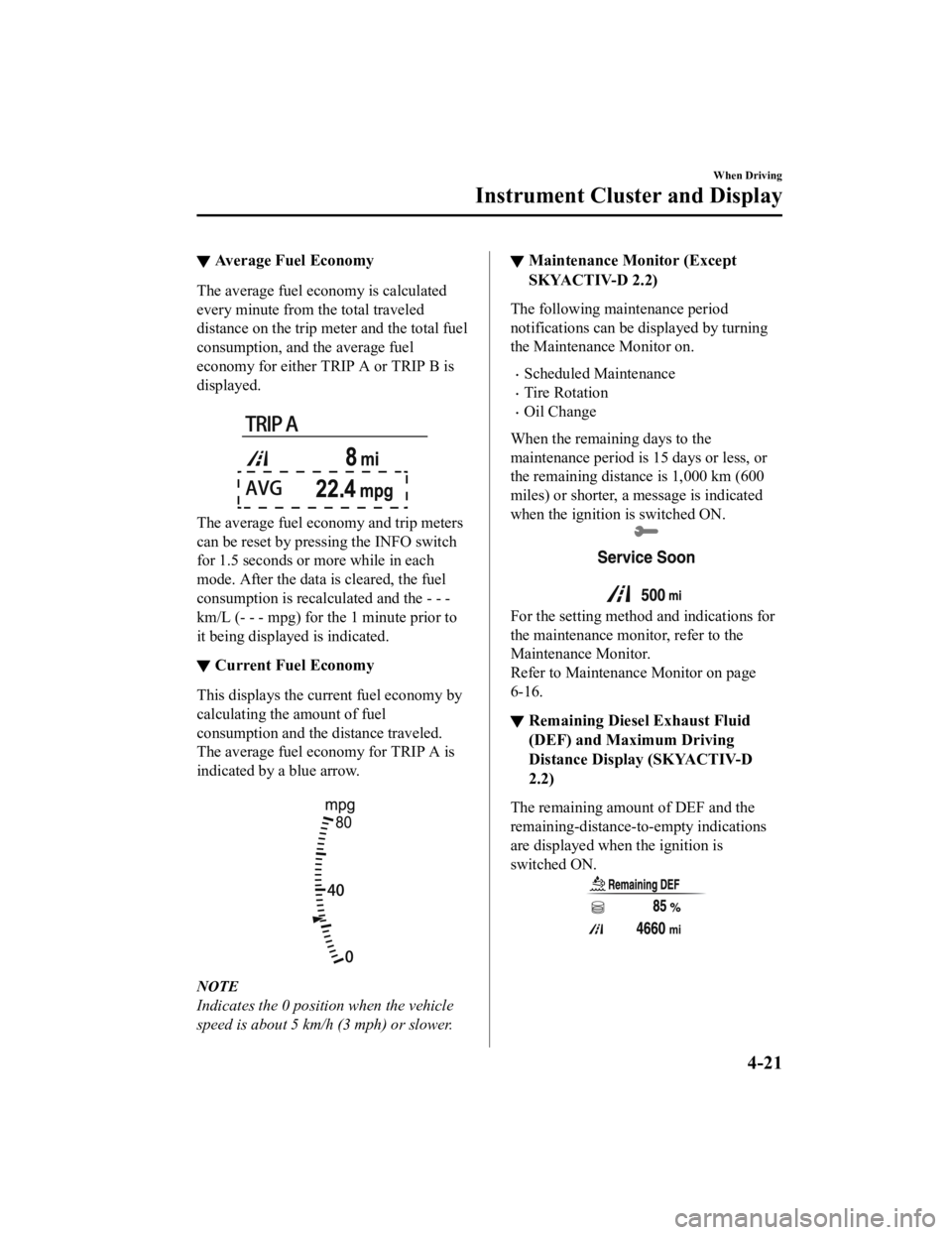
▼Average Fuel Economy
The average fuel economy is calculated
every minute from the total traveled
distance on the trip meter and the total fuel
consumption, and the average fuel
economy for either TRIP A or TRIP B is
displayed.
The average fuel economy and trip meters
can be reset by pressing the INFO switch
for 1.5 seconds or
more while in each
mode. After the data is cleared, the fuel
consumption is recalculated and the - - -
km/L (- - - mpg) for the 1 minute prior to
it being displayed is indicated.
▼ Current Fuel Economy
This displays the cu
rrent fuel economy by
calculating the amount of fuel
consumption and the distance traveled.
The average fuel economy for TRIP A is
indicated by a blue arrow.
NOTE
Indicates the 0 positi on when the vehicle
speed is about 5 km/h (3 mph) or slower.
▼ Maintenance Monitor (Except
SKYACTIV-D 2.2)
The following maintenance period
notifications can be displayed by turning
the Maintenance Monitor on.
Scheduled Maintenance
Tire Rotation
Oil Change
When the remaining days to the
maintenance period is 15 days or less, or
the remaining distance is 1,000 km (600
miles) or shorter, a message is indicated
when the ignition is switched ON.
For the setting method and indications for
the maintenance monitor, refer to the
Maintenance Monitor.
Refer to Maintenance Monitor on page
6-16.
▼Remaining Diesel Exhaust Fluid
(DEF) and Maximum Driving
Distance Display (SKYACTIV-D
2.2)
The remaining amount of DEF and the
remaining-distance-to-empty indications
are displayed when the ignition is
switched ON.
When Driving
Instrument Cluster and Display
4-21
CX-5_8HH4-EA-19A_Edition1
2018-11-21 10:03:20
Page 187 of 721
▼Wrench Indication
The wrench indication is displayed under
the following conditions.
When the preset maintenance period has
arrived.
Refer to Maintenance Monitor on page
6-16.
When the engine oil replacement period
has arrived.
(SKYACTIV-D 2.2)
When the engine oil has deteriorated.
When fuel filter (sedimentor) draining
is required. Consult an Authorized
Mazda Dealer.
NOTE
The wrench indication may display
earlier than the preset period depending
on vehicle usage conditions.
Whenever the engine oil is replaced, a
reset of the vehicle engine control unit is
necessary.
Refer to Maintenance Monitor on page
6-16.
▼ Glow Indicator Light
(SKYACTIV-D 2.2)
When the ignition is
switched ON, the
glow indicator light turns on. The glow
indicator light turns off when preheating is
finished.
The maintenance period for the glow plug
or a problem in the system may be
indicated under the following conditions.
Have your vehicle inspected by an
Authorized Mazda Dealer.
The glow indicator light does not turn
on when the ignition is switched ON or
it remains on.
The glow indicator light is flashing.
NOTE
If the vehicle is left with the ignition
switched ON without starting the engine
and a long period of time has elapsed
since preheating finished, the preheating
may be performed again and the glow
indicator light may turn on.
When Driving
Instrument Cluster and Display
4-29
CX-5_8HH4-EA-19A_Edition1 2018-11-21 10:03:20
Page 189 of 721

▼Multi-information Display (Type B)
INFO switchMulti-information Display (Type B)
The multi-information display indi
cates the following information.
Odometer
Trip meter
Engine coolant temperature gauge
Fuel gauge
Outside temperature
Distance-to-empty
Average fuel economy
Current fuel economy
Maintenance Monitor (Except SKYACTIV-D 2.2)
Remaining Diesel Exhaust Fluid (DEF) and Maximum Driving Distance Display
(SKYACTIV-D 2.2)
Blind Spot Monitoring (BSM) Display
Distance Recognition Support System (DRSS) Display
Mazda Radar Cruise Control wi th Stop & Go function (MRCC with Stop & Go function)
System Display
Lane Departure Warning System (LDWS) Display
Lane-keep Assist System (LAS) & Lane De parture Warning System (LDWS) Display
Cruise Control Display
Compass Display
Warning message
When Driving
Instrument Cluster and Display
4-31
CX-5_8HH4-EA-19A_Edition1 2018-11-21 10:03:20
Page 190 of 721

The screen content changes each time the INFO switch is pressed.
Press the INFO switchPress the INFO switch
Press the INFO switch Press the INFO switch
Press the INFO switch
Press the INFO switch
Current Fuel Economy,
Trip Meter A, Average
Fuel Economy, Outside
Temperature,
Odometer, Fuel Gauge
Current Fuel Economy,
Trip Meter B, Average
Fuel Economy, Outside
Temperature,
Odometer, Fuel Gauge
Engine Coolant
Temperature Gauge,
Maintenance Monitor,
Outside Temperature,
Odometer, Fuel Gauge i-ACTIVSENSE display,
Outside Temperature,
Odometer, Fuel Gauge Warning message,
Outside Temperature,
Odometer, Fuel Gauge
*3
*1
*2 *3: Displayed only when a warning occurs. *1: Except SKYACTIV-D 2.2
*2: SKYACTIV-D 2.2
Engine Coolant
Temperature Gauge,
Remaining Diesel
Exhaust Fluid (DEF),
Maximum Driving
Distance Display,
Outside Temperature,
Odometer, Fuel Gauge
Engine Coolant
Temperature Gauge,
Compass,
Distance-to-empty,
Outside Temperature,
Odometer, Fuel Gauge
When Driving
Instrument Cluster and Display
4-32
CX-5_8HH4-EA-19A_Edition1 2018-11-21 10:03:20
Page 195 of 721
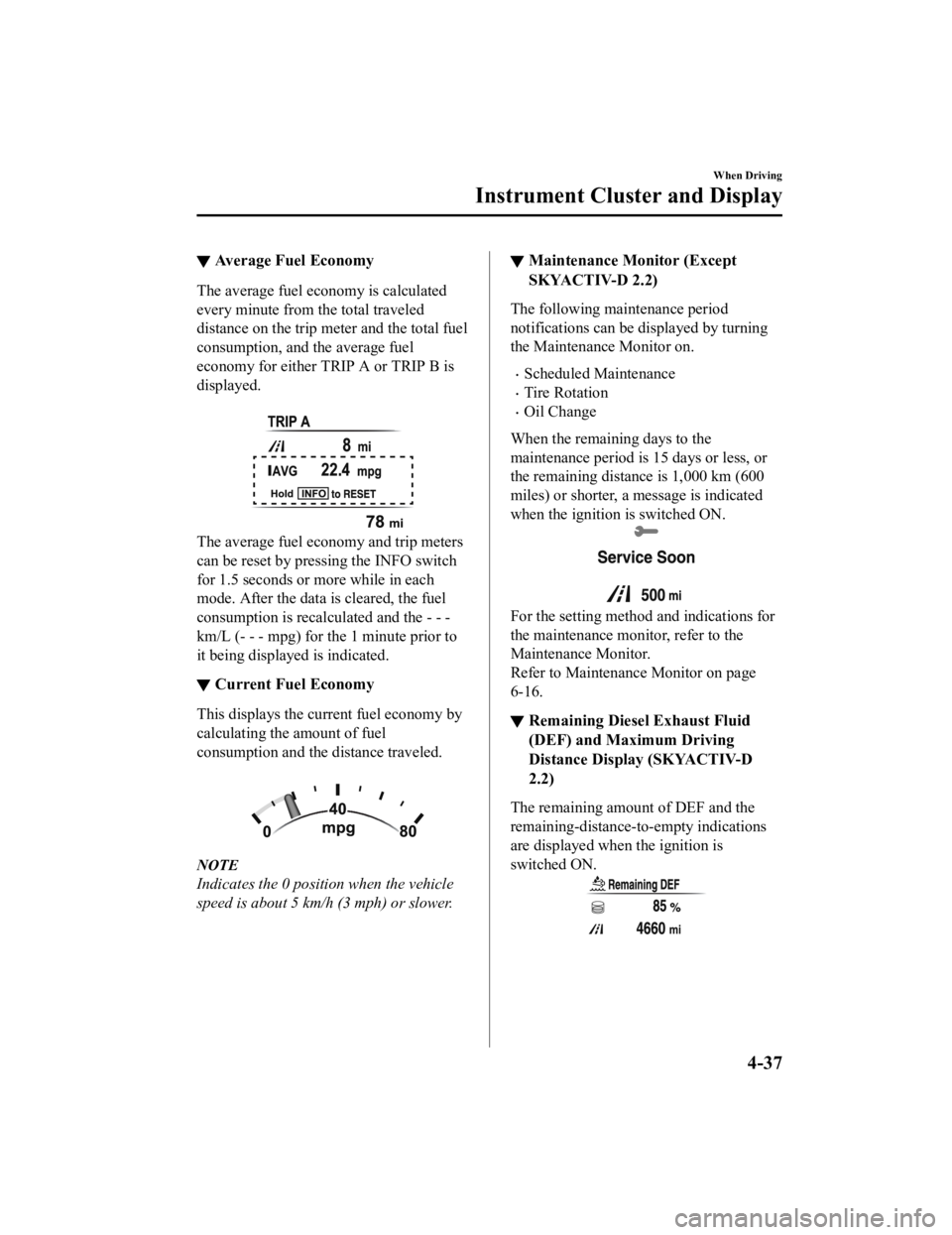
▼Average Fuel Economy
The average fuel economy is calculated
every minute from the total traveled
distance on the trip meter and the total fuel
consumption, and the average fuel
economy for either TRIP A or TRIP B is
displayed.
The average fuel economy and trip meters
can be reset by pressing the INFO switch
for 1.5 seconds or
more while in each
mode. After the data is cleared, the fuel
consumption is recalculated and the - - -
km/L (- - - mpg) for the 1 minute prior to
it being displayed is indicated.
▼ Current Fuel Economy
This displays the cu
rrent fuel economy by
calculating the amount of fuel
consumption and the distance traveled.
NOTE
Indicates the 0 positi on when the vehicle
speed is about 5 km/h (3 mph) or slower.
▼ Maintenance Monitor (Except
SKYACTIV-D 2.2)
The following maintenance period
notifications can be displayed by turning
the Maintenance Monitor on.
Scheduled Maintenance
Tire Rotation
Oil Change
When the remaining days to the
maintenance period is 15 days or less, or
the remaining distance is 1,000 km (600
miles) or shorter, a message is indicated
when the ignition is switched ON.
For the setting method and indications for
the maintenance monitor, refer to the
Maintenance Monitor.
Refer to Maintenance Monitor on page
6-16.
▼Remaining Diesel Exhaust Fluid
(DEF) and Maximum Driving
Distance Display (SKYACTIV-D
2.2)
The remaining amount of DEF and the
remaining-distance-to-empty indications
are displayed when the ignition is
switched ON.
When Driving
Instrument Cluster and Display
4-37
CX-5_8HH4-EA-19A_Edition1
2018-11-21 10:03:20
Page 203 of 721
▼Wrench Indication
The wrench indication is displayed under
the following conditions.
When the preset maintenance period has
arrived.
Refer to Maintenance Monitor on page
6-16.
When the engine oil replacement period
has arrived.
(SKYACTIV-D 2.2)
When the engine oil has deteriorated.
When fuel filter (sedimentor) draining
is required. Consult an Authorized
Mazda Dealer.
NOTE
The wrench indication may display
earlier than the preset period depending
on vehicle usage conditions.
Whenever the engine oil is replaced, a
reset of the vehicle engine control unit is
necessary.
Refer to Maintenance Monitor on page
6-16.
▼ Low Engine Coolant Temperature
Indicator Light (Blue)
The light illuminates continuously when
the engine coolant temperature is low and
turns off after the engine is warm.
▼Glow Indicator Light
(SKYACTIV-D 2.2)
When the ignition is
switched ON, the
glow indicator light turns on. The glow
indicator light turns off when preheating is
finished.
The maintenance period for the glow plug
or a problem in the system may be
indicated under the following conditions.
Have your vehicle inspected by an
Authorized Mazda Dealer.
The glow indicator light does not turn
on when the ignition is switched ON or
it remains on.
The glow indicator light is flashing.
NOTE
If the vehicle is left with the ignition
switched ON without starting the engine
and a long period of time has elapsed
since preheating finished, the preheating
may be performed again and the glow
indicator light may turn on.
When Driving
Instrument Cluster and Display
4-45
CX-5_8HH4-EA-19A_Edition1 2018-11-21 10:03:20
Page 215 of 721

▼Wrench Indicator Light
When the ignition is switched ON, the
wrench indicator light turns on and then
turns off after a few seconds.
The wrench indicator light turns on under
the following conditions:
When the preset maintenance period has
arrived.
When it’s time to replace the engine oil.
Refer to Maintenance Monitor on page
6-16.
NOTE
The wrench indicator light turns on
earlier than the preset period depending
on vehicle usage conditions.
Whenever the engine oil is replaced, a
reset of the vehicle engine control unit is
necessary.
Refer to Maintenance Monitor on page
6-16.
When Driving
Instrument Cluster and Display
4-57
CX-5_8HH4-EA-19A_Edition1 2018-11-21 10:03:20
Page 380 of 721

As an added safety feature, your vehicle has been equipped with a tire pressure monitoring
system (TPMS) that illuminates a low tire pressure telltale when one or more of your tires is
significantly under-inflated. Accordingly, when the low tire pressure telltale illuminates, you
should stop and check your tires as soon as possible, and inflate them to the proper
pressure. Driving on a significantly under-inflated tire causes the tire to overheat and can
lead to tire failure. Under-infla tion also reduces fuel efficiency and tire tread life, and may
affect the vehicle's handlin g and stopping ability.
Please note that the TPMS is not a substitute for proper tire maintenance, and it is the
driver's responsibility to maintain correct ti re pressure, even if under-inflation has not
reached the level to trigger illumination of the TPMS low tire pressure telltale.
Your vehicle has also been eq uipped with a TPMS malfunction indicator to indicate when
the system is not operating properly.
The TPMS malfunction indicator is combined with the low tire pressure telltale. When the
system detects a malfunction, the telltale w ill flash for approximately one minute and then
remain continuously illuminated. This sequen ce will continue upon subsequent vehicle
start-ups as long as the malfunction exists. When the malfunction indicator is illuminated,
the system may not be able to detect or signal low tire pressure as intended. TPMS
malfunctions may occur for a variety of reaso ns, including the installation of replacement
or alternate tires or wheels on the vehicle th at prevent the TPMS from functioning properly.
Always check the TPMS malfunction telltale af ter replacing one or more tires or wheels on
your vehicle to ensure that the replacement or alternate tires and wheels allow the TPMS to
continue to function properly.
To avoid false readings, the system samples for a little while before indicating a problem. As
a result it will not instantaneously regis ter a rapid tire deflation or blow out.
▼System Error Activation
When the warning light
flashes, there may
be a system malfunction. Consult an
Authorized Mazda Dealer.
A system error activation may occur in the
following cases:
When there is equipment or a device
near the vehicle using the same radio
frequency as that of the tire pressure
sensors.
When a metallic device such as a
non-genuine navigation system is
equipped near the center of the
dashboard, which may block radio
signals from the tire pressure sensor to
the receiver unit.
When using the following devices in the
vehicle that may cause radio
interference with the receiver unit.
A digital device such as a personal
computer.
A current converter device such as a
DC-AC converter.
When excess snow or ice adheres to the
vehicle, especially around the wheels.
When the tire pressure sensor batteries
are exhausted.
When using a wheel with no tire
pressure sensor installed.
When using tires with steel wire
reinforcement in the sidewalls.
When using tire chains.
When Driving
Tire Pressure Monitoring System
4-222
CX-5_8HH4-EA-19A_Edition1 2018-11-21 10:03:20
Page 384 of 721
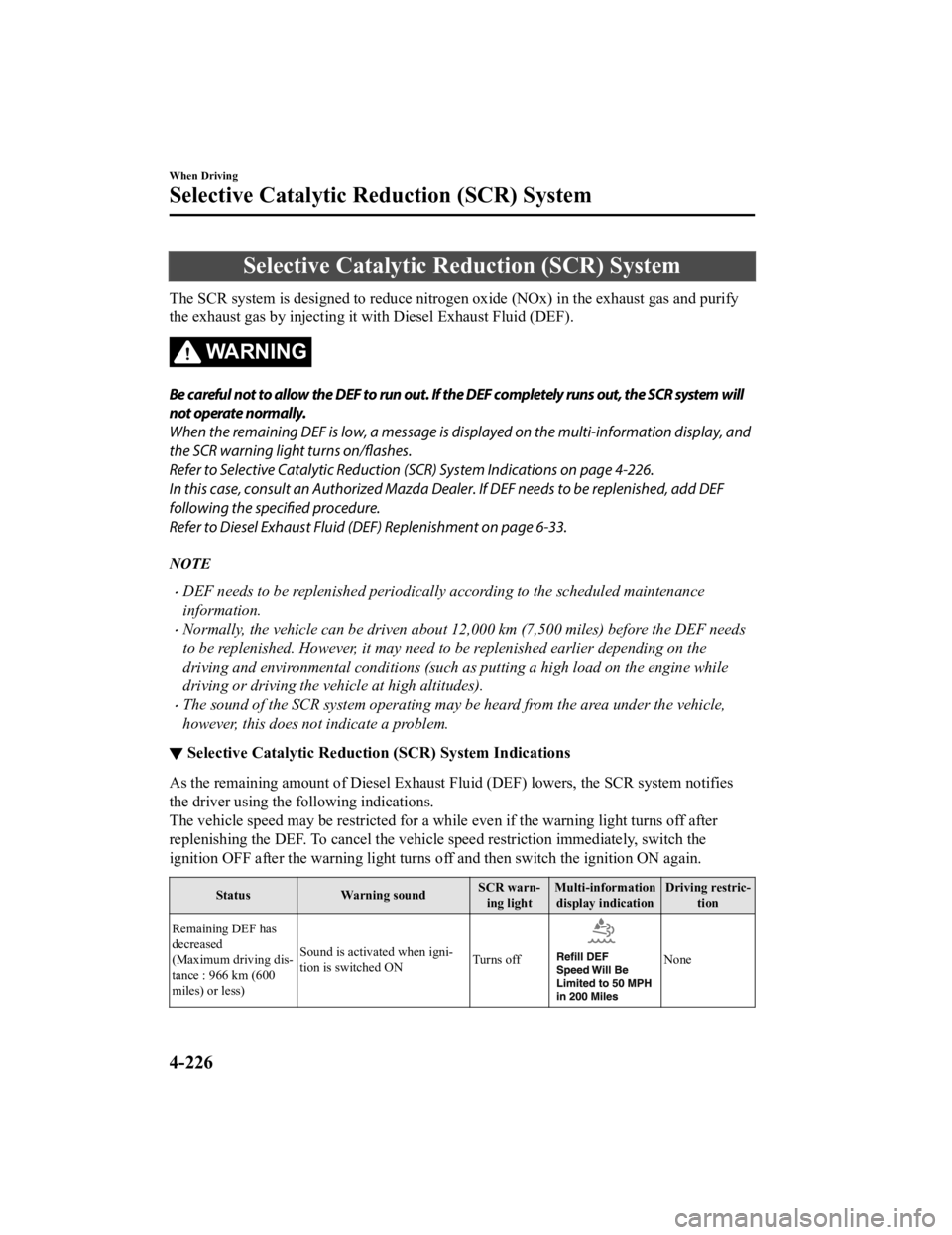
Selective Catalytic Reduction (SCR) System
The SCR system is designed to reduce nitrogen oxide (NOx) in the exhaust gas and purify
the exhaust gas by injecting it with Diesel Exhaust Fluid (DEF).
WA R N I N G
Be careful not to allow the DEF to run out. If the DEF completely runs out, the SCR system will
not operate normally.
When the remaining DEF is low, a message is displayed on the multi-information display, and
the SCR warning light turns
on/flashes.
Refer to Selective Catalytic Reduction (SCR) System Indications on page 4-226.
In this case, consult an Authorized Mazda De aler. If DEF needs to be replenished, add DEF
following the specified procedure.
Refer to Diesel Exhaust Fluid (DEF) Replenishment on page 6-33.
NOTE
DEF needs to be replenished periodically according to the scheduled maintenance
information.
Normally, the vehicle can be driven about 12,000 km (7,500 miles) before the DEF needs
to be replenished. However, it may need to be replenished earlier depending on the
driving and environmental conditions (such as putting a high load on the engine while
driving or driving the vehicle at high altitudes).
The sound of the SCR system operating may be heard from the area under the vehicle,
however, this does not indicate a problem.
▼ Selective Catalytic Reductio
n (SCR) System Indications
As the remaining amount of Diesel Exhaust Fluid (DEF) lowers, the SCR system notifies
the driver using the following indications.
The vehicle speed may be restricted for a while even if the warning light turns off after
replenishing the DEF. To cancel the vehicle speed restriction immediately, switch the
ignition OFF after the warning light turns off and then switch the ignition ON again.
StatusWarning sound SCR warn-
ing light Multi-information
display indication Driving restric-
tion
Remaining DEF has
decreased
(Maximum driving dis-
tance : 966 km (600
miles) or less) Sound is activated when igni-
tion is switched ON
Turns off
None
When Driving
Selective Catalytic Reduction (SCR) System
4-226
CX-5_8HH4-EA-19A_Edition1
2018-11-21 10:03:20
Page 408 of 721

Operating Tips
Operate the climate control system with
the engine running.
To prevent the battery from being
discharged, do not leave the fan control
dial/switch on for a long period of time
with the ignition switched ON when the
engine is not running.
Clear all obstructions such as leaves,
snow and ice from the hood and the air
inlet in the cowl grille to improve the
system efficiency.
Use the climate control system to defog
the windows and dehumidify the air.
The recirculate mode should be used
when driving through tunnels or while
in a traffic jam, or when you would like
to shut off outside air for quick cooling
of the interior.
Use the outside air position for
ventilation or windshield defrosting.
If the vehicle has been parked in direct
sunlight during hot weather, open the
windows to let warm air escape, then
run the climate control system.
Run the air conditioner about 10
minutes at least once a month to keep
internal parts lubricated.
Have the air conditioner checked before
the weather gets hot. Lack of refrigerant
may make the air conditioner less
efficient.
The refrigerant specifications are
indicated on a label attached to the
inside of the engine compartment. If the
wrong type of refrigerant is used, it
could result in a serious malfunction of
the air conditioner. Consult a
professional, government certified
repairer for the inspection or repair
because a special device is required for
the air conditioner maintenance.
For details, consult an Authorized
Mazda Dealer.
Label
Interior Features
Climate Control System
5-4
CX-5_8HH4-EA-19A_Edition1 2018-11-21 10:03:20