tires MAZDA MODEL CX-5 SKYACTIV-D 2019 Owner's Manual
[x] Cancel search | Manufacturer: MAZDA, Model Year: 2019, Model line: MODEL CX-5 SKYACTIV-D, Model: MAZDA MODEL CX-5 SKYACTIV-D 2019Pages: 721, PDF Size: 97.68 MB
Page 318 of 721

If an object placed on the dashboard is reflected in the windshield and picked up by the
camera.
Heavy luggage is loaded in the luggage compartment or on the rear seat and the
vehicle is tilted.
The tire pressures are not adjusted to the specified pressure.
Tires other than conventional tires are equipped.
Vehicle is driven on an intersection or junction, or on a forked road.
The white (yellow) lane lines are less visible because of dirt or fading/patchiness.
A vehicle in front of your vehicle is running near a white (yellow) lane line making it
less visible.
A white (yellow) lane line is less visible because of bad weather (rain, fog, or snow).
The vehicle is driven on a temporary lane or section with a closed lane resulting from
construction where there may be multiple white (yellow) lane lines or they are
interrupted.
A misleading line is picked up on the road such as a temporary line for construction, or
because of shade, lingering snow, or grooves filled with water.
The surrounding brightness suddenly changes such as when entering or exiting a
tunnel.
The illumination of the headlights is weakened because of dirt or the optical axis is
deviated.
The windshield is dirty or foggy.
The windshield, camera is fogged (water droplets).
Back-light is reflected off the road surface.
The road surface is wet and shiny after rain, or there are puddles on the road.
The shade of a guardrail parallel to a white (yellow) lane line is cast on the road.
The width of the driving lane is narrow or wide.
Driving on roads with tight curves.
The road is excessively uneven.
The vehicle is shaken after hitting a road bump.
There are 2 or more adjacent white (yellow) lane lines.
There are various road markings or lane markings of various shapes near an
intersection.
When Driving
i-ACTIVSENSE
4-160
CX-5_8HH4-EA-19A_Edition1 2018-11-21 10:03:20
Page 332 of 721

If you suddenly come close to a vehicle ahead.
2-wheeled vehicles, pedestrians, animals or standing trees.
Vehicle is driven with some of the tires having significant wear.
(Manual transaxle)
If the vehicle is stopped by the Smart City Brake Support (SCBS) operation and the clutch
pedal is not depressed, the engine stops.
▼Smart City Brake Support (SCBS)
Indicator Light (Red)*
If the Smart City Brake Support (SCBS) is
operating, the indicator light (red) flashes.
▼
Collision Warning*
If there is the possibility of a collision with
a vehicle ahead, the beep sounds
continuously and a warning is indicated in
the multi-information display and the
active driving display.
NOTE
The operation distance and volume of the
collision warning can be changed. Refer
to Personalization Features on page
9-12.
▼ Automatic Brake Operation
Display*
The automatic brake operation display is
indicated on the multi-information display
after the SCBS is operated.
NOTE
The collision warning beep sounds
intermittently while
the SCBS brake or
brake assist (SCBS brake assist) is
operating.
If the vehicle is stopped by the SCBS
operation and the brake pedal is not
depressed, the warning beep sounds 1
time after about 2 seconds and the SCBS
brake is automatically released.
▼ Stopping the Smart City Brake
Support (SCBS) System Operation
The SCBS system can be temporarily
deactivated.
Refer to Personalization Features on page
9-12.
When Driving
i-ACTIVSENSE
4-174*Some models.
CX-5_8HH4-EA-19A_Edition1
2018-11-21 10:03:20
Page 364 of 721

Do not disassemble or modify the Forward Sensing Camera (FSC).
Disassembly or modification of the Forward Sensing Camera (FSC) will cause a malfunction
or mistaken operation. Consequently, each sy stem may not operate normally which could
lead to an unexpected accident.
Heed the following cautions to assure the correct operation of the Forward Sensing Camera
(FSC).
Be careful not to scratch the Forward Sensing Camera (FSC) lens or allow it to get dirty.
Do not remove the Forward Sensing Camera (FSC) cover.
Do not place objects on the dashboard which reflect light.
Always keep the windshield glass around the camera clean by removing dirt or fogging.
Use the windshield defroster to remove fogging on the windshield.
Consult an Authorized Mazda Dealer regardi ng cleaning the interior side of the
windshield around the Forw ard Sensing Camera (FSC).
Consult an Authorized Mazda Dealer before performing repairs around the Forward
Sensing Camera (FSC).
The Forward Sensing Camera (FSC) is installe d to the windshield. Consult an Authorized
Mazda Dealer for windshield repair and replacement.
When cleaning the wind shield, do not allow glass cleaners or similar cleaning fluids to
get on the Forward Sensing Camera (FSC) le ns. In addition, do not touch the Forward
Sensing Camera (FSC) lens.
When performing repairs around the rearv iew mirror, consult an Authorized Mazda
Dealer.
Consult an Authorized Mazda Dealer regarding cleaning of the camera lens.
Do not hit or apply strong force to the Forward Sensing Camera (FSC) or the area around
it. If the Forward Sensing Camera (FSC) is severely hit or if there are cracks or damage
caused by flying gravel or debris in the area around it, stop using the following systems
and consult an Authorized Mazda Dealer.
High Beam Control System (HBC)
Lane-keep Assist System (LAS) & Lane Departure Warning System (LDWS)
Traffic Sign Recognition System (TSR)
Advanced Smart City Brak e Support (Advanced SCBS)
Smart City Brake Support (SCBS)
Mazda Radar Cruise Control with Stop & Go function (MRCC with Stop & Go function)
Smart Brake Support (SBS)
The direction in which the Forward Sensing Camera (FSC) is pointed has been
finely
adjusted. Do not change the installation posi tion of the Forward Sensing Camera (FSC) or
remove it. Otherwise, it could result in damage or malfunction.
Always use tires for all wheels that are of the specified size, and the same manufacturer,
brand, and tread pattern. In addition, do no t use tires with significantly different wear
patterns on the same vehicle as the system may not operate normally.
When Driving
i-ACTIVSENSE
4-206
CX-5_8HH4-EA-19A_Edition1 2018-11-21 10:03:20
Page 365 of 721

The Forward Sensing Camera (FSC) includes a function for detecting a soiled windshield
and informing the driver, however, depending on the conditions, it may not detect plastic
shopping bags, ice or snow on the windshield . In such cases, the system cannot accurately
determine a vehicle ahead and may not be able to operate normally. Always drive carefully
and pay attention to the road ahead.
NOTE
In the following cases, the Forward Sensing Camera (FSC) cannot detect target objects
correctly, and each system may be unable to operate normally.
The height of the vehicle ahead is low.
You drive your vehicle at the same speed as the vehicle ahead.
Headlights are not turned on during the night or when going through a tunnel.
In the following cases, the Forward Sensing Camera (FSC) may not be able to detect
target objects correctly.
Under bad weather condition, such as rain, fog and snow.
The window washer is being used or the windshield wipers are not used when it's
raining.
Ice, fog, snow, frost, rainfall, dirt, or foreign matter such as a plastic bag is stuck on the
windshield.
Trucks with low loading platforms and vehicl es with an extremely low or high profile.
When driving next to walls with no patterning (including fences and longitudinally
striped walls).
The taillights of the vehicle ahead are turned off.
A vehicle is outside the illumi nation range of the headlights.
The vehicle is making a sharp turn, or ascending or descending a steep slope.
Entering or exiting a tunnel.
Heavy luggage is loaded causing the vehicle to tilt.
Strong light is shone at the front of the vehicle (back light or high-beam light from
on-coming vehicles).
There are many light emitters on the vehicle ahead.
When the vehicle ahead is not equipped with taillights or the taillights are turned off at
nighttime.
Elongated luggage or cargo is loaded onto installed roof rails and covers the Forward
Sensing Camera (FSC).
Exhaust gas from the vehicle in front, sand, snow, and water vapor rising from
manholes and grating, and water splashed into the air.
When towing a malfunctioning vehicle.
The vehicle is driven with tires having significantly different wear.
The vehicle is driven on down slopes or bumpy roads.
There are water puddles on the road.
When Driving
i-ACTIVSENSE
4-207
CX-5_8HH4-EA-19A_Edition1 2018-11-21 10:03:20
Page 369 of 721

Do not use the front bumper to push other vehicles or obstructions such as when pulling
out of a parking space. Otherwise, the radar sensor (front) could be hit and its position
deviated.
Do not remove, disassemble, or mo dify the radar sensor (front).
For repairs, replacement or paint work ar ound the radar sensor (front), consult an
Authorized Mazda Dealer.
Do not modify the suspension. If the suspensi on are modified, the vehicle's posture could
change and the radar sensor (front) may not be able to correctly detect a vehicle ahead or
an obstruction.
NOTE
Under the following conditions, the radar sensor (front) may not be able to detect vehicles
ahead or obstructions correctly and each system may not operate normally.
The rear surface of a vehicle ahead does not reflect radio waves effectively, such as an
unloaded trailer or an automobile with a loading platform covered by a soft top,
vehicles with a hard plastic tailgate, and round-shaped vehicles.
Vehicles ahead with low vehicle height and thus less area for reflecting radio waves.
Visibility is reduced due to a vehicle ahead casting off water, snow, or sand from its tires
and onto your windshield.
The luggage compartment is loaded with heavy objects or the rear passenger seats are
occupied.
Ice, snow, or soiling is on the front surface of the front emblem.
During inclement weather such as rain, snow, or sand storms.
When driving near facilities or objects emitting strong radio waves.
Under the following conditions, the radar sensor (front) may not be able to detect vehicles
ahead or obstructions.
The beginning and end of a curve.
Roads with continuous curves.
Narrow lane roads due to road construction or lane closures.
The vehicle ahead enters the radar sensor's blind spot.
The vehicle ahead is running abnormally due to accident or vehicle damage.
Roads with repeated up and down slopes
Driving on poor roads or unpaved roads.
The distance between your vehicle and the vehicle ahead is extremely short.
A vehicle suddenly comes close such as by cutting into the lane.
To prevent incorrect operation of the system, use tires of the same specified size,
manufacturer, brand, and tread pattern on all four wheels. In addition, do not use tires
with significantly different wear patterns or tire pressures on the same vehicle (Including
the temporary spare tire).
If the battery power is weak, the system may not operate correctly.
When Driving
i-ACTIVSENSE
4-211
CX-5_8HH4-EA-19A_Edition1 2018-11-21 10:03:20
Page 379 of 721
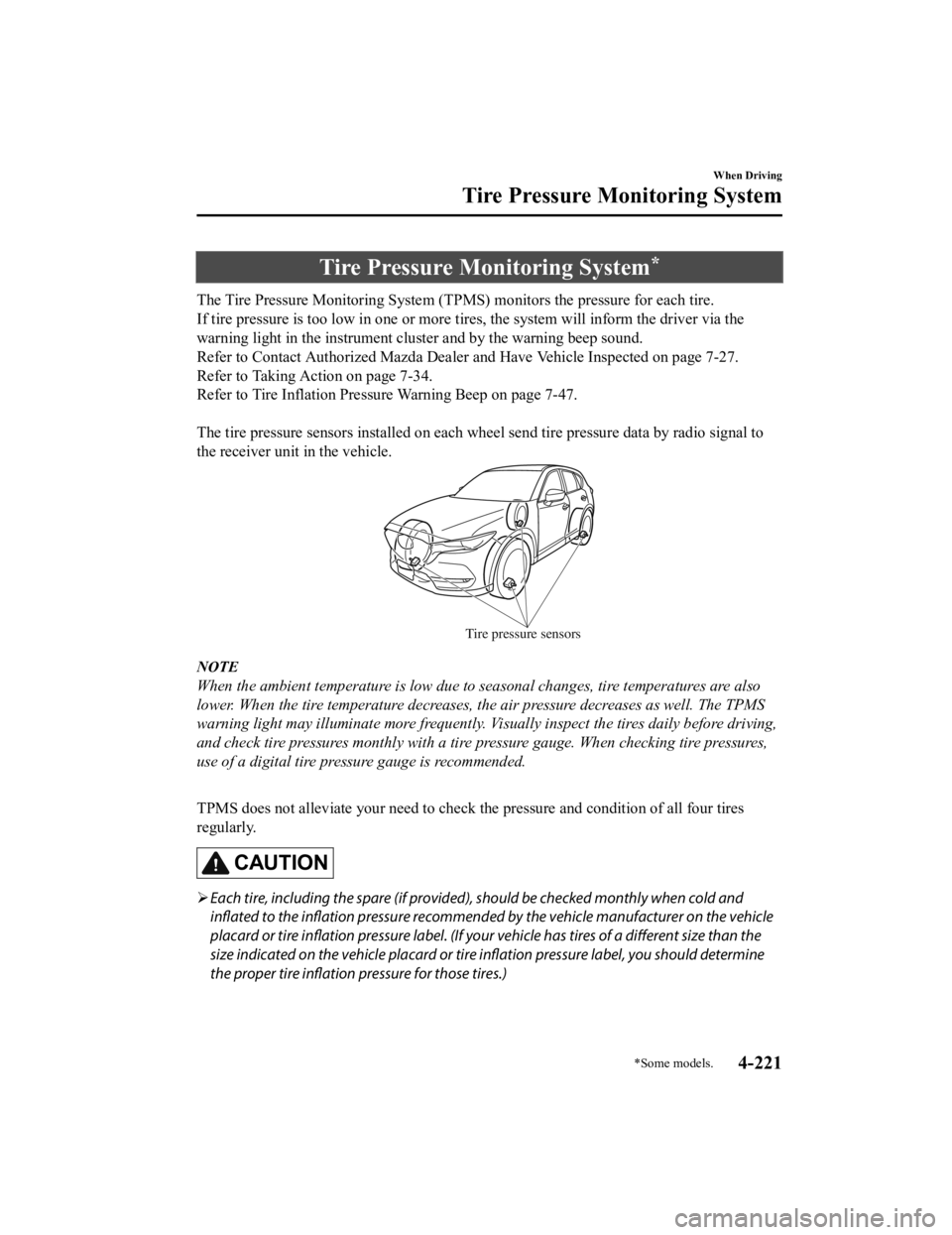
Tire Pressure Monitoring System*
The Tire Pressure Monitoring System (TPMS) monitors the pressure for each tire.
If tire pressure is too low in one or more t ires, the system will inform the driver via the
warning light in the instrument cluster and by the warning beep sound.
Refer to Contact Authorized Mazda Dealer and Have Vehicle Inspected on page 7-27.
Refer to Taking Action on page 7-34.
Refer to Tire Inflation Pressure Warning Beep on page 7-47.
The tire pressure sensors installed on each wheel send tire pressure data by radio signal to
the receiver unit in the vehicle.
Tire pressure sensors
NOTE
When the ambient temperature is low due to seasonal changes, tire temperatures are also
lower. When the tire temperature decreases, the air pressure decreases as well. The TPMS
warning light may illuminate more frequently. Vi sually inspect the tires daily before driving,
and check tire pressures monthly with a tire pressure gauge. When checking tire pressures,
use of a digital tire pressure gauge is recommended.
TPMS does not alleviate your need to check the pressure and condition of all four tires
regularly.
CAUTION
Each tire, including the spare (if provided), should be checked monthly when cold and
inflated to the inflation pressure recommended by the vehicle manufacturer on the vehicle
placard or tire inflation pressure label. (If your vehicle has tires of a different size than the
size indicated on the vehicle placard or tire inflation pressure label, you should determine
the proper tire inflation pressure for those tires.)
When Driving
Tire Pressure Monitoring System
*Some models.4-221
CX-5_8HH4-EA-19A_Edition1 2018-11-21 10:03:20
Page 380 of 721

As an added safety feature, your vehicle has been equipped with a tire pressure monitoring
system (TPMS) that illuminates a low tire pressure telltale when one or more of your tires is
significantly under-inflated. Accordingly, when the low tire pressure telltale illuminates, you
should stop and check your tires as soon as possible, and inflate them to the proper
pressure. Driving on a significantly under-inflated tire causes the tire to overheat and can
lead to tire failure. Under-infla tion also reduces fuel efficiency and tire tread life, and may
affect the vehicle's handlin g and stopping ability.
Please note that the TPMS is not a substitute for proper tire maintenance, and it is the
driver's responsibility to maintain correct ti re pressure, even if under-inflation has not
reached the level to trigger illumination of the TPMS low tire pressure telltale.
Your vehicle has also been eq uipped with a TPMS malfunction indicator to indicate when
the system is not operating properly.
The TPMS malfunction indicator is combined with the low tire pressure telltale. When the
system detects a malfunction, the telltale w ill flash for approximately one minute and then
remain continuously illuminated. This sequen ce will continue upon subsequent vehicle
start-ups as long as the malfunction exists. When the malfunction indicator is illuminated,
the system may not be able to detect or signal low tire pressure as intended. TPMS
malfunctions may occur for a variety of reaso ns, including the installation of replacement
or alternate tires or wheels on the vehicle th at prevent the TPMS from functioning properly.
Always check the TPMS malfunction telltale af ter replacing one or more tires or wheels on
your vehicle to ensure that the replacement or alternate tires and wheels allow the TPMS to
continue to function properly.
To avoid false readings, the system samples for a little while before indicating a problem. As
a result it will not instantaneously regis ter a rapid tire deflation or blow out.
▼System Error Activation
When the warning light
flashes, there may
be a system malfunction. Consult an
Authorized Mazda Dealer.
A system error activation may occur in the
following cases:
When there is equipment or a device
near the vehicle using the same radio
frequency as that of the tire pressure
sensors.
When a metallic device such as a
non-genuine navigation system is
equipped near the center of the
dashboard, which may block radio
signals from the tire pressure sensor to
the receiver unit.
When using the following devices in the
vehicle that may cause radio
interference with the receiver unit.
A digital device such as a personal
computer.
A current converter device such as a
DC-AC converter.
When excess snow or ice adheres to the
vehicle, especially around the wheels.
When the tire pressure sensor batteries
are exhausted.
When using a wheel with no tire
pressure sensor installed.
When using tires with steel wire
reinforcement in the sidewalls.
When using tire chains.
When Driving
Tire Pressure Monitoring System
4-222
CX-5_8HH4-EA-19A_Edition1 2018-11-21 10:03:20
Page 381 of 721

▼Tires and Wheels
CAUTION
When inspecting or adjusting the tire air
pressures, do not apply excessive force to
the stem part of the wheel unit. The stem
part could be damaged.
Changing tires and wheels
The following procedure allows the TPMS
to recognize a tire pressure sensor's unique
ID signal code whenever tires or wheels
are changed, such as changing to and from
winter tires.
NOTE
Each tire pressure sensor has a unique ID
signal code. The signal code must be
registered with the
TPMS before it can
work. The easiest way to do it is to have
an Authorized Mazda Dealer change your
tire and complete ID signal code
registration.
When having tires changed at an
Authorized Mazda Dealer
When an Authorized Mazda Dealer
changes your vehicle's tires, they will
complete the tire pressure sensor ID signal
code registration.
When changing tires yourself
If you or someone else changes tires, you
or someone else can also undertake the
steps for the TPMS to complete the ID
signal code registration.
1. After tires have been changed, switch the ignition ON, then back to ACC or
OFF.
2. Wait for about 15 minutes.
3. After about 15 minutes, drive the vehicle at a speed of at least 25 km/h
(16 mph) for 10 mi nutes and the tire
pressure sensor ID signal code will be
registered automatically.
NOTE
If the vehicle is driven within about 15
minutes of changing tires, the tire pressure
monitoring system warning light will flash
because the sensor ID signal code would
not have been registered. If this happens,
park the vehicle for about 15 minutes,
after which the sensor ID signal code will
register upon driving the vehicle for 10
minutes.
Replacing tires and wheels
CAUTION
When replacing/repairing the tires or
wheels or both, have the work done by
an Authorized Mazda Dealer, or the tire
pressure sensors may be damaged.
The wheels equipped on your Mazda are
specially designed for installation of the
tire pressure sensors. Do not use
non-genuine wheels, otherwise it may
not be possible to install the tire pressure
sensors.
Be sure to have the tire pressure sensors
installed whenever tires or wheels are
replaced.
When having a tire or wheel or both
replaced, the following types of tire
pressure sensor installations are possible.
The tire pressure sensor is removed
from the old wheel and installed to the
new one.
When Driving
Tire Pressure Monitoring System
4-223
CX-5_8HH4-EA-19A_Edition1 2018-11-21 10:03:20
Page 387 of 721

Rear View Monitor*
The rear view monitor provides visual images of the rear of the vehicle when reversing.
WA R N I N G
Always drive carefully
confirming the safety of the rear and the surrounding conditions by
looking directly with your eyes:
Reversing the vehicle by only looking at the screen is dangerous as it may cause an accident
or a collision with an object. The rear view monitor is only a visual assist device when
reversing the vehicle. The images on the scree n may be different from the actual conditions.
CAUTION
Do not use the rear view monitor under th e following conditions: Using the rear view
monitor under the following conditions is dang erous and could result in injury or vehicle
damage or both.
Icy or snow-covered roads.
Tire chains or a temporary spare tire is installed.
The liftgate is not fully closed.
The vehicle is on a road incline.
When the display is cold, images may course across the monitor or the screen and may be
dimmer than usual, which could cause difficulty in confirming the surrounding conditions
of the vehicle. Always drive carefully confirm ing the safety of the rear and the surrounding
conditions by looking directly with your eyes.
Do not apply excessive force to the camera. The camera position and angle may deviate.
Do not disassemble, modify, or remove it as it may no longer be waterproof.
The camera cover is made of plastic. Do no t apply degreasing agents, organic solvents,
wax, or glass coating agents to the camera cover. If any are spilled on the cover, wipe off
with a soft cloth immediately.
Do not rub the camera cover forcefully with an abrasive or hard brush. The camera cover or
lens may be scratched which might affect the images.
NOTE
If water, snow, or mud is stuck on the camera lens, wipe it off using a soft cloth. If it
cannot be wiped off, use a mild detergent.
If the camera temperature changes rapidly (Hot to cold, cold to hot), the rear view
monitor may not operate correctly.
When replacing the tires, consult an Authorized Mazda Dealer. Replacing the tires could
result in deviation of the guide lines which appear on the display.
When Driving
Rear View Monitor
*Some models.4-229
CX-5_8HH4-EA-19A_Edition1 2018-11-21 10:03:20
Page 513 of 721

6Maintenance and Care
How to keep your Mazda in top condition.
Essential Information........................6-2 Introduction.................................. 6-2
Scheduled Maintenance.................... 6-4 Scheduled Maintenance (U.S.A.,
Canada, and Puerto Rico)............. 6-4
Scheduled Maintenance
(Mexico)..................................... 6-11
Maintenance Monitor................. 6-16
Owner Maintenance........................ 6-19 Owner Maintenance
Precautions................................. 6-19
Hood........................................... 6-21
Engine Compartment
Overview.................................... 6-23
Engine Oil...................................6-25
Engine Coolant........................... 6-29
Brake/Clutch Fluid. .................... 6-31
Washer Fluid............................... 6-32
Diesel Exhaust Fluid (DEF)....... 6-33
Body Lubrication...... .................. 6-36
Wiper Blades.............................. 6-37
Battery........................................ 6-42
Key Battery Replacement........... 6-44
Tires............................................ 6-47
Light Bulbs................................. 6-51
Fuses........................................... 6-57
Appearance Care............................. 6-64
Exterior Care.............................. 6-64
Interior Care................................6-70
6-1
CX-5_8HH4-EA-19A_Edition1 2018-11-21 10:03:20