phone MAZDA MODEL CX-5 SKYACTIV-D 2019 Owner's Guide
[x] Cancel search | Manufacturer: MAZDA, Model Year: 2019, Model line: MODEL CX-5 SKYACTIV-D, Model: MAZDA MODEL CX-5 SKYACTIV-D 2019Pages: 721, PDF Size: 97.68 MB
Page 483 of 721

Ta bI t e m F u n c t i o n
Devices Bluetooth
Refer to Bluetooth
® Preparation on page 5-52.
Android Auto
*
An Android Auto™ mode connection can be
set on or off when connecting an Android™
Smartphone.
The setting takes effect directly after switching
on/off.
Displays in gray and cannot be selected if an
Android™ Smartphone is not connected.
Apple CarPlay
*
An Apple CarPlay™ connection can be set on
or off when connecting an iPhone®.
For the setting to take effect, it is necessary to
connect the iPhone
® again.
Displays in gray and cannot be selected if an
iPhone
® is not connected.
System Tool Tips Turns button explanations ON/OFF.
VR Examples
When this function is ON and the talk button
of the audio remote control switch is pressed,
voice command examples are displayed. When
the function is OFF, they are not displayed.
Language Changes the language.
Temperature Changes the setting between Fahrenheit and
Celsius.
Distance Changes the setting between miles and kilome-
ters.
Music Database Update Used to update Gracenote
®. Gracenote® is
used with USB Audio and Bluetooth® Audio,
and provides:
1. Supplemental music information (Such as song name, artist name)
2. Voice recognition assistance for Play Ar- tist and Play Album
Gracenote
® can be downloaded from the Maz-
da Handsfree Website.
Refer to Gracenote
® Database on page 5-39.
Restore All Factory Settings Memory and settings are
initialized to the fac-
tory settings.
The initialization launches by selecting the
button.
About Agreements and
Disclaimers
Verify the disclaimer and agree.
Version Information Can verify the current audio unit OS version
and Gracenote
® Database version.
Interior Features
Audio Set
*Some models.5-79
CX-5_8HH4-EA-19A_Edition1
2018-11-21 10:03:20
Page 485 of 721
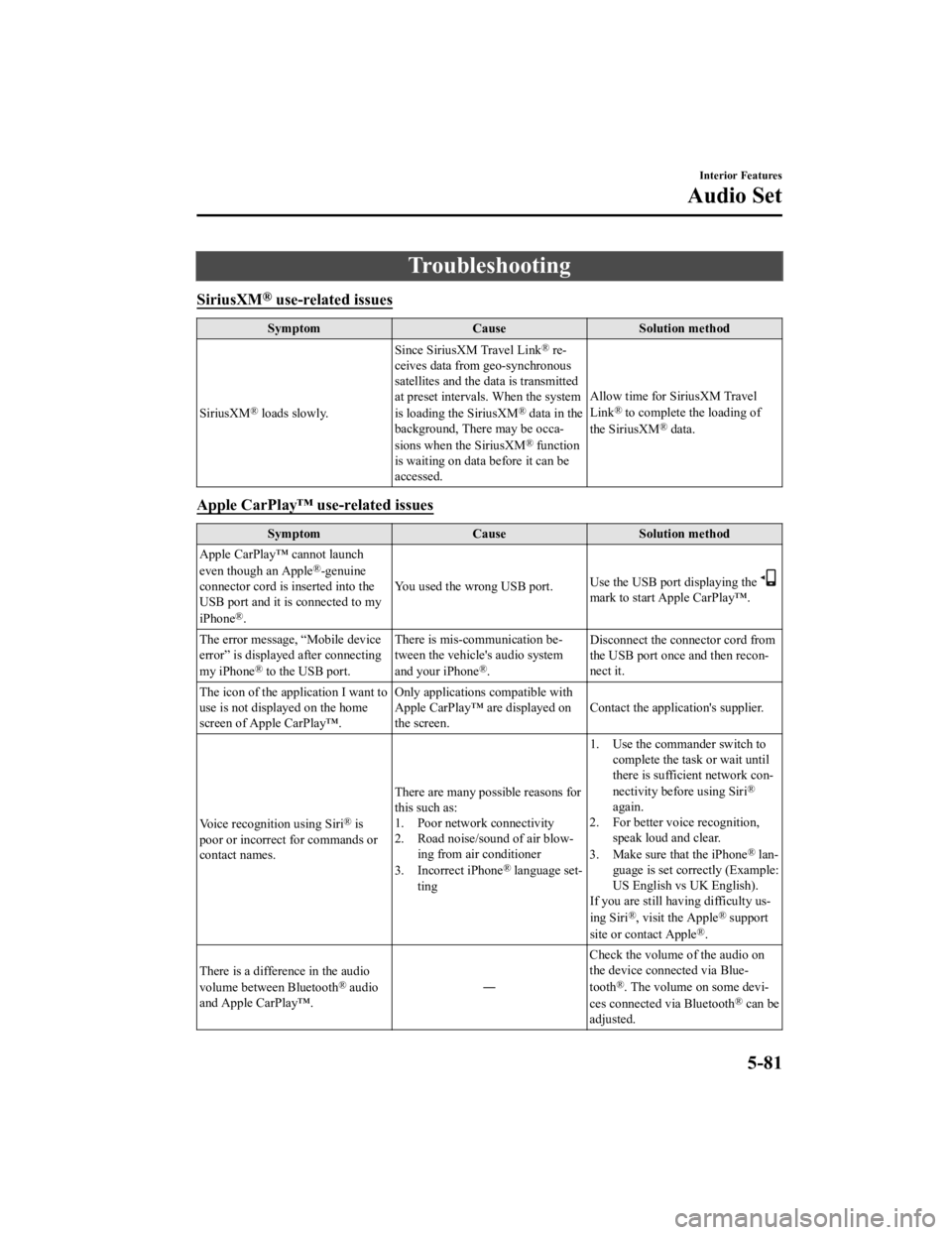
Troubleshooting
SiriusXM® use-related issues
SymptomCauseSolution method
SiriusXM
® loads slowly. Since SiriusXM Travel Link
® re-
ceives data from geo-synchronous
satellites and the data is transmitted
at preset intervals. When the system
is loading the SiriusXM
® data in the
background, There may be occa-
sions when the SiriusXM
® function
is waiting on data before it can be
accessed. Allow time for SiriusXM Travel
Link
® to complete the loading of
the SiriusXM® data.
Apple CarPlay™ use-related issues
Symptom CauseSolution method
Apple CarPlay™ cannot launch
even though an Apple
®-genuine
connector cord is inserted into the
USB port and it is connected to my
iPhone
®. You used the wrong USB port.
Use the USB port displaying the
mark to start Apple CarPlay™.
The error message, “Mobile device
error” is displaye d after connecting
my iPhone
® to the USB port. There is mis-communication be-
tween the vehicle's audio system
and your iPhone®.
Disconnect the connector cord from
the USB port once and then recon-
nect it.
The icon of the application I want to
use is not displayed on the home
screen of Apple CarPlay™. Only applications compatible with
Apple CarPlay™ are displayed on
the screen.
Contact the application's supplier.
Voice recognition using Siri
® is
poor or incorrect for commands or
contact names. There are many possible reasons for
this such as:
1. Poor network connectivity
2. Road noise/sound of air blow-
ing from air conditioner
3. Incorrect iPhone
® language set-
ting 1. Use the commander switch to
complete the task or wait until
there is sufficient network con-
nectivity before using Siri
®
again.
2. For better voice recognition, speak loud and clear.
3. Make sure that the iPhone
® lan-
guage is set correctly (Example:
US English vs UK English).
If you are still having difficulty us-
ing Siri
®, visit the Apple® support
site or contact Apple®.
There is a difference in the audio
volume between Bluetooth
® audio
and Apple CarPlay™. ―Check the volume of the audio on
the device connected via Blue-
tooth®. The volume on some devi-
ces connected via Bluetooth® can be
adjusted.
Interior Features
Audio Set
5-81
CX-5_8HH4-EA-19A_Edition1 2018-11-21 10:03:20
Page 486 of 721

Android Auto™ use-related issues
SymptomCauseSolution method
The Android Auto™ mode does not
launch even though the An-
droid™-genuine connector cord is
inserted into the USB port and it is
connected to my Android™ Smart-
phone. The Android Auto™ application has
not been downloaded to your An-
droid™ Smartphone.
To use Android Auto™ with your
vehicle, the Android Auto™ appli-
cation is required on your An-
droid™ Smartphone. Download the
Android Auto™ application from
the Google store™.
You used the wrong USB port. Use the USB port displaying the
mark to start the Android Auto™
mode.
The error message, “Mobile device
error” is displayed after connecting
my Android™ Smartphone to the
USB port. There is mis-communication be-
tween the vehicle's audio system
and your Android™ Smartphone.
Disconnect the connector cord from
the USB port once and then recon-
nect it.
Your Android™ Smartphone cannot
be paired because another device is
connected via Bluetooth
®. Disconnect the other device's Blue-
tooth
® connection, disconnect the
connector cord of the Android™
Smartphone from the USB terminal
once, and then reconnect it.
The icon of the application I want to
use is not displayed on the home
screen while in Android Auto™
mode. Only applications compatible with
Android Auto™ are displayed on
the screen.
Contact the appli
cation's supplier.
Voice recognition is poor or in-
correct.
Voice recognition responds slow-
ly or it does not work. ―
If you are having difficulty using
the voice recognition, visit the An-
droid Auto™ support site or contact
Google™.
There is a difference in the audio
volume between Bluetooth
® audio
and Android Auto™. ―Check the volume of the audio on
the device connected via Blue-
tooth®. The volume on some devi-
ces connected via Bluetooth® can
be adjusted.
Mazda Bluetooth® Hands-Free Customer Service
If you have any problems with Bluetooth®, contact our toll-free customer service center.
U.S.A.
Phone: 800-430-0153 (Toll-free)
Web: www.mazdausa.com/mazdaconnect
Canada
Phone: 800-430-0153 (Toll-free)
Web: www.mazdahandsfree.ca
Interior Features
Audio Set
5-82
CX-5_8HH4-EA-19A_Edition1 2018-11-21 10:03:20
Page 487 of 721

Mexico
Center of Attention to Client (CAC)
Phone: 01-800-01-MAZDA (Toll-free)
Web: www.mazdamexico.com.mx
Bluetooth
® Device pairing, connection problems
Symptom CauseSolution method
Unable to perform pairing ―Make sure that the Bluetooth
® de-
vice is compatible with the Blue-
tooth
® unit, and that Bluetooth® and
Find Mode*1 are on and the airplane
mode is off in the Bluetooth® device
setting. Turn off the power of the
Bluetooth
® device once, then turn it
back on. If pairing is still not possi-
ble after this, contact an Authorized
Mazda Dealer or Mazda Bluetooth
®
Hands-Free Customer Service.
Pairing cannot be performed again The pairing inform
ation paired to
the Bluetooth
® unit or device is not
recognized correctly. Perform pairing us
ing the following
procedure:
1. Delete the applicable Blue-
tooth
® device on the Mazda
Connect.
2. Delete “Mazda” from the Blue-
tooth
® search screen of the
Bluetooth® device.
3. Perform pairing again.
If pairing is not possible after trying
the procedure, turn off the power of
the Bluetooth
® device once, then
turn it back on. If pairing is still not
possible after this, contact an Au-
thorized Mazda Dealer or Mazda
Bluetooth
® Hands-Free Customer
Service.
It takes time for automatic connec-
tion There are a lot of paired Bluetooth
®
devices.Delete the pairing information for
unused Bluetooth
® devices.
If it takes time for an automatic con-
nection even though the above oper-
ation has been done, do a manual
connection.
Unable to perform pairing The Bluetooth
® function and the
Find Mode/Visible setting*1 on the
device may turn off automatically
after a period of time has elapsed
depending on the device. Check whether the Bluetooth® func-
tion and the Find Mode/Visible set-
ting
*1 on the device are turned on
and pairing or reconnect.
Does not connect automatically
when starting the engine
Interior Features
Audio Set
5-83
CX-5_8HH4-EA-19A_Edition1
2018-11-21 10:03:20
Page 488 of 721

SymptomCauseSolution method
Automatically connects, but then
disconnects suddenly
Disconnects intermittently The device is in a location in which
radio wave interference can occur
easily, such as inside a bag in a rear
seat, in a rear pocket of a pair of
pants.Move the device to a location in
which radio wave interference is
less likely to occur.
Does not connect automatically
when starting the engine The pairing information is updated
when the device OS is updated.Perform pairing using the following
procedure:
1. Delete the applicable Blue-
tooth
® device on the Mazda
Connect.
2. Delete “Mazda” from the Blue-
tooth
® search screen of the
Bluetooth® device.
3. Perform pairing again.
If pairing is not possible after trying
the procedure, turn off the power of
the Bluetooth
® device once, then
turn it back on. If pairing is still not
possible after this, contact an Au-
thorized Mazda Dealer or Mazda
Bluetooth
® Hands-Free Customer
Service.
*1 Setting which detects the existence of a device external to the Bluetooth® unit.
NOTE
When the OS of the device is updated, the pairing information may be deleted. If this
happens, reprogram the pairing information to the Bluetooth
® unit.
If you pair your phone which has already been paired to your vehicle more than once in
the past, you need to delete “Mazda” on your mobile device. Then, execute the
Bluetooth
® search on your mobile device once again, and pair to a newly detected
“Mazda”.
Before you pair your device, make sure that Bluetooth® is “ON”, both on your phone and
on the vehicle.
If Bluetooth®-enabled devices are used in the following locations or conditions,
connection via Bluetooth
® may not be possible.
The device is in a location hidden from the center display such as behind or under a
seat, or inside the glove compartment.
The device contacts or is covered by a metal object or body.
The device is set to power-saving mode.
Interior Features
Audio Set
5-84
CX-5_8HH4-EA-19A_Edition1 2018-11-21 10:03:20
Page 489 of 721

Different Bluetooth®-enabled devices can be used for Bluetooth® Hands-Free and
Bluetooth
® audio. For example, device A can be connected as a Bluetooth® Hands-Free
device and device B can be connected as a Bluetooth
® audio device. However, the
following may occur when they are used at the same time.
The Bluetooth® connection of the device is disconnected.
Noise occurs in the Hands-Free audio.
Hands-Free operates slowly.
Voice recognition related problems
Symptom CauseSolution method
Poor voice recognition
Excessive, slow speech.Excessive, forceful speech
(shouting).
Speaking before the beep sound
has ended.
Loud noise (speaking or noise
from outside/inside vehicle).
Airflow from A/C is blowing
against the microphone.
Speaking in off-standard expres-
sions (dialect). Regarding the causes indicated on
the left, be careful with how you
speak. In addition, when numbers
are spoken in a sequence, recogni-
tion ability will improve if no stop is
placed between the numbers.
False recognition of numbers
Poor voice recognition
There is a malfunc
tion in the micro-
phone. A poor connection or malfunction
with the microphone may have oc-
curred. Consult an Authorized Maz-
da Dealer.
Phone-related voice recognition is
disabled There is a problem with the connec-
tion between the Bluetooth
® unit
and the device. If there is any malfunction after
checking the pairing
situation, check
for device pairing or connection
problems.
Names in the phonebook are not
easily recognized The Bluetooth
® system is under a
condition in which recognition is
difficult. By carrying out the following meas-
ures, the rate of recognition will im-
prove.Clear memory from the phone-
book which is not used very of-
ten.
Avoid shortened names, use full
names. (Recognition improves
the longer the name is. By not us-
ing names such as “Mom”,
“Dad”, recognition will improve.)
When operating the audio, a song
name is not recognized Song names cannot be recognized
by voice.
―
Interior Features
Audio Set
5-85
CX-5_8HH4-EA-19A_Edition1
2018-11-21 10:03:20
Page 490 of 721
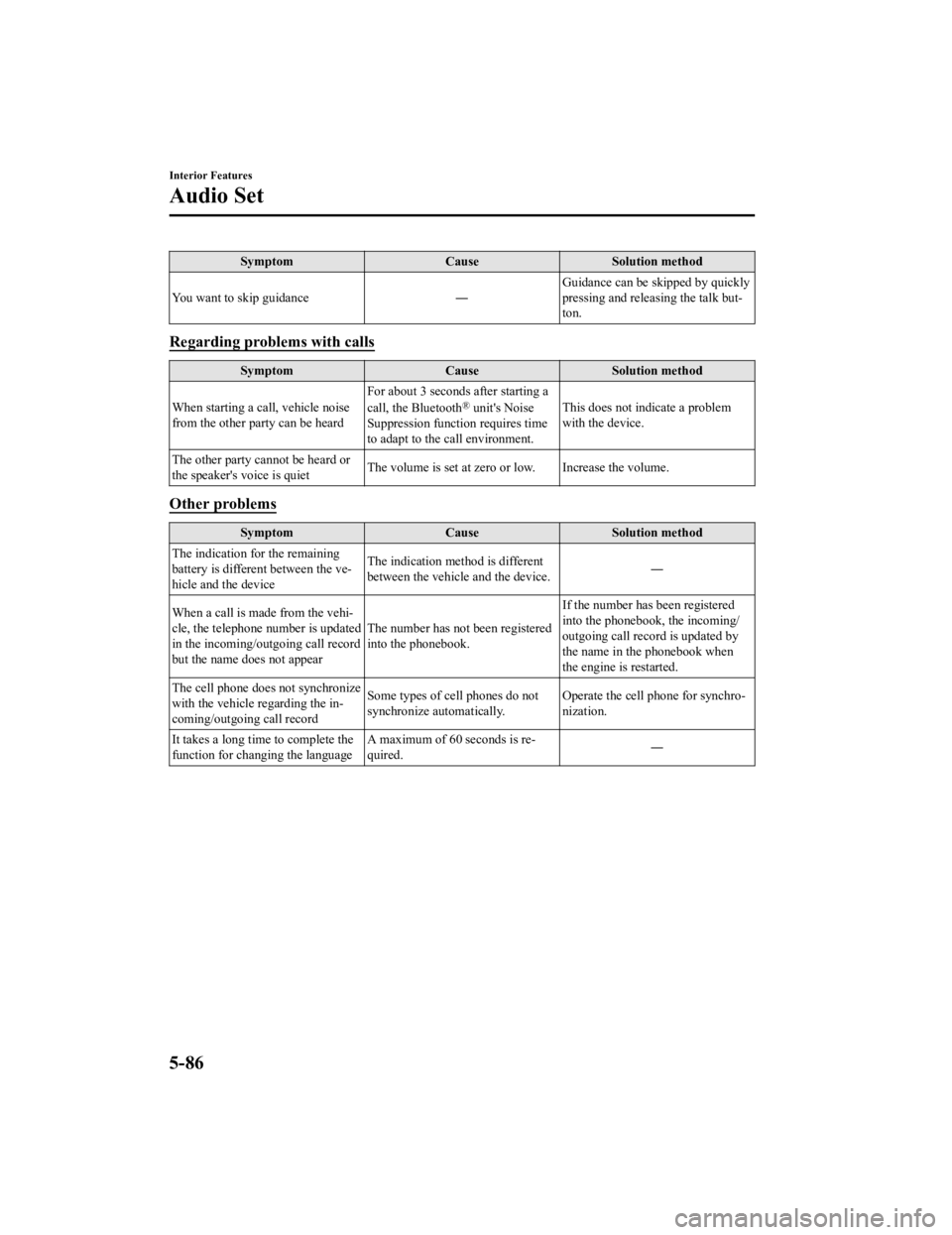
SymptomCauseSolution method
You want to skip guidance ―Guidance can be skipped by quickly
pressing and releasing the talk but-
ton.
Regarding problems with calls
Symptom
CauseSolution method
When starting a call, vehicle noise
from the other party can be heard For about 3 seconds after starting a
call, the Bluetooth
® unit's Noise
Suppression function requires time
to adapt to the call environment. This does not indicate a problem
with the device.
The other party cannot be heard or
the speaker's voice is quiet The volume is set at zero
or low. Increase the volume.
Other problems
Symptom CauseSolution method
The indication fo r the remaining
battery is different between the ve-
hicle and the device The indication method is different
between the vehicle and the device.
―
When a call is made from the vehi-
cle, the telephone number is updated
in the incoming/outgoing call record
but the name does not appear The number has not been registered
into the phonebook.If the number has been registered
into the phonebook, the incoming/
outgoing call record is updated by
the name in the phonebook when
the engine is restarted.
The cell phone does not synchronize
with the vehicle regarding the in-
coming/outgoing call record Some types of cell phones do not
synchronize automatically.
Operate the cell p
hone for synchro-
nization.
It takes a long time to complete the
function for changing the language A maximum of 60 seconds is re-
quired.
―
Interior Features
Audio Set
5-86
CX-5_8HH4-EA-19A_Edition1
2018-11-21 10:03:20
Page 491 of 721

Things You Need to Know
WA R N I N G
Always adjust the audio while the vehicle is
stopped:
Do not adjust the audio control switches
while driving the vehicle. Adjusting the
audio while driving the vehicle is
dangerous as it could distract your
attention from the vehicle operation which
could lead to a serious accident.
Even if the audio control switches are
equipped on the steering wheel, learn to
use the switches without looking down at
them so that you can keep your maximum
attention on the road while driving the
vehicle.
CAUTION
For the purposes of safe driving, adjust the
audio volume to a level that allows you to
hear sounds outside of the vehicle
including car horns and particularly
emergency vehicle sirens.
NOTE
To prevent the battery from being
discharged, do not leave the audio
system on for a long period of time when
the engine is not running.
If a cellular phone or CB radio is used
in or near the vehicle, it could cause
noise to occur from the audio system,
however, this does no t indicate that the
system has been damaged.
Do not spill any liquid on the audio
system.
▼ Radio Reception
AM characteristics
AM signals bend around such things as
buildings or mountains and bounce off the
ionosphere.
Therefore, they can reach longer distances
than FM signals.
Because of this, 2 stations may sometimes
be picked up on the same frequency at the
same time.
Station 2
Station 1 Ionosphere
Interior Features
Appendix
5-87
CX-5_8HH4-EA-19A_Edition1
2018-11-21 10:03:20
Page 496 of 721

(Vehicles without USB port indicated
with
)
If a device exceeds the maximum
electric current value of 1,000 mA, it
may not operate or recharge when
connected.
(Vehicles with USB port indicated with
)
If the current consumption of the
connected device exceeds the following
current value, it may not operate or
recharge.
Apple device is connected : 2,100 mA
Device compatible with BC1.2 is
connected : 1,500 mA
Device other than the above is
connected : 500 mA
Do not pull out the USB device while in
the USB mode (only pull it out while in
FM/AM radio mode).
The device will not operate if the data is
password protected.
MP3/WMA/AAC/OGG files written under
specifications other than the indicated
specification may not play normally or
files/folder names may not display
correctly.
▼ Agreements and disclaimers related
to Apple CarPlay™
This unit is compatible with Apple
CarPlay™ which can operate an iPhone
®
using the vehicle's audio device.
iPhone, Siri and Apple Music are
registered trademarks of Apple Inc.
Apple CarPlay is trademarks of Apple
Inc.
iOS is a trademark or registered
trademark of Cisco in the U.S. and other
countries and is used under license.
May not be compatible depending on the
model or OS version.
CAUTION
For the purposes of safety, do not
operate your iPhone
® while driving.
Disconnect the iPhone
® when it is not in
use. If the device is left in the cabin, it
could be damaged or the battery may
deteriorate due to the excessive
temperature or humidity inside the
cabin.
If the iPhone
® battery has deteriorated, it
may not recharge or play audio even if it
is connected to this unit.
Before use, carefully read the user
instructions for the iPhone
®.
NOTE
To prevent loss or damage of stored data,
we recommend that you always back up
your data.
▼ Operating Tips for Android™
Requires the Android Auto app on Google
Play and an Android compatible
smartphone running Android™ 5.0
Lollipop or higher.
CAUTION
For the purposes of safety, do not
operate your Android™ Smartphone
while driving.
Interior Features
Appendix
5-92
CX-5_8HH4-EA-19A_Edition1 2018-11-21 10:03:20
Page 497 of 721

Disconnect the Android™ Smartphone
when it is not in use. If the device is left in
the cabin, it could be damaged or the
battery may weaken due to the excessive
temperature or humidity inside the
cabin.
If the Android™ Smartphone battery has
deteriorated, it may not recharge or play
audio even if it is connected to this unit.
Before use, carefully read the user
instructions for the Android™
Smartphone.
NOTE
To prevent loss or damage of stored data,
we recommend that you always back up
your data.
Google, Android, Android Auto and
other related marks are trademarks of
Google LLC.
Interior Features
Appendix
5-93
CX-5_8HH4-EA-19A_Edition1
2018-11-21 10:03:20