belt MAZDA MODEL CX-5 SKYACTIV-D 2019 Workshop Manual
[x] Cancel search | Manufacturer: MAZDA, Model Year: 2019, Model line: MODEL CX-5 SKYACTIV-D, Model: MAZDA MODEL CX-5 SKYACTIV-D 2019Pages: 721, PDF Size: 97.68 MB
Page 184 of 721
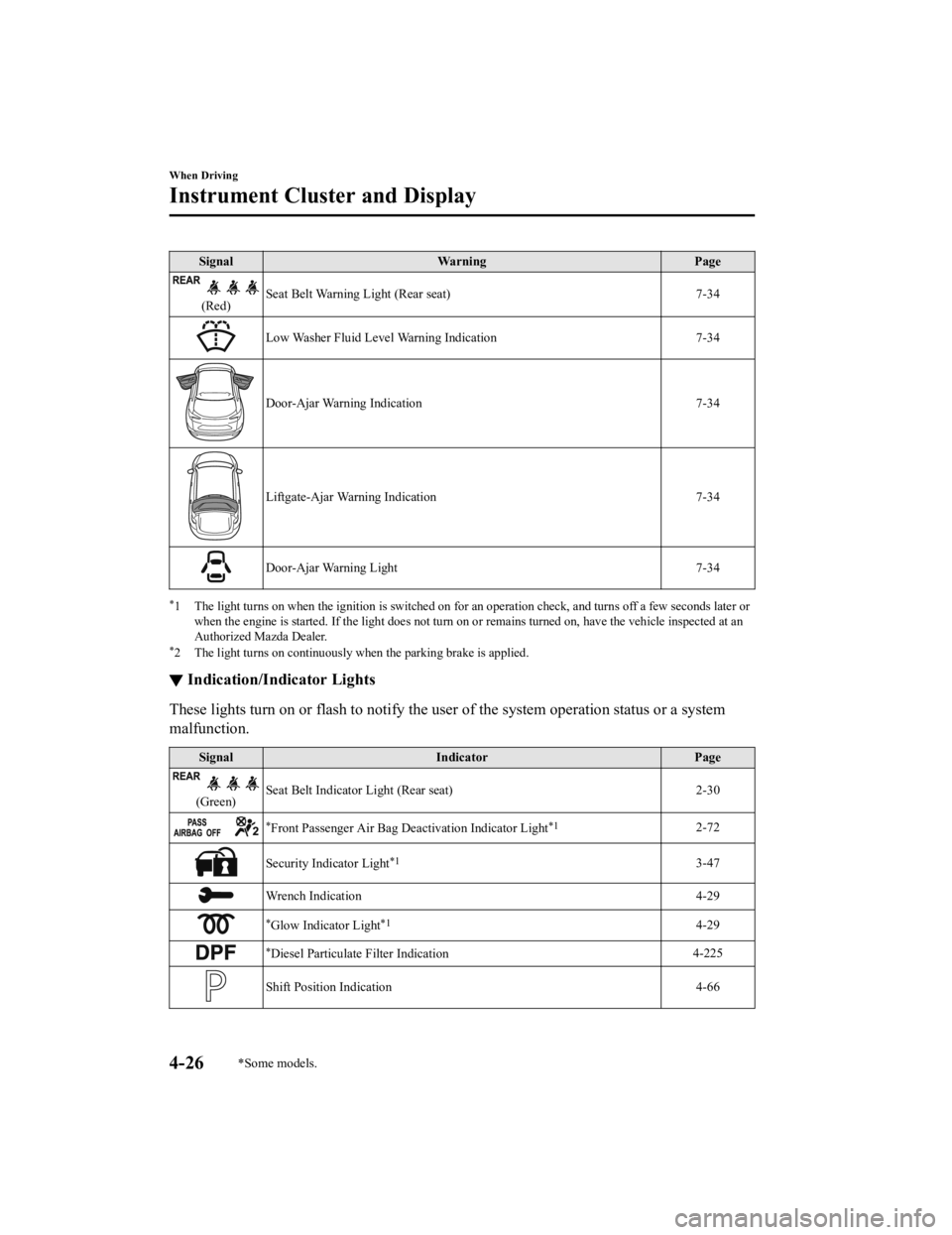
SignalWarning Page
(Red)Seat Belt Warning Light (Rear seat) 7-34
Low Washer Fluid Level Warning Indication
7-34
Door-Ajar Warning Indication7-34
Liftgate-Ajar Warning Indication 7-34
Door-Ajar Warning Light7-34
*1 The light turns on when the ignition is switched on for an operation check, and turns off a few seconds later or
when the engine is started. If the light does not turn on or remains turned on, have the vehicle inspected at an
Authorized Mazda Dealer.
*2 The light turns on continuously when the parking brake is applied.
▼ Indication/Indicator Lights
These lights turn on or flash to notify the user of the system operation status or a system
malfunction.
Signal
Indicator Page
(Green)Seat Belt Indicator Light (Rear seat) 2-30
*Front Passenger Air Bag Deactivation Indicator Light*12-72
Security Indicator Light*13-47
Wrench Indication
4-29
*Glow Indicator Light*14-29
*Diesel Particulate Filter Indication4-225
Shift Position Indication
4-66
When Driving
Instrument Cluster and Display
4-26*Some models.
CX-5_8HH4-EA-19A_Edition1 2018-11-21 10:03:20
Page 199 of 721

SignalWarning Page
Master Warning Indication/Warning Light 7-27
Electric Parking Brake (EPB) Warning Indication/Warning Light*17-27
Check Engine Light*17-27
*Selective Catalytic Reduction (SCR) system Warning Indication/Warning
Light*17-27
Automatic Transaxle Warning Indication 7-27
*AWD Warning Indication7-27
Air Bag/Front Seat Belt Preten
sioner System Warning Light*17-27
*Tire Pressure Monitoring System Warning Light*1
Flashing
7-27
Turns on 7-34
(Amber/White) KEY Warning Indication Amber
7-27
White 7-34
(Amber)
*High Beam Control System (HBC) Warning Indication/Warning Light*17-27
*Blind Spot Monitoring (BSM) Warning Indication 7-27
(Amber)
*Mazda Radar Cruise Control with Stop & Go function (MRCC with Stop
& Go function) Warning Indication 7-27
*Lane-keep Assist System (LAS) & Lane Departure Warning System
(LDWS) Warning Indication 7-27
LED Headlight Warning Light*17-27
*Smart Brake Support/Smart City Brake Support (SBS/SCBS) Warning In-
dication 7-34
Low Fuel Warnin
g Indication 7-34
Check Fuel Cap Warning Indication/Warning Light*17-34
When Driving
Instrument Cluster and Display
*Some models.4-41
CX-5_8HH4-EA-19A_Edition1 2018-11-21 10:03:20
Page 200 of 721
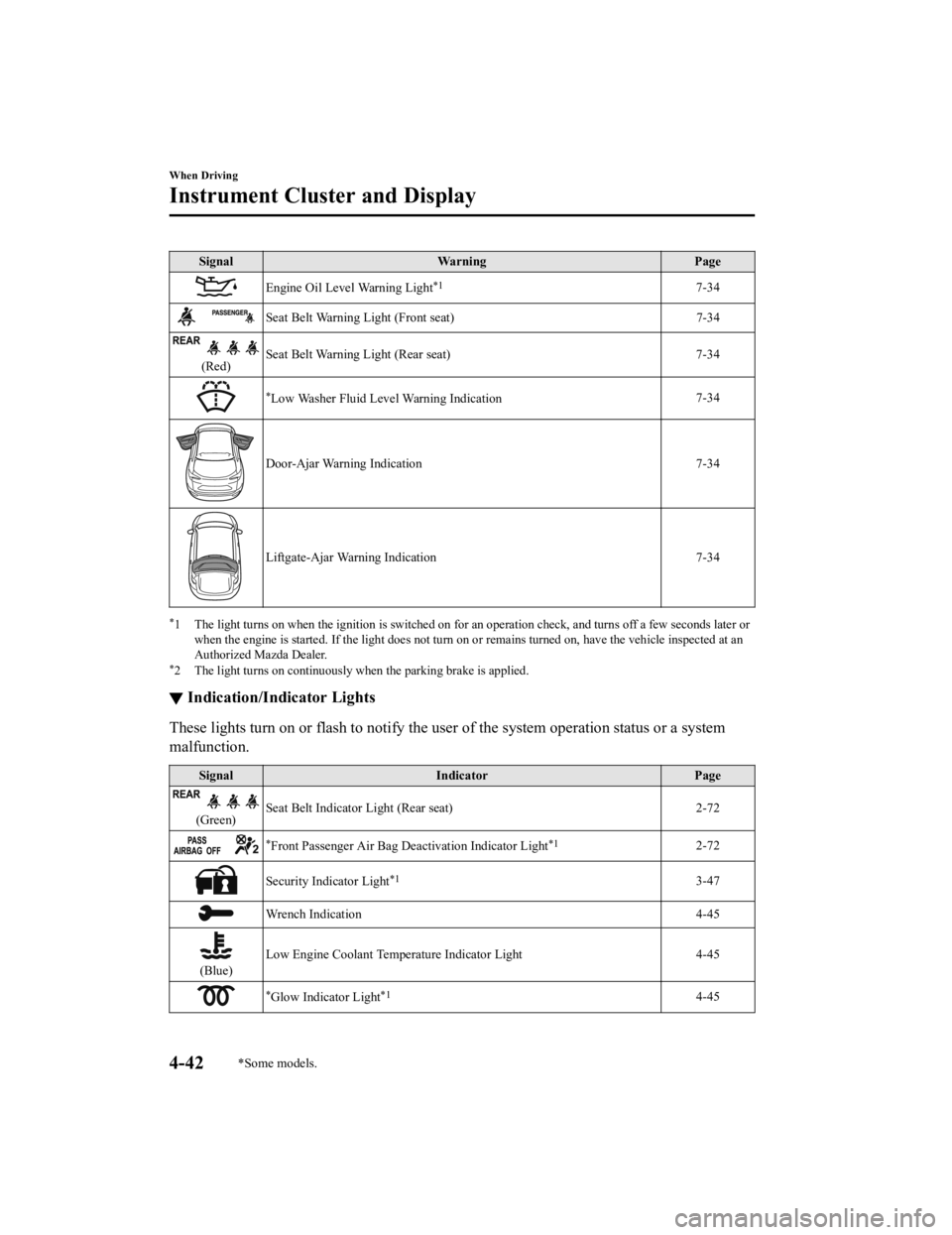
SignalWarning Page
Engine Oil Level Warning Light*17-34
Seat Belt Warning Light (Front seat) 7-34
(Red)Seat Belt Warning Light (Rear seat) 7-34
*Low Washer Fluid Level Warning Indication
7-34
Door-Ajar Warning Indication
7-34
Liftgate-Ajar Warning Indication 7-34
*1 The light turns on when the ignition is switched on for an operation check, and turns off a few seconds later or
when the engine is started. If the light does not turn on or remains turned on, have the vehicle inspected at an
Authorized Mazda Dealer.
*2 The light turns on continuously when the parking brake is applied.
▼ Indication/Indicator Lights
These lights turn on or flash to notify the user of the system operation status or a system
malfunction.
Signal
Indicator Page
(Green)Seat Belt Indicator Light (Rear seat) 2-72
*Front Passenger Air Bag Deactivation Indicator Light*12-72
Security Indicator Light*13-47
Wrench Indication
4-45
(Blue)Low Engine Coolant Temperature Indicator Light 4-45
*Glow Indicator Light*14-45
When Driving
Instrument Cluster and Display
4-42*Some models.
CX-5_8HH4-EA-19A_Edition1
2018-11-21 10:03:20
Page 212 of 721

SignalWarning Page
(Red)Brake Pedal Operation Demand Warning Light
*1
Flashing
4-100
Buzzer & Flash- ing
7-27
Check Engine Light*17-27
*Automatic Transaxle Warning Light*17-27
*AWD Warning Light 7-27
Air Bag/Front Seat Belt Pretensioner System Warning Light*17-27
*Tire Pressure Monitoring System Warning Light*1
Flashing
7-27
Turns on 7-34
(Red) KEY Warning Light
*1
Turns on
7-27
Flashing 7-34
LED Headlight Warning Light*17-27
(Amber)
*Smart City Brake Support (SCBS) Warning Light*17-34
Low Fuel Warning Light 7-34
Check Fuel Cap Warning Light*17-34
Engine Oil Level Warning Light*17-34
Seat Belt Warning Light (Front seat) 7-34
(Red)Seat Belt Warning Light (Rear seat) 7-34
*Low Washer Fluid Level Warning Light
7-34
Door-Ajar Warning Light
7-34
When Driving
Instrument Cluster and Display
4-54*Some models.
CX-5_8HH4-EA-19A_Edition1 2018-11-21 10:03:20
Page 213 of 721

*1 The light turns on when the ignition is switched on for an operation check, and turns off a few seconds later orwhen the engine is started. If the light does not turn on or remains turned on, have the vehicle inspected at an
Authorized Mazda Dealer.
*2 The light turns on continuously when the parking brake is applied.
▼ Indication/Indicator Lights
These lights turn on or flash to notify the us
er of the system operation status or a system
malfunction.
Signal Indicator Page
(Green)Seat Belt Indicator Light (Rear seat) 2-72
*Front Passenger Air Bag Deactivation Indicator Light*12-72
(Green)KEY Indicator Light 4-5
Security Indicator Light*13-47
Wrench Indication/Indicator Light*14-57
Shift Position Indication
4-66
Lights-On Indication/Indicator Light 4-73
Headlight High-Beam Indicator LightHeadlight
High-Low Beam 4-76
Flashing the Headlights 4-76
Turn Signal/Hazard Warning Indicator Lights Turn and
Lane-Change Signals4-79
Hazard Warning Flasher4-86
(Green) Brake Pedal Operation demand Indicator Light 4-96
AUTOHOLD Active Indicator Light*14-102
When Driving
Instrument Cluster and Display
*Some models.4-55
CX-5_8HH4-EA-19A_Edition1
2018-11-21 10:03:20
Page 256 of 721

Parking brake automatic release
If the accelerator pedal is depressed with
the parking brake applied and all of the
following conditions met, the parking
brake is released automatically.
The engine is running.
The driver's door is closed.
The driver's seat belt is fastened.
(Manual transaxle)
The change lever is in a position other
than neutral.
The clutch pedal is depressed halfway
(Automatic transaxle)
Selector lever is in the D, M, or R
position
NOTE
If something such as the driver's foot
contacts the accelerator pedal with the
engine running and the parking brake
applied, the parking brake may be
released automatically. If you do not
intend to drive immediately, shift the
change lever (manual transaxle) to the
neutral position, or shift the selector lever
(automatic transaxle) to the P or N
position.
▼ Warning Light
The warning light turns on when the
system has a malfunction.
Refer to Contact Authorized Mazda
Dealer and Have Vehicle Inspected on
page 7-27.
▼ Brake Pad Wear Indicator
When the disc brake pads become worn,
the built-in wear indicators contact the
disc plates. This causes a screeching noise
to warn that the pads should be replaced.
When you hear this noise, consult an
Authorized Mazda Dealer as soon as
possible.
WA R N I N G
Do not drive with worn disc pads:
Driving with worn disc pads is dangerous.
The brakes could fail and cause a serious
accident. As soon as you hear a screeching
noise consult an Authorized Mazda Dealer.
NOTE
In high humidity weather conditions,
brake noises, such as brake squeak or
brake squeal can be heard. It does not
indicate a malfunction.
When Driving
Brake
4-98
CX-5_8HH4-EA-19A_Edition1
2018-11-21 10:03:20
Page 260 of 721

▼AUTOHOLD System is Turned On
Press the AUTOHOLD switch and when
the AUTOHOLD standby indicator light
turns on, the AUTOHOLD function turns
on.
AUTOHOLD standby
indicator light
NOTE
When all of the following conditions are
met, the AUTOHOLD standby indicator
light turns on when the AUTOHOLD
switch is pressed and the AUTOHOLD
function turns on.
The ignition is switched ON (engine is
running).
The driver's seat belt is fastened.
The driver's door is closed.
There is no problem with the
AUTOHOLD function.
To operate AUTOHOLD and hold the
brakes
1. Depress the brake pedal and bring the
vehicle to a complete stop.
2. The AUTOHOLD active indicator
light in the instrument cluster turns on
and the brakes are held.
3. The vehicle is held in its stoppedposition even with the brake pedal
released.
NOTE
When all of the following conditions are
met, the AUTOHOLD operates and the
brakes are held.
The ignition is switched ON (engine is
running).
The vehicle is stopped.
The brake pedal is being depressed.
The AUTOHOLD active indicator light
turns on.
The accelerator pedal is not depressed.
The driver's seat belt is fastened.
The driver's door is closed.
There is no problem with the
AUTOHOLD function.
The parking brake is released.
There is no problem with the Electric
Parking Brake (EPB) function.
(Automatic transaxle vehicle)
The selector lever is in a position other
than R position or the vehicle tilts
forward with the selector lever in the R
position.
When Driving
Brake
4-102
CX-5_8HH4-EA-19A_Edition1 2018-11-21 10:03:20
Page 261 of 721

To release AUTOHOLD and start
driving the vehicle
If you do any of the following actions to
resume driving the vehicle, the brakes
release automatically and the
AUTOHOLD active indicator light turns
off.
(Manual transaxle vehicle)
You start to release the clutch pedal with
the shift lever shifted to a position other
than the neutral position
(Automatic transaxle vehicle)
The accelerator pedal is depressed.
The vehicle tilts rearward or the
selector lever is shifted to the R
position on level ground.
NOTE
If the Electric Parking Brake (EPB)
switch is pulled while the AUTOHOLD
is operating, the parking brake is
applied and the AUTOHOLD is
released. In addition, if the parking
brake is released under this condition,
the AUTOHOLD operates to hold the
brakes.
Under the following conditions, the
parking brake is automatically applied
and the AUTOHOLD is released. The
AUTOHOLD is re-enabled when the
conditions before the AUTOHOLD is
released are restored.
The driver’s seat belt is unfastened.
The driver’s door is opened.
When about 10 minutes or longer have
passed since the AUTOHOLD operation
started, the parking brake is
automatically applied. Because the
AUTOHOLD is restored when releasing
the parking brake, the hold on the
brakes by AUTOHOLD function
resumes.
(Manual transaxle vehicle)
When starting to drive the vehicle
forward or in reverse on a down slope,
depress the clutch pedal and shift the
shift lever to the appropriate position for
driving in the desired direction, and then
depress the accelerator pedal to release
the AUTOHOLD.
▼AUTOHOLD System is Turned Off
Depress the brake pedal and press the
AUTOHOLD switch. The AUTOHOLD is
turned off and the AUTOHOLD standby
indicator light turns off.
AUTOHOLD standby
indicator light
NOTE
When the brakes are not held such as
while driving the vehicle, the
AUTOHOLD can be turned off only by
pressing the AUTOHOLD switch.
When Driving
Brake
4-103
CX-5_8HH4-EA-19A_Edition1
2018-11-21 10:03:20
Page 307 of 721

▼Setting the System
The MRCC with Stop & Go function system ope
rates when all of the following conditions
are met.
Vehicle speed is 0 km/h (0 mph) to 145 km/h (90 mph)
The MRCC with Stop & Go function is turned on.
The brake pedal is not depressed.
The parking brake is released (Electric Parking Brake (EPB) indicator light is turned off).
There is no problem with the DSC.
All the doors are closed.
The driver's seat belt is fastened.
The selector lever is in the drive (D) position or manual (M) position (manual mode).
NOTE
In the following cases, the MRCC with Stop & Go function system is canceled when the
vehicle is traveling at 30 km/h (20 mph) or less and “Mazda Radar Cruise Control
disabled under 30 km/h (20 mph)” is displayed in the multi-information display.
The Forward Sensing Camera (FSC) cannot de tect target objects (There is problem
with the Forward Sensing Camera (FSC) or windshield is dirty).
There is a problem with the stop hold control function.
There is a problem with the Electric Parking Brake (EPB).
It may not be possible to set the MRCC with Stop & Go f unction system directly after
starting the engine, while the DSC operation is being checked.
(With Selective Catalytic Reduction (SCR) system)
It is not possible to set the MRCC with Stop & Go function system while the vehicle speed
is limited by the Selective Ca talytic Reduction (SCR) system.
Turning on the system
CANCEL switch RES switch
OFF switch
switch switch
MODE switch
SET- switch
SET+ switch
When Driving
i-ACTIVSENSE
4-149
CX-5_8HH4-EA-19A_Edition1
2018-11-21 10:03:20
Page 311 of 721

NOTE
The setting speed can be changed by
operating the SET
switch or SET
switch during stop hold control.
When accelerating using the SET
switch while in headway control, the set
vehicle speed can be adjusted but
acceleration is not possible. If there is
no longer a vehicle ahead, acceleration
continues until reaching the set vehicle
speed. For the set vehicle speed, check
the set vehicle speed indication in the
display.
When depressing the accelerator pedal,
the inter-vehicle distance indication in
the display changes to the white-line
indication.
Canceling the system
When the following operations are
performed, the MRCC with Stop & Go
function system is canceled, and the
MRCC with Stop & Go function set
indication (green) switches to the MRCC
with Stop & Go function main indication
(white) at the same time.
The OFF/CANCEL switch is pressed.
The brake pedal is depressed.
The parking brake is applied.
The selector lever is in the P (Park), N
(Neutral), or R (Reverse) position.
Under the following conditions, the
MRCC with Stop & Go function cancel
indication is displayed in the
multi-information display and a single
beep sound is heard.
The DSC has operated.
The Smart Brake Support (SBS) has
operated.
The Smart City Brake Support (SCBS)
or Advanced Smart City Brake Support
(Advanced SCBS) has operated.
When traveling on a downslope for a
long period of time.
There is a problem with the system.
The engine has stalled.
Any of the doors is opened.
The driver's seat belt is unfastened.
The parking brake is automatically
applied during stop hold control.
The radar sensor (front) cannot detect
target objects (during rain, fog, snow or
other inclement weather conditions, or
when the radiator grille is dirty).
(With Selective Catalytic Reduction
(SCR) system)
The vehicle speed is limited by the
Selective Catalytic Reduction (SCR)
system.
Resuming control
If the MRCC with Stop & Go function
system is canceled, you can resume
control at the previously set speed by
pressing the RES switch and after all of
the operation conditions have been met.
NOTE
If the set speed is not indicated in the
display, the control does not resume even
if the RES switch is pressed.
Turning off the system
Press the OFF/CANCEL switch 2 times
while the MRCC with Stop & Go function
system is operating to switch off the
system.
When Driving
i-ACTIVSENSE
4-153
CX-5_8HH4-EA-19A_Edition1 2018-11-21 10:03:20