change time MAZDA MODEL CX-5 SKYACTIV-D 2019 Workshop Manual
[x] Cancel search | Manufacturer: MAZDA, Model Year: 2019, Model line: MODEL CX-5 SKYACTIV-D, Model: MAZDA MODEL CX-5 SKYACTIV-D 2019Pages: 721, PDF Size: 97.68 MB
Page 444 of 721

You agree that your non-exclusive license to use the Gracenote Data, the Gracenote
Software, and Gracenote Servers will terminate if you violate these restrictions. If your
license terminates, you agree to cease any and all use of the Gracenote Data, the Gracenote
Software, and Gracenote Servers. Gracenote reserves all rights in Gracenote Data, the
Gracenote Software, and the Gracenote Servers, including all ownership rights. Under no
circumstances will Gracenote become liable for any payment to you for any information that
you provide. You agree that Gracenote, Inc. may enforce its rights under this Agreement
against you directly in its own name.
The Gracenote service uses a unique identifier to track queries for statistical purposes. The
purpose of a randomly assigned numeric identifier is to allow the Gracenote service to count
queries without knowing anything about who you are. For more information, see the web
page for the Gracenote Privacy Policy for the Gracenote service.
The Gracenote Software and each item of Gracenote Data are licensed to you “AS IS.”
Gracenote makes no representations or warranties, express or implied, regarding the
accuracy of any Gracenote Data from in the Gracenote Servers. Gracenote reserves the right
to delete data from the Gracenote Servers or to change data categories for any cause that
Gracenote deems sufficient. No warranty is made that the Gracenote Software or Gracenote
Servers are error-free or that functioning of Gracenote Softwa re or Gracenote Servers will
be uninterrupted. Grace note is not obligated to provide y ou with new enhanced or additional
data types or categories that Gracenote may provi de in the future and is free to discontinue
its services at any time.
GRACENOTE DISCLAIMS ALL WARRANTIES EXPRESS OR IMPLIED,
INCLUDING, BUT NOT LIMITED TO, IMPLIED WARRANTIES OF
MERCHANTABILITY, FITNESS FOR A PARTICULAR PURPOSE, TITLE, AND
NON-INFRINGEMENT. GRACENOTE DOES NOT WARRANT THE RESULTS THAT
WILL BE OBTAINED BY YOUR USE OF THE GRACENOTE SOFTWARE OR ANY
GRACENOTE SERVER. IN NO CASE WILL GRACENOTE BE LIABLE FOR ANY
CONSEQUENTIAL OR INCIDENTAL DAMAGES OR FOR ANY LOST PROFITS OR
LOST REVENUES.
© Gracenote, Inc. 2009
Updating th e database
The Gracenote® media database can be updated using USB device.
1. Connect a USB device containing the software for updating Gracenote
®.
2. Select the
icon on the home screen to display the Settings screen.
3. Select the
tab and select .
4. Select
. The list of the update package stored in the USB device and the version
are displayed.
5. Select the package to use the update.
6. Select
.
Interior Features
Audio Set
5-40
CX-5_8HH4-EA-19A_Edition1 2018-11-21 10:03:20
Page 449 of 721
How to use Android Auto™ mode*
▼What is Android Auto™?
Android Auto™ is an application which allows the operation of an Android™ Smartphone
using the vehicle's audio. Android Auto™ functions such as the phone, messages, music,
and map can be used with the vehicle's audio system.
CAUTION
YOU EXPRESSLY ACKNOWLEDGE AND AGREE THAT USE OF ANDROID AUTO™ (“THE
APPLICATION”) IS AT YOUR SOLE RISK AND THAT THE ENTIRE RISK AS TO SATISFACTORY
QUALITY, PERFORMANCE, ACCURACY AND EFFO RT IS WITH YOU TO THE MAXIMUM EXTENT
PERMITTED BY APPLICABLE LAW, AND THAT THE APPLICATION AND INFORMATION ON THE
APPLICATION IS PROVIDED “AS IS” AND “AS AVAILABLE,” WITH ALL FAULTS AND WITHOUT
WARRANTY OF ANY KIND, AND MAZDA HERE BY DISCLAIMS ALL WARRANTIES AND
CONDITIONS WITH RESPECT TO THE APPLICATION AND INFORMATION ON THE
APPLICATION, EITHER EXPRESS, IMPLIED OR STATUTORY, INCLUDING, BUT NOT LIMITED TO,
THE IMPLIED WARRANTIES AND/OR CONDITIONS OF MERCHANTABIL ITY, SATISFACTORY
QUALITY, FITNESS FOR A PARTICULAR PURP OSE, ACCURACY, QUIET ENJOYMENT, AND
NONINFRINGEMENT OF THIRD PARTY RIGHTS. AS EXAMPLES, AND WITHOUT LIMITATION,
MAZDA DISCLAIMS ANY WARRANTY REGARDING THE ACCURACY OF DATA PROVIDED BY
THE APPLICATION, SUCH AS THE ACCURACY OF DIRECTIONS, ESTIMATED TRAVEL TIME,
SPEED LIMITS, ROAD CONDITIONS, NEWS, WEATHER, TRAFFIC, OR OTHER CONTENT
PROVIDED BY GOOGLE, ITS AFFILIATES, OR THIRD PARTY PROVIDERS; MAZDA DOES NOT
GUARANTEE AGAINST LOSS OF APPLICATION DATA, WHICH MAY BE LOST AT ANY TIME;
MAZDA DOES NOT GUARANTEE THAT THE APPLICATION OR ANY SERVICES PROVIDED
THROUGH THEM WILL BE PROVIDED AT ALL TI MES OR THAT ANY OR ALL SERVICES WILL BE
AVAILABLE AT ANY PARTICULAR TIME OR LOCATION. FOR EXAMPLE, SERVICES MAY BE
SUSPENDED OR INTERRUPTED WITHOUT NOTI CE FOR REPAIR, MAINTENANCE, SECURITY
FIXES, UPDATES, ETC., SERVIC ES MAY BE UNAVAILABLE IN YOUR AREA OR LOCATION, ETC.
IN ADDITION, YOU UNDERSTAND THAT CHANGES IN THIRD PARTY TECHNOLOGY OR
GOVERNMENT REGULATION MAY RENDER THE SERVICES AND/OR APPLICATIONS
OBSOLETE AND/OR UNUSABLE.
TO THE EXTENT NOT PROHIBITED BY LAW, IN NO EVENT SHALL MAZDA OR ITS AFFILIATES
BE LIABLE FOR PERSONAL INJURY, OR ANY INCIDENTAL, SPECIAL, INDIRECT OR
CONSEQUENTIAL DAMAGES WHATSOEVER, INCLUDING, WITHOUT LIMITATION, DAMAGES
FOR LOSS OF PROFITS, CORRUPTION OR LOSS OF DATA, FAILURE TO TRANSMIT OR RECEIVE
ANY DATA, BUSINESS INTERRUPTION OR AN Y OTHER COMMERCIAL DAMAGES OR LOSSES,
ARISING OUT OF OR RELATED TO THE APPLICATION OR YOUR USE OF OR INABILITY TO USE
THE APPLICATION OR INFORMATION ON THE APPLICATION.
Interior Features
Audio Set
*Some models.5-45
CX-5_8HH4-EA-19A_Edition1 2018-11-21 10:03:20
Page 461 of 721
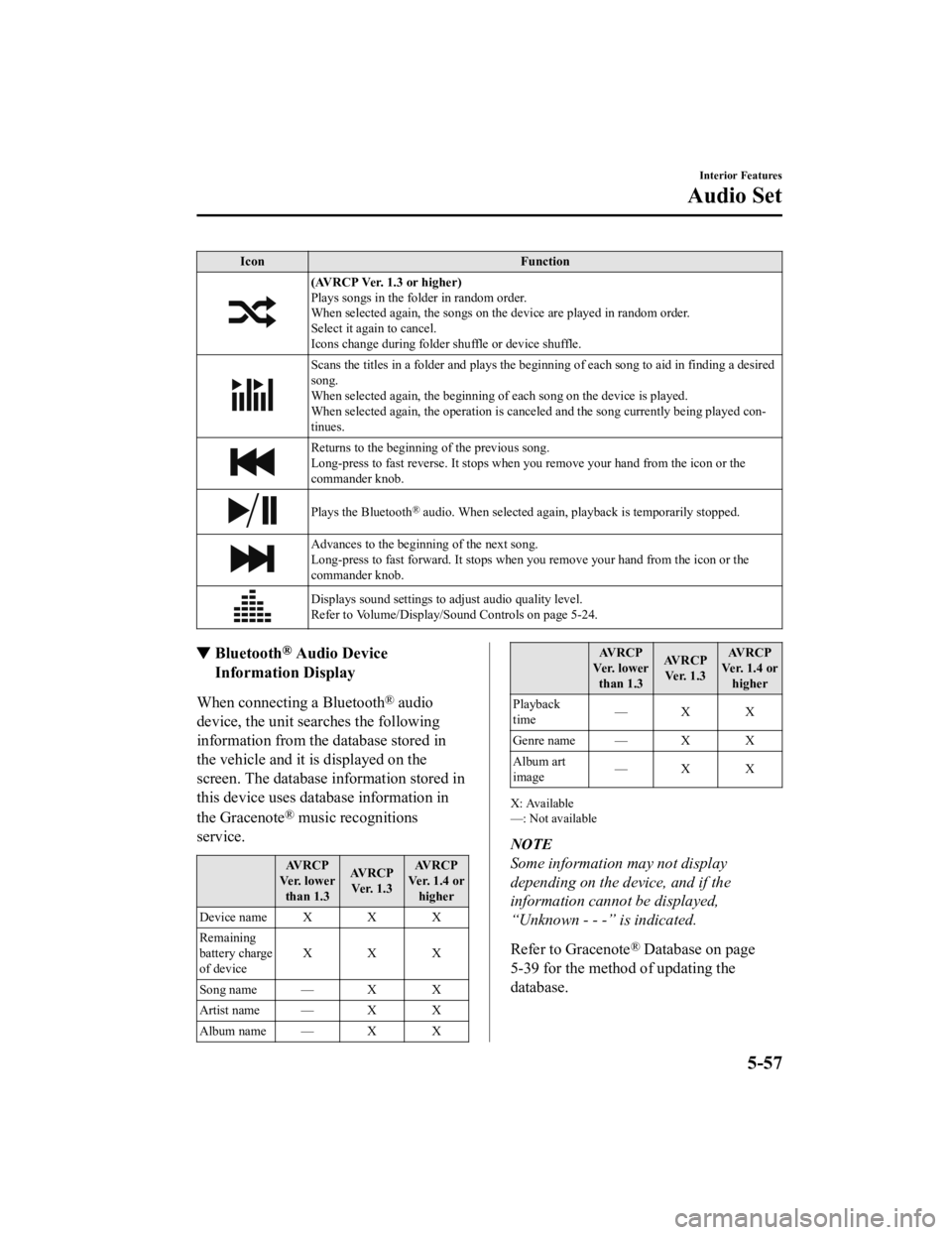
IconFunction
(AVRCP Ver. 1.3 or higher)
Plays songs in the folder in random order.
When selected again, the songs on th e device are played in random order.
Select it again to cancel.
Icons change during folder shuffle or device shuffle.
Scans the titles in a folder and plays the beginn ing of each song to aid in finding a desired
song.
When selected again, the beginning of each song on the device is played.
When selected again, the operation is canceled and the song currently being played con-
tinues.
Returns to the beginning of the previous song.
Long-press to fast reverse. It stops when you remove your hand from the icon or the
commander knob.
Plays the Bluetooth® audio. When selected again, playback is temporarily stopped.
Advances to the beginning of the next song.
Long-press to fast forward. It stops when you remove your hand from the icon or the
commander knob.
Displays sound settings to adjust audio quality level.
Refer to Volume/Display/Sound Controls on page 5-24.
▼ Bluetooth® Audio Device
Information Display
When connecting a Bluetooth® audio
device, the unit searches the following
information from the database stored in
the vehicle and it is displayed on the
screen. The database information stored in
this device uses database information in
the Gracenote
® music recognitions
service.
AVRCP
Ve r. l o w e r than 1.3 AVRCP
Ve r. 1 . 3 AVRCP
Ver. 1.4 or higher
Device name X X X
Remaining
battery charge
of device XXX
Song name — X X
Artist name — X X
Album name — X X
AV R C P
Ve r. l o w e r than 1.3 AV R C P
Ve r. 1 . 3 AV R C P
Ver. 1.4 or higher
Playback
time —X X
Genre name — X X
Album art
image —X X
X: Available
—: Not available
NOTE
Some information may not display
depending on the device, and if the
information cannot be displayed,
“Unknown - - -” is indicated.
Refer to Gracenote
® Database on page
5-39 for the method of updating the
database.
Interior Features
Audio Set
5-57
CX-5_8HH4-EA-19A_Edition1 2018-11-21 10:03:20
Page 482 of 721

Settings
NOTE
Depending on the grade and specification, the screen display may differ.
Select the
icon on the home screen and display the Settings screen.
Switch the tab and select the setting item you want to change.
You can customize settings in the setup display as follows:
Tab Item Function
AD-Disp Height
Brightness Control
Other
Refer to Active Driving Display on page 4-58.
Display Refer to Volume/Display /Sound Controls on page 5-24.
Safety 360° View Monitor
Distance Recognition Support System
Other Refer to Personalization Features on page
9-12.
Sound Refer to Volume/Display/Sound Controls on page 5-24.
Clock Adjust Time
Displays the currently
set time is displayed.
Press
to advance the hour/minute, and select to move the hour/minute back.
AM/PM can only be sel ected with the 12-hour
clock display.
GPS Sync Synchronizes with GPS when turned on.
When turned off, the time can be changed
from “Adjust Time”.
Time Format Changes the display between 12 and 24-hour
clock time.
Time Zone Select When it's not synchron
ized with GPS, select
the region you want to specify.
Daylight Savings Time Turns the daylight savi
ng time setting on/off.
When ON, the time advances 1 hour. When
OFF, it returns to normal time.
Ve h i c l e Rain Sensing Wiper
Door Locks
Other Refer to Personalization Features on page
9-12.
Interior Features
Audio Set
5-78
CX-5_8HH4-EA-19A_Edition1
2018-11-21 10:03:20
Page 492 of 721
FM characteristics
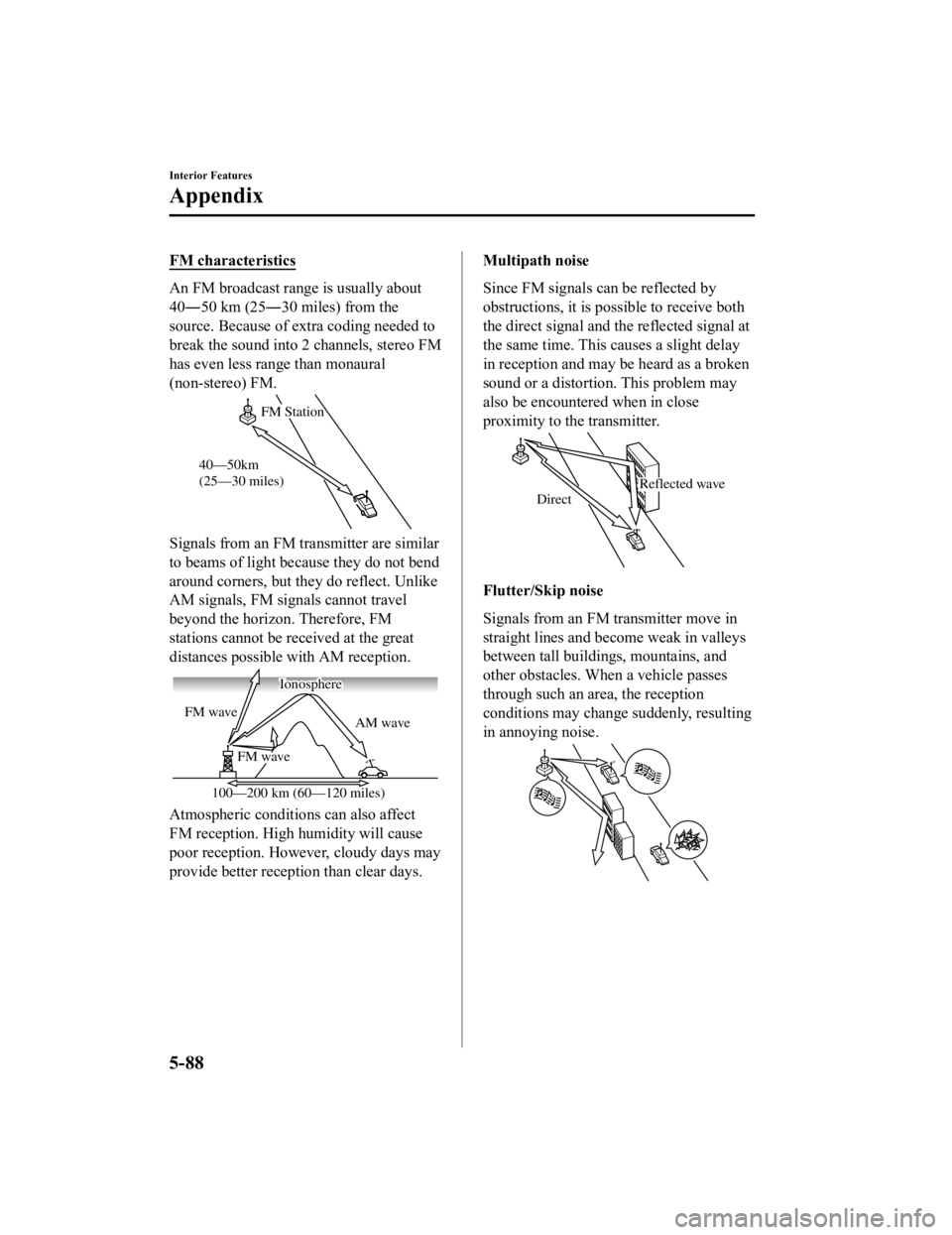
An FM broadcast range is usually about
40―50 km (25―30 miles) from the
source. Because of extra coding needed to
break the sound into 2 channels, stereo FM
has even less range than monaural
(non-stereo) FM.
FM Station
40—50km
(25—30 miles)
Signals from an FM transmitter are similar
to beams of light because they do not bend
around corners, but they do reflect. Unlike
AM signals, FM signals cannot travel
beyond the horizon. Therefore, FM
stations cannot be received at the great
distances possible with AM reception.
AM wave
FM wave
FM wave
100—200 km (60—120 miles) Ionosphere
Atmospheric conditions can also affect
FM reception. High humidity will cause
poor reception. However, cloudy days may
provide better reception than clear days.
Multipath noise
Since FM signals can be reflected by
obstructions, it is po
ssible to receive both
the direct signal and the reflected signal at
the same time. This causes a slight delay
in reception and may be heard as a broken
sound or a distortion . This problem may
also be encountered when in close
proximity to the transmitter.
Reflected wave
Direct
Flutter/Skip noise
Signals from an FM transmitter move in
straight lines and become weak in valleys
between tall buildings, mountains, and
other obstacles. When a vehicle passes
through such an area, the reception
conditions may change suddenly, resulting
in annoying noise.
Interior Features
Appendix
5-88
CX-5_8HH4-EA-19A_Edition1 2018-11-21 10:03:20
Page 493 of 721
Weak signal noise
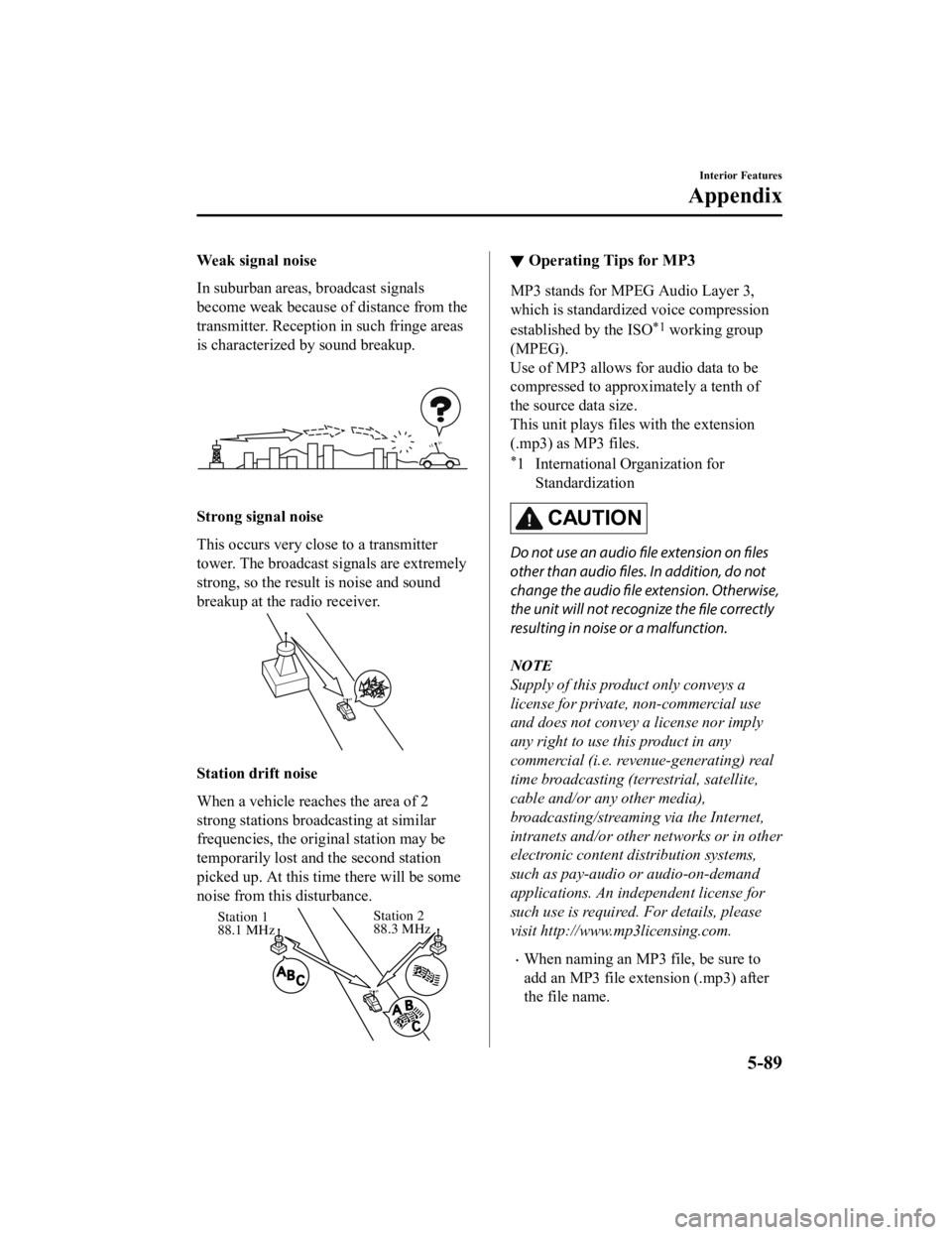
In suburban areas, broadcast signals
become weak because of distance from the
transmitter. Reception in such fringe areas
is characterized by sound breakup.
Strong signal noise
This occurs very close to a transmitter
tower. The broadcast signals are extremely
strong, so the result is noise and sound
breakup at the radio receiver.
Station drift noise
When a vehicle reaches the area of 2
strong stations broadcasting at similar
frequencies, the original station may be
temporarily lost and the second station
picked up. At this ti me there will be some
noise from this disturbance.
Station 2
88.3 MHz
Station 1
88.1 MHz
▼
Operating Tips for MP3
MP3 stands for MPEG Audio Layer 3,
which is standardized voice compression
established by the ISO
*1 working group
(MPEG).
Use of MP3 allows for audio data to be
compressed to approximately a tenth of
the source data size.
This unit plays files with the extension
(.mp3) as MP3 files.
*1 International Organization for
Standardization
CAUTION
Do not use an audio file extension on
files
other than audio files. In addition, do not
change the audio file extension. Otherwise,
the unit will not recognize the file correctly
resulting in noise or a malfunction.
NOTE
Supply of this product only conveys a
license for private, non-commercial use
and does not convey a license nor imply
any right to use this product in any
commercial (i.e. revenue-generating) real
time broadcasting (terrestrial, satellite,
cable and/or any other media),
broadcasting/streaming via the Internet,
intranets and/or other networks or in other
electronic content distribution systems,
such as pay-audio or audio-on-demand
applications. An independent license for
such use is required. For details, please
visit http://www.mp3licensing.com.
When naming an MP3 file, be sure to
add an MP3 file extension (.mp3) after
the file name.
Interior Features
Appendix
5-89
CX-5_8HH4-EA-19A_Edition1 2018-11-21 10:03:20
Page 502 of 721

Ambient Light*
An ambient light continuously turn on when the ignition is switched ON.
An ambient light dim when the parkin g lights or headlights are turned on.
Ambient light
NOTE
An ambient light turn on or off in conjunction with the illuminated entry system when the
ignition is switched OFF.
The ambient light illumination level can be ch anged while the parking lights or headlights
are turned on.
Refer to Personalization Features on page 9-12.
▼ Illuminated Entry System
The overhead lights turn on when any of
the following operations is done with the
overhead light sw
itch in the DOOR
position.
The ambient lights tu rn on regardless of
the overhead ligh t switch position.
The driver's door is unlocked with the
ignition is switched OFF.
The ignition is swit ched OFF with all
doors closed.
NOTE
The illumination time differs depending
on the operation.
Battery saver
If an interior light is left on with the
ignition switched OFF, the light is
turned off automatically after about 30
minutes to prevent battery depletion.
The operation of the illuminated entry
system can be changed.
Refer to Personalization Features on
page 9-12.
Interior Features
Interior Equipment
5-98*Some models.
CX-5_8HH4-EA-19A_Edition1 2018-11-21 10:03:20
Page 518 of 721
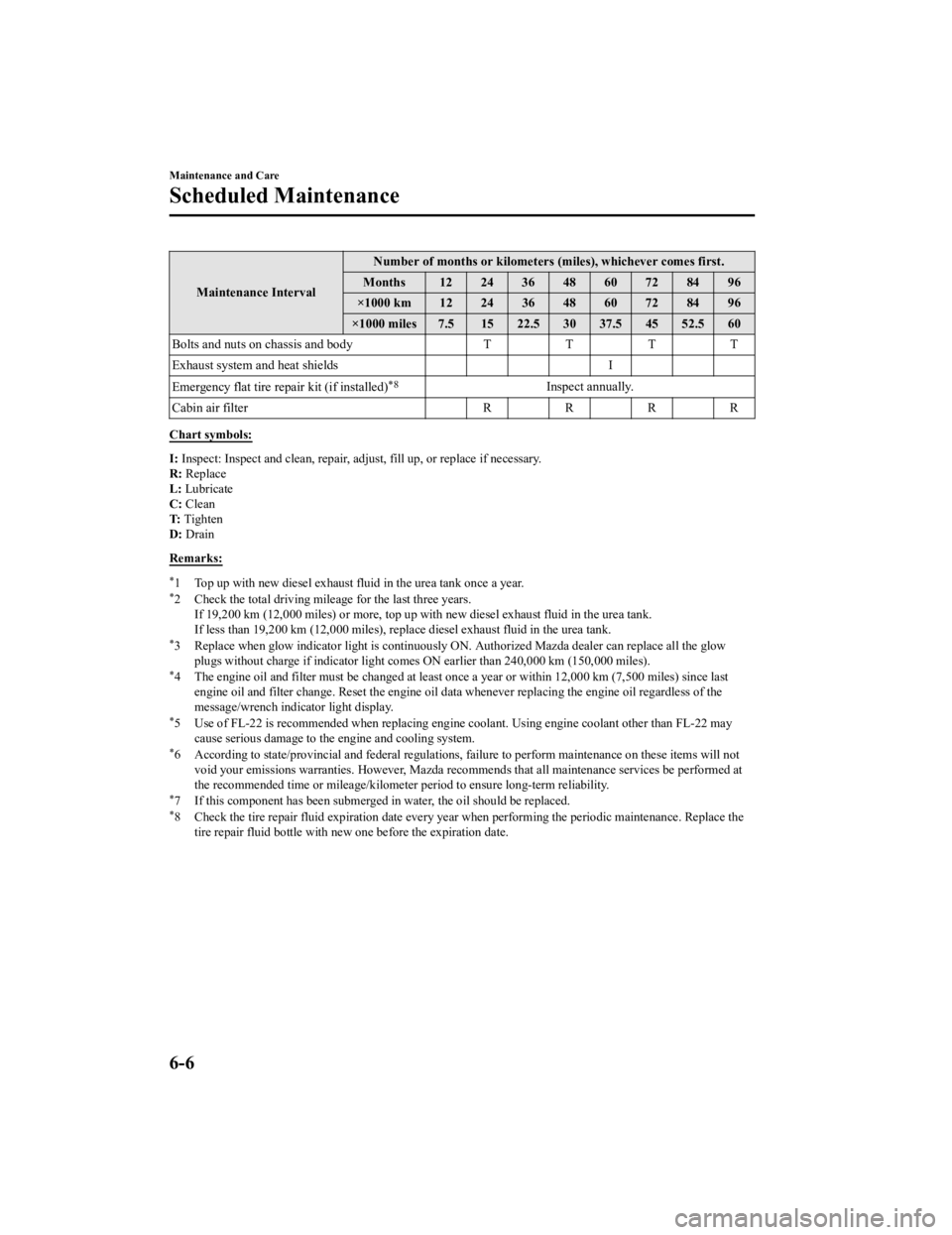
Maintenance IntervalNumber of months or kilometers (miles), whichever comes first.
Months 12 24 36 48 60 72 84 96
×1000 km 12 24 36 48 60 72 84 96
×1000 miles 7.5 15 22.5 30 37.5 45 52.5 60
Bolts and nuts on chassis and body TT TT
Exhaust system and heat shields I
Emergency flat tire repair kit (if installed)
*8Inspect annually.
Cabin air filter R R R R
Chart symbols:
I: Inspect: Inspect and clean, repair, ad just, fill up, or replace if necessary.
R: Replace
L: Lubricate
C: Clean
T: Tighten
D: Drain
Remarks:
*1 Top up with new diesel exhaust fluid in the urea tank once a year.*2 Check the total driving mileage for the last three years. If 19,200 km (12,000 miles) or more, top up with new diesel exhaust fluid in the urea tank.
If less than 19,200 km (12,000 miles), repl ace diesel exhaust fluid in the urea tank.
*3 Replace when glow indicator light is continuously ON. Authorized Mazda dealer can replace all the glow
plugs without charge if indicator light comes ON earlier than 240,000 km (150,000 miles).
*4 The engine oil and filter must be changed at least on ce a year or within 12,000 km (7,500 miles) since last
engine oil and filter change. Reset the engine oil data whenever repl acing the engine oil regardless of the
message/wrench indicator light display.
*5 Use of FL-22 is recommended when replacing engine coolant. Using engine coolant other than FL-22 may
cause serious damage to the engine and cooling system.
*6 According to state/provincial and fede ral regulations, failure to perform maintenance on these items will not
void your emissions warranties. However, Mazda recomme nds that all maintenance services be performed at
the recommended time or mileage/kilometer period to ensure long-term reliability.
*7 If this component has been submerged in water, the oil should be replaced.*8 Check the tire repair fluid expiration date every year when performing the periodic maintenance. Replace the
tire repair fluid bottle with new one before the expiration date.
Maintenance and Care
Scheduled Maintenance
6-6
CX-5_8HH4-EA-19A_Edition1 2018-11-21 10:03:20
Page 520 of 721
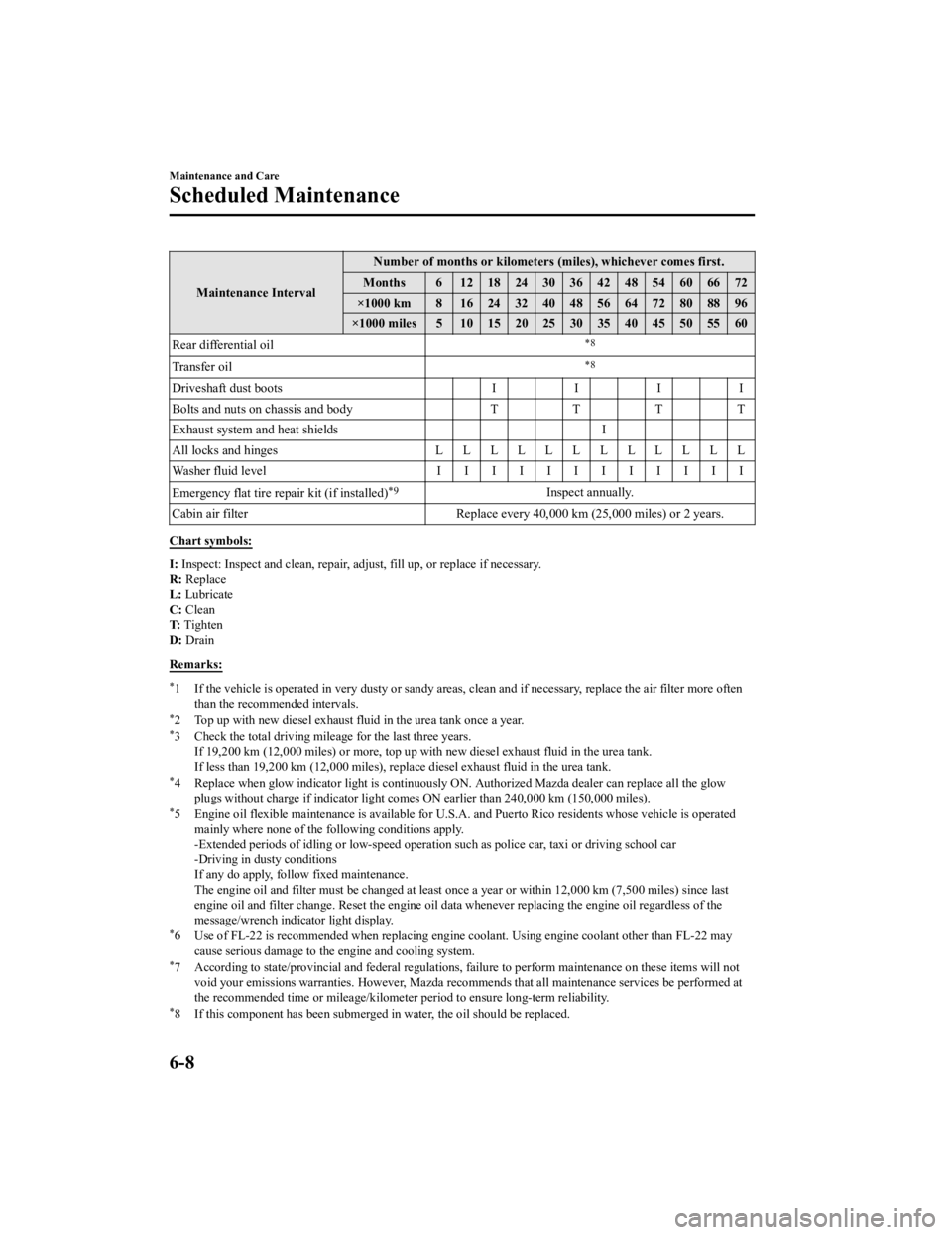
Maintenance IntervalNumber of months or kilometers (miles), whichever comes first.
Months 6 1218243036424854606672
×1000 km 8 1624324048566472808896
×1000 miles 5 10 15 20 25 30 35 40 45 50 55 60
Rear differential oil
*8
Transfer oil*8
Driveshaft dust boots II II
Bolts and nuts on chassis and body TTT T
Exhaust system and heat shields I
All locks and hinges LLLLLLLLLLLL
Washer fluid level IIIIIIIIIIII
Emergency flat tire repair kit (if installed)
*9Inspect annually.
Cabin air filter Replace every 40,000 km (25,000 miles) or 2 years.
Chart symbols:
I: Inspect: Inspect and clean, repair, ad just, fill up, or replace if necessary.
R: Replace
L: Lubricate
C: Clean
T: Tighten
D: Drain
Remarks:
*1 If the vehicle is operated in very dusty or sandy areas, clean and if necessary, replace the air filter more often
than the recommended intervals.
*2 Top up with new diesel exhaust fluid in the urea tank once a year.*3 Check the total driving mileage for the last three years. If 19,200 km (12,000 miles) or more, top up with new diesel exhaust fluid in the urea tank.
If less than 19,200 km (12,000 miles), repl ace diesel exhaust fluid in the urea tank.
*4 Replace when glow indicator light is continuously ON. Authorized Mazda dealer can replace all the glow
plugs without charge if indicator light comes ON earlier than 240,000 km (150,000 miles).
*5 Engine oil flexible maintenance is available for U.S.A. and Puerto Rico residents whose vehicle is operated
mainly where none of the following conditions apply.
-Extended periods of idling or low-speed operation such as police car, taxi or driving school car
-Driving in dusty conditions
If any do apply, follow fixed maintenance.
The engine oil and filter must be ch anged at least once a year or within 12,000 km (7,500 miles) since last
engine oil and filter change. Reset the engine oil data whenever repl acing the engine oil regardless of the
message/wrench indicator light display.
*6 Use of FL-22 is recommended when replacing engine coolant. Using engine coolant other than FL-22 may
cause serious damage to the engine and cooling system.
*7 According to state/provincial and fede ral regulations, failure to perform maintenance on these items will not
void your emissions warranties. However, Mazda recomme nds that all maintenance services be performed at
the recommended time or mileage/kilometer period to ensure long-term reliability.
*8 If this component has been submerged in water, the oil should be replaced.
Maintenance and Care
Scheduled Maintenance
6-8
CX-5_8HH4-EA-19A_Edition1 2018-11-21 10:03:20
Page 528 of 721

Maintenance Monitor
▼Maintenance Monitor
1. Select the icon on the home screen to display the Applications screen.
2. Select “Vehicle Status Monitor”.
3. Select “Maintenance” to display the maintenance list screen.
4. Switch the tab and select the setting item you want to change.
You can customize settings in the setup display as follows:
U.S.A. and Puerto Rico
Ta b I t e m E x p l a n a t i o n
Scheduled Setting
Notification can be switched on/off.
Time (months) Displays the time or distance until maintenance is due.
Select this item to set the maintenance period.
The wrench indication/indicator lig ht in the instrument cluster
will be illuminated when the remaining distance is less than 1,000
km or 600 mile, or the remaining number of days is less than 15
(whichever comes first).
Distance (mile or km)
Reset
Resets the time and distance
to the initial values.
Once the system turns on, it need s to be reset whenever carrying
out maintenance.
Tire Rotation Setting
Notification can be switched on/off.
Distance (mile or km) Displays the distance until tire rotation is due.
Select this item to set the tire rotation distance.
The wrench indication/indicator lig
ht in the instrument cluster
will be illuminated when the remaining distance is less than 1,000
km or 600 mile.
Reset Resets the remaining distance to the initial value.
Once the system turns on, it need
s to be reset whenever rotating
the tires.
Maintenance and Care
Scheduled Maintenance
6-16
CX-5_8HH4-EA-19A_Edition1 2018-11-21 10:03:20