audio MAZDA MODEL CX-5 SKYACTIV-D 2019 Repair Manual
[x] Cancel search | Manufacturer: MAZDA, Model Year: 2019, Model line: MODEL CX-5 SKYACTIV-D, Model: MAZDA MODEL CX-5 SKYACTIV-D 2019Pages: 721, PDF Size: 97.68 MB
Page 473 of 721

▼Receiving an Incoming Call
When an incoming call is received, the inco
ming call notification screen is displayed. The
“Incoming Call Notifications” setting must be on.
Refer to Communication Settings on page 5-74.
To accept the call, press the pick-up butt on on the audio control switch or select
on
the screen.
To reject the call, press the hang-up button on the audio control switch or select
on the
screen.
The following icons are displayed on the scre en during a call. Icons which can be used
differ depending on use conditions.
Icon Function
Displays the Communication menu.
Ends the call.
Transferring a call from hands-free to a mobile phone
Communication between the Bluetooth® unit and a device (mobil e phone) is canceled,
and an incoming call will be received by the device (mobile phone) like a standard call.
Transferring a call from a device (mobile phone) to hands-free
Communication between devices (mobile ph one) can be switched to Bluetooth®
Hands-Free.
Mute
The microphone can be muted during a call.
When selected again, the mute is canceled.
To make a 3-way call, select the contacts from the following:
: Call History is displayed.
: The phonebook is displayed.
: The dial pad is displayed. Input the phone number.
The device may be unusable depending on the contractual content.
The call on hold is made to make a 3-way call.
The device may be unusable depending on the contractual content.
Switches the call on hold.
DTMF (Dual Tone Multi-Fre quency Signal) Transmission
This function is used when transmitting DTMF via the dial pad. The receiver of a DTMF
transmission is generally a home telephone answering mach ine or a company's automated
guidance call center.
Input the number using a dial pad.
Interior Features
Audio Set
5-69
CX-5_8HH4-EA-19A_Edition1 2018-11-21 10:03:20
Page 474 of 721

NOTE
If the ignition is switched off during a
hands-free call, the line is transferred to
the device (Mobile phone)
automatically.
If the DTMF code has two or more
digits or symbols, each one must be
transmitted individually.
▼Call Interrupt
A call can be interrupted to receive an
incoming call from a third party.
When
is selected or the
pick-up button on the steering wheel is
pressed, the current call is held and the
system switches to the new incoming call.
When
is selected, the current
call is ended and the system switches to
the new incoming call (GSM network
only).
When
is selected or the hang-up
button on the steering wheel is pressed, an
incoming call is refused.
NOTE
The function may not be available
depending on the contractual content of
the mobile device.
The function may not be operable
depending on the type of the telephone
network and the mobile device.
▼ Receiving and Replying to Messages
(available only with E-mail/SMS
compatible phones)
SMS (Short Message Service) messages,
and E-mail received by connected devices
can be downloaded, displayed, and played
(read by the system).
Additionally, replies can also be made to
calls and messages in the received
messages.
Downloading messages
Up to 20 new messages can be
downloaded and displayed from a
connected device.
NOTE
For E-mail, 20 messages for each account
can be downloaded.
(Automatic downloading)
The “Auto Download Email” (E-mail) or
“Auto Download Text Message” (SMS)
setting must be on. A message is
downloaded automa
tically when the
Bluetooth
® unit is connected to the device.
Refer to Communication Settings on page
5-74.
Interior Features
Audio Set
5-70
CX-5_8HH4-EA-19A_Edition1 2018-11-21 10:03:20
Page 475 of 721

(Manually downloading)
When the “Auto Download Email”
(E-mail) or “Auto Download Text
Message” (SMS) setting is off, the
message is downloaded using the
following procedure.
1. Select the
icon on the home screen
to display the Communication screen.
2. Select
or to display
the Inbox.
3. Select
.
4. Download will be started from the
mobile phone.
NOTE
Attached data is not downloaded.
Messages up to 1 kilobyte (E-mail)/
140-bytes (SMS) can be downloaded.
A message list is created for each
device.
If the connected device does not
correspond to MAP 1.0, the AT
command is used to download. The
downloaded message indicates that it is
already read.
Downloading using the AT command
may not function depending on the
connected device.
If an iPhone is connected, the following
functions cannot be used.
Downloading past messages
Replying to messages
iPhone is a trademark of Apple Inc.,
registered in the U.S. and other
countries.
Receiving messages
(Method 1)
When a device receives a message, a
message received notification is displayed.
The “Email Notifications” (E-mail) or
“Text Notifications” (SMS) setting must
be on.
Refer to Communication Settings on page
5-74.
Select
and display the message.
(Method 2)
1. Select the
icon on the home screen
to display the Communication screen.
2. Select
and display the new
message list for E-mail and SMS.
3. Select the message you would like to display.
Interior Features
Audio Set
5-71
CX-5_8HH4-EA-19A_Edition1 2018-11-21 10:03:20
Page 476 of 721

The following icons are displayed in the lower part of the details on the message. Icons
which can be used differ depending on use conditions.
IconFunction
Displays the Communication menu.
Displays the inbox.
Plays back a message.
When selected again, playback is temporarily stopped.
Displays the previous message.
Displays the next message.
Only replies to the sender of the currently displayed message.
Select the sentence on the displayed reply screen and select the sentence for sending from
the preset message.
Select
.
(Only E-mail)
Replies to all members including CC.
Select the sentence on the displayed reply sc reen and select the sentence for sending from
the preset message.
Select
.
Makes a call to a person who sent a message.
For E-mail, this function may no t work depending on the device.
Deletes a message.
The messages stored in a device is also deleted.
NOTE
Up to three preset messages can be selected.
Interior Features
Audio Set
5-72
CX-5_8HH4-EA-19A_Edition1 2018-11-21 10:03:20
Page 477 of 721
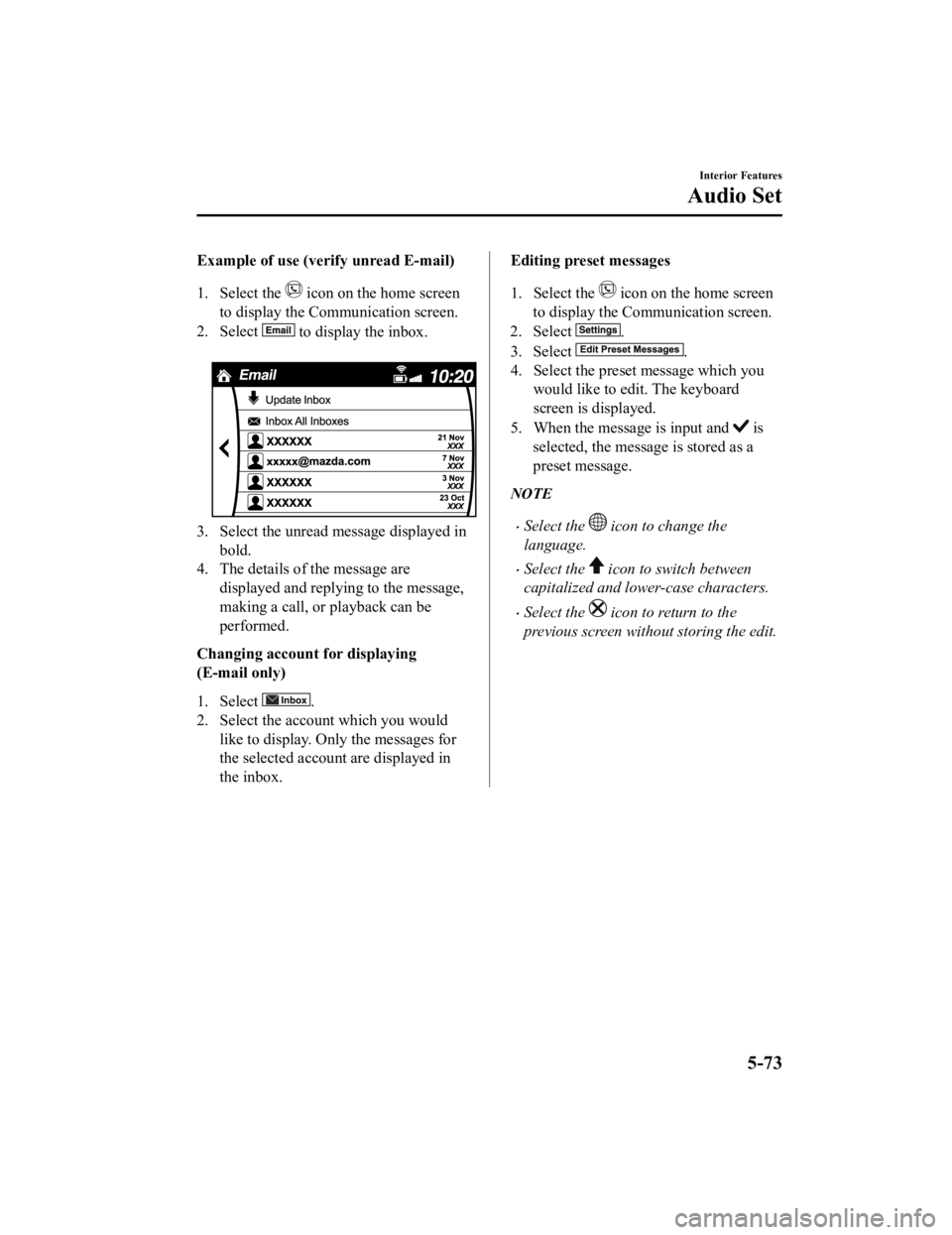
Example of use (verify unread E-mail)
1. Select the
icon on the home screen
to display the Communication screen.
2. Select
to display the inbox.
3. Select the unread message displayed in bold.
4. The details of the message are
displayed and replying to the message,
making a call, or playback can be
performed.
Changing accoun t for displaying
(E-mail only)
1. Select
.
2. Select the account which you would
like to display. Only the messages for
the selected account are displayed in
the inbox.
Editing preset messages
1. Select the
icon on the home screen
to display the Communication screen.
2. Select
.
3. Select
.
4. Select the preset message which you would like to edit. The keyboard
screen is displayed.
5. When the message is input and
is
selected, the message is stored as a
preset message.
NOTE
Select the icon to change the
language.
Select the icon to switch between
capitalized and lower-case characters.
Select the icon to return to the
previous screen without storing the edit.
Interior Features
Audio Set
5-73
CX-5_8HH4-EA-19A_Edition1 2018-11-21 10:03:20
Page 478 of 721

▼Communication Settings
Select the icon on the home screen to display the Communication screen.
Select
to change the setting.
Item Setting Function
Bluetooth
®— Go to Bluetooth® setting menu.
Refer to Bluetooth® Preparation on page 5-52.
Incoming Call Notifi-
cations On/Off Notifies when an
incoming call is received.
Auto Download Text
Message On/Off
Downloads SMS automatically when the Bluetooth
® unit is connected
to the device.
Text Notifications On/Off Notifies when a new SMS is received.
Auto Download
Email
*1On/Off Downloads E-mail automatically when the Bluetooth® unit is connect-
ed to the device.
Email Notifications On/Off Notifies when a new Email is received.
Auto Download Call
History On/Off
Downloads Call History automatically when the Bluetooth
® unit is
connected to the device.
Auto Download Con-
tacts
*1On/Off Downloads the phonebook automa
tically when the Bluetooth® unit is
connected to the device.
Ringtone Car/Phone/OffThe type of ring tone can be chan
ged. Three selections are available
including the standard ring tone set on the vehicle, the ring tone regis-
tered to your Bluetooth
® device, or no ring tone.
Phone Volume Adjusts using
the slider. Adjusts the conversation volume.
VR and Ringtone Adjusts using
the slider. Adjusts the voice guidance and ringtone volume.
Contacts Display Or-
der First Name, Last
Name Displays the contact information in
alphabetical order of the first
name.
Last Name, First Name Displays the contact information in
alphabetical order of the last
name.
Edit Preset Messages — Edits the preset message.
Refer to Receiving and Replying to Messages (available only with
E-mail/SMS compatible
phones) on page 5-70.
Emergency Assistance
Call On/Off Mobile Utilizes the Mobile 911 function.
Restore Factory set-
tings — Initializes all Communication Settings.
*1 Depending on the device, it may be necessary to acquire download permission on the device side.
Interior Features
Audio Set
5-74
CX-5_8HH4-EA-19A_Edition1
2018-11-21 10:03:20
Page 479 of 721

Voice Recognition
▼Basic Operation Method
Activating Voice Recognition
Press the talk button.
Ending Voice Recognition
Use one of the following methods:
Press the hang-up button.
Say, “Cancel”.
Operate the commander switch or the
center display (only when vehicle is
stopped).
Skipping Voice Guidance (for faster
operation)
Press and release the talk button.
Troubleshooting for Voice Recognition
If you do not understand an operation
method while in th e voice recognition
mode, say “Tutorial” or “Help”.
Commands useable anytime during
voice recognition
“Go Back” and “Cancel” are commands
which can be used at anytime during voice
recognition.
Returning to prev ious operation
To return to the previous operation, say,
“Go Back” while in voice recognition
mode.
Cancel
To put the Bluetooth
® Hands-Free system
in standby mode, say, “Cancel” while in
voice recognition mode.
To prevent a deterioration in the voice
recognition rate and voice quality, the
following points should be observed:
The voice recognition cannot be
performed while voice guidance or the
beep sound is operating. Wait until
the voice guidance or the beep sound
is finished before saying your
commands.
Phone related commands are available
only when your phone is connected via
Bluetooth
®. Make sure your phone is
connected via Bluetooth
® before you
operate phone related voice commands.
Music play commands, such as Play
Artist and Play Album can be used only
in USB audio mode.
Do not speak too slowly or loudly (no
loud voice).
Speak clearly, without pausing between
words or numbers.
Dialects or different wording other than
hands-free prompts cannot be
recognized by voice recognition. Speak
in the wording sp ecified by the voice
commands.
It is not necessary to face the
microphone or approach it. Speak the
voice commands while maintaining a
safe driving position.
Close the windows and/or the moonroof
to reduce loud noises from outside the
vehicle, or turn down the airflow of the
climate control system while Bluetooth
®
Hands-Free is being used.
Make sure the vents are not directing air
up towards the microphone.
Interior Features
Audio Set
5-75
CX-5_8HH4-EA-19A_Edition1 2018-11-21 10:03:20
Page 480 of 721

NOTE
If the voice recognition performance is not
satisfactory.
Refer to Troubleshooting on page 5-81.
Interior Features
Audio Set
5-76
CX-5_8HH4-EA-19A_Edition12018-11-21 10:03:20
Page 481 of 721

▼Voice Command List
Voice command
When the talk button is pressed and the following command is spoken, the audio or
navigation can be operated. The commands in the () can be omitted. The specified name and
number are put into the {}.
Standard command
Voice command
Function
Help Usable commands can be verified.
Tutorial Basic voice commands and methods of use can be verified.
(Navigate/Take me/Drive) Home Set the destination to Home.
Communication (phone) related command
Voice command Function
Call {name in phonebook} (mobile/
home/work/other)
Example: “Call John Mobile” Call to the contact in th
e downloaded phonebook.
Refer to Making a Call on page 5-65.
Redial Call to the last contact you called.
Refer to Making a Call on page 5-65.
Callback Call to the last contact who called you.
Refer to Making a Call on page 5-65.
Entertainment (audio)
related command
Voice command FunctionCorresponding audio
source
(Go to/Play) Bluetooth (Audio) Switches the audio source to BT audio.
Can also switch to each audio source by similarly us-
ing commands such as FM, AM, or USB. All
Play Artist {Artist name} Plays the selected artist. USB
Navigation related command*
For the navigation screen voice commands, refer to the separate navigation system manual.
NOTE
Some commands cannot be used depending on the grade and specification.
Some commands cannot be used depending on the device connection conditions and the
use conditions.
The commands are examples of the available commands.
Interior Features
Audio Set
*Some models.5-77
CX-5_8HH4-EA-19A_Edition1 2018-11-21 10:03:20
Page 482 of 721

Settings
NOTE
Depending on the grade and specification, the screen display may differ.
Select the
icon on the home screen and display the Settings screen.
Switch the tab and select the setting item you want to change.
You can customize settings in the setup display as follows:
Tab Item Function
AD-Disp Height
Brightness Control
Other
Refer to Active Driving Display on page 4-58.
Display Refer to Volume/Display /Sound Controls on page 5-24.
Safety 360° View Monitor
Distance Recognition Support System
Other Refer to Personalization Features on page
9-12.
Sound Refer to Volume/Display/Sound Controls on page 5-24.
Clock Adjust Time
Displays the currently
set time is displayed.
Press
to advance the hour/minute, and select to move the hour/minute back.
AM/PM can only be sel ected with the 12-hour
clock display.
GPS Sync Synchronizes with GPS when turned on.
When turned off, the time can be changed
from “Adjust Time”.
Time Format Changes the display between 12 and 24-hour
clock time.
Time Zone Select When it's not synchron
ized with GPS, select
the region you want to specify.
Daylight Savings Time Turns the daylight savi
ng time setting on/off.
When ON, the time advances 1 hour. When
OFF, it returns to normal time.
Ve h i c l e Rain Sensing Wiper
Door Locks
Other Refer to Personalization Features on page
9-12.
Interior Features
Audio Set
5-78
CX-5_8HH4-EA-19A_Edition1
2018-11-21 10:03:20