park assist MAZDA MODEL CX-50 2023 User Guide
[x] Cancel search | Manufacturer: MAZDA, Model Year: 2023, Model line: MODEL CX-50, Model: MAZDA MODEL CX-50 2023Pages: 583, PDF Size: 85.63 MB
Page 285 of 583

The CANCEL switch is pressed one time.The brake pedal is depressed.The selector lever is in the P, N, or R position.
In the following cases, the TJA cancel indication is displayed and a sound is activated
one time.
The DSC has operated.The Smart Brake Support (SBS) has operated.The vehicle is driven on a downslope for a long time.There is a problem with the system.The front radar sensor cannot detect target objects (during rain, fog, snow or other
inclement weather conditions, or when the radiator grille is dirty).
The parking brake is applied.Any of the doors is opened.The driver's seat belt is unfastened.The operation frequency of the braking by the TJA control is high.The parking brake is automatically applied during stop hold control.
Steering assist function
If any of the following conditions occurs, the steering assist function is temporarily
canceled.
The headway control function is canceled.White (yellow) lane lines cannot be detected or a vehicle ahead cannot be
recognized.
Your vehicle speed is more than about 64 km/h (40 mph).The accelerator pedal is operated.The turn signal lever is operated.The vehicle is being driven on a sharp curve.The width of a lane is excessively narrow or wide.The vehicle crosses a lane line.The driver takes his/her hands off the steering wheel.The steering wheel is operated abruptly.There is a problem with the system.The temperature in the Forward Sensing Camera (FSC) is too high or too low.The windshield around the Forwar d Sensing Camera (FSC) is foggy.The windshield around the Forward Se nsing Camera (FSC) is blocked by an
obstruction, causing poor forward visibility.
When Driving
i-ACTIVSENSE
4-134
CX-50_8KB8-EA-22A_Edition2_new 2022-1-6 14:55:18
Page 287 of 583

If the steering wheel is held lightly, or depending on the road conditions, the
system determines that you have released the steering wheel even if you are
holding it, and an alert is indicated on the multi-information display and the active
driving display.
To resume operation
If the TJA is temporarily canceled, it will resume operation at the previously set speed
by pressing the RES switch after all of the operation conditions have been met.
NOTE
If the set speed is not indicated on the di splay, the system does not operate even if
the RES switch is pressed.
After the operation, the steering assist operation may not operate for a period of 5
seconds at the most until the lane lines are detected or a vehicle ahead is
recognized.
Tu r n i n g off
When the TJA switch is pressed while the TJA is operating, the TJA turns off.
▼Stop Hold Control
While in headway control using the
TJA, your vehicle will stop when a
vehicle ahead stops. When the vehicle
is stopped and the stop hold control
operates, the TJA indicator light turns
on.
NOTE
Even if the TJA is temporarily
canceled during stop hold control,
the vehicle is held in its stopped
position.
The parking brake is automatically
applied and the vehicle is held in its
stopped position when 10 minutes
or longer have passed since the stop
hold control operated. When this
occurs, the TJA is temporarily
canceled.
The brake lights turn on during stop
hold control.
To resume driving
After the vehicle ahead starts moving
while your vehicle is stopped under
stop hold control, press the RES switch
or depress the accelerator pedal to
cancel the stop hold control and start
driving.
When Driving
i-ACTIVSENSE
4-136
CX-50_8KB8-EA-22A_Edition2_new 2022-1-6 14:55:18
Page 307 of 583

360° View Monitor*
▼360° View Monitor
The 360°View Monitor consists of the
following functions
which assist the
driver in checking the area surrounding
the vehicle using various indications in
the center display and a warning sound
while the vehicle is being driven at low
speeds or while parking.
To p v i e w
The top view displays an image of
the vehicle from directly above on
the center display by combining the
images taken from the 4 cameras set
on all sides of the vehicle. The top
view displays on the right side of the
screen when the front view or rear
view screen is being displayed. The
top view assists the driver in
checking the area surrounding the
vehicle when the vehicle is moving
forward or in reverse.
Front view/front wide view
The image from the front of the
vehicle is displayed on the center
display.
The view from the front assists the
driver in checking the front of the
vehicle by displaying guide lines on
the displayed image taken from the
front of the vehicle.
Side view
The images taken from the front left
and right sides of the vehicle are
displayed on the center display.
The side view assists the driver in
checking the front sides of the
vehicle by displaying guide lines on
the displayed image taken from the
front left and right sides of the
vehicle.
Rear view/rear wide view
The image from the rear of the
vehicle is displayed on the center
display.
The image from the rear assists the
driver in checking the rear of the
vehicle by displaying guide lines on
the displayed image taken from the
rear of the vehicle.
Parking sensor
If there are any obstructions near the
vehicle while the top view/side view
is displayed, an obstruction
detection indication turns on around
the bumper in the center display.
The parking sensors use ultrasonic
sensors to detect obstructions
around the vehicle when the vehicle
is driven at low speeds, such as
during garage or parallel parking,
and notifies the driver of the
approximate distance from the
vehicle to the surrounding
obstruction using sound and an
obstruction detection indication.
Refer to Parking Sensor System on
page 4-215.
Rear Cross Traffic Alert (RCTA)
If there is the possibility of a collision
with an approaching vehicle while
the rear view/rear wide view is
displayed, a warning is displayed on
the center display.
The Rear Cross Traffic Alert (RCTA)
uses rear side radar sensor to detect
vehicles approaching from the rear
left and right sides of the vehicle,
and it assists the driver in checking
the rear of the vehicle while reversing
by flashing the Blind Spot Monitoring
(BSM) warning lights and activating
the warning sound.
Refer to Rear Cross Traffic Alert
(RCTA) on page 4-113.
When Driving
i-ACTIVSENSE
4-156*Some models.
CX-50_8KB8-EA-22A_Edition2_new 2022-1-6 14:55:18
Page 319 of 583
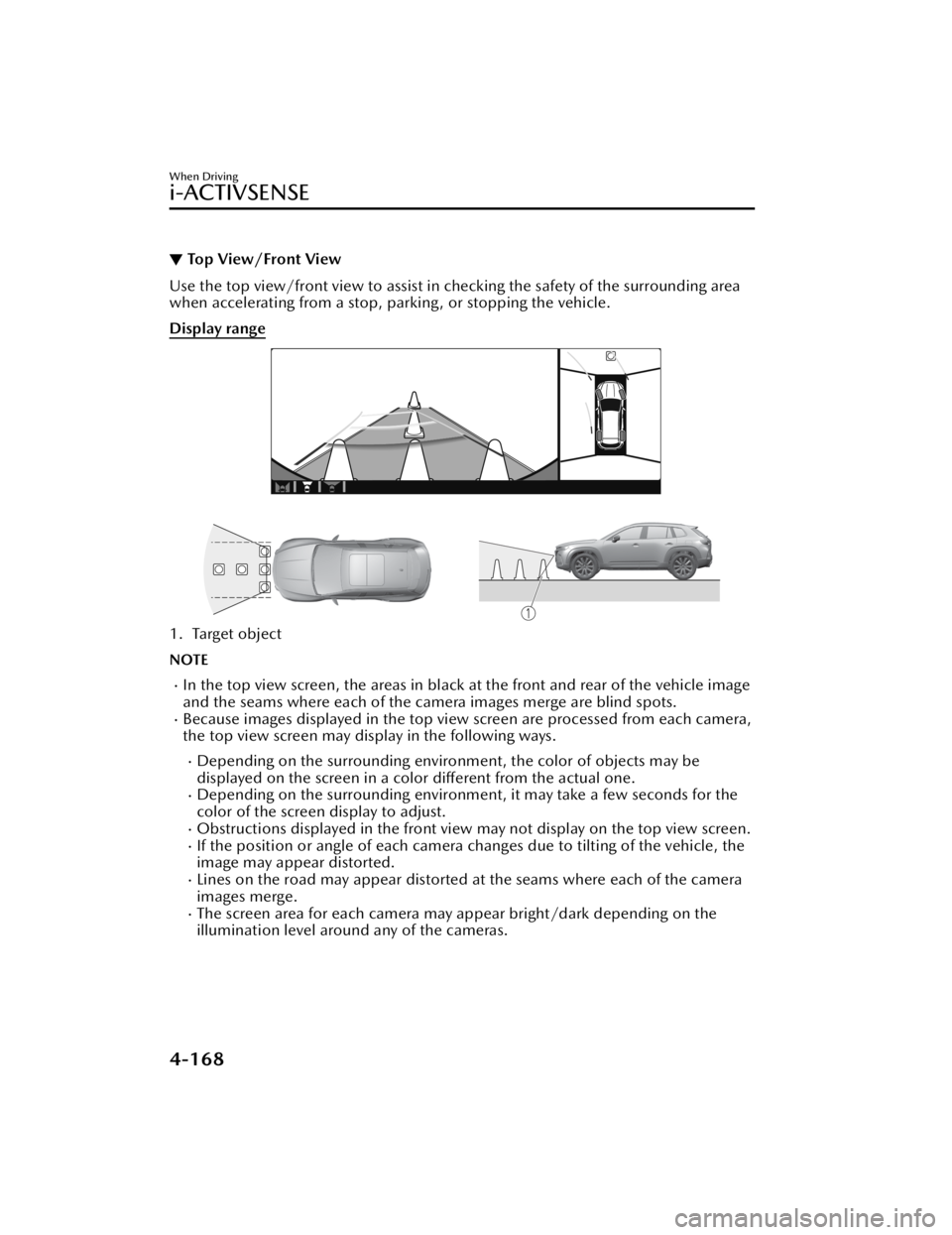
▼Top View/Front View
Use the top view/front view to assist in checking the safety of the surrounding area
when accelerating from a stop, parking, or stopping the vehicle.
Display range
1. Target object
NOTE
In the top view screen, the areas in black at the front and rear of the vehicle image
and the seams where each of the camera images merge are blind spots.
Because images displayed in the top view screen are processed from each camera,
the top view screen may display in the following ways.
Depending on the surrounding enviro
nment, the color of objects may be
displayed on the screen in a color different from the actual one.
Depending on the surrounding environment, it may take a few seconds for the
color of the screen display to adjust.
Obstructions displayed in the front view
may not display on the top view screen.If the position or angle of each camera changes due to tilting of the vehicle, the
image may appear distorted.
Lines on the road may appear distorted at the seams where each of the camera
images merge.
The screen area for each camera may appear bright/dark depending on the
illumination level around any of the cameras.
When Driving
i-ACTIVSENSE
4-168
CX-50_8KB8-EA-22A_Edition2_new 2022-1-6 14:55:18
Page 324 of 583

▼Side View
Use the side view to assist in checking the safety of the surrounding area when
accelerating from a stop, parking , or stopping the vehicle.
Display range
1. Target object
When Driving
i-ACTIVSENSE
4-173
CX-50_8KB8-EA-22A_Edition2_new
2022-1-6 14:55:18
Page 327 of 583

NOTE
Because there might be a difference between the image displayed on the screen
and the actual conditions, always check the safety of the surrounding area using
the mirrors and directly with your eyes when driving.
Even though the object displayed on the screen, such as a road curb or a division
line of a parking space, and the vehicle parallel guide lines appear parallel, they
may not actually be parallel.
▼ Top View/Rear View
Use the top view/rear view to assist in checking the safety of the surrounding area
when accelerating from a stop, parking, or stopping the vehicle.
Range of displayed screen image
1. Target object
NOTE
In the top view screen, the areas in black at the front and rear of the vehicle image
and the seams where each of the camera images merge are blind spots.
Because images displayed in the top view screen are processed from each camera,
the top view screen may display in the following ways.
Depending on the surrounding enviro
nment, the color of objects may be
displayed on the screen in a color different from the actual one.
Depending on the surrounding environment, it may take a few seconds for the
color of the screen display to adjust.
Obstructions displayed in the rear view may not display on the top view screen.
When Driving
i-ACTIVSENSE
4-176
CX-50_8KB8-EA-22A_Edition2_new 2022-1-6 14:55:18
Page 332 of 583

▼Top View/Rear Wide View
Use the top view/rear wide view to assist in checking the safety of the surrounding
area when accelerating from a stop, parking , or stopping the vehicle.
Range of displayed screen image
1. Target object
NOTE
In the top view screen, the areas in black
at the front and rear of the vehicle image
and the seams where each of the camera images merge are blind spots.
Because images displayed in the top view screen are processed from each camera,
the top view screen may display in the following ways.
Depending on the surrounding environment, the color of objects may be
displayed on the screen in a co lor different from the actual one.
Depending on the surrounding environment, it may take a few seconds for the
color of the screen display to adjust.
Obstructions displayed in the front view may not display on the top view screen.If the position or angle of each camera changes due to tilting of the vehicle, the
image may appear distorted.
Lines on the road may appear distorted at the seams where each of the camera
images merge.
The screen area for each camera may appear bright/dark depending on the
illumination level around any of the cameras.
When Driving
i-ACTIVSENSE
4-181
CX-50_8KB8-EA-22A_Edition2_new 2022-1-6 14:55:18
Page 344 of 583
Front Radar Sensor*
▼Front Radar Sensor
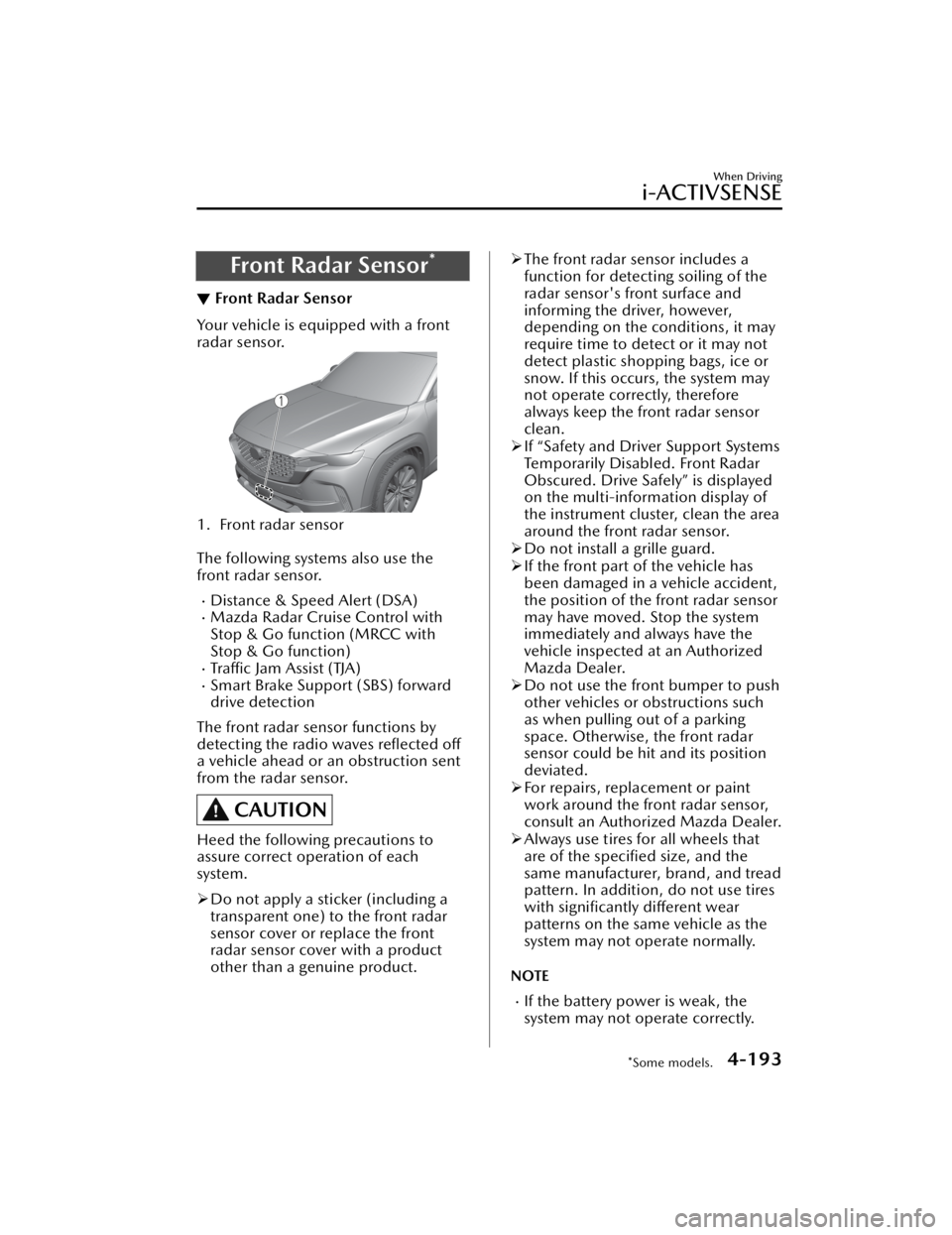
Your vehicle is equipped with a front
radar sensor.
1. Front radar sensor
The following systems also use the
front radar sensor.
Distance & Speed Alert (DSA)Mazda Radar Cruise Control with
Stop & Go function (MRCC with
Stop & Go function)
Tra ffi c
Jam Assist (TJA)Smart Brake Support (SBS) forward
drive detection
The front radar sensor functions by
detecting the radio waves reflected off
a vehicle ahead or an obstruction sent
from the radar sensor.
CAUTION
Heed the following precautions to
assure correct operation of each
system.
Do not apply a sticker (including a
transparent one) to the front radar
sensor cover or replace the front
radar sensor cover with a product
other than a genuine product.
The front radar sensor includes a
function for detecting soiling of the
radar sensor's front surface and
informing the driver, however,
depending on the conditions, it may
require time to detect or it may not
detect plastic shopping bags, ice or
snow. If this occurs, the system may
not operate correctly, therefore
always keep the front radar sensor
clean.
If “Safety and Driver Support Systems
Temporarily Disabled. Front Radar
Obscured. Drive Safely” is displayed
on the multi-information display of
the instrument cluster, clean the area
around the front radar sensor.
Do not install a grille guard.
If the front part of the vehicle has
been damaged in a vehicle accident,
the position of the front radar sensor
may have moved. Stop the system
immediately and always have the
vehicle inspected at an Authorized
Mazda Dealer.
Do not use the front bumper to push
other vehicles or obstructions such
as when pulling out of a parking
space. Otherwise, the front radar
sensor could be hit and its position
deviated.
For repairs, replacement or paint
work around the front radar sensor,
consult an Authorized Mazda Dealer.
Always use tires for all wheels that
are of the specified size, and the
same manufacturer, brand, and tread
pattern. In addition, do not use tires
with significantly different wear
patterns on the same vehicle as the
system may not operate normally.
NOTE
If the battery power is weak, the
system may not operate correctly.
When Driving
i-ACTIVSENSE
*Some models.4-193
CX-50_8KB8-EA-22A_Edition2_new 2022-1-6 14:55:18
Page 357 of 583

Rear View Monitor*
▼Rear View Monitor
The rear view monitor provides visual
images of the rear of the vehicle when
reversing.
WARNING
Always drive carefully confirming the
safety of the rear and the surrounding
conditions by looking directly with
your eyes:
Reversing the vehicle by only looking at
the screen is dangerous as it may cause
an accident or a collision with an
object. The rear view monitor is only a
visual assist device when reversing the
vehicle. The images on the screen may
be
different from the actual conditions.
CAUTION
Do not use the rear view monitor
under the following conditions:
Using the rear view monitor under
the following conditions is
dangerous and could result in injury
or vehicle damage or both.
Icy or snow-covered roads.
Tire chains or a temporary spare
tire is installed.
The trunk lid is not fully closed.
The vehicle is on a road incline.
Bumpy roads.
When the display is cold, images
may course across the monitor or the
screen and may be dimmer than
usual, which could cause
difficulty in
confirming the surrounding
conditions of the vehicle. Always
drive carefully confirming the safety
of the rear and the surrounding
conditions by looking directly with
your eyes.
Do not apply excessive force to the
camera. The camera position and
angle may deviate.
Do not disassemble, modify, or
remove it as it may no longer be
waterproof.
The camera cover is made of plastic.
Do not apply degreasing agents,
organic solvents, wax, or glass
coating agents to the camera cover.
If any are spilled on the cover, wipe
off with a soft cloth immediately.
Do not rub the camera cover
forcefully with an abrasive or hard
brush. The camera cover or lens may
be scratched which might affect the
images.
If a camera lens is severely damaged
by flying gravel, have the camera
replaced. For camera replacement,
consult an Authorized Mazda Dealer.
NOTE
If water, snow, or mud is stuck on
the camera lens, wipe it off using a
soft cloth. If it cannot be wiped off,
use a mild detergent.
If the camera temperature changes
rapidly (Hot to cold, cold to hot), the
rear view monitor may not operate
correctly.
When replacing the tires, consult an
Authorized Mazda Dealer. Replacing
the tires could result in deviation of
the guide lines which appear on the
display.
If the vehicle's front, side, or rear has
been involved in a collision, the
alignment of the rear view parking
camera (location, installation angle)
may have deviated. Always consult
an Authorized Mazda Dealer to have
the vehicle inspected.
When Driving
Rear View Monitor
4-206*Some models.
CX-50_8KB8-EA-22A_Edition2_new 2022-1-6 14:55:18
Page 366 of 583
Pa r k i n g S e n s o r Sys te m*
▼Parking Sensor System
The parking sensors use ultrasonic sensors which detect obstructions around the
vehicle when the vehicle is driven at low speeds, such as during garage or parallel
parking , and a buzzer sound and detection indicator notify the driver of the
approximate distance from the vehicle to the surrounding obstruction.
WARNING
Do not rely completely on the park
ing sensor system and be sure to
confirm the
safety around your vehicle visually when driving:
This system can assist the driver in operating the vehicle in the forward and
backward directions while parking. The detection ranges of the sensors are limited,
therefore, driving the vehicle while relying only on the system may cause an
accident. Always confirm the safety around your vehicle visually when driving.
CAUTION
Do not install any accessories within the detection ranges of the sensors. It may
affect the system operation.
Depending on the type of obstruction and the surrounding conditions, the
detection range of a sensor may narrow, or the sensors may not be able to detect
obstructions.
When washing the vehicle, do not spra y highly pressurized water against the
sensor area, or rub it strongly. Otherwise, it may not be able to detect obstructions
correctly and the system may not operate normally.
NOTE
When the ignition is switched OFF, the sy stem status before it was turned off is
maintained. For example, if the ignition is switched OFF while the parking sensor
is activated, the system will be activate d when the ignition is switched ON the
next time.
The system may not operate normally under the following conditions:
Mud, ice, or snow is adhering to the sensor area (Returns to normal operation
when removed).
The sensor area is frozen (Returns to normal operation when the ice is thawed).The sensor is covered by a hand.The sensor is excessively shocked.The vehicle is excessively tilted.Under extremely hot or cold weather conditions.The vehicle is driven on bumps, inclines, gravel, grating, or grass covered roads.
When Driving
Pa r k i n g S e n s o r Sys te m
*Some models.4-215
CX-50_8KB8-EA-22A_Edition2_new 2022-1-6 14:55:18