engine battery MAZDA MODEL CX-50 2023 Owner's Manual
[x] Cancel search | Manufacturer: MAZDA, Model Year: 2023, Model line: MODEL CX-50, Model: MAZDA MODEL CX-50 2023Pages: 583, PDF Size: 85.63 MB
Page 412 of 583
Interior Lights
▼Interior Lights
NOTE
Do not leave the lights on for long
periods while the engine is turned off.
Otherwise the battery power could be
depleted.
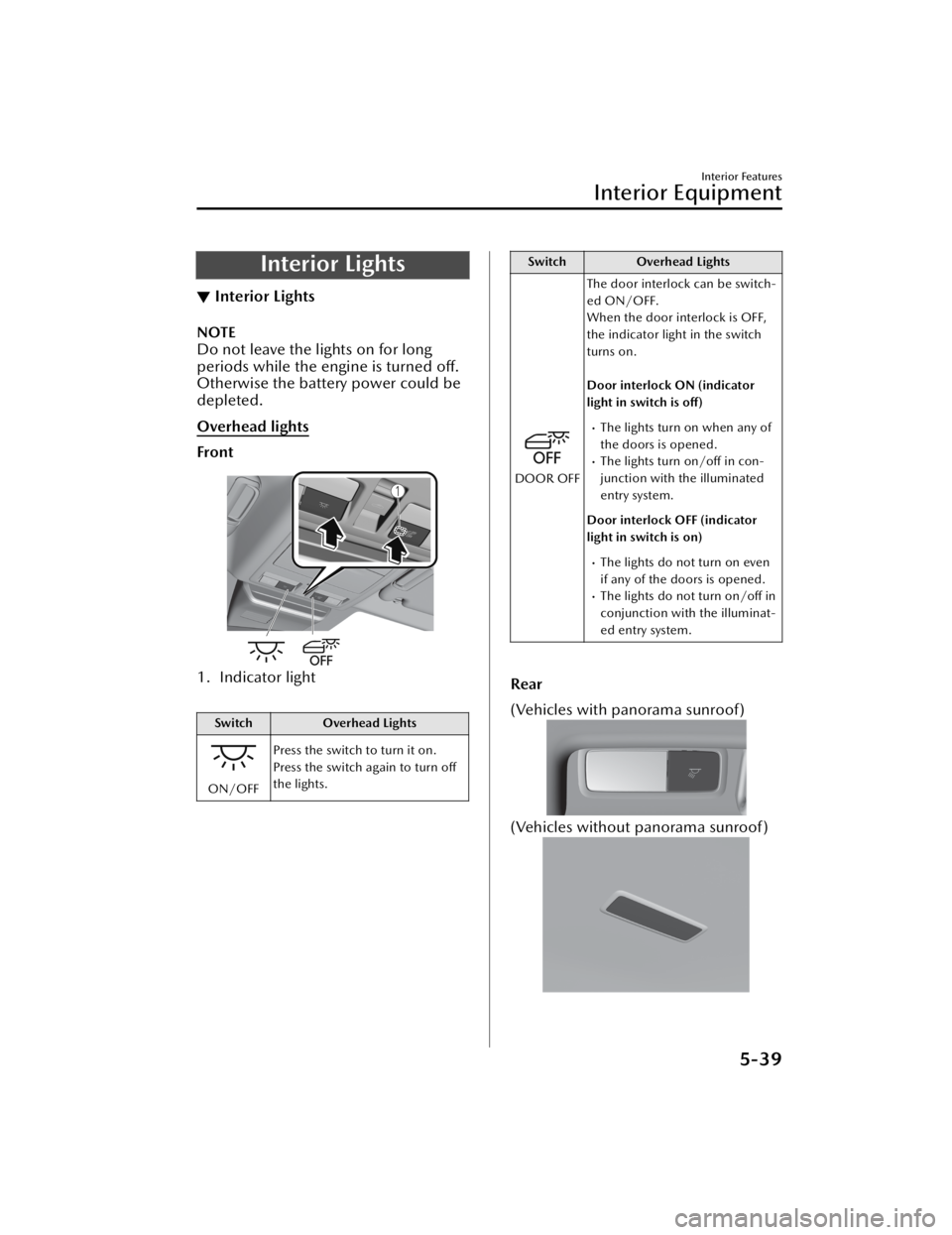
Overhead lights
Front
1. Indicator light
Switch
Overhead Lights
ON/OFFPress the switch to turn it on.
Press the switch again to turn off
the lights.
Switch
Overhead Lights
DOOR OFFThe door interlock can be switch-
ed ON/OFF.
When the door interlock is OFF,
the indicator light in the switch
turns on.
Door interlock ON (indicator
light in switch is off)
The lights turn on when any of
the doors is opened.
The lights turn on/off in con-
junction with the illuminated
entry system.
Door interlock OFF (indicator
light in switch is on)
The lights do not turn on even
if any of the doors is opened.
The lights do not turn on/off in
conjunction with the illuminat-
ed entry system.
Rear
(Vehicles with panorama sunroof)
(Vehicles without panorama sunroof)
Interior Features
Interior Equipment
5-39
CX-50_8KB8-EA-22A_Edition2_new 2022-1-6 14:55:18
Page 413 of 583

NOTE
The rear overhead light also turn on
and off when the front overhead light
switch is operated.
Map lights
Front
Press the switch to illuminate the front
map lights, and then press the switch
again to turn them off.
NOTE
The front map lights will not turn off
even if the switch is pressed in the
following cases:
The overhead lights turn on by
operating the overhead light
ON/OFF switch (
).The overhead lights turn on in
conjunction with a door opening/
closing.
The illuminated entry system is on.
Rear
When the overhead light ON/OFF
switch (
) is off, press the switch to
illuminate the rear map lights, and
then press the switch again to turn
them off.
NOTE
Once the rear map lights have been
turned off, they will turn on and off
in conjunction with the overhead
light operation.
The rear map lights will not turn off
even if the switch is pressed in the
following cases:
The overhead lights turn on by
operating the overhead light
ON/OFF switch (
).The overhead lights turn on in
conjunction with a door opening/
closing.
The illuminated entry system is on.
Luggage compartment light
The luggage compartment light is on
when the liftgate is open and off when
it is closed.
NOTE
Do not leave the liftgate open for long
periods while the engine is turned off.
Otherwise the battery power could be
depleted.
▼ Illuminated Entry System
The overhead lights turn on when any
of the following operations is done
with the overhead light switch in the
DOOR position.
Interior Features
Interior Equipment
5-40
CX-50_8KB8-EA-22A_Edition2_new
2022-1-6 14:55:18
Page 415 of 583

CAUTION
To prevent accessory socket damage
or electrical failure, pay attention to
the following:
Do not use accessories that require
more than 120 W (DC 12 V, 10 A).
Do not use accessories that are not
genuine Mazda accessories or the
equivalent.
Close the cover when the
accessory socket is not in use to
prevent foreign objects and liquids
from getting into the accessory
socket.
Correctly insert the plug into the
accessory socket.
Noise may occur on the audio
playback depending on the device
connected to the accessory socket.
Depending on the device connected
to the accessory socket, the vehicle's
electrical system may be affected,
which could cause the warning light
to illuminate. Disconnect the
connected device and make sure
that the problem is resolved. If the
problem is resolved, disconnect the
device from the socket and switch
the ignition off. If the problem is not
resolved, consult an Authorized
Mazda Dealer.
NOTE
To prevent discharging of the battery,
do not use the socket for long periods
with the engine off or idling.
Connecting the accessory socket
1. Open the lid.
2. Pass the connection plug cord
through the cutout of the console
and insert the plug into the
accessory socket.
1. Plug
Interior Features
Interior Equipment
5-42
CX-50_8KB8-EA-22A_Edition2_new 2022-1-6 14:55:18
Page 416 of 583

USB Power Outlet*
▼USB Power Outlet
The USB power outlets can be used
regardless of whether the ignition is
switched to ACC or ON.
Only use USB devices that have a
maximum power consumption of 12.5
W (DC 5 V, 2.5 A) or below.
1. USB power outlet
CAUTION
To prevent USB power outlets damage
or electrical failure, pay attention to
the following:
Do not use USB devices that require
more than 12.5 W (DC 5 V, 2.5 A).
Correctly connect the USB connector
into the USB power outlets.
NOTE
The USB power outlets are designed
only for charging and they cannot be
used for connecting to the vehicle's
audio system.
To prevent discharging of the battery,
do not use the USB power outlets for
long periods with the engine off or
idling.
Wireless Charger (Qi)*
▼ Wireless Charger (Qi)
You can charge mobile devices such as
Smartphones which comply with the
Qi Wireless Charging standard.
Only use mobile devices that have a
maximum power consumption of 5 W,
or 15 W or below. The maximum
power consumption
differs depending
on the mobile device.
1. LED indicator
2. Charging area
WARNING
Radio waves from the Wireless
Charger (Qi) may affect the operation
of medical devices such as
implanted-type cardiac pacemakers
or defibrillators.
Before using the Wireless Charger
(Qi) near people who use medical
devices, ask the medical device
manufacturer or your physician if
radio waves from the Wireless
Charger (Qi) will affect the device.
Interior Features
Interior Equipment
*Some models.5-43
CX-50_8KB8-EA-22A_Edition2_new 2022-1-6 14:55:18
Page 426 of 583

6Maintenance and Care
How to keep your Mazda in top condition.
Essential Information................. 6-2 Introduction.......................... 6-2
Scheduled Maintenance............ 6-4 Scheduled Maintenance......... 6-4
Owner Maintenance............... 6-11 Owner Maintenance
Precautions......................... 6-11
Hood.................................. 6-12
Engine Compartment
Overview............................ 6-14
Engine Oil........................... 6-16
Engine Coolant.................... 6-19
Brake Fluid.......................... 6-20
Washer Fluid....................... 6-21
Body Lubrication.................. 6-22
Wiper Blades....................... 6-22
Battery................................ 6-27
Key Battery Replacement...... 6-29
Tires.................................... 6-31
Light Bulbs...........................6-34
Fuses.................................. 6-35
Appearance Care.................... 6-43 Exterior Care....................... 6-43
Interior Care........................ 6-49
6-1
CX-50_8KB8-EA-22A_Edition2_new 2022-1-6 14:55:18
Page 439 of 583

Engine Compartment Overview
▼Engine Compartment Overview
SKYACTIV-G 2.5
1. Engine oil dipstick
2. Brake fluid reservoir
3. Battery
4. Fuse block
5. Cooling system cap
6. Engine oil-filler cap
7. Engine coolant reservoir
8. Windshield washer fluid reservoir
Maintenance and Care
Owner Maintenance
6-14
CX-50_8KB8-EA-22A_Edition2_new
2022-1-6 14:55:18
Page 440 of 583

SKYACTIV-G 2.5T
1. Engine oil dipstick
2. Brake fluid reservoir
3. Battery
4. Fuse block
5. Cooling system cap
6. Engine oil-filler cap
7. Engine coolant reservoir
8. Windshield washer fluid reservoir
Maintenance and Care
Owner Maintenance
6-15
CX-50_8KB8-EA-22A_Edition2_new
2022-1-6 14:55:18
Page 473 of 583

▼Aluminum Wheel Maintenance
A protective coating is provided over
the aluminum wheels. Special care is
needed to protect this coating.
CAUTION
Do not use any detergent other than
mild detergent. Before using any
detergent, verify the ingredients.
Otherwise, the product could discolor
or stain the aluminum wheels.
NOTE
Do not use a wire brush or any
abrasive cleaner, polishing
compound, or solvent on aluminum
wheels. They may damage the
coating.
Always use a sponge or soft cloth to
clean the wheels.
Rinse the wheels thoroughly with
lukewarm or cold water. Also, be
sure to clean the wheels after driving
on dusty or salted roads to help
prevent corrosion.
Avoid washing your vehicle in an
automatic car wash that uses
high-speed or hard brushes.
(20-inch wheel vehicle)
If your aluminum wheels lose luster,
apply wax which contains no
polishing powder.
▼ Plastic Part Maintenance
When cleaning the plastic lenses of
the lights, do not use gasoline,
kerosene, rectified spirit, paint,
thinner, highly acidic detergents, or
strongly alkaline detergents.
Otherwise, these chemical agents
can discolor or damage the surfaces
resulting in a significant loss in
functionality. If plastic parts become
inadvertently exposed to any of these
chemical agents, flush with water
immediately.
If plastic parts such as the bumpers
become inadvertently exposed to
chemical agents or fluids such as
gasoline, oil, engine coolant, or
battery fluid, it could cause
discoloration, staining, or paint
peeling. Wipe off any such chemical
agents or fluids using a soft cloth
immediately.
High water temperature and high
water pressure car washers are
available depending on the type of
high pressure car washer device. If
the car washer nozzle is put too
close to the vehicle or aimed at one
area for an extended period of time,
it could deform plastic parts or
damage the paint.
Do not use wax containing
compounds (polish). Otherwise, it
could result in paint damage.
In addition, do not use an electrical
or air tool to apply wax. Otherwise,
the frictional heat generated could
result in deformation of plastic parts
or paint damage.
Maintenance and Care
Appearance Care
6-48
CX-50_8KB8-EA-22A_Edition2_new
2022-1-6 14:55:18
Page 478 of 583

7If Trouble Arises
Helpful information on what to do if a problem arises with the
vehicle.
Parking in an Emergency............ 7-2 Parking in an Emergency......... 7-2
Flat Tire................................... 7-3 Spare Tire and Tool Storage ..........
............................................ 7-3
Changing a Flat Tire................7-5
Battery Runs Out..................... 7-11 Jump-Starting...................... 7-11
Emergency Starting................. 7-14 Starting a Flooded Engine..... 7-14
Push-Starting....................... 7-14
Overheating........................... 7-15 Overheating........................ 7-15
Emergency Towing.................. 7-17 Towing Description.............. 7-17
Tiedown Hooks
*.................. 7-18
Warning/Indicator Lights and
Warning Sounds..................... 7-20If a Warning Light Turns On or
Flashes................................ 7-20
Message Indicated on Multi-
information Display............. 7-32
Warning Sound is
Activated.............................7-36
When Liftgate Cannot be
Opened................................. 7-41 When Liftgate Cannot be
Opened.............................. 7-41
Active Driving Display Does Not
Operate................................. 7-42 If the Active Driving Display Does
Not Operate
*....................... 7-42
Windshield Wipers Operate at High
Speed.................................... 7-43 Windshield Wipers Operate at
High Speed......................... 7-43
*Some models.7-1
CX-50_8KB8-EA-22A_Edition2_new 2022-1-6 14:55:18
Page 489 of 583

Route the jumper cables away from parts that will be moving:
Connecting a jumper cable near or to moving parts (cooling fans, belts) is
dangerous. The cable could get caught when the engine starts and cause serious
injury.
CAUTION
Use only a 12 V booster system. You can dama ge a 12 V starter, ignition system, and
other electrical parts beyond repair with a 24 V power supply (two 12 V batteries in
series or a 24 V motor generator set).
1. Move the booster vehicle so that its battery is as close as possible to your
vehicle's battery.
2. Make sure that the power such as for th e headlights and air conditioner is turned
off.
3. Remove the battery cover.
4. Turn off the booster vehicle's engine and connect the jumper cables in the following order.
Make sure that the jumper cables are se curely connected so that they do not
disconnect due to engine vibrations.
1st lead
Positive (+) terminal on the discharged battery
Positive (+) terminal on booster vehicle's battery
2nd lead
Negative (-) terminal on booster vehicle's battery
If Trouble Arises
Battery Runs Out
7-12
CX-50_8KB8-EA-22A_Edition2_new 2022-1-6 14:55:18