steering wheel MAZDA MODEL CX-7 2007 (in English) Owner's Manual
[x] Cancel search | Manufacturer: MAZDA, Model Year: 2007, Model line: MODEL CX-7, Model: MAZDA MODEL CX-7 2007Pages: 406, PDF Size: 6.11 MB
Page 217 of 406
Black plate (217,1)
6Interior Comfort
Use of various features for drive comfort, including air-conditioning and audio
system.
Climate Control System ............................................................... 6-2
Operating Tips ........................................................................... 6-2
Vent Operation .......................................................................... 6-3
Types of the Climate Control System ....................................... 6-5
Manual Type
í.......................................................................... 6-6
Fully Automatic Typeí........................................................... 6-11
Audio System ............................................................................... 6-16
Antenna ................................................................................... 6-16
Operating Tips for Audio System ........................................... 6-16
Audio Set ................................................................................ 6-27
Audio Control Switch Operation (Steering Wheel)
í............. 6-45
Safety Certification ................................................................. 6-48
Interior Equipment ..................................................................... 6-49
Sunvisors ................................................................................. 6-49
Interior Lights ......................................................................... 6-50
Information Display ................................................................ 6-52
Cup Holder .............................................................................. 6-54
Bottle Holder ........................................................................... 6-55
Storage Compartments ............................................................ 6-56
Accessory Sockets .................................................................. 6-57
6-1íSome models.
CX-7_8V28-EA-06B_Edition2 Page217
Monday, March 13 2006 5:6 PM
Form No.8V28-EA-06B
Page 232 of 406
Black plate (232,1)
Antenna
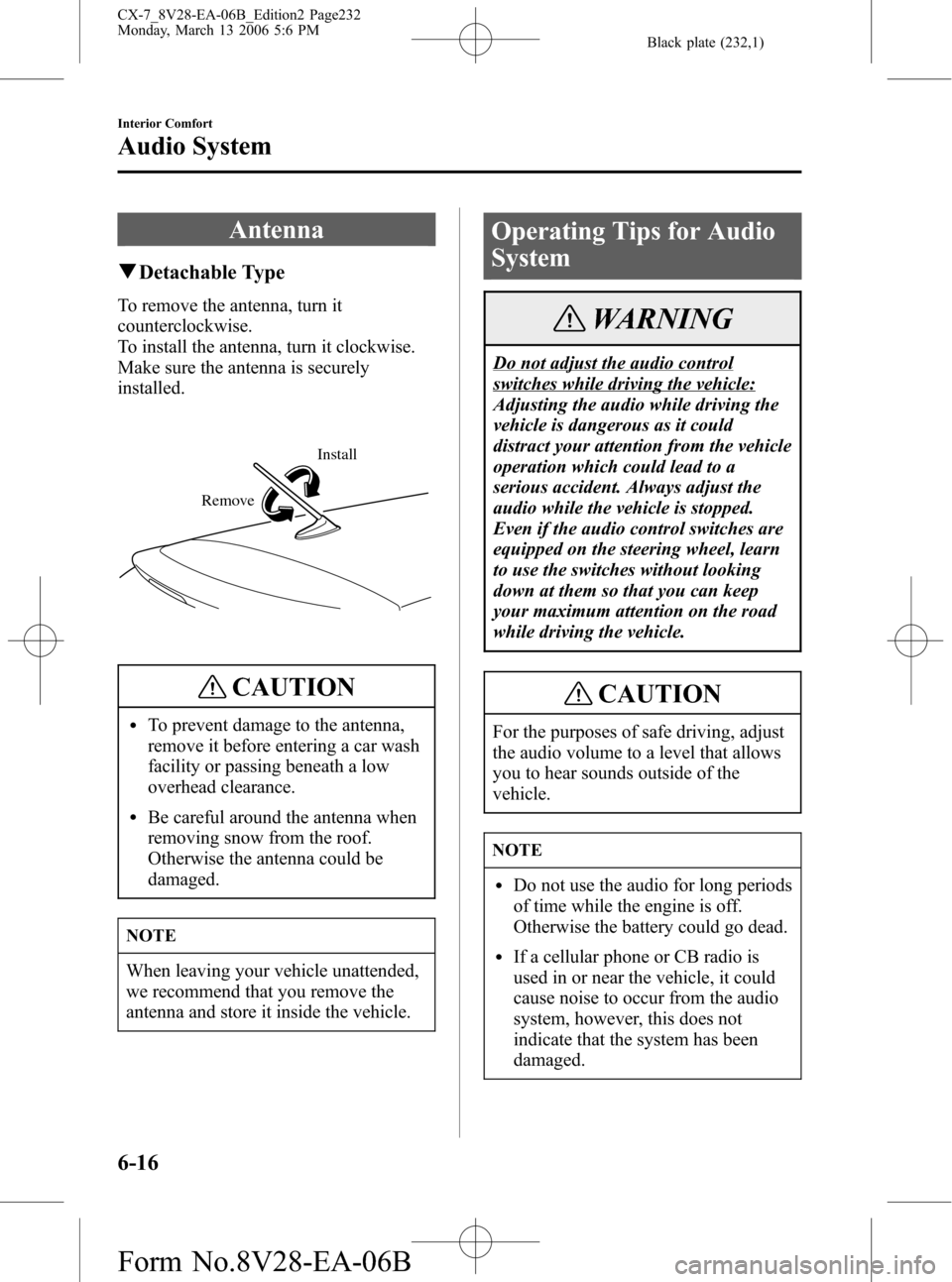
qDetachable Type
To remove the antenna, turn it
counterclockwise.
To install the antenna, turn it clockwise.
Make sure the antenna is securely
installed.
Install
Remove
CAUTION
lTo prevent damage to the antenna,
remove it before entering a car wash
facility or passing beneath a low
overhead clearance.
lBe careful around the antenna when
removing snow from the roof.
Otherwise the antenna could be
damaged.
NOTE
When leaving your vehicle unattended,
we recommend that you remove the
antenna and store it inside the vehicle.
Operating Tips for Audio
System
WARNING
Do not adjust the audio control
switches while driving the vehicle:
Adjusting the audio while driving the
vehicle is dangerous as it could
distract your attention from the vehicle
operation which could lead to a
serious accident. Always adjust the
audio while the vehicle is stopped.
Even if the audio control switches are
equipped on the steering wheel, learn
to use the switches without looking
down at them so that you can keep
your maximum attention on the road
while driving the vehicle.
CAUTION
For the purposes of safe driving, adjust
the audio volume to a level that allows
you to hear sounds outside of the
vehicle.
NOTE
lDo not use the audio for long periods
of time while the engine is off.
Otherwise the battery could go dead.
lIf a cellular phone or CB radio is
used in or near the vehicle, it could
cause noise to occur from the audio
system, however, this does not
indicate that the system has been
damaged.
6-16
Interior Comfort
Audio System
CX-7_8V28-EA-06B_Edition2 Page232
Monday, March 13 2006 5:6 PM
Form No.8V28-EA-06B
Page 261 of 406

Black plate (261,1)
Audio Control Switch
Operation (Steering Wheel)
í
When the audio unit is turned on,
operation of the audio unit from the
steering wheel is possible.
NOTE
Because the audio unit will be turned
off under the following conditions, the
switches will be inoperable.
lWhen the ignition switch is turned to
the LOCK position.
lWhen the power button on the audio
unit is pressed and the audio unit is
turned off.
lWhen CD being played is ejected.
(For the In-dash CD changer, when
all CDs are ejected.)
Without navigation system
With navigation system
Use the VOICE switch for navigation
system sound operation.
For details, refer to
“NAVIGATION SYSTEM”.
VOICE switch
NOTE
lThe VOICE switch is operable with
the audio unit turned off.
lMazda has installed this system to
prevent distraction while driving the
vehicle and using audio controls on
the dashboard.
Always make safe driving your first
priority.
Interior Comfort
Audio System
6-45íSome models. CX-7_8V28-EA-06B_Edition2 Page261
Monday, March 13 2006 5:7 PM
Form No.8V28-EA-06B
Page 280 of 406
Black plate (280,1)
Changing a Flat Tire
NOTE
If the following occurs while driving, it
could indicate a flat tire.
lSteering becomes difficult.
lThe vehicle begins to vibrate
excessively.
lThe vehicle pulls in one direction.
If you have a flat tire, drive slowly to a
level spot that is well off the road and out
of the way of traffic to change the tire.
Stopping in traffic or on the shoulder of a
busy road is dangerous.
WARNING
Jacking a Vehicle:
Changing a tire is dangerous if not
done properly. The vehicle can slip off
the jack and seriously injure someone.
Be sure to follow the directions for
changing a tire, and never get under a
vehicle that is supported only by a
jack.
Passenger in Vehicle Supported by a
Jack:
Allowing someone to remain in a
vehicle supported by a jack is
dangerous. The occupant could cause
the vehicle to fall resulting in serious
injury. Never allow anyone inside a
vehicle supported by a jack.
CAUTION
(With Tire Pressure Monitoring
System)
The wheels equipped on your Mazda
are specially designed for installation of
the tire pressure sensors. Do not use
non-genuine wheels, otherwise it may
not be possible to install the tire
pressure sensors.
NOTE
lMake sure the jack is well lubricated
before using it.
(With Tire Pressure Monitoring
System)
lBe sure to register the tire pressure
sensor ID signal code whenever tires
or wheels are changed (page 5-29).
1. Park on a level surface off the right-of-
way and firmly set the parking brake.
2. Shift into Park (P) and turn off the
engine.
3. Turn on the hazard warning flasher.
4. Have everyone get out of the vehicle
and away from the vehicle and traffic.
5. Remove the jack, tool, and spare tire
(page 7-3).
7-6
In Case of an Emergency
Flat Tire
CX-7_8V28-EA-06B_Edition2 Page280
Monday, March 13 2006 5:7 PM
Form No.8V28-EA-06B
Page 326 of 406

Black plate (326,1)
CAUTION
Limited-Slip Differential system;
don't use the following:
lTires not of the designated size
lTires of different sizes or types at the
same time
lTires not sufficiently inflated
If these instructions aren't followed, the
rotation of the left and right wheels will
be different and will thus apply a
constant load on the limited-slip
differential.
This will cause a malfunction.
qReplacing a Tire
WARNING
Worn Tires:
Driving with worn tires is dangerous.
Reduced braking, steering, and
traction could result in an accident.
Always use tires that are in good
condition.
CAUTION
(With Tire Pressure Monitoring
System)
When replacing/repairing the tires or
wheels or both, have the work done by
an Authorized Mazda Dealer, or the tire
pressure sensors may be damaged.
NOTE
(With Tire Pressure Monitoring
System)
lWhen tires with steel wire
reinforcement in the sidewalls are
used, the system may not function
correctly even with a genuine wheel.
Refer to System Error Activation on
page 5-28.
lBe sure to install the tire pressure
sensors whenever tires or wheels are
replaced.
Refer to Tires and Wheels on page
5-29.
If a tire wears evenly, a wear indicator
will appear as a solid band across the
tread.
Replace the tire when this happens.
New treadTread wear indicator
Worn tread
You should replace it before the band is
across the entire tread.
8-30
Maintenance and Care
Owner Maintenance
CX-7_8V28-EA-06B_Edition2 Page326
Monday, March 13 2006 5:7 PM
Form No.8V28-EA-06B
Page 331 of 406

Black plate (331,1)
NOTE
lTo replace the bulb, contact an
Authorized Mazda Dealer.
lIf the halogen bulb is accidentally
touched, it should be cleaned with
rubbing alcohol before being used.
lUse the protective cover and carton
of the replacement bulb to dispose of
the old bulb promptly out of the
reach of children.
Low-beam bulb
(Xenon fusion bulb)
You cannot replace the low beam bulbs by
yourself.
The bulbs must be replaced at an
Authorized Mazda Dealer.
(Halogen bulbs)
1. Make sure the headlight switch is off.
2. If you are changing the right Low-
beam bulb, start the engine, turn the
steering wheel all the way to the right,
and turn off engine. If you are
changing the left Low-beam bulb, turn
the steering wheel to the left.3. Turn the screws and the center section
of the plastic retainers
counterclockwise and remove them,
then partially peel back the mudguard.
InstallationRemoval
4. Detach the electrical connector from
the bulb by pulling it to the rear.
5. Pull off the sealing cover.
6. Unhook the bulb retaining spring.
Maintenance and Care
Owner Maintenance
8-35
CX-7_8V28-EA-06B_Edition2 Page331
Monday, March 13 2006 5:7 PM
Form No.8V28-EA-06B
Page 332 of 406
Black plate (332,1)
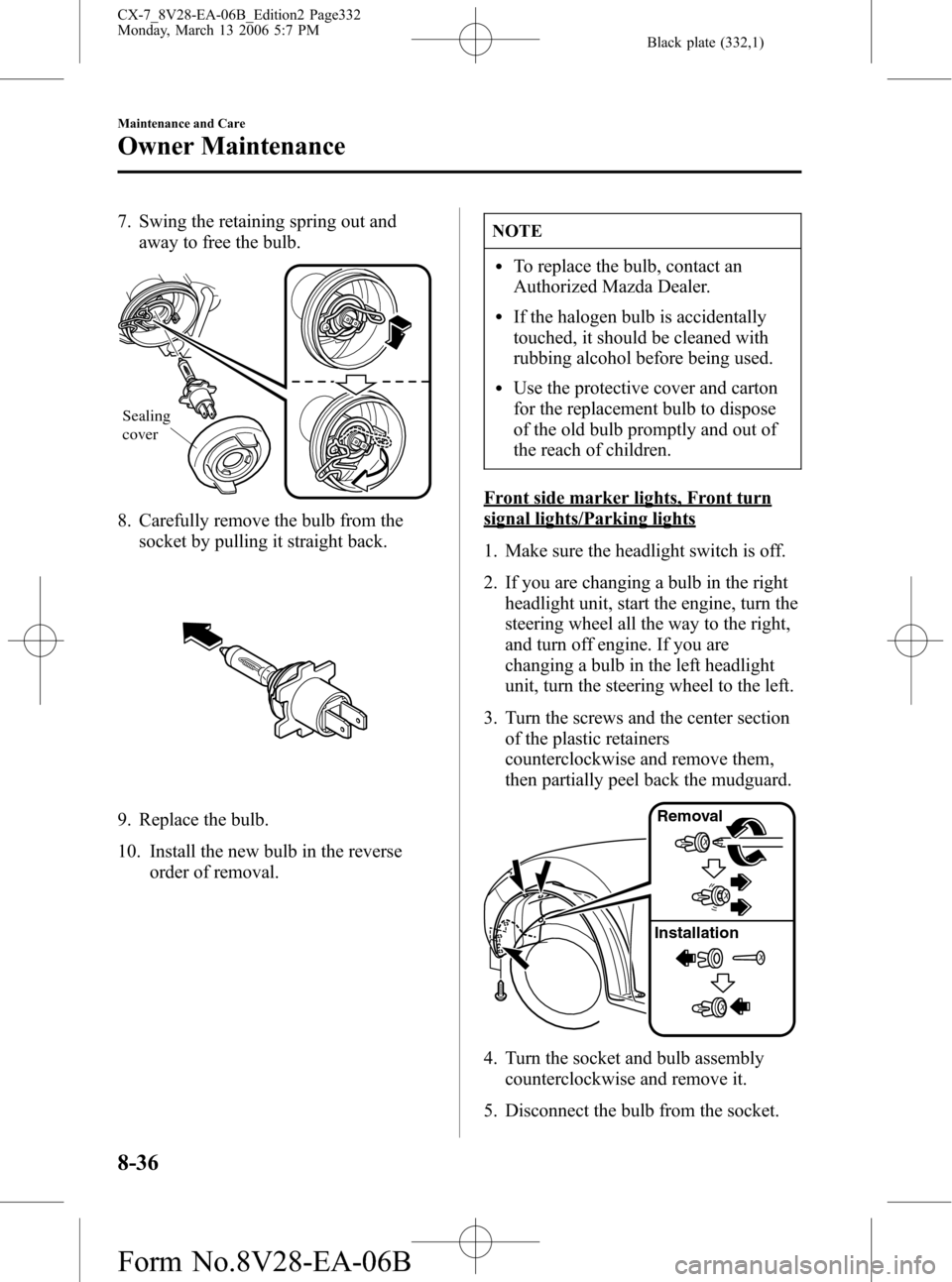
7. Swing the retaining spring out and
away to free the bulb.
Sealing
cover
8. Carefully remove the bulb from the
socket by pulling it straight back.
9. Replace the bulb.
10. Install the new bulb in the reverse
order of removal.
NOTE
lTo replace the bulb, contact an
Authorized Mazda Dealer.
lIf the halogen bulb is accidentally
touched, it should be cleaned with
rubbing alcohol before being used.
lUse the protective cover and carton
for the replacement bulb to dispose
of the old bulb promptly and out of
the reach of children.
Front side marker lights, Front turn
signal lights/Parking lights
1. Make sure the headlight switch is off.
2. If you are changing a bulb in the right
headlight unit, start the engine, turn the
steering wheel all the way to the right,
and turn off engine. If you are
changing a bulb in the left headlight
unit, turn the steering wheel to the left.
3. Turn the screws and the center section
of the plastic retainers
counterclockwise and remove them,
then partially peel back the mudguard.
InstallationRemoval
4. Turn the socket and bulb assembly
counterclockwise and remove it.
5. Disconnect the bulb from the socket.
8-36
Maintenance and Care
Owner Maintenance
CX-7_8V28-EA-06B_Edition2 Page332
Monday, March 13 2006 5:7 PM
Form No.8V28-EA-06B
Page 333 of 406

Black plate (333,1)
Front side marker lights
Front turn signal lights/Parking lights
6. Install the new bulb in the reverse order
of removal.
Fog lightsí
1. Make sure the headlight switch is off.
2. If you are changing the right fog light
bulb, start the engine, turn the steering
wheel all the way to the right, and turn
off engine. If you are changing the left
fog light bulb, turn the steering wheel
to the left.3. Turn the screws and the center section
of the plastic retainers
counterclockwise and remove them,
then partially peel back the mudguard.
InstallationRemoval
4. Disconnect the electrical connector
from the bulb by pressing the tab on
the connector with your finger and
pulling the connector downward.
5. Turn the socket and bulb assembly
counterclockwise and remove it.
Carefully remove the bulb from its
socket in the reflector by gently pulling
it straight backward out of the socket.
6. Install the new bulb in the reverse order
of removal.
Maintenance and Care
Owner Maintenance
8-37íSome models. CX-7_8V28-EA-06B_Edition2 Page333
Monday, March 13 2006 5:7 PM
Form No.8V28-EA-06B
Page 347 of 406

Black plate (347,1)
To keep the fabric looking clean and
fresh, take care of it. Otherwise its color
will be affected, it can be stained easily,
and its fire-resistance may be reduced.
CAUTION
Use only recommended cleaners and
procedures. Others may affect
appearance and fire-resistance.
Piano black panelí
The following parts are fitted with panels
that have been treated with a special
coating that resists scratching.
Steering wheel (partial)
When the panel needs to be cleaned, use a
soft cloth to wipe off dirt from the surface.
NOTE
Scratches or nicks on the panels
resulting from the use of a hard brush or
cloth may not be repairable.
qCleaning the Lap/Shoulder Belt
Webbing
Clean the webbing with a mild soap
solution recommended for upholstery or
carpets. Follow instructions. Don't bleach
or dye the webbing; this may weaken it.
After cleaning the belts, thoroughly dry
the belt webbing and make sure there is
no remaining moisture before retracting
them.
WARNING
Damaged Seat Belt:
Using damaged seat belts is
dangerous. In a collision, damaged
belts cannot provide adequate
protection. Have an Authorized Mazda
Dealer replace damaged belts
immediately.
qCleaning the Window Interiors
If the windows become covered with an
oily, greasy, or waxy film, clean them
with glass cleaner. Follow the directions
on the container.
CAUTION
Don't scrape or scratch the inside of the
rear window. You may damage the rear
window defroster grid.
Maintenance and Care
Appearance Care
8-51íSome models. CX-7_8V28-EA-06B_Edition2 Page347
Monday, March 13 2006 5:8 PM
Form No.8V28-EA-06B
Page 377 of 406

Black plate (377,1)
CAUTION
Rotate unidirectional tires and radial tires that have an asymmetrical tread pattern or
studs only from front to rear, not from side to side. Tire performance will be weakened if
rotated from side to side.
(With limited-slip differential)
Don't use the following:
lTires not of the designated size
lTires of different sizes or types at the same time
lTires not sufficiently inflated
If these instructions aren't followed, the rotation of the left and right wheels will be
different and will thus apply a constant load on the limited-slip differential.
This will cause a malfunction.
qReplacing a Tire
WARNING
Worn Tires:
Driving with worn tires is dangerous. Reduced braking, steering, and traction could
result in an accident. Always use tires that are in good condition.
If a tire wears evenly, a wear indicator will appear as a solid band across the tread. Replace
the tire when this happens.
New treadTread wear indicator
Worn tread
You should replace it before the band is across the entire tread.
Customer Information and Reporting Safety Defects
Tire Information (except Canada)
9-29
CX-7_8V28-EA-06B_Edition2 Page377
Monday, March 13 2006 5:8 PM
Form No.8V28-EA-06B