lights MAZDA MODEL CX-7 2009 (in English) Owner's Guide
[x] Cancel search | Manufacturer: MAZDA, Model Year: 2009, Model line: MODEL CX-7, Model: MAZDA MODEL CX-7 2009Pages: 454, PDF Size: 6.24 MB
Page 209 of 454
Black plate (209,1)
NOTE
If the battery is disconnected or a fuse is
replaced, the DSC will be inoperable. When
this happens, the TCS OFF indicator light
flashes and the TCS/DSC indicator light
illuminates.
To reactivate the DSC, perform the following
procedure with the battery connected.
1. Turn the ignition switch to the ON position.
2. Turn the steering clockwise fully, then turn
it counterclockwise fully.
3. Make sure the TCS OFF indicator turns off.
4. Turn the ignition switch to the OFF
position, then turn it to the ON position
again.
5. Make sure the TCS/DSC indicator light
turns off.
If the TCS/DSC indicator light and the TCS
OFF indicator light remain illuminated even
after turning the ignition switch to the ON
position, attempt the procedure again. If this
still does not work, consult an Authorized
Mazda Dealer.
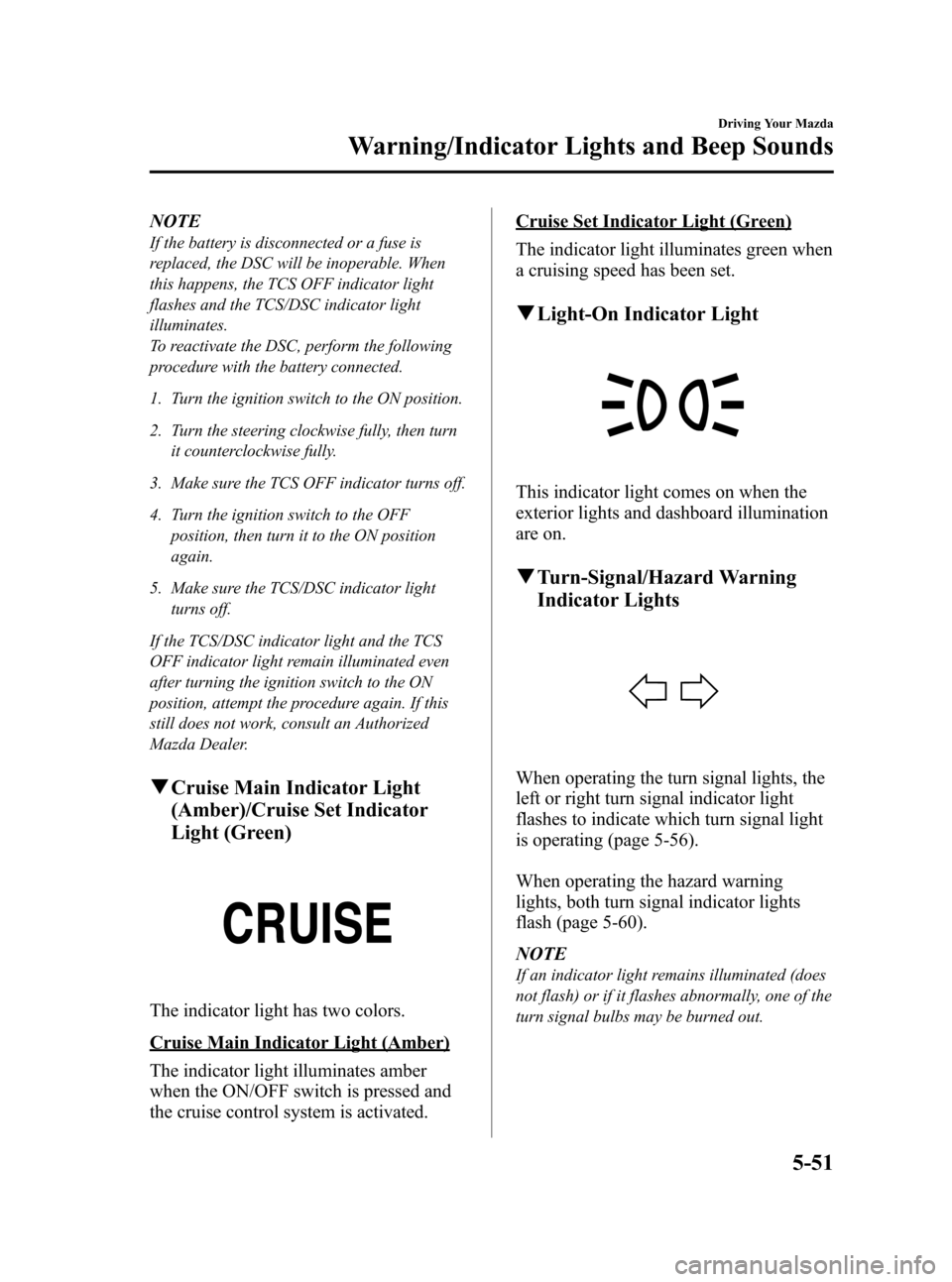
qCruise Main Indicator Light
(Amber)/Cruise Set Indicator
Light (Green)
The indicator light has two colors.
Cruise Main Indicator Light (Amber)
The indicator light illuminates amber
when the ON/OFF switch is pressed and
the cruise control system is activated.
Cruise Set Indicator Light (Green)
The indicator light illuminates green when
a cruising speed has been set.
qLight-On Indicator Light
This indicator light comes on when the
exterior lights and dashboard illumination
are on.
qTurn-Signal/Hazard Warning
Indicator Lights
When operating the turn signal lights, the
left or right turn signal indicator light
flashes to indicate which turn signal light
is operating (page 5-56).
When operating the hazard warning
lights, both turn signal indicator lights
flash (page 5-60).
NOTE
If an indicator light remains illuminated (does
not flash) or if it flashes abnormally, one of the
turn signal bulbs may be burned out.
Driving Your Mazda
Warning/Indicator Lights and Beep Sounds
5-51
CX-7_8Z60-EA-08D_Edition2 Page209
Friday, May 30 2008 5:27 PM
Form No.8Z60-EA-08D
Page 210 of 454

Black plate (210,1)
Beep Sounds
qAir Bag/Front Seat Belt
Pretensioner System Warning Beep
If a malfunction is detected in both the air
bag/front seat belt pretensioner system
and the warning light, a warning beep
sound will be heard for about 1 minute.
After that, the one-minute beep will be
repeated every 30 minutes.
Have your vehicle inspected at an
Authorized Mazda Dealer as soon as
possible.
WARNING
Do not drive the vehicle with the air
bag/front seat belt pretensioner system
warning beep sounding:
Driving the vehicle with the air bag/
front seat belt pretensioner system
warning beep sounding is dangerous.
In a collision, the air bags and the
front seat belt pretensioner system
will not deploy and this could result
in death or serious injury.
Contact an Authorized Mazda Dealer
to have the vehicle inspected as soon
as possible.
qSeat Belt Warning Beep
If the driver's seat belt is not fastened
when the ignition switch is turned to the
ON position, a beep sound will be heard
for about 6 seconds.
If the driver's seat belt is not fastened and
the vehicle is driven at a speed faster than
about 20 km/h (12 mph), a beep sound
will be heard again for a specified period
of time.
Refer to Seat Belt Warning Light/Beep on
page 5-43.
qIgnition Key Reminder
If the ignition switch is in the LOCK or
ACC position with the key inserted, a
continuous beep sound will be heard
when the driver's door is opened.
qLights-On Reminder
If lights are on and the key is removed
from the ignition switch, a continuous
beep sound will be heard when the
driver's door is opened.
NOTE
When the advanced keyless function is used
and the start knob is in the ACC position, the
Start Knob Not in Lock Warning Beep (page
3-16) overrides the lights-on reminder.
qParking Brake Reminder
If the parking brake has not been
completely released and the vehicle is
driven at about 5 km/h (3 mph) or faster, a
continuous beep sound will be heard to
notify the driver that the parking brake
has not been released.
qTire Inflation Pressure Warning
Beep
The warning beep sound will be heard for
about 3 seconds when there is any
abnormality in tire inflation pressures
(page 5-27).
qAdvanced Keyless Warning
Warning indicators for the advanced key,
such as“the advanced key removed from
vehicle warning”, use a beep sound and
warning/indicator lights in the instrument
cluster.
Refer to Warning and Beep Sounds on
page 3-16.
5-52
Driving Your Mazda
Warning/Indicator Lights and Beep Sounds
CX-7_8Z60-EA-08D_Edition2 Page210
Friday, May 30 2008 5:27 PM
Form No.8Z60-EA-08D
Page 211 of 454

Black plate (211,1)
Lighting Control
qHeadlights
Type A (Without AUTO position)
Turn the headlight switch to turn the
headlights, other exterior lights and
dashboard illumination on or off.
Switch Position
Headlights Off Off On
Taillights
Parking lights
License lights
Side-marker lights
Dashboard illuminationOff On On
NOTE
To prevent discharging the battery, don't leave
the lights on while the engine is off unless
safety requires them.
Type B (With AUTO position)
Turn the headlight switch to turn the
headlights, other exterior lights and
dashboard illumination on or off.
Switch Position
Headlights Off Off On
Auto Taillights
Parking lights
License lights
Side-marker
lights
Dashboard
illuminationOff On On
NOTE
To prevent discharging the battery, don't leave
the lights on while the engine is off unless
safety requires them.
AUTO (Auto-light control)
When the headlight switch is in the
AUTO position and the ignition switch is
in the ON position, the light sensor senses
the surrounding lightness or darkness and
automatically turns on or off the
headlights, other exterior lights and
dashboard illumination (see chart above).
Driving Your Mazda
Switches and Controls
5-53
CX-7_8Z60-EA-08D_Edition2 Page211
Friday, May 30 2008 5:27 PM
Form No.8Z60-EA-08D
Page 212 of 454

Black plate (212,1)
CAUTION
Do not shade the light sensor by
adhering a sticker or a label on the
windshield, or putting an object on it.
Otherwise the light sensor will not
operate correctly.
Sensor
NOTElWhen the headlight switch is in the AUTO
position and the ignition switch is turned to
the ACC or LOCK position, the headlights,
other exterior lights and dashboard
illumination will turn off.
lThe timing for turning on the headlights,
other exterior lights and dashboard
illumination can be delayed by adjusting
the sensitivity of the light sensor. Consult an
Authorized Mazda Dealer regarding sensor
adjustment.
Xenon fusion headlight bulbsí
The low-beam bulbs of the headlights
have xenon fusion bulbs that produce a
bright white beam over a wide area.
WARNING
Do not replace the xenon fusion bulbs
yourself:
Replacing the xenon fusion bulbs
yourself is dangerous. Because the
xenon fusion bulbs require high
voltage, you could receive an electric
shock if the bulbs are handled
incorrectly. Consult an Authorized
Mazda Dealer when the replacement
is necessary.
NOTE
If the headlights flicker, or the brightness
weakens, the bulb-life may be depleted and a
replacement is necessary. Consult an
Authorized Mazda Dealer.
qLights-On Reminder
If lights are on and the key is removed
from the ignition switch, a continuous
beep sound will be heard when the
driver's door is opened.
NOTE
When the advanced keyless function is used
and the start knob is in the ACC position, the
overrides the lights-on reminder.
5-54
Driving Your Mazda
íSome models.
Switches and Controls
CX-7_8Z60-EA-08D_Edition2 Page212
Friday, May 30 2008 5:27 PM
Form No.8Z60-EA-08D
Page 213 of 454

Black plate (213,1)
qHeadlight High-Low Beam
Push the lever forward for high beam.
Pull back to original position for low
beam.
High beam
Low beam
qFlashing the Headlights
To flash the headlights, pull the lever fully
toward you. The headlight switch does
not need to be on, and the lever will return
to the normal position when released.
qHeadlight Levelingí
The number of passengers and weight of
cargo in the luggage compartment change
the angle of the headlights.
The headlight leveling switch adjusts this
angle.
Select the proper setting from the following chart.
Front seat
Rear
seatLoadSwitch
Position
Driver Passenger
×―――0
××――0
×× ×―1
×× ×× 2
×――×3
×: Yes
―:No
qDaytime Running Lights (Canada)
In Canada, vehicles must be driven with
the headlights on during daytime
operation.
For that reason, the daytime running lights
automatically turn on when the ignition
switch is turned to the ON position.
NOTE
The Daytime Running Lights turn off when the
parking brake is applied.
Driving Your Mazda
Switches and Controls
5-55íSome models. CX-7_8Z60-EA-08D_Edition2 Page213
Friday, May 30 2008 5:27 PM
Form No.8Z60-EA-08D
Page 214 of 454
Black plate (214,1)
Turn and Lane-Change
Signals
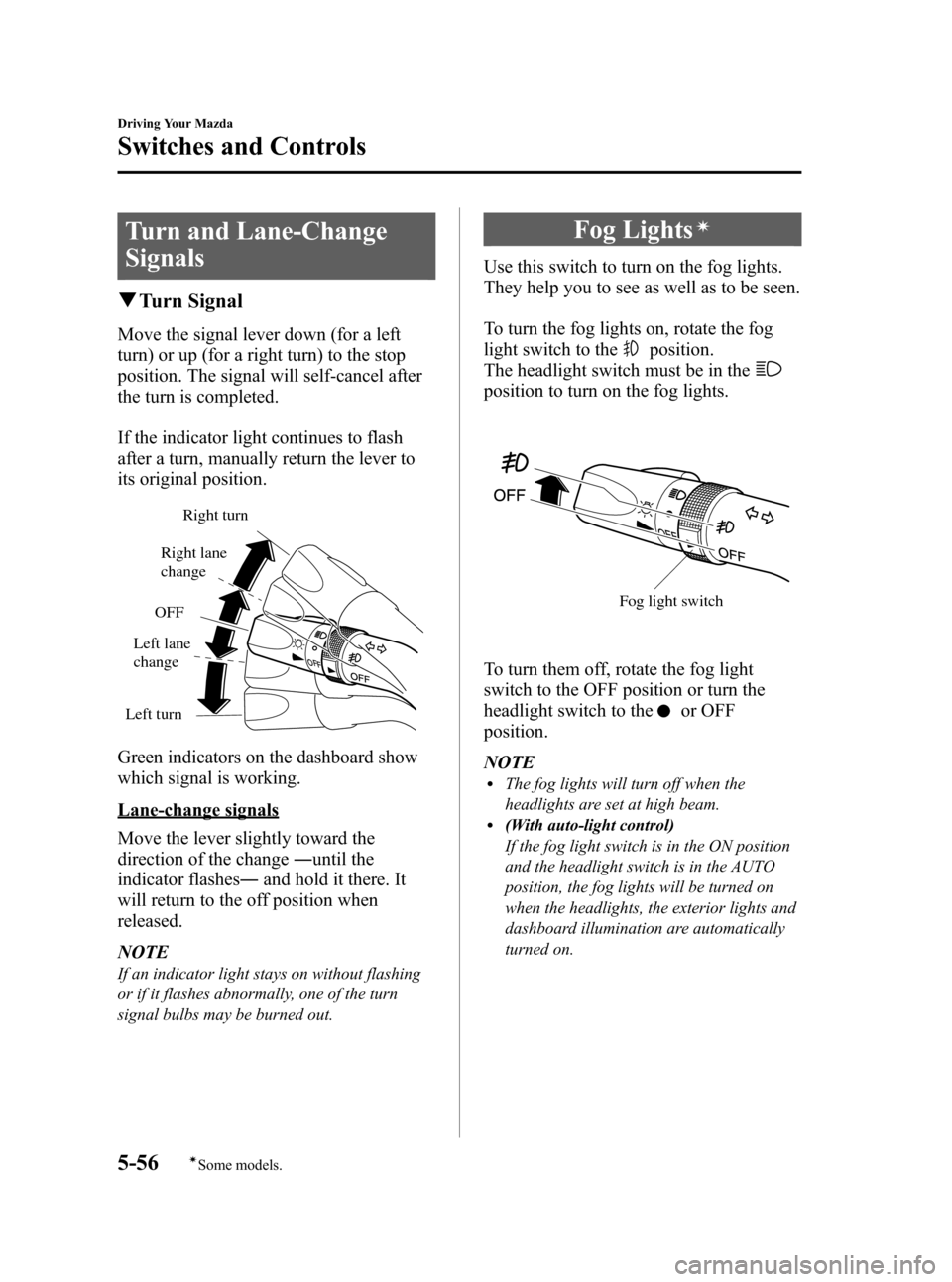
qTurn Signal
Move the signal lever down (for a left
turn) or up (for a right turn) to the stop
position. The signal will self-cancel after
the turn is completed.
If the indicator light continues to flash
after a turn, manually return the lever to
its original position.
Right turn
Left turnOFFRight lane
change
Left lane
change
Green indicators on the dashboard show
which signal is working.
Lane-change signals
Move the lever slightly toward the
direction of the change―until the
indicator flashes―and hold it there. It
will return to the off position when
released.
NOTE
If an indicator light stays on without flashing
or if it flashes abnormally, one of the turn
signal bulbs may be burned out.
Fog Lightsí
Use this switch to turn on the fog lights.
They help you to see as well as to be seen.
To turn the fog lights on, rotate the fog
light switch to the
position.
The headlight switch must be in the
position to turn on the fog lights.
Fog light switch
To turn them off, rotate the fog light
switch to the OFF position or turn the
headlight switch to the
or OFF
position.
NOTE
lThe fog lights will turn off when the
headlights are set at high beam.
l(With auto-light control)
If the fog light switch is in the ON position
and the headlight switch is in the AUTO
position, the fog lights will be turned on
when the headlights, the exterior lights and
dashboard illumination are automatically
turned on.
5-56
Driving Your Mazda
íSome models.
Switches and Controls
CX-7_8Z60-EA-08D_Edition2 Page214
Friday, May 30 2008 5:27 PM
Form No.8Z60-EA-08D
Page 218 of 454

Black plate (218,1)
Horn
To sound the horn, press themark on
the steering wheel.
Hazard Warning Flasher
The hazard warning lights should always
be used when you stop on or near a
roadway in an emergency.
The hazard warning lights warn other
drivers that your vehicle is a traffic hazard
and that they must take extreme caution
when near it.
Depress the hazard warning flasher and all
the turn signals will flash.
NOTE
lThe turn signals do not work when the
hazard warning lights are on.
lCheck local regulations about the use of
hazard warning lights while the vehicle is
being towed to verify that it is not in
violation of the law.
5-60
Driving Your Mazda
Switches and Controls
CX-7_8Z60-EA-08D_Edition2 Page218
Friday, May 30 2008 5:27 PM
Form No.8Z60-EA-08D
Page 221 of 454
Black plate (221,1)
5. Press and hold the just-trained
HomeLink button and observe the
indicator light.
If the indicator lightstays on constantly,
programming is completeand your
device should activate when the
HomeLink button is pressed and released.
NOTE
To program the remaining two HomeLink
buttons, begin with“Programming”―step 2.
Do not repeat step 1.
If the indicator light blinksrapidly for
two seconds and then turns to a
constant light, continue with
“Programming”steps 6―8to complete
the programming of a rolling code
equipped device (most commonly a
garage door opener).
6. At the garage door opener receiver
(motor-head unit) in the garage, locate
the“learn”or“smart”button. This can
usually be found where the hanging
antenna wire is attached to the motor-
head unit.
7. Firmly press and release the“learn”or
“smart”button. (The name and color of
the button may vary by manufacturer.)
NOTE
There are 30 seconds in which to initiate step
8.
8. Return to the vehicle and firmlypress,
hold for two seconds and releasethe
programmed HomeLink button. Repeat
the“press/hold/release”sequence a
second time, and, depending on the
brand of the garage door opener (or
other rolling code equipped device),
repeat this sequence a third time to
complete the programming process.HomeLink should now activate your
rolling code equipped device.
NOTE
To program the remaining two HomeLink
buttons, begin with“Programming”―step 2.
Do not repeat step 1.
For questions or comments, please contact
HomeLink atwww.homelink.comor1-
800-355-3515.
qGate operator/Canadian
Programming
Canadian radio-frequency laws require
transmitter signals to“time-out”(or quit)
after several seconds of transmission―
which may not be long enough for
HomeLink to pick up the signal during
programming. Similar to this Canadian
law, some U.S. gate operators are
designed to“time-out”in the same
manner.
If you live in Canada or you are having
difficulties programming a gate operator
by using the“Programming”procedures
(regardless of where you live),replace
“Programming HomeLink”step 3with
the following:
NOTE
If programming a garage door opener or gate
operator, it is advised to unplug the device
during the“cycling”process to prevent
possible overheating.
Driving Your Mazda
Switches and Controls
5-63
CX-7_8Z60-EA-08D_Edition2 Page221
Friday, May 30 2008 5:27 PM
Form No.8Z60-EA-08D
Page 223 of 454
Black plate (223,1)
6Interior Comfort
Use of various features for drive comfort, including air-conditioning and audio
system.
Climate Control System ............................................................... 6-2
Operating Tips ........................................................................... 6-2
Vent Operation .......................................................................... 6-3
Types of the Climate Control System ....................................... 6-5
Manual Type ............................................................................. 6-6
Fully Automatic Type ............................................................. 6-10
Audio System ............................................................................... 6-15
Antenna ................................................................................... 6-15
Operating Tips for Audio System ........................................... 6-16
Audio Set ................................................................................ 6-25
Audio Control Switch Operation (Steering Wheel) ................ 6-56
AUX Mode (Auxiliary input) ................................................. 6-58
Safety Certification ................................................................. 6-61
Bluetooth Hands-Free ................................................................. 6-62
Bluetooth Hands-Free
í.......................................................... 6-62
Basic Bluetooth Hands-Free Operation ................................... 6-66
Convenient Use of the Hands-Free System ............................. 6-69
Hands-Free Telephone Setting ................................................ 6-75
When Bluetooth Hands-Free cannot be used .......................... 6-80
Safety Certification ................................................................. 6-80
Mazda Bluetooth Hands-Free Customer Service .................... 6-81
Interior Equipment ..................................................................... 6-82
Sunvisors ................................................................................. 6-82
Interior Lights ......................................................................... 6-83
Information Display ................................................................ 6-85
Cup Holder .............................................................................. 6-87
Bottle Holder ........................................................................... 6-88
Storage Compartments ............................................................ 6-89
Accessory Sockets .................................................................. 6-91
6-1íSome models.
CX-7_8Z60-EA-08D_Edition2 Page223
Friday, May 30 2008 5:27 PM
Form No.8Z60-EA-08D
Page 305 of 454

Black plate (305,1)
Interior Lights
qIlluminated Entry System
When the illuminated entry system
operates, the overhead light (switch is in
the DOOR position) turns on for:
lAbout 30 seconds after the driver's
door is unlocked and the ignition
switch is in the LOCK position (with
the ignition key removed).
lAbout 15 seconds after all doors are
closed (If your vehicle is equipped with
the advanced key, the overhead light
turns on for about 5 seconds when the
advanced key is outside of the vehicle).
lAbout 15 seconds after the ignition
switch is in the LOCK position (with
the ignition key removed) with all
doors closed.
The light also turns off when:
lThe ignition switch is turned to the ON
position and all doors are closed.
lThe driver's door is locked.
NOTE
Battery saver
If any door is left opened, the light goes out
after about 30 minutes to save the battery.
The light turns on again when the ignition
switch is turned to the ON position, or when
any door is opened after all doors have been
closed.
qOverhead Lights
Front
Switch Position Front Overhead Lights
Light off
lLight is on when any door is
open
lLight is on or off when the
illuminated entry system is
on
Rear
Switch
PositionRear Overhead Lights
Light off
Light is on when any door is open
Light is on or off when the
illuminated entry system is on
Light on
Interior Comfort
Interior Equipment
6-83
CX-7_8Z60-EA-08D_Edition2 Page305
Friday, May 30 2008 5:28 PM
Form No.8Z60-EA-08D