wheel MAZDA MODEL CX-7 2009 (in English) Service Manual
[x] Cancel search | Manufacturer: MAZDA, Model Year: 2009, Model line: MODEL CX-7, Model: MAZDA MODEL CX-7 2009Pages: 454, PDF Size: 6.24 MB
Page 190 of 454

Black plate (190,1)
3. After about 15 minutes, drive the
vehicle at a speed of at least 25 km/h
(16 mph) for 10 minutes and the tire
pressure sensor ID signal code will be
registered automatically.
NOTE
If the vehicle is driven within about 15 minutes
of changing tires, the tire pressure monitoring
system warning light will flash because the
sensor ID signal code would not have been
registered. If this happens, park the vehicle for
about 15 minutes, after which the sensor ID
signal code will register upon driving the
vehicle for 10 minutes.
Replacing tires and wheels
CAUTION
ØWhen replacing/repairing the tires
or wheels or both, have the work
done by an Authorized Mazda
Dealer, or the tire pressure sensors
may be damaged.
ØThe wheels equipped on your
Mazda are specially designed for
installation of the tire pressure
sensors. Do not use non-genuine
wheels, otherwise it may not be
possible to install the tire pressure
sensors.
Be sure to have the tire pressure sensors
installed whenever tires or wheels are
replaced.
When having a tire or wheel or both
replaced, the following types of tire
pressure sensor installations are possible.
lThe tire pressure sensor is removed
from the old wheel and installed to the
new one.
lThe same tire pressure sensor is used
with the same wheel. Only the tire is
replaced.
lA new tire pressure sensor is installed
to a new wheel.
NOTE
lThe tire pressure sensor ID signal code
must be registered when a new tire pressure
sensor is purchased. For purchase of a tire
pressure sensor and registration of the tire
pressure sensor ID signal code, consult an
Authorized Mazda Dealer.
lWhen reinstalling a previously removed tire
pressure sensor to a wheel, replace the
grommet (seal between valve body/sensor
and wheel) for the tire pressure sensor.
5-32
Driving Your Mazda
Starting and Driving
CX-7_8Z60-EA-08D_Edition2 Page190
Friday, May 30 2008 5:27 PM
Form No.8Z60-EA-08D
Page 199 of 454
Black plate (199,1)
NOTE
When the engine is jump-started to charge the
battery, uneven rpm occurs and the ABS
warning light comes on. This is due to a weak
battery, not a malfunction.
Recharge the battery.
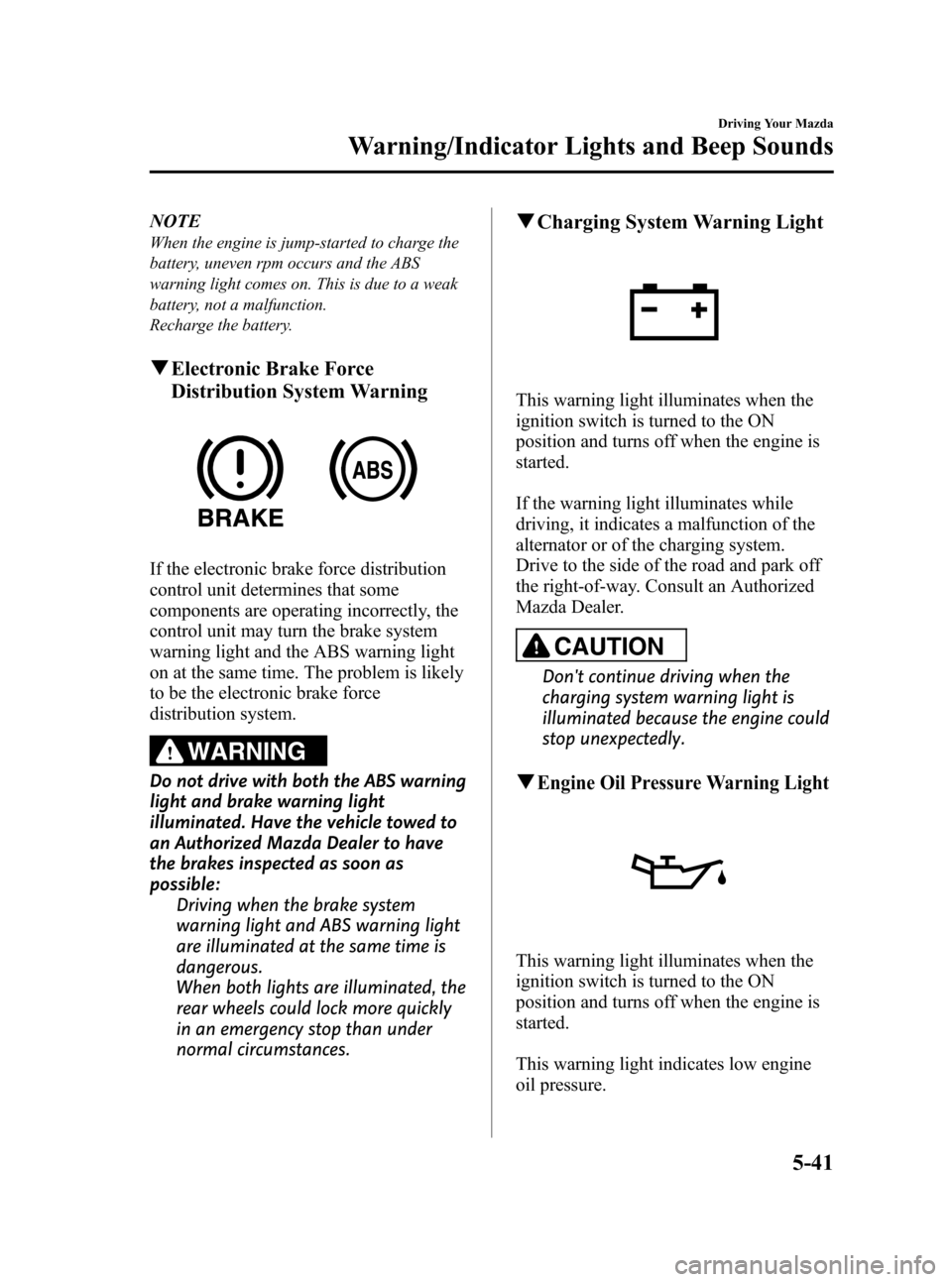
qElectronic Brake Force
Distribution System Warning
If the electronic brake force distribution
control unit determines that some
components are operating incorrectly, the
control unit may turn the brake system
warning light and the ABS warning light
on at the same time. The problem is likely
to be the electronic brake force
distribution system.
WARNING
Do not drive with both the ABS warning
light and brake warning light
illuminated. Have the vehicle towed to
an Authorized Mazda Dealer to have
the brakes inspected as soon as
possible:
Driving when the brake system
warning light and ABS warning light
are illuminated at the same time is
dangerous.
When both lights are illuminated, the
rear wheels could lock more quickly
in an emergency stop than under
normal circumstances.
qCharging System Warning Light
This warning light illuminates when the
ignition switch is turned to the ON
position and turns off when the engine is
started.
If the warning light illuminates while
driving, it indicates a malfunction of the
alternator or of the charging system.
Drive to the side of the road and park off
the right-of-way. Consult an Authorized
Mazda Dealer.
CAUTION
Don't continue driving when the
charging system warning light is
illuminated because the engine could
stop unexpectedly.
qEngine Oil Pressure Warning Light
This warning light illuminates when the
ignition switch is turned to the ON
position and turns off when the engine is
started.
This warning light indicates low engine
oil pressure.
Driving Your Mazda
Warning/Indicator Lights and Beep Sounds
5-41
CX-7_8Z60-EA-08D_Edition2 Page199
Friday, May 30 2008 5:27 PM
Form No.8Z60-EA-08D
Page 203 of 454
Black plate (203,1)
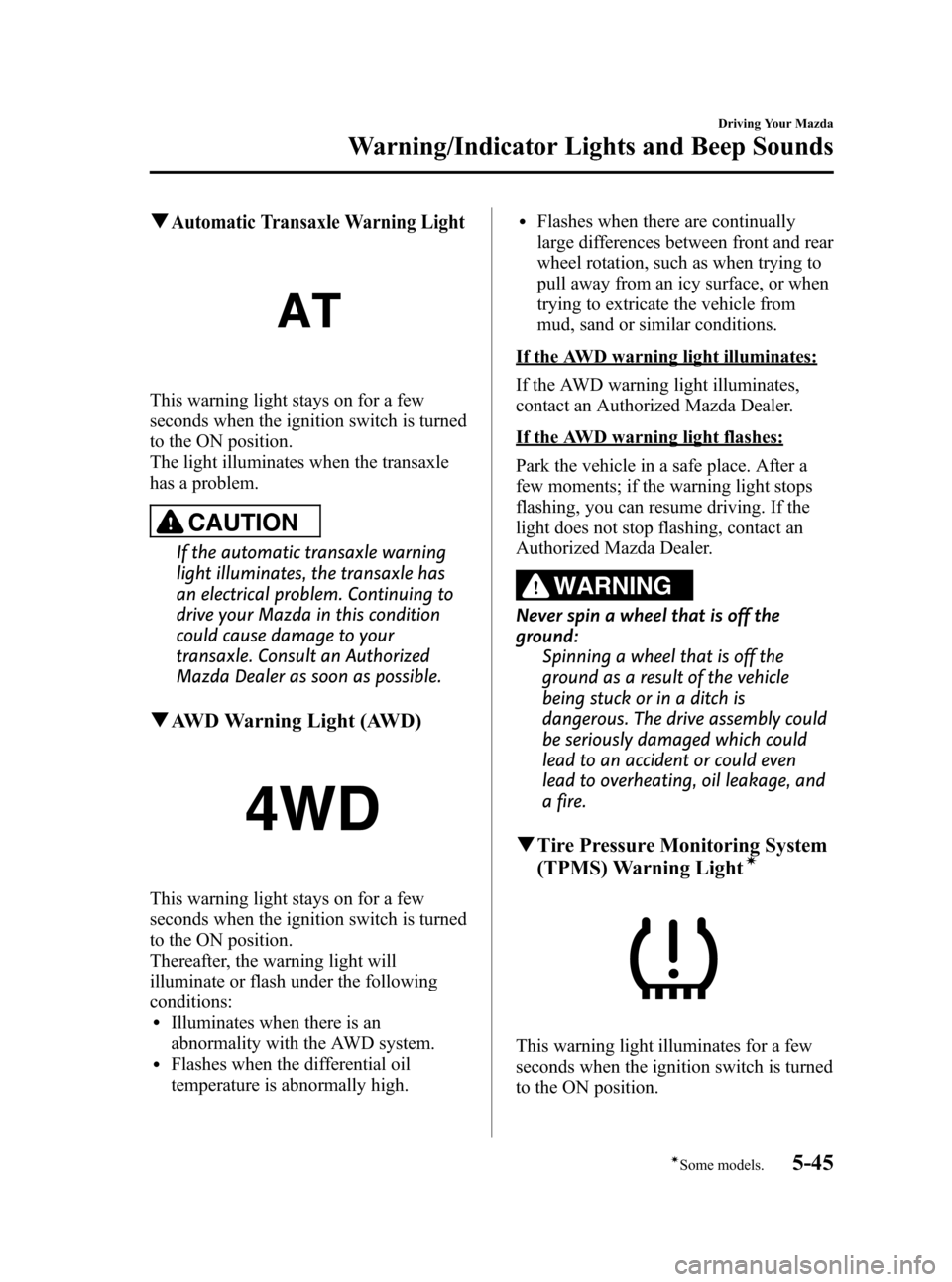
qAutomatic Transaxle Warning Light
This warning light stays on for a few
seconds when the ignition switch is turned
to the ON position.
The light illuminates when the transaxle
has a problem.
CAUTION
If the automatic transaxle warning
light illuminates, the transaxle has
an electrical problem. Continuing to
drive your Mazda in this condition
could cause damage to your
transaxle. Consult an Authorized
Mazda Dealer as soon as possible.
qAWD Warning Light (AWD)
This warning light stays on for a few
seconds when the ignition switch is turned
to the ON position.
Thereafter, the warning light will
illuminate or flash under the following
conditions:
lIlluminates when there is an
abnormality with the AWD system.
lFlashes when the differential oil
temperature is abnormally high.
lFlashes when there are continually
large differences between front and rear
wheel rotation, such as when trying to
pull away from an icy surface, or when
trying to extricate the vehicle from
mud, sand or similar conditions.
If the AWD warning light illuminates:
If the AWD warning light illuminates,
contact an Authorized Mazda Dealer.
If the AWD warning light flashes:
Park the vehicle in a safe place. After a
few moments; if the warning light stops
flashing, you can resume driving. If the
light does not stop flashing, contact an
Authorized Mazda Dealer.
WARNING
Never spin a wheel that is off the
ground:
Spinning a wheel that is off the
ground as a result of the vehicle
being stuck or in a ditch is
dangerous. The drive assembly could
be seriously damaged which could
lead to an accident or could even
lead to overheating, oil leakage, and
a fire.
qTire Pressure Monitoring System
(TPMS) Warning Lightí
This warning light illuminates for a few
seconds when the ignition switch is turned
to the ON position.
Driving Your Mazda
Warning/Indicator Lights and Beep Sounds
5-45íSome models. CX-7_8Z60-EA-08D_Edition2 Page203
Friday, May 30 2008 5:27 PM
Form No.8Z60-EA-08D
Page 204 of 454

Black plate (204,1)
Thereafter, the warning light illuminates
and a beep is heard when tire pressure is
too low in one or more tires, and flashes
when there is a system malfunction.
WARNING
If the tire pressure monitoring system
warning light illuminates or flashes, or
the tire pressure warning beep sound is
heard, decrease vehicle speed
immediately and avoid sudden
maneuvering and braking:
If the tire pressure monitoring system
warning light illuminates or flashes,
or the tire pressure warning beep
sound is heard, it is dangerous to
drive the vehicle at high speeds, or
perform sudden maneuvering or
braking. Vehicle drivability could
worsen and result in an accident.
To determine if you have a slow leak
or a flat, pull over to a safe position
where you can check the visual
condition of the tire and determine if
you have enough air to proceed to a
place where air may be added and
the system monitored again, an
Authorized Mazda Dealer or a tire
repair station.
Do not ignore the TPMS Warning Light:
Ignoring the TPMS warning light is
dangerous, even if you know why it is
illuminated. Have the problem taken
care of as soon as possible before it
develops into a more serious
situation that could lead to tire
failure and a dangerous accident.
Warning light illuminates/Warning
beep sounds
When the warning light illuminates, and
the warning beep sound is heard (about 3
seconds), tire pressure is too low in one or
more tires.
Adjust the tire pressure to the correct tire
pressure. Refer to the specification charts
(page 10-6).
CAUTION
When replacing/repairing the tires or
wheels or both, have the work done
by an Authorized Mazda Dealer, or
the tire pressure sensors may be
damaged.
5-46
Driving Your Mazda
Warning/Indicator Lights and Beep Sounds
CX-7_8Z60-EA-08D_Edition2 Page204
Friday, May 30 2008 5:27 PM
Form No.8Z60-EA-08D
Page 218 of 454

Black plate (218,1)
Horn
To sound the horn, press themark on
the steering wheel.
Hazard Warning Flasher
The hazard warning lights should always
be used when you stop on or near a
roadway in an emergency.
The hazard warning lights warn other
drivers that your vehicle is a traffic hazard
and that they must take extreme caution
when near it.
Depress the hazard warning flasher and all
the turn signals will flash.
NOTE
lThe turn signals do not work when the
hazard warning lights are on.
lCheck local regulations about the use of
hazard warning lights while the vehicle is
being towed to verify that it is not in
violation of the law.
5-60
Driving Your Mazda
Switches and Controls
CX-7_8Z60-EA-08D_Edition2 Page218
Friday, May 30 2008 5:27 PM
Form No.8Z60-EA-08D
Page 223 of 454
Black plate (223,1)
6Interior Comfort
Use of various features for drive comfort, including air-conditioning and audio
system.
Climate Control System ............................................................... 6-2
Operating Tips ........................................................................... 6-2
Vent Operation .......................................................................... 6-3
Types of the Climate Control System ....................................... 6-5
Manual Type ............................................................................. 6-6
Fully Automatic Type ............................................................. 6-10
Audio System ............................................................................... 6-15
Antenna ................................................................................... 6-15
Operating Tips for Audio System ........................................... 6-16
Audio Set ................................................................................ 6-25
Audio Control Switch Operation (Steering Wheel) ................ 6-56
AUX Mode (Auxiliary input) ................................................. 6-58
Safety Certification ................................................................. 6-61
Bluetooth Hands-Free ................................................................. 6-62
Bluetooth Hands-Free
í.......................................................... 6-62
Basic Bluetooth Hands-Free Operation ................................... 6-66
Convenient Use of the Hands-Free System ............................. 6-69
Hands-Free Telephone Setting ................................................ 6-75
When Bluetooth Hands-Free cannot be used .......................... 6-80
Safety Certification ................................................................. 6-80
Mazda Bluetooth Hands-Free Customer Service .................... 6-81
Interior Equipment ..................................................................... 6-82
Sunvisors ................................................................................. 6-82
Interior Lights ......................................................................... 6-83
Information Display ................................................................ 6-85
Cup Holder .............................................................................. 6-87
Bottle Holder ........................................................................... 6-88
Storage Compartments ............................................................ 6-89
Accessory Sockets .................................................................. 6-91
6-1íSome models.
CX-7_8Z60-EA-08D_Edition2 Page223
Friday, May 30 2008 5:27 PM
Form No.8Z60-EA-08D
Page 225 of 454

Black plate (225,1)
Vent Operation
Push
qAdjusting the Vents
Directing airflow
You can direct air flow by rotating the vent.
Opening/closing vents
These vents can be opened and closed with wheel.
NOTE
When using the air conditioner, mist may come out from the vents. This is not a sign of trouble but a
result of humid air being suddenly cooled.
Interior Comfort
Climate Control System
6-3
CX-7_8Z60-EA-08D_Edition2 Page225
Friday, May 30 2008 5:27 PM
Form No.8Z60-EA-08D
Page 238 of 454
Black plate (238,1)
Operating Tips for Audio
System
WARNING
Do not adjust the audio control
switches while driving the vehicle:
Adjusting the audio while driving the
vehicle is dangerous as it could
distract your attention from the
vehicle operation which could lead to
a serious accident. Always adjust the
audio while the vehicle is stopped.
Even if the audio control switches are
equipped on the steering wheel, learn
to use the switches without looking
down at them so that you can keep
your maximum attention on the road
while driving the vehicle.
CAUTION
For the purposes of safe driving,
adjust the audio volume to a level
that allows you to hear sounds
outside of the vehicle.
NOTE
lDo not use the audio for long periods of
time while the engine is off. Otherwise the
battery could go dead.
lIf a cellular phone or CB radio is used in
or near the vehicle, it could cause noise to
occur from the audio system, however, this
does not indicate that the system has been
damaged.
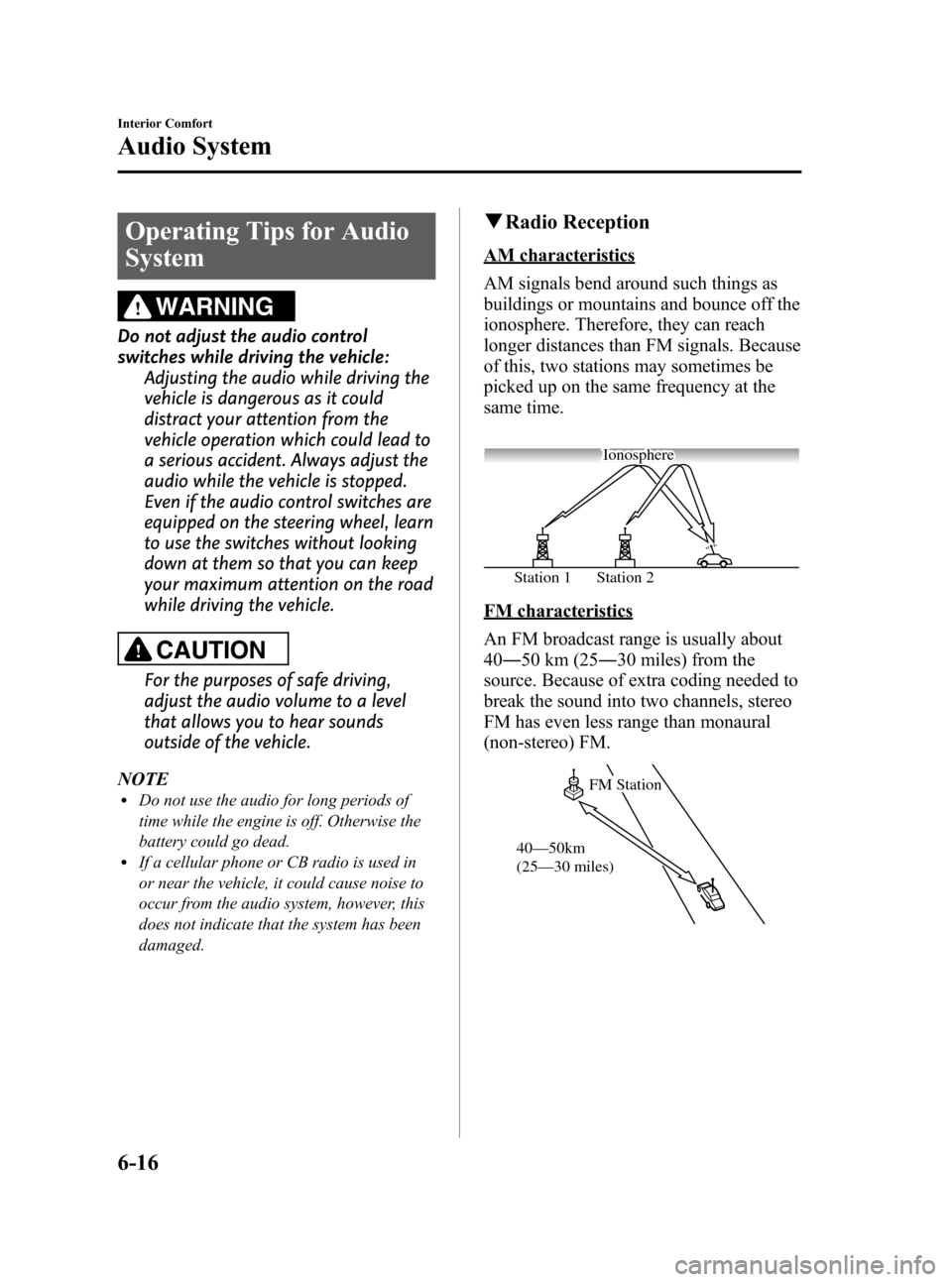
qRadio Reception
AM characteristics
AM signals bend around such things as
buildings or mountains and bounce off the
ionosphere. Therefore, they can reach
longer distances than FM signals. Because
of this, two stations may sometimes be
picked up on the same frequency at the
same time.
Station 2 Station 1Ionosphere
FM characteristics
An FM broadcast range is usually about
40―50 km (25―30 miles) from the
source. Because of extra coding needed to
break the sound into two channels, stereo
FM has even less range than monaural
(non-stereo) FM.
FM Station
40—50km
(25—30 miles)
6-16
Interior Comfort
Audio System
CX-7_8Z60-EA-08D_Edition2 Page238
Friday, May 30 2008 5:27 PM
Form No.8Z60-EA-08D
Page 278 of 454

Black plate (278,1)
Audio Control Switch
Operation (Steering Wheel)
When the audio unit is turned on,
operation of the audio unit from the
steering wheel is possible.
NOTE
Because the audio unit will be turned off under
the following conditions, the switches will be
inoperable.
lWhen the ignition switch is turned to the
LOCK position.
lWhen the power button on the audio unit is
pressed and the audio unit is turned off.
lWhen the CD being played is ejected and
the audio unit is turned off.
Without Bluetooth Hands-Free and
navigation system
With Bluetooth Hands-Free only/
Bluetooth Hands-Free and navigation
system
Use the talk button, pick-up button, and
hang-up button for navigation system
sound operation.
For details, refer to the separate manual
“NAVIGATION SYSTEM”.
Talk button
Hang-up button Pick-up button
NOTElThe talk button, pick-up button, and hang-
up button are operable with the audio unit
turned off.
lMazda has installed this system to prevent
distraction while driving the vehicle and
using audio controls on the dashboard.
Always make safe driving your first priority.
6-56
Interior Comfort
Audio System
CX-7_8Z60-EA-08D_Edition2 Page278
Friday, May 30 2008 5:28 PM
Form No.8Z60-EA-08D
Page 282 of 454

Black plate (282,1)
3. Press the MEDIA button ()of
the audio unit or the mode switch
(
) of the audio control switches
on the steering wheel to change to the
AUX mode.
Audio Unit Audio Control
Switches
NOTElSet the volume of the portable audio unit to
the maximum within the range that the
sound does not become distorted, then
adjust the volume using the power/volume
dial of the audio unit or the up/down switch
of the audio control switch.
lIf the connection plug is pulled out from the
auxiliary jack while in AUX mode, noise
may occur.
6-60
Interior Comfort
Audio System
CX-7_8Z60-EA-08D_Edition2 Page282
Friday, May 30 2008 5:28 PM
Form No.8Z60-EA-08D