rear entertainment MAZDA MODEL CX-9 2007 Owners Manual (in English)
[x] Cancel search | Manufacturer: MAZDA, Model Year: 2007, Model line: MODEL CX-9, Model: MAZDA MODEL CX-9 2007Pages: 502, PDF Size: 9.94 MB
Page 10 of 502
Black plate (10,1)
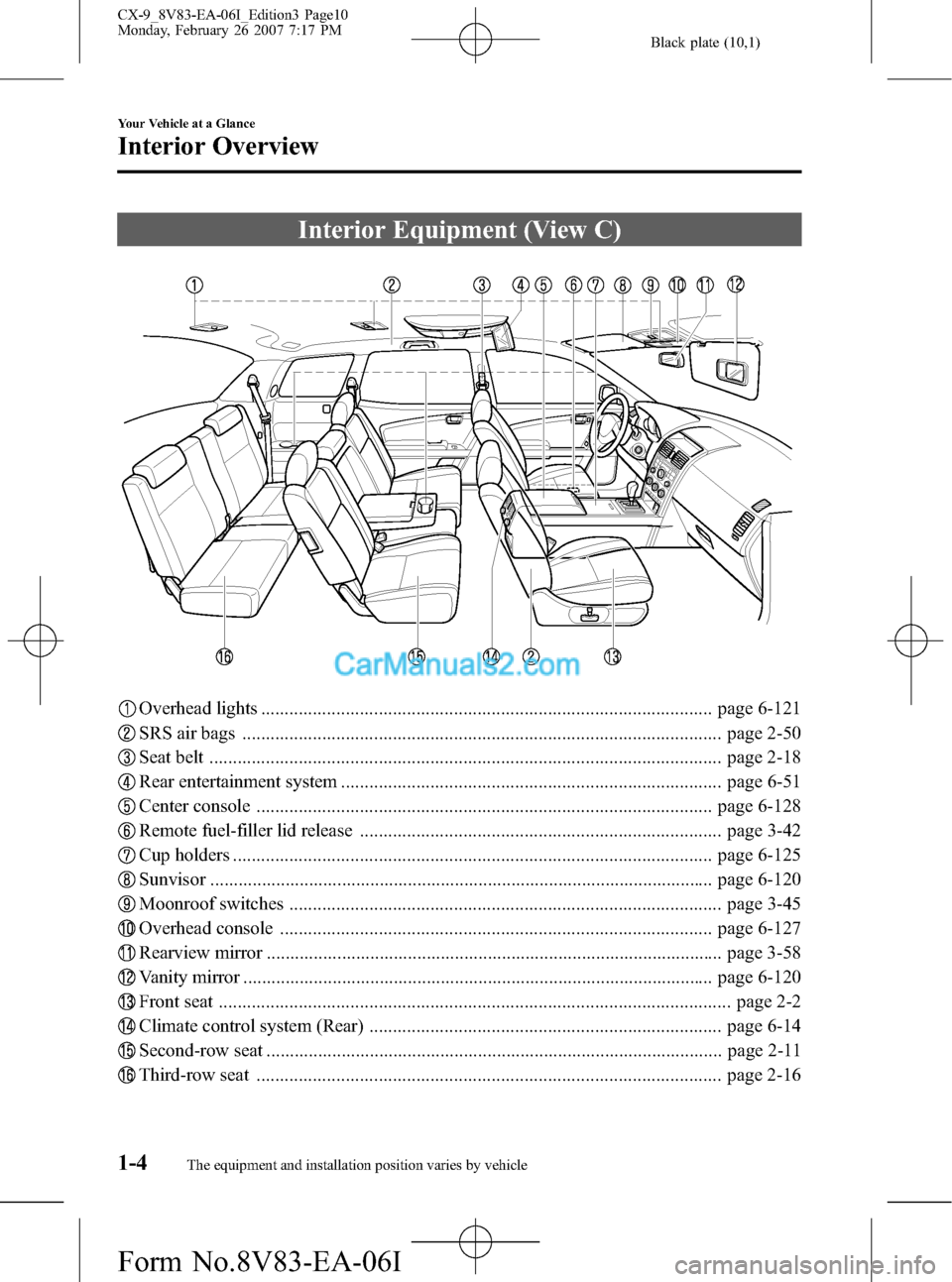
Interior Equipment (View C)
Overhead lights ................................................................................................ page 6-121
SRS air bags ...................................................................................................... page 2-50
Seat belt ............................................................................................................. page 2-18
Rear entertainment system ................................................................................. page 6-51
Center console ................................................................................................. page 6-128
Remote fuel-filler lid release ............................................................................. page 3-42
Cup holders ...................................................................................................... page 6-125
Sunvisor ........................................................................................................... page 6-120
Moonroof switches ............................................................................................ page 3-45
Overhead console ............................................................................................ page 6-127
Rearview mirror ................................................................................................. page 3-58
Vanity mirror .................................................................................................... page 6-120
Front seat ............................................................................................................. page 2-2
Climate control system (Rear) ........................................................................... page 6-14
Second-row seat ................................................................................................. page 2-11
Third-row seat ................................................................................................... page 2-16
1-4
Your Vehicle at a Glance
The equipment and installation position varies by vehicle
Interior Overview
CX-9_8V83-EA-06I_Edition3 Page10
Monday, February 26 2007 7:17 PM
Form No.8V83-EA-06I
Page 227 of 502

Black plate (227,1)
6Interior Comfort
Use of various features for drive comfort, including air-conditioning and audio
system.
Climate Control System .......................... 6-2
Operating Tips .................................... 6-2
Vent Operation (Front) ........................ 6-4
Fully Automatic Type ......................... 6-6
Vent Operation (Rear) ....................... 6-12
Control Panel (Rear) ......................... 6-14
Audio System ......................................... 6-17
Antenna ............................................. 6-17
Operating Tips for Audio System ..... 6-17
Audio Set .......................................... 6-27
Audio Control Switch Operation (Steering
Wheel) ............................................... 6-46
Auxiliary Input (AUX mode) ............ 6-48
Safety Certification ........................... 6-50
Rear Entertainment System ................. 6-51
Rear Entertainment System
í............ 6-51
Part Names ........................................ 6-60
Before Operation ............................... 6-63
Sound Output .................................... 6-69
Rear Entertainment System
Functions ........................................... 6-73
DVD video, DVD audio, Video CD, Audio
CD and MP3/WMA CD Playback (Disc
Mode) ................................................ 6-74
Auxiliary Input (AUX mode) ............ 6-88
Language Code List .......................... 6-92
Country Code List ............................. 6-94
Error Message ................................... 6-98
Symptoms and Actions ................... 6-100Bluetooth Hands-Free ......................... 6-103
Bluetooth Hands-Free
í.................. 6-103
Basic Bluetooth Hands-Free
Operation ........................................ 6-106
Convenient Use of the Hands-Free
System ............................................. 6-109
Hands-Free Telephone Setting ........ 6-113
When the Bluetooth Hands-Free cannot be
used ................................................. 6-118
Safety Certification ......................... 6-119
Interior Equipment ............................. 6-120
Sunvisors ......................................... 6-120
Interior Lights ................................. 6-121
Information Display ........................ 6-123
Cup Holder ...................................... 6-125
Bottle Holder ................................... 6-127
Storage Compartments .................... 6-127
Accessory Sockets .......................... 6-131
Power Outlet
í................................ 6-132
6-1íSome models.
CX-9_8V83-EA-06I_Edition3 Page227
Monday, February 26 2007 7:19 PM
Form No.8V83-EA-06I
Page 256 of 502

Black plate (256,1)
NOTEl“DVD”or“Surround”is displayed in
areas depending on the model.l“MUSIC”or“ALL”is displayed in
areas depending on the model.l“MOVIE”or“Rr”is displayed in
areas depending on the model.
The display switches to the 5.1-channel
sound mode when the following
conditions are met:
lThe vehicle is Rear Entertainment
System equipped.
lThe mode is switched to“RSES”(page
6-47).
lA CD or a DVD is inserted in the Rear
Entertainment System or the sound of
the disc is 5.1 Dolby Digital/DTS
audio.
NOTE
About 5 seconds after selecting any mode, the
volume function will be automatically selected.
To reset bass, treble, fade, and balance, press
the audio control dial for 2 seconds. The unit
will beep and“CLEAR”will be displayed.
Automatic Level Control (ALC)
(Standard audio-equipped model)
The automatic level control is a feature
that automatically adjusts audio volume
and sound quality according to the vehicle
speed.
The volume increases in accordance with
the increase in vehicle speed, and
decreases as vehicle speed decreases.The following four modes are available.
Select the desired mode.
Mode Volume change
No change
Minimum
Medium
Maximum
Turn the audio control dial to select ALC
OFF or ALC LEVEL1―3 modes. The
selected mode will be indicated.
*AudioPilotTM(Bose®Sound System-
equipped model)
AudioPilot automatically adjusts audio
volume and sound quality in accordance
with the level of noise entering the vehicle
interior while driving. When AudioPilot is
turned ON, the system automatically
calculates the conditions for optimum
hearing of sound which may be difficult
to hear depending on exterior noise.
* AudioPilot
TMis a registered trademark
of Bose Corporation.
6-30
Interior Comfort
Audio System
CX-9_8V83-EA-06I_Edition3 Page256
Monday, February 26 2007 7:19 PM
Form No.8V83-EA-06I
Page 257 of 502

Black plate (257,1)
*Centerpoint®(Bose®Sound System-
equipped model)
Centerpoint offers you the experience of
5.1-channel surround sound in your
vehicle even with your conventional 2-
channel stereo DVDs inserted in the Rear
Entertainment System main unit or 2-
channel stereo CDs.
Turn up the volume to enhance the
surround sound effect, or down to lessen
it.
Indication Volume change
Minimum
Low
Medium
High
Maximum
1. Turn the audio control dial and select
CENTERPT ON.
2. Press the audio control dial and select
the surround effect mode.
3. Turn the audio control dial to select
CENTERPT MIN―MAX mode. The
selected mode will be indicated.
NOTElCenterpoint®operates only with a 2-
channel stereo CD.
lCenterpoint®does not work with AM/FM/
SIRIUS/AUX.
* Centerpoint®is a registered trademark
of Bose Corporation.
Rear seat-optimized
The rear seat-optimized function allows
passengers to optimize the audio output to
the rear for a more pleasurable acoustic
field when selecting the 5.1-channel
sound mode.
Select DVD MOVIE
*1to increase the
surround effect to the rear seat. Select
DVD MUSIC
*2to apply the surround
effect to all seats.
*1“Surround”and“Rr”will be displayed
instead of“DVD”and“MOVIE”
depending on the model.
*2“Surround”and“ALL”will be
displayed instead of“DVD”and
“MUSIC”depending on the model.
NOTE
Rear seat-optimized is only effective if a CD or
a DVD inserted in the Rear Entertainment
System main unit is 5.1 Dolby Digital/DTS
audio.
Interior Comfort
Audio System
6-31
CX-9_8V83-EA-06I_Edition3 Page257
Monday, February 26 2007 7:19 PM
Form No.8V83-EA-06I
Page 277 of 502

Black plate (277,1)
Rear Entertainment Systemí
qRear Entertainment System Outline
The Rear Entertainment System has a 9.0-inch wide LCD, as well as DVD video, DVD
audio, video CD, audio CD, and MP3/WMA CD playback functions. Moreover, the system
is equipped with input terminals for video picture and audio sound, and AV equipment such
as a video game player or a video camera can be connected and displayed on the monitor
screen.
qProper Operation of Rear Entertainment System
For safe driving, read the following warnings and cautions before starting operation, and
use the system properly.
WARNING
ØDo not disassemble or modify this unit.
It may cause an accident, fire, or electrical shock.
ØDo not use if there is a malfunction condition such as no screen image or sound.
It may cause an accident, fire, or electrical shock. Follow the procedures in
“Symptoms and Actions”(page 6-100) and if the problem is not resolved, consult
an Authorized Mazda Dealer.
ØDo not use if some problem has occurred.
If any problem occurs, such as a foreign material penetration, spilled liquid,
smoking from internal burning, or other abnormal smells, stop operation
immediately and consult an Authorized Mazda Dealer. If operation is continued, it
may cause an accident, fire, or electrical shock.
ØLower the volume to minimum before turning off the power.
If the volume is set high, loud sound will be produced when turning on the power,
causing auditory problems or an accident.
ØAdjust the volume while driving so that ambient sound can be heard.
If the volume is too high and ambient sound cannot be heard while driving,
driving operation could be obstructed causing an accident.
ØDo not leave the remote controller and the headphones unstowed.
If the remote controller and the headphone are not stowed, they could fall under
the brake pedal during a sudden stop or while turning, which could obstruct
driving operation and cause an accident.
CAUTION
ØDo not put foreign material into the disc slot.
It may cause a fire or malfunction.
ØDo not clean plastic finished parts with solvent such as benzene or thinner.
The parts may deform causing a fire or malfunction.
Interior Comfort
Rear Entertainment System
6-51íSome models. CX-9_8V83-EA-06I_Edition3 Page277
Monday, February 26 2007 7:19 PM
Form No.8V83-EA-06I
Page 278 of 502

Black plate (278,1)
qOperating Tips for Disc
Playable discs
DVD video
*1, DVD audio*2, video CD, audio CD, CD-R, CD-RW, DVD-R, DVD-RW and
dts CD*3can be played.
NOTE
It may not be possible to play DVD video, DVD audio, video CD, audio CD, and MP3/WMA CD
according to the procedures indicated in these instructions if the playback conditions have been
restricted by the producer.
Read the instruction manual accompanying the DVD video, video CD, DVD audio, audio CD.
6-52
Interior Comfort
Rear Entertainment System
CX-9_8V83-EA-06I_Edition3 Page278
Monday, February 26 2007 7:19 PM
Form No.8V83-EA-06I
Page 279 of 502

Black plate (279,1)
DVD video
●Region code must include“1”or“ALL”.
●NTSC
(National Television System Committee)
recorded type.
●8 cm (3in) or 12 cm (5in) size DVD videos bearing the following logo can be played.
DVD audio
DVD audio bearing the following logo can be played.
DVD-R and DVD-RW
DVD-Rs and DVD-RWs bearing each of the following logos can
be played.
Video CD, audio CD, CD-R, and CD-RW
●Playback control function supported.
●8 cm (3in) or 12 cm (5in) size
●MP3 recorded type. Video CDs, audio CDs, CD-Rs, and CD-RWs bearing each of the
following logos can be played.
*1: Audio is not produced by the headphones when DTS audio is selected. Listen to DTS audio over the vehicle's
speakers.
*2: Stereo playback is produced.
*3: Audio is not produced from the headphones. Listen to this audio from the speakers.
Unplayable discs
lDiscs not bearing the logo mark indicated in the above table.lDiscs not including“1”or“ALL”in region code.lDiscs recorded in other than NTSC (e.g. PAL or SECAM).
Interior Comfort
Rear Entertainment System
6-53
CX-9_8V83-EA-06I_Edition3 Page279
Monday, February 26 2007 7:19 PM
Form No.8V83-EA-06I
Page 280 of 502

Black plate (280,1)
lDVD-ROM, DVD-RAM, DVD+RW, CD-ROM, CDV, CD-G, CVD, VSD, SVCD,
SACD, photo CDs, non-conventional discs (e.g. heart-shaped), and partially transparent
discs.
lDiscs recorded in CD-TEXT format.lHD DVD and Blu-ray discs
Handling of discs
lDo not use non-conventional discs such as heart-shaped, octagonal discs, or discs with a
memory portion that is transparent or translucent. The unit could be damaged.
Transparent
lWhen driving over uneven surfaces, the sound may jump.lBe sure never to touch the signal surface when handling the discs. Pick up the discs by
grasping the outer edge or the edge of the hole and the outer edge.
lDo not write on or attach labels, stickers or similar to discs.lDefective (cracked or badly bent) discs should never be used.lA new disc may have rough edges on its inner and outer perimeters. If a disc with rough
edges is used, proper setting will not be possible and the unit will not play the disc.
Remove the rough edges in advance by using a ball-point pen or pencil as shown below.
To remove the rough edges, rub the side of the pen or pencil against the inner and outer
perimeter of the discs.
6-54
Interior Comfort
Rear Entertainment System
CX-9_8V83-EA-06I_Edition3 Page280
Monday, February 26 2007 7:19 PM
Form No.8V83-EA-06I
Page 281 of 502

Black plate (281,1)
Disc cleaning
Do not use record sprays, antistatic agents, or household spray cleaners. Volatile chemicals
such as benzine and thinner can also damage the surface of the disc and must not be used.
Anything that can damage, warp or fog plastic should never be used to clean discs.
Condensation
Immediately after turning on the heater when the vehicle is cold, the disc or optical
components (prism and lens) in the unit may become clouded with condensation. At this
time, the disc will eject immediately when placed in the unit. A clouded disc can be
corrected simply by wiping it with a soft cloth. Clouded optical components will clear
naturally in about an hour. Wait for normal operation to return before attempting to use the
unit.
Operating tips for DVD video
Region code
The playback restriction area is set in a DVD video. The playback restriction area is
indicated by a region code, and a DVD video can be played only in its indicated area.
The region code for U.S.A. and Canada are“1”. DVD videos bearing region code
including“1”or“ALL”on the package or the instruction manual can be played by this
unit. The region code setting for this unit has been set to“1”.
DVD videos bearing any of the following logos on the package or instruction manual can
be played.
Interior Comfort
Rear Entertainment System
6-55
CX-9_8V83-EA-06I_Edition3 Page281
Monday, February 26 2007 7:19 PM
Form No.8V83-EA-06I
Page 282 of 502

Black plate (282,1)
Playable DISC specification
CD-R and CD-RW including MP3/WMA files can be played with this unit. Discs which
conform to the following formats can be played.
Name Standard Explanation
CD-R, CD-RW formatISO9660Level 1
Level 2
ISO9660 extensionJoliet
Romeo
Multi-session Supported
Maximum hierarchy
number8 hierarchies (Including root)
Maximum folder
number256 folders
Maximum file number512 files (Total capacity included in a disc.) Files other than MP3 or WMA are not
included.)
Operating tips for MP3
NOTE
Supply of this product only conveys a license for private, non-commercial use and does not convey a
license nor imply any right to use this product in any commercial (i.e. revenue-generating) real time
broadcasting (terrestrial, satellite, cable and/or any other media), broadcasting/streaming via the
Internet, intranets and/or other networks or in other electronic content distribution systems, such as
pay-audio or audio-on-demand applications. An independent license for such use is required. For
details, please visit http://www.mp3licensing.com.
Playable MP3 file specification
Playable MP3 files are as follows:
Item Content
SpecificationMPEG1 AUDIO LAYER3
MPEG2.5 AUDIO LAYER3
MPEG2 AUDIO LAYER3
Sampling frequencyMPEG1 32, 44.1, 48kHz
MPEG2 16, 22.05, 24kHz
Bit rateMPEG132, 40, 48, 56, 64, 80, 96, 112, 128, 160, 192, 224, 256, 320
kbps
MPEG2, 2.5 32, 40, 48, 56, 64, 80, 96, 112, 128, 144, 160 kbps
VBR (Variable Bit Rate) Supported
Channel mode Stereo, Joint stereo, Dual channel, Monaural
ID3 tag Ver. 1.0, Ver. 1.1 title, artist name, album name
lThis unit corresponds to MP3 files in which both header and data comply with the MP3
format.
6-56
Interior Comfort
Rear Entertainment System
CX-9_8V83-EA-06I_Edition3 Page282
Monday, February 26 2007 7:19 PM
Form No.8V83-EA-06I