AUX MAZDA MODEL CX-9 2008 (in English) Owner's Manual
[x] Cancel search | Manufacturer: MAZDA, Model Year: 2008, Model line: MODEL CX-9, Model: MAZDA MODEL CX-9 2008Pages: 506, PDF Size: 11.52 MB
Page 259 of 506

Black plate (259,1)
*AudioPilot®(Bose®Sound System-
equipped model)
AudioPilot automatically adjusts audio
volume and sound quality in accordance
with the level of noise entering the vehicle
interior while driving. When AudioPilot is
turned ON, the system automatically
calculates the conditions for optimum
hearing of sound which may be difficult
to hear depending on exterior noise.
* AudioPilot
®is a registered trademark
of Bose Corporation.
*Centerpoint®(Bose®Sound System-
equipped model)
Centerpoint offers you the experience of
5.1-channel surround sound in your
vehicle even with your conventional 2-
channel stereo DVDs inserted in the Rear
Entertainment System main unit or 2-
channel stereo CDs.
The true surround sound effect of
Centerpoint can be adjusted to any one of
five level between minimum and
maximum enhancement.
Indication Enhance level
Minimum
Low
Medium
High
Maximum
1. Turn the audio control dial and select
CENTERPT ON.
2. Press the audio control dial and select
the surround effect mode.3. Turn the audio control dial to select
CENTERPT MIN―MAX mode. The
selected mode will be indicated.
NOTElCenterpoint®operates optimally with a 2-
channel stereo CD. MP3 audio files can be
played, however, MP3 audio files encoded
with high compression may result in poor
sound quality.
lCenterpoint®is available for 2-channel
stereo audio except for AM/FM/SIRIUS/
AUX.
* Centerpoint®is a registered trademark
of Bose Corporation.
Rear seat-optimized
The rear seat-optimized function allows
passengers to optimize the audio output to
the rear for a more pleasurable acoustic
field when selecting the 5.1-channel
sound mode.
Select Surround Rr to increase the
surround effect to the rear seat. Select
Surround ALL to apply the surround
effect to all seats.
NOTE
Rear seat-optimized is only effective if a CD or
a DVD inserted in the Rear Entertainment
System main unit is 5.1 Dolby Digital/DTS
audio.
Interior Comfort
Audio System
6-31
CX-9_8Z28-EA-07J_Edition2 Page259
Thursday, November 22 2007 12:4 AM
Form No.8Z28-EA-07J
Page 272 of 506

Black plate (272,1)
Display scroll (MP3 compatible type)
Only 12 characters can be displayed at
one time. To display the rest of the
characters of a long title, turn the display
feed dial (
) to the right. Hidden
titles can be scrolled into the display one
character at a time.
NOTE
The displayable number of characters is
limited. If the number of characters, including
the file extension (.mp3), exceeds 32
characters, it may not be fully displayed.
Message display
If“CHECK CD”is displayed, it means
that there is some CD malfunction. Check
the CD for damage, dirt, or smudges, and
then properly reinsert. If the message
appears again, take the unit to an
Authorized Mazda Dealer for service.
qOperating the Auxiliary jack
You can connect portable audio units or
similar products on the market to the
auxiliary jack to listen to music or audio
over the vehicle's speakers, refer to
Auxiliary Input (page 6-48).
6-44
Interior Comfort
Audio System
CX-9_8Z28-EA-07J_Edition2 Page272
Thursday, November 22 2007 12:4 AM
Form No.8Z28-EA-07J
Page 275 of 506
Black plate (275,1)
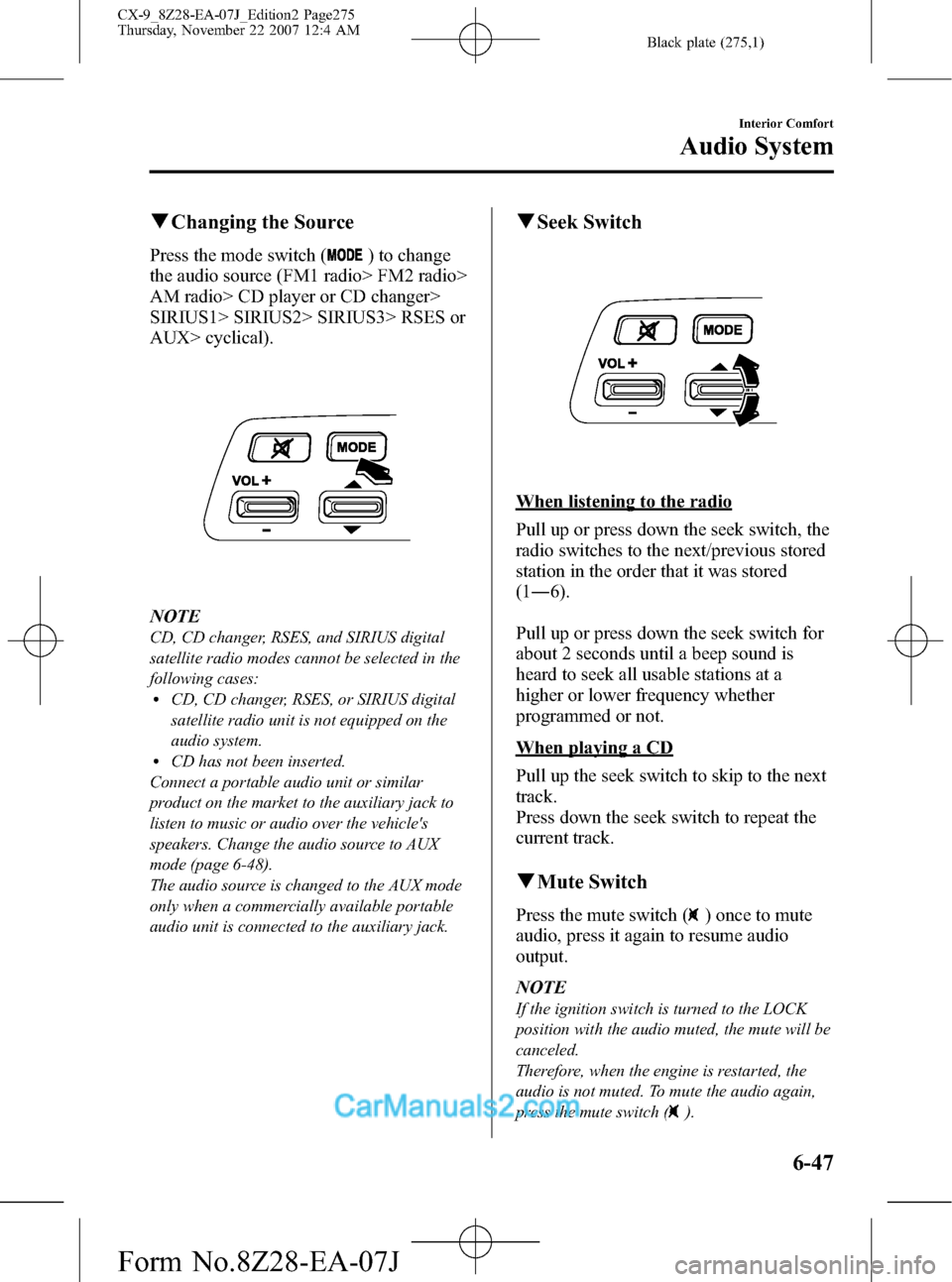
qChanging the Source
Press the mode switch () to change
the audio source (FM1 radio> FM2 radio>
AM radio> CD player or CD changer>
SIRIUS1> SIRIUS2> SIRIUS3> RSES or
AUX> cyclical).
NOTE
CD, CD changer, RSES, and SIRIUS digital
satellite radio modes cannot be selected in the
following cases:
lCD, CD changer, RSES, or SIRIUS digital
satellite radio unit is not equipped on the
audio system.
lCD has not been inserted.
Connect a portable audio unit or similar
product on the market to the auxiliary jack to
listen to music or audio over the vehicle's
speakers. Change the audio source to AUX
mode (page 6-48).
The audio source is changed to the AUX mode
only when a commercially available portable
audio unit is connected to the auxiliary jack.
qSeek Switch
When listening to the radio
Pull up or press down the seek switch, the
radio switches to the next/previous stored
station in the order that it was stored
(1―6).
Pull up or press down the seek switch for
about 2 seconds until a beep sound is
heard to seek all usable stations at a
higher or lower frequency whether
programmed or not.
When playing a CD
Pull up the seek switch to skip to the next
track.
Press down the seek switch to repeat the
current track.
qMute Switch
Press the mute switch () once to mute
audio, press it again to resume audio
output.
NOTE
If the ignition switch is turned to the LOCK
position with the audio muted, the mute will be
canceled.
Therefore, when the engine is restarted, the
audio is not muted. To mute the audio again,
press the mute switch (
).
Interior Comfort
Audio System
6-47
CX-9_8Z28-EA-07J_Edition2 Page275
Thursday, November 22 2007 12:4 AM
Form No.8Z28-EA-07J
Page 276 of 506

Black plate (276,1)
Auxiliary Input (AUX mode)
You can connect portable audio units or
similar products on the market to the
auxiliary jack to listen to music or audio
over the vehicle's speakers.
Auxiliary jack
WARNING
Do not adjust the portable audio unit
or a similar product while driving the
vehicle:
Adjusting the portable audio unit or
a similar product while driving the
vehicle is dangerous as it could
distract your attention from the
vehicle operation which could lead to
a serious accident. Always adjust the
portable audio unit or a similar
product while the vehicle is stopped.
6-48
Interior Comfort
Audio System
CX-9_8Z28-EA-07J_Edition2 Page276
Thursday, November 22 2007 12:4 AM
Form No.8Z28-EA-07J
Page 277 of 506
Black plate (277,1)
NOTElBefore using the auxiliary jack, read the
manufacturer's instructions for the product
being connected.
lUse a commercially-available, non-
impedance (3.5
) stereo mini plug for
connecting the portable audio unit to the
auxiliary jack. Before using the auxiliary
jack, read the manufacture's instructions
for connecting a portable audio unit to the
auxiliary jack.
lTo prevent discharging of the battery, do
not use the auxiliary input for long periods
with the engine off or idling.
lNoise may occur depending on the product
connected to the auxiliary jack.
lWith regard to connecting a portable audio
or similar device to a power source, use the
battery for the device, not the accessory
socket.
WARNING
Do not allow the connection plug cord
to get tangled with the parking brake
or the shift lever:
Allowing the plug cord to become
tangled with the parking brake or
the shift lever is dangerous as it
could interfere with driving, resulting
in an accident.
CAUTION
ØDo not place objects or apply force
to the auxiliary jack with the plug
connected.
ØNoise may occur during playback
if the accessory socket equipped
on the vehicle is used. (If noise
occurs, do not use the accessory
socket.)NOTE
lInsert the plug to the auxiliary jack
securely.
lInsert or remove the plug with the plug
perpendicular to the auxiliary jack hole.
lInsert or remove the plug by holding its
base.
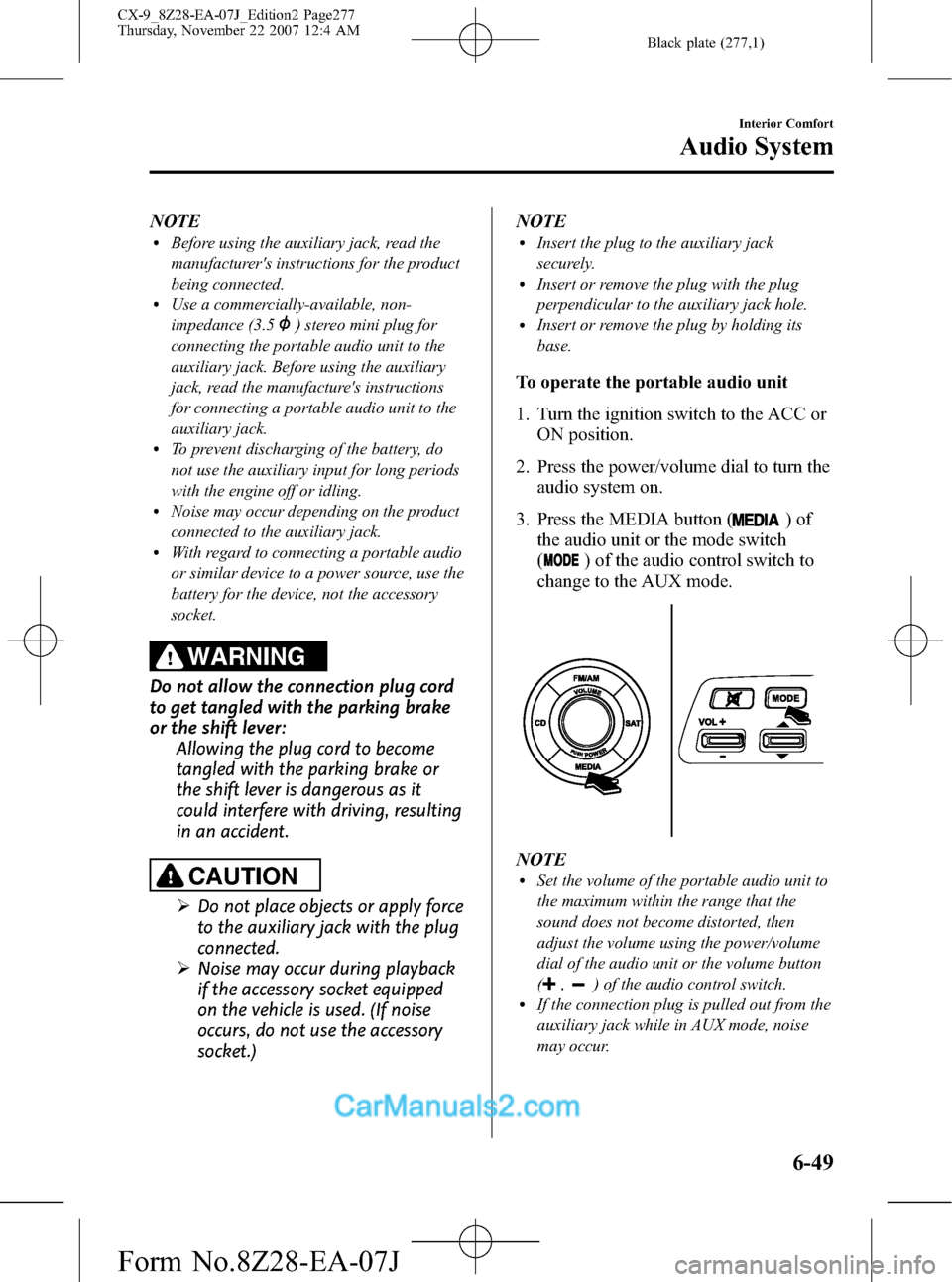
To operate the portable audio unit
1. Turn the ignition switch to the ACC or
ON position.
2. Press the power/volume dial to turn the
audio system on.
3. Press the MEDIA button (
)of
the audio unit or the mode switch
(
) of the audio control switch to
change to the AUX mode.
NOTElSet the volume of the portable audio unit to
the maximum within the range that the
sound does not become distorted, then
adjust the volume using the power/volume
dial of the audio unit or the volume button
(
,) of the audio control switch.lIf the connection plug is pulled out from the
auxiliary jack while in AUX mode, noise
may occur.
Interior Comfort
Audio System
6-49
CX-9_8Z28-EA-07J_Edition2 Page277
Thursday, November 22 2007 12:4 AM
Form No.8Z28-EA-07J
Page 301 of 506

Black plate (301,1)
Rear Entertainment System Functions
qMode
The Rear Entertainment System has Disc and AUX modes.
Mode Function Page
Disc modeDVD video, video CD, DVD audio, and audio CD can be
played.6-74
AUX (Auxiliary) mode
*AV equipment with output terminals for image and sound,
such as a video game player and a video camera, can be
used.6-88
* Auxiliary terminals in which AV equipment can be connected are equipped.
Refer to Auxiliary terminals and accessory socket on page 6-88.
Mode change
Press the SOURCE button. The mode changes between Disc and AUX.
Disc modeAUX mode
("AUX" is displayed.) ("DISC" is displayed.)
Interior Comfort
Rear Entertainment System
6-73
CX-9_8Z28-EA-07J_Edition2 Page301
Thursday, November 22 2007 12:5 AM
Form No.8Z28-EA-07J
Page 316 of 506

Black plate (316,1)
NOTElThe display angle change is not available
for discs other than multi-angle recorded
DVD discs. Refer to the instruction manual
accompanying the disc for details.
lThe screen size and angle can be changed
when On-Screen Mark and Angle Mark is
off.
Mode Priority
The priority of the inserted discs (CD-R/
CD-RW) can be selected.
Audio
Digital Output
Not used with this unit.
Audio DRC
The audio dynamic range can be adjusted
to reduce the difference between the
maximum and minimum audio output.
Audio compression of the DVD video
playback can be selected or deselected
during playback using the following
modes:
Mode Function
NONE Playback with normal volume
LINELower volume is increased to
reduce difference in volume range.
RFUse when it is still difficult to hear
sound while using LINE.
Sound quality is reduced while
using RF.
NOTE
Only sound output from the headphones is
available.
Auxiliary Input (AUX mode)
In AUX mode, AV equipment such as a
video game player or a video camera can
be used by connecting the image and
sound cables to the auxiliary terminals.
NOTE
lBefore operating, read the instruction
manual accompanying the AV equipment to
be used.
lTo listen to the Rear Entertainment System
sound from the vehicle speakers, change the
audio or navigation system sound to the
Rear Entertainment System sound.
Refer to Sound on page 6-69.
To listen to audio other than from the
speakers of the rear entertainment system, it
is necessary to use the wireless headphones
that are included. For headphone
specification, refer to
“Operation Tips for Headphones”(page
6-59).
lThe cooling fan for this unit may activate if
the temperature of the unit is high, however,
this does not indicate a malfunction.
qAuxiliary Terminals and Power
Outlet
The auxiliary terminals and power outlet
are positioned as shown in the figure.
Power outlet
(AC115V)
Auxiliary
terminals
6-88
Interior Comfort
Rear Entertainment System
CX-9_8Z28-EA-07J_Edition2 Page316
Thursday, November 22 2007 12:5 AM
Form No.8Z28-EA-07J
Page 317 of 506
Black plate (317,1)
Auxiliary terminals
The auxiliary terminals consist of one
image input terminal and two sound input
terminals (for left and right).
Image input terminal: Yellow
Sound input (Right) terminal: Red
Sound input (Left) terminal: White
To use, open the cover.
CAUTION
Close the cover when the terminals
are not in use. If foreign material
penetrates, or liquid is spilled on it, it
may cause a malfunction.
NOTE
lFor monaural equipment (with one sound
output terminal), connect the terminal to
the sound input terminal (White). The
sound is output from the speaker to which
the terminal has been connected.
lNoise may occur depending on the
connected equipment.
Power Outlet
The power outlet can be used as a power
supply for electrical devices when the
ignition switch is in the ACC or ON
position.
Only use AC 115 V electrical appliances
requiring no greater than 100 W
Open the cover to use the power outlet.
WARNING
ØNever use medical instruments
with the power outlet.
ØFollow the cautions below to
prevent electrical shock.
ØDo not plug accessories into the
power outlet or unplug them
with wet hands.
ØDo not put anything other than
plugs into the outlet.
ØDo not disassemble the outlet.
CAUTION
ØAlways close the cover when not in
use. If foreign objects or liquid
penetrate the outlet, it may cause
a malfunction.
ØDo not use electrical appliances
that exceed the prescribed power
capacity. It may cause a
malfunction.
NOTE
To prevent discharging of the battery, do not
use the auxiliary input for long periods with
the engine off or idling.
Plug-in
1. Open the cover.
Interior Comfort
Rear Entertainment System
6-89
CX-9_8Z28-EA-07J_Edition2 Page317
Thursday, November 22 2007 12:5 AM
Form No.8Z28-EA-07J
Page 319 of 506

Black plate (319,1)
1. Turn the ignition switch to the LOCK
position.
2. If a power supply is necessary, connect
the outlet to the power outlet.
Refer to Power outlet on page 6-88.
3. Connect the image cable and sound
cables to the input terminals.
Auxiliary
terminalsAccessory socket
(DC12 V, 10 A) Plug
Red
White
Yellow
Sound cable (Right)
Sound cable (Left)Image cableAV
equipment
NOTElFor monaural equipment (with one sound
output terminal), connect the terminal to
either of the sound input terminals (Red)
and (White). The sound is output from the
speaker to which the terminal has been
connected.
lNoise may occur depending on the
connected equipment.
4. Turn the ignition switch to the ACC or
ON position.5. Press the SOURCE button and select
the AUX mode.
Refer to Mode on page 6-73.
6. Operate the equipment following the
instruction manual accompanying the
equipment.
Interior Comfort
Rear Entertainment System
6-91
CX-9_8Z28-EA-07J_Edition2 Page319
Thursday, November 22 2007 12:5 AM
Form No.8Z28-EA-07J
Page 356 of 506
Black plate (356,1)
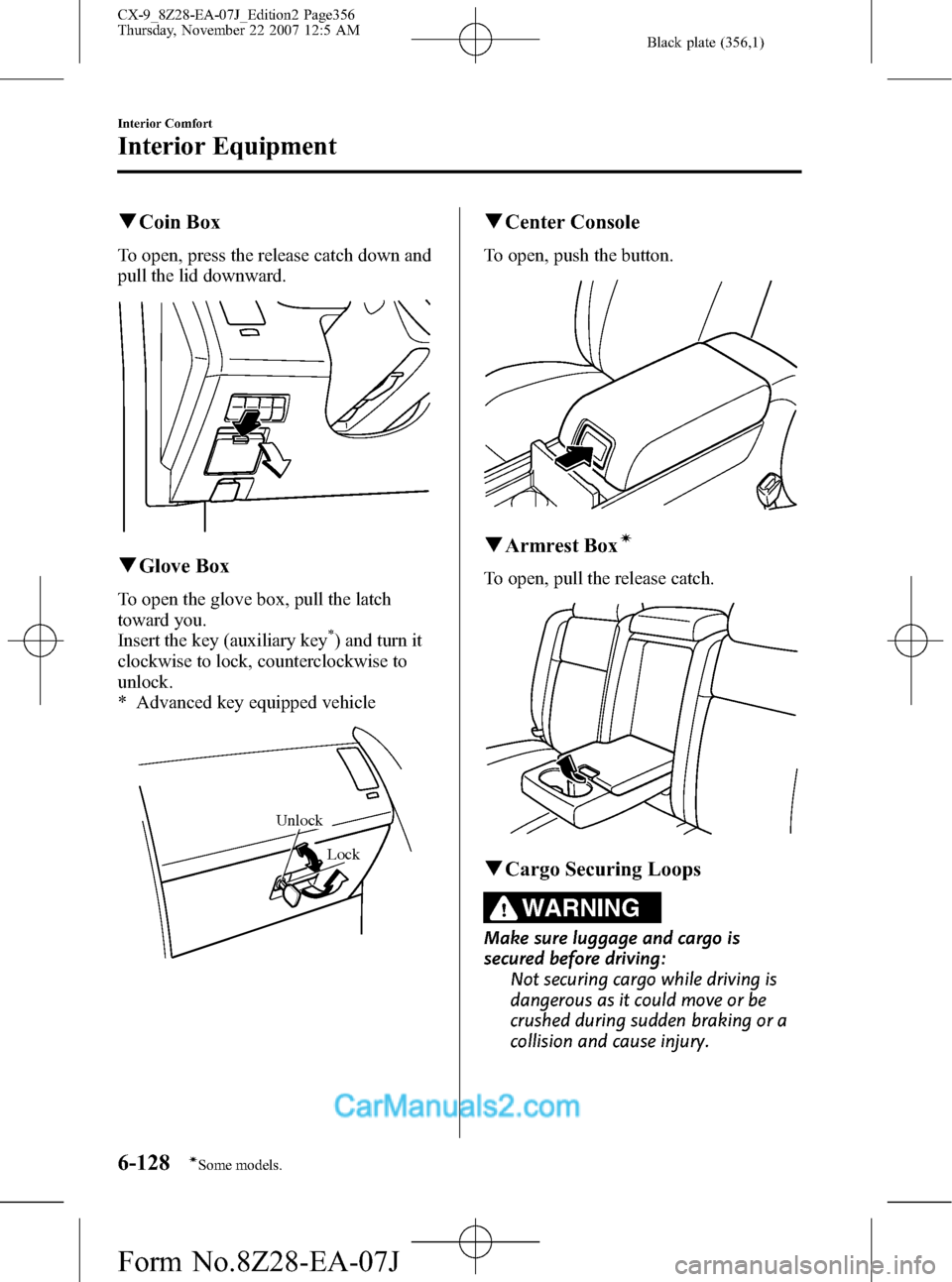
qCoin Box
To open, press the release catch down and
pull the lid downward.
qGlove Box
To open the glove box, pull the latch
toward you.
Insert the key (auxiliary key
*) and turn it
clockwise to lock, counterclockwise to
unlock.
* Advanced key equipped vehicle
Lock
Unlock
qCenter Console
To open, push the button.
qArmrest Boxí
To open, pull the release catch.
qCargo Securing Loops
WARNING
Make sure luggage and cargo is
secured before driving:
Not securing cargo while driving is
dangerous as it could move or be
crushed during sudden braking or a
collision and cause injury.
6-128
Interior Comfort
íSome models.
Interior Equipment
CX-9_8Z28-EA-07J_Edition2 Page356
Thursday, November 22 2007 12:5 AM
Form No.8Z28-EA-07J