Jack MAZDA MODEL CX-9 2008 Owners Manual (in English)
[x] Cancel search | Manufacturer: MAZDA, Model Year: 2008, Model line: MODEL CX-9, Model: MAZDA MODEL CX-9 2008Pages: 506, PDF Size: 11.52 MB
Page 157 of 506

Black plate (157,1)
The three main causes of vehicle-trailer accidents are driver error, excessive speed, and
improper trailer loading.
Before driving
lHave your cooling and braking system checked by an Authorized Mazda Dealer.lBefore starting out, inspect the operation of all vehicle and trailer lights and all vehicle-
to-trailer connections. Stop and re-inspect all lights and connections after driving a short
distance.
Driving
lYour Mazda will handle differently with a trailer in tow, so practice turning, backing,
and stopping in a traffic-free area.
lTake time to get accustomed to the extra weight and length.lAllow more room between your vehicle and the one in front because braking distance
increases with a trailer. For each 16 km/h (10 mph) of speed, allow at least one vehicle
and trailer length between your Mazda and the vehicle ahead.
lAvoid jerky starts or sudden acceleration.lAvoid sudden braking. It may cause loss of control and result in jackknifing, especially
so on wet or slippery roads.
lShift the shift lever to the D position when towing a trailer in hilly terrain or when
heavily loaded.
These positions will allow operating the vehicle without frequent shifting.
Lane changes and turning
Avoid quick lane changes, sudden turns, and tight turns. Slow down before turning to
avoid the need of sudden braking.
A turning trailer will make a tighter arc than the tow vehicle. Compensate with turns that
are larger than normal.
Passing
Plan well ahead to pass other vehicles, and provide plenty of room before changing lanes.
Crosswinds from passing vehicles, especially larger ones, and the effects of rough roads
will affect handling.
If swaying occurs, firmly grip the steering wheel and reduce speed immediately, but
gradually.
Steer straight ahead. If no extreme correction of steering or braking is made, the
combination of less speed and firm steering will result in stability.
Backing up
Backing a vehicle with a trailer requires practice and patience. Back slowly, and have a
helper outside at the rear of the trailer to reduce the risk of an accident.
To turn the trailer, place your hand at the bottom of the steering wheel and turn it in the
direction you want the trailer to go. Make only slight movements to prevent sharp or
prolonged turning.
Before Driving Your Mazda
Towing
4-17
CX-9_8Z28-EA-07J_Edition2 Page157
Thursday, November 22 2007 12:2 AM
Form No.8Z28-EA-07J
Page 255 of 506

Black plate (255,1)
Audio Set
lAudio information is displayed on the information display.lThere are two types of In-dash CD changers. Check which In-dash CD changer your
vehicle is equipped with.
CD Player In-Dash CD Changer (non-MP3 compatible)
In-dash CD Changer (MP3 compatible)
Power/Volume/Sound Controls .............................................................................. page 6-28
Operating the Radio ............................................................................................... page 6-34
Operating the Compact Disc (CD) Player .............................................................. page 6-38
Operating the In-Dash CD Changer ....................................................................... page 6-40
Operating the Auxiliary jack .................................................................................. page 6-44
Error Indications ..................................................................................................... page 6-45
Interior Comfort
Audio System
6-27
CX-9_8Z28-EA-07J_Edition2 Page255
Thursday, November 22 2007 12:3 AM
Form No.8Z28-EA-07J
Page 272 of 506

Black plate (272,1)
Display scroll (MP3 compatible type)
Only 12 characters can be displayed at
one time. To display the rest of the
characters of a long title, turn the display
feed dial (
) to the right. Hidden
titles can be scrolled into the display one
character at a time.
NOTE
The displayable number of characters is
limited. If the number of characters, including
the file extension (.mp3), exceeds 32
characters, it may not be fully displayed.
Message display
If“CHECK CD”is displayed, it means
that there is some CD malfunction. Check
the CD for damage, dirt, or smudges, and
then properly reinsert. If the message
appears again, take the unit to an
Authorized Mazda Dealer for service.
qOperating the Auxiliary jack
You can connect portable audio units or
similar products on the market to the
auxiliary jack to listen to music or audio
over the vehicle's speakers, refer to
Auxiliary Input (page 6-48).
6-44
Interior Comfort
Audio System
CX-9_8Z28-EA-07J_Edition2 Page272
Thursday, November 22 2007 12:4 AM
Form No.8Z28-EA-07J
Page 275 of 506
Black plate (275,1)
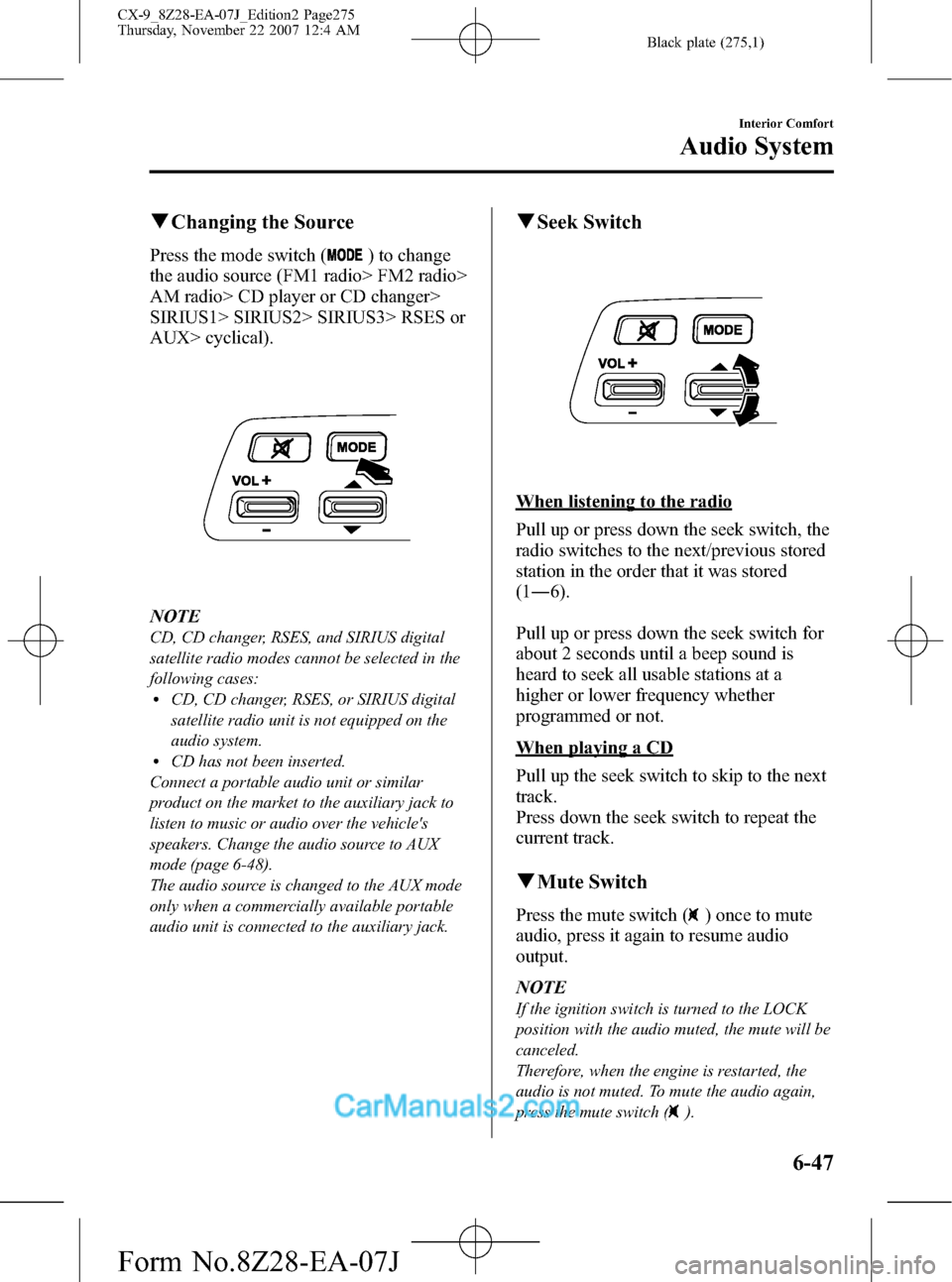
qChanging the Source
Press the mode switch () to change
the audio source (FM1 radio> FM2 radio>
AM radio> CD player or CD changer>
SIRIUS1> SIRIUS2> SIRIUS3> RSES or
AUX> cyclical).
NOTE
CD, CD changer, RSES, and SIRIUS digital
satellite radio modes cannot be selected in the
following cases:
lCD, CD changer, RSES, or SIRIUS digital
satellite radio unit is not equipped on the
audio system.
lCD has not been inserted.
Connect a portable audio unit or similar
product on the market to the auxiliary jack to
listen to music or audio over the vehicle's
speakers. Change the audio source to AUX
mode (page 6-48).
The audio source is changed to the AUX mode
only when a commercially available portable
audio unit is connected to the auxiliary jack.
qSeek Switch
When listening to the radio
Pull up or press down the seek switch, the
radio switches to the next/previous stored
station in the order that it was stored
(1―6).
Pull up or press down the seek switch for
about 2 seconds until a beep sound is
heard to seek all usable stations at a
higher or lower frequency whether
programmed or not.
When playing a CD
Pull up the seek switch to skip to the next
track.
Press down the seek switch to repeat the
current track.
qMute Switch
Press the mute switch () once to mute
audio, press it again to resume audio
output.
NOTE
If the ignition switch is turned to the LOCK
position with the audio muted, the mute will be
canceled.
Therefore, when the engine is restarted, the
audio is not muted. To mute the audio again,
press the mute switch (
).
Interior Comfort
Audio System
6-47
CX-9_8Z28-EA-07J_Edition2 Page275
Thursday, November 22 2007 12:4 AM
Form No.8Z28-EA-07J
Page 276 of 506

Black plate (276,1)
Auxiliary Input (AUX mode)
You can connect portable audio units or
similar products on the market to the
auxiliary jack to listen to music or audio
over the vehicle's speakers.
Auxiliary jack
WARNING
Do not adjust the portable audio unit
or a similar product while driving the
vehicle:
Adjusting the portable audio unit or
a similar product while driving the
vehicle is dangerous as it could
distract your attention from the
vehicle operation which could lead to
a serious accident. Always adjust the
portable audio unit or a similar
product while the vehicle is stopped.
6-48
Interior Comfort
Audio System
CX-9_8Z28-EA-07J_Edition2 Page276
Thursday, November 22 2007 12:4 AM
Form No.8Z28-EA-07J
Page 277 of 506
Black plate (277,1)
NOTElBefore using the auxiliary jack, read the
manufacturer's instructions for the product
being connected.
lUse a commercially-available, non-
impedance (3.5
) stereo mini plug for
connecting the portable audio unit to the
auxiliary jack. Before using the auxiliary
jack, read the manufacture's instructions
for connecting a portable audio unit to the
auxiliary jack.
lTo prevent discharging of the battery, do
not use the auxiliary input for long periods
with the engine off or idling.
lNoise may occur depending on the product
connected to the auxiliary jack.
lWith regard to connecting a portable audio
or similar device to a power source, use the
battery for the device, not the accessory
socket.
WARNING
Do not allow the connection plug cord
to get tangled with the parking brake
or the shift lever:
Allowing the plug cord to become
tangled with the parking brake or
the shift lever is dangerous as it
could interfere with driving, resulting
in an accident.
CAUTION
ØDo not place objects or apply force
to the auxiliary jack with the plug
connected.
ØNoise may occur during playback
if the accessory socket equipped
on the vehicle is used. (If noise
occurs, do not use the accessory
socket.)NOTE
lInsert the plug to the auxiliary jack
securely.
lInsert or remove the plug with the plug
perpendicular to the auxiliary jack hole.
lInsert or remove the plug by holding its
base.
To operate the portable audio unit
1. Turn the ignition switch to the ACC or
ON position.
2. Press the power/volume dial to turn the
audio system on.
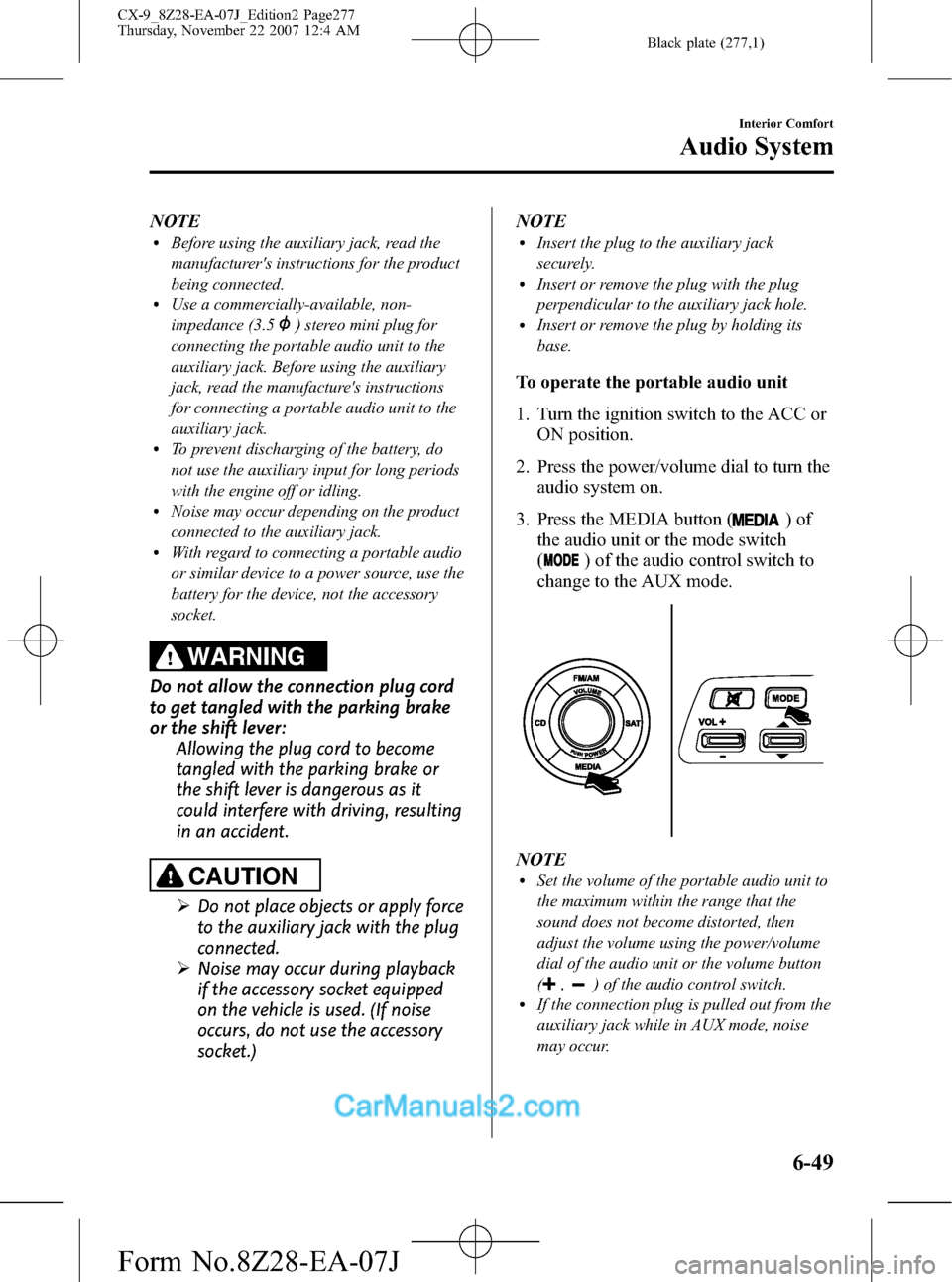
3. Press the MEDIA button (
)of
the audio unit or the mode switch
(
) of the audio control switch to
change to the AUX mode.
NOTElSet the volume of the portable audio unit to
the maximum within the range that the
sound does not become distorted, then
adjust the volume using the power/volume
dial of the audio unit or the volume button
(
,) of the audio control switch.lIf the connection plug is pulled out from the
auxiliary jack while in AUX mode, noise
may occur.
Interior Comfort
Audio System
6-49
CX-9_8Z28-EA-07J_Edition2 Page277
Thursday, November 22 2007 12:4 AM
Form No.8Z28-EA-07J
Page 363 of 506

Black plate (363,1)
Spare Tire and Tool Storage
Spare tire and tools are stored in the locations illustrated in the diagram.
JackJack lever
Lug wrench Tiedown eyelet
Flat tire beltSpare tire carrier bolt socket
In Case of an Emergency
Flat Tire
7-3
CX-9_8Z28-EA-07J_Edition2 Page363
Thursday, November 22 2007 12:5 AM
Form No.8Z28-EA-07J
Page 364 of 506

Black plate (364,1)
qJack
To remove the jack
1. Open the cargo sub-compartment.
2. Remove the cover.
3. Turn the wing bolt and jack screw
counterclockwise.
Jack screw
Wing bolt
To secure the jack
1. Insert the wing bolt into the jack with
the jack screw pointing right and turn
the wing bolt clockwise to temporarily
tighten it.
2. Turn the jack screw in the direction
shown in the figure.
Jack screw
Wing bolt
3. Turn the wing bolt completely to
secure the jack.
NOTE
If the jack is not completely secured, it could
rattle while driving. Make sure the jack screw
is sufficiently tightened.
qSpare Tire
Your Mazda has a temporary spare tire.
The temporary spare tire is lighter and
smaller than a conventional tire, and is
designed only for emergency use and
should be used only for VERY short
periods. Temporary spare tires should
NEVER be used for long drives or
extended periods.
7-4
In Case of an Emergency
Flat Tire
CX-9_8Z28-EA-07J_Edition2 Page364
Thursday, November 22 2007 12:5 AM
Form No.8Z28-EA-07J
Page 365 of 506
Black plate (365,1)
WARNING
Do not install the temporary spare tire
in place of a driving wheel:
Driving with the temporary spare tire
on one of the driving wheels is
dangerous. Especially on ice or snow.
Handling will be affected. You could
lose control of the vehicle and have
an accident. Move a regular tire to a
driving wheel and install the
temporary spare tire to the non-
driving wheel.
CAUTION
ØWhen using the temporary spare
tire, driving stability may decrease
compared to when using only the
conventional tire. Drive carefully.
ØTo avoid damage to the temporary
spare tire or to the vehicle, observe
the following precautions:
ØDo not exceed 80 km/h (50
mph).
ØAvoid driving over obstacles.
Also, do not drive through an
automatic car wash. This tire's
diameter is smaller than a
conventional tire, so the ground
clearance is reduced about
25 mm (1 in).
ØDo not use a tire chain on this
tire because it will not fit
properly.
ØDo not use your temporary
spare tire on any other vehicle;
it has been designed only for
your Mazda.
ØUse only one temporary spare
tire on your vehicle at the same
time.NOTE
(With Tire Pressure Monitoring System)
A tire pressure sensor is not installed to the
temporary spare tire. The warning light will
flash continuously while the temporary spare
tire is being used (page 5-29).
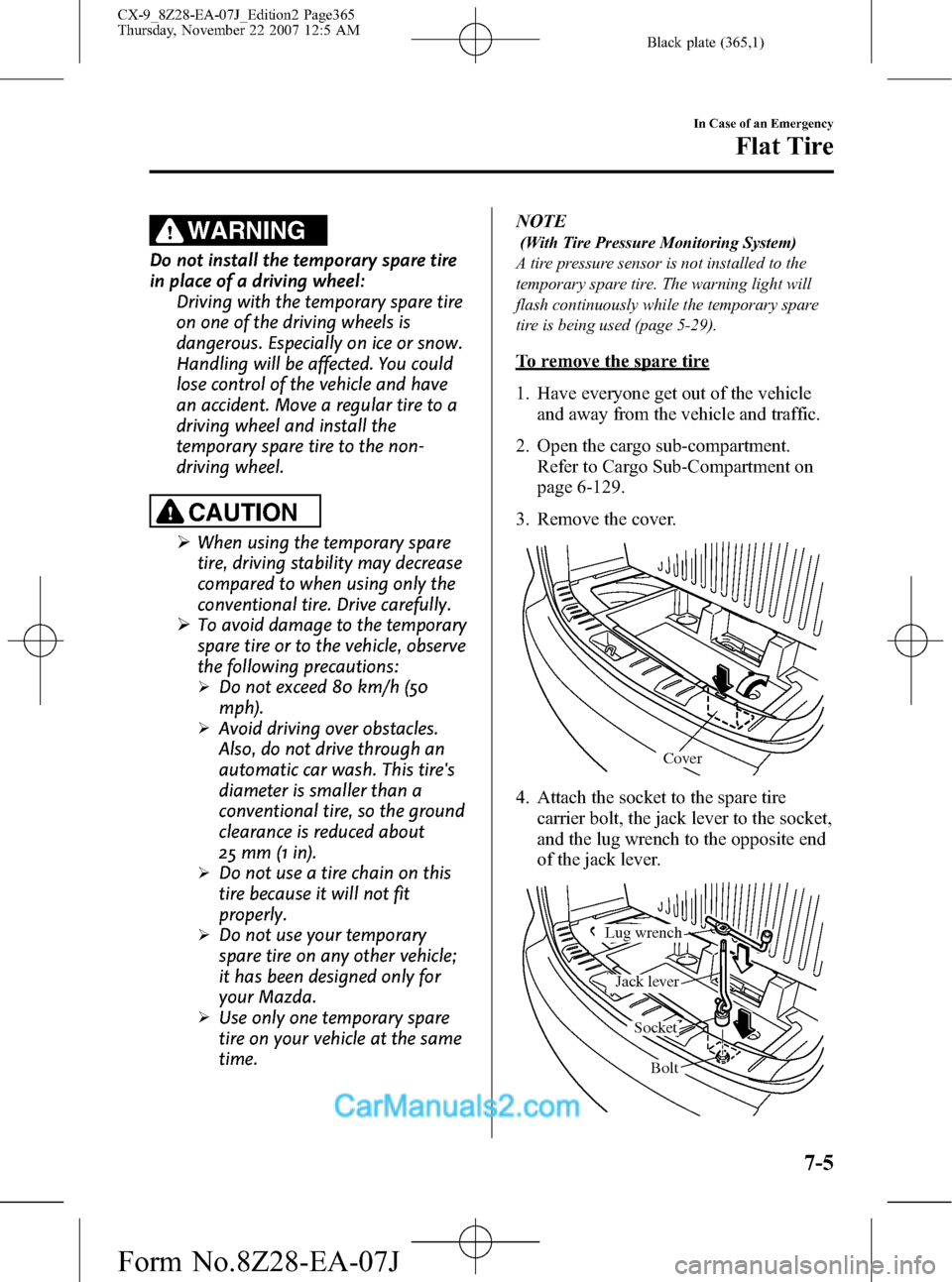
To remove the spare tire
1. Have everyone get out of the vehicle
and away from the vehicle and traffic.
2. Open the cargo sub-compartment.
Refer to Cargo Sub-Compartment on
page 6-129.
3. Remove the cover.
Cover
4. Attach the socket to the spare tire
carrier bolt, the jack lever to the socket,
and the lug wrench to the opposite end
of the jack lever.
Bolt Socket Lug wrench
Jack lever
In Case of an Emergency
Flat Tire
7-5
CX-9_8Z28-EA-07J_Edition2 Page365
Thursday, November 22 2007 12:5 AM
Form No.8Z28-EA-07J
Page 368 of 506
Black plate (368,1)
Changing a Flat Tire
NOTE
If the following occurs while driving, it could
indicate a flat tire.
lSteering becomes difficult.lThe vehicle begins to vibrate excessively.lThe vehicle pulls in one direction.
If you have a flat tire, drive slowly to a
level spot that is well off the road and out
of the way of traffic to change the tire.
Stopping in traffic or on the shoulder of a
busy road is dangerous.
WARNING
Be sure to follow the directions for
changing a tire, and never get under a
vehicle that is supported only by a jack:
Changing a tire is dangerous if not
done properly. The vehicle can slip off
the jack and seriously injure
someone.
Never allow anyone inside a vehicle
supported by a jack:
Allowing someone to remain in a
vehicle supported by a jack is
dangerous. The occupant could cause
the vehicle to fall resulting in serious
injury.
CAUTION
(With Tire Pressure Monitoring
System)
The wheels equipped on your Mazda
are specially designed for installation
of the tire pressure sensors. Do not
use non-genuine wheels, otherwise it
may not be possible to install the tire
pressure sensors.NOTE
lMake sure the jack is well lubricated before
using it.
(With Tire Pressure Monitoring System)
lBe sure to register the tire pressure sensor
ID signal code whenever tires or wheels are
changed (page 5-31).
1. Park on a level surface off the right-of-
way and firmly set the parking brake.
2. Shift into Park (P) and turn off the
engine.
3. Turn on the hazard warning flasher.
4. Have everyone get out of the vehicle
and away from the vehicle and traffic.
5. Remove the jack, tool, and spare tire
(page 7-3).
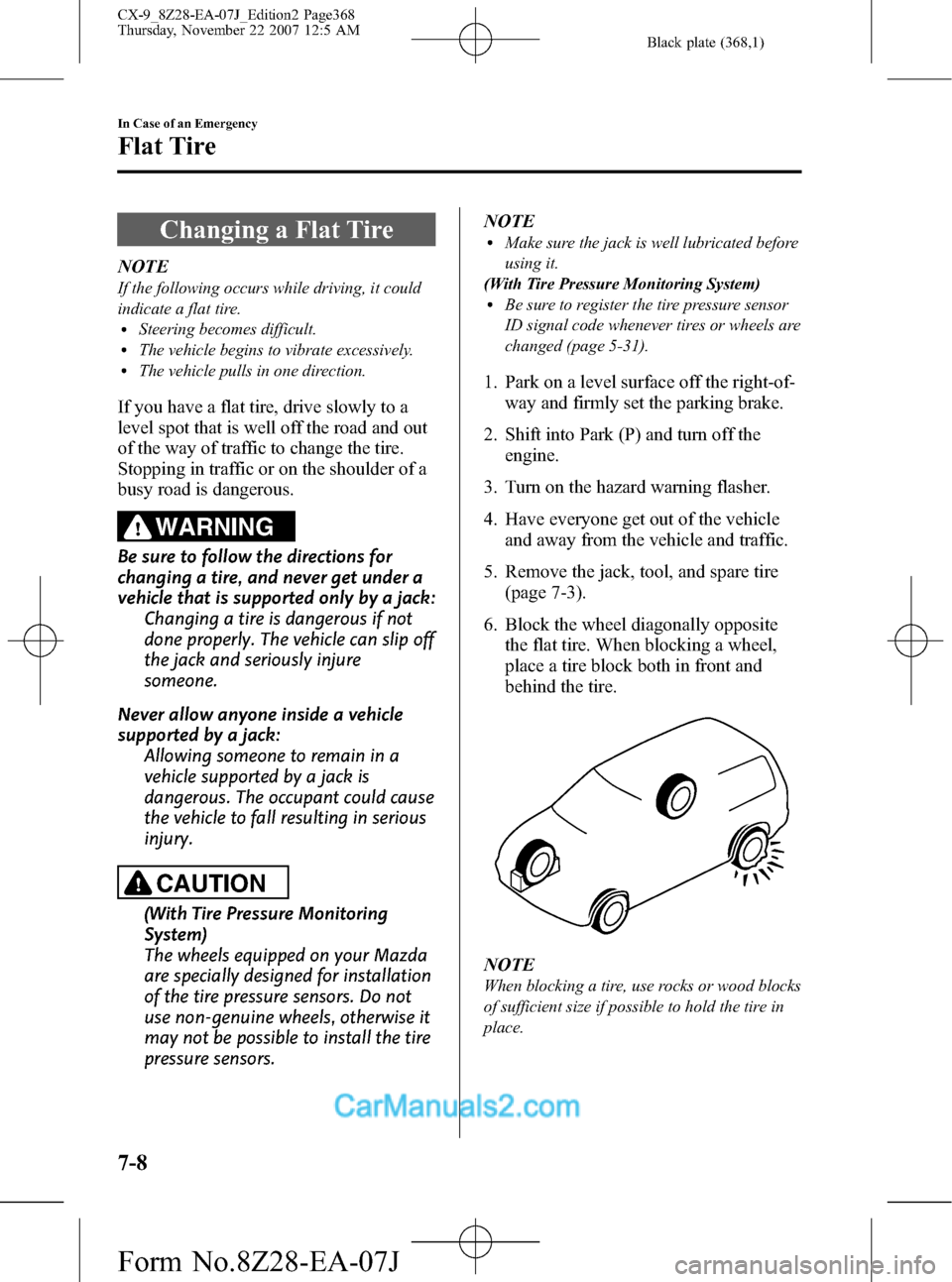
6. Block the wheel diagonally opposite
the flat tire. When blocking a wheel,
place a tire block both in front and
behind the tire.
NOTE
When blocking a tire, use rocks or wood blocks
of sufficient size if possible to hold the tire in
place.
7-8
In Case of an Emergency
Flat Tire
CX-9_8Z28-EA-07J_Edition2 Page368
Thursday, November 22 2007 12:5 AM
Form No.8Z28-EA-07J