AUX MAZDA MODEL CX-9 2013 (in English) Owner's Manual
[x] Cancel search | Manufacturer: MAZDA, Model Year: 2013, Model line: MODEL CX-9, Model: MAZDA MODEL CX-9 2013Pages: 598
Page 265 of 598

Black plate (265,1)
6Interior Comfort
Use of various features for drive comfort, including air-conditioning and audio
system.
Climate Control System .......................... 6-2
Operating Tips .................................... 6-2
Vent Operation (Front) ........................ 6-4
Fully Automatic Type ......................... 6-6
Vent Operation (Rear) ....................... 6-12
Fully Automatic Type (Rear) ............ 6-14
Audio System ......................................... 6-17
Antenna ............................................. 6-17
Operating Tips for Audio System ..... 6-17
Audio Set .......................................... 6-31
Audio Control Switch Operation ...... 6-52
AUX/USB/iPod Mode ...................... 6-54
Safety Certification ........................... 6-65
Rear Entertainment System ................. 6-66
Rear Entertainment System
í............ 6-66
Part Names ........................................ 6-76
Before Operation ............................... 6-79
Sound Output .................................... 6-85
Rear Entertainment System
Functions ........................................... 6-89
DVD video, DVD audio, Video CD, Audio
CD and MP3/WMA CD Playback (Disc
Mode) ................................................ 6-90
Auxiliary Input (AUX mode) .......... 6-104
Language Code List ........................ 6-108
Country Code List ........................... 6-110
Error Message ................................. 6-114
Symptoms and Actions ................... 6-116
Bluetooth® ........................................... 6-118
Bluetooth®
í................................... 6-118
Bluetooth® Hands-Free .................. 6-124
Bluetooth® Audio ........................... 6-143
Troubleshooting .............................. 6-147
Safety Certification ......................... 6-151Rear View Monitor .............................. 6-153
Rear View Monitor
í...................... 6-153
Interior Equipment ............................. 6-164
Sunvisors ......................................... 6-164
Interior Lights ................................. 6-165
Information Display ........................ 6-167
Cup Holder ...................................... 6-171
Bottle Holder ................................... 6-173
Storage Compartments .................... 6-174
Accessory Sockets .......................... 6-177
Power Outlet
í................................ 6-179
6-1íSome models.
CX-9_8CM9-EA-12I_Edition1 Page265
Thursday, September 13 2012 2:36 PM
Form No.8CM9-EA-12I
Page 295 of 598

Black plate (295,1)
Audio Set
CAUTION
Do not press the panel strongly or press it with a sharp-pointed object. Otherwise,
the panel could be damaged.
Power/Volume/Display/Sound Controls ............................................................ page 6-32
Operating the Radio ........................................................................................... page 6-36
Operating the Satellite Radio ............................................................................. page 6-40
Operating the Compact Disc (CD) Player .......................................................... page 6-48
How to use the Auxiliary jack/USB port ........................................................... page 6-51
Error Indication .................................................................................................. page 6-51
Setup .................................................................................................................. page 6-52
Interior Comfort
Audio System
6-31
CX-9_8CM9-EA-12I_Edition1 Page295
Thursday, September 13 2012 2:37 PM
Form No.8CM9-EA-12I
Page 298 of 598

Black plate (298,1)
AudioPilot®2*4
AudioPilot®2 automatically adjusts audio
volume and sound quality in accordance
with the level of noise entering the vehicle
interior while driving. When AudioPilot
®
2 is turned on, the system automatically
calculates the conditions for optimum
hearing of sound which may be difficult
to hear depending on exterior noise.
AudioPilot
®2 can be set on or off.
*4 AudioPilot®2 is a registered
trademark of Bose Corporation.
Centerpoint
®*5
Centerpoint®offers you the experience of
5.1-channel surround sound in your
vehicle even with your conventional 2-
channel stereo CDs. Centerpoint
®can be
set on or off.
*5 Centerpoint
®is a registered trademark
of Bose Corporation.
NOTE
lCenterpoint®operates optimally with a 2-
channel stereo CD. Audio files encoded
with high compression can be played,
however, they may result in poor sound
quality.
lCenterpoint®is available for 2-channel
stereo audio except for AM radio/FM radio/
AUX/Bluetooth® audio.
Sound setting reset
The settings for bass, treble, balance, and
fade can be returned to their initial
settings.
1. Touch the
on-screen button.
2. Touch the
on-screen button.
6-34
Interior Comfort
Audio System
CX-9_8CM9-EA-12I_Edition1 Page298
Thursday, September 13 2012 2:37 PM
Form No.8CM9-EA-12I
Page 315 of 598

Black plate (315,1)
(CD shuffle)
Touch the
on-screen button two
times during playback to play the songs in
the CD shuffle.“
”is displayed during
playback.
Touch the
on-screen button while
“
”is displayed to cancel.
Display scroll
If a whole title cannot be displayed at one
time, touch the
on-screen button on
the right side of the title. When the last
character is displayed, touch the
on-
screen button to display the first character
of the title.
NOTE
lTheon-screen button is displayed only
if a whole title cannot be displayed at one
time.
lThe information viewable in the display is
only CD information (such as artist name,
song title) which has been recorded to the
CD.
lThis unit cannot display some characters.
Character which cannot be displayed are
indicated by an asterisk (
).lThe number of characters which can be
displayed is restricted.
Message Display
If“CD Error”is displayed, it means that
there is some CD malfunction. Check the
CD for damage, dirt, or smudges, and
then properly reinsert. If the message
appears again, take the unit to an
Authorized Mazda Dealer for service.
qOperating the Auxiliary jack/
USB port
Without auxiliary jack
Audio can be played from the vehicle
audio device by connecting USB memory
or an iPod to the USB port.
Refer to AUX/USB/iPod Mode on page
6-54.
With auxiliary jack
Audio can be heard from the vehicle's
speakers by connecting a commercially-
available portable audio unit to the
auxiliary jack.
Use a commercially-available, non-
impedance (3.5
) stereo mini plug cable.
Contact an Authorized Mazda Dealer for
details.
In addition, audio can be played from the
vehicle audio device by connecting USB
memory or an iPod to the USB port.
Refer to AUX/USB/iPod Mode on page
6-54.
qError Indications
If you see an error indication on the
display, find the cause in the chart. If you
cannot clear the error indication, take the
vehicle to an Authorized Mazda Dealer.
IndicationCause Solution
CD
ErrorCD is inserted
upside downInsert the CD
properly. If the error
indication continues
to display, consult an
Authorized Mazda
Dealer.
CD is defectiveInsert another CD
properly. If the error
indication continues
to display, consult an
Authorized Mazda
Dealer.
Interior Comfort
Audio System
6-51
CX-9_8CM9-EA-12I_Edition1 Page315
Thursday, September 13 2012 2:37 PM
Form No.8CM9-EA-12I
Page 318 of 598
Black plate (318,1)
AUX/USB/iPod Mode
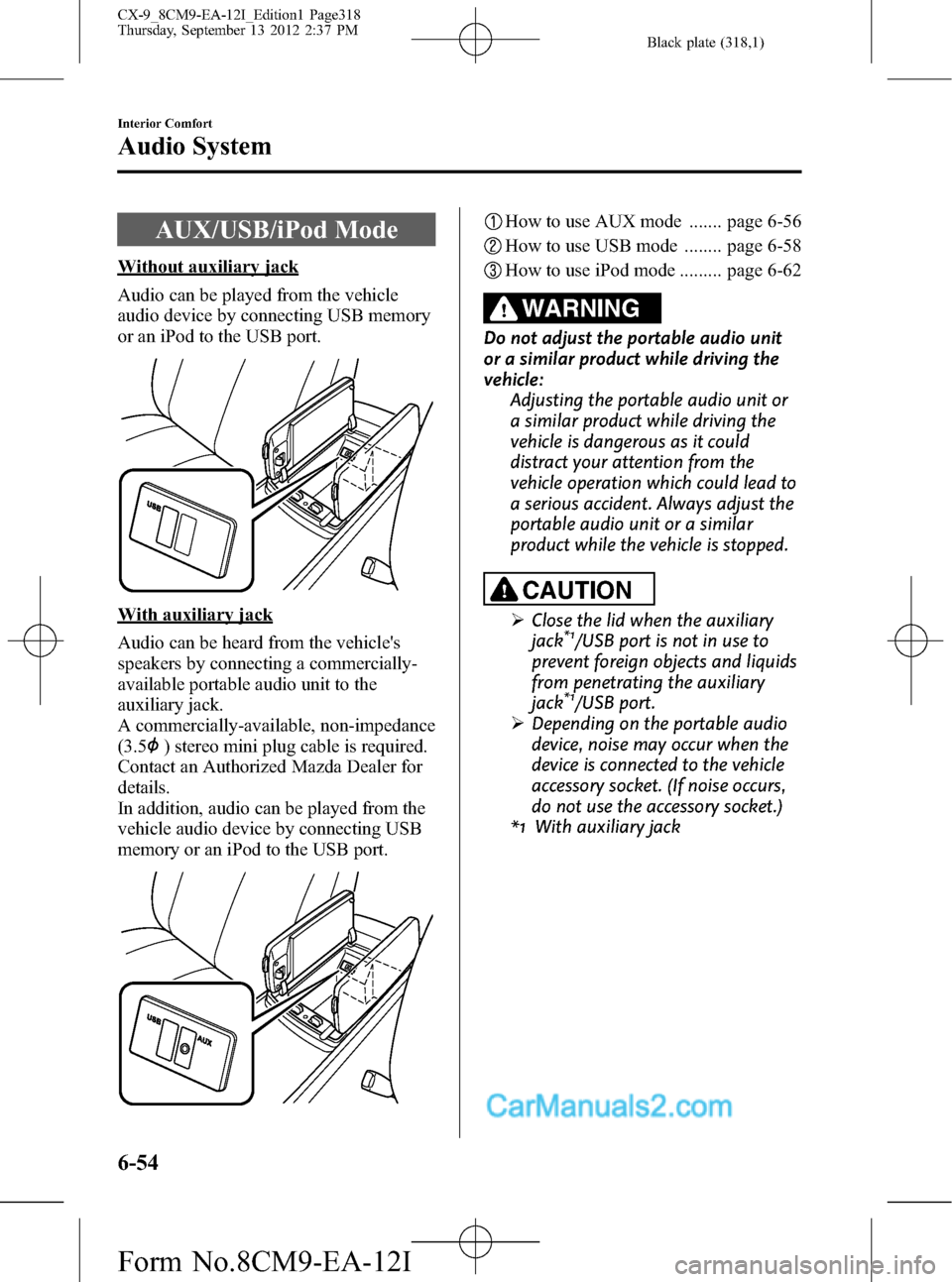
Without auxiliary jack
Audio can be played from the vehicle
audio device by connecting USB memory
or an iPod to the USB port.
With auxiliary jack
Audio can be heard from the vehicle's
speakers by connecting a commercially-
available portable audio unit to the
auxiliary jack.
A commercially-available, non-impedance
(3.5
) stereo mini plug cable is required.
Contact an Authorized Mazda Dealer for
details.
In addition, audio can be played from the
vehicle audio device by connecting USB
memory or an iPod to the USB port.
How to use AUX mode ....... page 6-56
How to use USB mode ........ page 6-58
How to use iPod mode ......... page 6-62
WARNING
Do not adjust the portable audio unit
or a similar product while driving the
vehicle:
Adjusting the portable audio unit or
a similar product while driving the
vehicle is dangerous as it could
distract your attention from the
vehicle operation which could lead to
a serious accident. Always adjust the
portable audio unit or a similar
product while the vehicle is stopped.
CAUTION
ØClose the lid when the auxiliary
jack*1/USB port is not in use to
prevent foreign objects and liquids
from penetrating the auxiliary
jack
*1/USB port.
ØDepending on the portable audio
device, noise may occur when the
device is connected to the vehicle
accessory socket. (If noise occurs,
do not use the accessory socket.)
*1 With auxiliary jack
6-54
Interior Comfort
Audio System
CX-9_8CM9-EA-12I_Edition1 Page318
Thursday, September 13 2012 2:37 PM
Form No.8CM9-EA-12I
Page 319 of 598
Black plate (319,1)
NOTElBefore using the auxiliary jack*1/USB port,
refer to the instruction manual for the
portable audio device.
l(With auxiliary jack)
Use a commercially-available, non-
impedance (3.5
) stereo mini plug for
connecting the portable audio unit to the
auxiliary jack. Before using the auxiliary
jack, read the manufacturer's instructions
for connecting a portable audio unit to the
auxiliary jack.
lTo prevent discharging of the battery, do
not use the auxiliary input for long periods
with the engine off or idling.
lWhen connecting a device to the auxiliary
jack*1or USB port, noise may occur
depending on the connected device. If the
device is connected to the vehicle's
accessory socket, the noise can be reduced
by unplugging it from the accessory socket.
*1 With auxiliary jack
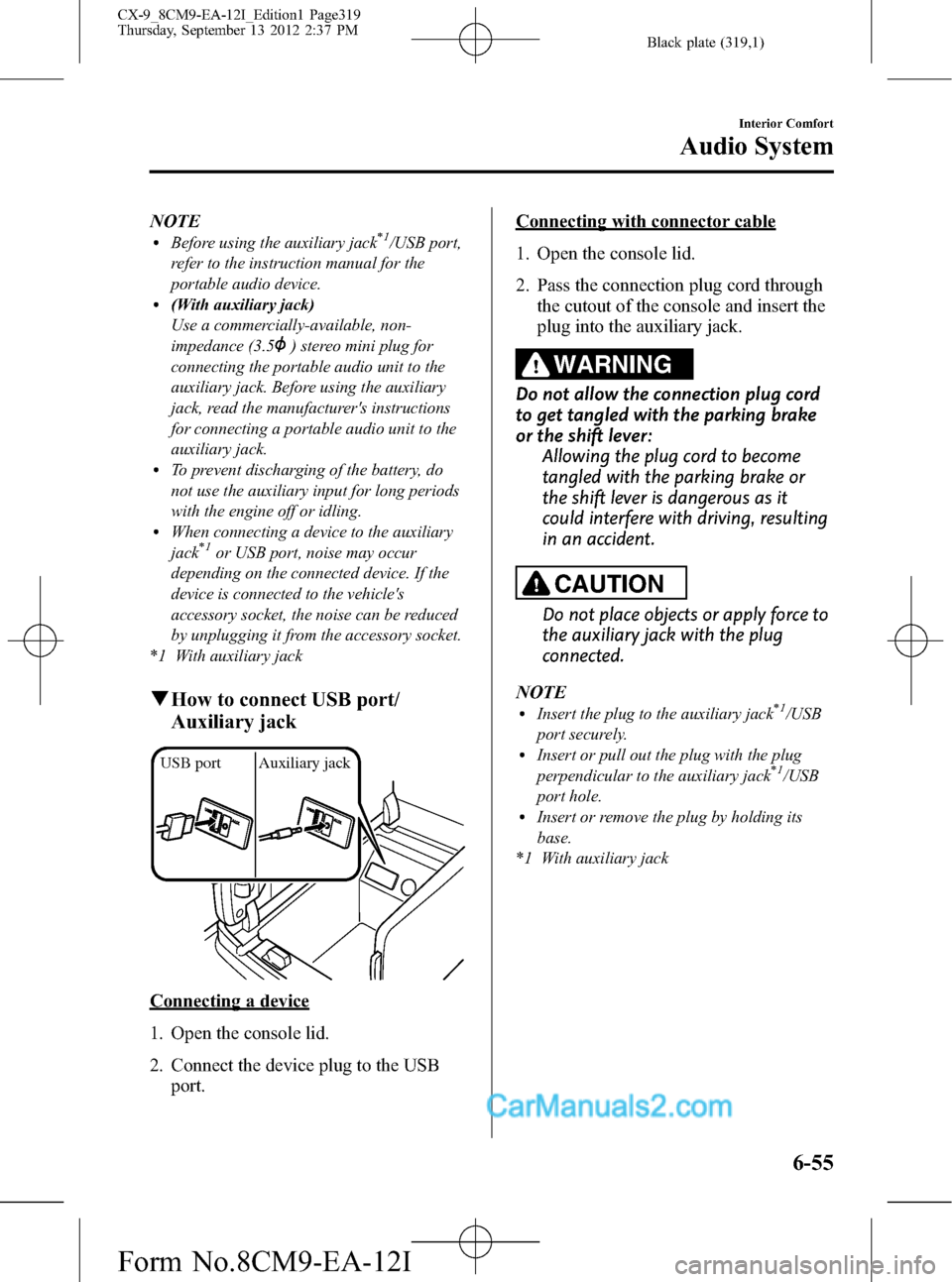
qHow to connect USB port/
Auxiliary jack
USB port Auxiliary jack
Connecting a device
1. Open the console lid.
2. Connect the device plug to the USB
port.
Connecting with connector cable
1. Open the console lid.
2. Pass the connection plug cord through
the cutout of the console and insert the
plug into the auxiliary jack.
WARNING
Do not allow the connection plug cord
to get tangled with the parking brake
or the shift lever:
Allowing the plug cord to become
tangled with the parking brake or
the shift lever is dangerous as it
could interfere with driving, resulting
in an accident.
CAUTION
Do not place objects or apply force to
the auxiliary jack with the plug
connected.
NOTE
lInsert the plug to the auxiliary jack*1/USB
port securely.
lInsert or pull out the plug with the plug
perpendicular to the auxiliary jack*1/USB
port hole.
lInsert or remove the plug by holding its
base.
*1 With auxiliary jack
Interior Comfort
Audio System
6-55
CX-9_8CM9-EA-12I_Edition1 Page319
Thursday, September 13 2012 2:37 PM
Form No.8CM9-EA-12I
Page 320 of 598

Black plate (320,1)
qHow to use AUX mode
1. Switch the ignition to ACC or ON.
2. Press the power/volume dial to turn the
audio system on.
3. Press the audio button (
)to
display the audio screen.
4. Press the
on-screen tab to switch
to the AUX mode.
NOTE
lWhen the device is not connected to the
auxiliary jack, the mode does not switch to
the AUX mode.
lSet the volume of the portable audio unit to
the maximum within the range that the
sound does not become distorted, then
adjust the volume using the power/volume
dial.
lAudio adjustments other than audio volume
can only be done using the portable audio
device.
lIf the connection plug is pulled out from the
auxiliary jack while in AUX mode, noise
may occur.
6-56
Interior Comfort
Audio System
CX-9_8CM9-EA-12I_Edition1 Page320
Thursday, September 13 2012 2:37 PM
Form No.8CM9-EA-12I
Page 349 of 598

Black plate (349,1)
Sound Output
qSound Output from Vehicle Speakers
Press the audio button () andon-screen tab.“AUX”is displayed on the audio
display and it changes to the Rear Entertainment System sound.
Sound/Music being played by the Rear Entertainment System can be heard from the
vehicle speakers.
Adjust the volume with the dial on the audio unit.
qUsing the Headphone Speakers
CAUTION
ØFor safety reasons, the driver should never wear the headphones while driving.
Not being able to hear sound outside of the vehicle could result in a serious
accident.
ØUse the headphones with the volume set at moderate level. Listening at an
excessive volume level for extended periods of time will have an adverse effect on
your hearing ability.
ØIf the headphone arms are spread excessively is could result in damage.
ØDo not apply excessive force to the headphones or get them wet. Also, do not
leave the headphones in a place exposed to direct sunlight or high temperature. It
could cause a malfunction.
NOTE
lTo listen to audio other than from the speakers of the rear entertainment system, it is necessary to
use the wireless headphones that are included. For headphone specification, refer to
“Operation Tips for Headphones”(page 6-75).
lWhen the headphones are not in use, turn them off.lIf there is no sound produced from a signal for 3 minutes or longer after the headphone power is
turned on, or there is no signal reception, the headphone power turns off automatically.
lIf the headphones are continuously used for 4 hours or more after the sound signal is received, the
headphone power turns off automatically.
Interior Comfort
Rear Entertainment System
6-85
CX-9_8CM9-EA-12I_Edition1 Page349
Thursday, September 13 2012 2:37 PM
Form No.8CM9-EA-12I
Page 353 of 598

Black plate (353,1)
Rear Entertainment System Functions
qMode
The Rear Entertainment System has Disc and AUX modes.
Mode Function Page
Disc modeDVD video, video CD, DVD audio, and audio CD can be
played.6-90
AUX (Auxiliary) mode
*AV equipment with output terminals for image and sound,
such as a video game player and a video camera, can be
used.6-104
* Auxiliary terminals in which AV equipment can be connected are equipped.
Refer to Auxiliary Terminals and Power Outlet on page 6-104.
Mode change
Press the SOURCE button. The mode changes between Disc and AUX.
Disc modeAUX mode
("AUX" is displayed.) ("DISC" is displayed.)
Interior Comfort
Rear Entertainment System
6-89
CX-9_8CM9-EA-12I_Edition1 Page353
Thursday, September 13 2012 2:38 PM
Form No.8CM9-EA-12I
Page 368 of 598

Black plate (368,1)
NOTElThe display angle change is not available
for discs other than multi-angle recorded
DVD discs. Refer to the instruction manual
accompanying the disc for details.
lThe screen size and angle can be changed
when On-Screen Mark and Angle Mark is
off.
Mode Priority
The priority of the inserted discs (CD-R/
CD-RW) can be selected.
Audio
Digital Output
Not used with this unit.
Audio DRC
The audio dynamic range can be adjusted
to reduce the difference between the
maximum and minimum audio output.
Audio compression of the DVD video
playback can be selected or deselected
during playback using the following
modes:
Mode Function
NONE Playback with normal volume
LINELower volume is increased to
reduce difference in volume range.
RFUse when it is still difficult to hear
sound while using LINE.
Sound quality is reduced while
using RF.
NOTE
Only sound output from the headphones is
available.
Auxiliary Input (AUX mode)
In AUX mode, AV equipment such as a
video game player or a video camera can
be used by connecting the image and
sound cables to the auxiliary terminals.
NOTE
lBefore operating, read the instruction
manual accompanying the AV equipment to
be used.
lTo listen to the Rear Entertainment System
sound from the vehicle speakers, change the
audio sound to the Rear Entertainment
System sound.
Refer to Sound Output from Vehicle
Speakers on page 6-85.
To listen to audio other than from the
speakers of the rear entertainment system, it
is necessary to use the wireless headphones
that are included. For headphone
specification, refer to
“Operation Tips for Headphones”(page
6-75).
lThe cooling fan for this unit may activate if
the temperature of the unit is high, however,
this does not indicate a malfunction.
qAuxiliary Terminals and Power
Outlet
The auxiliary terminals and power outlet
are positioned as shown in the figure.
Power outlet
(AC115V)
Auxiliary
terminals
6-104
Interior Comfort
Rear Entertainment System
CX-9_8CM9-EA-12I_Edition1 Page368
Thursday, September 13 2012 2:38 PM
Form No.8CM9-EA-12I