reset MAZDA MODEL CX-9 2017 (in English) User Guide
[x] Cancel search | Manufacturer: MAZDA, Model Year: 2017, Model line: MODEL CX-9, Model: MAZDA MODEL CX-9 2017Pages: 612
Page 167 of 612

4–19
When Driving
Instrument Cluster and Display
Trip Computer and INFO Switch
(Without Multi-information
Display)
The following information can be selected
by pressing the INFO switch with the
ignition switched ON.
Distance-to-empty mode
Average fuel economy mode
Current fuel economy mode
Compass mode
If you have any problems with your trip
computer, consult an Authorized Mazda
Dealer.
Distance-to-empty mode
This mode displays the approximate
distance you can travel on the remaining
fuel based on the fuel economy.
The distance-to-empty will be calculated
and displayed every second.
NOTE
Even though the distance-to-empty
display may indicate a suffi cient amount
of remaining driving distance before
refueling is required, refuel as soon as
possible if the fuel level is very low or
the low fuel warning light illuminates.
The display may not change unless you
add more than approximately 9 L (2.3
US gal, 1.9 Imp gal) of fuel.
The distance-to-empty is the
approximate remaining distance the
vehicle can be driven until all the
graduation marks in the fuel gauge
(indicating the remaining fuel supply)
disappear.
If there is no past fuel economy
information such as after fi rst
purchasing your vehicle or the
information is deleted when the battery
cables are disconnected, the actual
distance-to empty/range may differ from
the amount indicated.
Average fuel economy mode
This mode displays the average fuel
economy by calculating the total fuel
consumption and the total traveled
distance since purchasing the vehicle, re-
connecting the battery after disconnection,
or resetting the data. The average fuel
economy is calculated and displayed every
minute.
To clear the data being displayed, press the
INFO switch for more than 1.5 seconds.
After pressing the INFO switch, - - - L/100
km (- - - mpg) will be displayed for about
1 minute before the fuel economy is
recalculated and displayed.
CX-9_8FS7-EA-16K_Edition2.indb 19CX-9_8FS7-EA-16K_Edition2.indb 192016/12/15 18:33:382016/12/15 18:33:38
Page 171 of 612

4–23
When Driving
Instrument Cluster and Display
Odometer, Trip Meter and Trip
Meter Selector
The odometer is constantly displayed on
the screen when the ignition is switched
ON, and the TRIP A or TRIP B screen
can be displayed by operating the INFO
switch.
Press the INFO switchINFO switch
Odometer,
Trip meter A
Odometer,
Trip meter B
Odometer
The odometer records the total distance
the vehicle has been driven.
Trip meter
The driving distance for a specifi ed
interval is indicated. Two types (TRIP
A, TRIP B) of interval distance and the
average fuel economy for each can be
measured.
For instance, trip meter A can record the
distance from the point of origin, and
trip meter B can record the distance from
where the fuel tank is fi lled.
When trip meter A is selected, TRIP A
will be displayed. When trip meter B is
selected, TRIP B will be displayed.
The trip meter and average fuel economy
can be reset by pressing the INFO switch
for 1.5 second or more while in each
mode.
NOTE
Only the trip meters record tenths of
kilometers (miles).
The trip record will be erased when:
The power supply is interrupted
(blown fuse or the battery is
disconnected).
The vehicle is driven over 1999 km
(mile).
CX-9_8FS7-EA-16K_Edition2.indb 23CX-9_8FS7-EA-16K_Edition2.indb 232016/12/15 18:33:402016/12/15 18:33:40
Page 174 of 612
4–26
When Driving
Instrument Cluster and Display
Average Fuel Economy
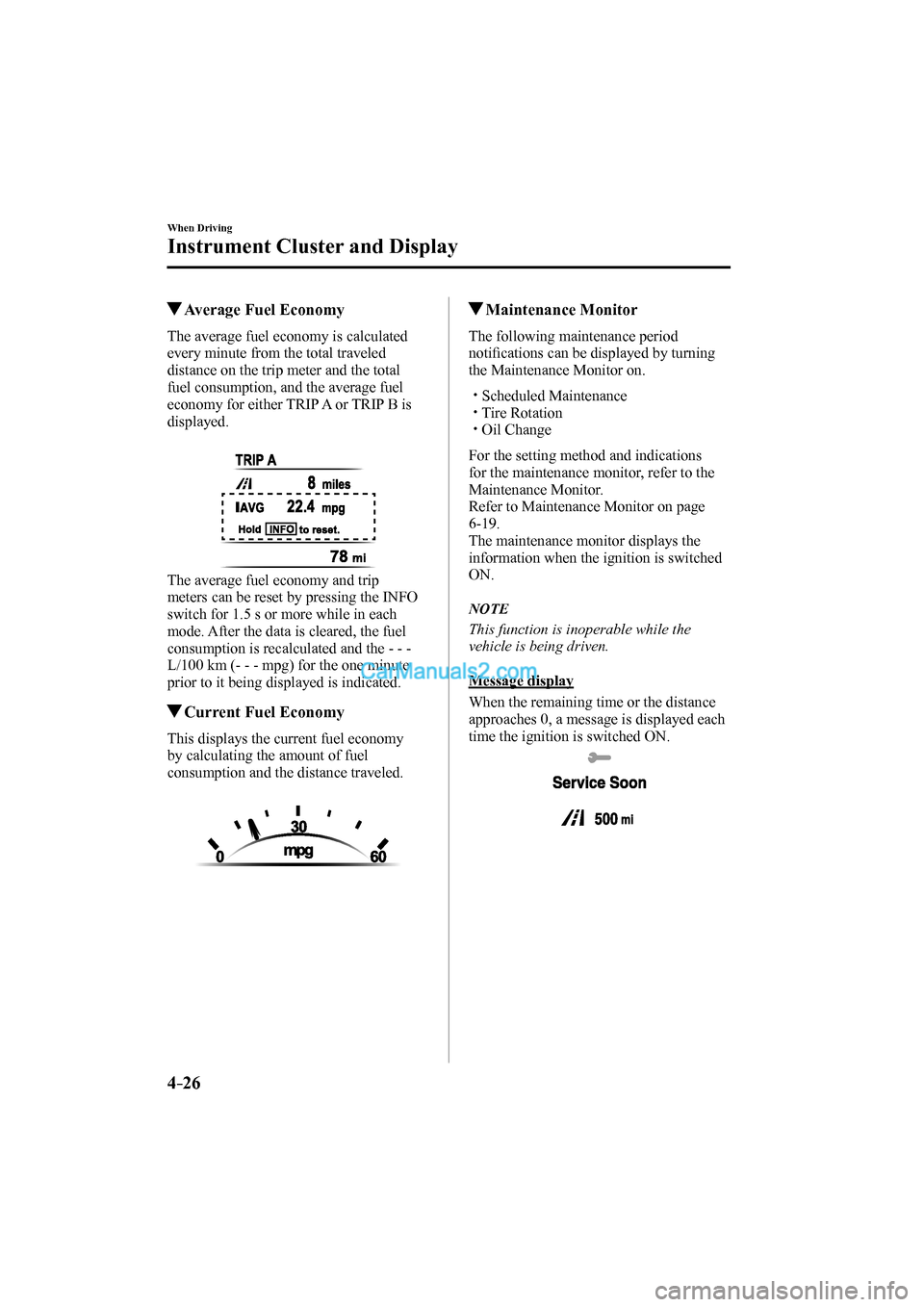
The average fuel economy is calculated
every minute from the total traveled
distance on the trip meter and the total
fuel consumption, and the average fuel
economy for either TRIP A or TRIP B is
displayed.
The average fuel economy and trip
meters can be reset by pressing the INFO
switch for 1.5 s or more while in each
mode. After the data is cleared, the fuel
consumption is recalculated and the - - -
L/100 km (- - - mpg) for the one minute
prior to it being displayed is indicated.
Current Fuel Economy
This displays the current fuel economy
by calculating the amount of fuel
consumption and the distance traveled.
Maintenance Monitor
The following maintenance period
notifi cations can be displayed by turning
the Maintenance Monitor on.
Scheduled Maintenance
Tire Rotation
Oil Change
For the setting method and indications
for the maintenance monitor, refer to the
Maintenance Monitor.
Refer to Maintenance Monitor on page
6-19 .
The maintenance monitor displays the
information when the ignition is switched
ON.
NOTE
This function is inoperable while the
vehicle is being driven.
Message display
When the remaining time or the distance
approaches 0, a message is displayed each
time the ignition is switched ON.
CX-9_8FS7-EA-16K_Edition2.indb 26CX-9_8FS7-EA-16K_Edition2.indb 262016/12/15 18:33:432016/12/15 18:33:43
Page 175 of 612

4–27
When Driving
Instrument Cluster and Display
*Some models.
NOTE
If any of the INFO switch is pressed
while a message is displayed, it will no
longer be displayed the next time the
ignition is switched ON.
After the vehicle is serviced and the
remaining time/distance is reset, the
message for the next maintenance
period will be displayed when the
remaining distance or time to the next
maintenance period approaches 0
(displays when engine is started).
If there are multiple messages, they are
displayed according to their order.
If OFF is set for Messages, messages
are not displayed.
Blind Spot Monitoring (BSM)
Display
Displays the system status.
Refer to Blind Spot Monitoring (BSM) on
page 4-91 .
Distance Recognition Support
System (DRSS) Display *
Displays the distance between your
vehicle and the vehicle ahead.
Refer to Distance Recognition Support
System (DRSS) on page 4-97 .
Mazda Radar Cruise Control
(MRCC) Display *
Displays the currently set system status.
Refer to Mazda Radar Cruise Control
(MRCC) on page 4-105 .
CX-9_8FS7-EA-16K_Edition2.indb 27CX-9_8FS7-EA-16K_Edition2.indb 272016/12/15 18:33:432016/12/15 18:33:43
Page 176 of 612

4–28
When Driving
Instrument Cluster and Display
*Some models.
Lane-keep Assist System (LAS) &
Lane Departure Warning System
(LDWS) Display
*
Displays the system status.
Refer to Lane-keep Assist System (LAS)
& Lane Departure Warning System
(LDWS) on page 4-116 .
Cruise Control Set Vehicle Speed
Display *
The vehicle speed preset using the cruise
control is displayed.
Refer to Cruise Control on page 4-146 .
Compass Display
The direction the vehicle is moving is
displayed while the vehicle is being
driven.
Display Direction
N North
S South
E East
W West
Warning (Display Indication)
A message is displayed to notify the user of the system operation status and malfunctions or
abnormalities.
If the warning light turns on/fl ashes simultaneously or a symbol is indicated in the display,
check the information regarding the warning light or symbol. (page 4-31 )
When only a message is displayed, refer to Message Indicated in Multi-information Display.
(page 7-44 )
CX-9_8FS7-EA-16K_Edition2.indb 28CX-9_8FS7-EA-16K_Edition2.indb 282016/12/15 18:33:442016/12/15 18:33:44
Page 178 of 612
4–30
When Driving
Instrument Cluster and Display
The active driving display indicates the following information: Blind Spot Monitoring (BSM) Operation Conditions and Warnings
Refer to Blind Spot Monitoring (BSM) on page 4-91 .
Distance Recognition Support System (DRSS) Operation Conditions and Warnings
Refer to Distance Recognition Support System (DRSS) on page 4-97 .
Mazda Radar Cruise Control (MRCC) Operation Conditions and Warnings
Refer to Mazda Radar Cruise Control (MRCC) on page 4-105 .
Lane-keep Assist System (LAS) & Lane Departure Warning System (LDWS) Operation
Conditions and Warnings
Refer to Lane-keep Assist System (LAS) & Lane Departure Warning System (LDWS) on
page 4-116 .
Smart City Brake Support (SCBS) Warnings
Refer to Smart City Brake Support (SCBS) on page 4-128 .
Smart Brake Support (SBS) Operation Conditions and Warnings
Refer to Smart Brake Support (SBS) on page 4-133 .
Cruise Control Operation Conditions
Refer to Cruise Control on page 4-146 .
Navigation Guidance (vehicles with navigation system)
Speed limit indicator (vehicles with navigation system)
Vehicle Speed
Each setting/adjustment for the active driving display can be performed on the center display.
1. Select the icon on the home screen and display the Settings screen.
2. Select the AD-Disp tab.
3. Select the desired item and perform the setting/adjustment.
Method for adjusting screen brightness (automatically/manually)
Screen brightness initial settings (automatic adjustment is selected)
Screen brightness adjustment (manual adjustment is selected)
Display position of active driving display (display height) Active driving display angle adjustment (display angle correction)
Turn by turn (TBT) display/non-display (navigation guidance)
Active driving display ON/OFF (indication)
Reset settings (reset)
NOTE
The desired driving position (display position, brightness level, display information) can be
called up after programming the position.
Refer to Driving Position Memory on page 2-8 .
CX-9_8FS7-EA-16K_Edition2.indb 30CX-9_8FS7-EA-16K_Edition2.indb 302016/12/15 18:33:452016/12/15 18:33:45
Page 185 of 612

4–37
When Driving
Instrument Cluster and Display
*Some models.
Wrench Indicator Light *
When the ignition is switched ON, the
wrench indicator light turns on and then
turns off after a few seconds.
The wrench indicator light turns on under
the following conditions:
When the preset maintenance period has
arrived.
When it’s time to replace the engine oil.
Refer to Maintenance Monitor on page
6-19 .
Low Engine Coolant Temperature
Indicator Light (Blue) *
The light illuminates continuously when
the engine coolant temperature is low and
turns off after the engine is warm.
CX-9_8FS7-EA-16K_Edition2.indb 37CX-9_8FS7-EA-16K_Edition2.indb 372016/12/15 18:33:512016/12/15 18:33:51
Page 225 of 612

4–77
When Driving
Fuel Economy Monitor
Fuel Economy Monitor
The Fuel Consumption information is displayed by operating each icon in the display.
In addition, after completing a trip, the total energy effi ciency to date is displayed in the
ending display when the ending display is turned on.
1. Select the icon on the home screen to display the applications screen.
2. Select the “Fuel Economy Monitor”.
3. Operate the commander switch or touch the screen and display the menu.
NOTE
When the menu is displayed by touching the screen, the display is hidden automatically after
6 seconds.
4. Select the icon in the menu and perform the operation. Each icon operates as follows:
Indication on display Control status
Hides the menu display.
Displays the application screen.
Resets the fuel economy data.
Displays the following setting screen.
Ending display on/off switching
On/off switching for function which synchronizes
reset fuel economy data to trip meter (Trip A)
(Type B instrument cluster only)
CX-9_8FS7-EA-16K_Edition2.indb 77CX-9_8FS7-EA-16K_Edition2.indb 772016/12/15 18:34:112016/12/15 18:34:11
Page 226 of 612

4–78
When Driving
Fuel Economy Monitor
Fuel Consumption Display
Information regarding the fuel economy is displayed.
Indication on display Control status
Displays the fuel economy for the past 60 minutes.
Displays the fuel economy every minute for the
past 1 to 10 minutes.
Displays the fuel economy every 10 minutes for the
past 10 to 60 minutes.
Displays the average fuel economy over the past 5
resets and after the current reset.
Calculates the average fuel economy every minute
after vehicle travel begins, and displays it.
NOTE
The fuel economy data can be reset by doing the following operation:
Press the reset switch from the menu screen.
When the function which synchronizes the fuel economy monitor and the trip meter is
on, reset trip A of the trip meter.
Delete the average fuel economy information displayed in the trip computer.
After resetting the fuel economy data, “-- -” is displayed while the average fuel economy
is calculated.
Ending Screen Display
If the ending display on the fuel economy monitor is on when the ignition is switched from
ON to OFF, the information regarding the fuel economy is displayed.
CX-9_8FS7-EA-16K_Edition2.indb 78CX-9_8FS7-EA-16K_Edition2.indb 782016/12/15 18:34:122016/12/15 18:34:12
Page 253 of 612

4–105
When Driving
i-ACTIVSENSE
*Some models.
Mazda Radar Cruise Control (MRCC) *
The Mazda Radar Cruise Control (MRCC) system is designed to maintain headway control *1
according to the vehicle speed using a radar sensor (front) to detect the distance to a vehicle
ahead, and by presetting the vehicle speed between 30 km/h (19 mph) and 145 km/h (90
mph), the driver is freed from having to constantly use the accelerator or brake pedals.
*1 Headway Control: Control of the distance between your vehicle and the vehicle ahead
detected by the Mazda Radar Cruise Control (MRCC) system.
Additionally, if your vehicle starts closing in on the vehicle ahead because, for example, the
vehicle ahead brakes suddenly, a warning sound and a warning indication in the display are
activated simultaneously to alert you to maintain a suffi cient distance between the vehicles.
Use the Mazda Radar Cruise Control (MRCC) system on expressways and other highways
which do not require a lot of repeated acceleration and deceleration.
CX-9_8FS7-EA-16K_Edition2.indb 105CX-9_8FS7-EA-16K_Edition2.indb 1052016/12/15 18:34:222016/12/15 18:34:22