radio MAZDA MODEL CX-9 2017 (in English) Owner's Manual
[x] Cancel search | Manufacturer: MAZDA, Model Year: 2017, Model line: MODEL CX-9, Model: MAZDA MODEL CX-9 2017Pages: 612
Page 312 of 612

4–16 4
When Driving
Parking Sensor System
The system may not operate normally under the following conditions:
Mud, ice, or snow is adhering to the sensor area (Returns to normal operation when
removed).
The sensor area is frozen (Returns to normal operation when the ice is thawed).
The sensor is covered by a hand.
The sensor is excessively shocked.
The vehicle is excessively tilted.
Under extremely hot or cold weather conditions.
The vehicle is driven on bumps, inclines, gravel, or grass covered roads.
Anything which generates ultrasound is near the vehicle, such as another vehicle's
horn, the engine sound of a motorcycle, the air brake sound of a large-sized vehicle, or
another vehicle's sensors.
The vehicle is driven in heavy rain or in road conditions causing water-splash.
A commercially-available fender pole or an antenna for a radio transmitter is installed
to the vehicle.
The vehicle is moving towards a tall or square curbstone.
An obstruction is too close to the sensor.
Obstructions under the bumper may not be detected. Obstructions that are lower than the
bumper or thin which may have been initially detected but are no longer detected as the
vehicle approaches more closely.
The following types of obstructions may not be detected:
Thin objects such as wire or rope
Things which absorb sonic waves easily such as cotton or snow
Angular shaped objects
Very tall objects, and those which are wide at the top
Small, short objects
Always have the system inspected at an Authorized Mazda Dealer if any shock is applied
to the bumpers, even in a minor accident. If the sensors are deviated, they cannot detect
obstructions.
The system may have a malfunction if the beep does not operate or the indicator
light does not illuminate when the park assist sensors switch is turned on. Consult an
Authorized Mazda Dealer.
The system may have a malfunction if the beep sound which indicates a system
malfunction is heard and the indicator light fl ashes. Consult an Authorized Mazda Dealer.
The beeper which indicates a system malfunction may not be heard if the ambient
temperature is extremely cold, or mud, ice, or snow adheres to the sensor area. Remove
any foreign material from the sensor area.
When installing a trailer hitch, consult an Authorized Mazda Dealer.
CX-9_8FS7-EA-16K_Edition2.indb 164CX-9_8FS7-EA-16K_Edition2.indb 1642016/12/15 18:34:462016/12/15 18:34:46
Page 319 of 612
5–1
*Some models.
5Interior Features
Use of various features for ride comfort, including air-conditioning and
audio system.
Climate Control System...................... 5-2
Operating Tips ................................ 5-2
Vent Operation (Front) ................... 5-3
Front Air Conditioner ..................... 5-5
Vent Operation (Rear) .................... 5-9
Rear Air Conditioner .................... 5-11
Before Using the Audio System ........ 5-14
Audio Control Switch .................. 5-14
AUX/USB .................................... 5-15
Antenna ........................................ 5-18
Audio Set ............................................ 5-19
Basic Operation Method .............. 5-19
Home screen ................................. 5-23
Volume/Display/Sound
Controls ........................................ 5-24
Operating the Radio ..................... 5-26
Operating the Satellite Radio
* ...... 5-30
How to use AUX mode ................ 5-34
How to use USB mode ................. 5-35
Bluetooth
® .................................... 5-40
Bluetooth® Preparation ................. 5-43
Available Language ...................... 5-45
Bluetooth
® Audio ......................... 5-46
How to Use Pandora® ................... 5-49
How to Use Aha™ ....................... 5-51
How to Use Stitcher™ Radio ....... 5-55
Bluetooth
® Hands-Free ................ 5-57
Voice Recognition ........................ 5-67
Settings ......................................... 5-70
Applications ................................. 5-72
Troubleshooting ........................... 5-73
Appendix ............................................ 5-76
Things You Need to Know ........... 5-76
Interior Equipment ........................... 5-81
Sunvisors ...................................... 5-81
Interior Lights .............................. 5-82
Accessory Sockets ....................... 5-85
USB Power Outlet
* ...................... 5-86
Cup Holder ................................... 5-87
Bottle Holder ................................ 5-89
Storage Compartments ................. 5-89
Sunshade
(Rear Door Window)
* .................. 5-93
CX-9_8FS7-EA-16K_Edition2.indb 1CX-9_8FS7-EA-16K_Edition2.indb 12016/12/15 18:34:492016/12/15 18:34:49
Page 332 of 612
5–14
Interior Features
Before Using the Audio System
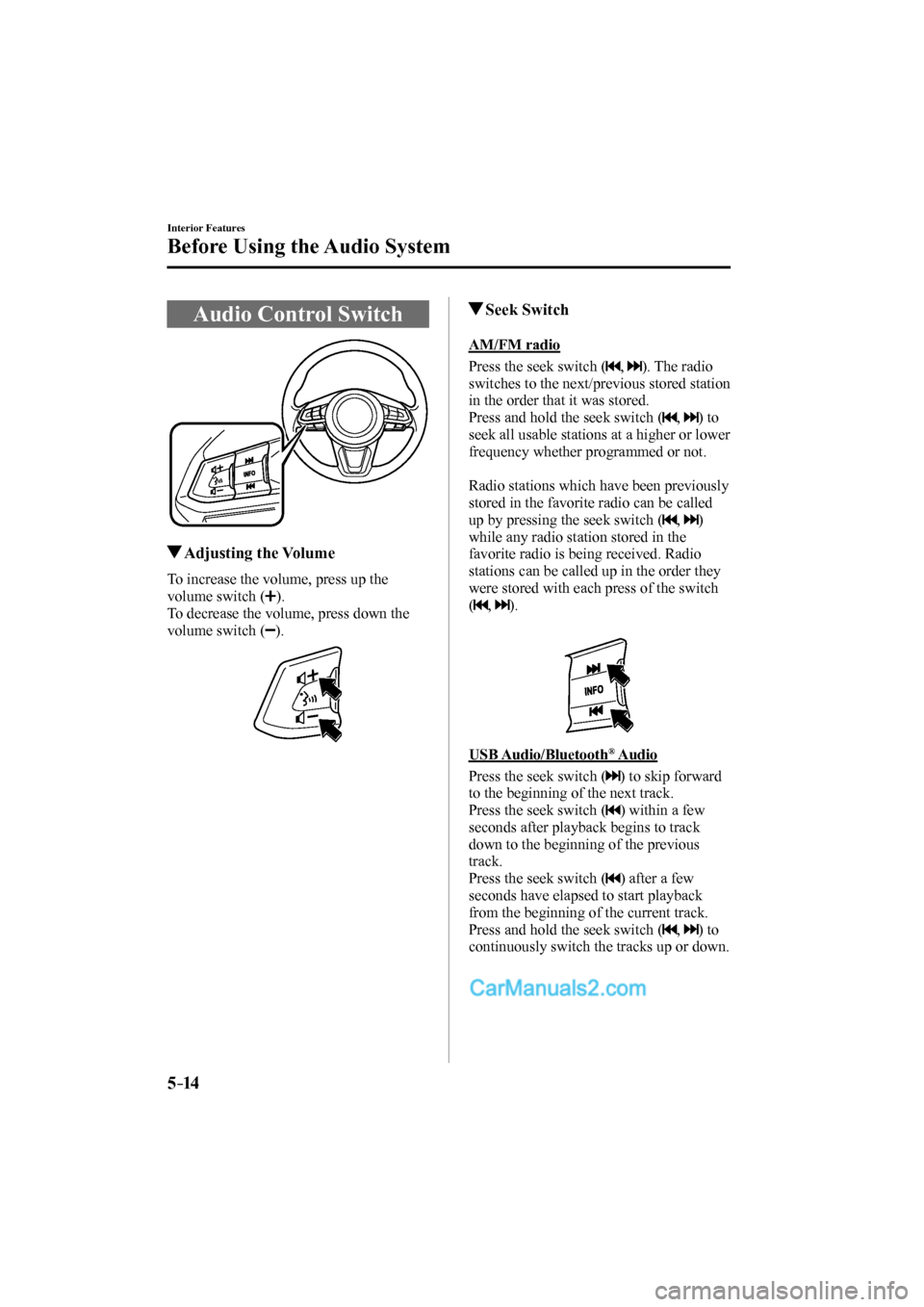
Audio Control Switch
Adjusting the Volume
To increase the volume, press up the
volume switch (
).
To decrease the volume, press down the
volume switch (
).
Seek Switch
AM/FM radio
Press the seek switch (
, ). The radio
switches to the next/previous stored station
in the order that it was stored.
Press and hold the seek switch (
, ) to
seek all usable stations at a higher or lower
frequency whether programmed or not.
Radio stations which have been previously
stored in the favorite radio can be called
up by pressing the seek switch (
, )
while any radio station stored in the
favorite radio is being received. Radio
stations can be called up in the order they
were stored with each press of the switch
(
, ).
USB Audio/Bluetooth
® Audio
Press the seek switch (
) to skip forward
to the beginning of the next track.
Press the seek switch (
) within a few
seconds after playback begins to track
down to the beginning of the previous
track.
Press the seek switch (
) after a few
seconds have elapsed to start playback
from the beginning of the current track.
Press and hold the seek switch (
, ) to
continuously switch the tracks up or down.
CX-9_8FS7-EA-16K_Edition2.indb 14CX-9_8FS7-EA-16K_Edition2.indb 142016/12/15 18:34:552016/12/15 18:34:55
Page 333 of 612
5–15
Interior Features
Before Using the Audio System
Pandora ® /Aha™/Stitcher™ Radio
Press the seek switch (
) to skip forward
to the beginning of the next track.
Press and hold the seek switch (
) to
evaluate the playback of the current song
as “Like”.
Press and hold the seek switch (
) to
evaluate the playback of the current song
as “Dislike”.
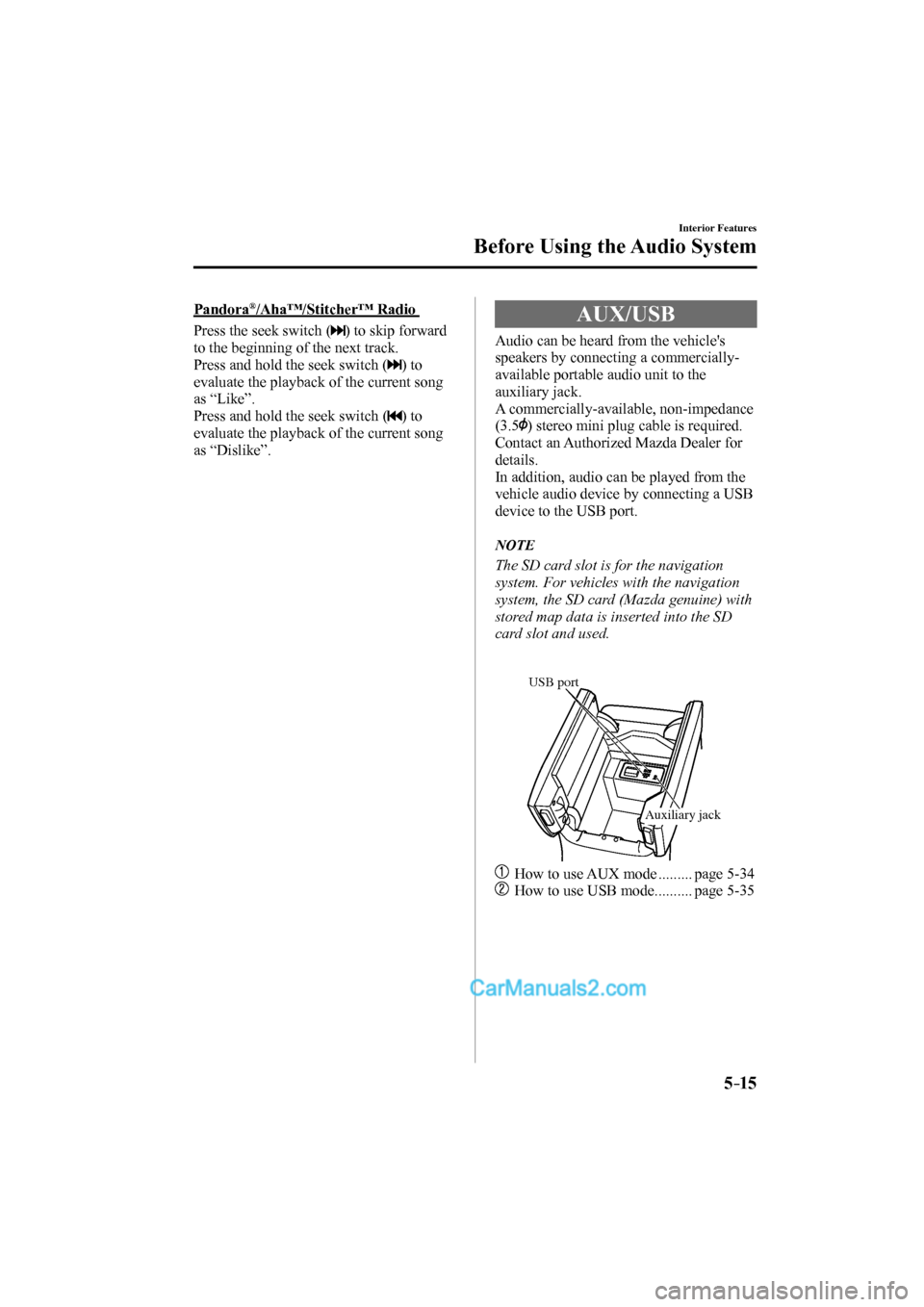
AUX/USB
Audio can be heard from the vehicle's
speakers by connecting a commercially-
available portable audio unit to the
auxiliary jack.
A commercially-available, non-impedance
(3.5
) stereo mini plug cable is required.
Contact an Authorized Mazda Dealer for
details.
In addition, audio can be played from the
vehicle audio device by connecting a USB
device to the USB port.
NOTE
The SD card slot is for the navigation
system. For vehicles with the navigation
system, the SD card (Mazda genuine) with
stored map data is inserted into the SD
card slot and used.
USB port
Auxiliary jack
How to use AUX mode ......... page 5-34
How to use USB mode .......... page 5-35
CX-9_8FS7-EA-16K_Edition2.indb 15CX-9_8FS7-EA-16K_Edition2.indb 152016/12/15 18:34:572016/12/15 18:34:57
Page 338 of 612
5–20
Interior Features
Audio Set
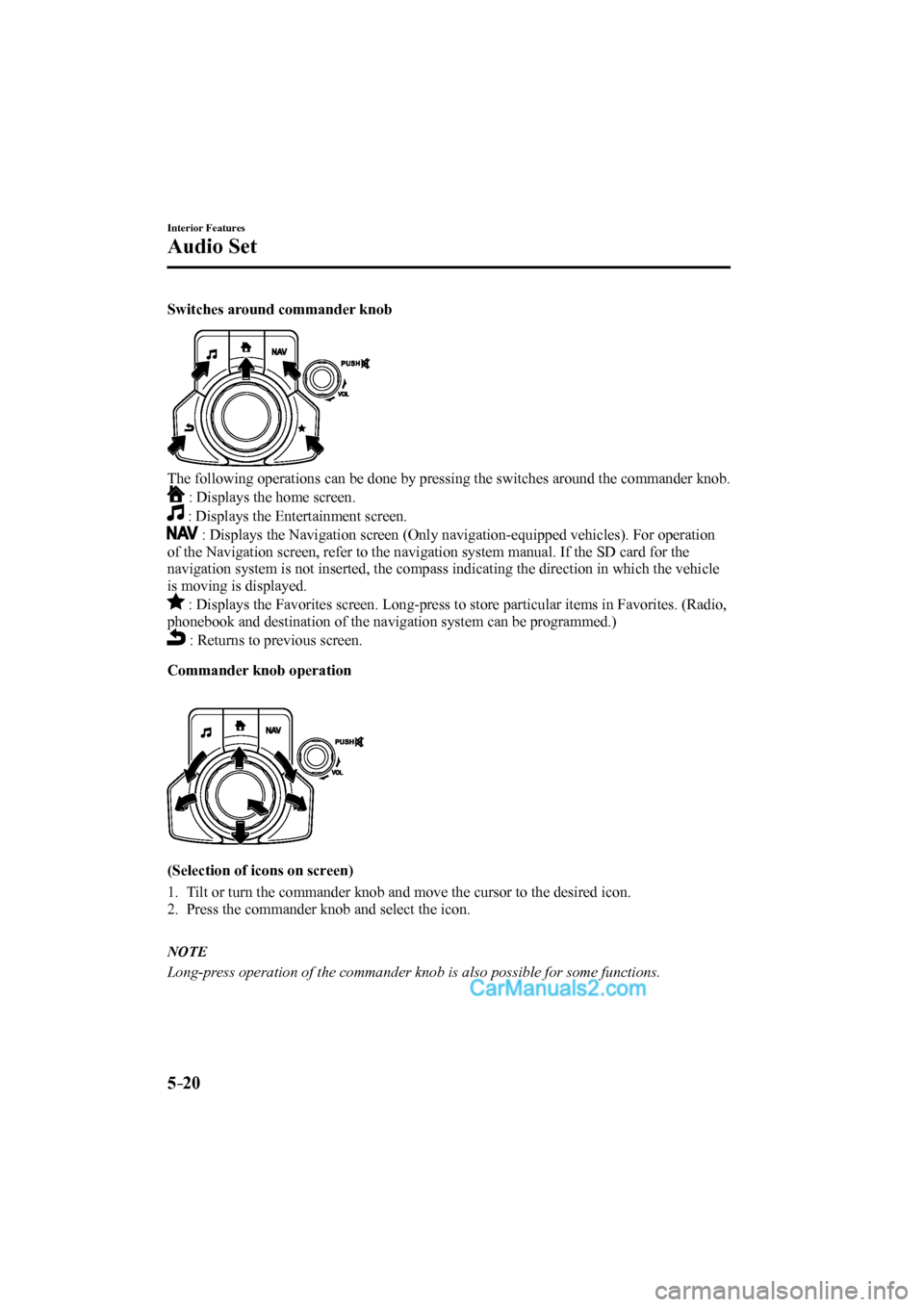
Switches around commander knob
The following operations can be done by pressing the switches around the commander knob.
: Displays the home screen.
: Displays the Entertainment screen.
: Displays the Navigation screen (Only navigation-equipped vehicles). For operation
of the Navigation screen, refer to the navigation system manual. If the SD card for the
navigation system is not inserted, the compass indicating the direction in which the vehicle
is moving is displayed.
: Displays the Favorites screen. Long-press to store particular items in Favorites. (Radio,
phonebook and destination of the navigation system can be programmed.)
: Returns to previous screen.
Commander knob operation
(Selection of icons on screen)
1. Tilt or turn the commander knob and move the cursor to the desired icon.
2. Press the commander knob and select the icon.
NOTE
Long-press operation of the commander knob is also possible for some functions.
CX-9_8FS7-EA-16K_Edition2.indb 20CX-9_8FS7-EA-16K_Edition2.indb 202016/12/15 18:34:592016/12/15 18:34:59
Page 341 of 612
5–23
Interior Features
Audio Set
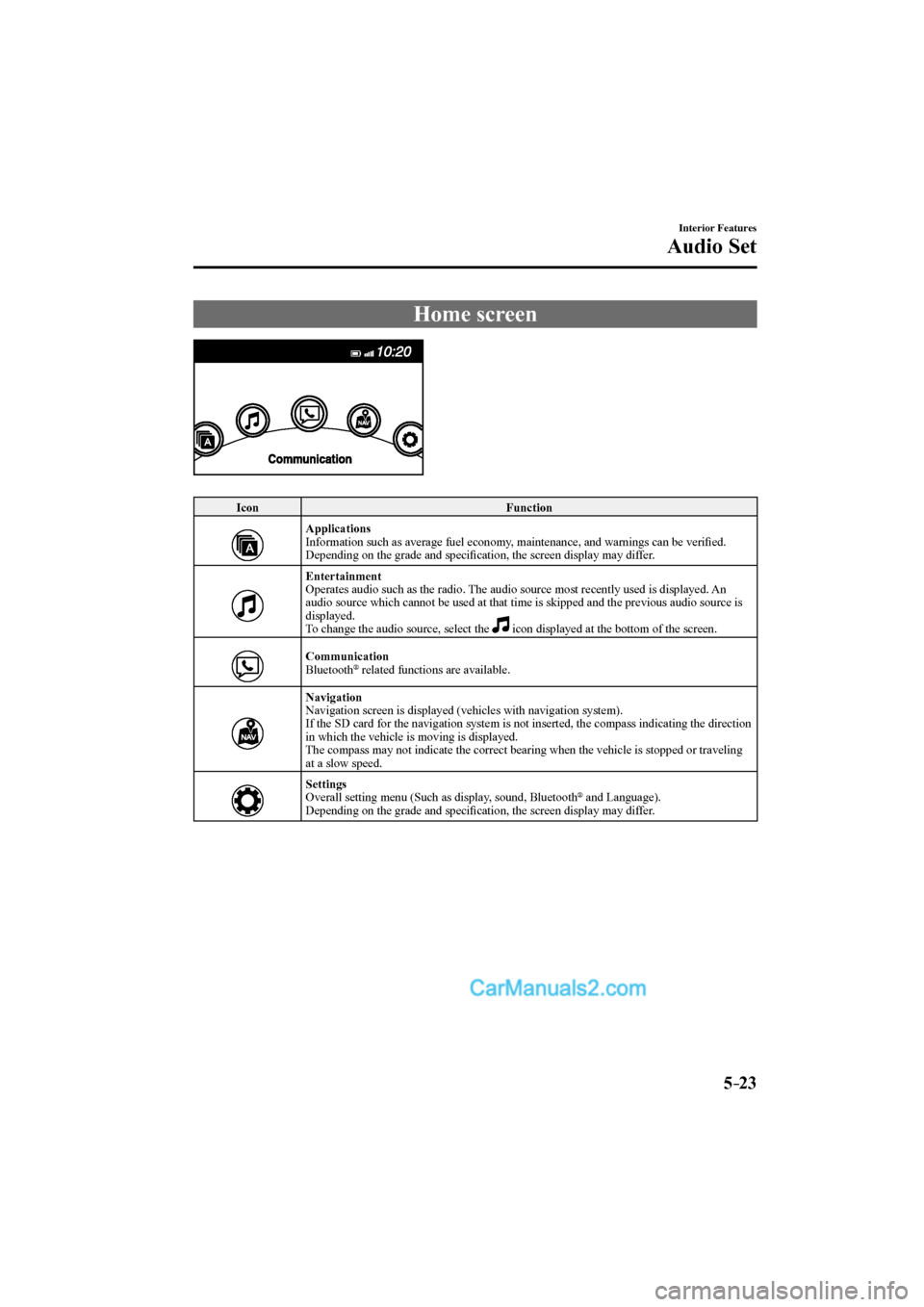
Home screen
Icon Function
Applications
Information such as average fuel economy, maintenance, and warnings can be verifi ed.
Depending on the grade and specifi cation, the screen display may differ.
Entertainment
Operates audio such as the radio. The audio source most recently used is displayed. An
audio source which cannot be used at that time is skipped and the previous audio source is
displayed.
To change the audio source, select the icon displayed at the bottom of the screen.
Communication
Bluetooth ® related functions are available.
Navigation
Navigation screen is displayed (vehicles with navigation system).
If the SD card for the navigation system is not inserted, the compass indicating the direction
in which the vehicle is moving is displayed.
The compass may not indicate the correct bearing when the vehicle is stopped or traveling
at a slow speed.
Settings
Overall setting menu (Such as display, sound, Bluetooth
® and Language).
Depending on the grade and specifi cation, the screen display may differ.
CX-9_8FS7-EA-16K_Edition2.indb 23CX-9_8FS7-EA-16K_Edition2.indb 232016/12/15 18:35:012016/12/15 18:35:01
Page 343 of 612
5–25
Interior Features
Audio Set
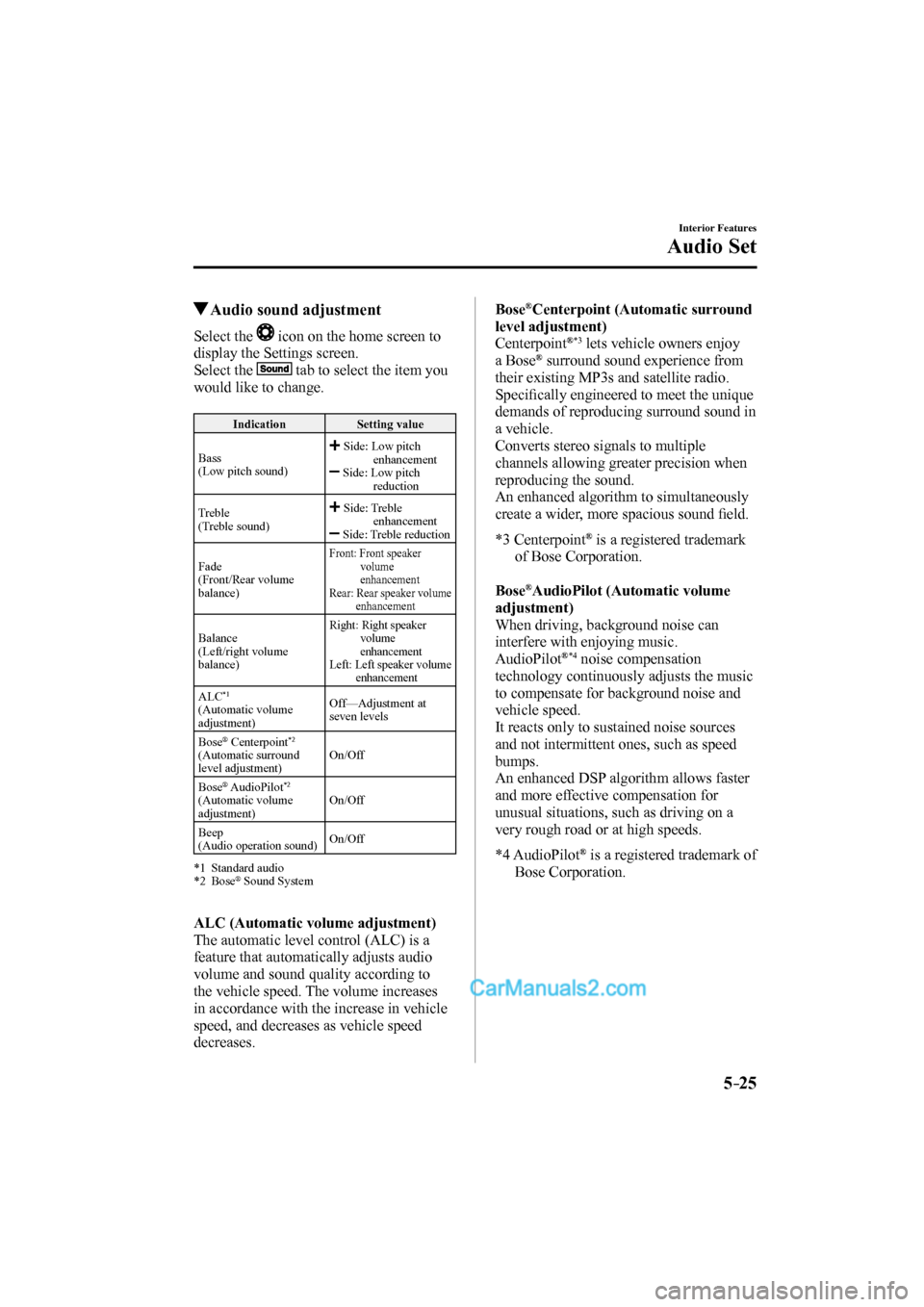
Audio sound adjustment
Select the icon on the home screen to
display the Settings screen.
Select the
tab to select the item you
would like to change.
Indication Setting value
Bass
(Low pitch sound)
Side: Low pitch
enhancement
Side: Low pitch
reduction
Treble
(Treble sound)
Side: Treble
enhancement
Side: Treble reduction
Fade
(Front/Rear volume
balance)
Front: Front speaker
volume
enhancement
Rear: Rear speaker volume
enhancement
Balance
(Left/right volume
balance) Right: Right speaker
volume
enhancement
Left: Left speaker volume
enhancement
ALC *1
(Automatic volume
adjustment) Off—Adjustment at
seven levels
Bose
® Centerpoint *2
(Automatic surround
level adjustment) On/Off
Bose
® AudioPilot *2
(Automatic volume
adjustment) On/Off
Beep
(Audio operation sound) On/Off
*1 Standard audio
*2 Bose
® Sound System
ALC (Automatic volume adjustment)
The automatic level control (ALC) is a
feature that automatically adjusts audio
volume and sound quality according to
the vehicle speed. The volume increases
in accordance with the increase in vehicle
speed, and decreases as vehicle speed
decreases.
Bose ® Centerpoint (Automatic surround
level adjustment)
Centerpoint
® *3 lets vehicle owners enjoy
a Bose ® surround sound experience from
their existing MP3s and satellite radio.
Specifi cally engineered to meet the unique
demands of reproducing surround sound in
a vehicle.
Converts stereo signals to multiple
channels allowing greater precision when
reproducing the sound.
An enhanced algorithm to simultaneously
create a wider, more spacious sound fi eld.
*3 Centerpoint
® is a registered trademark
of Bose Corporation.
Bose
® AudioPilot (Automatic volume
adjustment)
When driving, background noise can
interfere with enjoying music.
AudioPilot
® *4 noise compensation
technology continuously adjusts the music
to compensate for background noise and
vehicle speed.
It reacts only to sustained noise sources
and not intermittent ones, such as speed
bumps.
An enhanced DSP algorithm allows faster
and more effective compensation for
unusual situations, such as driving on a
very rough road or at high speeds.
*4 AudioPilot
® is a registered trademark of
Bose Corporation.
CX-9_8FS7-EA-16K_Edition2.indb 25CX-9_8FS7-EA-16K_Edition2.indb 252016/12/15 18:35:032016/12/15 18:35:03
Page 344 of 612
5–26
Interior Features
Audio Set
Operating the Radio
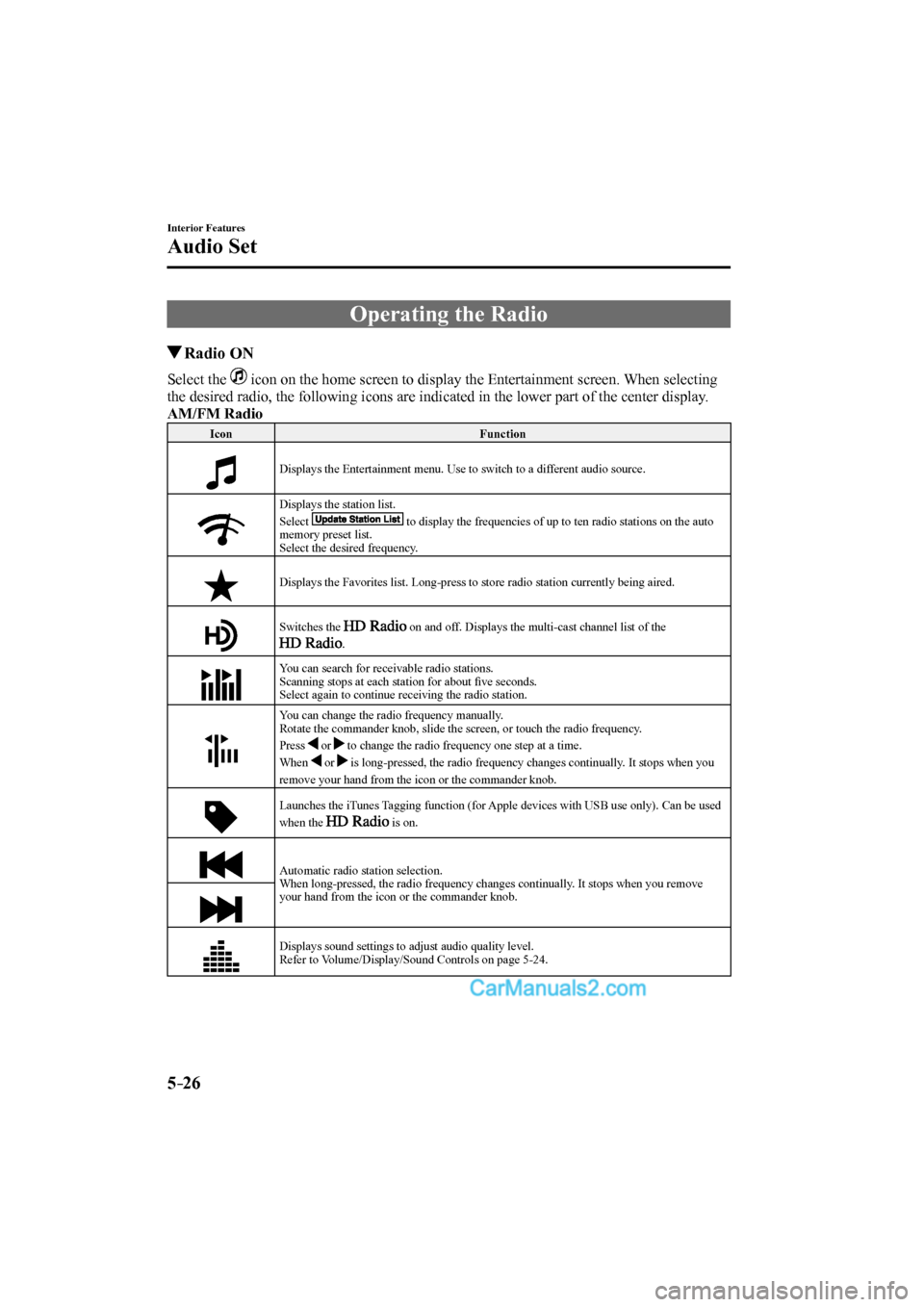
Radio ON
Select the icon on the home screen to display the Entertainment screen. When selecting
the desired radio, the following icons are indicated in the lower part of the center display.
AM/FM Radio
Icon Function
Displays the Entertainment menu. Use to switch to a different audio source.
Displays the station list.
Select
to display the frequencies of up to ten radio stations on the auto
memory preset list.
Select the desired frequency.
Displays the Favorites list. Long-press to store radio station currently being aired.
Switches the
on and off. Displays the multi-cast channel list of the
.
You can search for receivable radio stations.
Scanning stops at each station for about fi ve seconds.
Select again to continue receiving the radio station.
You can change the radio frequency manually.
Rotate the commander knob, slide the screen, or touch the radio frequency.
Press
or to change the radio frequency one step at a time.
When
or is long-pressed, the radio frequency changes continually. It stops when you
remove your hand from the icon or the commander knob.
Launches the iTunes Tagging function (for Apple devices with USB use only). Can be used
when the is on.
Automatic radio station selection.
When long-pressed, the radio frequency changes continually. It stops when you remove
your hand from the icon or the commander knob.
Displays sound settings to adjust audio quality level.
Refer to Volume/Display/Sound Controls on page 5-24 .
CX-9_8FS7-EA-16K_Edition2.indb 26CX-9_8FS7-EA-16K_Edition2.indb 262016/12/15 18:35:042016/12/15 18:35:04
Page 345 of 612
5–27
Interior Features
Audio Set
*Some models.
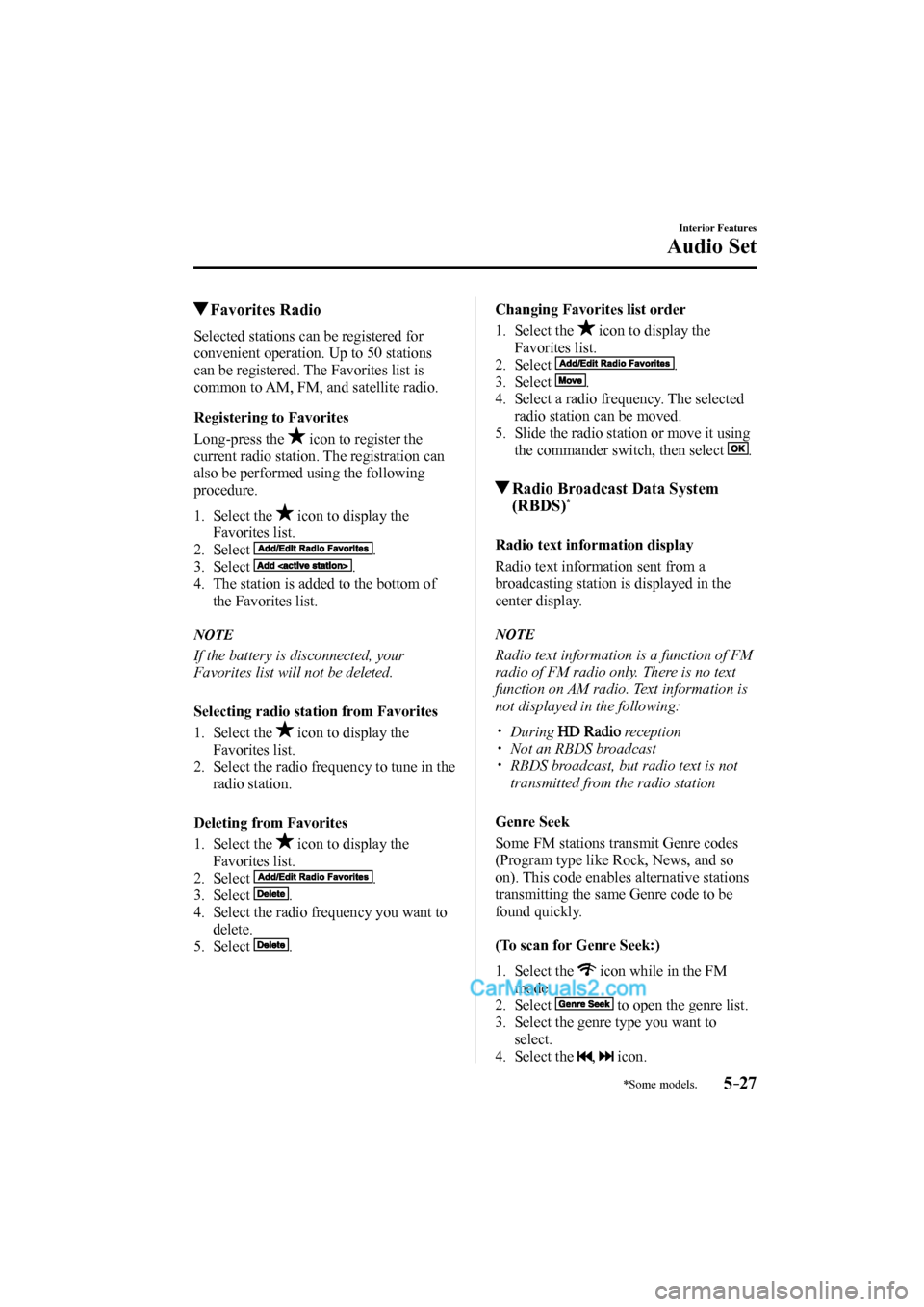
Favorites Radio
Selected stations can be registered for
convenient operation. Up to 50 stations
can be registered. The Favorites list is
common to AM, FM, and satellite radio.
Registering to Favorites
Long-press the
icon to register the
current radio station. The registration can
also be performed using the following
procedure.
1. Select the icon to display the
Favorites list.
2. Select
.
3. Select
.
4. The station is added to the bottom of
the Favorites list.
NOTE
If the battery is disconnected, your
Favorites list will not be deleted.
Selecting radio station from Favorites
1. Select the
icon to display the
Favorites list.
2. Select the radio frequency to tune in the
radio station.
Deleting from Favorites
1. Select the
icon to display the
Favorites list.
2. Select
.
3. Select
.
4. Select the radio frequency you want to
delete.
5. Select
.
Changing Favorites list order
1. Select the
icon to display the
Favorites list.
2. Select
.
3. Select
.
4. Select a radio frequency. The selected
radio station can be moved.
5. Slide the radio station or move it using
the commander switch, then select
.
Radio Broadcast Data System
(RBDS) *
Radio text information display
Radio text information sent from a
broadcasting station is displayed in the
center display.
NOTE
Radio text information is a function of FM
radio of FM radio only. There is no text
function on AM radio. Text information is
not displayed in the following:
During reception
Not an RBDS broadcast
RBDS broadcast, but radio text is not
transmitted from the radio station
Genre Seek
Some FM stations transmit Genre codes
(Program type like Rock, News, and so
on). This code enables alternative stations
transmitting the same Genre code to be
found quickly.
(To scan for Genre Seek:)
1. Select the icon while in the FM
mode.
2. Select
to open the genre list.
3. Select the genre type you want to
select.
4. Select the
, icon.
CX-9_8FS7-EA-16K_Edition2.indb 27CX-9_8FS7-EA-16K_Edition2.indb 272016/12/15 18:35:052016/12/15 18:35:05
Page 346 of 612
5–28
Interior Features
Audio Set
NOTE
To change the desired genre, select the
icon.
Ex.)
89.3 is currently being received. With
Rock selected as the Genre, the radio
stations broadcasting Rock are at the
following frequencies.
98.3
*1 , 98.7, 104.3 *1 , 107.1
*1 Radio stations with good reception
The frequency changes as follows each
time
is pressed.
89.3→98.3→104.3→98.3
NOTE
Only one Genre can be selected.
It may not be possible to receive any
station even if the Genre Seek function
is used.
If a program in the selected genre is not
broadcast to a region, reception is not
possible even if the Genre Seek function
is used.
The Genre Seek function searches for
genre code (program type) which FM
analog broadcasts transmit.
specialty programs (HD2-HD8) cannot
be searched because they are not FM
analog broadcasts.
If radio stations which are selected by
scanning using the Genre Seek function
are
broadcasting stations,
they are changed from analog
broadcasts to
broadcasts
after a few seconds if the reception
conditions are good. The genre is
displayed after the switch, however, the
genre for FM analog broadcasts may
differ.
HD Radio
What is HD Radio™ Technology and
how does it work?
HD Radio™ Technology is the digital
evolution of analog AM/FM radio. Your
radio product has a special receiver which
allows it to receive digital broadcasts
(where available) in addition to the analog
broadcasts it already receives. Digital
broadcasts have better sound quality than
analog broadcasts as digital broadcasts
provide free, crystal clear audio. For more
information, and a guide to available radio
stations and programming, please visit
www.hdradio.com.
Benefi ts of HD Radio™ Technology
(Information)
The song title, artist name, album name
and genre will appear on the screen when
available by the radio station.
(Multicast)
On the FM radio frequency most digital
stations have “multiple” or supplemental
programs on each FM station.
Listening to HD Radio™ Technology
I f
icon turns on by selecting a radio
station which is an
broadcasting
station, the analog broadcast is switched to
an
broadcast automatically after
a few seconds and then received.
If the
broadcast is stopped and
changed to an analog broadcast, press
down
to turn off .
Multicast channel selection (FM)
If multi-cast channels are available for an
broadcast currently being
received, the multi-cast channel list is
displayed. Select the desired radio station.
CX-9_8FS7-EA-16K_Edition2.indb 28CX-9_8FS7-EA-16K_Edition2.indb 282016/12/15 18:35:072016/12/15 18:35:07