reset MAZDA MODEL CX-9 2018 (in English) User Guide
[x] Cancel search | Manufacturer: MAZDA, Model Year: 2018, Model line: MODEL CX-9, Model: MAZDA MODEL CX-9 2018Pages: 640
Page 179 of 640
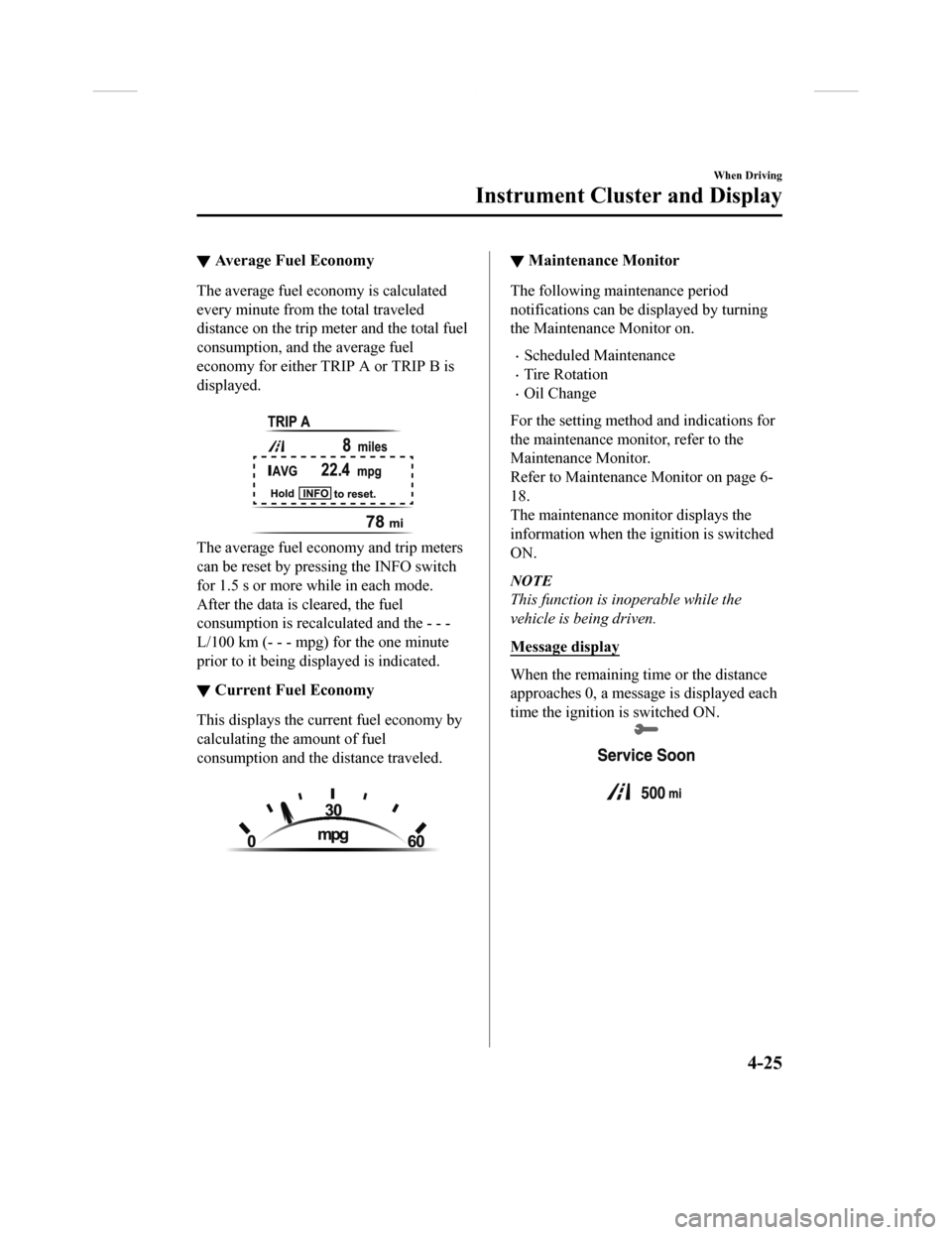
▼Average Fuel Economy
The average fuel economy is calculated
every minute from the total traveled
distance on the trip me
ter and the total fuel
consumption, and the average fuel
economy for either TRIP A or TRIP B is
displayed.
The average fuel economy and trip meters
can be reset by pressing the INFO switch
for 1.5 s or more while in each mode.
After the data is cleared, the fuel
consumption is recalcu lated and the - - -
L/100 km (- - - mpg) for the one minute
prior to it being displayed is indicated.
▼ Current Fuel Economy
This displays the curr
ent fuel economy by
calculating the amount of fuel
consumption and the distance traveled.
▼ Maintenance Monitor
The following maintenance period
notifications can be displayed by turning
the Maintenance Monitor on.
•Scheduled Maintenance
•Tire Rotation
•Oil Change
For the setting method and indications for
the maintenance monitor, refer to the
Maintenance Monitor.
Refer to Maintenance Monitor on page 6-
18.
The maintenance monitor displays the
information when the ignition is switched
ON.
NOTE
This function is inoperable while the
vehicle is being driven.
Message display
When the remaining time or the distance
approaches 0, a message is displayed each
time the ignition is switched ON.
When Driving
Instrument Cluster and Display
4-25
CX-9_8GC3-EA-17G_Edition1 2017-5-29 10:13:38
Page 180 of 640

NOTE
•If any of the INFO switch is pressed
while a message is displayed, it will no
longer be displayed the next time the
ignition is switched ON.
•After the vehicle is serviced and the
remaining time/distance is reset, the
message for the next maintenance
period will be displayed when the
remaining distance or time to the next
maintenance period approaches 0
(displays when engine is started).
•If there are multiple messages, they are
displayed according to their order.
•If OFF is set for Messages, messages
are not displayed.
▼Blind Spot Monitoring (BSM)
Display
Displays the system status.
Refer to Blind Spot M
onitoring (BSM) on
page 4-91.
▼ Distance Recognition Support
System (DRSS) Display*
Displays the distance between your
vehicle and the vehicle ahead.
Refer to Distance Recognition Support
System (DRSS) on page 4-104.
▼Mazda Radar Cruise Control with
Stop & Go function (MRCC with
Stop & Go function) Display
*
Displays the currently set system status.
Refer to Mazda Radar
Cruise Control with
Stop & Go function (MRCC with Stop &
Go function) on page 4-110.
When Driving
Instrument Cluster and Display
4-26*Some models.
CX-9_8GC3-EA-17G_Edition1 2017-5-29 10:13:38
Page 181 of 640

▼Lane-keep Assist System (LAS) &
Lane Departure Warning System
(LDWS) Display
*
Displays the system status.
Refer to Lane-keep A
ssist System (LAS)
& Lane Departure Warning System
(LDWS) on page 4-123.
▼ Cruise Control Set Vehicle Speed
Display*
The vehicle speed preset using the cruise
control is displayed.
Refer to Cruise Cont
rol on page 4-155.
▼Compass Display
The direction the vehicle is moving is
displayed while the vehicle is being
driven.
Display
Direction
NN orth
SS outh
EE ast
WW est
▼ Warning (Display Indication)
A message is displayed to notify the user
of the system operation status and
malfunctions or abnormalities.
If the warning light turns on/flashes
simultaneously or a symbol is indicated in
the display, check the information
regarding the warning light or symbol.
(page 4-31)
When only a message is displayed, refer to
Message Indicated in Multi-information
Display. (page 7-46)
When Driving
Instrument Cluster and Display
*Some models.4-27
CX-9_8GC3-EA-17G_Edition1
2017-5-29 10:13:38
Page 184 of 640

Each setting/adjustment for the active driving display can be performed on the center
display.
1. Select the
icon on the home screen and display the Settings screen.
2. Select the AD-Disp tab.
3. Select the desired item and perform the setting/adjustment.
•Method for adjusting screen brightness (automatically/manually)
•Screen brightness initial setting s (automatic adjustment is selected)
•Screen brightness adjustment (m anual adjustment is selected)
•Display position of active driving display (display height)
•Active driving display angle adjustment (display angle correcti on)
•Active driving display ON/OFF (indication)
•Reset settings (reset)
NOTE
•The desired driving position (display position, brightness level, display information) can
be called up after programming the position.
Refer to Driving Position Memory on page 2-8.
When Driving
Instrument Cluster and Display
4-30
CX-9_8GC3-EA-17G_Edition1 2017-5-29 10:13:38
Page 193 of 640

▼Wrench Indicator Light
When the ignition is switched ON, the
wrench indicator light turns on and then
turns off after a few seconds.
The wrench indicator light turns on under
the following conditions:
•When the preset maintenance period has
arrived.
•When it’s time to replace the engine oil.
Refer to Maintenance Monitor on page 6-
18.
▼ Low Engine Coolant Temperature
Indicator Light (Blue)*
The light illuminates continuously when
the engine coolant temperature is low and
turns off after the engine is warm.
When Driving
Instrument Cluster and Display
*Some models.4-39
CX-9_8GC3-EA-17G_Edition1
2017-5-29 10:13:38
Page 231 of 640

Fuel Economy Monitor
The Fuel Consumption information is displayed by operating each icon in the display.
In addition, after completing a t rip, the total energy efficiency to date is displayed in the
ending display when the ending display is turned on.
1. Select the
icon on the home screen to display the applications screen.
2. Select the “Fuel Economy Monitor”.
3. Select the
icon at the bottom left of the screen to display the menu in t he lower part
of the screen.
4. Select the icon in the menu and perform the operation. Each i con operates as follows:
Indication on display Control status
Hides the menu display.
Displays the application screen.
Resets the fuel economy data.
Displays the following setting screen.
•Ending display on/off switching•On/off switching for function which synchronizes re-
set fuel economy data to trip meter (Trip A) (Type B
instrument cluster only)
NOTE
The fuel economy monitor screen after the ignition is switched from ON to OFF is changed
to the original fuel economy monitor screen wh en the ignition is switched ON the next time.
When Driving
Fuel Economy Monitor
4-77
CX-9_8GC3-EA-17G_Edition1 2017-5-29 10:13:38
Page 232 of 640

▼Fuel Consumption Display
Information regarding the fuel economy is displayed.
Indication on display
Control status
Displays the fuel economy for the past 60 minutes.
•Displays the fuel economy e very minute for the past 1
to 10 minutes.
•Displays the fuel economy every 10 minutes for the
past 10 to 60 minutes.
Displays the average fuel economy over the past 5
resets and after the current reset.
Calculates the average fuel economy every minute
after vehicle travel begins, and displays it.
NOTE
•The fuel economy data can be reset by doing the following operation:
•Press the reset switch from the menu screen.
•When the function which synchronizes the fuel economy monitor and the trip meter is
on, reset trip A of the trip meter.
•Delete the average fuel economy information displayed in the trip computer.
•After resetting the fuel economy data, “-- -” is displayed while the average fuel economy
is calculated.
▼ Ending Screen Display
If the ending display on the fuel economy monitor is on when th
e ignition is switched from
ON to OFF, the informa tion regarding the fuel economy is displa yed.
When Driving
Fuel Economy Monitor
4-78
CX-9_8GC3-EA-17G_Edition1 2017-5-29 10:13:38
Page 264 of 640

Mazda Radar Cruise Control with Stop & Go function(MRCC with Stop & Go function)
*
The MRCC with Stop & Go function system is designed to maintain headway control*1
with a vehicle ahead according to your vehicle's speed using a radar sensor (front) to detect
the distance to the vehicle ahead and a preset vehicle speed wi thout you having to use the
accelerator or brake pedals.
*1 Headway Control: Control of the distance between your vehicle and the vehicle ahead
detected by the Mazda Radar Cruise Control (MRCC) system.
Additionally, if your vehicle starts closing in on the vehicle ahead such as if the vehicle
ahead brakes suddenly, a warning sound and a warning indication in the display are
activated simultaneously to alert you to maintain a sufficient distance between the vehicles.
If the vehicle ahead stops while you are following behind it, y our vehicle will stop and be
held stopped automatically (stop hold control), and headway con trol will resume when you
resume driving the vehicle such as by pressing the RES switch.
Also refer to the following befo re using the MRCC with Stop & G o function.
•Forward Sensing Camera (FSC) (page 4-145)
•Radar sensor (front) (page 4-150)
WA R N I N G
Do not rely completely on the MRCC with Stop & Go function:
The MRCC with Stop & Go function system has detection limitations depending on the type of
vehicle ahead and its conditions, the weather conditions, and the road conditions.
Additionally, the system may be unable to dece lerate sufficiently to avoid hitting the vehicle
ahead if the vehicle ahead applies the brakes sudd enly or another vehicle cuts into the driving
lane, which could result in an accident.
Always drive carefully and verify the surroundi ng conditions and depress the brake pedal or
accelerator pedal while keeping a safer distance from vehicles ahead or on-coming vehicles.
Do not use the MRCC with Stop & Go function system in the following locations, using the
MRCC with Stop & Go function system at the following locations may result in an unexpected
accident:
General roads other than high ways (Driving under these conditions using the MRCC with
Stop & Go function system is not possible.)
Roads with sharp curves and where vehicle tr affic is heavy and there is insufficient space
between vehicles.
Roads where frequent and repetitive accelerati on and deceleration occur (Driving under
these conditions using the MRCC with Stop & Go function system is not possible).
When Driving
i-ACTIVSENSE
4-110*Some models.
CX-9_8GC3-EA-17G_Edition1 2017-5-29 10:13:38
Page 276 of 640

Cancelling using OFF/CAN switch
When the OFF/CAN switch is pressed
once, the cruise control function is
cancelled.
Automatically cancel
The cruise control function is canceled
automatically in the following cases.
•The brake pedal is depressed.
•The parking brake is applied.
•The selector lever is shifted to P or N
position.
NOTE
•If the vehicle speed decreases by about
15 km/h (9.4 mph) or more than the set
speed, the cruise control function may
be canceled.
•When the vehicle speed is less than 21
km/h (13 mph), the cruise control
function is canceled. In this case, the
vehicle speed will not return to the
original set speed even if the vehicle is
accelerated to 25 km/h (16 mph) or
higher and the RES switch is pressed.
Reset the cruise control function.
When Driving
i-ACTIVSENSE
4-122
CX-9_8GC3-EA-17G_Edition1 2017-5-29 10:13:38
Page 311 of 640

3. Set the cruise control by pressing theSET
switch at the desired speed. The
cruise control is set at the moment the
SET
switch is pressed. Release the
accelerator pedal simultaneously. The
cruise set indication (green) is
displayed.
NOTE
•The cruise control speed setting cannot
be performed under the following
conditions:
•The selector lever is in the P or N
position.
•The parking brake is applied.
•Release the SET or RES/ switch at
the desired speed, otherwise the speed
will continue increasing while the RES/
switch is pressed and held, and
continue decreasing while the SET
switch is pressed and held (except when
the accelerator pedal is depressed).
•On a steep grade, the vehicle may
momentarily slow down while
ascending, or speed up while
descending.
•The cruise control will cancel if the
vehicle speed decreases below 21 km/h
(13 mph) when climbing a steep grade.
•The cruise control may cancel at about
15 km/h (9 mph) below the preset speed
such as when climbing a long, steep
grade.
The vehicle speed preset using the cruise
control is displayed in the instrument
cluster.
Type A Instrument Cluster
Type B Instrument Cluster Multi-information Display
Active Driving Display
▼
To Increase Cruising Speed
Follow either of these procedures.
To increase speed using cruise control
switch
Press the RES/ switch and hold it. Your
vehicle will accelerate. Release the switch
at the desired speed.
Press the RES/
switch and release it
immediately to adjust the preset speed.
Multiple operations will increase the
preset speed according to the number of
times it is operated.
Increasing speed with a single RES/
switch operation
Instrument cluster display for vehicle
speed indicated in km/h: 1 km/h (0.6 mph)
Instrument cluster display for vehicle
speed indicated in mph: 1 mph (1.6 km/h)
When Driving
Cruise Control
4-157
CX-9_8GC3-EA-17G_Edition1 2017-5-29 10:13:38