service MAZDA MODEL CX-9 2018 Owners Manual (in English)
[x] Cancel search | Manufacturer: MAZDA, Model Year: 2018, Model line: MODEL CX-9, Model: MAZDA MODEL CX-9 2018Pages: 640
Page 3 of 640

Thank you for choosing a Mazda. We at Mazda design and build vehicles with complete
customer satisfaction in mind.
To help ensure enjoyable and trouble-free operation of your Mazda, read this manual
carefully and follow its recommendations.
An Authorized Mazda Dealer knows your vehicle best. So when mai ntenance or service is
necessary, that's the place to go.
Our nationwide network of Mazda professionals is dedicated to p roviding you with the best
possible service.
We assure you that all of us at Mazda have an ongoing interest in your motoring pleasure
and in your full satisfaction with your Mazda product.
Mazda Motor Corporation
HIROSHIMA, JAPAN
Important Notes About This Manual
Keep this manual in the glove com partment as a handy reference for the safe and enjoyable use of your Mazda.
Should you resell the vehicle, leave this manual with it for th e next owner.
All specifications and descriptio ns are accurate at the time of printing. Because improvement is a constant goal
at Mazda, we reserve the right to make changes in specifications at any time without notice and without obliga-
tion.
Air Conditioner and the Environment
Your Mazda's genuine air condit ioner is filled with a refrigerant that has been found not to damage the earth's
ozone layer. If the air conditione r does not operate properly, consult an Authorized Mazda Dealer.
Perchlorate
Certain components of this vehicle such as [air bag modules, se at belt pretensioners, lithium batteries,…] may
contain Perchlorate Material-- Special handling may apply for s ervice or vehicle end of life disposal. See
www.dtsc.ca.gov/hazardouswaste/perchlorate.
Please be aware that this manual applies to all models, equipme nt and options. As a result, you may find
some explanations for equipment not installed on your vehicle.
©2017 Mazda Motor CorporationJuly 2017 (Print1)
A Word to Mazda Owners
CX-9_8GC3-EA-17G_Edition1 2017-5-29 10:13:38
Page 20 of 640
▼Driving Position Memory*
The desired driving position can be called
up after programming the position.
The following driving positions can be
programmed.
•Driver’s seat position
(seat slide, height
adjustment, front edge of seat bottom,
seat recline)
Refer to Seat Operation on page 2-5.
•Active driving display (display position,
brightness level, display information)
Refer to Active Driving Display on page
4-28.
CAUTION
Do not place fingers or hands around the
bottom of the seat while the seat memory
function is operating. The seat moves
automatically while the seat memory
function is operating and fingers or hands
could get pinched and injured.
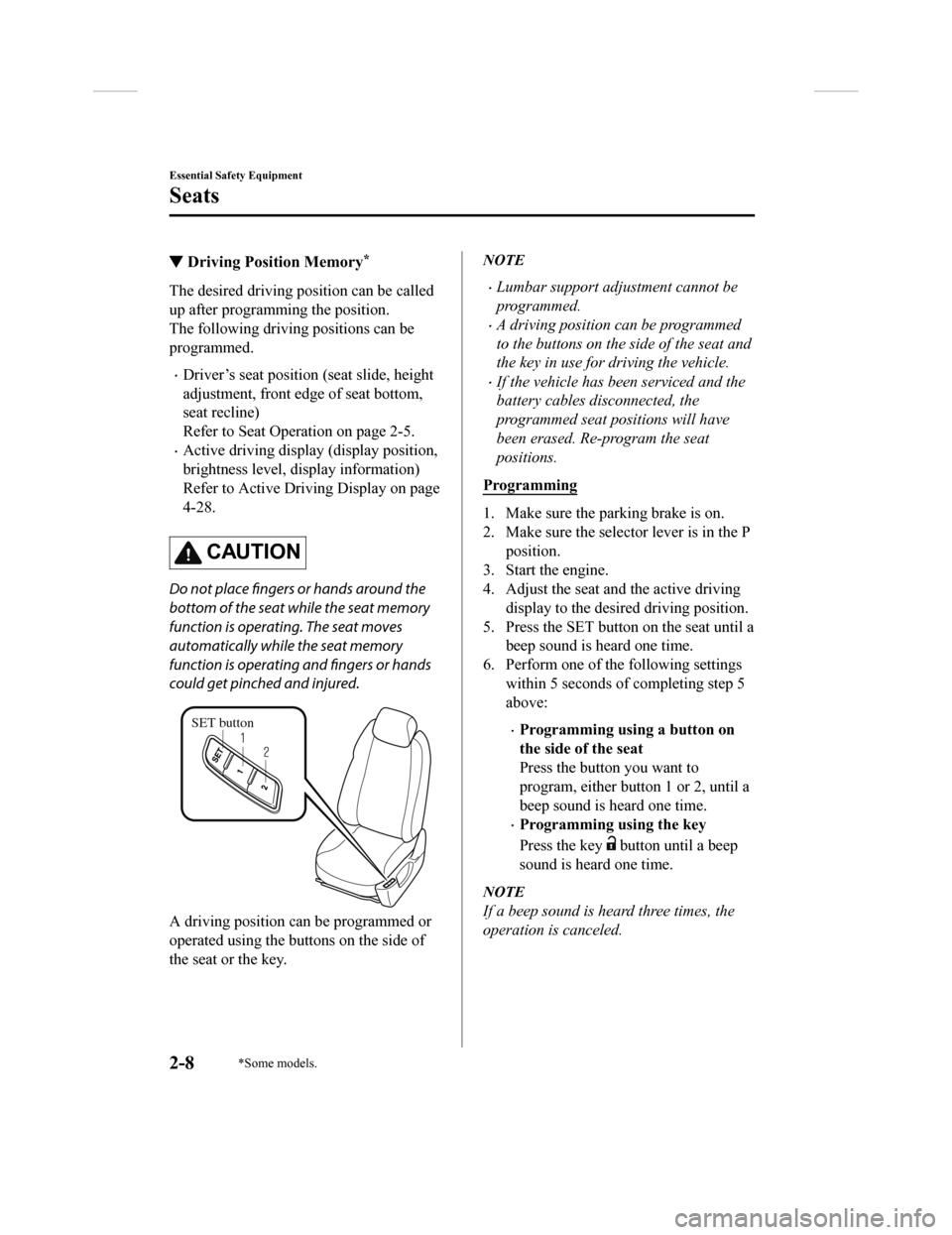
SET button
A driving position can be programmed or
operated using the buttons on the side of
the seat or the key.
NOTE
•Lumbar support adjustment cannot be
programmed.
•A driving position can be programmed
to the buttons on the side of the seat and
the key in use for driving the vehicle.
•If the vehicle has been serviced and the
battery cables disconnected, the
programmed seat positions will have
been erased. Re-program the seat
positions.
Programming
1. Make sure the parking brake is on.
2. Make sure the selector lever is in the P position.
3. Start the engine.
4. Adjust the seat and the active driving display to the desired driving position.
5. Press the SET button on the seat until a beep sound is heard one time.
6. Perform one of the following settings within 5 seconds of completing step 5
above:
•Programming using a button on
the side of the seat
Press the button you want to
program, either button 1 or 2, until a
beep sound is heard one time.
•Programming using the key
Press the key
button until a beep
sound is heard one time.
NOTE
If a beep sound is heard three times, the
operation is canceled.
Essential Safety Equipment
Seats
2-8*Some models.
CX-9_8GC3-EA-17G_Edition1 2017-5-29 10:13:38
Page 98 of 640

Power liftgate button*
To open/close the liftgate, press the power
liftgate button for one second or more with
the liftgate in the fully closed/open
position.
The hazard warning lights flash twice and
the liftgate opens/closes after the beep
sounds.
Panic button
If you witness from a distance someone
attempting to break into or damage your
vehicle, press and hold the panic button to
activate the vehicle's alarm. Call
emergency services if necessary.
NOTE
The panic button will work whether any
door or the liftgate is open or closed.
(Turning on the alarm)
Pressing the panic button for 1 second or
more will trigger the alarm for about 2
minutes and 30 seconds, and the following
will occur:
•The horn sounds intermittently.
•The hazard warning lights flash.
(Turning off the alarm)
The alarm stops by pressing any button on
the key.
▼ Operational Range
The system operates only when the driver
is in the vehicle or within operational
range while the key is being carried.
Starting the Engine
NOTE
•Starting the engine may be possible even
if the key is outside of the vehicle and
extremely close to a door and window,
however, always start the engine from
the driver's seat.
If the vehicle is started and the key is not
in the vehicle, the vehic
le will not restart
after it is shut off and the ignition is
switched to off.
•The luggage compartment is out of the
assured operational range, however, if
the key (transmitter) is operable the
engine will start.
Before Driving
Keys
3-8*Some models.
CX-9_8GC3-EA-17G_Edition1 2017-5-29 10:13:38
Page 153 of 640

Fuel consumption
Trailer towing causes higher fuel consumption.
Maintenance
If you tow a trailer frequently, have your vehicle serviced as shown in Scheduled
Maintenance (page 6-4).
Before Driving
To w i n g
3-63
CX-9_8GC3-EA-17G_Edition1 2017-5-29 10:13:38
Page 180 of 640

NOTE
•If any of the INFO switch is pressed
while a message is displayed, it will no
longer be displayed the next time the
ignition is switched ON.
•After the vehicle is serviced and the
remaining time/distance is reset, the
message for the next maintenance
period will be displayed when the
remaining distance or time to the next
maintenance period approaches 0
(displays when engine is started).
•If there are multiple messages, they are
displayed according to their order.
•If OFF is set for Messages, messages
are not displayed.
▼Blind Spot Monitoring (BSM)
Display
Displays the system status.
Refer to Blind Spot M
onitoring (BSM) on
page 4-91.
▼ Distance Recognition Support
System (DRSS) Display*
Displays the distance between your
vehicle and the vehicle ahead.
Refer to Distance Recognition Support
System (DRSS) on page 4-104.
▼Mazda Radar Cruise Control with
Stop & Go function (MRCC with
Stop & Go function) Display
*
Displays the currently set system status.
Refer to Mazda Radar
Cruise Control with
Stop & Go function (MRCC with Stop &
Go function) on page 4-110.
When Driving
Instrument Cluster and Display
4-26*Some models.
CX-9_8GC3-EA-17G_Edition1 2017-5-29 10:13:38
Page 367 of 640
iTunes Tagging (for Apple devices with
USB use only)
By tagging a song currently being aired,
the song can later be purchased from the
iTunes Store. One hundred tags can be
stored. A maximum of 100 tags (for 100
songs) can be stored for later
downloading.
1. Select the
icon. The tag is stored in
the audio unit.
2. Connect the device via the vehicle's
USB. Any stored ta g(s) will be sent
automatically to the connected device.
3. Once at home or after parking the vehicle safely, log onto the iTunes
Store with your device. Your
previously tagged song(s) can now be
easily purchased.
NOTE
•Both AM and FM can be
used.
•Because iTunes tagging only supports
purchases from the iTunes Store, direct
downloading of music from the vehicle's
audio unit is not possible.
•If the available memory for the
connected device is insufficient, the tag
is not sent.
•If an error occurs wh ile the tag is being
sent, reconnect the device.
Operating the Satellite
Radio
*
▼What is satellite radio?
SiriusXM® Satellite Radio
SiriusXM satellite radio is a
subscription-based satellite radio service
that broadcasts a varie
ty of music, sports,
news, weather, traffic and entertainment
programming.
Your new Mazda vehicle is
factory-installed with SiriusXM satellite
radio hardware and includes a limited trial
subscription term that begins on the date
of sale or lease of your vehicle. See an
authorized dealer for availability.
The satellite radio service should be active
in your vehicle, if you cannot hear
SiriusXM audio, please activate online by
visiting siriusxm.com/refresh
or by calling
SiriusXM Listener Care at
1-877-447-0011 (U.S.A.)/1-888-539-7474
Customer Care (Canada). You can find the
radio ID by turning to Channel 0 or
visiting siriusxm.com/activationhelp
(U.S.A), and siriusxm.ca/subscribe-now/
(Canada).
For more information on extended
subscription terms (a service fee is
required), the online media player and a
list of SiriusXM satellite radio channels,
and other features, please visit
www.siriusxm.com
(U.S.A), and
www.siriusxm.ca
(Canada), or call
SiriusXM at 1-877-4 47-0011 (U.S.A.)/
1-888-539-7474 (Canada).
Interior Features
Audio Set
*Some models.5-33
CX-9_8GC3-EA-17G_Edition1 2017-5-29 10:13:38
Page 375 of 640

▼Gracenote® Database
When a USB device is connected to this unit and the audio is pl
ayed, the album name, artist
name, genre and title informati on are automatically displayed i f there is a match in the
vehicle's database compilation to the music being played. The i nformation stored in this
device uses database information in the Gracenote
® music recognition service.
CAUTION
For information related to the most recent Gracenote® database which can be used and how
to install it, go to the Mazda Hands Free Website:
http://www.mazdahandsfree.com
Introduction
Gracenote, the Gracenote logo and logotype are either a registe red trademark or a trademark
of Gracenote, Inc. in the United States and/or other countries.
Gracenote® End User License Agreement
This application or device contains software from Gracenote, In c. of Emeryville, California
(“Gracenote”). The software from Gracenote (the “Gracenote Soft ware”) enables this
application to perform disc and/ or file identification and obtain music-related information,
including name, artist, track, and title information (“Gracenot e Data”) from online servers or
embedded databases (collectively, “Gracenote Servers”) and to p erform other functions. You
may use Gracenote Data only by means of the intended End-User f unctions of this
application or device.
You agree that you will use Gracenote Data, the Gracenote Softw are, and Gracenote Servers
for your own personal non-commercial use only. You agree not to assign, copy, transfer or
transmit the Gracenot e Software or any Gracenote Data to any th ird party. YOU AGREE
NOT TO USE OR EXPLOIT GRACENOTE DATA, THE GRACENOTE SOFTWARE,
OR GRACENOTE SERVERS, EXCEPT AS EXPRESSLY PERMITTED HEREIN.
You agree that your non-exclusive license to use the Gracenote Data, the Gracenote
Software, and Gracenote Servers will terminate if you violate these restrictions. If your
license terminates, you agree to cease any and all use of the G racenote Data, the Gracenote
Software, and Gracenote Servers. Gracenote reserves all rights in Gracenote Data, the
Gracenote Software, and the Gracenote Servers, including all ow nership rights. Under no
circumstances will Gracenote become liable for any payment to y ou for any information that
you provide. You agree that Gracenote, Inc. may enforce its rig hts under this Agreement
against you directly in its own name.
Interior Features
Audio Set
5-41
CX-9_8GC3-EA-17G_Edition1 2017-5-29 10:13:38
Page 376 of 640

The Gracenote service uses a unique identifier to track queries for statistical purposes. The
purpose of a randomly assigned numeric identifier is to allow the Gracenote service to count
queries without knowing anything about who you are. For more in formation, see the web
page for the Gracenote Privacy Policy for the Gracenote service .
The Gracenote Software and each item of Gracenote Data are lice nsed to you “AS IS.”
Gracenote makes no representations or warranties, express or implied, regarding the
accuracy of any Gracenote Data from in the Gracenote Servers. G racenote reserves the right
to delete data from the Gracenote Servers or to change data cat egories for any cause that
Gracenote deems sufficient. No warranty is made that the Gracen ote Software or Gracenote
Servers are error-free or that f unctioning of Gracenote Softwar e or Gracenote Servers will
be uninterrupted. Gra cenote is not obligated to provide you wit h new enhanced or additional
data types or categories that Gracenote may provide in the futu re and is free to discontinue
its services at any time.
GRACENOTE DISCLAIMS ALL WARRANTIES EXPRESS OR IMPLIED,
INCLUDING, BUT NOT LIMITED TO, IMPLIED WARRANTIES OF
MERCHANTABILITY, FITNESS FOR A PARTICULAR PURPOSE, TITLE, AND
NON-INFRINGEMENT. GRACENOTE DOES NOT WARRANT THE RESULTS THAT
WILL BE OBTAINED BY YOUR USE OF THE GRACENOTE SOFTWARE OR ANY
GRACENOTE SERVER. IN NO CASE WILL GRACENOTE BE LIABLE FOR ANY
CONSEQUENTIAL OR INCIDENTAL DAMAGES OR FOR ANY LOST PROFITS OR
LOST REVENUES.
© Gracenote, Inc. 2009
Updating the database
The Gracenote® media database can be updated using USB device.
1. Connect a USB device containing the software for updating Gra cenote
®.
2. Select the
icon on the home screen to display the Settings screen.
3. Select the
tab and select .
4. Select
. The list of the update package stored in the USB device and t he version
are displayed.
5. Select the package to use the update.
6. Select
.
NOTE
Gracenote® can be downloaded from the Mazda Hands-free Website.
Interior Features
Audio Set
5-42
CX-9_8GC3-EA-17G_Edition1 2017-5-29 10:13:38
Page 380 of 640
Bluetooth® Preparation
▼Device pairing
To use Bluetooth® audio and Hands-Free,
the device equipped with Bluetooth
® has
to be paired to the unit using the following
procedure. A maximum of seven devices
including Bluetooth
® audio devices and
hands-free mobile phones can be paired.
NOTE
•The Bluetooth® system may not operate
for 1 or 2 minutes after the ignition is
switched to ACC or ON. However, this
does not indicate a problem. If the
Bluetooth
® system does not connect
automatically after 1 or 2 minutes have
elapsed, make sure that the Bluetooth
®
setting on the device is normal and
attempt to reconnect the Bluetooth
®
device from the vehicle side.
•If Bluetooth®-enabled devices are used
in the following loca tions or conditions,
connection via Bluetooth
® may not be
possible.
•The device is in a location hidden
from the center display such as behind
or under a seat, or inside the glove
compartment.
•The device contacts or is covered by a
metal object or body.
•The device is set to power-saving
mode.
Pairing Procedure
1. Select the
icon on the home screen
to display the Settings screen.
2. Select the
tab.
3. Select
.
4. Turn the Bluetooth® setting on.
5. Select
to display the
message and switch to the device
operation.
6. Using your device, perform a search
for the Bluetooth
® device (Peripheral
device).
7. Select “Mazda” from the device list searched by the device.
8. (Device with Bluetooth
® version 2.0)
Input the displayed 4-digit pairing
code into the device.
(Device with Bluetooth
® version 2.1
or higher)
Make sure the displayed 6-digit code
on the audio is also displayed on the
device, and touch the
.
Connection permission and phonebook
access permission for your mobile
device may be required depending on
the mobile device.
9. If pairing is successful, the functions
of the device connected to Bluetooth
®
are displayed.
10. (Devices compatible with Mazda
E-mail / SMS function)
SMS (Short Message Service)
messages, and E-mail for the device
are downloaded automatically. A
download permission operation for
your device may be required
depending on the device.
NOTE
When Call history and messages are
downloaded automati cally, each automatic
download setting must be on.
Refer to Communication Settings on page
5-71.
Interior Features
Audio Set
5-46
CX-9_8GC3-EA-17G_Edition1 2017-5-29 10:13:38
Page 390 of 640

How to Use Aha™
▼What is Aha™?
Aha™*1 is an application which can be used to enjoy various Internet
content such as
Internet radio and podcasts.
Stay connected to your friends activities by getting updates fr om Facebook and Twitter.
Using the location-based service, nearby services and destinati ons can be searched or
real-time local inform ation can be obtained.
For details on Aha™, refer to “http://www.aharadio.com/”.
*1 Aha™, the Aha™ logo, and the Ah a™ trade dress are trademarks or registered
trademarks of Harman International Industries, Inc., used with permission.
NOTE
•The service content provided by Aha™ varies depending on the country in which the user
resides. In addition, the service is not available in some countries.
•To operate Aha™ from your Bluetooth® device, perform the following in advance:
•Install the Aha™ application to your device.
•Create an Aha™ account for your device.
•Log onto Aha™ using your device.
•Select the preset station on your device.
Interior Features
Audio Set
5-56
CX-9_8GC3-EA-17G_Edition1 2017-5-29 10:13:38