air condition MAZDA MODEL CX-9 2019 (in English) Owner's Guide
[x] Cancel search | Manufacturer: MAZDA, Model Year: 2019, Model line: MODEL CX-9, Model: MAZDA MODEL CX-9 2019Pages: 692
Page 433 of 692

How to use Android Auto™ mode*
▼What is Android Auto™?
Android Auto™ is an application which allows the operation of a
n Android™ Smartphone
using the vehicle's audio. Android Auto™ functions such as the phone, messages, music,
and map can be used with the vehicle's audio system.
CAUTION
YOU EXPRESSLY ACKNOWLEDGE AND AGREE THAT USE OF ANDROID AUTO™ (“THE
APPLICATION”) IS AT YOUR SOLE RISK AND THAT THE ENTIRE RISK AS TO SATISFACTORY
QUALITY, PERFORMANCE, ACCURACY AND EFFO RT IS WITH YOU TO THE MAXIMUM EXTENT
PERMITTED BY APPLICABLE LAW, AND THAT THE APPLICATION AND INFORMATION ON THE
APPLICATION IS PROVIDED “AS IS” AND “AS AVAILABLE,” WITH ALL FAULTS AND WITHOUT
WARRANTY OF ANY KIND, AND MAZDA HERE BY DISCLAIMS ALL WARRANTIES AND
CONDITIONS WITH RESPECT TO THE APPLICATION AND INFORMATION ON THE
APPLICATION, EITHER EXPRESS, IMPLIED OR STATUTORY, INCLUDING, BUT NOT LIMITED TO,
THE IMPLIED WARRANTIES AND/OR CONDITIONS OF MERCHANTABIL ITY, SATISFACTORY
QUALITY, FITNESS FOR A PARTICULAR PURP OSE, ACCURACY, QUIET ENJOYMENT, AND
NONINFRINGEMENT OF THIRD PARTY RIGHTS. AS EXAMPLES, AND WITHOUT LIMITATION,
MAZDA DISCLAIMS ANY WARRANTY REGARDING THE ACCURACY OF DATA PROVIDED BY
THE APPLICATION, SUCH AS THE ACCURACY OF DIRECTIONS, ESTIMATED TRAVEL TIME,
SPEED LIMITS, ROAD CONDITIONS, NEWS, WEATHER, TRAFFIC, OR OTHER CONTENT
PROVIDED BY GOOGLE, ITS AFFILIATES, OR THIRD PARTY PROVIDERS; MAZDA DOES NOT
GUARANTEE AGAINST LOSS OF APPLICATION DATA, WHICH MAY BE LOST AT ANY TIME;
MAZDA DOES NOT GUARANTEE THAT THE APPLICATION OR ANY SERVICES PROVIDED
THROUGH THEM WILL BE PROVIDED AT ALL TI MES OR THAT ANY OR ALL SERVICES WILL BE
AVAILABLE AT ANY PARTICULAR TIME OR LOCATION. FOR EXAMPLE, SERVICES MAY BE
SUSPENDED OR INTERRUPTED WITHOUT NOTI CE FOR REPAIR, MAINTENANCE, SECURITY
FIXES, UPDATES, ETC., SERVIC ES MAY BE UNAVAILABLE IN YOUR AREA OR LOCATION, ETC.
IN ADDITION, YOU UNDERSTAND THAT CHANGES IN THIRD PARTY TECHNOLOGY OR
GOVERNMENT REGULATION MAY RENDER THE SERVICES AND/OR APPLICATIONS
OBSOLETE AND/OR UNUSABLE.
TO THE EXTENT NOT PROHIBITED BY LAW, IN NO EVENT SHALL MAZDA OR ITS AFFILIATES
BE LIABLE FOR PERSONAL INJURY, OR ANY INCIDENTAL, SPECIAL, INDIRECT OR
CONSEQUENTIAL DAMAGES WHATSOEVER, INCLUDING, WITHOUT LIMITATION, DAMAGES
FOR LOSS OF PROFITS, CORRUPTION OR LOSS OF DATA, FAILURE TO TRANSMIT OR RECEIVE
ANY DATA, BUSINESS INTERRUPTION OR AN Y OTHER COMMERCIAL DAMAGES OR LOSSES,
ARISING OUT OF OR RELATED TO THE APPLICATION OR YOUR USE OF OR INABILITY TO USE
THE APPLICATION OR INFORMATION ON THE APPLICATION.
Interior Features
Audio Set
*Some models.5-45
CX-9_8HB2-EA-18G_Edition1 2018-5-11 13:09:27
Page 440 of 692
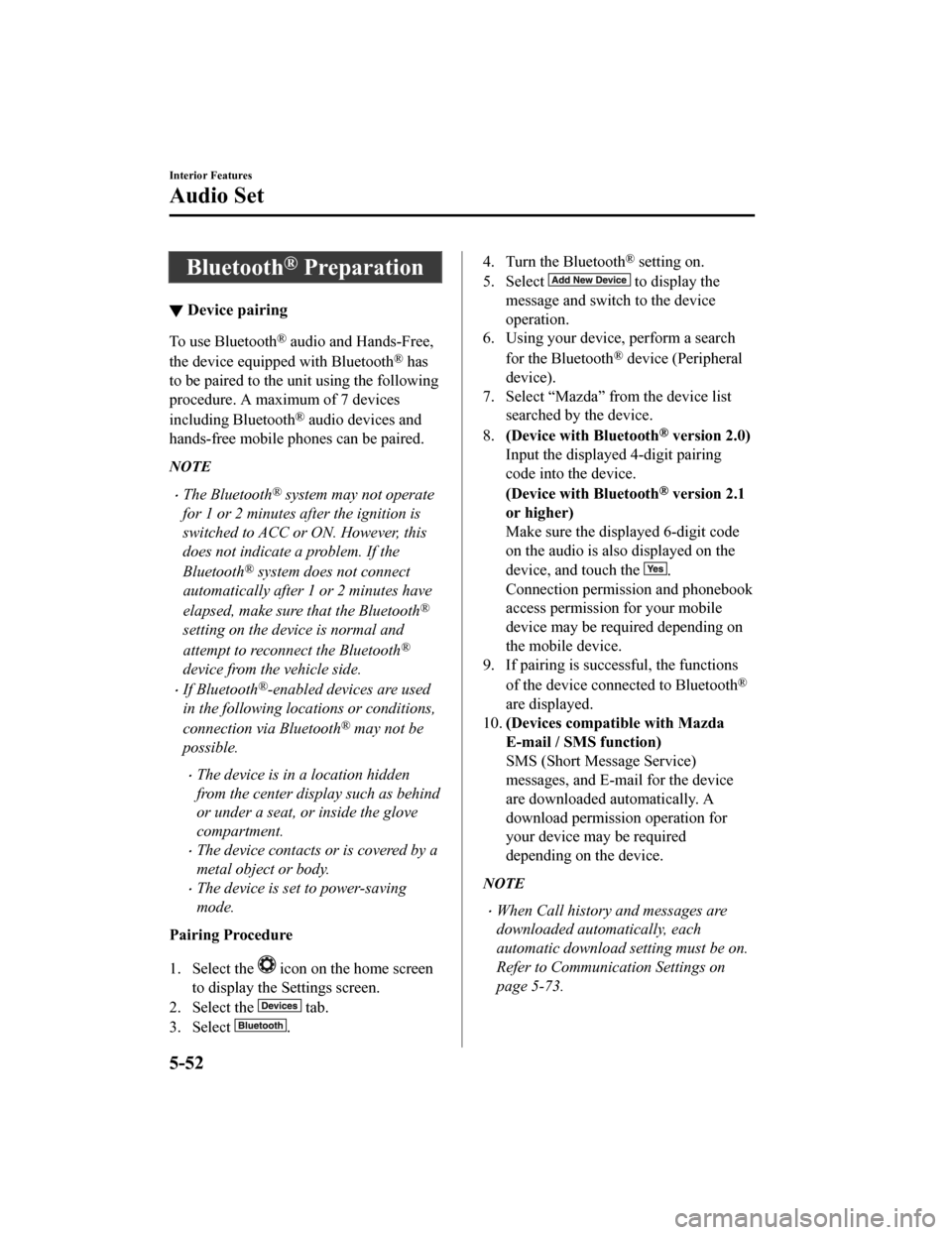
Bluetooth® Preparation
▼Device pairing
To use Bluetooth® audio and Hands-Free,
the device equipped with Bluetooth
® has
to be paired to the unit using the following
procedure. A maximum of 7 devices
including Bluetooth
® audio devices and
hands-free mobile phones can be paired.
NOTE
The Bluetooth® system may not operate
for 1 or 2 minutes after the ignition is
switched to ACC or ON. However, this
does not indicate a problem. If the
Bluetooth
® system does not connect
automatically after 1 or 2 minutes have
elapsed, make sure that the Bluetooth
®
setting on the device is normal and
attempt to reconnect the Bluetooth
®
device from the vehicle side.
If Bluetooth®-enabled devices are used
in the following loca tions or conditions,
connection via Bluetooth
® may not be
possible.
The device is in a location hidden
from the center display such as behind
or under a seat, or inside the glove
compartment.
The device contacts or is covered by a
metal object or body.
The device is set to power-saving
mode.
Pairing Procedure
1. Select the
icon on the home screen
to display the Settings screen.
2. Select the
tab.
3. Select
.
4. Turn the Bluetooth® setting on.
5. Select
to display the
message and switch to the device
operation.
6. Using your device, perform a search
for the Bluetooth
® device (Peripheral
device).
7. Select “Mazda” from the device list searched by the device.
8. (Device with Bluetooth
® version 2.0)
Input the displayed 4-digit pairing
code into the device.
(Device with Bluetooth
® version 2.1
or higher)
Make sure the displayed 6-digit code
on the audio is also displayed on the
device, and touch the
.
Connection permission and phonebook
access permission for your mobile
device may be required depending on
the mobile device.
9. If pairing is successful, the functions
of the device connected to Bluetooth
®
are displayed.
10. (Devices compatible with Mazda
E-mail / SMS function)
SMS (Short Message Service)
messages, and E-mail for the device
are downloaded automatically. A
download permission operation for
your device may be required
depending on the device.
NOTE
When Call history and messages are
downloaded automatically, each
automatic download setting must be on.
Refer to Communication Settings on
page 5-73.
Interior Features
Audio Set
5-52
CX-9_8HB2-EA-18G_Edition1 2018-5-11 13:09:27
Page 441 of 692
After a device is registered, the system
automatically identifies the device. By
activating Bluetooth
® Hands-Free again,
or by activating Bluetooth
® Hands-Free
first after switching the ignition from OFF
to ACC, the device connection condition
is indicated in the center display.
IMPORTANT note about pairing and
automatic reconnection:
If pairing is redone on the same
mobile phone device, first clear
“Mazda” displayed on the Bluetooth
®
setting screen of the mobile device.
When the OS of the device is updated,
the pairing information may be deleted.
If this happens, reprogram the pairing
information to the Bluetooth
® unit.
Before you pair your device, make sure
that Bluetooth
® is “ON”, both on your
phone and on the vehicle.
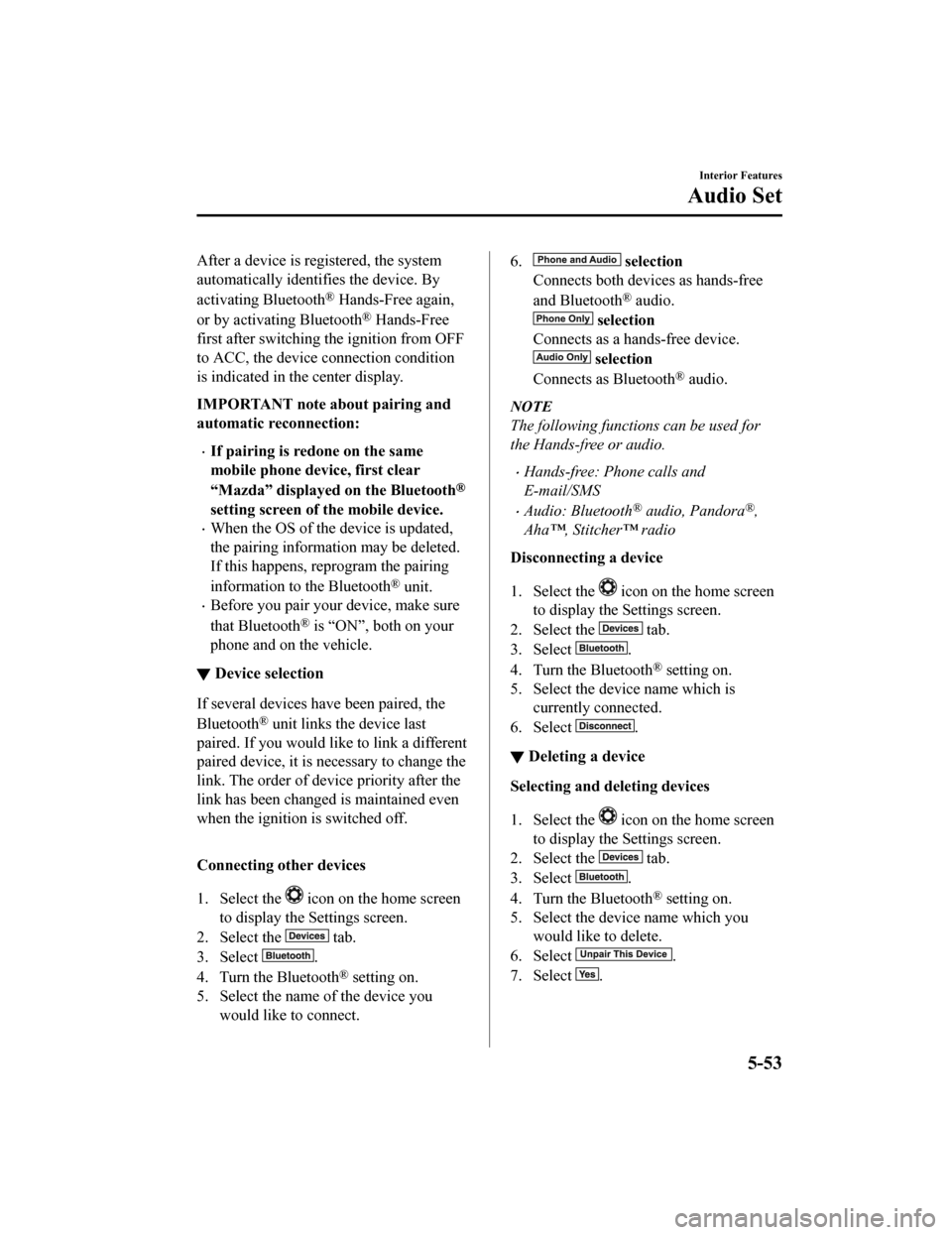
▼ Device selection
If several devices have been paired, the
Bluetooth
® unit links the device last
paired. If you would like to link a different
paired device, it is n ecessary to change the
link. The order of device priority after the
link has been changed is maintained even
when the ignition is switched off.
Connecting other devices
1. Select the
icon on the home screen
to display the Settings screen.
2. Select the
tab.
3. Select
.
4. Turn the Bluetooth
® setting on.
5. Select the name of the device you
would like to connect.
6. selection
Connects both devices as hands-free
and Bluetooth
® audio.
selection
Connects as a hands-free device.
selection
Connects as Bluetooth
® audio.
NOTE
The following functions can be used for
the Hands-free or audio.
Hands-free: Phone calls and
E-mail/SMS
Audio: Bluetooth® audio, Pandora®,
Aha™, Stitcher™ radio
Disconnecting a device
1. Select the
icon on the home screen
to display the Settings screen.
2. Select the
tab.
3. Select
.
4. Turn the Bluetooth
® setting on.
5. Select the device name which is currently connected.
6. Select
.
▼ Deleting a device
Selecting and deleting devices
1. Select the
icon on the home screen
to display the Settings screen.
2. Select the
tab.
3. Select
.
4. Turn the Bluetooth
® setting on.
5. Select the device name which you would like to delete.
6. Select
.
7. Select
.
Interior Features
Audio Set
5-53
CX-9_8HB2-EA-18G_Edition1 2018-5-11 13:09:27
Page 470 of 692
NOTE
When the OS of the device is updated, the pairing information may be deleted. If this
happens, reprogram the pairing information to the Bluetooth
® unit.
If you pair your phone which has already been paired to your vehicle more than once in
the past, you need to delete “Mazda” on your mobile device. Then, execute the
Bluetooth
® search on your mobile device once again, and pair to a newly detected
“Mazda”.
Before you pair your device, make sure that Bluetooth® is “ON”, both on your phone and
on the vehicle.
If Bluetooth®-enabled devices are used in the following locations or conditions,
connection via Bluetooth
® may not be possible.
The device is in a location hidden from the center display such as behind or under a
seat, or inside the glove compartment.
The device contacts or is covered by a metal object or body.
The device is set to power-saving mode.
Different Bluetooth®-enabled devices can be used for Bluetooth® Hands-Free and
Bluetooth
® audio. For example, device A can be connected as a Bluetooth® Hands-Free
device and device B can be connected as a Bluetooth
® audio device. However, the
following may occur when they are used at the same time.
The Bluetooth® connection of the device is disconnected.
Noise occurs in the Hands-Free audio.
Hands-Free operates slowly.
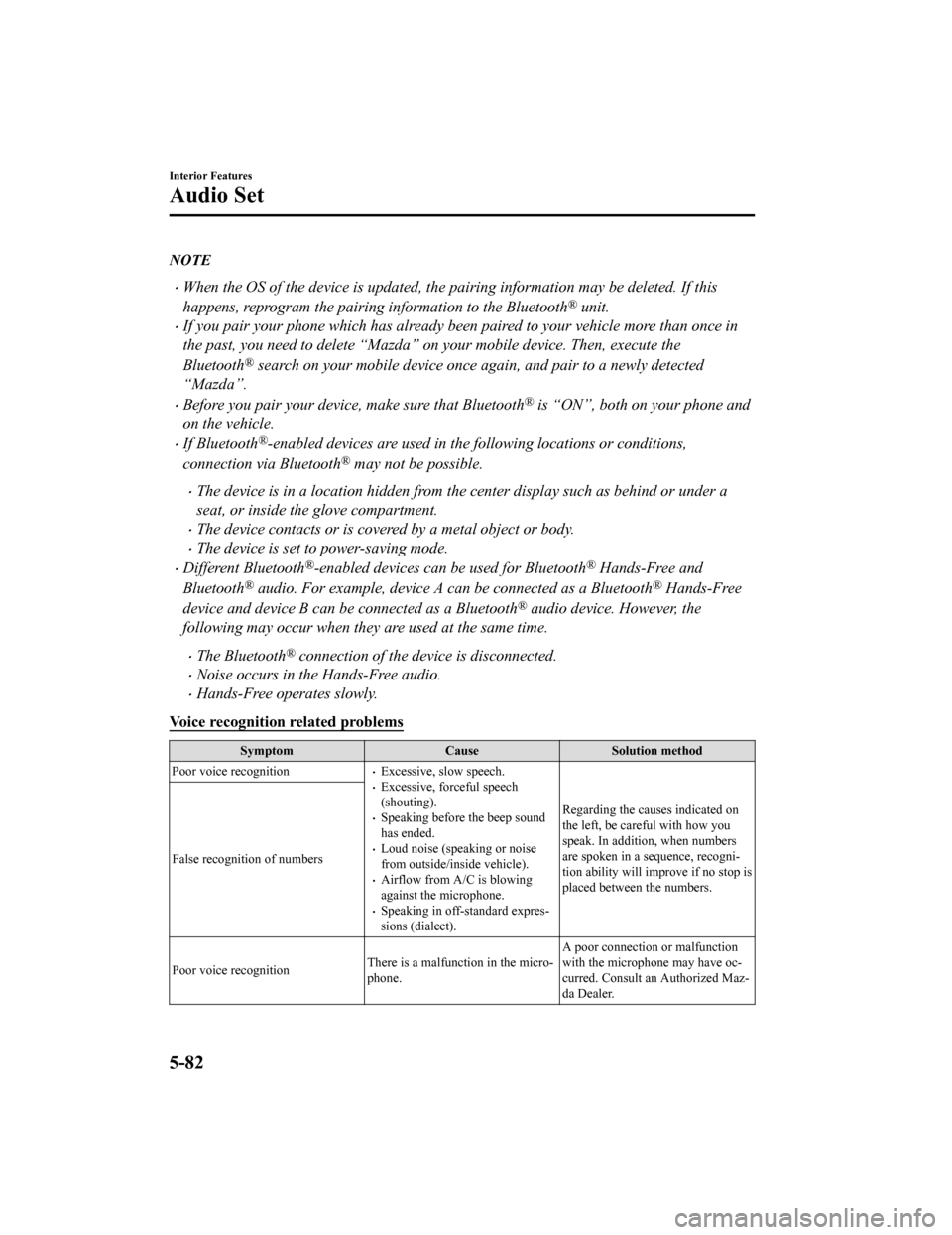
Voice recognition related problems
Symptom CauseSolution method
Poor voice recognition
Excessive, slow speech.Excessive, forceful speech
(shouting).
Speaking before the beep sound
has ended.
Loud noise (speaking or noise
from outside/inside vehicle).
Airflow from A/C is blowing
against the microphone.
Speaking in off-standard expres‐
sions (dialect). Regarding the causes indicated on
the left, be careful with how you
speak. In addition, when numbers
are spoken in a sequence, recogni‐
tion ability will imp
rove if no stop is
placed between the numbers.
False recognition of numbers
Poor voice recognition
There is a malfunction in the micro‐
phone.A poor connection or malfunction
with the microphone may have oc‐
curred. Consult an Authorized Maz‐
da Dealer.
Interior Features
Audio Set
5-82
CX-9_8HB2-EA-18G_Edition1
2018-5-11 13:09:27
Page 471 of 692
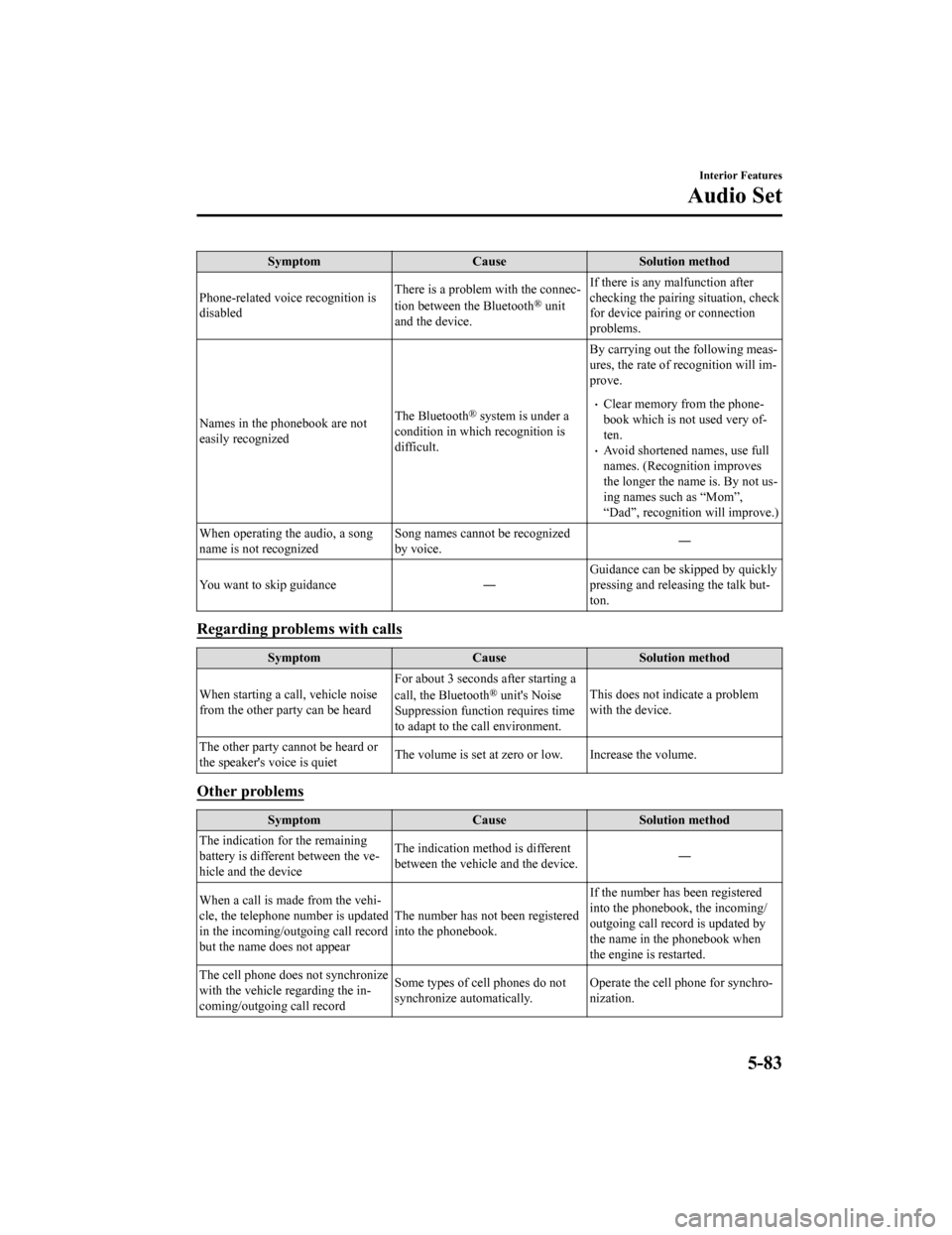
SymptomCauseSolution method
Phone-related voice recognition is
disabled There is a problem with the connec‐
tion between the Bluetooth
® unit
and the device. If there is any malfunction after
checking the pairin
g situation, check
for device pairing or connection
problems.
Names in the phonebook are not
easily recognized The Bluetooth
® system is under a
condition in which recognition is
difficult. By carrying out the following meas‐
ures, the rate of recognition will im‐
prove.Clear memory from the phone‐
book which is not used very of‐
ten.
Avoid shortened names, use full
names. (Recognition improves
the longer the name is. By not us‐
ing names such as “Mom”,
“Dad”, recognition will improve.)
When operating the audio, a song
name is not recognized Song names cannot be recognized
by voice.
―
You want to skip guidance ― Guidance can be skipped by quickly
pressing and releasing the talk but‐
ton.
Regarding proble
ms with calls
Symptom CauseSolution method
When starting a call, vehicle noise
from the other party can be heard For about 3 seconds
after starting a
call, the Bluetooth
® unit's Noise
Suppression function requires time
to adapt to the call environment. This does not indicate a problem
with the device.
The other party cannot be heard or
the speaker's voice is quiet The volume is set at zero or low. Increase the volume.
Other problems
Symptom
CauseSolution method
The indication for the remaining
battery is different between the ve‐
hicle and the device The indication method is different
between the vehicle and the device.
―
When a call is made from the vehi‐
cle, the telephone number is updated
in the incoming/outgoing call record
but the name does not appear The number has not been registered
into the phonebook.If the number has been registered
into the phonebook, the incoming/
outgoing call record is updated by
the name in the phonebook when
the engine is restarted.
The cell phone does not synchronize
with the vehicle regarding the in‐
coming/outgoing call record Some types of cell phones do not
synchronize automatically.
Operate the cell phone for synchro‐
nization.
Interior Features
Audio Set
5-83
CX-9_8HB2-EA-18G_Edition1
2018-5-11 13:09:27
Page 500 of 692
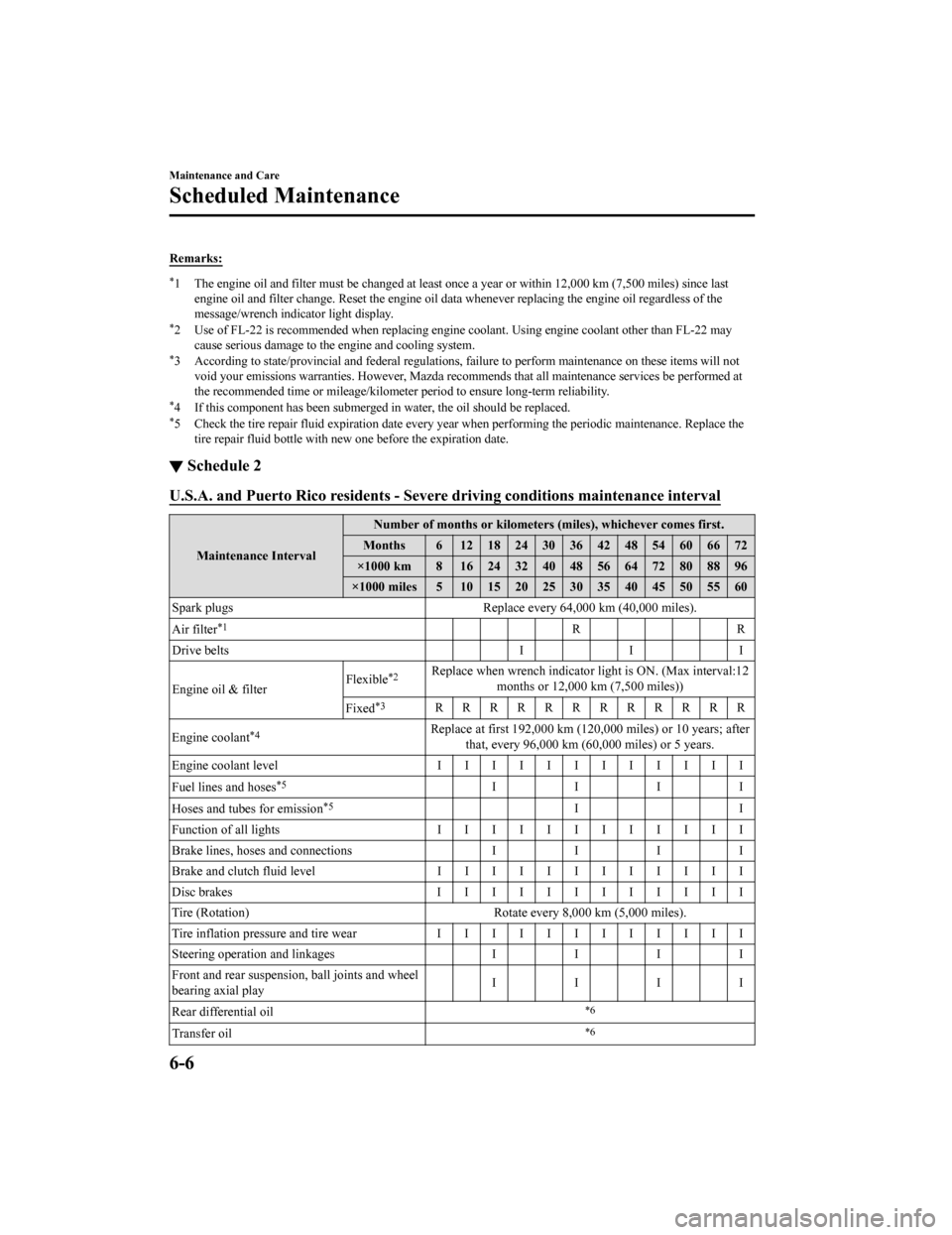
Remarks:
*1 The engine oil and filter must be changed at least once a year or within 12,000 km (7,500 miles) since last
engine oil and filter change. Re set the engine oil data whenever replacing the engine oil regardless of the
message/wrench indicator light display.
*2 Use of FL-22 is recommended when replacing engine coolant. Using engine coolant other than FL-22 may
cause serious damage to the engine and cooling system.
*3 According to state/provincial and federal regulations, failure to perform maintenance on these items will not
void your emissions warranties. H owever, Mazda recommends that all maintenance services be performed at
the recommended time or mileage/kilometer period to ensure long -term reliability.
*4 If this component has been submerged in water, the oil should be replaced.*5 Check the tire repair fluid expiration date every year when performing the periodic maintenance. Replace the
tire repair fluid bottle with ne w one before the expiration dat e.
▼Schedule 2
U.S.A. and Puerto Rico residents - Severe driving conditions ma
intenance interval
Maintenance IntervalNumber of months or kilometers (miles), whichever comes first.
Months 6 1218243036424854606672
×1000 km 8 16 24 32 40 48 56 64 72 80 88 96
×1000 miles 5 10 15 20 25 30 35 40 45 50 55 60
Spark plugs Replace every 64,000 km (40, 000 miles).
Air filter
*1RR
Drive belts I I I
Engine oil & filter Flexible
*2Replace when wrench indicator light is ON. (Max interval:12
months or 12,000 km (7,500 miles))
Fixed
*3RRRRRRRRRRRR
Engine coolant
*4Replace at first 192,000 km (120, 000 miles) or 10 years; after
that, every 96,000 km (60,000 miles) or 5 years.
Engine coolant level IIIIIIIIIIII
Fuel lines and hoses
*5IIII
Hoses and tubes for emission
*5II
Function of all lights IIIIIIIIIIII
Brake lines, hoses and connections II II
Brake and clutch fluid level I I I I I I I I I I I I
Disc brakes IIIIIIIIIIII
Tire (Rotation) Rotate every 8,000 km (5,000 miles).
Tire inflation pressure and tire wear IIIIIIIIIIII
Steering operation and linkages II II
Front and rear suspensi on, ball joints and wheel
bearing axial play IIII
Rear differential oil
*6
Transfer oil*6
Maintenance and Care
Scheduled Maintenance
6-6
CX-9_8HB2-EA-18G_Edition1 2018-5-11 13:09:27
Page 502 of 692
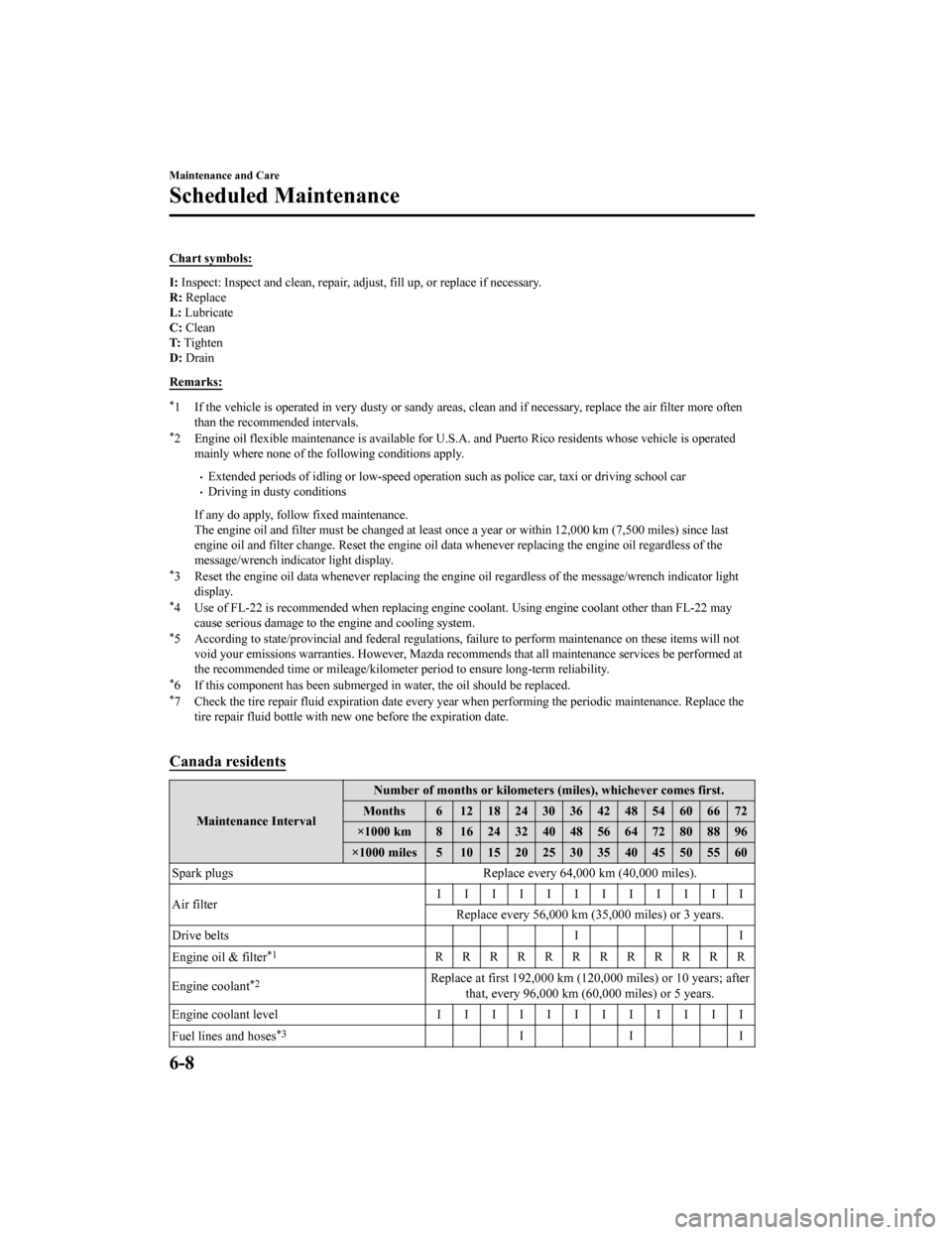
Chart symbols:
I: Inspect: Inspect and clean, r epair, adjust, fill up, or replac e if necessary.
R: Replace
L: Lubricate
C: Clean
T: Tighten
D: Drain
Remarks:
*1 If the vehicle is operated in v ery dusty or sandy areas, clean and if necessary, replace the air filter more often
than the recommended intervals.
*2 Engine oil flexible maintenance is available for U.S.A. and Puerto Rico residents whose vehicle is operated
mainly where none of the fo llowing conditions apply.
Extended periods of idling or low -speed operation such as police car, taxi or driving school carDriving in dusty conditions
If any do apply, follow fixed maintenance.
The engine oil and filter must be changed at least once a year or within 12,000 km (7,500 miles) since last
engine oil and filter change. Re set the engine oil data whenever replacing the engine oil regardless of the
message/wrench indicator light display.
*3 Reset the engine oil data whenever replacing the engine oil re gardless of the message/wrench indicator light
display.
*4 Use of FL-22 is recommended when replacing engine coolant. Using engine coolant other than FL-22 may
cause serious damage to the engine and cooling system.
*5 According to state/provincial and federal regulations, failure to perform maintenance on these items will not
void your emissions warranties. H owever, Mazda recommends that all maintenance services be performed at
the recommended time or mileage/kilometer period to ensure long -term reliability.
*6 If this component has been submerged in water, the oil should be replaced.*7 Check the tire repair fluid expiration date every year when performing the periodic maintenance. Replace the
tire repair fluid bottle with ne w one before the expiration dat e.
Canada residents
Maintenance Interval Number of months or kilometers (miles), whichever comes first.
Months 6 1218243036424854606672
×1000 km 8 16 24 32 40 48 56 64 72 80 88 96
×1000 miles 5 10 15 20 25 30 35 40 45 50 55 60
Spark plugs Replace every 64,000 km (40, 000 miles).
Air filter IIIIIIIIIIII
Replace every 56,000 km (35 ,000 miles) or 3 years.
Drive belts II
Engine oil & filter
*1RRRRRRRRRRRR
Engine coolant
*2Replace at first 192,000 km (120, 000 miles) or 10 years; after
that, every 96,000 km (60,000 miles) or 5 years.
Engine coolant level IIIIIIIIIIII
Fuel lines and hoses
*3III
Maintenance and Care
Scheduled Maintenance
6-8
CX-9_8HB2-EA-18G_Edition1 2018-5-11 13:09:27
Page 504 of 692
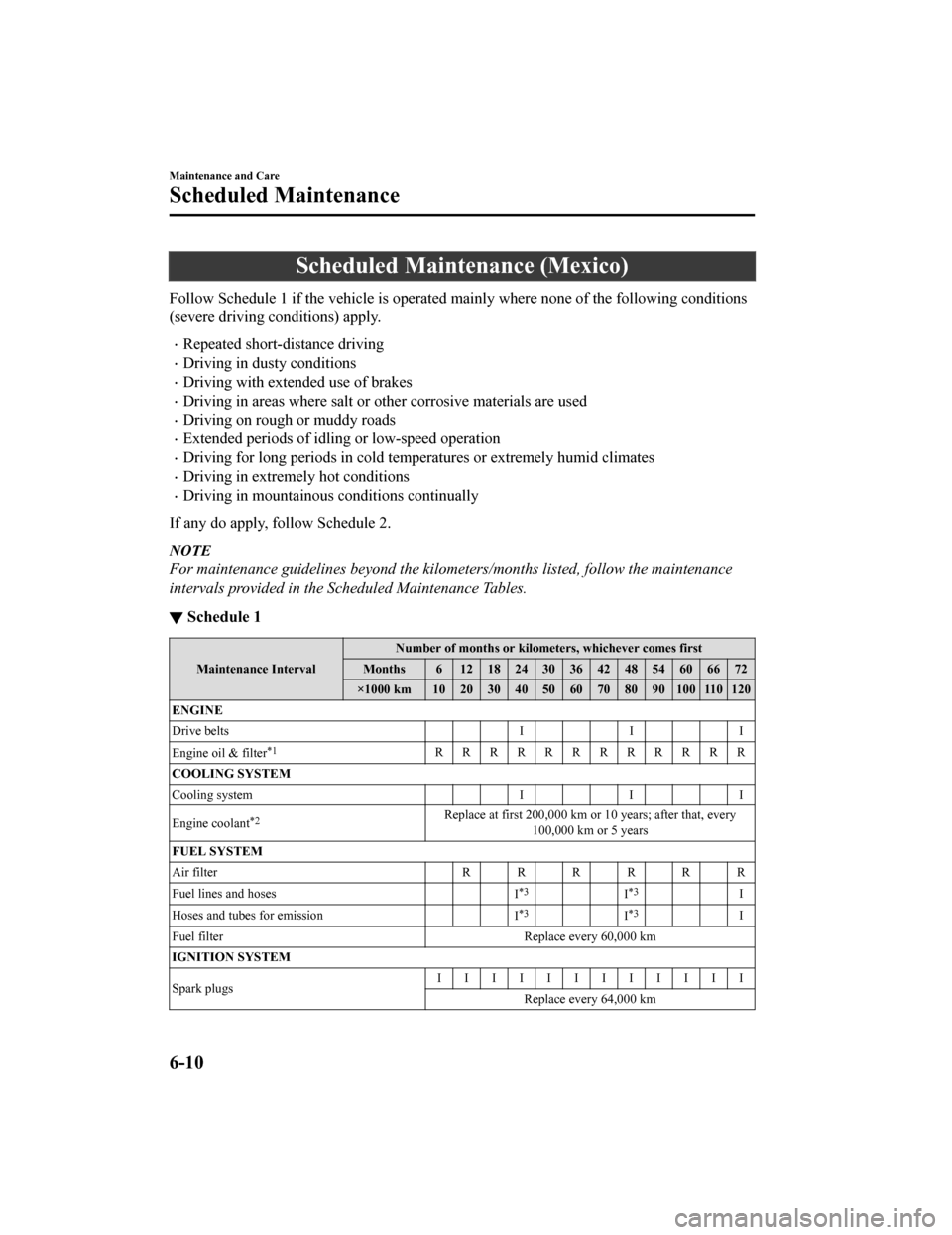
Scheduled Maintenance (Mexico)
Follow Schedule 1 if the vehicle is operated mainly where none of the following conditions
(severe driving conditions) apply.
Repeated short-distance driving
Driving in dusty conditions
Driving with extended use of brakes
Driving in areas where salt or other corrosive materials are us ed
Driving on rough or muddy roads
Extended periods of idling or low-speed operation
Driving for long periods in cold temperatures or extremely humi d climates
Driving in extremely hot conditions
Driving in mountainous conditions continually
If any do apply, follow Schedule 2.
NOTE
For maintenance guidelines beyond the kilome ters/months listed, follow the maintenance
intervals provided in the Scheduled Maintenance Tables.
▼ Schedule 1
Maintenance Interval Number of months or kilometers, whichever comes first
Months 6 1218243036424854606672
×1000 km 102030405060708090100110120
ENGINE
Drive belts II I
Engine oil & filter
*1RRRRRRRRRRRR
COOLING SYSTEM
Cooling system II I
Engine coolant
*2Replace at first 200,000 km or 10 years; after that, every 100,000 km or 5 years
FUEL SYSTEM
Air filter RRRRRR
Fuel lines and hoses I
*3I*3I
Hoses and tubes for emission I
*3I*3I
Fuel filter Replace every 60,000 km
IGNITION SYSTEM
Spark plugs IIIIIIIIIIII
Replace every 64,000 km
Maintenance and Care
Scheduled Maintenance
6-10
CX-9_8HB2-EA-18G_Edition1 2018-5-11 13:09:27
Page 505 of 692
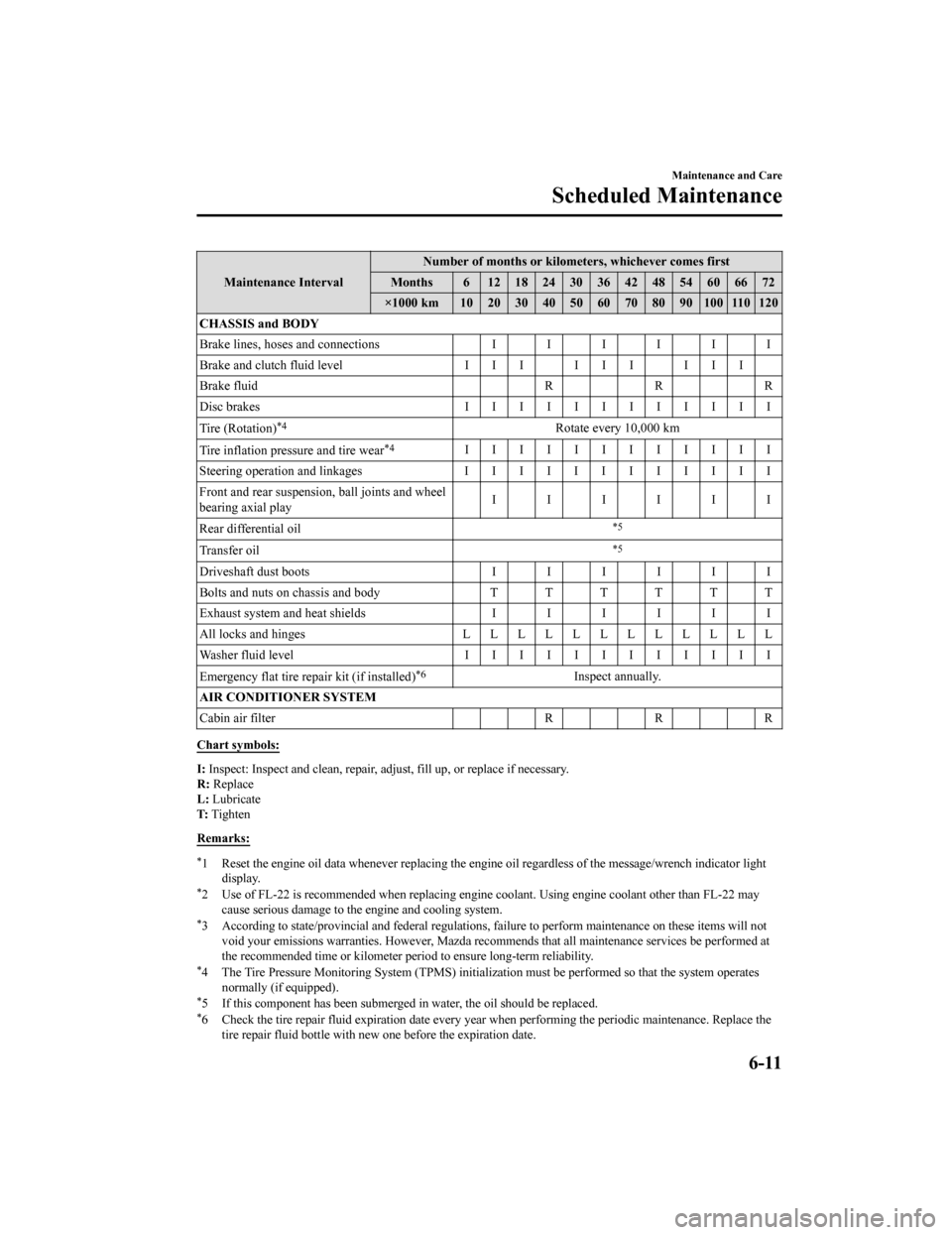
Maintenance IntervalNumber of months or kilometers, whichever comes first
Months 6 1218243036424854606672
×1000 km 10 20 30 40 50 60 70 80 90 100 110 120
CHASSIS and BODY
Brake lines, hoses and connections IIIIII
Brake and clutch fluid level I I I I I I I I I
Brake fluid RRR
Disc brakes IIIIIIIIIIII
Tire (Rotation)
*4Rotate every 10,000 km
Tire inflation pressure and tire wear
*4IIIIIIIIIIII
Steering operation and linkages I I I I I I I I I I I I
Front and rear suspension, ball joints and wheel
bearing axial play IIIIII
Rear differential oil
*5
Transfer oil*5
Driveshaft dust boots IIIIII
Bolts and nuts on chassis and body T T T T T T
Exhaust system and heat shields IIIIII
All locks and hinges LLLLLLLLLLLL
Washer fluid level IIIIIIIIIIII
Emergency flat tire repair kit (if installed)
*6Inspect annually.
AIR CONDITIONER SYSTEM
Cabin air filter R R R
Chart symbols:
I: Inspect: Inspect and clean, re pair, adjust, fill up, or replac e if necessary.
R: Replace
L: Lubricate
T: Tighten
Remarks:
*1 Reset the engine oil data whene ver replacing the engine oil regardless of the message/wrench indicator light
display.
*2 Use of FL-22 is recommended wh en replacing engine coolant. Using engine coolant other than FL-22 may
cause serious damage to the engine and cooling system.
*3 According to state/provincial and federal regulations, failure to perform maintenance on these items will not void your emissions warranties. However, Mazda recommends that all maintenance services be performed at
the recommended time or kilomete r period to ensure long-term reliability.
*4 The Tire Pressure Monitoring Sy stem (TPMS) initialization must be performed so that the system operates
normally (if equipped).
*5 If this component has been subm erged in water, the oil should be replaced.*6 Check the tire repair fluid exp iration date every year when performing the periodic maintenance. Replace the
tire repair fluid bottle with new one before the expiration date.
Maintenance and Care
Scheduled Maintenance
6-11
CX-9_8HB2-EA-18G_Edition1 2018-5-11 13:09:27
Page 507 of 692
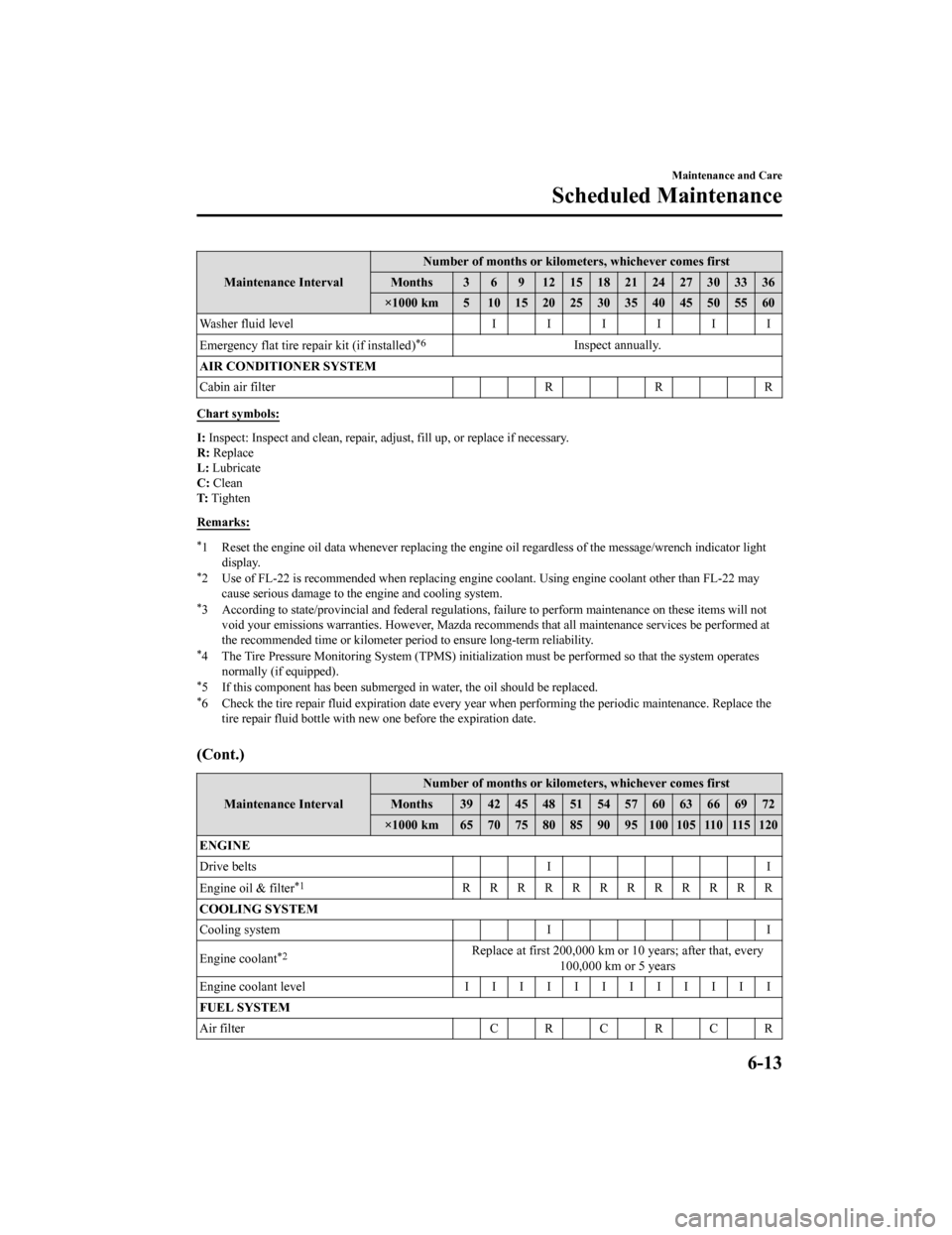
Maintenance IntervalNumber of months or kilometers, whichever comes first
Months 3 6 9 121518212427303336
×1000 km 5 1015202530354045505560
Washer fluid level IIIIII
Emergency flat tire repair kit (if installed)
*6Inspect annually.
AIR CONDITIONER SYSTEM
Cabin air filter RRR
Chart symbols:
I: Inspect: Inspect and clean, re pair, adjust, fill up, or replac e if necessary.
R: Replace
L: Lubricate
C: Clean
T: Tighten
Remarks:
*1 Reset the engine oil data whene ver replacing the engine oil regardless of the message/wrench indicator light
display.
*2 Use of FL-22 is recommended wh en replacing engine coolant. Using engine coolant other than FL-22 may
cause serious damage to the engine and cooling system.
*3 According to state/provincial and federal regulations, failure to perform maintenance on these items will not void your emissions warranties. However, Mazda recommends that all maintenance services be performed at
the recommended time or kilomete r period to ensure long-term reliability.
*4 The Tire Pressure Monitoring Sy stem (TPMS) initialization must be performed so that the system operates
normally (if equipped).
*5 If this component has been subm erged in water, the oil should be replaced.*6 Check the tire repair fluid exp iration date every year when performing the periodic maintenance. Replace the
tire repair fluid bottle with new one before the expiration date.
(Cont.)
Maintenance Interval Number of months or kilometers, whichever comes first
Months 39 42 45 48 51 54 57 60 63 66 69 72
×1000 km 65 70 75 80 85 90 95 100 105 110 115 120
ENGINE
Drive belts II
Engine oil & filter
*1RRRRRRRRRRRR
COOLING SYSTEM
Cooling system I I
Engine coolant
*2Replace at first 200,000 km or 10 years; after that, every 100,000 km or 5 years
Engine coolant level IIIIIIIIIIII
FUEL SYSTEM
Air filter CRCRCR
Maintenance and Care
Scheduled Maintenance
6-13
CX-9_8HB2-EA-18G_Edition1 2018-5-11 13:09:27