ad blue MAZDA MODEL CX-9 2021 User Guide
[x] Cancel search | Manufacturer: MAZDA, Model Year: 2021, Model line: MODEL CX-9, Model: MAZDA MODEL CX-9 2021Pages: 723, PDF Size: 10.61 MB
Page 390 of 723
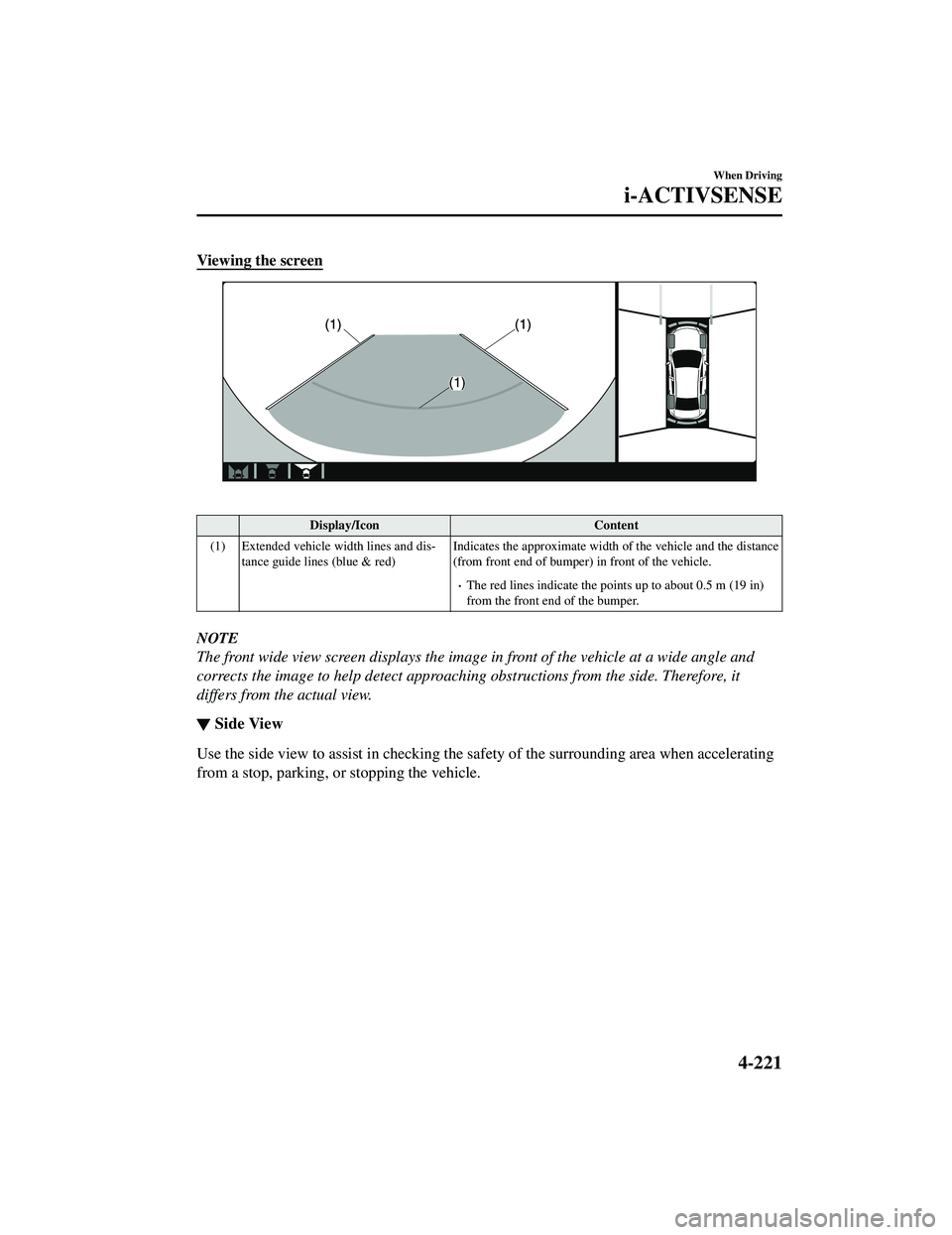
Viewing the screen
Display/IconContent
(1) Extended vehicle width lines and dis ‐
tance guide lines (blue & red) Indicates the approximate width
of the vehicle and the distance
(from front end of bumper) in front of the vehicle.
The red lines indicate the points up to about 0.5 m (19 in)
from the front end of the bumper.
NOTE
The front wide view screen displays the image in front of the vehicle at a wide angle and
corrects the image to help detect approaching obstructions from the side. Therefore, it
differs from the actual view.
▼ Side View
Use the side view to assist in checking the sa
fety of the surrounding area when accelerating
from a stop, parking, or stopping the vehicle.
When Driving
i-ACTIVSENSE
4-221
CX-9_8JK1-EA-20G_Edition6_old 2021-12-8 9:30:44
Page 391 of 723
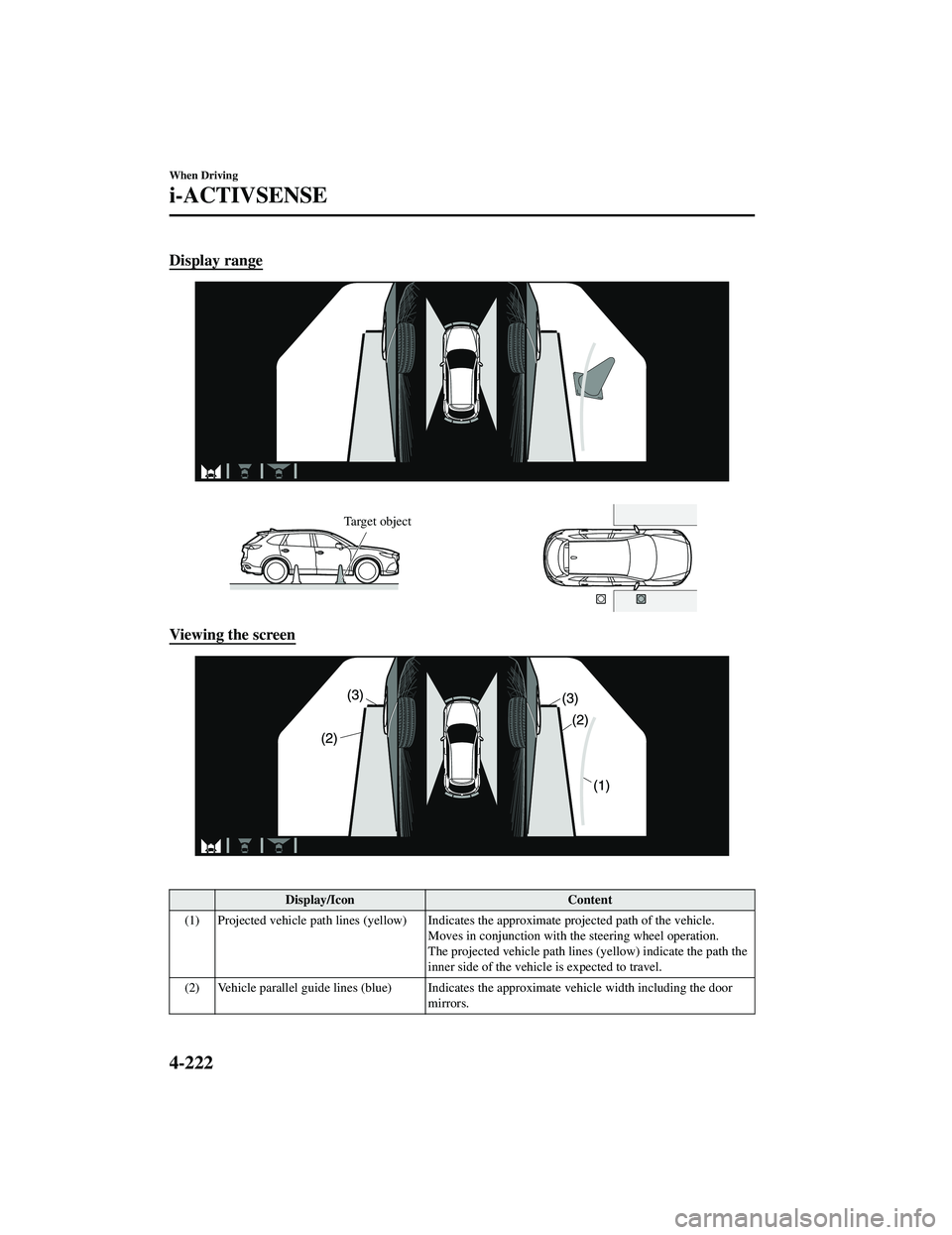
Display range
Target object
Viewing the screen
Display/IconContent
(1) Projected vehicle path lines (yellow) Indicates the approximate projected path of the vehicle.
Moves in conjunction with th e steering wheel operation.
The projected vehicle path lines (yellow) indicate the path the
inner side of the vehicle is expected to travel.
(2) Vehicle parallel guide lines (blue) Indicates the approximate vehicle width including the door
mirrors.
When Driving
i-ACTIVSENSE
4-222
CX-9_8JK1-EA-20G_Edition6_old 2021-12-8 9:30:44
Page 392 of 723
Display/IconContent
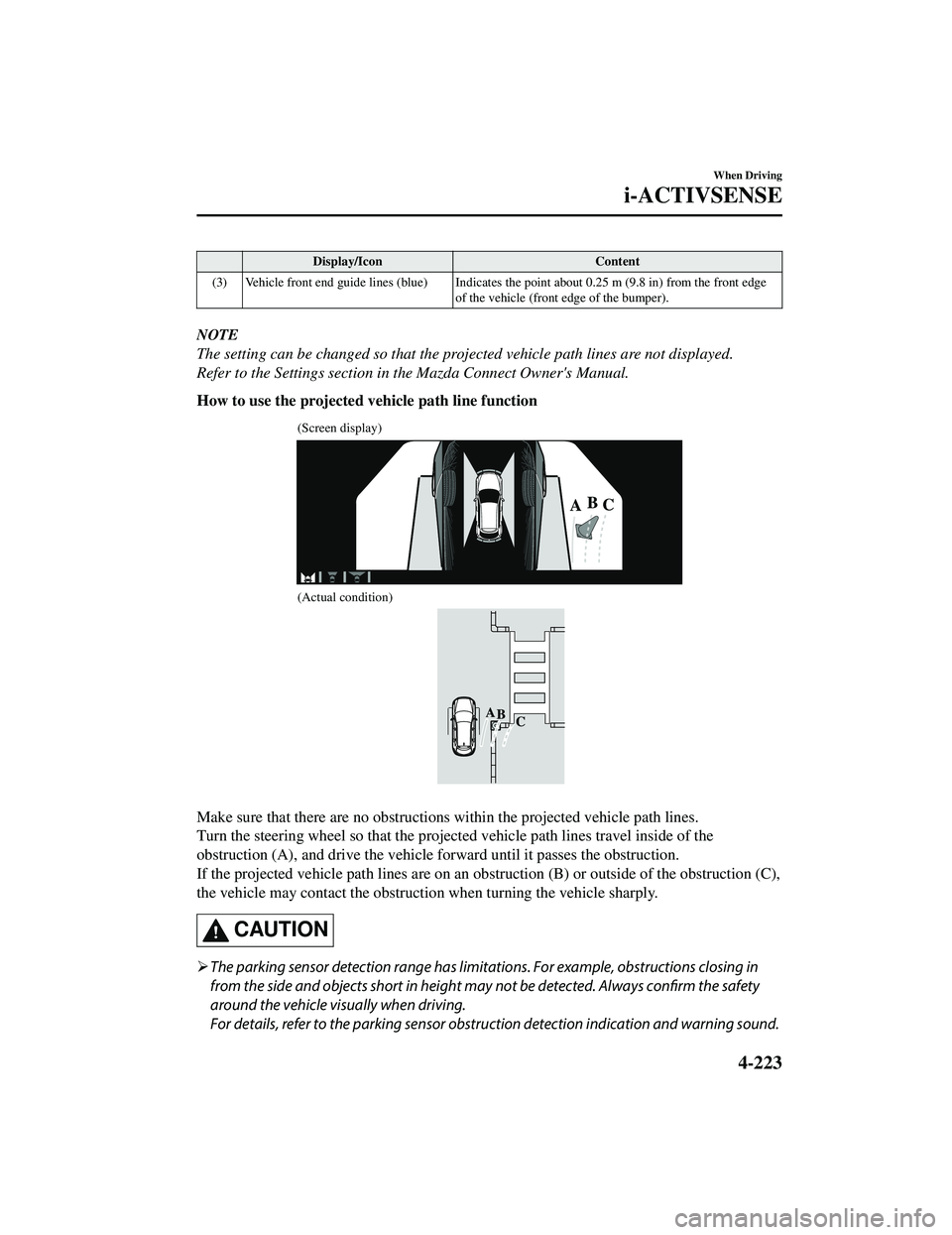
(3) Vehicle front end guide lines (blue) Indicates th e point about 0.25 m (9.8 in) from the front edge
of the vehicle (front edge of the bumper).
NOTE
The setting can be changed so that the projected vehicle path lines are not displayed.
Refer to the Settings section in the Mazda Connect Owner's Manual.
How to use the projected vehicle path line function
(Screen display)
(Actual condition)
Make sure that there are no obstructions within the projected vehicle path lines.
Turn the steering wheel so that the projected vehicle path lines travel inside of the
obstruction (A), and drive the vehicle forward until it passes the obstruction.
If the projected vehicle path lines are on an obs truction (B) or outside of the obstruction (C),
the vehicle may contact the obstruction when turning the vehicle sharply.
CAUTION
The parking sensor detection range has limita tions. For example, obstructions closing in
from the side and objects short in height may not be detected. Always confirm the safety
around the vehicle vi sually when driving.
For details, refer to the parking sensor obstruction detection indication and warning sound.
When Driving
i-ACTIVSENSE
4-223
CX-9_8JK1-EA-20G_Edition6_old 2021-12-8 9:30:44
Page 394 of 723
If an image containing an object with a conspicuous color is picked up by any of the
cameras, the screen area for each camera may be affected and it may display in that
color.
Obstructions displayed in the rear view may not display on the top view screen.
If the position or angle of each camera changes due to tilting of the vehicle, the image
may appear distorted.
Lines on the road may appear distorted at the seams where each of the camera images
merge.
The screen area for each camera may appear bright/dark depending on the illumination
level around any of the cameras.
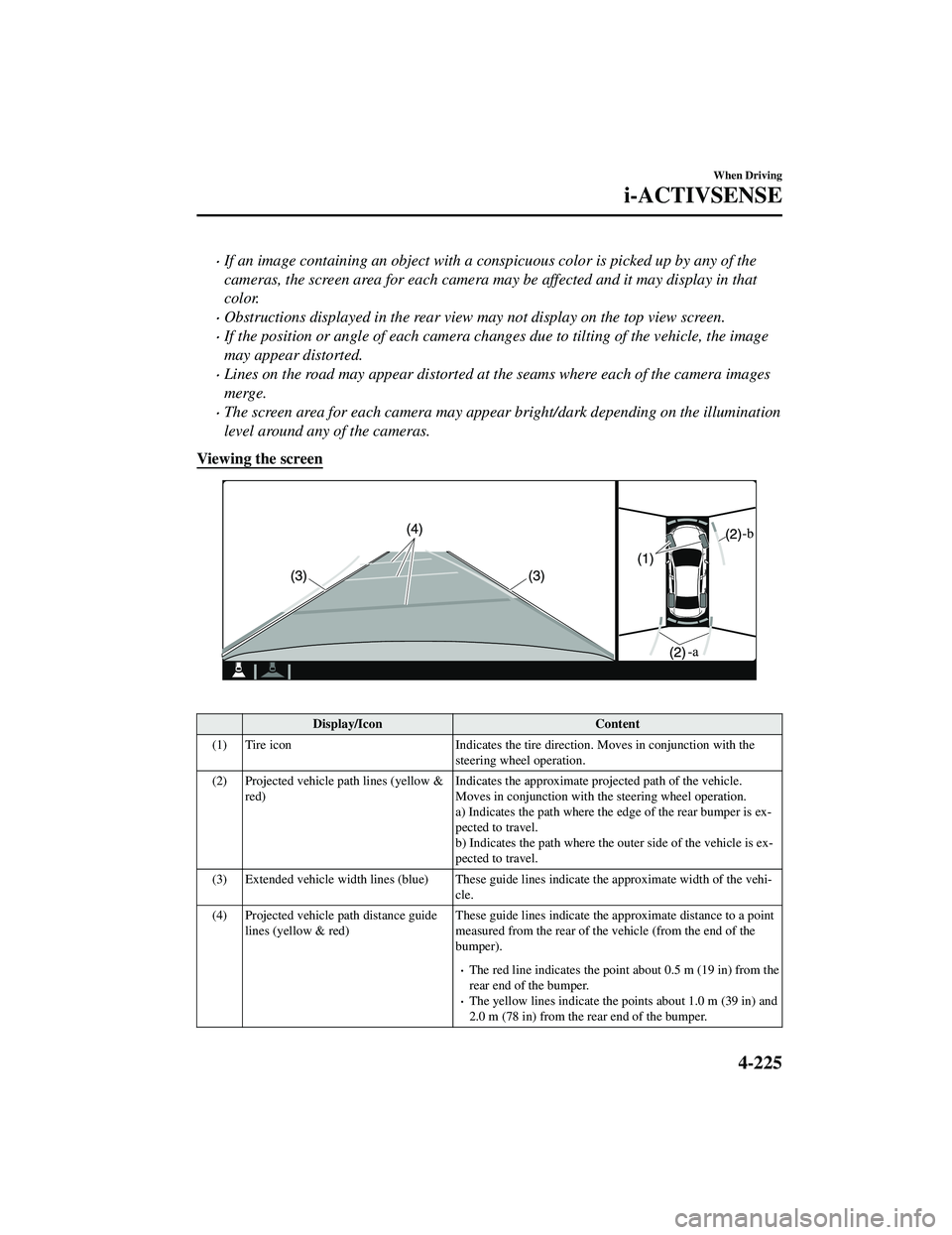
Viewing the screen
Display/Icon Content
(1) Tire icon Indicates the tire direction. Moves in conjunction with the
steering wheel operation.
(2) Projected vehicle path lines (yellow & red) Indicates the approximate proj
ected path of the vehicle.
Moves in conjunction with the steering wheel operation.
a) Indicates the path where the edge of the rear bumper is ex ‐
pected to travel.
b) Indicates the path where the outer side of the vehicle is ex ‐
pected to travel.
(3) Extended vehicle width lines (blue) These guide lines indicate the approximate width of the vehi‐
cle.
(4) Projected vehicle path distance guide lines (yellow & red) These guide lines indicate the ap
proximate distance to a point
measured from the rear of the vehicle (from the end of the
bumper).
The red line indicates the poin t about 0.5 m (19 in) from the
rear end of the bumper.
The yellow lines indicate the poi nts about 1.0 m (39 in) and
2.0 m (78 in) from the rear end of the bumper.
When Driving
i-ACTIVSENSE
4-225
CX-9_8JK1-EA-20G_Edition6_old 2021-12-8 9:30:44
Page 399 of 723

Viewing the screen
Display/IconContent
(1) Extended vehicle width lines and dis ‐
tance guide lines (blue & red) These guide lines indicate the
approximate width of the vehi‐
cle and distance to a point measur ed from the rear of the vehi‐
cle (from the end of the bumper).
The red lines indicate the points up to about 0.5 m (19 in)
from the rear end of the bumper.
NOTE
The top view/rear wide view screen displays the image at the rear of the vehicle at a wide
angle and corrects the image to help detect approaching obstructions from the side.
Therefore, it differs from the actual view.
▼ Margin of Error Between
Road Surface on Screen and Actual Road Surface
There might be some margin of error between the road surface appearing on the screen and
the actual road surface. A margin of error in the perceived distance could lead to an
accident, therefore be aware of the followin g conditions which can more easily produce
errors in the perceived distance.
The vehicle tilts due to weight of passengers and cargo.
If the vehicle is tilted, obstructions picked up by a camera can appear farther or closer than
the actual distance from the vehicle.
When Driving
i-ACTIVSENSE
4-230
CX-9_8JK1-EA-20G_Edition6_old 2021-12-8 9:30:44
Page 473 of 723
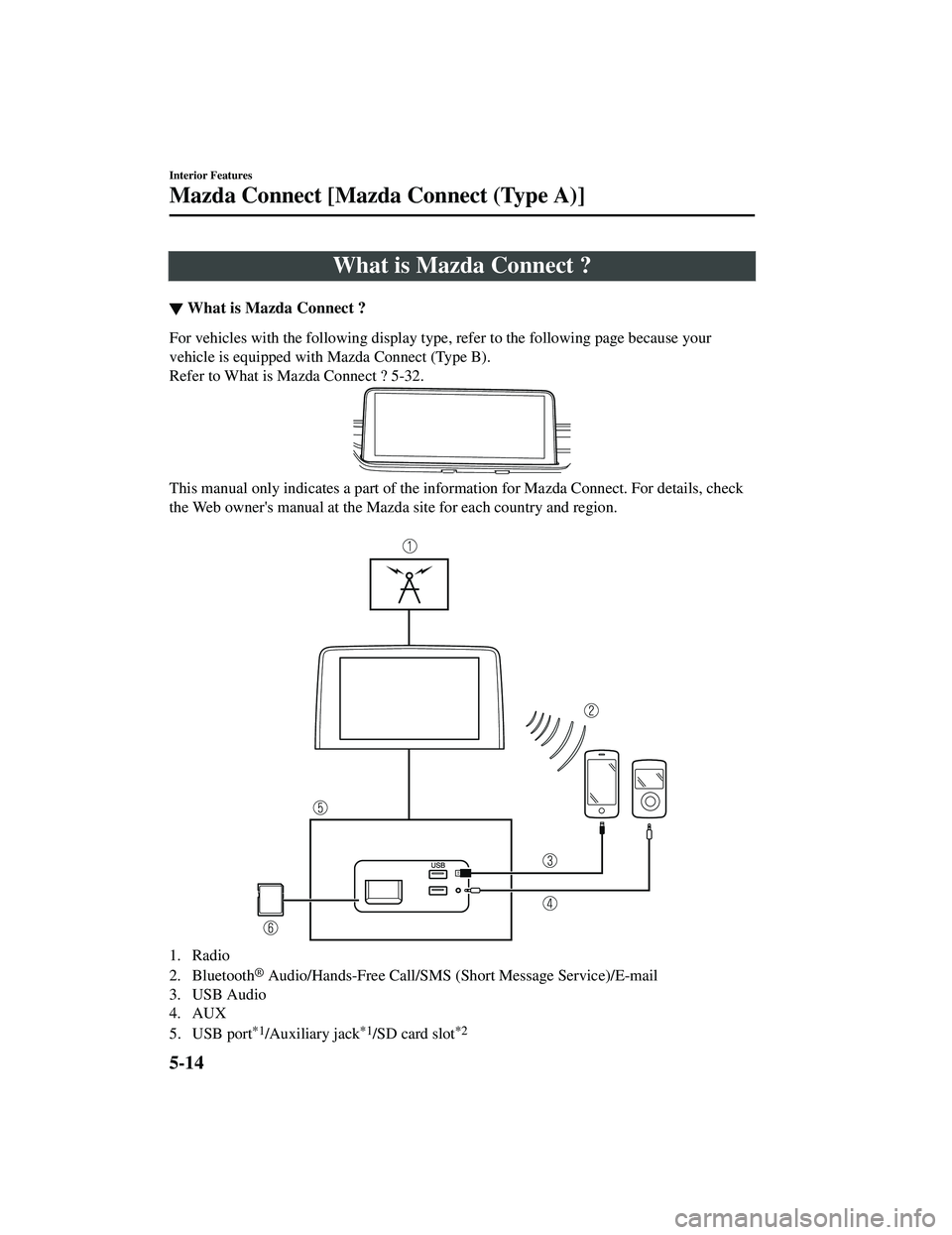
What is Mazda Connect ?
▼What is Mazda Connect ?
For vehicles with the following display type, refer to the following page because your
vehicle is equipped with Mazda Connect (Type B).
Refer to What is Mazda Connect ? 5-32.
This manual only indicates a part of the info
rmation for Mazda Connect. For details, check
the Web owner's manual at the Mazda site for each country and region.
1. Radio
2. Bluetooth
® Audio/Hands-Free Call/SMS (Short Message Service)/E-mail
3. USB Audio
4. AUX
5. USB port
*1/Auxiliary jack*1/SD card slot*2
Interior Features
Mazda Connect [Mazda Connect (Type A)]
5-14
CX-9_8JK1-EA-20G_Edition6_old 2021-12-8 9:30:44
Page 474 of 723
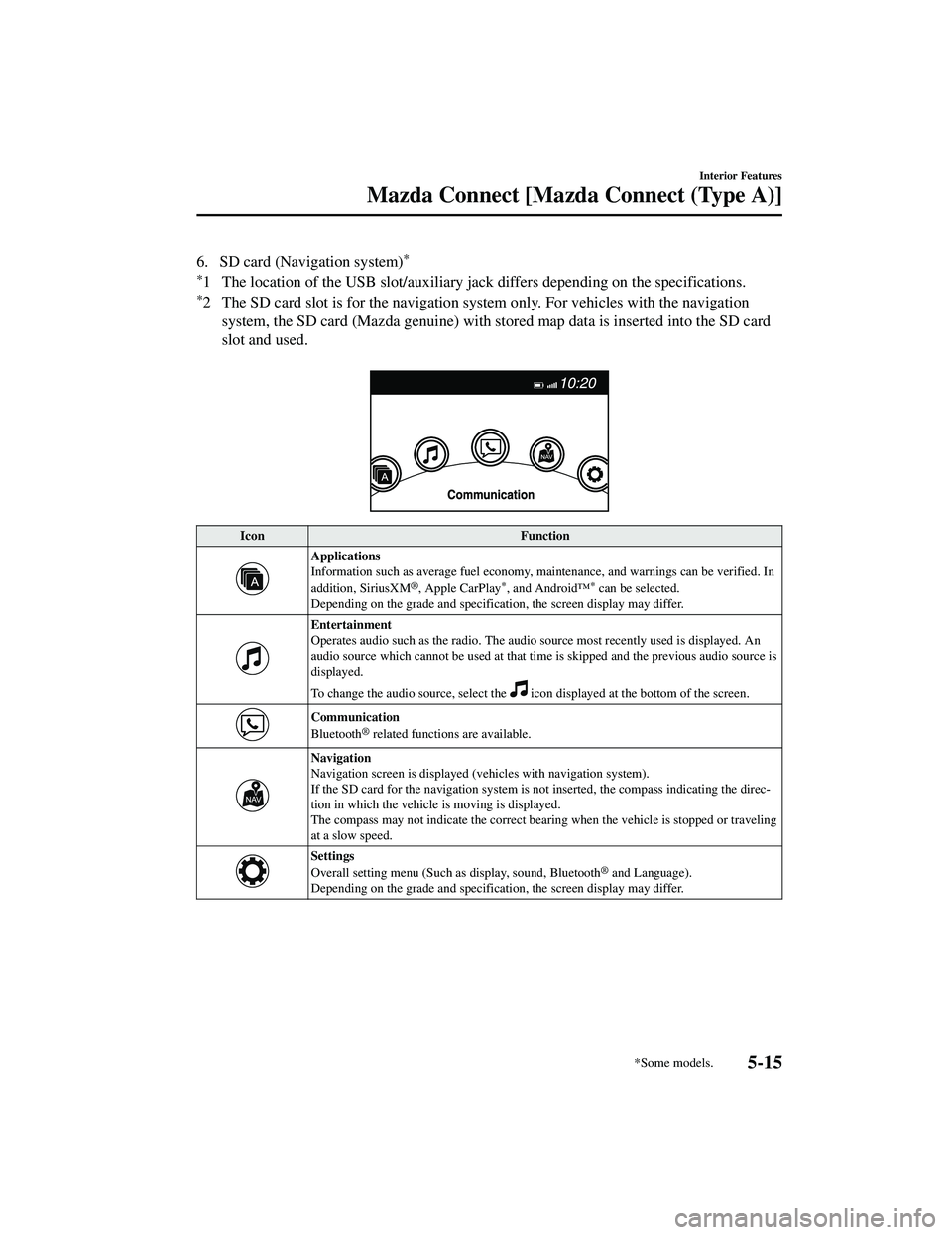
6. SD card (Navigation system)*
*
1 The location of the USB slot/auxiliary jack differs depending on the specifications.
*2 The SD card slot is for the navigation system only. For vehicles with the navigation system, the SD card (Mazda genuine) with st ored map data is inserted into the SD card
slot and used.
Icon Function
Applications
Information such as average fuel economy, maintenance, and warnings can be verified. In
addition, SiriusXM
®, Apple CarPlay*, and Android™* can be selected.
Depending on the grade and specificatio n, the screen display may differ.
Entertainment
Operates audio such as the radio. The audio source most recently used is displayed. An
audio source which cannot be used at that tim e is skipped and the previous audio source is
displayed.
To change the audio source, select the
icon displayed at the bottom of the screen.
Communication
Bluetooth® related functions are available.
Navigation
Navigation screen is displayed (v ehicles with navigation system).
If the SD card for the navigation system is no t inserted, the compass indicating the direc‐
tion in which the vehicle is moving is displayed.
The compass may not indicate the correct bearin g when the vehicle is stopped or traveling
at a slow speed.
Settings
Overall setting menu (Such as display, sound, Bluetooth® and Language).
Depending on the grade and specificatio n, the screen display may differ.
Interior Features
Mazda Connect [Mazda Connect (Type A)]
*Some models.5-15
CX-9_8JK1-EA-20G_Edition6_old 2021-12-8 9:30:44
Page 480 of 723

To decrease the volume, press down the volume switch ().
Seek Switch
AM/FM radio
Press the seek switch (
, ) while any radio station stored in the favorite radio is being
received. Radio stations can be called up in the order they were stored with each press of the
switch (
, ).
USB Audio/Bluetooth® Audio /CD
Press the seek switch (
5-21
CX-9_8JK1-EA-20G_Edition6_old 2021-12-8 9:30:44
Page 482 of 723
Say, “Cancel”.
Operate the commander switch or the center display (only when vehicle is stopped).
Skipping Voice Guidance (for faster operation)
Press and release the talk button.
Troubleshooting for Voice Recognition
If you do not understand an operation method while in the voice recognition mode, say
“Tutorial” or “Help”.
Commands useable anytime during voice recognition
“Go Back” and “Cancel” are commands which can be used at anytime during voice
recognition.
Returning to prev ious operation
To return to the previous operation, say, “Go Back” while in voice recognition mode.
Cancel
To put the Bluetooth
® Hands-Free system in standby mode, say, “Cancel” while in voice
recognition mode.
To prevent a deterioration in the voice rec ognition rate and voice quality, the following
points should be observed:
The voice recognition cannot be performed while voice guidance or the beep sound is
operating. Wait until the voice guidance or the beep sound is finished before saying
your commands.
Phone related commands are available only when your phone is connected via
Bluetooth
®. Make sure your phone is connected via Bluetooth® before you operate phone
related voice commands.
Music play commands, such as Play Artist and Play Album can be used only in USB
audio mode.
Do not speak too slowly or loudly (no loud voice).
Speak clearly, without pausing between words or numbers.
Dialects or different wording other than hands-free prompts cannot be recognized by
voice recognition. Speak in the wording specified by the voice commands.
It is not necessary to face the microphone or approach it. Speak the voice commands
while maintaining a safe driving position.
Close the windows and/or the moonroof to reduce loud noises from outside the vehicle, or
turn down the airflow of the clim ate control system while Bluetooth
® Hands-Free is being
used.
Interior Features
Mazda Connect [Mazda Connect (Type A)]
5-23
CX-9_8JK1-EA-20G_Edition6_old 2021-12-8 9:30:44
Page 483 of 723
Make sure the vents are not directing air up towards the microphone.
Voice Command List
Voice command
When the talk button is pressed and the following command is spoken, the audio or
navigation can be operated. The commands in the () can be omitted. The specified name and
number are put into the {}.
Standard command
Voice command Function
Help Usable commands can be verified.
Tutorial Basic voice commands and methods of use can be verified.
(Navigate/Take me/Drive) Home Set the destination to Home.
Communication (phone) related command
Voice command Function
Call {name in phonebook} (mobile/
home/work/other)
Example: “Call John Mobile” Call to the contact in the downloaded phonebook.
Redial Call to the last contact you called.
Callback Call to the last contact who called you.
Entertainment (audio) related command
Voice command FunctionCorresponding audio
source
(Go to/Play) Bluetooth (Audio) Switches the audio source to BT audio.
Can also switch to each audio source by similarly us
‐
ing commands such as FM, AM, or USB. All
Play Artist {Artist name} Plays the selected artist. USB
Navigation related command*
For the navigation screen voice commands, refer to the separate navigation system manual.
NOTE
Some commands cannot be used depending on the grade and specification.
Some commands cannot be used depending on the device connection conditions and the
use conditions.
The commands are examples of the available commands.
Interior Features
Mazda Connect [Mazda Connect (Type A)]
5-24*Some models.
CX-9_8JK1-EA-20G_Edition6_old 2021-12-8 9:30:44