oil temperature MAZDA MODEL CX-9 2021 Owners Manual
[x] Cancel search | Manufacturer: MAZDA, Model Year: 2021, Model line: MODEL CX-9, Model: MAZDA MODEL CX-9 2021Pages: 723, PDF Size: 10.61 MB
Page 155 of 723
Winter Driving
Carry emergency gear, including tire
chains, window scraper, flares, a small
shovel, jumper cables, and a small bag of
sand or salt.
Ask an Authorized Mazda Dealer to check
the following:
Have the proper ratio of antifreeze in the
radiator.
Refer to Engine Coolant on page 6-22.
Inspect the battery and its cables. Cold
reduces battery capacity.
Use an engine oil appropriate for the
lowest ambient temperatures that the
vehicle will be driven in (page 6-20).
Inspect the ignition system for damage
and loose connections.
Use washer fluid made with
antifreeze―but do not use engine
coolant antifreeze for washer fluid (page
6-24).
NOTE
Remove snow before driving. Snow left
on the windshield is dangerous as it
could obstruct vision.
Do not apply excessive force to a
window scraper when removing ice or
frozen snow on the mirror glass and
windshield.
Never use warm or hot water for
removing snow or ice from windows and
mirrors as it could result in the glass
cracking.
Drive slowly. Braking performance can
be adversely affected if snow or ice
adheres to the brake components. If this
situation occurs, drive the vehicle
slowly, releasing the accelerator pedal
and lightly applying the brakes several
times until the brake performance
returns to normal.
▼ Snow Tires
Use snow tires on all 4 wheels
Do not go faster than 120 km/h (75 mph)
while driving with snow
tires. Inflate snow
tires 30 kPa (0.3 kgf/cm
2, 4.3 psi) more
than recommended on the tire pressure
label (driver's door frame), but never more
than the maximum cold-tire pressure
shown on the tires.
The vehicle is originally equipped with all
season radials designed to be used all year
around. In some extreme climates you
may find it necessary to replace them with
snow tires during the winter months to
further improve traction on snow and ice
covered roads.
WA R N I N G
Use only the same size and type tires (snow,
radial, or non-radial) on all 4 wheels:
Using tires different in size or type is
dangerous. Your vehi cle's handling could
be greatly affected and result in an
accident.
CAUTION
Check local regulations before using
studded tires.
Before Driving
Driving Tips
3-52
CX-9_8JK1-EA-20G_Edition6_old 2021-12-8 9:30:44
Page 192 of 723

▼Warning/Indicator Lights
Instrument Cluster varies depending on model and specifications.
Center of Dashboard
Warning lights will appear in any of the highlighted areas
Instrument Cluster
▼
Warning Indication/Warning Lights
These lights turn on or flash to notify the us
er of the system operation status or a system
malfunction.
Signal Warning Page
Brake System Warning Indication/Warning Light*1*27-28
ABS Warning Light*1
Electronic Brake
Force Distribu ‐
tion System Wa r n i n g 7-28
ABS warning 7-31
Charging System Warning Indication/Warning Light*17-28
Engine Oil Warning Light*17-28
High Engine Coolant Temperature Warning Indication 7-28
Power Steering Malfunction Indication7-28
Master Warning Indication 7-31
When Driving
Instrument Cluster and Display
4-23
CX-9_8JK1-EA-20G_Edition6_old 2021-12-8 9:30:44
Page 207 of 723

▼Warning/Indicator Lights
Instrument Cluster varies depending on model and specifications.
Instrument Cluster
Center of Dashboard
Warning lights will appear in any of the highlighted areas
▼Warning Indication/Warning Lights
These lights turn on or flash to notify the user of the system operation status or a system
malfunction.
Signal
Warning Page
Brake System Warning Indication/Warning Light*1*27-28
ABS Warning Light*1
Electronic Brake
Force Distribu ‐
tion System Wa r n i n g 7-28
ABS warning 7-31
Charging System Warning Indication/Warning Light*17-28
Engine Oil Warning Light*17-28
(Red) High Engine Coolant Temperature Warning Light
*17-28
Power Steering Malfun
ction Indication 7-28
When Driving
Instrument Cluster and Display
4-38
CX-9_8JK1-EA-20G_Edition6_old 2021-12-8 9:30:44
Page 212 of 723

*1 The light turns on when the ignition is switched on for an operation check, and turns off
a few seconds later or when the engine is star ted. If the light does not turn on or remains
turned on, have the vehicle inspected at an Authorized Mazda Dealer.
▼ Wrench Indicator Light
The wrench indication is displayed under
the following conditions.
When the preset maintenance period has
arrived.
Refer to the Informat
ion section in the
Mazda Connect Owner's Manual.
When the engine oil replacement period
has arrived.
NOTE
The wrench indication may display
earlier than the preset period depending
on vehicle usage conditions.
Whenever the engine oil is replaced, a
reset of the vehicle engine control unit is
necessary.
Refer to the Information section in the
Mazda Connect Owner's Manual.
▼ Low Engine Coolant Temperature
Indicator Light (Blue)
When Driving
Instrument Cluster and Display
4-43
CX-9_8JK1-EA-20G_Edition6_old
2021-12-8 9:30:44
Page 352 of 723

The front doors or the liftgate is not fully closed.
The vehicle is on a road incline.
The door mirrors are retracted.
Do not hit the front/rear camera, front bumper, and door mirrors forcefully. The camera
position or installation angle may shift.
The cameras are of a waterproof structure. Do not disassemble, modify, or remove a
camera.
The camera cover is made of hard plastic, therefore do not apply oil film remover, organic
solvents, wax, or coating agents. If any such agent gets on the camera cover, wipe it off
using a soft cloth immediately.
Do not rub the camera lens forcefully, or clean it with an abrasive or hard brush. Otherwise,
it could scratch the camera lens and negatively affect the images.
Consult an Authorized Mazda Dealer for repair, painting, or replacement of the front/rear
camera, front bumper and door mirrors.
Heed the following cautions to assure that the 360°View Monitor operates normally.
Do not modify the vehicle suspensions or lower/raise the vehicle body, or both.
Always use wheels of the specified type and si ze for the front and rear wheels. Consult an
Authorized Mazda Dealer for tire replacement.
When the display is cold, images may leave trai ls or the screen might be darker than usual,
making it difficult to check the vehicle surroundi ngs. Always confirm the safety at the front
and around the vehicle visually when driving.
The method for parking/stopping the vehicle using the 360°View Monitor differs depending
on the road circumstances/conditions and th e vehicle conditions. When and how much you
turn the steering wheel will differ depending on the situation, , therefore always check the
vehicle surroundings directly with yo ur eyes while using the system.
Also, before using the system, always make sure that the vehicle can be parked/stopped in
the parking/stopping space.
NOTE
If there are water droplets, snow, or mud on the camera lens, wipe it off using a soft cloth.
If the camera lens is especially dirt y, wash it off with mild detergent.
If the area where the camera is installed, such as the liftgate or door mirrors, has been
damaged in a vehicle accident, the camera (position, installation angle) may have shifted.
Always consult an Authorized Mazda Dealer to have the vehicle inspected.
If the camera is subjected to excessive changes in temperature such as by pouring hot
water on the camera during cold weather, the 360°View Monitor may not operate
normally.
If the battery voltage is low, the screen might be temporarily difficult to view, however,
this does not indicate a problem.
When Driving
i-ACTIVSENSE
4-183
CX-9_8JK1-EA-20G_Edition6_old 2021-12-8 9:30:44
Page 524 of 723

Charging may not operate normally
under the following conditions:
The mobile device is fully charged.
There is foreign matter between the
mobile device and the charging area.
The temperature of the mobile device
is high.
The mobile device is placed with the
charging side facing upward.
The mobile device is placed in a
position extremely deviating from the
center of the charging area.
Your vehicle is in an area where strong
radio waves or electrical noise occur
such as near a television tower, power
plant, or airport.
When the power is turned off while the
Near Field Communication (NFC)
function setting of the mobile device is
on, the LED indicator turns off.
Keep the following items away from the
charging area. Otherwise the data stored
on the mobile device could be erased or
the device could malfunction.
Magnetic items such as magnets,
magnetic cards, and magnetic
recording media.
High precision devices such as
wristwatches.
Before using the Wireless Charger (Qi),
make sure to back up the data stored on
the mobile device. The data on the
mobile device could be deleted.
Do not wipe the Wireless Charger (Qi)
using oil, alcohol, or thinner, or spray
hairspray or insecticide onto it.
Otherwise, it could cause damage or
cracking.Do not leave mobile devices in the cabin.
The temperature inside the cabin may
become very hot, causing the devices to
malfunction.
NOTE
A mobile device larger than the
charging area cannot be charged.
If the function to reduce noise on the
radio is used, fast charging may be
disabled depending on the mobile device
being charged.
If the LED indicator is flashing in amber
or green, the charging efficiency is low.
Check that there is no foreign matter
between the mobile device and the
charging area, and position the mobile
device near the center of the charging
area.
Depending on the mobile device case or
accessories used, the mobile device may
not charge, or the charging efficiency
may be reduced resulting in a longer
charging time. If charging does not start
even when a mobile device is placed on
the charging area, remove the mobile
device case or any accessories.
While the keyless entry is operating,
charging may stop temporarily, however,
this does not indicate a problem.
During charging, the Wireless Charger
(Qi) and the mobile device become
warm, however, this does not indicate a
problem.
If the mobile device temperature rises
during charging, charging may stop due
to the protection function of the device.
If that happens, wait until the mobile
device cools down sufficiently and then
recharge it.
Interior Features
Interior Equipment
5-65
CX-9_8JK1-EA-20G_Edition6_old 2021-12-8 9:30:44
Page 537 of 723

Scheduled Maintenance (U.S.A., Canada, and Puerto
Rico)
Follow Schedule 1 if the vehicle is operated mainly where none of the following conditions
(severe driving conditions)apply.
Repeated short-distance driving
Driving in dusty conditions
Driving with extended use of brakes
Driving in areas where salt or other corrosive materials are used
Driving on rough or muddy roads
Extended periods of idling or low-speed operation
Driving for long periods in cold temperatures or extremely humid climates
Driving in extremely hot conditions
Driving in mountainous conditions continually
If any do apply, follow Schedule 2. (Canada residents follow Schedule 2.)
Vehicles using Engine Oil Flexible Maintenance
Engine Oil Flexible Maintenance is select ed by default for U.S.A. and Puerto Rico
residents.
If any following conditions do apply, follow Schedule 2 with engine oil fixed maintenance.
Extended periods of idling or low-speed opera tion such as police car, taxi or driving
school car
Driving in dusty conditions
The vehicle calculates the remaining oil life based on engine operating conditions. The
vehicle lets you know when an oil change is due by illuminating the wrench indicator light
in the instrument cluster. Change the oil as soon as possible within the next 1,000 km (600
mile) or 15 days. Refer to the Information section in the Mazda Connect Owner's Manual
for the details.
NOTE
Please ensure that the Flexible Oil Maintenance Setting is reset after each Oil and Filter
replacement.
For maintenance guidelines beyond the miles/months listed, follow the maintenance
intervals provided in the Scheduled Maintenance Tables.
Maintenance and Care
Scheduled Maintenance
6-4
CX-9_8JK1-EA-20G_Edition6_old 2021-12-8 9:30:44
Page 543 of 723

Scheduled Maintenance (Mexico)
Follow Schedule 1 if the vehicle is operated mainly where none of the following conditions
(severe driving conditions) apply.
Repeated short-distance driving
Driving in dusty conditions
Driving with extended use of brakes
Driving in areas where salt or other corrosive materials are used
Driving on rough or muddy roads
Extended periods of idling or low-speed operation
Driving for long periods in cold temperatures or extremely humid climates
Driving in extremely hot conditions
Driving in mountainous conditions continually
If any do apply, follow Schedule 2.
NOTE
For maintenance guidelines beyond the kilome ters/months listed, follow the maintenance
intervals provided in the Scheduled Maintenance Tables.
▼ Schedule 1
Maintenance Interval Number of months or kilometers, whichever comes first
Months 6 1218243036424854606672
×1000 km 10 20 30 40 50 60 70 80 90 100 110 120
Drive belts II I
Engine oil & filter
*1RRRRRRRRRRRR
Cooling system I I I
Engine coolant
*2Replace at first 200,000 km or 10 years; after that, every 100,000 km or 5 years
Air filter RRRRRR
Fuel lines and hoses I
*3I*3I
Hoses and tubes for emission I
*3I*3I
Fuel filter Replace every 60,000 km
Spark plugs IIIIIIIIIIII
Replace every 64,000 km
Brake lines, hoses and connections IIIIII
Brake and clutch fluid level I I I I I I I I I
Brake fluid RRR
Disc brakes IIIIIIIIIIII
Tire (Rotation) Rotate every 10,000 km
Maintenance and Care
Scheduled Maintenance
6-10
CX-9_8JK1-EA-20G_Edition6_old 2021-12-8 9:30:44
Page 554 of 723
(Mexico)
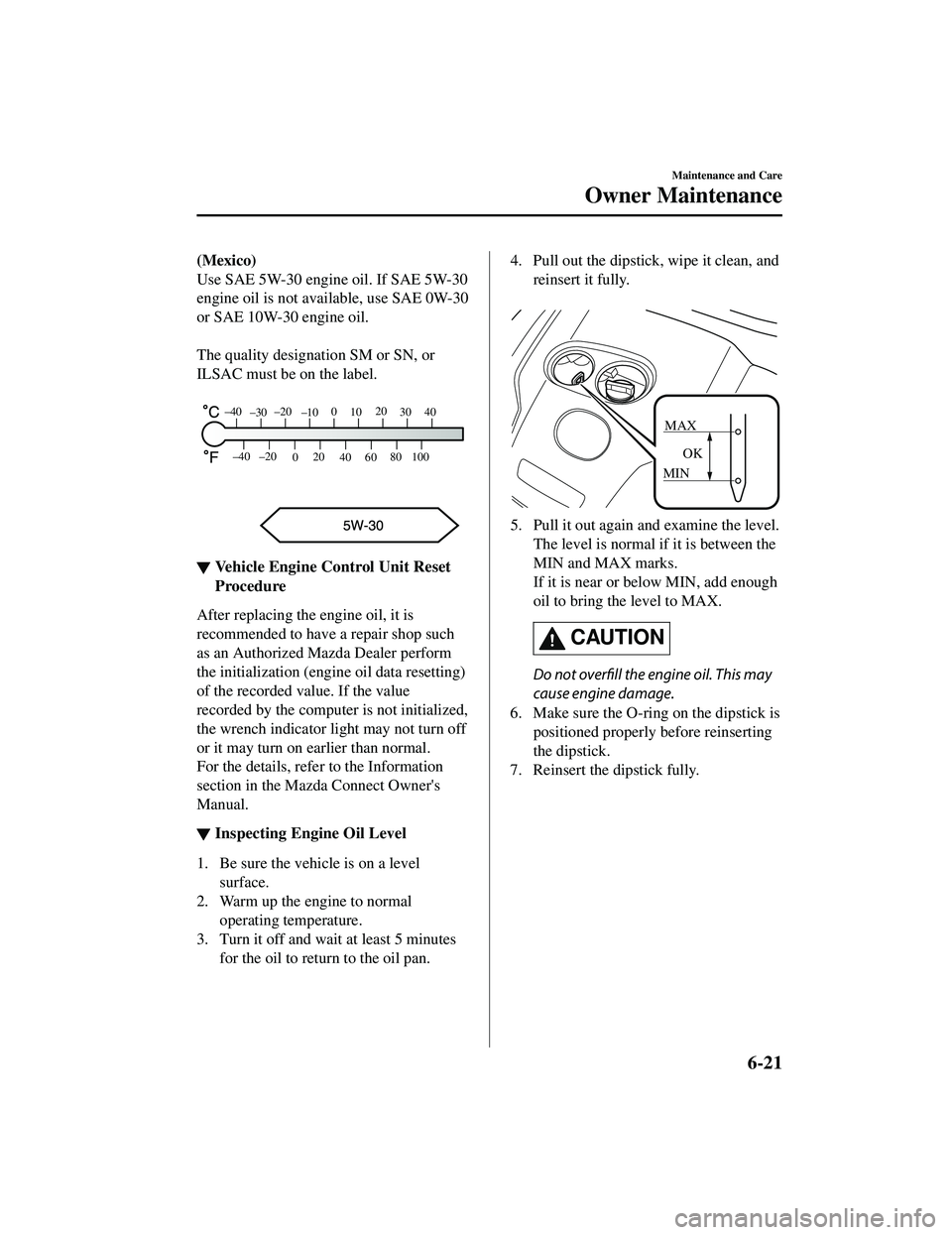
Use SAE 5W-30 engine oil. If SAE 5W-30
engine oil is not available, use SAE 0W-30
or SAE 10W-30 engine oil.
The quality designation SM or SN, or
ILSAC must be on the label.
80
60
40
20
0
–40 –20
30
100
40
20
10
0
–10
–20
–30
–40
▼ Vehicle Engine Control Unit Reset
Procedure
After replacing the engine oil, it is
recommended to have a repair shop such
as an Authorized Mazda Dealer perform
the initialization (engine oil data resetting)
of the recorded value. If the value
recorded by the computer is not initialized,
the wrench indicator li
ght may not turn off
or it may turn on earlier than normal.
For the details, refe r to the Information
section in the Mazda Connect Owner's
Manual.
▼ Inspecting Engine Oil Level
1. Be sure the vehicle is on a level
surface.
2. Warm up the engine to normal operating temperature.
3. Turn it off and wait at least 5 minutes for the oil to return to the oil pan.
4. Pull out the dipstick, wipe it clean, and
reinsert it fully.
MAX
MIN OK
5. Pull it out again and examine the level.
The level is normal if it is between the
MIN and MAX marks.
If it is near or below MIN, add enough
oil to bring the level to MAX.
CAUTION
Do not overfill the engine oil. This may
cause engine damage.
6. Make sure the O-ring on the dipstick is positioned properly before reinserting
the dipstick.
7. Reinsert the dipstick fully.
Maintenance and Care
Owner Maintenance
6-21
CX-9_8JK1-EA-20G_Edition6_old 2021-12-8 9:30:44
Page 588 of 723

plain water is ineffective, use a mild soap
made for use on vehicles.
Thoroughly rinse off all soap with
lukewarm or cold water. Do not allow
soap to dry on the finish.
After washing the vehicle, dry it with a
clean chamois to prevent water spots from
forming.
WARNING
Dry off brakes that have become wet by
driving slowly, releasing the accelerator
pedal and lightly applying the brakes
several times until the brake performance
returns to normal:
Driving with wet brakes is dangerous.
Increased stopping distance or the vehicle
pulling to one side when braking could
result in a serious accident. Light braking
will indicate whether the brakes have been
affected.
When using an automatic car wash
Retract the door mirrors.
The automatic car wash brushes could
reduce the paint lustre or hasten paint
deterioration.
When using a high water pressure car
wash
High water temperature and high water
pressure car washers are available
depending on the type of car wash
machine. If the car washer nozzle is put
too close to the vehicle, the force of the
spray could damage or deform the
molding, affect the sealability of parts, and
allow water to penetrate the interior. Keep
a sufficient space (30 cm (12 in) or more)
between the nozzle and the vehicle. In
addition, do not spend too much time
spraying the same area of the vehicle, and
be very careful when spraying between
gaps in doors and around windows.
Waxing
Your vehicle needs to be waxed when
water no longer beads on the finish.
Always wash and dry the vehicle before
waxing it. In addition to the vehicle body,
wax the metal trim to maintain its luster.
1. Use wax which contains no abrasives. Wax containing abrasives will remove
paints and could damage bright metal
parts.
2. Use a good grade of natural wax for metallic, mica, and solid colors.
3. When waxing, coat evenly with the
sponge supplied or a soft cloth.
4. Wipe off the wax with a soft cloth.
CAUTION
(Vehicles with hands-free liftgate)
When waxing the vehicle, turn off the
hands-free liftgate using the Mazda
Connect or do not bring the transmitter
into the area around the liftgate. The
liftgate could open un expectedly resulting
in an accident.
Refer to Power Liftgate on page 3-22.
NOTE
A spot remover to remove oil, tar, and
similar materials will usually also take off
the wax. Rewax these areas even if the rest
of the vehicle does not need it.
Maintenance and Care
Appearance Care
6-55
CX-9_8JK1-EA-20G_Edition6_old 2021-12-8 9:30:44