park assist MAZDA MODEL CX-9 2022 User Guide
[x] Cancel search | Manufacturer: MAZDA, Model Year: 2022, Model line: MODEL CX-9, Model: MAZDA MODEL CX-9 2022Pages: 715, PDF Size: 81.06 MB
Page 349 of 715

CAUTION
The parking sensor detection range has limitations. For example, obstructions closing in from
the side and objects short in height may not be detected. Always confirm the safety around
the vehicle visually when driving.
For details, refer to the parking sensor obstru ction detection indication and warning sound.
Refer to Parking Sensor System on page 4-260.
NOTE
The setting can be changed so that the projected vehicle path lines are not displayed.
Refer to the Settings section in the Mazda Connect Owner's Manual.
How to use the projected v ehicle path line function
(Actual condition)
(Screen display)
Make sure that there are no obstructions within the projected v ehicle path lines.
Drive the vehicle forward while turning the steering wheel so that no obstructions come
within the projected vehicle path lines.
▼Front Wide View
Use the front wi
de view to assist in ch ecking the safety of the surrounding area when
accelerating from a stop or entering a T-shaped intersection an d intersection.
When Driving
i-ACTIVSENSE
4-182
CX-9_8KH5-EA-21K_Edition2_old 2021-9-16 14:11:22
Page 351 of 715

NOTE
The parking sensor obstruction detection indication does not display. Switch the screen
display to the top view/front view or side view display if the parking sensor warning sound
is activated.
The front wide view screen displays the image in front of the vehicle at a wide angle and
corrects the image to help detect approaching obstructions from the side. Therefore, it
differs from the actual view.
▼Side View
Use the side view to assist in checking the safety of the surro
unding area when accelerating
from a stop, parking, or stopping the vehicle.
Display range
(Actual condition)
(Screen display)
Target object
Viewing the screen
(When the projected vehicle
path line display is on) (When the projected vehicle
path line display is off)
Display/Icon
Content
Parking sensor viewDisplays the parking sensor detection condition when the
parking sensor is activated.
For details, refer to the parking sensor obstruction detection
indication and warning sound.
Refer to Parking Sensor System on page 4-260.
When Driving
i-ACTIVSENSE
4-184
CX-9_8KH5-EA-21K_Edition2_old 2021-9-16 14:11:22
Page 353 of 715

Do not turn the steering wheel any more until the vehicle has passed the obstruction, even
if the obstruction is not visible on the side view image. If the steering wheel is turned even
more, the vehicle may contact the obst ruction if it is turned sharply.
NOTE
Because there might be a difference between the image displayed on the screen and the
actual conditions, always check the safety of the surrounding area using the mirrors and
directly with your eyes when driving.
Even though the object displayed on the screen, such as a road curb or a division line of a
parking space, and the vehicle parallel guide lines appear parallel, they may not actually
be parallel.
▼Top View/Rear View
Use the top view/rear view to assist in checking the safety of
the surrounding area when
accelerating from a stop, parking, or stopping the vehicle.
Range of displayed screen image
(Actual condition) (Screen display)
Target object
NOTE
In the top view screen, the areas in black at the front and rear of the vehicle image and the
seams where each of the camera images merge are blind spots.
Because images displayed in the top view screen are processed from each camera, the top
view screen may display in the following ways.
When Driving
i-ACTIVSENSE
4-186
CX-9_8KH5-EA-21K_Edition2_old 2021-9-16 14:11:22
Page 356 of 715

1. Back the vehicle into the parking space by turning the steering wheel so that the vehicle
enters the center of the parking space.
(Actual condition)
(Screen display)
2. After the vehicle starts entering the parking space, stop and adjust the steering wheel so
that the distance between the veh icle width lines and the sides of the parking space on
the left and right are roughly equal, and then continue backing up slowly.
3. Once the vehicle width lines and the sides of the parking spa ce on the left and right are
parallel, straighten the wheels and back the vehicle slowly int o the parking space.
Continue checking the vehicle's surroundings and then stop the vehicle in the best
possible position. (If the park ing space has division lines, check whether the vehicle
width guide lines are parallel to them.)
(Actual condition)
(Screen display)
▼ Rear Wide View
Use the rear wide view to assist in checking the safety of the
surrounding area when
accelerating from a stop, parking, or stopping the vehicle.
When Driving
i-ACTIVSENSE
4-189
CX-9_8KH5-EA-21K_Edition2_old 2021-9-16 14:11:22
Page 362 of 715

360° View Monitor (Mazda Connect (Type B))*
▼360° View Monitor
The 360°View Monitor consists of the following functions which
assist the driver in
checking the area surrounding the vehicle using various indications in the center display and
a warning sound while the vehicle is being driven at low speeds or while parking.
To p v i e w
The top view displays an image of the vehicle from directly abo ve on the center display
by combining the images taken from the 4 cameras set on all sid es of the vehicle. The top
view displays on the right side of the screen when the front vi ew or rear view screen is
being displayed. The top view assists the driver in checking th e area surrounding the
vehicle when the vehicle is moving forward or in reverse.
Front view/front wide view
The image from the front of the vehicle is displayed on the cen ter display.
The view from the front assists t he driver in checking the front of the vehicle by
displaying guide lines on the di splayed image taken from the fr ont of the vehicle.
Side view
The images taken from the front left and right sides of the vehicle are displayed on the
center display.
The side view assists the driver in checking the front sides of the vehicle by displaying
guide lines on the displayed ima ge taken from the front left and right sides of the vehicle.
Rear view/rear wide view
The image from the rear of the vehicle is displayed on the cent er display.
The image from the rear assists the driver in checking the rear of the vehicle by displaying
guide lines on the displayed ima ge taken from the rear of the vehicle.
Parking sensor
If there are any obstructions nea r the vehicle while the top view/side view is displayed, an
obstruction detection indication turns on around the bumper in the center display.
The parking sensors use ultrasonic sensors to detect obstructio ns around the vehicle when
the vehicle is driven at low speeds, such as during garage or p arallel parking, and notifies
the driver of the approximate di stance from the vehicle to the surrounding obstruction
using sound and an obstruction detection indication.
Refer to Parking Sensor System on page 4-270.
Rear Cross Traffic Alert (RCTA)
If there is the possibility of a collision with an approaching vehicle while the rear view/
rear wide view is displayed, a w arning is displayed on the center display.
The Rear Cross Traffic Alert (RCT A) uses rear side radar sensor to detect vehicles
approaching from the rear left and right sides of the vehicle, and it assists the driver in
checking the rear of the vehicle while reversing by flashing th e Blind Spot Monitoring
(BSM) warning lights and activating the warning sound.
When Driving
i-ACTIVSENSE
*Some models.4-195
CX-9_8KH5-EA-21K_Edition2_old 2021-9-16 14:11:22
Page 371 of 715
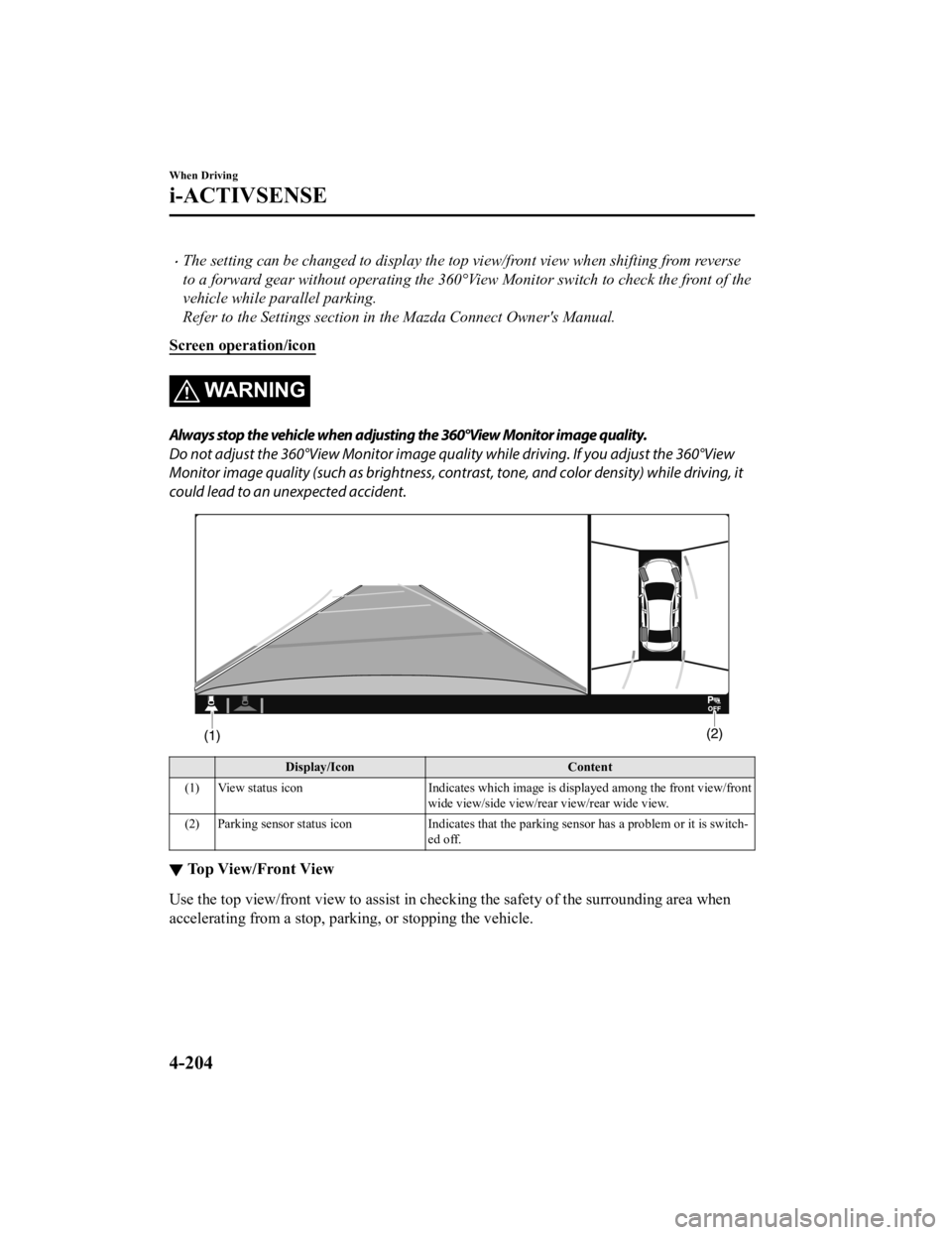
The setting can be changed to display the top view/front view when shifting from reverse
to a forward gear without operating the 360°View Monitor sw itch to check the front of the
vehicle while parallel parking.
Refer to the Settings section in the Mazda Connect Owner's Manual.
Screen operation/icon
WA R N I N G
Always stop the vehicle when adjusting the 360°View Monitor image quality.
Do not adjust the 360°View Monitor image qualit y while driving. If you adjust the 360°View
Monitor image quality (such as brightness, contra st, tone, and color density) while driving, it
could lead to an unexpected accident.
Display/Icon Content
(1) View status icon Indicates which image is displayed among the front view/front
wide view/side view/rear view/rear wide view.
(2) Parking sensor status icon Indicates that the parking sensor has a problem or it is switch‐
ed off.
▼ Top View/Front View
Use the top view/front
view to assist in checking the safety of the surrounding area when
accelerating from a stop, parking, or stopping the vehicle.
When Driving
i-ACTIVSENSE
4-204
CX-9_8KH5-EA-21K_Edition2_old 2021-9-16 14:11:22
Page 376 of 715
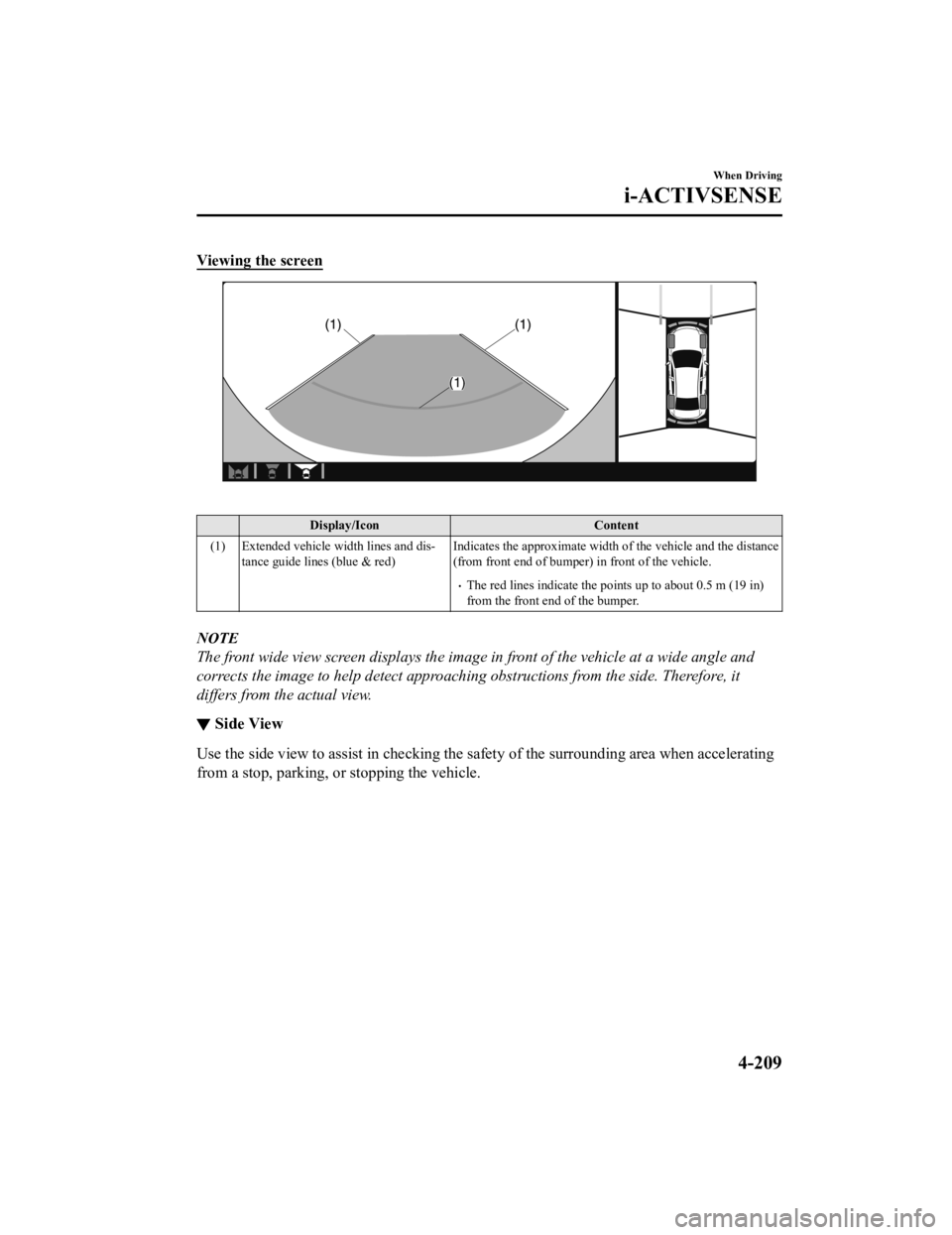
Viewing the screen
Display/IconContent
(1) Extended vehicle width lines and dis‐ tance guide lines (blue & red) Indicates the approximate width o
f the vehicle and the distance
(from front end of bumper) in front of the vehicle.
The red lines indicate the poin ts up to about 0.5 m (19 in)
from the front end of the bumper.
NOTE
The front wide view screen displays the image in front of the vehicle at a wide angle and
corrects the image to help detect approaching obstructions from the side. Therefore, it
differs from the actual view.
▼ Side View
Use the side view to assist in c
hecking the safety of the surrounding area when accelerating
from a stop, parking, or stopping the vehicle.
When Driving
i-ACTIVSENSE
4-209
CX-9_8KH5-EA-21K_Edition2_old 2021-9-16 14:11:22
Page 379 of 715
Refer to Parking Sensor System on page 4-270.
Do not turn the steering wheel any more until the vehicle has passed the obstruction, even
if the obstruction is not visible on the side view image. If the steering wheel is turned even
more, the vehicle may contact the obst ruction if it is turned sharply.
NOTE
Because there might be a difference between the image displayed on the screen and the
actual conditions, always check the safety of the surrounding area using the mirrors and
directly with your eyes when driving.
Even though the object displayed on the screen, such as a road curb or a division line of a
parking space, and the vehicle parallel guide lines appear parallel, they may not actually
be parallel.
▼Top View/Rear View
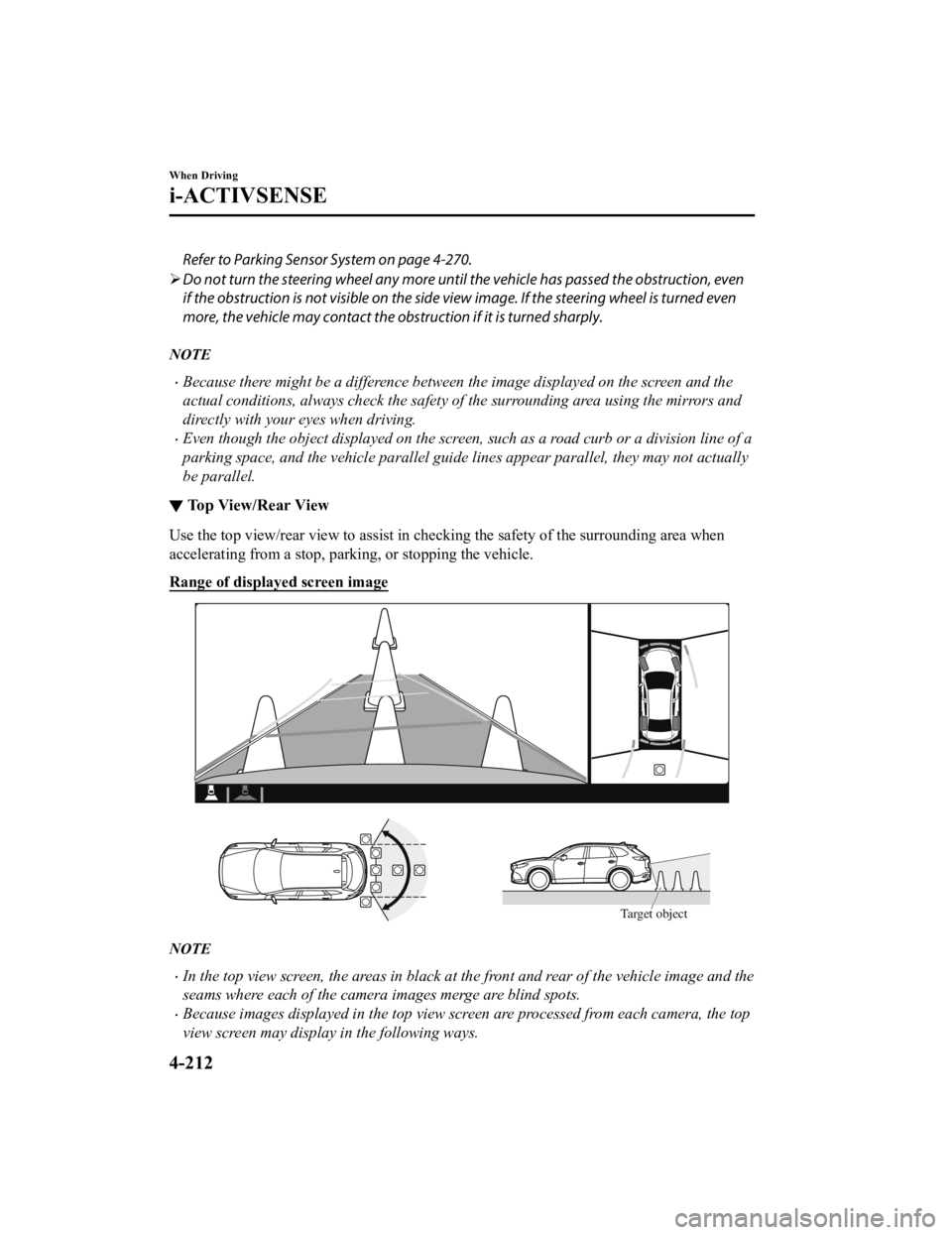
Use the top view/rear view to assist in checking the safety of
the surrounding area when
accelerating from a stop, parking, or stopping the vehicle.
Range of displayed screen image
Target object
NOTE
In the top view screen, the areas in black at the front and rear of the vehicle image and the
seams where each of the camera images merge are blind spots.
Because images displayed in the top view screen are processed from each camera, the top
view screen may display in the following ways.
When Driving
i-ACTIVSENSE
4-212
CX-9_8KH5-EA-21K_Edition2_old 2021-9-16 14:11:22
Page 383 of 715

possible position. (If the parking space has division lines, ch eck whether the vehicle
width guide lines are parallel to them.)
(Screen display)
(Actual condition)
▼ Top View/Rear Wide View
Use the top view/rear wide view to assist in checking the safet
y of the surrounding area
when accelerating from a stop, parking, or stopping the vehicle .
When Driving
i-ACTIVSENSE
4-216
CX-9_8KH5-EA-21K_Edition2_old 2021-9-16 14:11:22
Page 393 of 715

Exhaust gas from the vehicle in front, sand, snow, and water vapor rising from
manholes and grating, and water splashed into the air.
When towing a malfunctioning vehicle.
The vehicle is driven with tires having significantly different wear.
The vehicle is driven on down slopes or bumpy roads.
There are water puddles on the road.
The surroundings are dark such as during the night, early evening, or early morning, or
in a tunnel or indoor parking lot.
The illumination brightness of the headlights is reduced or the headlight illumination is
weakened due to dirt or a deviated optical axis.
The target object enters the blind spot of the Forward Sensing Camera (FSC).
A person or object bursts onto the road from the shoulder or cuts right in front of you.
You change lanes and approach a vehicle ahead.
When driving extremely close to the target object.
Tire chains or a temporary spare tire is installed.
The vehicle ahead has a special shape. For example, a vehicle towing a trailer house or
a boat, or a vehicle carrier carrying a vehicle with its front pointed rearward.
If the Forward Sensing Camera (FSC) cannot operate normally due to backlight or fog,
the system functions related to the Forward Sensing Camera (FSC) are temporarily
stopped and the following warn ing lights turn on. However, this does not indicate a
malfunction.
High Beam Control System (HBC) warning light (amber)
Lane-keep Assist System (LAS) & Lane Departure Warning System (LDWS) warning
indication
Mazda Radar Cruise Control with Stop & Go function (MRCC with Stop & Go
function) warning indication
Smart Brake Support/Smart City Brake Support (SBS/SCBS) warning indication
(amber)
If the Forward Sensing Camera (FSC) cannot operate normally due to high temperatures,
the system functions related to the Forward Sensing Camera (FSC) are temporarily
stopped and the following warn ing lights turn on. However, this does not indicate a
malfunction. Cool down the area around the Forward Sensing Camera (FSC) such as by
turning on the air conditioner.
High Beam Control System (HBC) warning light (amber)
Lane-keep Assist System (LAS) & Lane Departure Warning System (LDWS) warning
indication
Mazda Radar Cruise Control with Stop & Go function (MRCC with Stop & Go
function) warning indication
When Driving
i-ACTIVSENSE
4-226
CX-9_8KH5-EA-21K_Edition2_old 2021-9-16 14:11:22