fuel MAZDA MODEL CX-9 2022 Owner's Manual
[x] Cancel search | Manufacturer: MAZDA, Model Year: 2022, Model line: MODEL CX-9, Model: MAZDA MODEL CX-9 2022Pages: 715, PDF Size: 81.06 MB
Page 197 of 715

▼Multi-information Display (Type B)
INFO switchMulti-information Display (Type B)
The multi-information display in
dicates the following information.
Odometer
Trip meter
Engine coolant temperature gauge
Fuel gauge
Outside temperature
Distance-to-empty
Average fuel economy
Current fuel economy
Maintenance Monitor
Blind Spot Monitoring (BSM) Display
Distance Recognition Support System (DRSS) Display
Mazda Radar Cruise Control with S top & Go function (MRCC with Stop & Go function)
System Display
Lane-keep Assist System (LAS) & Lane Departure Warning System ( LDWS) Display
Cruise Control Display
Compass Display
Message Display
When Driving
Instrument Cluster and Display
4-30
CX-9_8KH5-EA-21K_Edition2_old 2021-9-16 14:11:22
Page 198 of 715

The screen content changes each time the INFO switch is pressed.
Press the INFO switch
Press the INFO switch
Press the INFO switch Press the INFO switch
Press the INFO switch Press the INFO switch
Current Fuel Economy,
Trip Meter A, Average
Fuel Economy, Outside
Temperature,
Odometer, Fuel Gauge
Current Fuel Economy,
Trip Meter B, Average
Fuel Economy, Outside
Temperature,
Odometer, Fuel Gauge
Engine Coolant
Temperature Gauge,
Maintenance Monitor,
Outside Temperature,
Odometer, Fuel Gauge i-ACTIVSENSE display,
Outside Temperature,
Odometer, Fuel Gauge Warning message,
Outside Temperature,
Odometer, Fuel Gauge
*1
*1: Displayed only when a warning occurs. Engine Coolant
Temperature Gauge,
Compass,
Distance-to-empty,
Outside Temperature,
Odometer, Fuel Gauge
▼
Odometer, Trip Meter and Trip
Meter Selector
The odometer is constantly displayed on
the screen when the ignition is switched
ON, and the TRIP A or TRIP B screen can
When Driving
Instrument Cluster and Display
4-31
CX-9_8KH5-EA-21K_Edition2_old
2021-9-16 14:11:22
Page 199 of 715

be displayed by operating the INFO
switch.
Press the INFO switchINFO switch
Odometer,
Trip meter A
Odometer,
Trip meter B
Odometer
The odometer records the total distance
the vehicle has been driven.
Trip meter
The driving distance for a specified
interval is indicated. Two types (TRIP A,
TRIP B) of interval distance and the
average fuel economy for each can be
measured.
For instance, trip me ter A can record the
distance from the point of origin, and trip
meter B can record the distance from
where the fuel tank is filled.
When trip meter A is selected, TRIP A
will be displayed. Wh en trip meter B is
selected, TRIP B will be displayed.
The trip meter and average fuel economy
can be reset by pressi ng the INFO switch
for 1.5 seconds or more while in each
mode.
NOTE
Only the trip meters record tenths of
kilometers (miles).
The trip record will be erased when:
The power supply is interrupted
(blown fuse or the battery is
disconnected).
The vehicle is driven over 9999.9 km
(mile).
▼ Engine Coolant Temperature Gauge
Displays the engine coolant temperature.
The blue range of the gauge indicates that
the engine coolant temperature is low, and
the red range of the gauge indicates that
the engine coolant temperature is high and
overheating.
When Driving
Instrument Cluster and Display
4-32
CX-9_8KH5-EA-21K_Edition2_old
2021-9-16 14:11:22
Page 200 of 715

CAUTION
If the high engine coolant temperature
warning light (red) flashes, there is a
possibility of overheating. Drive slowly to
reduce engine load until you can find a safe
place to stop the vehicle and wait for the
engine to cool down.
Refer to Overheating on page 7-23.
NOTE
If the engine coolant temperature is high
or the engine is hot, the engine output
may be limited.
The temperature unit (Centigrade/
Fahrenheit) of the engine coolant gauge
display changes in conjunction with the
temperature unit of the outside
temperature display.
Refer to the Settings section in the
Mazda Connect Owner's Manual.
▼Fuel Gauge
The fuel gauge shows approximately how
much fuel is remaining in the tank when
the ignition is switched ON. We
recommend keeping the tank over 1/4 full.
Full
1/4 Full
Empty
If the fuel level is low, () and () turn an
amber color. Refuel as soon as possible.
If inconsistency in engine performance or
stalling occurs due to low fuel level
conditions, refuel the vehicle as soon as
possible and add at least 10 L (2.7 US gal,
2.2 Imp gal) of fuel.
Refer to Taking Action on page 7-36.
NOTE
After refueling, it may require some time
for the indicator to stabilize. In addition,
the indicator may deviate while driving
on a slope or curve since the fuel moves
in the tank.
The direction of the arrow () indicates
that the fuel-filler lid is on the left side
of the vehicle.
When Driving
Instrument Cluster and Display
4-33
CX-9_8KH5-EA-21K_Edition2_old 2021-9-16 14:11:22
Page 202 of 715

▼Outside Temperature Display
When the ignition is switched ON, the
outside temperatur
e is displayed.
NOTE
Under the following conditions, the
outside temperature display may differ
from the actual outside temperature
depending on the surroundings and
vehicle conditions:
Significantly cold or hot temperatures.
Sudden changes in outside
temperature.
The vehicle is parked.
The vehicle is driven at low speeds.
Changing the Temperature Unit of the
Outside Temperature Display
The outside temperature unit can be
switched between Celsius and Fahrenheit.
Settings can be changed by operating the
center display screen.
Refer to the Settings section in the Mazda
Connect Owner's Manual.
NOTE
When the temperature unit indicated in the
outside temperature display is changed,
the temperature unit indicated in the
engine coolant gauge display changes in
conjunction with it.
▼ Distance-to-empty
This displays the approximate distance
you can travel on the
remaining fuel based
on the fuel economy.
The distance-to-empty will be calculated
and displayed every second.
NOTE
Even though the distance-to-empty
display may indicate a sufficient amount
of remaining driving distance before
refueling is required , refuel as soon as
possible if the fuel level is very low or
the low fuel warning light illuminates.
The display will not change unless you
add more than approximately 9 L (2.3
US gal, 1.9 Imp gal) of fuel.
The distance-to-empty is the
approximate remaining distance the
vehicle can be driven until all the
graduation marks in the fuel gauge
indicating the remaining fuel supply
disappear.
If there is no past fuel economy
information such as after first
purchasing your vehicle or the
information is deleted when the battery
cables are disconnected, the actual
distance-to empty/range may differ from
the amount indicated.
▼ Average Fuel Economy
The average fuel economy is calculated
every minute from the total traveled
distance on the trip meter and the total fuel
consumption, and the average fuel
When Driving
Instrument Cluster and Display
4-35
CX-9_8KH5-EA-21K_Edition2_old
2021-9-16 14:11:22
Page 203 of 715
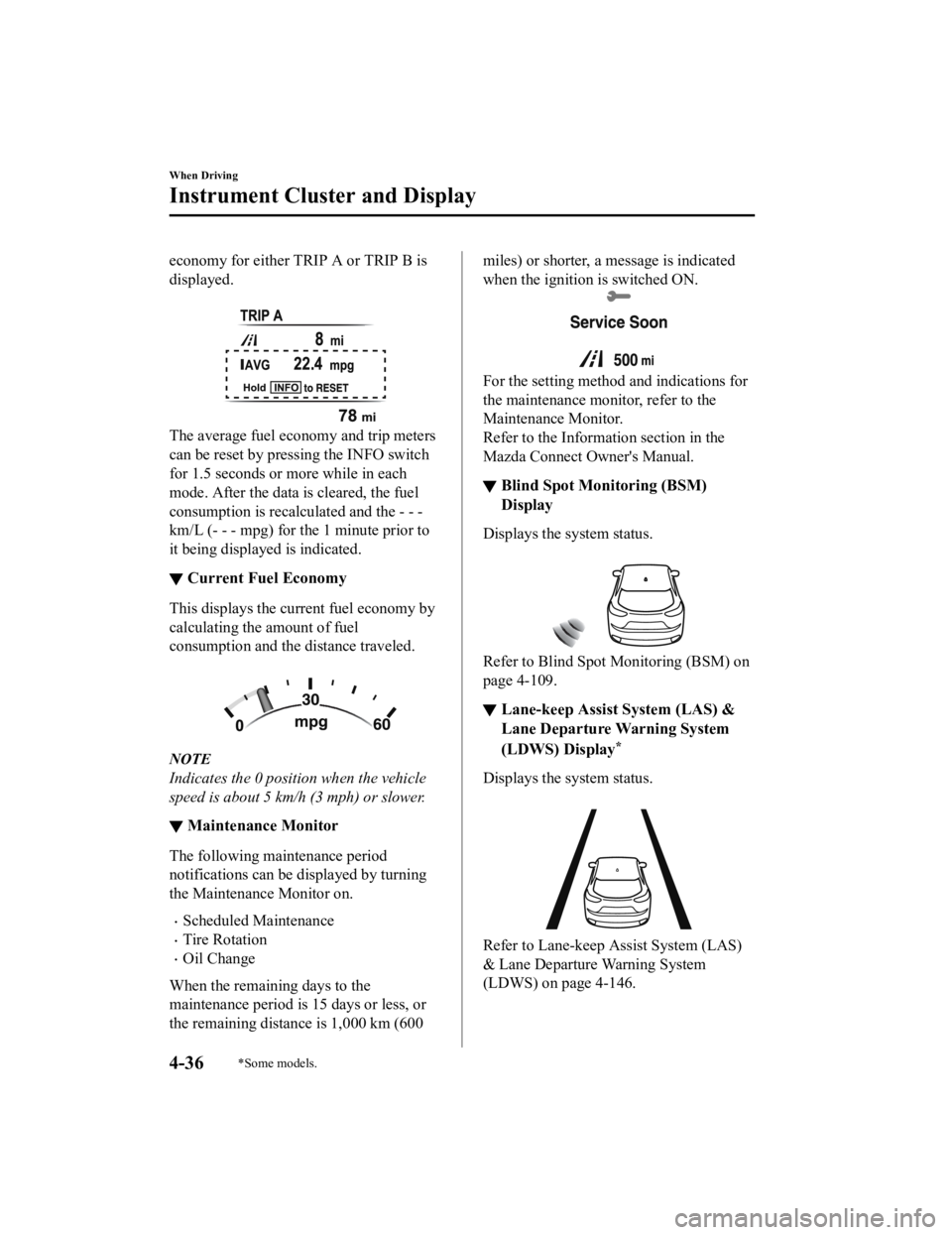
economy for either TRIP A or TRIP B is
displayed.
The average fuel economy and trip meters
can be reset by pressing the INFO switch
for 1.5 seconds or more while in each
mode. After the data is cleared, the fuel
consumption is recalculated and the - - -
km/L (- - - mpg) for t he 1 minute prior to
it being displayed is indicated.
▼ Current Fuel Economy
This displays the current fuel economy by
calculating the amount of fuel
consumption and the distance traveled.
NOTE
Indicates the 0 position when the vehicle
speed is about 5 km/h (3 mph) or slower.
▼Maintenance Monitor
The following maintenance period
notifications can be displayed by turning
the Maintenance Monitor on.
Scheduled Maintenance
Tire Rotation
Oil Change
When the remaining days to the
maintenance period is 15 days or less, or
the remaining distance is 1,000 km (600
miles) or shor ter, a message is indicated
when the ignition is switched ON.
For the setting method and indications for
the maintenance monitor, refer to the
Maintenance Monitor.
Refer to the Information section in the
Mazda Connect Owner's Manual.
▼ Blind Spot Monitoring (BSM)
Display
Displays the system status.
Refer to Blind Spot Monitoring (BSM) on
page 4-109.
▼Lane-keep Assist System (LAS) &
Lane Departure Warning System
(LDWS) Display
*
Displays the system status.
Refer to Lane-keep Assist System (LAS)
& Lane Departure Warning System
(LDWS) on page 4-146.
When Driving
Instrument Cluster and Display
4-36*Some models.
CX-9_8KH5-EA-21K_Edition2_old
2021-9-16 14:11:22
Page 207 of 715
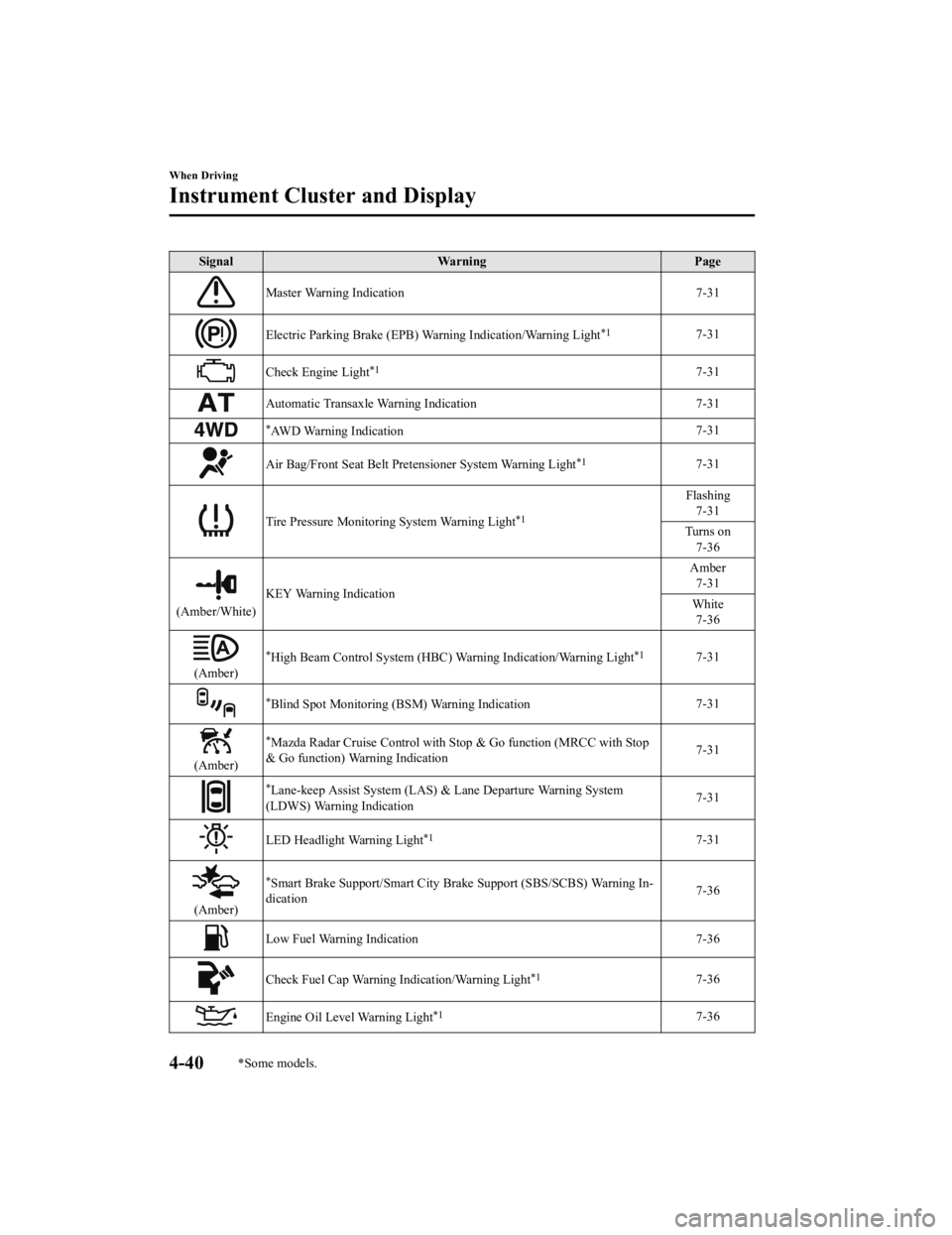
SignalWarning Page
Master Warning Indication 7-31
Electric Parking Brake (EPB) Warning Indication/Warning Light*17-31
Check Engine Light*17-31
Automatic Transaxle Warning Indication 7-31
*AWD Warning Indication 7-31
Air Bag/Front Seat Belt Pretensioner System Warning Light*17-31
Tire Pressure Monitoring System Warning Light*1
Flashing
7-31
Turns on 7-36
(Amber/White) KEY Warning Indication Amber
7-31
White 7-36
(Amber)
*High Beam Control System (HBC) W arning Indication/Warning Light*17-31
*Blind Spot Monitoring (BSM) Warning Indication 7-31
(Amber)
*Mazda Radar Cruise Control with Stop & Go func
tion (MRCC with Stop
& Go function) Warning Indication 7-31
*Lane-keep Assist System (LAS) &
Lane Departure Warning System
(LDWS) Warning Indication 7-31
LED Headlight Warning Light*17-31
(Amber)
*Smart Brake Support/Sma
rt City Brake Support (SBS/SCBS) Warning In‐
dication 7-36
Low Fuel Warning Indication
7-36
Check Fuel Cap Warning Indication/Warning Light*17-36
Engine Oil Level Warning Light*17-36
When Driving
Instrument Cluster and Display
4-40*Some models.
CX-9_8KH5-EA-21K_Edition2_old 2021-9-16 14:11:22
Page 264 of 715

Drive Selection
Drive selection is a system to switch the vehicle's drive mode. When the sport mode is
selected, the vehicle's response against accelerator operation is enhanced. This provides
additional quick acceleration which may be needed to safely mak e maneuvers such as lane
changes, merging onto freeways, or passing other vehicles.
CAUTION
Do not use the sport mode when driving on slip pery roads such as wet or snow-covered roads.
It may cause tire slipping.
NOTE
When sport mode is selected, driving at higher engine speeds may increase fuel
consumption. Mazda recommends that you cancel sport mode for normal driving.
Drive mode cannot be switched in the following conditions:
ABS/TCS/DSC is operating
The Mazda Radar Cruise Control with St op & Go function (MRCC with Stop & Go
function) System/cruise control is operating.
Steering wheel is being operated abruptly
▼ Drive Selection Switch
Press the drive selection switch forward
(“
”) to select the sport mode.
Pull the drive selection switch back
(“
”) to cancel the sport mode.
NOTE
In the following cases, the drive
selection is canceled.
The ignition is switched OFF.
Mazda Radar Cruise Control with
Stop & Go function (MRCC with Stop
& Go function) System/cruise control
is set.
Depending on the driving conditions
when sport mode is selected, the vehicle
may perform shift-down or slightly
accelerate.
▼ Select Mode Indication
The light is illumin
ated while in SPORT
mode.
When Driving
Drive Selection
4-97
CX-9_8KH5-EA-21K_Edition2_old 2021-9-16 14:11:22
Page 408 of 715

As an added safety feature, your vehicle has been equipped with a tire pressure monitoring
system (TPMS) that illuminates a low tire pre ssure telltale when one or more of your tires is
significantly under-inflated. Accordingly, when th e low tire pressure telltale illuminates, you
should stop and check your tires as soon as possible, and inflate them to the proper
pressure. Driving on a significantly under-in flated tire causes the tire to overheat and can
lead to tire failure. Under-inflation also reduce s fuel efficiency and tire tread life, and may
affect the vehicle's handling and stopping ability.
Please note that the TPMS is not a substitute for proper tire maintenance, and it is the
driver's responsibility to maintain correct ti re pressure, even if under-inflation has not
reached the level to trigger illumination of the TPMS low tire pressure telltale.
Your vehicle has also been equipped with a TPMS malfunction indicator to indicate when
the system is not operating properly.
The TPMS malfunction indicator is combined with the low tire pressure telltale. When the
system detects a malfunction, the telltale wi ll flash for approximately one minute and then
remain continuously illuminated. This sequen ce will continue upon subsequent vehicle
start-ups as long as the malfunction exists. When the malfunction indicator is illuminated,
the system may not be able to detect or signal low tire pressure as intended. TPMS
malfunctions may occur for a variety of reasons, including the installation of replacement
or alternate tires or wheels on the vehicle th at prevent the TPMS from functioning properly.
Always check the TPMS malfunction telltale after replacing one or more tires or wheels on
your vehicle to ensure that the replacement or alternate tires and wheels allow the TPMS to
continue to function properly.
To avoid false readings, the system samples fo r a little while before indicating a problem. As
a result it will not instantaneously regi ster a rapid tire deflation or blow out.
▼System Error Activation
When the warning light flashes, there may
be a system malfunction. Consult an
Authorized Mazda Dealer.
A system error activation may occur in the
following cases:
When there is equipment or a device
near the vehicle using the same radio
frequency as that of the tire pressure
sensors.
When a metallic device such as a
non-genuine navigation system is
equipped near the center of the
dashboard, which may block radio
signals from the tire
pressure sensor to
the receiver unit.
When using the following devices in the
vehicle that may cause radio
interference with the receiver unit.
A digital device such as a personal
computer.
A current converter device such as a
DC-AC converter.
When excess snow or ice adheres to the
vehicle, especially around the wheels.
When the tire pressu re sensor batteries
are exhausted.
When using a wheel with no tire
pressure sensor installed.
When using tires with steel wire
reinforcement in the sidewalls.
When using tire chains.
When Driving
Tire Pressure Monitoring System
4-241
CX-9_8KH5-EA-21K_Edition2_old 2021-9-16 14:11:22
Page 460 of 715
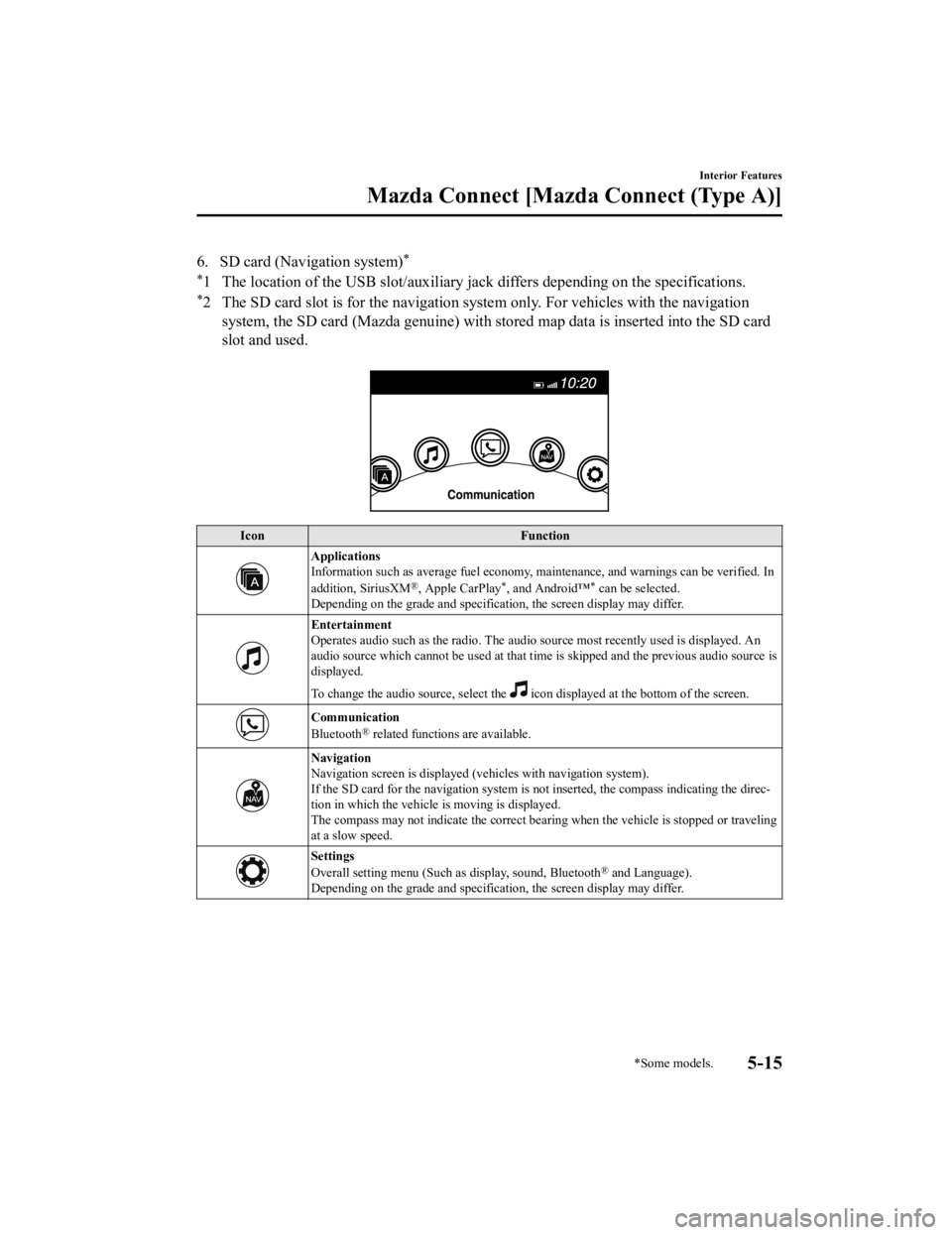
6. SD card (Navigation system)*
*
1 The location of the USB slot/auxiliary jack differs depending on the specifications.
*2 The SD card slot is for the navigation system only. For vehicles with the navigation
system, the SD card (Mazda genuine) with stored map data is ins erted into the SD card
slot and used.
Icon Function
Applications
Information such as average fuel economy, maintenance, and warn ings can be verified. In
addition, SiriusXM
®, Apple CarPlay*, and Android™* can be selected.
Depending on the grade and specification, the screen display ma y differ.
Entertainment
Operates audio such as the radio. The audio source most recentl y used is displayed. An
audio source which cannot be used at that time is skipped and t he previous audio source is
displayed.
To change the audio source, select the
icon displayed at the bottom of the screen.
Communication
Bluetooth® related functions are available.
Navigation
Navigation screen is displayed (v ehicles with navigation system).
If the SD card for the navigation system is not inserted, the compass indicating the direc‐
tion in which the vehicle is moving is displayed.
The compass may not indicate th e correct bearing when the vehicle is stopped or traveling
at a slow speed.
Settings
Overall setting menu (Such a s display, sound, Bluetooth® and Language).
Depending on the grade and specification, the screen display ma y differ.
Interior Features
Mazda Connect [Mazda Connect (Type A)]
*Some models.5-15
CX-9_8KH5-EA-21K_Edition2_old 2021-9-16 14:11:22