parking brake MAZDA MODEL MAZDASPEED 3 2013 (in English) User Guide
[x] Cancel search | Manufacturer: MAZDA, Model Year: 2013, Model line: MODEL MAZDASPEED 3, Model: MAZDA MODEL MAZDASPEED 3 2013Pages: 611, PDF Size: 7.02 MB
Page 171 of 611

NOTE
Having to add brake fluid is sometimes an
indicator of leakage. Consult an Authorized
Mazda Dealer as soon as possible even if the
brake light is no longer illuminated.
WARNING
Do not drive with the brake system
warning light illuminated. Contact an
Authorized Mazda Dealer to have the
brakes inspected as soon as possible:
Driving with the brake system
warning light illuminated is
dangerous. It indicates that your
brakes may not work at all or that
they could completely fail at any
time. If this light remains
illuminated, after checking that the
parking brake is fully released, have
the brakes inspected immediately.
qAnti-Lock Brake System (ABS)
The ABS control unit continuously
monitors the speed of each wheel. If one
wheel is about to lock up, the ABS
responds by automatically releasing and
reapplying that wheel's brake.
The driver will feel a slight vibration in
the brake pedal and may hear a chattering
noise from the brake system. This is
normal ABS system operation. Continue
to depress the brake pedal without
pumping the brakes.
WARNING
Do not rely on ABS as a substitute for
safe driving:
The ABS cannot compensate for
unsafe and reckless driving, excessive
speed, tailgating (following another
vehicle too closely), driving on ice and
snow, and hydroplaning (reduced tire
friction and road contact because of
water on the road surface). You can
still have an accident.
NOTE
lBraking distances may be longer on loose
surfaces (snow or gravel, for example)
which usually have a hard foundation. A
vehicle with a normal braking system may
require less distance to stop under these
conditions because the tires will build up a
wedge of surface layer when the wheels
skid.
lThe sound of the ABS operating may be
heard when starting the engine or
immediately after starting the vehicle,
however, it does not indicate a malfunction.
qABS Warning Light
The warning light stays on for a few
seconds when the ignition is switched
ON.
5-8
Driving Your Mazda
Starting and Driving
Page 174 of 611

(6-speed transaxle)
Vehicles with 6-speed transaxle are
equipped with a device to prevent shifting
to R (reverse) by mistake. Push the shift
lever downward and shift to R.
WARNING
Do not use sudden engine braking on
slippery road surfaces or at high
speeds:
Shifting down while driving on wet,
snowy, or frozen roads, or while
driving at high speeds causes sudden
engine braking, which is dangerous.
The sudden change in tire speed
could cause the tires to skid. This
could lead to loss of vehicle control
and an accident.
Be sure to leave the shift lever in 1 or R
position and set the parking brake
when leaving the vehicle unattended:
Otherwise the vehicle could move
and cause an accident.
CAUTION
ØKeep your foot off the clutch pedal
except when shifting gears. Also,
do not use the clutch to hold the
vehicle on an upgrade. Riding the
clutch will cause needless clutch
wear and damage.
ØDo not apply any excessive lateral
force to the gear lever when
changing from 5th to 4th gear.
This could lead to the accidental
selection of 2nd gear, which can
result in damage to the transaxle.
ØMake sure the vehicle comes to a
complete stop before shifting to R.
Shifting to R while the vehicle is
still moving may damage the
transaxle.
NOTE
If shifting to R is difficult, shift back into
neutral, release the clutch pedal, and try
again.
qRecommendations for Shifting
Upshifting
For normal acceleration, we recommend
these shift points.
(MZR 2.0)
Gear Vehicle speed
1 to 2 21 km/h (13 mph)
2 to 3 39 km/h (24 mph)
3 to 4 55 km/h (34 mph)
4 to 5 79 km/h (49 mph)
(SKYACTIV-G 2.0)
Gear Vehicle speed
1 to 2 24 km/h (15 mph)
2 to 3 42 km/h (26 mph)
3 to 4 60 km/h (37 mph)
4 to 5 75 km/h (46 mph)
5 to 6 79 km/h (49 mph)
Driving Your Mazda
Starting and Driving
5-11
Page 177 of 611

qTransaxle Ranges
The shift lever must be in P or N to
operate the starter.
P (Park)
P locks the transaxle and prevents the
front wheels from rotating.
WARNING
Always set the shift lever to P and set
the parking brake:
Only setting the shift lever to the P
position without using the parking
brake to hold the vehicle is
dangerous. If P fails to hold, the
vehicle could move and cause an
accident.
CAUTION
ØShifting into P, N or R while the
vehicle is moving can damage
your transaxle.
ØShifting into a driving gear or
reverse when the engine is running
faster than idle can damage the
transaxle.
R (Reverse)
In position R, the vehicle moves only
backward. You must be at a complete stop
before shifting to or from R, except under
rare circumstances as explained in
Rocking the Vehicle (page 4-9).
N (Neutral)
In N, the wheels and transaxle are not
locked. The vehicle will roll freely even
on the slightest incline unless the parking
brake or brakes are on.
WARNING
If the engine is running faster than idle,
do not shift from N or P into a driving
gear:
It's dangerous to shift from N or P
into a driving gear when the engine
is running faster than idle. If this is
done, the vehicle could move
suddenly, causing an accident or
serious injury.
Do not shift into N when driving the
vehicle:
Shifting into N while driving is
dangerous. Engine braking cannot be
applied when decelerating which
could lead to an accident or serious
injury.
CAUTION
Do not shift into N when driving the
vehicle. Doing so can cause transaxle
damage.
NOTE
Apply the parking brake or depress the brake
pedal before moving the shift lever from N to
prevent the vehicle from moving unexpectedly.
D (Drive)
D is the normal driving position. From a
stop, the transaxle will automatically shift
through a 5-gear/6-gear
*sequence.
* SKYACTIV-G 2.0
M (Manual)
M is the manual shift mode position.
Gears can be shifted up or down by
operating the shift lever.
Refer to Manual Shift Mode (page 5-16).
5-14
Driving Your Mazda
Starting and Driving
Page 212 of 611
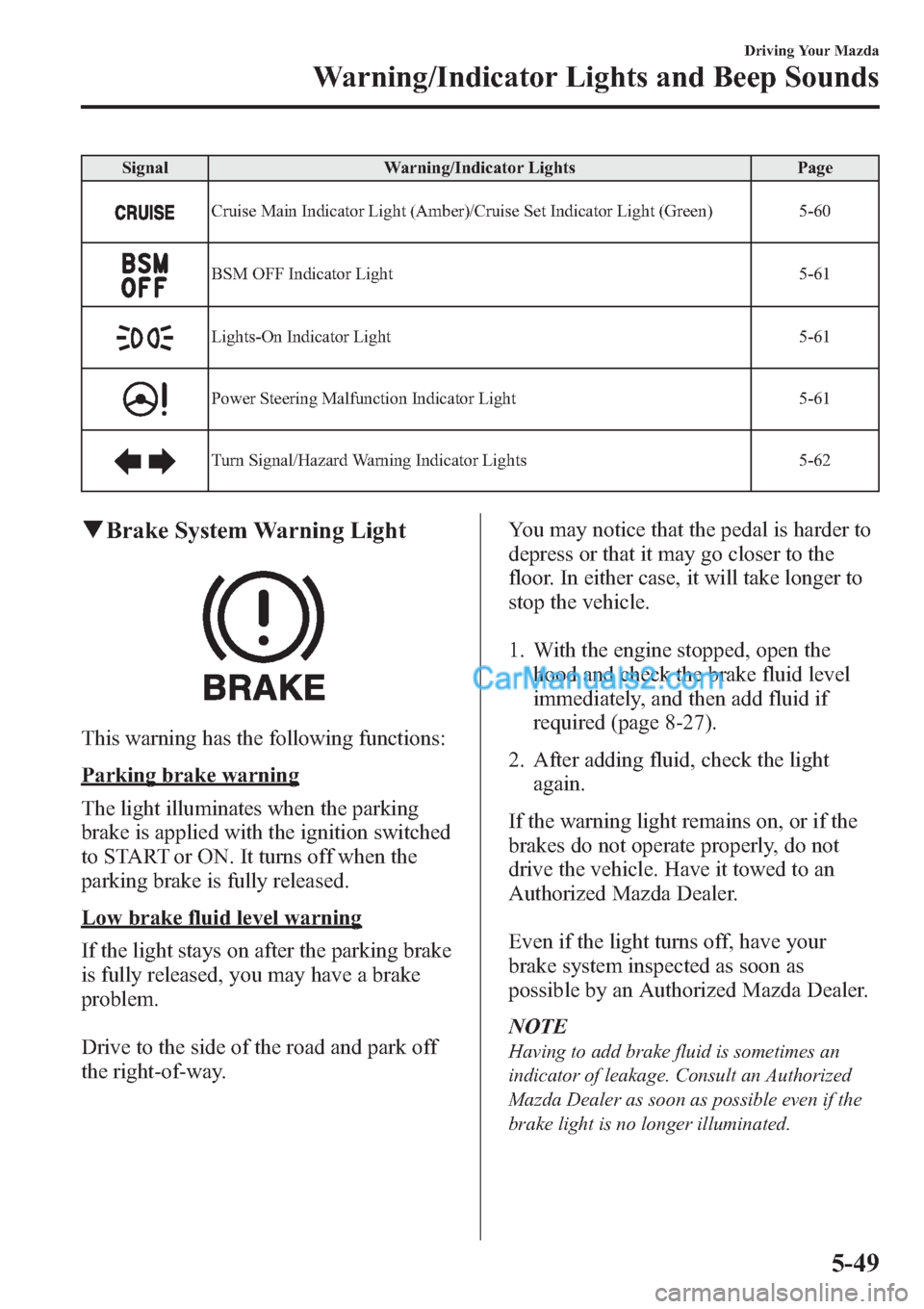
Signal Warning/Indicator Lights Page
Cruise Main Indicator Light (Amber)/Cruise Set Indicator Light (Green) 5-60
BSM OFF Indicator Light 5-61
Lights-On Indicator Light 5-61
Power Steering Malfunction Indicator Light 5-61
Turn Signal/Hazard Warning Indicator Lights 5-62
qBrake System Warning Light
This warning has the following functions:
Parking brake warning
The light illuminates when the parking
brake is applied with the ignition switched
to START or ON. It turns off when the
parking brake is fully released.
Low brake fluid level warning
If the light stays on after the parking brake
is fully released, you may have a brake
problem.
Drive to the side of the road and park off
the right-of-way.You may notice that the pedal is harder to
depress or that it may go closer to the
floor. In either case, it will take longer to
stop the vehicle.
1. With the engine stopped, open the
hood and check the brake fluid level
immediately, and then add fluid if
required (page 8-27).
2. After adding fluid, check the light
again.
If the warning light remains on, or if the
brakes do not operate properly, do not
drive the vehicle. Have it towed to an
Authorized Mazda Dealer.
Even if the light turns off, have your
brake system inspected as soon as
possible by an Authorized Mazda Dealer.
NOTE
Having to add brake fluid is sometimes an
indicator of leakage. Consult an Authorized
Mazda Dealer as soon as possible even if the
brake light is no longer illuminated.
Driving Your Mazda
Warning/Indicator Lights and Beep Sounds
5-49
Page 213 of 611

WARNING
Do not drive with the brake system
warning light illuminated. Contact an
Authorized Mazda Dealer to have the
brakes inspected as soon as possible:
Driving with the brake system
warning light illuminated is
dangerous. It indicates that your
brakes may not work at all or that
they could completely fail at any
time. If this light remains
illuminated, after checking that the
parking brake is fully released, have
the brakes inspected immediately.
qMalfunction Warning Light
When the ignition is switched ON, the
malfunction warning light illuminates and
then turns off after a few seconds.
The light illuminates continuously if any
one of the following occurs. Consult an
Authorized Mazda Dealer:
lThe brake switch has a malfunction.l(SKYACTIV-G 2.0)
There is a problem with the battery
system.
WARNING
Do not drive the vehicle with the
malfunction warning light illuminated.
Driving with the malfunction
warning light illuminated is
dangerous because the brake lights
and engine control system may not
operate normally due to a brake
switch malfunction which could lead
to an accident. Have your vehicle
inspected by an Authorized Mazda
Dealer.
qABS Warning Light
The warning light stays on for a few
seconds when the ignition is switched
ON.
If the ABS warning light stays on while
you're driving, the ABS control unit has
detected a system malfunction. If this
occurs, your brakes will function normally
as if the vehicle had no ABS.
Should this happen, consult an Authorized
Mazda Dealer as soon as possible.
NOTE
lWhen the engine is jump-started to charge
the battery, uneven rpm occurs and the ABS
warning light may illuminate. If this occurs,
it is the result of the weak battery and does
not indicate an ABS malfunction.
Recharge the battery.
l(With DSC vehicles)
The brake assist system does not operate
while the ABS warning light is illuminated.
5-50
Driving Your Mazda
Warning/Indicator Lights and Beep Sounds
Page 232 of 611

Pressing the AFS OFF switch again turns
off the AFS OFF indicator light and turns
on the AFS.
qDaytime Running Lights (Canada)
In Canada, vehicles must be driven with
the headlights on during daytime
operation.
For that reason, the daytime running lights
automatically turn on when the ignition is
switched ON.
NOTE
The Daytime Running Lights turn off when the
parking brake is applied.
Turn and Lane-Change
Signals
Turn Signals
Move the signal lever down (for a left
turn) or up (for a right turn) to the stop
position. The signal will self-cancel after
the turn is completed.
If the indicator light continues to flash
after a turn, manually return the lever to
its original position.
Right turn
Left turn Right lane change
Left lane changeOFF
Green indicators on the dashboard show
which signal is working.
Lane-change signals
(Without Smart Turn)
Move the lever slightly toward the
direction of the change―until the
indicator flashes―and hold it there. It
will return to the off position when
released.
(With Smart Turn)
To signal a lane change, press the turn
signal lever up or down halfway and
release. After releasing the lever, the turn
signal indicator flashes three times.
Driving Your Mazda
Switches and Controls
5-69
Page 331 of 611
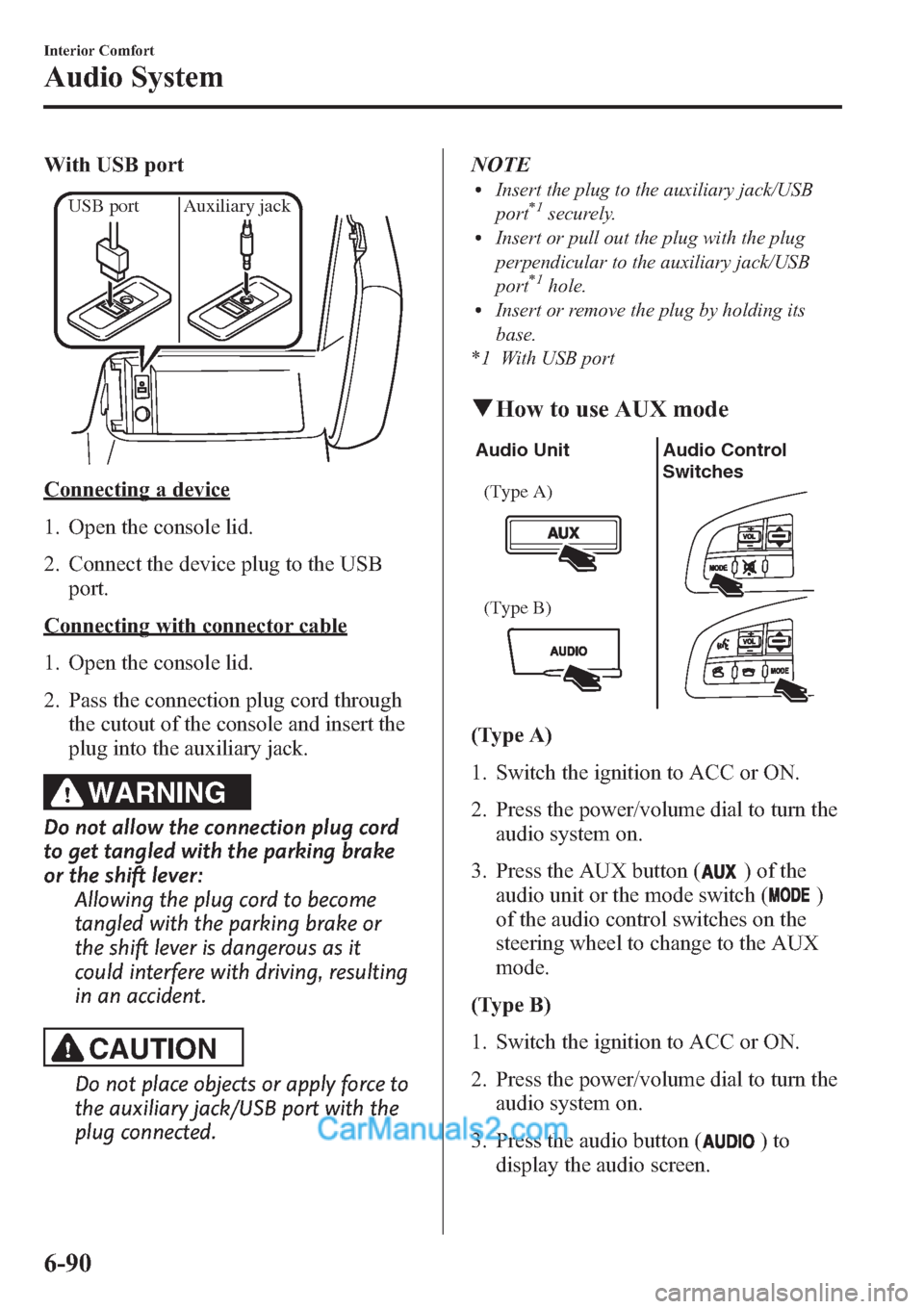
With USB port
USB port Auxiliary jack
Connecting a device
1. Open the console lid.
2. Connect the device plug to the USB
port.
Connecting with connector cable
1. Open the console lid.
2. Pass the connection plug cord through
the cutout of the console and insert the
plug into the auxiliary jack.
WARNING
Do not allow the connection plug cord
to get tangled with the parking brake
or the shift lever:
Allowing the plug cord to become
tangled with the parking brake or
the shift lever is dangerous as it
could interfere with driving, resulting
in an accident.
CAUTION
Do not place objects or apply force to
the auxiliary jack/USB port with the
plug connected.NOTE
lInsert the plug to the auxiliary jack/USB
port*1securely.lInsert or pull out the plug with the plug
perpendicular to the auxiliary jack/USB
port
*1hole.lInsert or remove the plug by holding its
base.
*1 With USB port
qHow to use AUX mode
Audio Unit Audio Control
Switches
(Type A)
(Type B)
(Type A)
1. Switch the ignition to ACC or ON.
2. Press the power/volume dial to turn the
audio system on.
3. Press the AUX button (
) of the
audio unit or the mode switch (
)
of the audio control switches on the
steering wheel to change to the AUX
mode.
(Type B)
1. Switch the ignition to ACC or ON.
2. Press the power/volume dial to turn the
audio system on.
3. Press the audio button (
)to
display the audio screen.
6-90
Interior Comfort
Audio System
Page 429 of 611
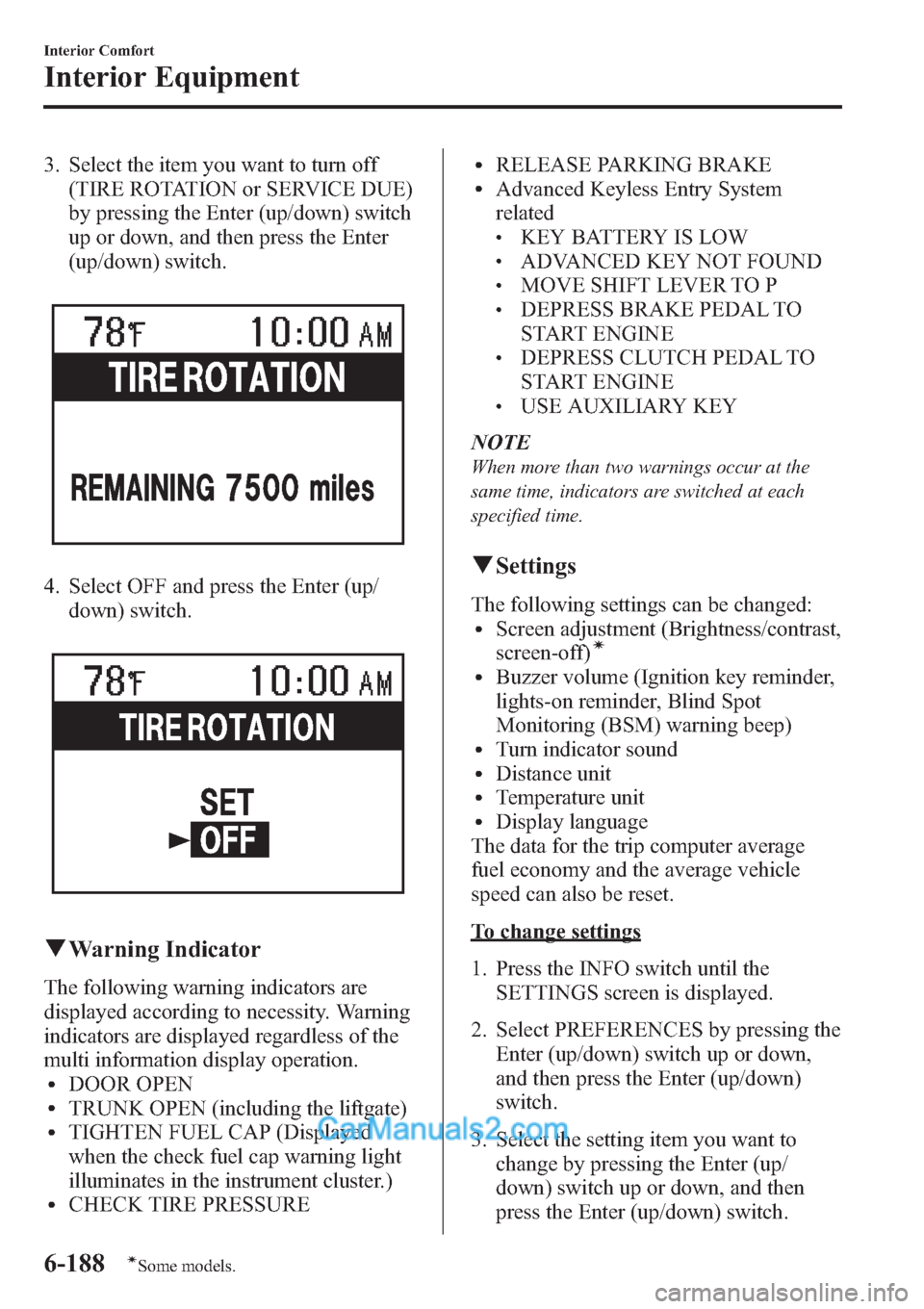
3. Select the item you want to turn off
(TIRE ROTATION or SERVICE DUE)
by pressing the Enter (up/down) switch
up or down, and then press the Enter
(up/down) switch.
4. Select OFF and press the Enter (up/
down) switch.
qWarning Indicator
The following warning indicators are
displayed according to necessity. Warning
indicators are displayed regardless of the
multi information display operation.
lDOOR OPENlTRUNK OPEN (including the liftgate)lTIGHTEN FUEL CAP (Displayed
when the check fuel cap warning light
illuminates in the instrument cluster.)
lCHECK TIRE PRESSURE
lRELEASE PARKING BRAKElAdvanced Keyless Entry System
related
lKEY BATTERY IS LOWlADVANCED KEY NOT FOUNDlMOVE SHIFT LEVER TO PlDEPRESS BRAKE PEDAL TO
START ENGINE
lDEPRESS CLUTCH PEDAL TO
START ENGINE
lUSE AUXILIARY KEY
NOTE
When more than two warnings occur at the
same time, indicators are switched at each
specified time.
qSettings
The following settings can be changed:lScreen adjustment (Brightness/contrast,
screen-off)í
lBuzzer volume (Ignition key reminder,
lights-on reminder, Blind Spot
Monitoring (BSM) warning beep)
lTurn indicator soundlDistance unitlTemperature unitlDisplay language
The data for the trip computer average
fuel economy and the average vehicle
speed can also be reset.
To change settings
1. Press the INFO switch until the
SETTINGS screen is displayed.
2. Select PREFERENCES by pressing the
Enter (up/down) switch up or down,
and then press the Enter (up/down)
switch.
3. Select the setting item you want to
change by pressing the Enter (up/
down) switch up or down, and then
press the Enter (up/down) switch.
6-188
Interior Comfort
íSome models.
Interior Equipment
Page 447 of 611

NOTElMake sure the jack is well lubricated before
using it.
(With Tire Pressure Monitoring System)
lBe sure to register the tire pressure sensor
ID signal code whenever tires or wheels are
changed (page 5-35).
1. Park on a level surface off the right-of-
way and firmly set the parking brake.
2. Put a vehicle with an automatic
transaxle in Park (P), a manual
transaxle in Reverse (R) or 1, and turn
off the engine.
3. Turn on the hazard warning flasher.
4. Have everyone get out of the vehicle
and away from the vehicle and traffic.
5. Remove the jack, tool, and spare tire
(page 7-3).
6. Block the wheel diagonally opposite
the flat tire. When blocking a wheel,
place a tire block both in front and
behind the tire.
NOTE
When blocking a tire, use rocks or wood blocks
of sufficient size if possible to hold the tire in
place.
qRemoving a Flat Tire
1. If your vehicle is equipped with a
wheel cover, pry off the wheel cover
with the beveled end of the lug wrench.
NOTE
Force the end of the lug wrench firmly between
wheel and cover, or removal will be difficult.
CAUTION
There is a valve-stem mark inside the
wheel cover. When installing the
wheel cover, align this mark with the
tire's valve stem.
Damage could occur during
installation if the wheel cover is not
properly aligned.
7-10
In Case of an Emergency
Flat Tire
Page 453 of 611

Overheating
If the High engine coolant temperature
warning light illuminates, the vehicle
loses power, or you hear a loud knocking
or pinging noise, the engine is probably
too hot.
WARNING
Switch the ignition to off and
make sure the fan is not running before
attempting to work near the cooling
fan:
Working near the cooling fan when it
is running is dangerous. The fan
could continue running indefinitely
even if the engine has stopped and
the engine compartment temperature
is high. You could be hit by the fan
and seriously injured.
Do not remove the cooling
system cap when the engine and
radiator are hot:
When the engine and radiator are
hot, scalding coolant and steam may
shoot out under pressure and cause
serious injury.
Open the hood ONLY after steam is no
longer escaping from the engine:
Steam from an overheated engine is
dangerous. The escaping steam could
seriously burn you.
If the High engine coolant temperature
warning light illuminates:
1. Drive safely to the side of the road and
park off the right-of-way.2. Put a vehicle with an automatic
transaxle in park (P), a manual
transaxle in neutral.
3. Apply the parking brake.
4. Turn off the air conditioner.
5. Check whether coolant or steam is
escaping from under the hood or from
the engine compartment.
If steam is coming from the engine
compartment:
Do not go near the front of the vehicle.
Stop the engine.
Wait until the steam dissipates, then
open the hood and start the engine.
If neither coolant nor steam is
escaping:
Open the hood and idle the engine until
it cools.
CAUTION
If the cooling fan does not operate
while the engine is running, the
engine temperature will increase.
Stop the engine and call an
Authorized Mazda Dealer.
6. Make sure the cooling fan is operating,
then turn off the engine after the
temperature has decreased.
7. When cool, check the coolant reservoir
level.
If it's low, look for coolant leaks from
the radiator and hoses.
7-16
In Case of an Emergency
Overheating