change wheel MAZDA MODEL MX-30 EV 2022 User Guide
[x] Cancel search | Manufacturer: MAZDA, Model Year: 2022, Model line: MODEL MX-30 EV, Model: MAZDA MODEL MX-30 EV 2022Pages: 547, PDF Size: 79.35 MB
Page 250 of 547

WARNING
Do not rely completely on DAA and
always drive carefully:
The DAA detects driver fatigue and
decreased attentiveness and
encourages the driver to take a rest,
however, it is not designed to prevent
the vehicle from straying. If you rely too
much on the DAA it could lead to an
accident. Drive carefully and operate
the steering wheel appropriately.
In addition, the system may not be
able to detect driver fatigue and
decreased attentiveness correctly
depending on the traffic and driving
conditions. The driver must take
suffi cient rest in order to drive safely.
NOTE
The DAA operates when all of the
following conditions are met.
The vehicle speed is about 65 to
140 km/h (41 to 86 mph).
The system detects white (yellow)
lane lines.
The system has completed learning
of the driver’s driving data after 60
minutes have passed since the
driver began driving vehicle.
The DAA does not operate under the
following conditions.
The vehicle speed is less than
about 65 km/h (41 mph).
The vehicle speed exceeds about
140 km/h (86 mph).
The vehicle is making a sharp turn.The vehicle is changing lanes.The system cannot detect white
(yellow) lane lines.
The DAA may not operate normally
under the following conditions.
White (yellow) lane lines are less
visible because of dirt or fading/
patchiness.
The vehicle is jolted or swayed
continuously by strong winds or
rough roads.
The vehicle is driven aggressively.When making frequent lane
changes.
The vehicle is making a curve.The DAA detects driver fatigue and
decreased attentiveness based on
the driving data when the vehicle is
driven at about 65 to 140 km/h (41
to 86 mph) for about 20 minutes.
The driving data will be reset under
the following conditions.
The vehicle is stopped for 15
minutes or longer.
The vehicle is driven at less than
about 65 km/h (41 mph) for
about 30 minutes.
The power switch is switched
off.After the DAA has displayed the first
message encouraging rest, it does
not display the next one until 60
minutes have passed.
▼ Driver Attention Alert (DAA)
Display
When the system detects driver fatigue
or decreased attentiveness, it activates
the warning sound and displays an
alert in the multi-information display.
1. “Time for a Break” message is
displayed
When Driving
i-ACTIVSENSE
4-101
MX -30_8JD4-EA -21G_Edition2_new 2021-5-18 14:38:07
Page 260 of 547

Mazda Radar Cruise
Control with Stop & Go function (MRCC with
Stop & Go function)
*
▼ Mazda Radar Cruise Control with
Stop & Go function (MRCC with
Stop & Go function)
The MRCC with Stop & Go function is
a system designed to enable
constant-speed driving at a set speed
and headway control to maintain a
constant distance with a vehicle ahead
according to your vehicle speed. The
system automatically accelerates,
decelerates, and stops your vehicle
without you having to depress the
accelerator or brake pedal.
Also refer to the following information
before using the MRCC with Stop &
Go function.
Refer to Forward Sensing Camera
(FSC) on page 4-71.
Refer to Front Radar Sensor on page
4-77.
WARNING
Do not rely completely on the MRCC
with Stop & Go function and always
drive carefully:
The MRCC with Stop & Go function
may not be able to detect a vehicle
ahead depending on the type of
vehicle and its conditions, the weather
conditions, and the road conditions.
Additionally, the system might be
unable to decelerate su
fficiently if the
vehicle ahead applies the brakes
suddenly or another vehicle cuts into
your lane, which could result in an
accident.
Always check the surrounding
conditions and depress the brake
pedal or accelerator pedal while
keeping a safe distance from a vehicle
ahead or a vehicle following behind
you.
Do not use the system under the
following conditions. Otherwise, it
may result in an accident:
The vehicle is driven on roads other
than highways.
The vehicle is driven on roads with
sharp curves or with heavy tra ffic
where su fficient distances between
vehicles cannot be kept.
The vehicle is driven on roads where
acceleration and deceleration are
frequently repeated.
The vehicle is exiting the main lane
on an expressway to enter an
interchange, a rest area, or a parking
area.
The vehicle is driven on slippery
roads such as icy roads,
snow-covered roads, and unpaved
roads.
The vehicle is driven on a long
downslope.
The vehicle is driven on a steep
slope.
A two-wheeled vehicle such as a
motorcycle or bicycle is traveling
ahead.
The vehicle is being towed.
Proximity warnings activate
frequently.
Switch the MRCC with Stop & Go
function off when it is not being used.
Leaving the MRCC with Stop & Go
function on when it is not in use is
dangerous as it could operate
unexpectedly, resulting in an accident.
When Driving
i-ACTIVSENSE
*Some models.4-111
MX -30_8JD4-EA -21G_Edition2_new 2021-5-18 14:38:07
Page 267 of 547

Traffic Jam Assist (TJA)*
▼ Tra
ffic Jam Assist (TJA)
The TJA is a system designed to reduce
driver fatigue during
traffic jams when
driving on expressways or highways.
The TJA consists of a headway control
function and a steering assist function.
Headway control function
The function performs headway
control to maintain a constant distance
between your vehicle and a vehicle
ahead at a preset vehicle speed
without you having to depress the
accelerator or brake pedal.
Steering assist function
When vehicle lane lines are detected,
the function assists your steering
operation to follow the vehicle lane
lines.
When vehicle lane lines are not
detected, the function assists your
steering operation to follow the
trajectory of the vehicle ahead.
Also refer to the fo llowing information
before using the TJA.
Refer to Forward Sensing Camera
(FSC) on page 4-71.
Refer to Front Radar Sensor on page
4-77.
WARNING
Do not rely completely on the TJA and
always drive carefully:
The TJA is not an automated driving
system. Therefore, the function has
limitations. Do not rely completely
on the system and always stay on
course using the steering wheel.
Set a vehicle speed within the speed
limit according to the road
conditions and the weather
conditions.
The TJA may not be able to detect a
vehicle ahead depending on the type
of vehicle ahead and its conditions,
the weather conditions, and the road
conditions. Additionally, the system
might be unable to decelerate
suffi ciently if the vehicle ahead
applies the brakes suddenly or
another vehicle cuts into your lane,
which could result in an accident.
Do not use the system under the
following conditions. Otherwise, it
may result in an accident:
The vehicle is driven on roads other
than expressways and highways.
The vehicle is driven on roads with
sharp curves or with heavy tra ffic
where su fficient distances between
vehicles cannot be kept.
The vehicle is driven on roads where
acceleration and deceleration are
frequently repeated.
The vehicle is exiting the main lane
on an expressway to enter an
interchange, a rest area, or a parking
area.
The vehicle is driven on slippery
roads such as icy roads,
snow-covered roads, and unpaved
roads.
The vehicle is driven on a long
downslope.
The vehicle is driven on a steep
slope.
A two-wheeled vehicle such as a
motorcycle or bicycle is traveling
ahead.
The vehicle is being towed.
Proximity warnings activate
frequently.
When Driving
i-ACTIVSENSE
4-118*Some models.
MX -30_8JD4-EA -21G_Edition2_new 2021-5-18 14:38:07
Page 278 of 547

Active driving display
NOTE
When the driver operates the
steering wheel while the steering
wheel operation assist is operating,
the steering wheel operation
assistance is canceled.
When the steering wheel operation
assist is performed several times
within a certain period of time, the
warning sound is activated.
▼System Canceling
The Lane-keep Assist System (LAS) can
be set to inoperable.
(If only the LAS is turned o
ff)
Refer to the Settings section in the
Mazda Connect Owner's Manual.
(If the LAS is turned o ff by operating
the i-ACTIVSENSE OFF switch)
Refer to i-ACTIVSENSE OFF Switch
on page 4-70.
NOTE
If the power switch is switched OFF
while you have canceled the system
using the i-ACTIVSENSE OFF switch,
the LAS is automatically enabled the
next time the power switch is switched
ON. However, if the system is canceled
using [Settings] in Mazda Connect, the
LAS is not automatically enabled.
Emergency Lane Keeping
(ELK)
*
▼Emergency Lane Keeping (ELK)
The ELK is a system designed to assist
the driver’s steering wheel operation to
avoid danger.
The ELK consists of the Blind Spot
Assist function to prevent your vehicle
from colliding with vehicles on
adjacent lanes, and the Road Keep
Assist function to prevent your vehicle
from deviating from the road.
Refer to Blind Spot Assist on page
4-129.
Refer to Road Keep Assist on page
4-133.
▼
Blind Spot Assist*
The Blind Spot Assist function assists
the driver in avoiding collisions with
vehicles in adjacent lanes (excluding
vehicles approaching in the opposite
direction).
The Blind Spot Assist function detects
white lines (yellow lines) on the vehicle
lane using the Forward Sensing Camera
(FSC) and detects vehicles on adjacent
lanes using the rear side radar sensors.
If there is a possibility of a collision
with a vehicle in an adjacent lane
when you try to change lanes or if you
may deviate from your lane, it assists
your steering wheel operation to keep
you in the driving lane.
When the steering wheel operation
assist operates, a warning sound and
warning indications on displays alert
the driver of the possibility of a
collision. Furthermore, if the possibility
of a collision increases, a warning
When Driving
i-ACTIVSENSE
*Some models.4-129
MX
-30_8JD4-EA -21G_Edition2_new 2021-5-18 14:38:07
Page 281 of 547

Snow, ice, or mud is adhering
around a rear side radar sensor.
The temperature around a rear side
radar sensor is high.
There is a problem with the system.
System problem
If there is a problem with the system,
the i-ACTIVSENSE warning indication/
warning light turns on and a message is
indicated.
Refer to i-ACTIVSENSE Warning
Indication/Warning Light on page
7-29.
Steering wheel operation assist
If there is a possibility of collision with
a vehicle in an adjacent lane when you
try to change lanes or if you may
deviate from the lane, the steering
wheel operation assist operates.
While the steering wheel operation
assist is operating , the system notifies
the driver using a warning sound,
multi-information display, and the
active driving display that it is assisting
the steering wheel operation.
Multi-information display (Basic
display)
Multi-information display
(i-ACTIVSENSE display)
Active driving display
NOTE
If the driver operates the steering
wheel while the steering wheel
operation assist is operating, the
steering wheel operation assist is
canceled.
When the steering wheel operation
assist is performed several times
within a certain period of time, the
warning sound is activated.
Collision warning
If the possibility of a collision with a
vehicle in an adjacent lane increases,
the direction to which the steering
wheel needs to be turned to avoid a
collision is displayed on the
multi-information display and the
active driving displa y, together with a
warning sound activated.
When Driving
i-ACTIVSENSE
4-132
MX -30_8JD4-EA -21G_Edition2_new 2021-5-18 14:38:07
Page 295 of 547

Consult an Authorized Mazda Dealer
for repair, painting , or replacement
of the front/rear camera, front
bumper, liftgate and door mirrors.
Heed the following cautions to
assure that the 360°View Monitor
operates normally.
Do not modify the vehicle
suspensions or lower/raise the
vehicle body, or both.
Always use tires of the
specified
type and size for the front and rear
wheels. Consult an Authorized
Mazda Dealer for tire replacement.
When the display is cold, images
may leave trails or the screen might
be darker than usual, making it
di fficult to check the vehicle
surroundings. Always confirm the
safety at the front and around the
vehicle visually when driving.
The method for parking/stopping
the vehicle using the 360°View
Monitor
differs depending on the
road circumstances/conditions and
the vehicle conditions. When and
how much you turn the steering
wheel will differ depending on the
situation, therefore always check the
vehicle surroundings directly with
your eyes while using the system.
Also, before using the system, always
make sure that the vehicle can be
parked/stopped in the parking/
stopping space.
NOTE
If there are water droplets, snow, or
mud on the camera lens, wipe it off
using a soft cloth. If the camera lens
is especially dirty, wash it o ff with
mild detergent.
If the camera lens is touched or there
is any dirt on it, it could a ffect the
screen image. Wipe the lens using a
soft cloth.
If the area where the camera is
installed, such as the front bumper,
liftgate or door mirrors, has been
damaged in a vehicle accident, the
camera (position, installation angle)
may have shifted. Always consult an
Authorized Mazda Dealer to have
the vehicle inspected.
If the camera is subjected to
excessive changes in temperature
such as by pouring hot water on the
camera during cold weather, the
360°View Monitor may not operate
normally.
If the vehicle is driven during cold
temperatures and the camera
temperature decreases, the top view
and the side view may become
u n c l ea r. H o we ve r, t h i s d o e s n o t
indicate a problem. If the vehicle is
stopped for a while and the camera
temperature increases, the top view
and the side view will return to the
normal condition.
If the lead-acid battery voltage is
low, the screen might be temporarily diffi cult to view, however, this does
not indicate a problem.
The 360°View Monitor has
limitations. Objects under the
bumper or near both ends of the
bumper cannot be displayed.
Obstructions above the upper image
range of the camera are not
displayed.
Under the following conditions, the
screen might be di fficult to view,
however this does not indicate a
problem.
The temperature near the lens is
high/low.
When Driving
i-ACTIVSENSE
4-146
MX -30_8JD4-EA -21G_Edition2_new 2021-5-18 14:38:07
Page 306 of 547
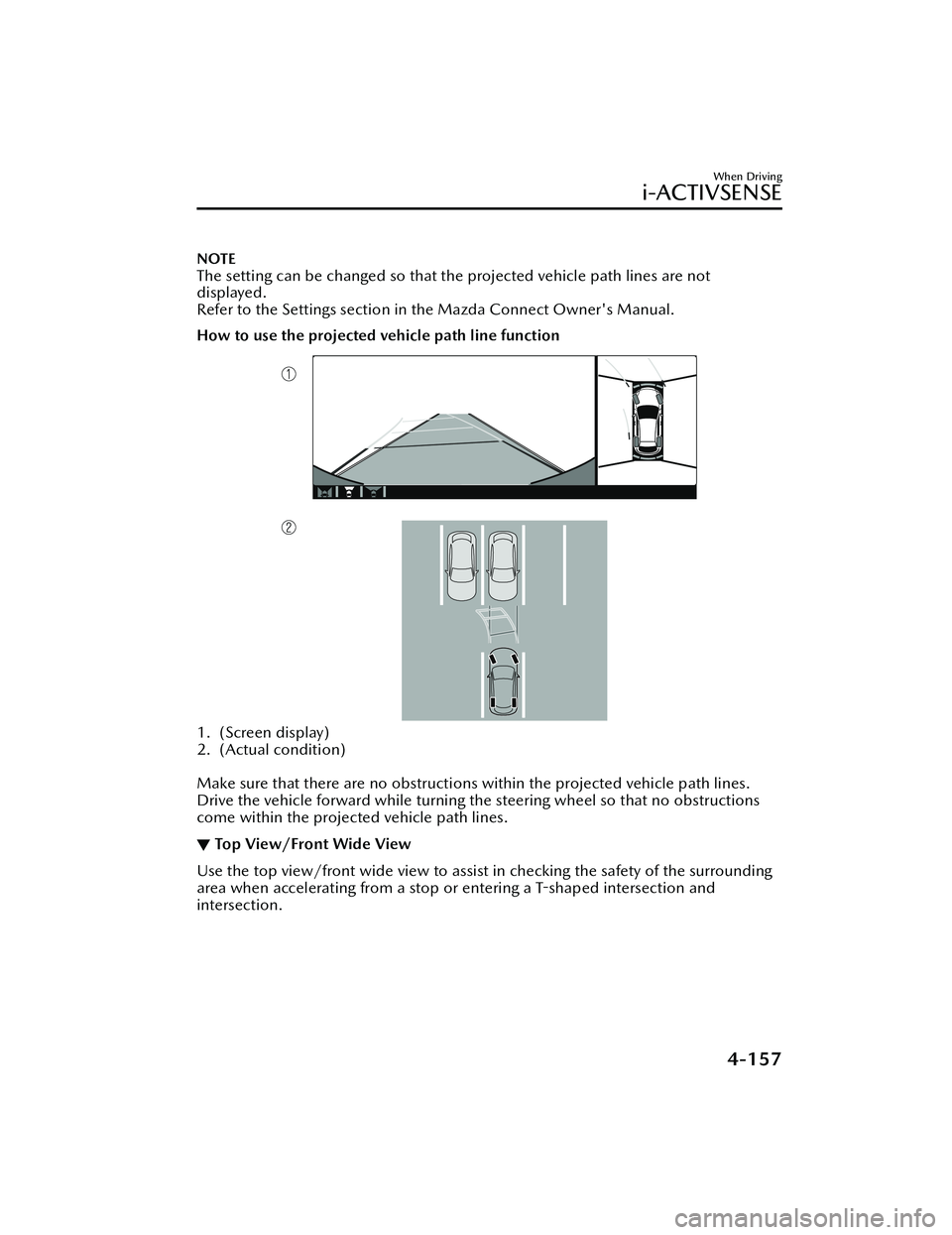
NOTE
The setting can be changed so that the projected vehicle path lines are not
displayed.
Refer to the Settings section in the Mazda Connect Owner's Manual.
How to use the projected vehicle path line function
1. (Screen display)
2. (Actual condition)
Make sure that there are no obstructions within the projected vehicle path lines.
Drive the vehicle forward while turning the steering wheel so that no obstructions
come within the projected vehicle path lines.
▼Top View/Front Wide View
Use the top view/front wide view to assist in checking the safety of the surrounding
area when accelerating from a stop or entering a T
-shaped intersection and
intersection.
When Driving
i-ACTIVSENSE
4-157
MX -30_8JD4-EA -21G_Edition2_new 2021-5-18 14:38:07
Page 310 of 547

Display/IconContent
(3) Vehicle front end guide lines (blue) Indicates the point about 0.25 m (9.84 in) from the front edge of the vehicle (front edge of the bumper).
NOTE
The setting can be changed so that the projected vehicle path lines are not
displayed.
Refer to the Settings section in the Mazda Connect Owner's Manual.
How to use the projected vehicle path line function
1. (Screen display)
2. (Actual condition)
Make sure that there are no obstructions within the projected vehicle path lines.
Turn the steering wheel so that the projected vehicle path lines travel inside of the
obstruction (A), and drive the vehicle forward until it passes the obstruction.
If the projected vehicle path lines are on an obstruction (B) or outside of the
obstruction (C), the vehicle may contact the obstruction when turning the vehicle
sharply.
When Driving
i-ACTIVSENSE
4-161
MX -30_8JD4-EA -21G_Edition2_new 2021-5-18 14:38:07
Page 313 of 547
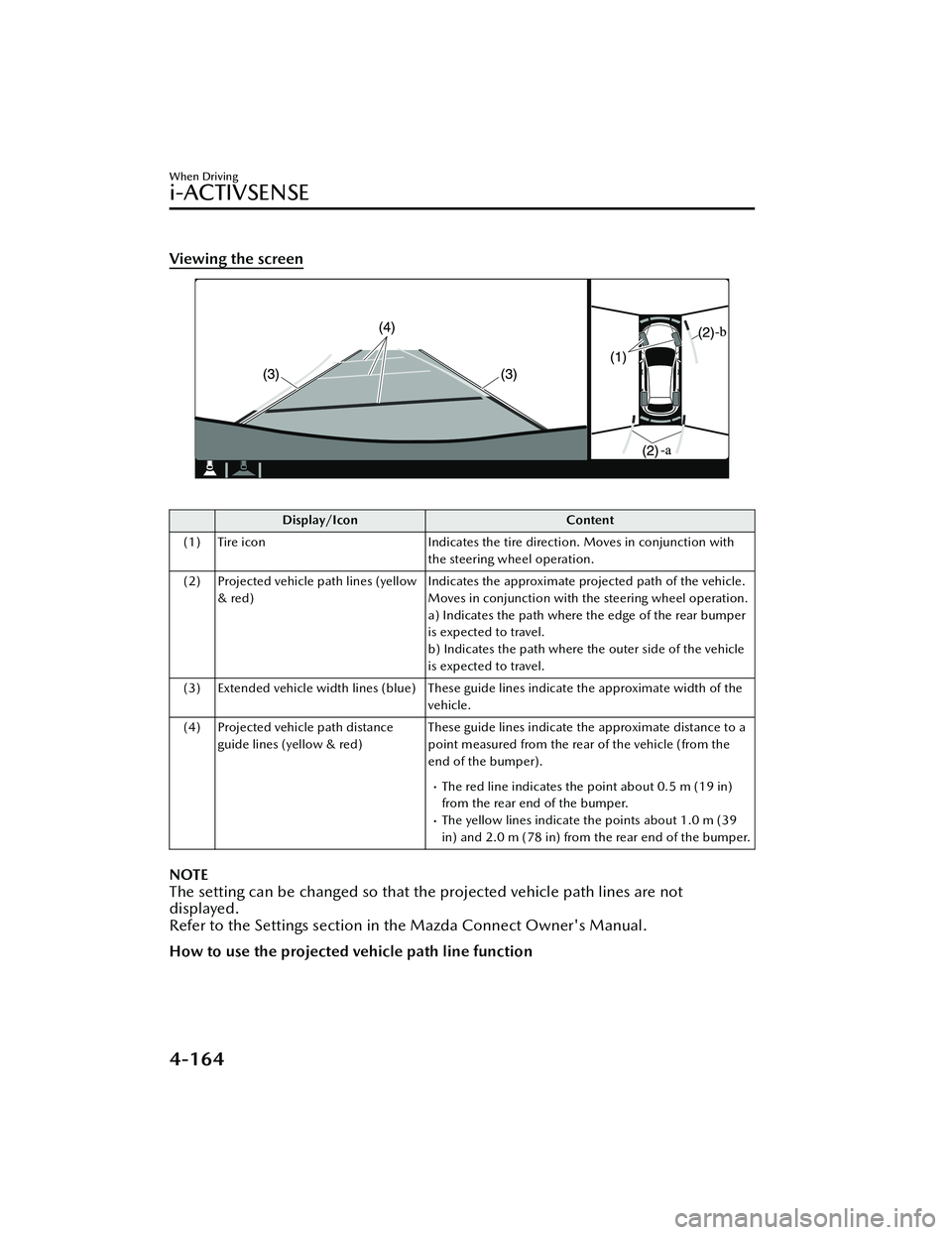
Viewing the screen
Display/IconContent
(1) Tire icon Indicates the tire direction. Moves in conjunction with
the steering wheel operation.
(2) Projected vehicle path lines (yellow & red) Indicates the approximate projected path of the vehicle.
Moves in conjunction with the steering wheel operation.
a) Indicates the path where the edge of the rear bumper
is expected to travel.
b) Indicates the path where the outer side of the vehicle
is expected to travel.
(3) Extended vehicle width lines (blue) These guide lines indicate the approximate width of the vehicle.
(4) Projected vehicle path distance guide lines (yellow & red) These guide lines indicate the approximate distance to a
point measured from the rear of the vehicle (from the
end of the bumper).
The red line indicates the point about 0.5 m (19 in)
from the rear end of the bumper.
The yellow lines indicate the points about 1.0 m (39
in) and 2.0 m (78 in) from the rear end of the bumper.
NOTE
The setting can be changed so that th
e projected vehicle path lines are not
displayed.
Refer to the Settings section in the Mazda Connect Owner's Manual.
How to use the projected vehicle path line function
When Driving
i-ACTIVSENSE
4-164
MX -30_8JD4-EA -21G_Edition2_new 2021-5-18 14:38:07
Page 335 of 547
Images displayed on the monitor from the rear view parking camera are reversed
images (mirror images).
Some optionally installed vehicle accessories may be picked up by the camera. Do
not install any optional parts that can interfere with the camera view, such as
illuminating parts or parts made of re flective material.
It may be di fficult to see the display under the following conditions, however, it
does not indicate a malfunction.
In darkened areas.When the temperature around the lens is high/low.When the camera is wet such as on a rainy day or during periods of high
humidity.
When foreign material such as mud is stuck around the camera.When the camera lens reflects sunlight or headlight beams.The surroundings are illuminated by vehicle lights,
fluorescent lights, or LED
lights (display may flicker).
Extremely small dark or white dots appear on the screen (dots may flicker).Image display may be delayed if the temperature around the camera is low.
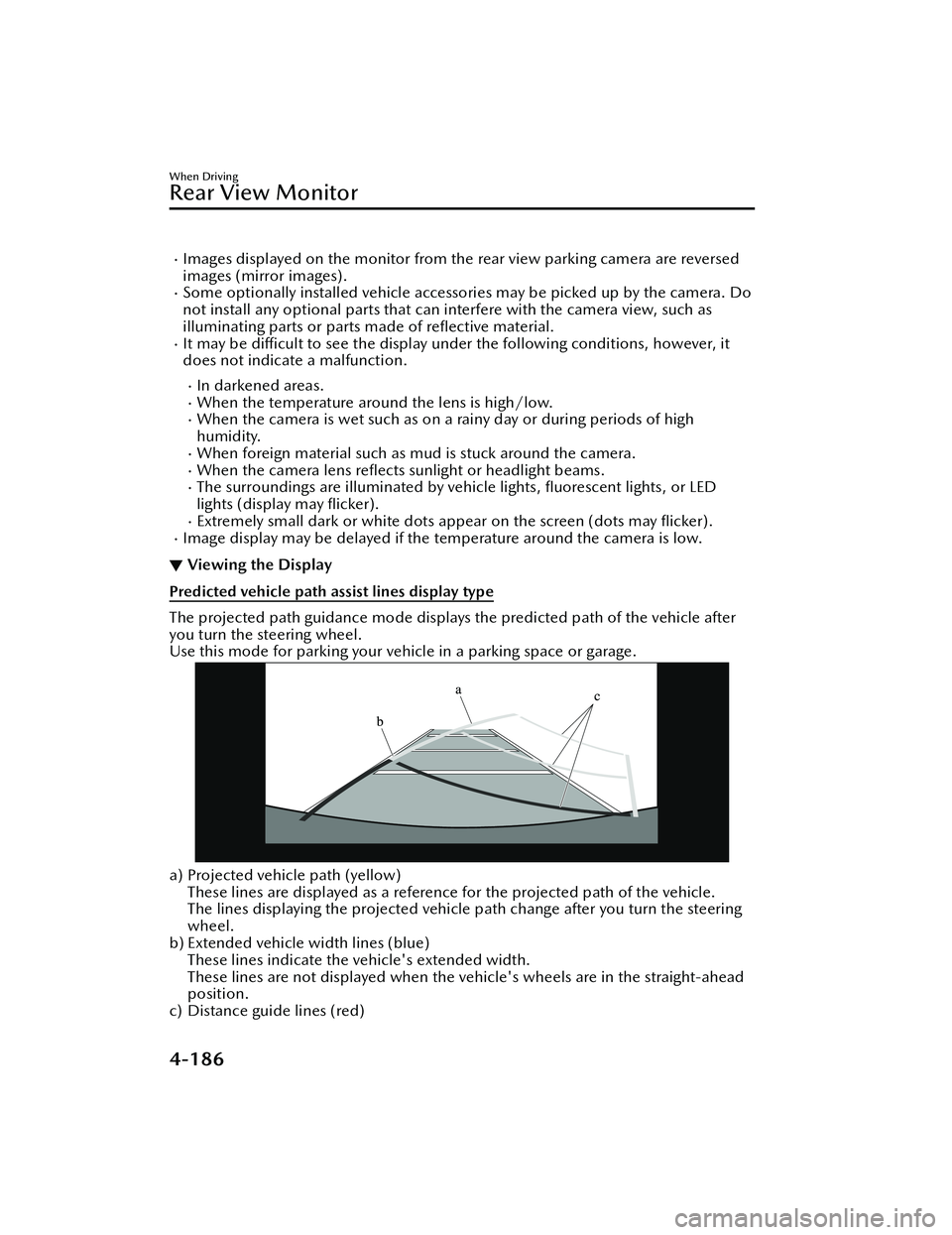
▼ Viewing the Display
Predicted vehicle path assist lines display type
The projected path guidance mode displays the predicted path of the vehicle after
you turn the steering wheel.
Use this mode for parking your vehi
cle in a parking space or garage.
a) Projected vehicle path (yellow)
These lines are displayed as a reference for the projected path of the vehicle.
The lines displaying the projected vehicle path change after you turn the steering
wheel.
b) Extended vehicle width lines (blue)
These lines indicate the vehicle's extended width.
These lines are not displayed when the vehicle's wheels are in the straight-ahead
position.
c) Distance guide lines (red)
When Driving
Rear View Monitor
4-186
MX -30_8JD4-EA -21G_Edition2_new 2021-5-18 14:38:07