sat MAZDA MODEL MX-5 MIATA 2005 Owners Manual
[x] Cancel search | Manufacturer: MAZDA, Model Year: 2005, Model line: MODEL MX-5 MIATA, Model: MAZDA MODEL MX-5 MIATA 2005Pages: 298, PDF Size: 3.03 MB
Page 3 of 298
Black plate (3,1)
Thank you for choosing a Mazda. We at Mazda design and build vehicles with complete
customer satisfaction in mind.
To help ensure enjoyable and trouble-free operation of your Mazda, read this manual
carefully and follow its recommendations.
An Authorized Mazda Dealer knows your vehicle best. So when maintenance or service is
necessary, that's the place to go.
Our nationwide network of Mazda professionals is dedicated to providing you with the best
possible service.
We assure you that all of us at Mazda have an ongoing interest in your motoring pleasure
and in your full satisfaction with your Mazda product.Mazda Motor CorporationHIROSHIMA, JAPAN
Important Notes About This Manual
Keep this manual in the glove box as a handy reference for the safe and enjoyable use of your Mazda. Should you
resell the vehicle, leave this manual with it for the next owner.
All specifications and descriptions are accurate at the time of printing. Because improvement is a constant goal at
Mazda, we reserve the right to make changes in specifications at any time without notice and without obligation.
Event Data Recorder
This vehicle is equipped with an event data recorder. In the event of a crash, this device records data related to
vehicle dynamics and safety systems for a short period of time. These data can help provide a better
understanding of the circumstances in which crashes and injuries occur and lead to the designing of safer
vehicles.
Air Conditioning and the Environment
Your Mazda's genuine air conditioner is filled with HFC134a (R134a), a refrigerant that has been found not to
damage the earth's ozone layer. If the air conditioner does not operate properly, consult an Authorized Mazda
Dealer.
Please be aware that this manual applies to all models, equipment and options. As a result, you may find
some explanations for equipment not installed on your vehicle.
©2004 Mazda Motor Corporation
Printed in Japan Sep. 2004(Print2)
A Word to Mazda Owners
MX-5 Miata_8T72-EA-04G_Edition2 Page3
Tuesday, August 31 2004 11:23 AM
Form No.8T72-EA-04G
Page 99 of 298
Black plate (99,1)
qAnti-Lock Brake System (ABS)í
The ABS control unit continuously
monitors the speed of each wheel. If one
is about to lock up, the ABS responds by
automatically releasing and reapplying
that wheel's brake.
The driver will feel a slight vibration in
the brake pedal and may hear a chattering
noise from the brake system. This is
normal when the ABS operates. Don't
pump the brakes, continue to press down
on the brake pedal.
WARNING
ABS:
The ABS cannot compensate for
unsafe and reckless driving, excessive
speed, tailgating (following another
vehicle too closely), and hydroplaning
(reduced tire friction and road contact
because of water on the road surface).
You can still have an accident. So
don't rely on ABS as a substitute for
safe driving.
NOTE
Braking distances may be longer on
loose surfaces (snow or gravel, for
example) which usually have a hard
foundation. A vehicle with a normal
braking system may require less
distance to stop under these conditions
because the tires will build up a wedge
of surface layer when the wheels skid.
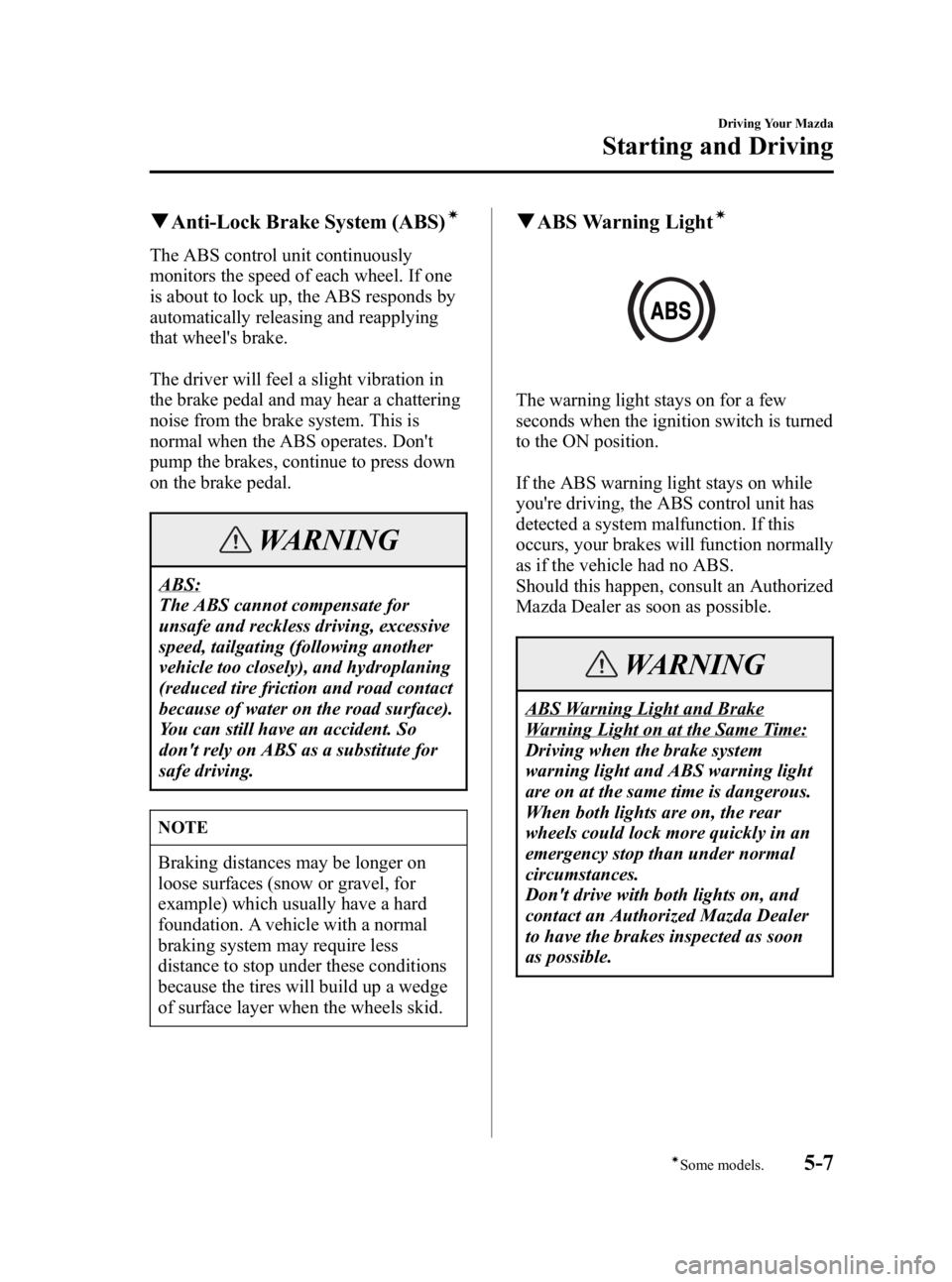
qABS Warning Lightí
The warning light stays on for a few
seconds when the ignition switch is turned
to the ON position.
If the ABS warning light stays on while
you're driving, the ABS control unit has
detected a system malfunction. If this
occurs, your brakes will function normally
as if the vehicle had no ABS.
Should this happen, consult an Authorized
Mazda Dealer as soon as possible.
WARNING
ABS Warning Light and Brake
Warning Light on at the Same Time:
Driving when the brake system
warning light and ABS warning light
are on at the same time is dangerous.
When both lights are on, the rear
wheels could lock more quickly in an
emergency stop than under normal
circumstances.
Don't drive with both lights on, and
contact an Authorized Mazda Dealer
to have the brakes inspected as soon
as possible.
Driving Your Mazda
Starting and Driving
5-7íSome models.
MX-5 Miata_8T72-EA-04G_Edition2 Page99
Tuesday, August 31 2004 11:24 AM
Form No.8T72-EA-04G
Page 140 of 298
Black plate (140,1)
qOperating Tips for CD Player/In-
Dash CD Changer
Condensation phenomenon
Immediately after turning on the heater
when the vehicle is cold, the CD or
optical components (prism and lens) in the
CD player/changer may become clouded
with condensation. At this time, the CD
will eject immediately when placed in the
unit. A clouded CD can be corrected
simply by wiping it with a soft cloth.
Clouded optical components will clear
naturally in about an hour. Wait for
normal operation to return before
attempting to use the unit.
Handling the CD player/In-dash CD
changer
The following precautions should be
observed.
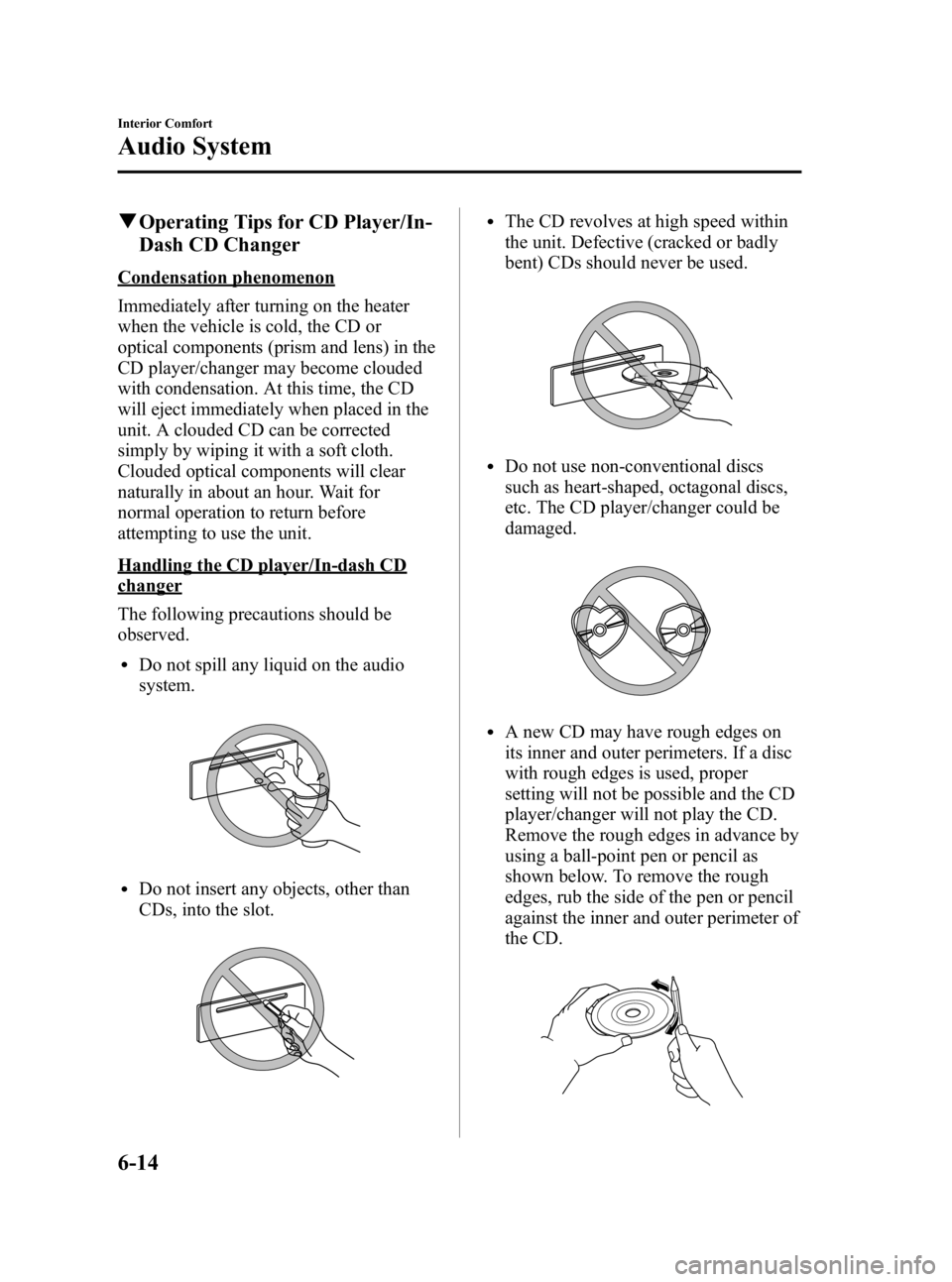
lDo not spill any liquid on the audio
system.
lDo not insert any objects, other than
CDs, into the slot.
lThe CD revolves at high speed within
the unit. Defective (cracked or badly
bent) CDs should never be used.
lDo not use non-conventional discs
such as heart-shaped, octagonal discs,
etc. The CD player/changer could be
damaged.
lA new CD may have rough edges on
its inner and outer perimeters. If a disc
with rough edges is used, proper
setting will not be possible and the CD
player/changer will not play the CD.
Remove the rough edges in advance by
using a ball-point pen or pencil as
shown below. To remove the rough
edges, rub the side of the pen or pencil
against the inner and outer perimeter of
the CD.
6-14
Interior Comfort
Audio System
MX-5 Miata_8T72-EA-04G_Edition2 Page140
Tuesday, August 31 2004 11:24 AM
Form No.8T72-EA-04G
Page 152 of 298
Black plate (152,1)
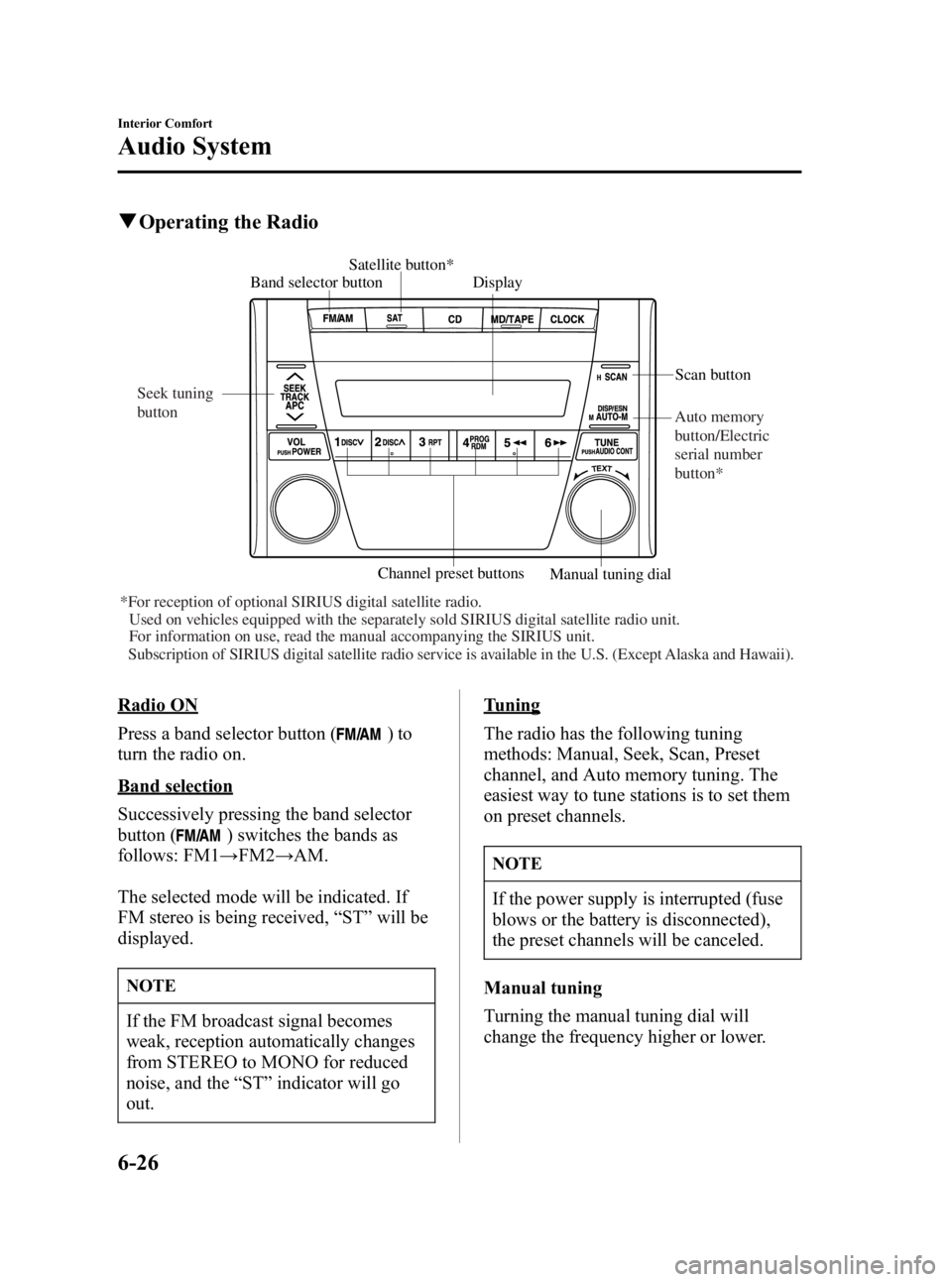
qOperating the Radio
Band selector button Satellite button*
Display
Channel preset buttons Scan button
Manual tuning dial
*For reception of optional SIRIUS digital satellite radio. Used on vehicles equipped with the separately sold SIRIUS digital satellite radio\
unit.For information on use, read the manual accompanying the SIRIUS unit.
Subscription of SIRIUS digital satellite radio service is available in the U.S. (Except Alaska and Hawaii). Seek tuning
button
Auto memory
button/Electric
serial number
button*
Radio ON
Press a band selector button (
)to
turn the radio on.
Band selection
Successively pressing the band selector
button (
) switches the bands as
follows: FM1 →FM2 →AM.
The selected mode will be indicated. If
FM stereo is being received, “ST ”will be
displayed.
NOTE
If the FM broadcast signal becomes
weak, reception automatically changes
from STEREO to MONO for reduced
noise, and the “ST ”indicator will go
out.
Tuning
The radio has the following tuning
methods: Manual, Seek, Scan, Preset
channel, and Auto memory tuning. The
easiest way to tune stations is to set them
on preset channels.
NOTE
If the power supply is interrupted (fuse
blows or the battery is disconnected),
the preset channels will be canceled.
Manual tuning
Turning the manual tuning dial will
change the frequency higher or lower.
6-26
Interior Comfort
Audio System
MX-5 Miata_8T72-EA-04G_Edition2 Page152
Tuesday, August 31 2004 11:24 AM
Form No.8T72-EA-04G
Page 154 of 298
Black plate (154,1)
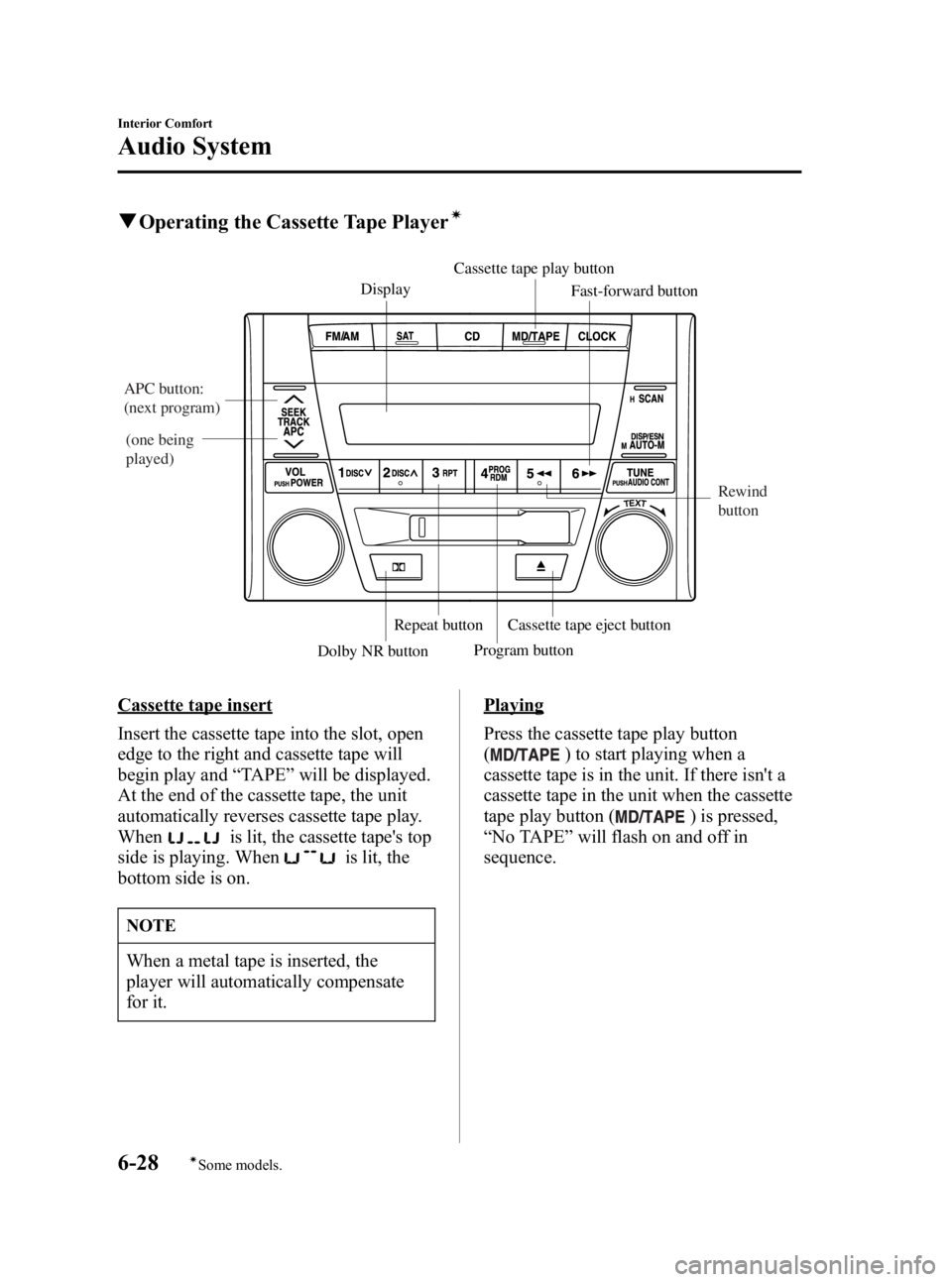
qOperating the Cassette Tape Playerí
Display Cassette tape play button
Cassette tape eject button Fast-forward button
Program button
Dolby NR button
Repeat button
APC button:
(next program)
(one being
played)
Rewind
button
Cassette tape insert
Insert the cassette tape into the slot, open
edge to the right and cassette tape will
begin play and“TAPE ”will be displayed.
At the end of the cassette tape, the unit
automatically reverses cassette tape play.
When
is lit, the cassette tape's top
side is playing. When
is lit, the
bottom side is on.
NOTE
When a metal tape is inserted, the
player will automatically compensate
for it.
Playing
Press the cassette tape play button
(
) to start playing when a
cassette tape is in the unit. If there isn't a
cassette tape in the unit when the cassette
tape play button (
) is pressed,
“ No TAPE ”will flash on and off in
sequence.
6-28
Interior Comfort
íSome models.
Audio System
MX-5 Miata_8T72-EA-04G_Edition2 Page154
Tuesday, August 31 2004 11:24 AM
Form No.8T72-EA-04G
Page 180 of 298
Black plate (180,1)
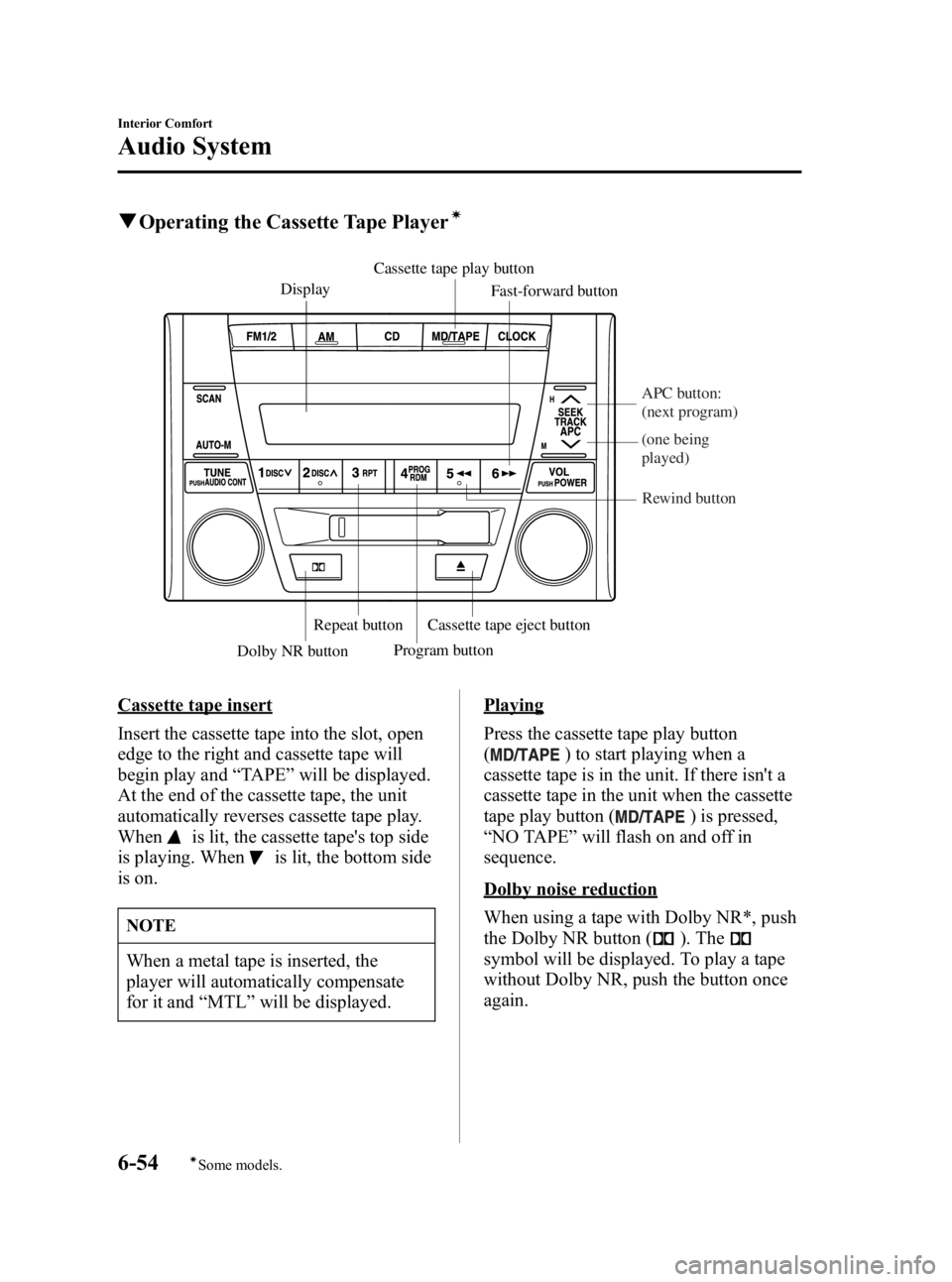
qOperating the Cassette Tape Playerí
Display Cassette tape play button
Cassette tape eject button Fast-forward button
Program button
Dolby NR button
Repeat button
APC button:
(next program)
(one being
played)
Rewind button
Cassette tape insert
Insert the cassette tape into the slot, open
edge to the right and cassette tape will
begin play and “TAPE ”will be displayed.
At the end of the cassette tape, the unit
automatically reverses cassette tape play.
When
is lit, the cassette tape's top side
is playing. When
is lit, the bottom side
is on.
NOTE
When a metal tape is inserted, the
player will automatically compensate
for it and “MTL ”will be displayed.
Playing
Press the cassette tape play button
(
) to start playing when a
cassette tape is in the unit. If there isn't a
cassette tape in the unit when the cassette
tape play button (
) is pressed,
“ NO TAPE ”will flash on and off in
sequence.
Dolby noise reduction
When using a tape with Dolby NR*, push
the Dolby NR button (
). The
symbol will be displayed. To play a tape
without Dolby NR, push the button once
again.
6-54
Interior Comfort
íSome models.
Audio System
MX-5 Miata_8T72-EA-04G_Edition2 Page180
Tuesday, August 31 2004 11:24 AM
Form No.8T72-EA-04G
Page 268 of 298
Black plate (268,1)
Customer Assistance (U.S.A.)
Your complete and permanent satisfaction is our business. We are here to serve you. All
Authorized Mazda Dealers have the knowledge and the tools to keep your Mazda vehicle
in top condition.
If you have any questions or recommendations for improvement regarding the service of
your Mazda vehicle or servicing by Mazda Dealer personnel, we recommend that you take
the following steps:
qSTEP 1: Contact Your Mazda Dealer
Discuss the matter with an Authorized Mazda Dealer. This is the quickest and best way to
address the issue. If your concern has not been resolved by the CUSTOMER RELATIONS,
SALES, SERVICE, or PARTS MANAGER, then please contact the GENERAL
MANAGER of the dealership or the OWNER.
qSTEP 2: Contact Mazda North American Operations
If for any reason you feel the need for further assistance after contacting your dealership
management, you can reach Mazda North American Operations by one of three ways.
By email at: www.mazdaUSA.com (Click the TALK TO US link at the top of the home
page).
Answers to many of your Frequently Asked Questions (FAQs), including how to locate or
contact a local Mazda Dealership in the U.S., can be found here.
By phone at: 1 (800) 222-5500
By letter at:
Attn: Customer Assistance
Mazda North American Operations
7755 Irvine Center Drive
Irvine, CA 92618-2922
P.O. Box 19734
Irvine, CA 92623-9734
In order to serve you efficiently and effectively, please help us by providing the following
information:
1. Your name, address, and telephone number
2. Year and model of vehicle
3. Vehicle Identification Number (17 digits, noted on your registration or title or located on
the upper driver's side corner of the dash)
9-2
Customer Information and Reporting Safety Defects
Customer Assistance
MX-5 Miata_8T72-EA-04G_Edition2 Page268
Tuesday, August 31 2004 11:25 AM
Form No.8T72-EA-04G
Page 270 of 298
Black plate (270,1)
Customer Assistance (Canada)
qSatisfaction Review Process
Your complete and permanent satisfaction is of primary concern to Mazda. All Authorized
Mazda Dealers have both the knowledge and tools to keep your Mazda in top condition. In
our experience, any questions, problems, or complaints regarding the operation of your
Mazda or any other general service transactions are most effectively resolved by your
dealer. If the cause of your dissatisfaction cannot adequately be addressed by normal
dealership procedures, we recommend that you take the following steps:
qSTEP 1: Contact the Mazda Dealer
Discuss the matter with a member of dealership management. If the Service Manager has
already reviewed your concerns, contact the owner of the dealership or its General
Manager.
qSTEP 2: Contact the Mazda Regional Office
If you feel that you still require assistance, ask the dealer Service Manager to arrange for
you to meet the local Mazda Service Representative. If more expedient, contact Mazda
Canada Inc.Regional Office nearest you for such arrangements. Regional Office address
and phone numbers are shown (page 9-6).
qSTEP 3: Contact the Mazda Customer Relations Department
If still not substantially satisfied, contact the Customer Relations Department, Mazda
Canada Inc., 55 Vogell Road, Richmond Hill, Ontario, L4B 3K5 Canada TEL:1 (800) 263-
4680.
Provide the Department with the following information:
1. Your name, address and telephone number
2. Year and model of vehicle
3. Vehicle Identification Number (VIN). Refer to the “Vehicle Identification Labels ”page
of section 10 of this manual for the location of the VIN.
4. Purchase date
5. Present odometer reading
6. Your dealer's name and location
7. The nature of your problem and/or cause of dissatisfaction
The Department, in cooperation with the local Mazda Service Representative, will review
the case to determine if everything possible has been done to ensure your satisfaction.
9-4
Customer Information and Reporting Safety Defects
Customer Assistance
MX-5 Miata_8T72-EA-04G_Edition2 Page270
Tuesday, August 31 2004 11:25 AM
Form No.8T72-EA-04G
Page 271 of 298
Black plate (271,1)
Please recognize that the resolution of service problems in most cases requires the use of
your Mazda dealer's service facilities, personnel and equipment. We urge you to follow the
above three steps in sequence for most effective results.
qMediation/Arbitration Program
Occasionally a customer concern cannot be resolved through Mazda's Customer
Satisfaction Program. If after exhausting the procedures in this manual your concern is still
not resolved, you have another option.
Mazda Canada Inc. participates in an arbitration program administered by the
Canadian Motor Vehicle Arbitration Plan (CAMVAP). CAMVAP will advise you about
how your concern may be reviewed and resolved by an independent third party through
binding arbitration.
Your complete satisfaction is the goal of Mazda Canada Inc. and our dealers.
Mazda's participation in CAMVAP makes a valuable contribution to our achieving that
goal. There is no charge for using CAMVAP. CAMVAP results are fast, fair and final as the
award is binding on both you and Mazda Canada Inc.
qCanadian Motor Vehicle Arbitration Plan (CAMVAP)
If a specific item of concern arises, where a solution cannot be reached between an owner,
Mazda, and/or one of it's dealers (that all parties cannot agree upon), the owner may wish
to use the services offered by the Canadian Motor Vehicle Arbitration Plan (CAMVAP).
CAMVAP uses the services of Provincial Administrators to assist consumers in scheduling
and preparing for their arbitration hearings. However, before you can proceed with
CAMVAP you must follow your Mazda dispute resolution process as outlined previously.
Customer Information and Reporting Safety Defects
Customer Assistance
9-5
MX-5 Miata_8T72-EA-04G_Edition2 Page271
Tuesday, August 31 2004 11:25 AM
Form No.8T72-EA-04G
Page 273 of 298
Black plate (273,1)
Customer Assistance (Puerto Rico)
Your complete and permanent satisfaction is our business. That is why all Authorized
Mazda Dealers have the knowledge and the tools to keep your Mazda vehicle in top
condition.
If you have any questions or recommendations for improvement regarding the service of
your Mazda vehicle or servicing by Mazda Dealer personnel, we recommend that you take
the following steps:
qSTEP 1
Discuss the matter with an Authorized Mazda Dealer. This is the quickest and best way to
address the issue. If your concern has not been resolved by the CUSTOMER RELATIONS,
SALES, SERVICE, or PARTS MANAGER, then please contact the GENERAL
MANAGER of the dealership or the OWNER.
qSTEP 2
If, after following STEP 1, you feel the need for further assistance, please contact your
area's Mazda representative (Indicated on the next page).
Please help us by providing the following information:
1. Your name, address, and telephone number
2. Year and model of vehicle
3. Vehicle Identification Number (17 digits, noted on your registration or title or located on
the upper driver's side corner of the dash)
4. Purchase date and current mileage
5. Your dealer's name and location
6. Your question(s)
Customer Information and Reporting Safety Defects
Customer Assistance
9-7
MX-5 Miata_8T72-EA-04G_Edition2 Page273
Tuesday, August 31 2004 11:25 AM
Form No.8T72-EA-04G