transmission MAZDA MODEL MX-5 MIATA 2009 Owner's Manual
[x] Cancel search | Manufacturer: MAZDA, Model Year: 2009, Model line: MODEL MX-5 MIATA, Model: MAZDA MODEL MX-5 MIATA 2009Pages: 444, PDF Size: 5.47 MB
Page 168 of 444

Black plate (168,1)
NOTE
If the gears cannot be shifted down when
driving at higher speeds, the gear position
indicator will flash twice to signal that the
gears cannot be shifted down.
Shifting
You can shift gears up and down by
operating the shift lever or the steering
shift switches.
NOTE
lIf the steering shift switches on both sides
(left and right) are operated simultaneously,
the gear will shift once.
lThe gear will not shift if:lThe steering shift switch and the shift
lever are operated simultaneously.
lThe UP switch and DOWN switch are
operated simultaneously.
Manually Shifting up
(M1→M2 →M3 →M4 →M5 →M6)
To shift up to a higher gear, tap the shift
lever back (
) once.
To shift up to a higher gear with the
steering shift switches, tap either of the
UP switches toward you once with your
fingers.
UP switches
WARNING
Keep your hands on the steering wheel
rim when using fingers or thumbs on
the steering shift switches: Putting your hands inside the rim of
the steering wheel when using the
steering shift switches is dangerous.
If the driver's air bag were to deploy
in a collision, your hands could be
impacted causing injury.
NOTE
lWhen driving slowly, the gears may not
shift up depending on vehicle speed.
lIn manual shift mode, gears do not shift up
automatically. Do not run the engine with
the tachometer needle in the RED ZONE. If
the tachometer needle enters the RED
ZONE, you may feel engine-braking
because the fuel delivery will be stopped to
protect the engine. However, this does not
indicate an abnormality.
lWhen depressing the accelerator fully, the
transmission will shift to a lower gear,
depending on vehicle speed (Except
M2 →M1).
5-16
Driving Your Mazda
Starting and Driving
MX-5_8Z78-EA-08K_Edition1 Page168
Thursday, October 23 2008 1:53 PM
Form No.8Z78-EA-08K
Page 169 of 444
Black plate (169,1)
Manually Shifting down
(M6→M5 →M4 →M3 →M2 →M1)
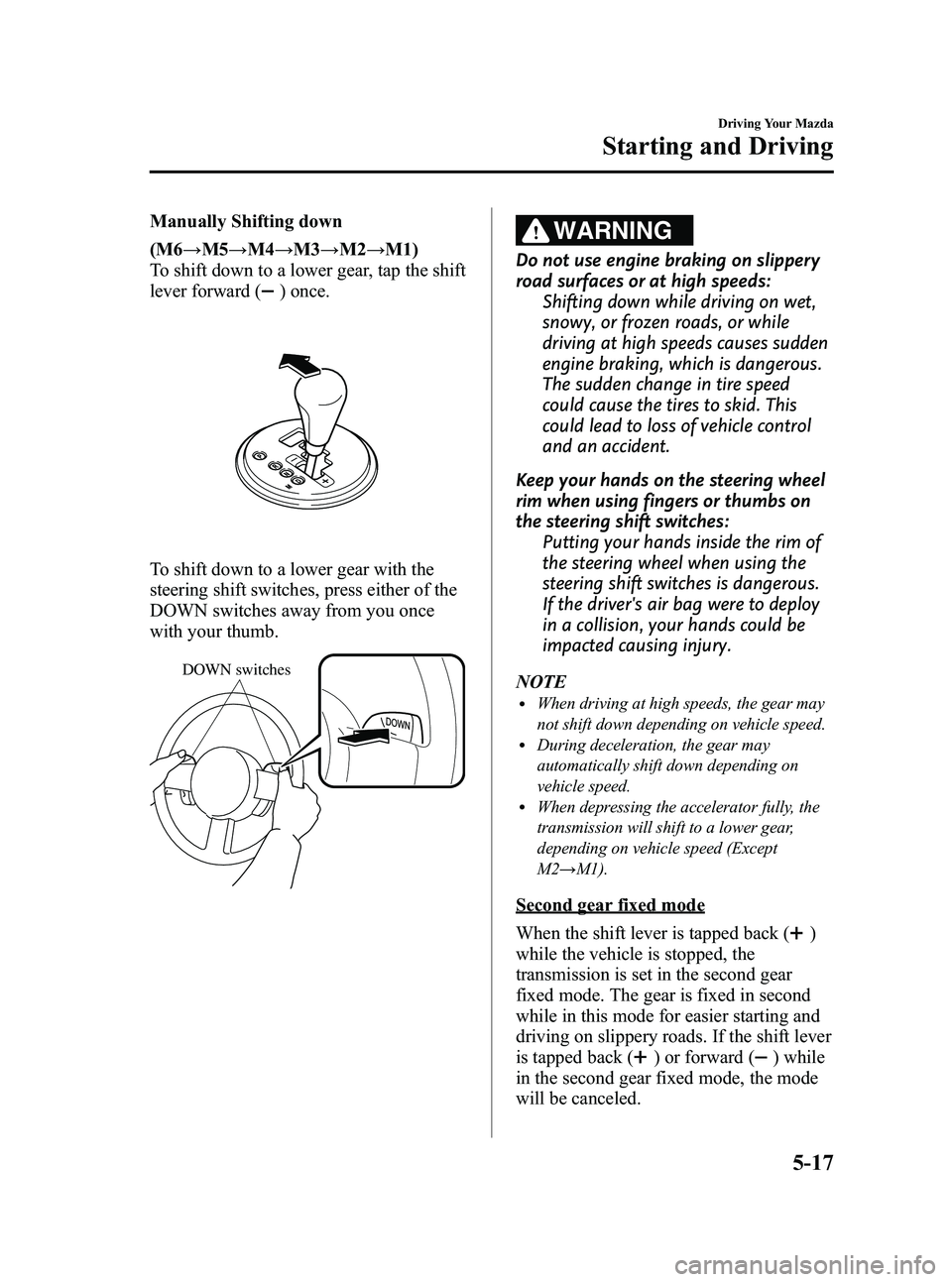
To shift down to a lower gear, tap the shift
lever forward (
) once.
To shift down to a lower gear with the
steering shift switches, press either of the
DOWN switches away from you once
with your thumb.
DOWN switches
WARNING
Do not use engine braking on slippery
road surfaces or at high speeds: Shifting down while driving on wet,
snowy, or frozen roads, or while
driving at high speeds causes sudden
engine braking, which is dangerous.
The sudden change in tire speed
could cause the tires to skid. This
could lead to loss of vehicle control
and an accident.
Keep your hands on the steering wheel
rim when using fingers or thumbs on
the steering shift switches: Putting your hands inside the rim of
the steering wheel when using the
steering shift switches is dangerous.
If the driver's air bag were to deploy
in a collision, your hands could be
impacted causing injury.
NOTE
lWhen driving at high speeds, the gear may
not shift down depending on vehicle speed.
lDuring deceleration, the gear may
automatically shift down depending on
vehicle speed.
lWhen depressing the accelerator fully, the
transmission will shift to a lower gear,
depending on vehicle speed (Except
M2 →M1).
Second gear fixed mode
When the shift lever is tapped back (
)
while the vehicle is stopped, the
transmission is set in the second gear
fixed mode. The gear is fixed in second
while in this mode for easier starting and
driving on slippery roads. If the shift lever
is tapped back (
) or forward () while
in the second gear fixed mode, the mode
will be canceled.
Driving Your Mazda
Starting and Driving
5-17
MX-5_8Z78-EA-08K_Edition1 Page169
Thursday, October 23 2008 1:53 PM
Form No.8Z78-EA-08K
Page 170 of 444

Black plate (170,1)
Shifting specification
Shifting up
If the vehicle speed is lower than the
speed specified for each gear, the gear
cannot be shifted up to a higher gear.
GearVehicle speed
M1 →M2 Between 0 and 18 km/h
(0 and 11 mph), depending on how
much the accelerator pedal is
depressed.
M2 →M3
M3 →M4 Between 22 and 32 km/h
(13 and 19 mph), depending on how
much the accelerator pedal is
depressed.
M4 →M5 Between 40 and 48 km/h
(25 and 29 mph), depending on how
much the accelerator pedal is
depressed.
M5 →M6 Between 50 and 68 km/h
(31 and 42 mph), depending on how
much the accelerator pedal is
depressed.
Shifting down
If the vehicle speed is higher than the
speed specified for each gear, the gear
cannot be shifted to a lower gear so as to
protect the transmission.
Gear
Vehicle speed
M5 →M4 164 km/h (102 mph)
M4 →M3 117 km/h (72 mph)
M3 →M2 80 km/h (49 mph)
M2 →M1 35 km/h (21 mph)
During deceleration, the gears shift down
automatically when speed is reduced to
the following:
Gear Vehicle speed
M6 →M5 47 km/h (29 mph)
M5 →M4 38 km/h (23 mph)
M4 →M3 20 km/h (12 mph)
M3 →M2 15 km/h (9 mph)
M2 →M1 12 km/h (7 mph)
NOTE
The gear does not shift down to M1
automatically while in the second gear fixed
mode.
If the vehicle is kicked down at the
following speeds or lower, the gears shift
down automatically:
Gear Vehicle speed
M6 →M5 190 km/h (118 mph)
M6 →M4 125 km/h (77 mph)
M5 →M4 125 km/h (77 mph)
M5 →M3 78 km/h (48 mph)
M4 →M3 78 km/h (48 mph)
M4 →M2 50 km/h (31 mph)
M3 →M2 50 km/h (31 mph)
Recommendations for shifting
Upshifting
For normal acceleration, we recommend these shift
points.
Gear Vehicle speed
M1 to M2 24 km/h (15 mph)
M2 to M3 40 km/h (25 mph)
M3 to M4 53 km/h (33 mph)
M4 to M5 59 km/h (37 mph)
M5 to M6 78 km/h (49 mph)
For cruising
Gear Vehicle speed
M1 to M2 22 km/h (14 mph)
M2 to M3 27 km/h (17 mph)
M3 to M4 41 km/h (26 mph)
M4 to M5 56 km/h (35 mph)
M5 to M6 64 km/h (40 mph)
Downshifting
When you must slow down in heavy
traffic or on a steep upgrade, downshift
before the engine starts to overwork. This
gives better acceleration when you need
more speed.
5-18
Driving Your Mazda
Starting and Driving
MX-5_8Z78-EA-08K_Edition1 Page170
Thursday, October 23 2008 1:53 PM
Form No.8Z78-EA-08K
Page 171 of 444
Black plate (171,1)
On a steepdowngrade , downshifting
helps maintain safe speed and prolongs
brake life.
q Direct Modeí
Direct mode can be used for temporarily
switching gears by operating the steering
shift switch while the vehicle is being
driven with the selector lever in the D
range.
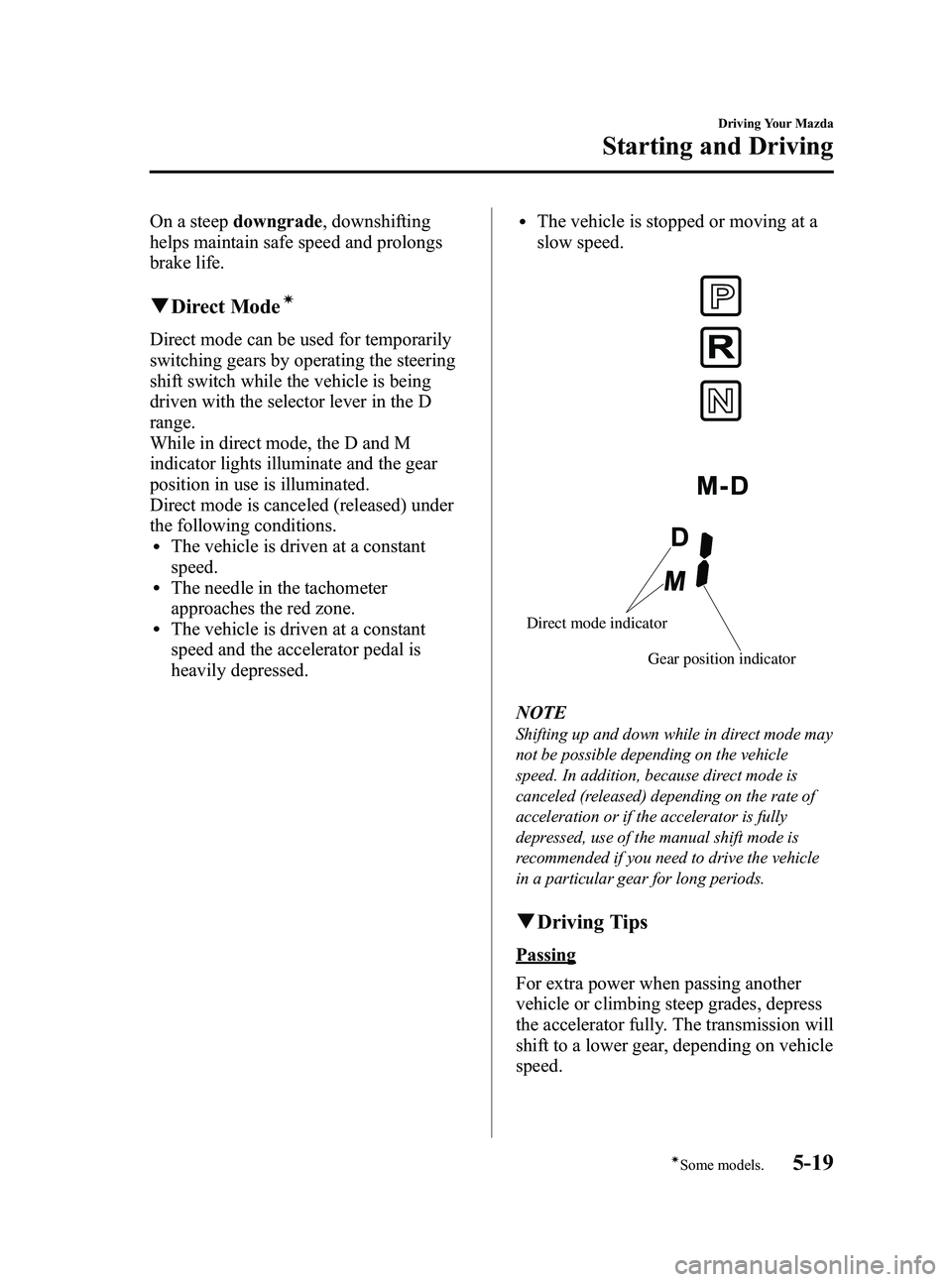
While in direct mode, the D and M
indicator lights illuminate and the gear
position in use is illuminated.
Direct mode is canceled (released) under
the following conditions.
lThe vehicle is driven at a constant
speed.
lThe needle in the tachometer
approaches the red zone.
lThe vehicle is driven at a constant
speed and the accelerator pedal is
heavily depressed.
lThe vehicle is stopped or moving at a
slow speed.
Gear position indicator
Direct mode indicator
NOTE
Shifting up and down while in direct mode may
not be possible depending on the vehicle
speed. In addition, because direct mode is
canceled (released) depending on the rate of
acceleration or if the accelerator is fully
depressed, use of the manual shift mode is
recommended if you need to drive the vehicle
in a particular gear for long periods.
q
Driving Tips
Passing
For extra power when passing another
vehicle or climbing steep grades, depress
the accelerator fully. The transmission will
shift to a lower gear, depending on vehicle
speed.
Driving Your Mazda
Starting and Driving
5-19íSome models.
MX-5_8Z78-EA-08K_Edition1 Page171
Thursday, October 23 2008 1:53 PM
Form No.8Z78-EA-08K
Page 175 of 444

Black plate (175,1)
To increase speed using accelerator
pedal
Depress the accelerator pedal to accelerate
to the desired speed.
Press down the cruise control SET/-
switch and release it immediately.
Cruise
control
switch
NOTE
Accelerate if you want to speed up temporarily
when the cruise control is on. Greater speed
will not interfere with or change the set speed.
Take your foot off the accelerator to return to
the set speed.
qTo Decrease Cruising Speed
Press down the cruise control SET/-
switch and hold it. The vehicle will
gradually slow.
Release the switch at the speed you want.
Cruise
control
switch
Your vehicle has a tap-down feature that
allows you to decrease your current speed
in decrements of 1.6 km/h (1 mph) by a
momentary tap of the cruise control SET/-
switch. Multiple taps will decrease your
vehicle speed 1.6 km/h (1 mph) for each
tap.
qTo Resume Cruising Speed at
More Than 30 km/h (19 mph)
If some other method besides the ON/
OFF switch was used to cancel cruising
speed (such as applying the brake pedal)
and the system is still activated, the most
recent set speed will automatically resume
when the cruise control RES/+ switch is
pressed up.
If vehicle speed is below 30 km/h (19
mph), increase the vehicle speed up to 30
km/h (19 mph) or more and press up the
cruise control RES/+ switch.
Cruise
control
switch
qTo Cancel
To cancel the system, use oneof these
methods:
lPress the ON/OFF switch.lSlightly depress the brake pedal.lDepress the clutch pedal (Manual
transmission only).
Driving Your Mazda
Starting and Driving
5-23
MX-5_8Z78-EA-08K_Edition1 Page175
Thursday, October 23 2008 1:53 PM
Form No.8Z78-EA-08K
Page 189 of 444

Black plate (189,1)
The trip meter records the total distance
the vehicle is driven until the meter is
again reset. Return it to“0.0 ”by holding
the selector depressed for 1 second or
more. Use this meter to measure trip
distances and to compute fuel
consumption.
NOTE
lOnly the trip meters record tenths of
kilometers (miles).
lThe trip record will be erased when:lThe power supply is interrupted (blown
fuse or the battery is disconnected).
lThe vehicle is driven over 999.9 km
(mile).
Average fuel economy display
This mode displays the average fuel
economy by calculating the fuel
consumption and the distance traveled
since connecting the battery or resetting
the data.
Average fuel economy will be calculated
and displayed every minute.
To clear the data being displayed, press
the selector for more than 1 second. After
pressing the selector, - - - L/100 km (- - -
mpg) will be displayed for about 1 minute
before the fuel economy is recalculated
and displayed.
Outside temperature display
This mode displays the outside
temperature. NOTE
l(Temperature unit change function)í
To change the outside temperature display
from Fahrenheit (°F) to Centigrade (°C),
press and hold the selector for several
seconds while the outside temperature is
displayed.
lUnder the following conditions, the ambient
temperature display may differ from the
actual ambient temperature depending on
the surroundings and vehicle conditions:
lSignificantly cold or hot temperatures.lSudden changes in ambient temperature.lThe vehicle is parked.lThe vehicle is driven at low speeds.
q
Tachometer
The tachometer shows engine speed in
thousands of revolutions per minute
(rpm).
Manual Transmission
Red zone
Driving Your Mazda
Instrument Cluster and Indicators
5-37íSome models.
MX-5_8Z78-EA-08K_Edition1 Page189
Thursday, October 23 2008 1:53 PM
Form No.8Z78-EA-08K
Page 190 of 444

Black plate (190,1)
Automatic Transmission
Red zone
CAUTION
Do not run the engine with the
tachometer needle in the RED ZONE.
This may cause severe engine
damage.
qEngine Coolant Temperature Gauge
The engine coolant temperature gauge
shows the temperature of the engine
coolant.
If the needle is near H, it indicates
overheating.
CAUTION
Driving with an overheated engine
can cause serious engine damage
(page 7-18).
qFuel Gauge
The fuel gauge shows approximately how
much fuel is remaining in the tank when
the ignition switch is in the ON position.
We recommend keeping the tank over 1/4
full. When the low fuel warning light
illuminates or when the needle is near E,
refuel as soon as possible.
Low fuel
warning light
NOTElAfter refueling, it may require some time for
the needle to stabilize. In addition, the
needle may deviate while driving on a slope
or curve since the fuel moves in the tank.
lThe direction of the arrow () shows that
the fuel-filler lid is on the left side of the
vehicle.
5-38
Driving Your Mazda
Instrument Cluster and Indicators
MX-5_8Z78-EA-08K_Edition1 Page190
Thursday, October 23 2008 1:53 PM
Form No.8Z78-EA-08K
Page 193 of 444
Black plate (193,1)
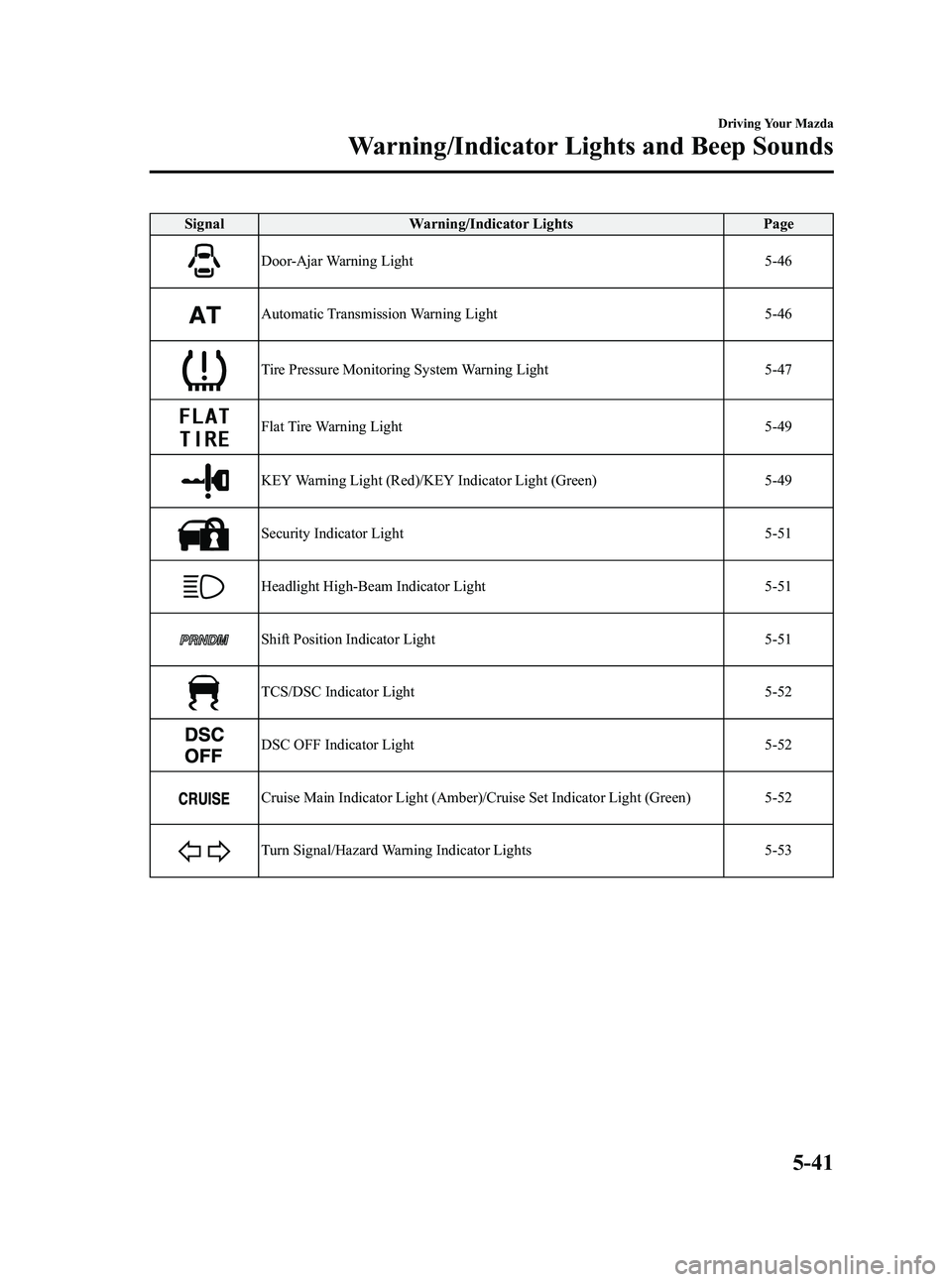
SignalWarning/Indicator Lights Page
Door-Ajar Warning Light 5-46
Automatic Transmission Warning Light5-46
Tire Pressure Monitoring System Warning Light5-47
Flat Tire Warning Light5-49
KEY Warning Light (Red)/KEY Indicator Light (Green)5-49
Security Indicator Light5-51
Headlight High-Beam Indicator Light5-51
Shift Position Indicator Light5-51
TCS/DSC Indicator Light5-52
DSC OFF Indicator Light5-52
Cruise Main Indicator Light (Amber)/Cruise Set Indicator Light (Green) 5-52
Turn Signal/Hazard Warning Indicator Lights5-53
Driving Your Mazda
Warning/Indicator Lights and Beep Sounds
5-41
MX-5_8Z78-EA-08K_Edition1 Page193
Thursday, October 23 2008 1:53 PM
Form No.8Z78-EA-08K
Page 198 of 444

Black plate (198,1)
Driver seated/Passenger seated
The seat belt warning function reminds
the passenger to fasten the seat belt
according to the chart below.
ConditionVehicle speed
Between 0 ―20
km/h
(0 ― 12 mph) 20 km/h
(12 mph) or more
Seat belt
(Driver)
Seat belt
(Passenger)
Indicator
Beep
: Fastened: Unfastened: Illuminated: Flashing: Beep
Placing heavy items on the passenger seat
may cause the passenger seat belt warning
function to operate depending on the
weight of the item.
Once the beep sound is heard, it continues
sounding even if the vehicle speed lowers
to 20 km/h (12 mph) or less until the
seatbelt is fastened or the beep sound
period has passed.
NOTE
lTo allow the passenger seat weight sensor
to function properly, do not place and sit on
an additional seat cushion on the passenger
seat. The sensor may not function properly
because the additional seat cushion could
cause sensor interference.
lWhen a small child sits on the passenger
seat, it is possible that neither the warning
light nor the warning beep operate.
q Door-Ajar Warning Light
This warning light illuminates when any
door or the trunk is not securely closed.
Close the door or the trunk securely
before driving the vehicle.
qAutomatic Transmission Warning
Light
This warning light stays on for a few
seconds when the ignition switch is turned
to the ON position.
The light illuminates when the
transmission has a problem.
CAUTION
If the automatic transmission
warning light illuminates, the
transmission has an electrical
problem. Continuing to drive your
Mazda in this condition could cause
damage to your transmission.
Consult an Authorized Mazda Dealer
as soon as possible.
5-46
Driving Your Mazda
Warning/Indicator Lights and Beep Sounds
MX-5_8Z78-EA-08K_Edition1 Page198
Thursday, October 23 2008 1:53 PM
Form No.8Z78-EA-08K
Page 203 of 444
Black plate (203,1)
NOTE
The advanced key can be set so that the KEY
indicator light (green) does not flash even if
the battery power is low.
Refer to Setting Change (Function
Customization)(page 3-21).
qSecurity Indicator Light
This indicator light starts flashing every 2
seconds when the ignition switch is turned
from the ON to the ACC position and the
immobilizer system is armed.
The light stops flashing when the ignition
switch is turned to the ON position with
the correct ignition key.
At this time, the immobilizer system is
disarmed and the light illuminates for
about 3 seconds and then turns off.
If the engine does not start with the
correct ignition key, and the security
indicator light keeps illuminating or
flashing, the system may have a
malfunction. Consult an Authorized
Mazda Dealer.
qHeadlight High-Beam Indicator
Light
This light indicates one of two things:lThe high-beam headlights are on.lThe turn signal lever is in the flash-to-
pass position.
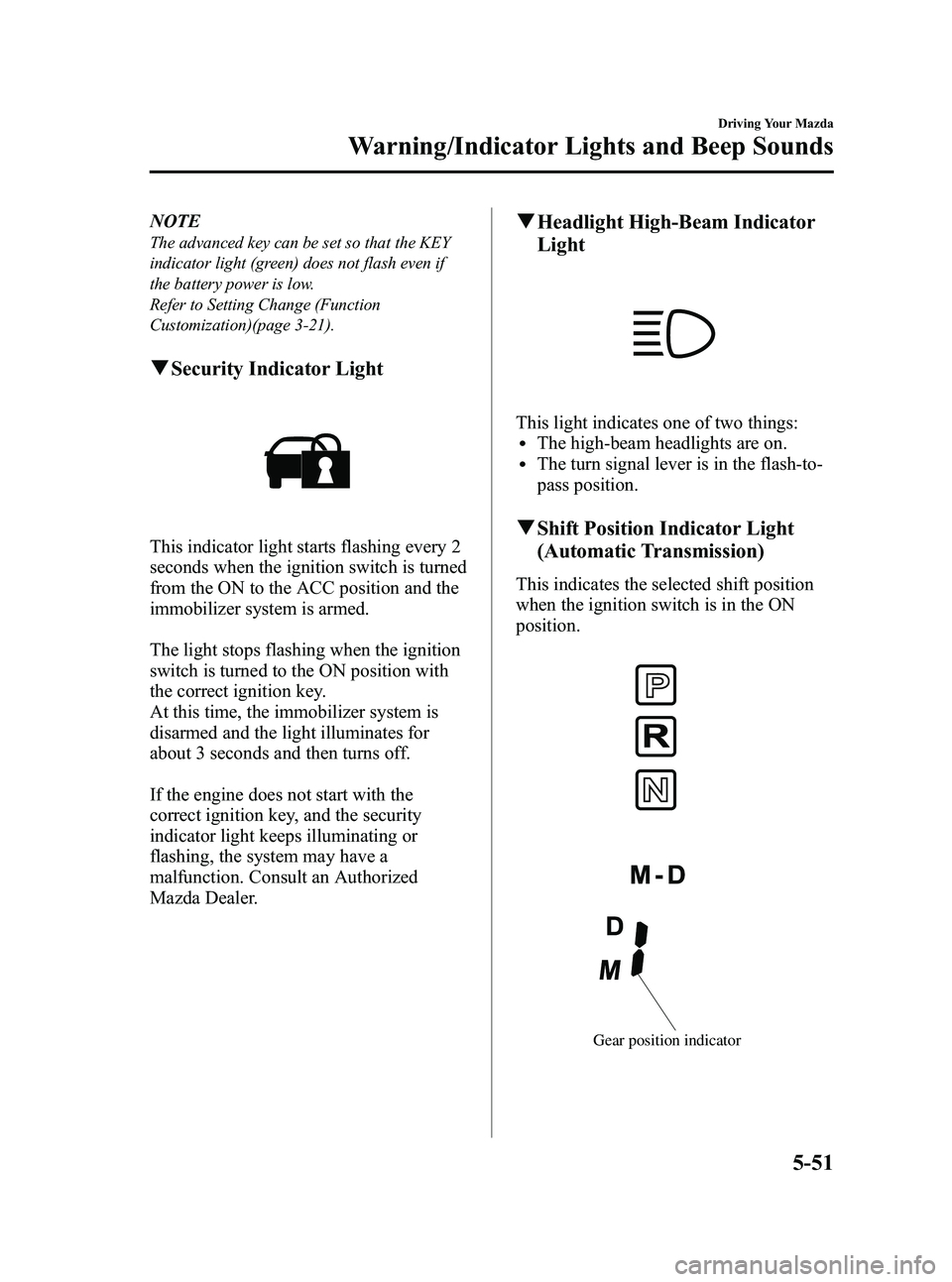
qShift Position Indicator Light
(Automatic Transmission)
This indicates the selected shift position
when the ignition switch is in the ON
position.
Gear position indicator
Driving Your Mazda
Warning/Indicator Lights and Beep Sounds
5-51
MX-5_8Z78-EA-08K_Edition1 Page203
Thursday, October 23 2008 1:53 PM
Form No.8Z78-EA-08K