transmission MAZDA MODEL MX-5 MIATA 2015 Owner's Manual
[x] Cancel search | Manufacturer: MAZDA, Model Year: 2015, Model line: MODEL MX-5 MIATA, Model: MAZDA MODEL MX-5 MIATA 2015Pages: 448, PDF Size: 4.7 MB
Page 160 of 448
Black plate (160,1)
Indicators
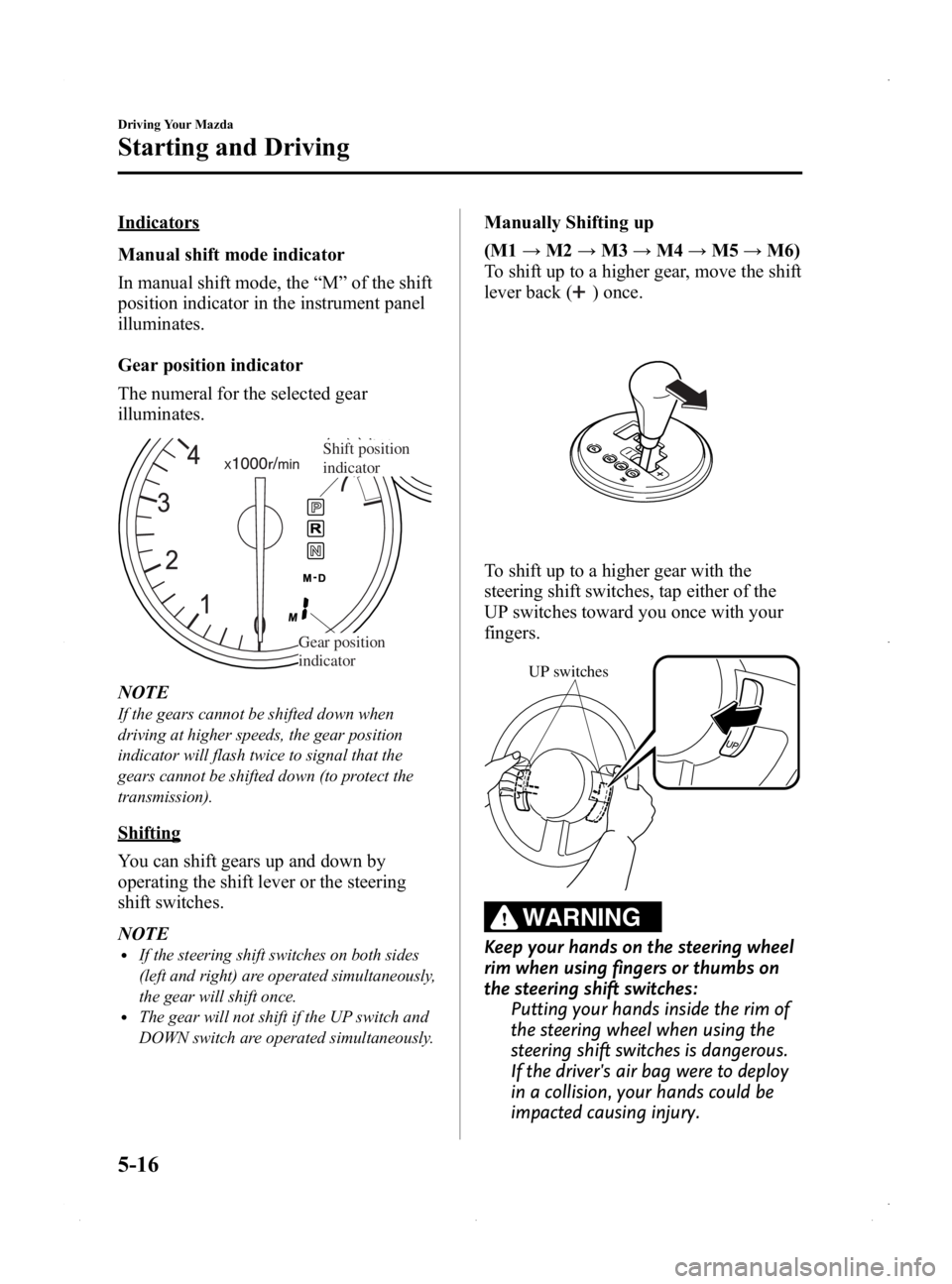
Manual shift mode indicator
In manual shift mode, the“M ”of the shift
position indicator in the instrument panel
illuminates.
Gear position indicator
The numeral for the selected gear
illuminates.
Shift position
indicator
Gear position
indicator
NOTE
If the gears cannot be shifted down when
driving at higher speeds, the gear position
indicator will flash twice to signal that the
gears cannot be shifted down (to protect the
transmission).
Shifting
You can shift gears up and down by
operating the shift lever or the steering
shift switches.
NOTE
lIf the steering shift switches on both sides
(left and right) are operated simultaneously,
the gear will shift once.
lThe gear will not shift if the UP switch and
DOWN switch are operated simultaneously.
Manually Shifting up
(M1 →M2 →M3 →M4 →M5 →M6)
To shift up to a higher gear, move the shift
lever back (
) once.
To shift up to a higher gear with the
steering shift switches, tap either of the
UP switches toward you once with your
fingers.
UP switches
WARNING
Keep your hands on the steering wheel
rim when using fingers or thumbs on
the steering shift switches: Putting your hands inside the rim of
the steering wheel when using the
steering shift switches is dangerous.
If the driver's air bag were to deploy
in a collision, your hands could be
impacted causing injury.
5-16
Driving Your Mazda
Starting and Driving
MX-5_8EN7-EA-14E_Edition3 Page160
Friday, September 5 2014 3:19 PM
Form No.8EN7-EA-14E
Page 161 of 448
Black plate (161,1)
NOTElWhen driving slowly, the gears may not
shift up.
lIn manual shift mode, gears do not shift up
automatically. Do not run the engine with
the tachometer needle in the RED ZONE. If
the tachometer needle enters the RED
ZONE, you may feel engine-braking.
However, this does not indicate an
abnormality.
lWhen depressing the accelerator fully, the
transmission will shift to a lower gear,
depending on vehicle speed (Except M2→
M1).
Manually Shifting down
(M6→ M5→M4 →M3 →M2 →
M1)
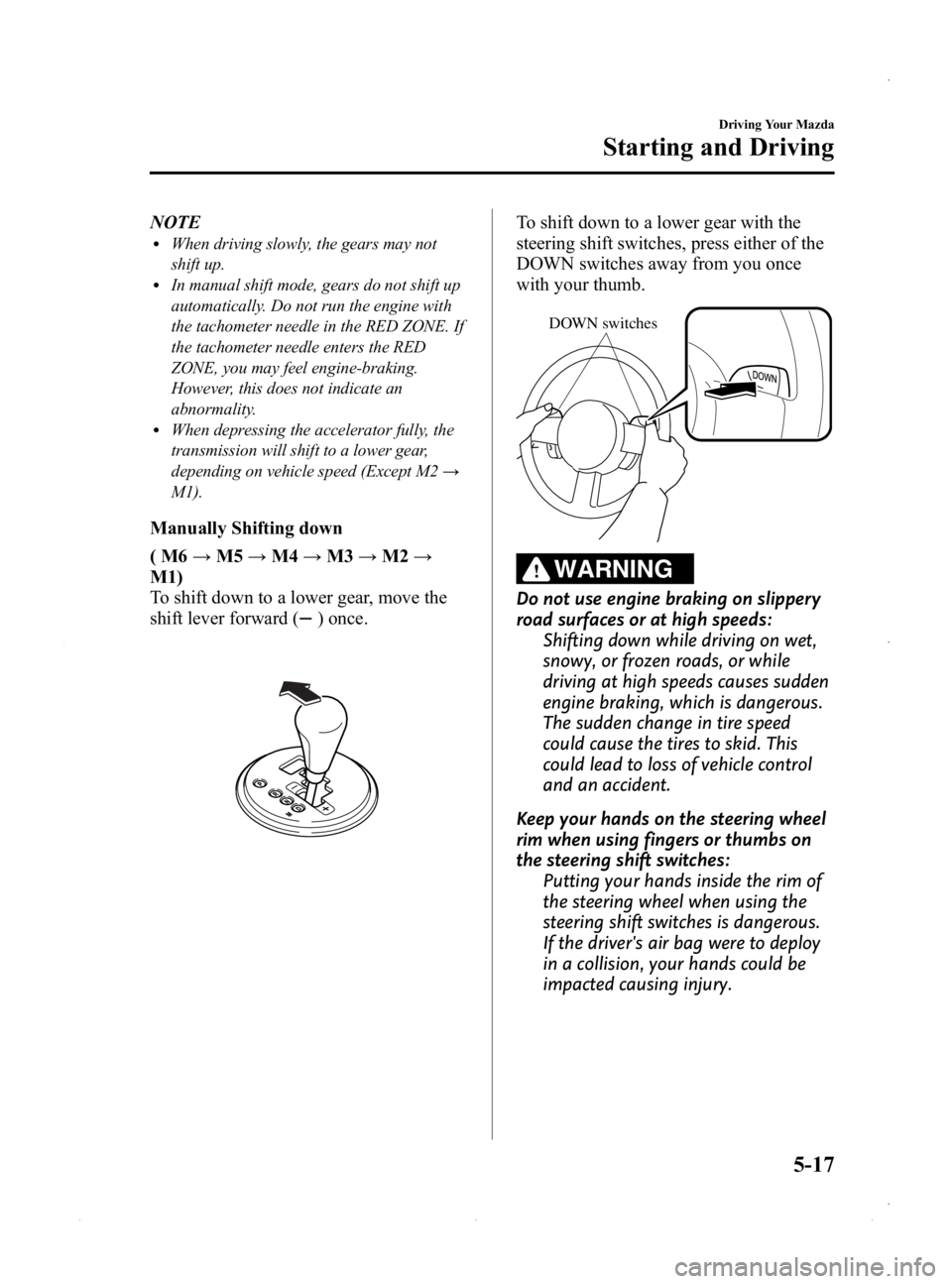
To shift down to a lower gear, move the
shift lever forward (
) once.
To shift down to a lower gear with the
steering shift switches, press either of the
DOWN switches away from you once
with your thumb.
DOWN switches
WARNING
Do not use engine braking on slippery
road surfaces or at high speeds: Shifting down while driving on wet,
snowy, or frozen roads, or while
driving at high speeds causes sudden
engine braking, which is dangerous.
The sudden change in tire speed
could cause the tires to skid. This
could lead to loss of vehicle control
and an accident.
Keep your hands on the steering wheel
rim when using fingers or thumbs on
the steering shift switches: Putting your hands inside the rim of
the steering wheel when using the
steering shift switches is dangerous.
If the driver's air bag were to deploy
in a collision, your hands could be
impacted causing injury.
Driving Your Mazda
Starting and Driving
5-17
MX-5_8EN7-EA-14E_Edition3 Page161
Friday, September 5 2014 3:19 PM
Form No.8EN7-EA-14E
Page 162 of 448

Black plate (162,1)
NOTElWhen driving at high speeds, the gear may
not shift down.
lDuring deceleration, the gear may
automatically shift down depending on
vehicle speed.
lWhen depressing the accelerator fully, the
transmission will shift to a lower gear,
depending on vehicle speed (Except M2→
M1).
Second gear fixed mode
When the selector lever is tapped back
(
) while the vehicle speed is about 10
km/h (6 mph) or less, the transmission is
set in the second gear fixed mode. The
gear is fixed in second while in this mode
for easier acceleration from a stop and
driving on slippery roads such as snow-
covered roads.
If the selector lever is tapped back (
)or
forward (
) while in the second gear
fixed mode, the mode will be canceled.
5-18
Driving Your Mazda
Starting and Driving
MX-5_8EN7-EA-14E_Edition3 Page162
Friday, September 5 2014 3:19 PM
Form No.8EN7-EA-14E
Page 165 of 448
Black plate (165,1)
NOTE
Shifting up and down while in direct mode may
not be possible depending on the vehicle
speed. In addition, because direct mode is
canceled (released) depending on the rate of
acceleration or if the accelerator is fully
depressed, use of the manual shift mode is
recommended if you need to drive the vehicle
in a particular gear for long periods.
qDriving Tips
WARNING
Do not allow the vehicle to move in
reverse on an up-slope while the
selector lever is in a forward gear
position, or move forward on a down-
slope while the selector lever is in the
reverse position.
Otherwise, the engine will stop,
causing the loss of the power brake
and power steering functions, and
make it difficult to control the vehicle
which could result in an accident.
Passing
For extra power when passing another
vehicle or climbing steep grades, depress
the accelerator fully. The transmission will
shift to a lower gear, depending on vehicle
speed.
Climbing steep grades from a stop
To climb a steep grade from a stopped
position:
1. Depress the brake pedal.
2. Shift to D or M1, depending on theload weight and grade steepness.
3. Release the brake pedal while gradually accelerating.
Descending steep grades
When descending a steep grade, shift to
lower gears, depending on load weight
and grade steepness. Descend slowly,
using the brakes only occasionally to
prevent them from overheating.
Driving Your Mazda
Starting and Driving
5-21
MX-5_8EN7-EA-14E_Edition3 Page165
Friday, September 5 2014 3:19 PM
Form No.8EN7-EA-14E
Page 169 of 448
Black plate (169,1)
Your vehicle has a tap-down feature that
allows you to decrease your current speed
in decrements of 1.6 km/h (1 mph) by a
momentary tap of the cruise control SET/-
switch. Multiple taps will decrease your
vehicle speed 1.6 km/h (1 mph) for each
tap.
qTo Resume Cruising Speed at
More Than 30 km/h (19 mph)
If some other method besides the ON/
OFF switch was used to cancel cruising
speed (such as applying the brake pedal)
and the system is still activated, the most
recent set speed will automatically resume
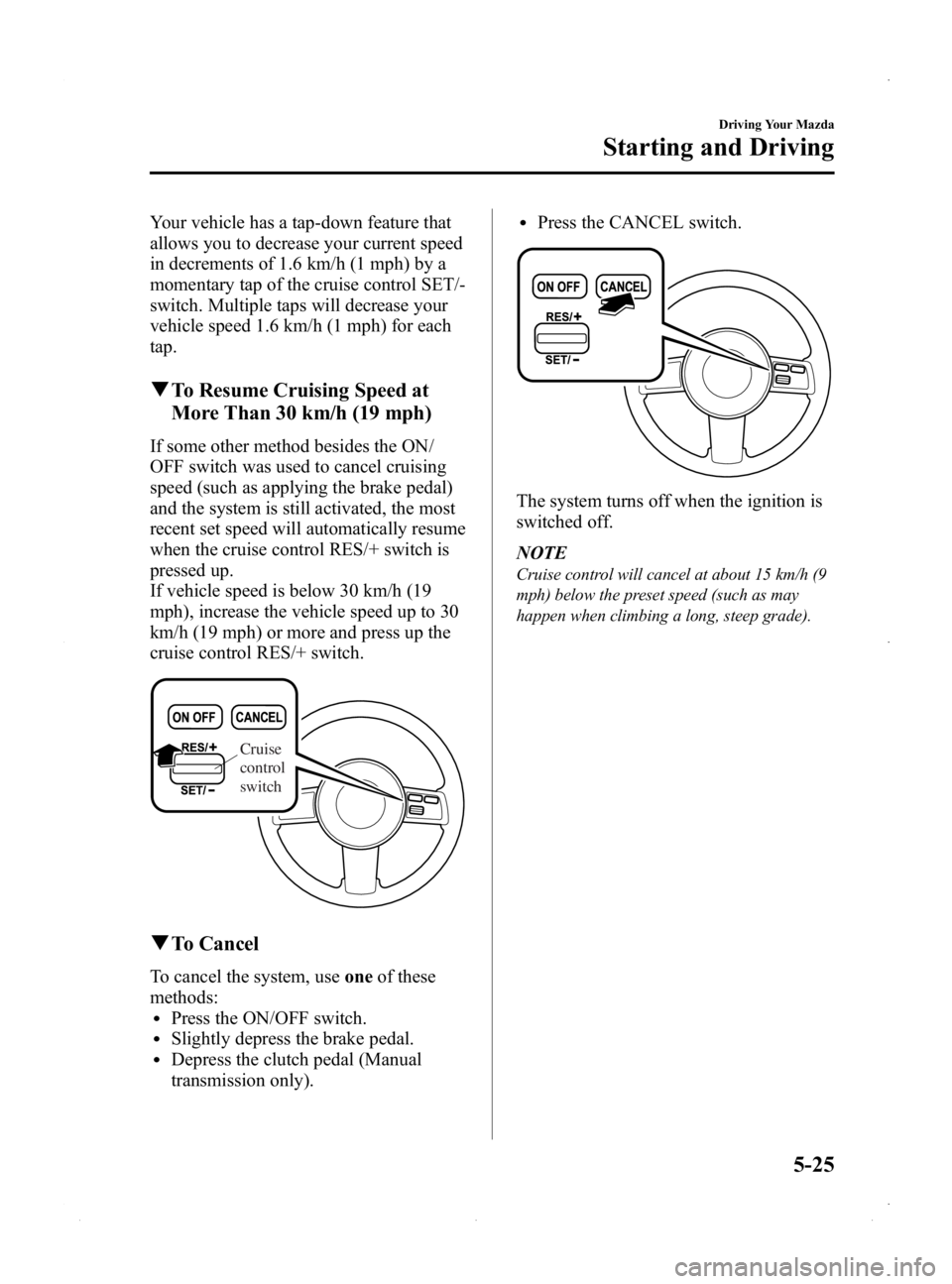
when the cruise control RES/+ switch is
pressed up.
If vehicle speed is below 30 km/h (19
mph), increase the vehicle speed up to 30
km/h (19 mph) or more and press up the
cruise control RES/+ switch.
Cruise
control
switch
qTo Cancel
To cancel the system, use oneof these
methods:
lPress the ON/OFF switch.lSlightly depress the brake pedal.lDepress the clutch pedal (Manual
transmission only).
lPress the CANCEL switch.
The system turns off when the ignition is
switched off.
NOTE
Cruise control will cancel at about 15 km/h (9
mph) below the preset speed (such as may
happen when climbing a long, steep grade).
Driving Your Mazda
Starting and Driving
5-25
MX-5_8EN7-EA-14E_Edition3 Page169
Friday, September 5 2014 3:19 PM
Form No.8EN7-EA-14E
Page 186 of 448

Black plate (186,1)
SignalWarning/Indicator Lights Page
Seat Belt Warning Light 5-46
Door-Ajar Warning Light5-46
Automatic Transmission Warning Light5-46
Tire Pressure Monitoring System Warning Light5-47
KEY Warning Light (Red)/KEY Indicator Light (Green)5-49
Security Indicator Light5-50
Headlight High-Beam Indicator Light5-51
Shift Position Indicator Light5-51
TCS/DSC Indicator Light5-51
DSC OFF Indicator Light5-52
Cruise Main Indicator Light (Amber)/Cruise Set Indicator Light (Green) 5-52
Turn Signal/Hazard Warning Indicator Lights5-52
5-42
Driving Your Mazda
Warning/Indicator Lights and Beep Sounds
MX-5_8EN7-EA-14E_Edition3 Page186
Friday, September 5 2014 3:19 PM
Form No.8EN7-EA-14E
Page 190 of 448

Black plate (190,1)
WARNING
Never tamper with the air bag/
pretensioner systems and always have
an Authorized Mazda Dealer perform
all servicing and repairs:Self-servicing or tampering with the
systems is dangerous. An air bag/
pretensioner could accidentally
activate or become disabled causing
serious injury or death.
qLow Fuel Warning Light
Low fuel
warning light
This warning light signals that the fuel
tank will soon be empty.
Refuel as soon as possible.
qSeat Belt Warning Light
The seat belt warning light illuminates if
the driver or front passenger's seat is
occupied and the seat belt is not fastened
when the ignition switched ON.
qDoor-Ajar Warning Light
This warning light illuminates when any
door is not securely closed.
Close the door securely before driving the
vehicle.
qAutomatic Transmission Warning
Light
This warning light stays on for a few
seconds when the ignition is switched
ON.
The light illuminates when the
transmission has a problem.
CAUTION
If the automatic transmission
warning light illuminates, the
transmission has an electrical
problem. Continuing to drive your
Mazda in this condition could cause
damage to your transmission.
Consult an Authorized Mazda Dealer
as soon as possible.
5-46
Driving Your Mazda
Warning/Indicator Lights and Beep Sounds
MX-5_8EN7-EA-14E_Edition3 Page190
Friday, September 5 2014 3:19 PM
Form No.8EN7-EA-14E
Page 195 of 448

Black plate (195,1)
qHeadlight High-Beam Indicator
Light
This light indicates one of two things:lThe high-beam headlights are on.lThe turn signal lever is in the flash-to-
pass position.
qShift Position Indicator Light
(Automatic Transmission)
This indicates the selected shift position
when the ignition is switched ON.
Gear position indicator
Gear position indicator
The gear position indicator displays the
gear in use while in either manual shift or
direct mode.
qTCS/DSC Indicator Lightí
This indicator light stays on for a few
seconds when the ignition is switched
ON. If the TCS or DSC is operating, the
indicator light flashes.
If the light stays on, the TCS or DSC may
have a malfunction and they may not
operate correctly. Take your vehicle to an
Authorized Mazda Dealer.
NOTE
lIn addition to the indicator light flashing, a
slight lugging sound will come from the
engine. This indicates that the TCS is
operating properly.
lOn slippery surfaces, such as fresh snow, it
will be impossible to achieve high rpm
when the TCS is on.
Driving Your Mazda
Warning/Indicator Lights and Beep Sounds
5-51íSome models.
MX-5_8EN7-EA-14E_Edition3 Page195
Friday, September 5 2014 3:19 PM
Form No.8EN7-EA-14E
Page 205 of 448

Black plate (205,1)
WARNING
Do not use the HomeLink system with
any garage door opener that lacks the
safety stop and reverse feature:Using the HomeLink system with any
garage door opener that lacks the
safety stop and reverse feature as
required by federal safety standards
is dangerous. (This includes garage
doors manufactured before April 1,
1982.)
Using these garage door openers can
increase the risk of serious injury or
death. For further information,
contact HomeLink at 1-800-355-3515
or www.homelink.com or your
Authorized Mazda Dealer.
Always check the areas surrounding
garage doors and gates for people or
obstructions before programming or
during operation of the HomeLink
system: Programming or operating the
HomeLink system without verifying
the safety of areas surrounding
garage doors and gates is dangerous
and could result in an unexpected
accident and serious injury if
someone were to be hit.
CAUTION
HomeLink has been tested and
complies with FCC and Industry
Canada rules. Changes or
modifications not expressly approved
by the party responsible for
compliance could void the user's
authority to operate the device. NOTE
FCC ID: NZLMOBHL4
CANADA: 4112A-MOBHL4
This device complies with part 15 of the FCC
Rules. Operation is subject to the following
two conditions:
1- This device may not cause harmful
interference, and
2- This device must accept any interference
received, including interference that may cause
undesired operation.
NOTE
The programming will not be erased even if
the battery is disconnected.
Pre-programming the HomeLink
System
NOTE
It is recommended that a new battery be
placed in the hand-held transmitter of the
device being programmed to HomeLink for
quicker training and accurate transmission of
the radio-frequency signal.
lVerify that there is a remote control
transmitter available for the device you
would like to program.
lDisconnect the power to the device.
Programming the HomeLink System
CAUTION
When programming a garage door
opener or a gate, disconnect the
power to these devices before
performing programming, as
continuous operation of the devices
could damage the motor.
Driving Your Mazda
Switches and Controls
5-61
MX-5_8EN7-EA-14E_Edition3 Page205
Friday, September 5 2014 3:19 PM
Form No.8EN7-EA-14E
Page 207 of 448
Black plate (207,1)
Gate operator/Canadian Programming
Canadian radio-frequency laws require
transmitter signals to“time-out ”(or quit)
after several seconds of transmission ―
which may not be long enough for
HomeLink to pick up the signal during
programming. Similar to this Canadian
law, some U.S. gate operators are
designed to “time-out ”in the same
manner.
If you live in Canada or you are having
difficulties programming a gate operator
by using the “Programming ”procedures
(regardless of where you live), replace
“ Programming HomeLink ”step 2 with
the following:
NOTE
If programming a garage door opener or gate
operator, it is advised to unplug the device
during the “cycling ”process to prevent
possible overheating.
Continue to press and hold the HomeLink
button while you press and release ―
every two seconds (“ cycle ”) your hand-
held transmitter until the frequency signal
has successfully been accepted by
HomeLink. (The indicator light will flash
slowly and then rapidly.) Proceed with
“ Programming ”step 3 to complete.
Operating the HomeLink System
Press the programmed HomeLink button
to operate a programmed device. The
code will continue being transmitted for a
maximum of 20 seconds.
Reprogramming the HomeLink system
To program a device to HomeLink using a
HomeLink button previously trained,
follow these steps:
1. Press and hold the desired HomeLink
button. DO NOT release the button.
2. The indicator light will begin to flash after 20 seconds. Without releasing the
HomeLink button, proceed with
“Programming ”- step 1.
Erasing Programmed HomeLink
Buttons
To erase the existing programming from
all three operating channels, press and
hold the two outside buttons (
,)
on the auto-dimming mirror until the
HomeLink indicator light begins to flash
after approximately 10 seconds.
Verify that the programming has been
erased when you resell the vehicle.
q Type B
NOTE
HomeLink and HomeLink house are registered
trademarks of Johnson Controls.
Driving Your Mazda
Switches and Controls
5-63
MX-5_8EN7-EA-14E_Edition3 Page207
Friday, September 5 2014 3:19 PM
Form No.8EN7-EA-14E