AUX MAZDA MODEL MX-5 MIATA 2018 User Guide
[x] Cancel search | Manufacturer: MAZDA, Model Year: 2018, Model line: MODEL MX-5 MIATA, Model: MAZDA MODEL MX-5 MIATA 2018Pages: 576, PDF Size: 55.37 MB
Page 240 of 576

CAUTION
Depending on the portable audio device,
noise may occur when the device is
connected to the vehicle accessory socket.
(If noise occurs, do not use the accessory
socket.)
NOTE
This mode may not be usable depending
on the portable audio device to be
connected.
Before using the auxiliary jack/USB
port, refer to the instruction manual for
the portable audio device.
Use a commercially-available,
non-impedance (3.5
) stereo mini plug
for connecting the portable audio unit to
the auxiliary jack. Before using the
auxiliary jack, read the manufacturer's
instructions for connecting a portable
audio unit to the auxiliary jack.
To prevent discharging of the battery, do
not use the auxiliary input for long
periods with the engine off or idling.
When connecting a device to the
auxiliary jack or USB port, noise may
occur depending on the connected
device. If the device is connected to the
vehicle's accessory socket, the noise can
be reduced by unplugging it from the
accessory socket.
▼ How to connect USB port/Auxiliary
jack
Ty p e A
USB port Auxiliary jack
Ty p e B
USB port Auxiliary jack
Connecting a device
1. If there is a cover on the AUX jack or
USB port, remove the cover.
2. Connect the connector on the device to the USB port.
Connecting with a connector cable
1. If there is a cover on the AUX jack or USB port, remove the cover.
2. Connect the device plug/connector cable to the auxiliary jack/USB port.
Interior Features
Before Using the Audio System
5-18
MX-5_8GF7-EA-17J_Edition2 2017-10-31 14:07:27
Page 241 of 576
WA R N I N G
Do not allow the connection plug cord to
get tangled with the parking brake or the
shift lever (manual transmission)/selector
lever (automatic transmission):
Allowing the plug cord to become tangled
with the parking brake or the shift lever
(manual transmission)/selector lever
(automatic transmission) is dangerous as it
could interfere with driving, resulting in an
accident.
CAUTION
Do not place objects or apply force to the
auxiliary jack/USB port with the plug
connected.
NOTE
Insert the plug into the auxiliary
jack/USB port securely.
Insert or pull out the plug with the plug
perpendicular to the auxiliary jack/USB
port hole.
Insert or remove the plug by holding its
base.
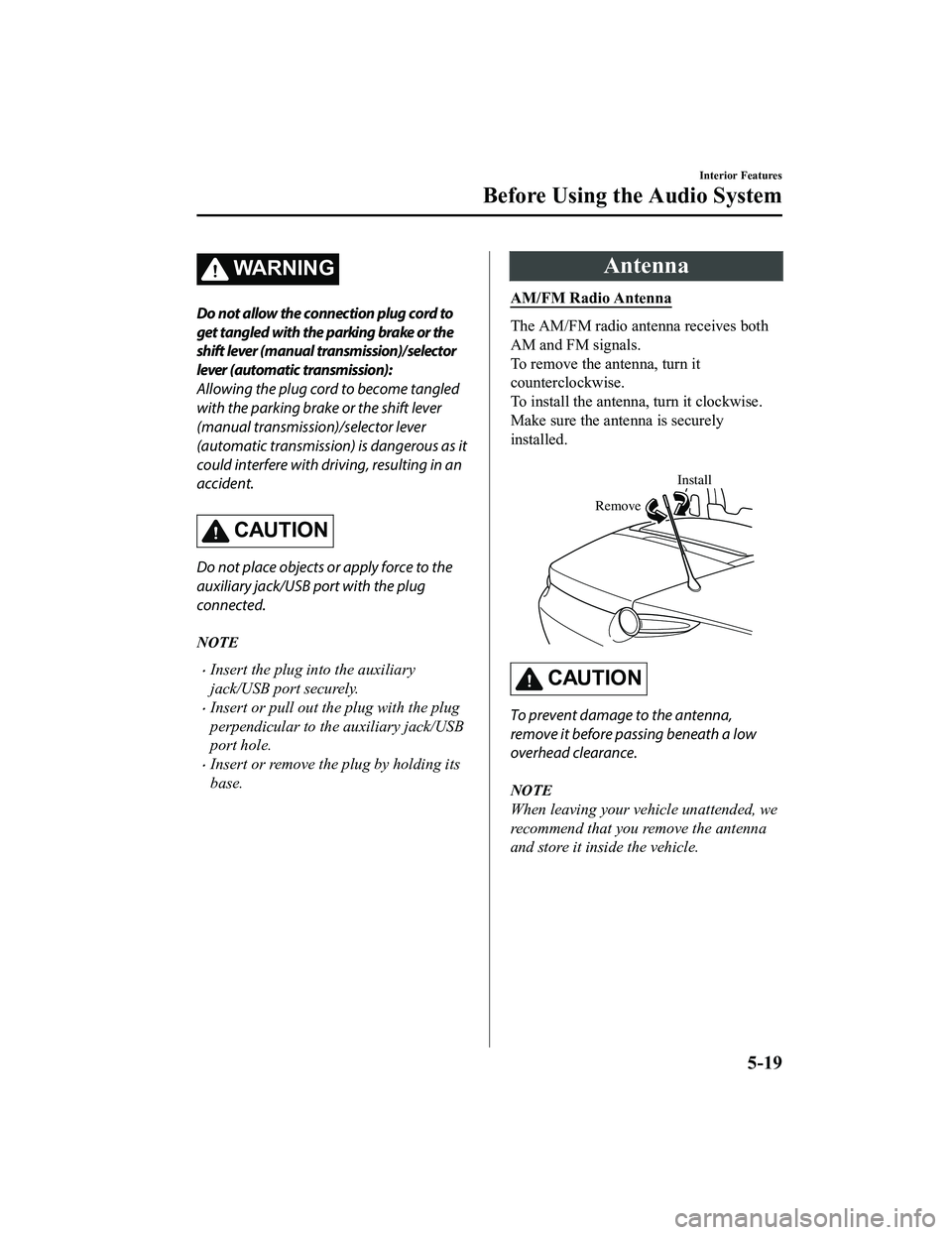
Antenna
AM/FM Radio Antenna
The AM/FM radio antenna receives both
AM and FM signals.
To remove the antenna, turn it
counterclockwise.
To install the antenna, turn it clockwise.
Make sure the antenna is securely
installed.
Install
Remove
CAUTION
To prevent damage to the antenna,
remove it before passing beneath a low
overhead clearance.
NOTE
When leaving your vehicle unattended, we
recommend that you remove the antenna
and store it inside the vehicle.
Interior Features
Before Using the Audio System
5-19
MX-5_8GF7-EA-17J_Edition2 2017-10-31 14:07:27
Page 251 of 576

Display scroll
Only 13 characters can be displayed at one
time. To display the rest of the characters
of a long title, press and hold the text
button (3). The display scrolls the next 13
characters. Press and hold the text button
(3) again after the last 13 characters have
been displayed to return to the beginning
of the title.
NOTE
The number of characters which can be
displayed is restricted.
How to use AUX mode
1. Switch the ignition to ACC or ON.
2. Press the power/volume dial to turn the audio system on.
3. Press the media button (
) of the
audio unit to change to the AUX mode.
NOTE
When the device is not connected to the
auxiliary jack, the mode does not switch
to the AUX mode.
Adjust the audio volume using the
portable audio device or audio unit.
Audio adjustments other than audio
volume can only be done using the
portable audio device.
If the connection plug is pulled out from
the auxiliary jack while in AUX mode,
noise may occur.
Interior Features
Audio Set [Type A (non-touchscreen)]
5-29
MX-5_8GF7-EA-17J_Edition2 2017-10-31 14:07:27
Page 273 of 576
Bluetooth® Audio
Applicable Bluetooth® specification
(Recommended)
Ve r . 2 . 0
Response profile
A2DP (Advanced Audio Distribution
Profile) Ver. 1.0
AVRCP (Audio/Video Remote Control
Profile) Ver. 1.0/1.3
A2DP is a profile which transmits only
audio to the Bluetooth
® unit. If your
Bluetooth
® audio device corresponds only
to A2DP, but not AVRCP, you cannot
operate it using the control panel of the
vehicle's audio system. In this case, only
the operations on the mobile device are
available the same as when a portable
audio device for a non-compliant
Bluetooth
® device is connected to the
AUX terminal.
Function A2DP AV R C P
Ver. 1.0 Ver. 1.3
Playback — X X
Pause — X X
File (Track) up/down — X X
Reverse — — X
Fast-forward — — X
Te x t d i s p l a y — — X
X: Available
—: Not available
NOTE
The battery consumption of Bluetooth®
audio devices increases while
Bluetooth
® is connected.
If a general mobile phone device is USB
connected during music playback over
the Bluetooth
® connection, the
Bluetooth
® connection is disconnected.
For this reason, you cannot have music
playback over a Bluetooth
® connection
and music playback using a USB
connection at the same time.
The system may not operate normally
depending on the Bluetooth
® audio
device.
▼ Switching to Bluetooth® audio mode
To listen to music or voice audio recorded
to a Bluetooth
® audio device, switch to the
Bluetooth
® audio mode to operate the
audio device using the audio system
control panel. Any Bluetooth
® audio
device must be paired to the vehicle's
Bluetooth
® unit before it can be used.
Refer to Bluetooth
® Preparation (Type A)
on page 5-39.
1. Turn on the Bluetooth
® audio device's
power.
2. Switch the ignition to ACC or ON.
Make sure that the “
” symbol is
displayed in the audio display. The
symbol is not displayed if an un-paired
Bluetooth
® audio device is being used
or the vehicle's Bluetooth
® unit has a
malfunction.
NOTE
Some Bluetooth® audio devices need a
certain amount of time before the “
”
symbol is displayed.
3. Press the media button (
) to
switch to the Bluetooth
® audio mode
and start playback.
Interior Features
Audio Set [Type A (non-touchscreen)]
5-51
MX-5_8GF7-EA-17J_Edition2 2017-10-31 14:07:27
Page 309 of 576

How to use AUX mode
▼Playback
1. Select the icon on the home screen to display the Entertainment screen.
2. Select
to switch to the AUX mode. The following icons are displayed i n the lower
part of the center display.
Icon Function
Displays the Entertainment menu. Use to switch to a different a udio source.
Displays sound settings to adjust audio quality level.
Refer to Volume/Display/Sound Controls on page 5-74.
NOTE
If a device is not connected to the auxiliary jack, the mode does not switch to the AUX
mode.
Adjust the audio volume using the portable audio device, commander switch, or audio
control switch.
Audio adjustments can also be made using the portable audio device's volume setting.
If the connection plug is pulled out from the auxiliary jack while in AUX mode, noise may
occur.
Interior Features
Audio Set [Type B (touchscreen)]
5-87
MX-5_8GF7-EA-17J_Edition2 2017-10-31 14:07:27
Page 322 of 576
Bluetooth® Audio
Applicable Bluetooth® specification
(Recommended)
Ver. 1.1/1.2/2.0
EDR/2.1 EDR/3.0
(conformity)
Response profile
A2DP (Advanced Audio Distribution
Profile) Ver. 1.0/1.2
AVRCP (Audio/Video Remote Control
Profile) Ver. 1.0/1.3/1.4
A2DP is a profile which transmits only
audio to the Bluetooth
® unit. If your
Bluetooth
® audio device corresponds only
to A2DP, but not AVRCP, you cannot
operate it using the control panel of the
vehicle's audio system. In this case, only
the operations on the mobile device are
available the same as when a portable
audio device for a non-compliant
Bluetooth
® device is connected to the
AUX terminal.
Function A2DP AV R C P
Ve r. 1.0 Ve r.
1.3 Ve r.
1.4
Playback X X X X
Pause X X X X
File (Track)
up/down —XXX
Reverse — — X X
Fast-forward — — X X
Te x t d i s p l a y — — X X
Repeat — —De-
pends
on de- vice De-
pends
on de- vice
Function A2DP AV R C P
Ve r. 1.0 Ve r.
1.3 Ve r.
1.4
Shuffle — — De-
pends
on de- vice De-
pends
on de- vice
Scan — —De-
pends
on de- vice De-
pends
on de- vice
Folder up/
down ——— De-
pends
on de-
vice
X: Available
—: Not available
NOTE
The battery consumption of Bluetooth®
audio devices increases while
Bluetooth
® is connected.
If a general mobile phone device is USB
connected during music playback over
the Bluetooth
® connection, the
Bluetooth
® connection is disconnected.
For this reason, you cannot have music
playback over a Bluetooth
® connection
and music playback using a USB
connection at the same time.
If a device which supports AVRCP Ver.
1.6 or higher is connected, song
information may not display correctly.
The system may not operate normally
depending on the Bluetooth
® audio
device.
Interior Features
Audio Set [Type B (touchscreen)]
5-100
MX-5_8GF7-EA-17J_Edition2 2017-10-31 14:07:27
Page 368 of 576

Storage Compartments
WA R N I N G
Keep storage boxes closed when driving:
Driving with the storage boxes open is
dangerous. To reduce the possibility of
injury in an accident or a sudden stop, keep
the storage boxes closed when driving.
Do not put articles in storage spaces with
no lid:
Putting articles in storage spaces with no
lid is dangerous as they could be thrown
around the cabin if the vehicle is suddenly
accelerated and cause injury depending on
how the article is stored.
CAUTION
Do not leave lighters or eyeglasses in the
storage boxes while parked under the sun.
A lighter could explode or the plastic
material in eyeglasses could deform and
crack from high temperature.
▼ Console Box
To use, open the lid.
▼ Seat Side Box
CAUTION
When using the rear console cup holders,
remove any cups before opening the seat
side box.
If the seat side box is opened with cups still
in them, the lid will hit the cups and cause
the contents to spill.
To open, press the latch down to open the
seat side box.
Insert the auxiliary key and turn it
clockwise to lock, counterclockwise to
unlock.
Lock
Unlock
Interior Features
Interior Equipment
5-146
MX-5_8GF7-EA-17J_Edition2
2017-10-31 14:07:27
Page 404 of 576

The following conditions indicate that the
battery power is low:
The KEY indicator light (green) flashes
in the instrument cluster for about 30
seconds after the engine is turned off
(for vehicles with a type A instrument
cluster (page 4-26), messages are
displayed in the instrument cluster).
The system does not operate and the
operation indicator light on the
transmitter does not flash when the
buttons are pressed.
The system's operational range is
reduced.
Replacing the battery at an Authorized
Mazda Dealer is recommended to prevent
damage to the key. If replacing the battery
by yourself, follow the instruction.
Replacing the key battery
1. Press the knob and pull out the auxiliary key.
Knob
2. Twist a tape-wrapped flathead
screwdriver in the direction of the
arrow and open the cover slightly.
Cover
3. Insert the tape-wrapped flatheadscrewdriver into the gap and slide it in
the direction of the arrow.
Cover
Gap
4. Twist the flathead screwdriver in the
direction of the arrow and remove the
cover.
Cover
Maintenance and Care
Owner Maintenance
6-34
MX-5_8GF7-EA-17J_Edition2 2017-10-31 14:07:27
Page 405 of 576

5. Remove the battery cap, then removethe battery.
CAUTION
Be careful not to allow the rubber
ring shown in the figure to be
scratched or damaged.
If the rubber ring detaches, reattach
it before inserting a new battery.
Rubber ring
6. Insert a new battery with the positive
pole facing up, and then cover the
battery with the battery cap.
7. Close the cover.
8. Reinsert the auxiliary key.
Maintenance and Care
Owner Maintenance
6-35
MX-5_8GF7-EA-17J_Edition2 2017-10-31 14:07:27
Page 568 of 576

Index
A
Accessory Socket............................ 5-140
Adaptive Front Lighting System
(AFS)................................................. 4-75
Add-On Non-Genuine Parts and
Accessories........................................ 8-19
Advanced KeyAdvanced keyless entry system..... 3-9
Operational range........................ 3-10
Air Bag Systems............................... 2-26
Air Bag/Seat Belt Pr etensioner System
Warning Beep.................................... 7-49
Ambient Temperature Display.......... 4-15
Antilock Brake System (ABS).......... 4-64
Audio Control Switch
Adjusting the Volume.................. 5-16
Seek Switch................................. 5-16
Audio Set [Type A (non-touchscreen)] AUX.............................................5-29
Bluetooth®.................................. 5-36
CD Player.................................... 5-26
Clock............................................5-23
Error Indications.......................... 5-35
iPod mode....................................5-33
Power/Volume/Sound Controls... 5-21
Radio............................................5-24
Troubleshooting.......... ................. 5-64
USB............................................. 5-30
Voice Recognition.... ................... 5-60
Audio Set [Type B (touchscreen)] Applications............................... 5-125
AUX.............................................5-87
Bluetooth®.................................. 5-93
CD Player.................................... 5-84
Radio............................................5-76
Satellite Radio........ ..................... 5-80
Settings...................................... 5-123
Troubleshooting........... .............. 5-126
USB............................................. 5-88
Voice Recognition..................... 5-120
Volume/Display/Sound
Controls....................................... 5-74
Audio System Antenna........................................5-19
Appendix................................... 5-131
Audio Control Switch................. 5-16
Audio Set [Type A (non-
touchscreen)]............................... 5-21
Audio Set [Type B
(touchscreen)].............................. 5-68
AUX/USB mode..........................5-17
Before Using the Audio
System......................................... 5-16
Automatic Transmission Active Adaptive Shift (AAS)...... 4-36
Automatic transmission
controls........................................ 4-34
Direct mode................................. 4-42
Driving tips..................................4-43
Manual shift mode.......................4-37
Shift-lock system......................... 4-35
Transmission ranges.................... 4-35
B
Back Trim Storage Box.................. 5-147
Battery............................................... 6-31Maintenance.................................6-33
Replacement................................ 6-33
Specifications.................................9-4
Battery Runs Out.............................. 7-23 Jump-starting............................... 7-23
Blind Spot Monitoring (BSM).......... 4-85
Blind Spot Monitoring (BSM) System
Warning Beep.................................... 7-52
Bluetooth® [Type A (non-touchscreen)] Bluetooth® Audio....................... 5-51
Bluetooth® Hands-Free...............5-53
Bluetooth® Preparation............... 5-39
Bluetooth® [Type B (touchscreen)] Bluetooth® Audio..................... 5-100
10-2
MX-5_8GF7-EA-17J_Edition2 2017-10-31 14:07:27