brake light MAZDA MODEL MX-5 MIATA 2018 Owner's Manual
[x] Cancel search | Manufacturer: MAZDA, Model Year: 2018, Model line: MODEL MX-5 MIATA, Model: MAZDA MODEL MX-5 MIATA 2018Pages: 576, PDF Size: 55.37 MB
Page 164 of 576

The headlights turn off if the lever is
pulled again while the headlights are
illuminated.
▼ Leaving Home Light
The leaving home light turns on the lights
when the transmitte
r unlock button is
pressed while away from the vehicle.
The following light s turn on when the
leaving home light is operated.
Low beams, Parking lights, Taillights,
License plate lights.
To turn on the lights
When the ignition switch and the headlight
switch are in the following conditions, the
headlights will il luminate when the
transmitter unlock button is pressed and
the vehicle receives the transmitter signal.
The headlights turn off after a certain
period of time has elapsed (30 seconds).
Ignition switch: off
Headlight switch: , , or
Lock button
Unlock
button
NOTE
Operation of the leaving home light can
be turned on or off.
Refer to Personalization Features on
page 9-9.
When the transmitter lock button is
pressed and the vehicle receives the
transmitter signal, the headlights turn
off.
When the headlight switch is turned to
the
position, the headlights turn off.
▼ Headlight Leveling
The number of passengers and weight of
cargo in the luggage compartment change
the angle of the headlights.
The angle of the headlights will be
automatically adjusted when turning on
the headlights.
▼Daytime Running Lights
Some countries requir
e moving vehicles to
have their lights on (daytime running
lights) during the daytime.
The daytime running lights turn on
automatically when the vehicle starts
moving.
They turn off when the parking brake is
operated or the shift lever is shifted to the
P position (automatic transmission
vehicle).
NOTE
(Except Canada)
The daytime running lights can be
deactivated.
Refer to Personalization Features on page
9-9.
When Driving
Switches and Controls
4-48
MX-5_8GF7-EA-17J_Edition2 2017-10-31 14:07:27
Page 176 of 576

Brake System
▼Foot Brake
This vehicle has power-assisted brakes
that adjust automatically through normal
use.
Should power-assist fail, you can stop by
applying greater force than normal to the
brake pedal. But the d
istance required to
stop will be greater than usual.
WA R N I N G
Do not coast with the engine stalled or
turned off,
find a safe place to stop:
Coasting with the engine stalled or turned
off is dangerous. Braking will require more
effort, and the brake's power-assist could
be depleted if you pump the brake. This will
cause longer stopping distances or even an
accident.
Shift to a lower gear when going down
steep hills:
Driving with your foot continuously on the
brake pedal or steadily applying the brakes
for long distances is dangerous. This causes
overheated brakes, resulting in longer
stopping distances or even total brake
failure. This could cause loss of vehicle
control and a serious accident. Avoid
continuous application of the brakes.
Dry off brakes that have become wet by
driving slowly, releasing the accelerator
pedal and lightly applying the brakes
several times until the brake performance
returns to normal:
Driving with wet brakes is dangerous.
Increased stopping distance or the vehicle
pulling to one side when braking could
result in a serious accident. Light braking
will indicate whether the brakes have been
affected.
CAUTION
Do not drive with your foot held on the
clutch pedal or brake pedal, or hold the
clutch pedal depressed halfway
unnecessarily. Doing so could result in
the following:
The clutch and brake parts will wear
out more quickly.
The brakes can overheat and adversely
affect brake performance.
Always depress the brake pedal with the
right foot. Applying the brakes with the
unaccustomed left foot could slow your
reaction time to an emergency situation
resulting in insufficient braking
operation.
When Driving
Brake
4-60
MX-5_8GF7-EA-17J_Edition2 2017-10-31 14:07:27
Page 177 of 576
Wear shoes appropriate for driving in
order to avoid your shoe contacting the
brake pedal when depressing the
accelerator pedal.
▼ Parking Brake
CAUTION
Driving with the parking brake on will
cause excessive wear of the brake parts.
NOTE
For parking in snow, refer to Winter
Driving (page 3-52) regarding parking
brake use.
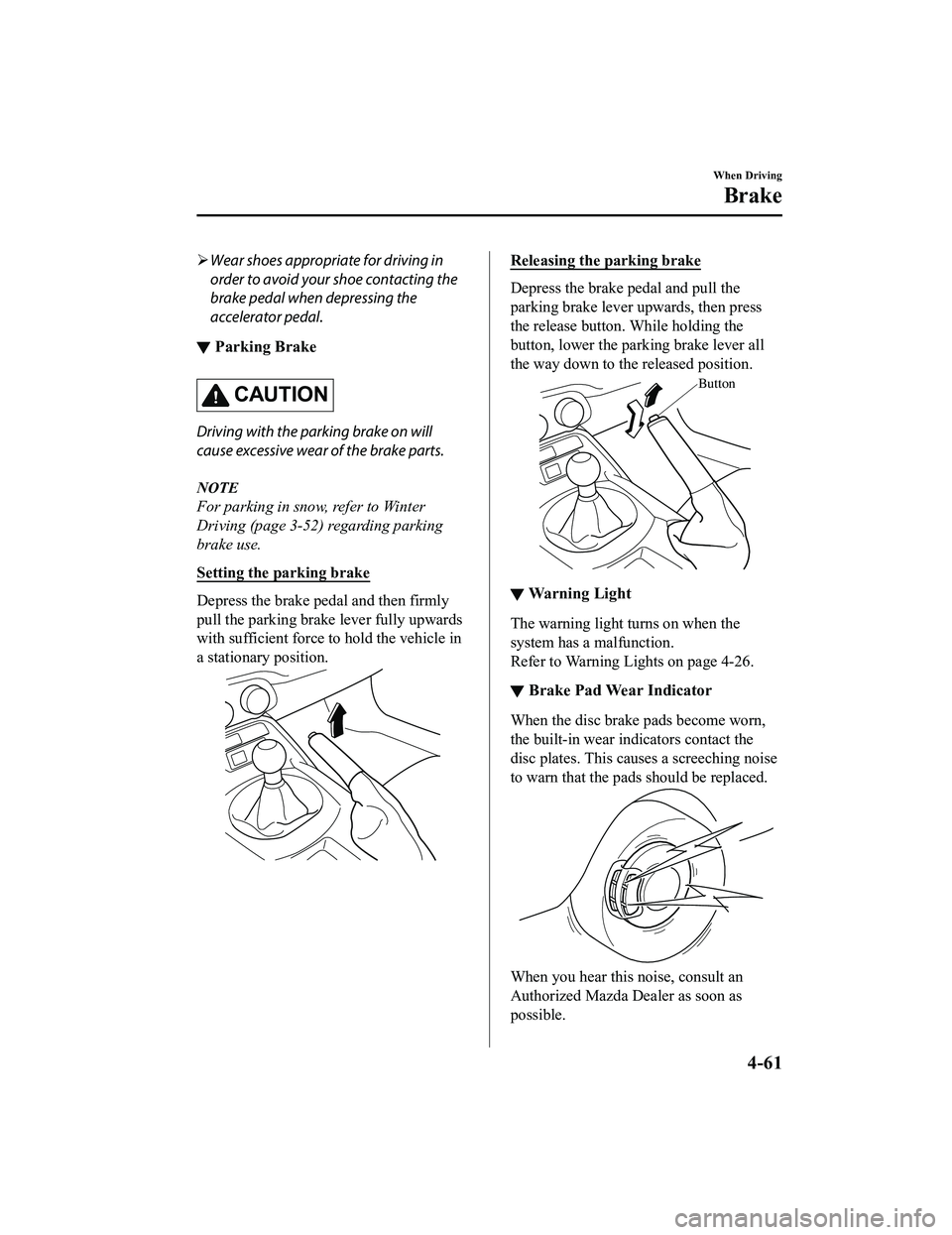
Setting the parking brake
Depress the brake pedal and then firmly
pull the parking brake lever fully upwards
with sufficient force to hold the vehicle in
a stationary position.
Releasing the parking brake
Depress the brake pedal and pull the
parking brake lever upwards, then press
the release button. While holding the
button, lower the parking brake lever all
the way down to the released position.
Button
▼War ni ng L i gh t
The warning light
turns on when the
system has a malfunction.
Refer to Warning Lights on page 4-26.
▼ Brake Pad Wear Indicator
When the disc brake pads become worn,
the built-in wear indicators contact the
disc plates. This caus
es a screeching noise
to warn that the pads should be replaced.
When you hear this noise, consult an
Authorized Mazda Dealer as soon as
possible.
When Driving
Brake
4-61
MX-5_8GF7-EA-17J_Edition2 2017-10-31 14:07:27
Page 179 of 576

NOTE
HLA does not operate on a gentle slope.
In addition, the gradient of the slope on
which the system will operate changes
depending on the vehicle's load.
HLA does not operate if the parking
brake is applied, the vehicle has not
stopped completely, or the clutch pedal
is released.
While HLA is operating, the brake pedal
may feel stiff and vibrate, however, this
does not indicate a malfunction.
HLA does not operate while the
TCS/DSC indicator light is illuminated.
Refer to Warning/Indicator Lights on
page 4-26.
HLA does not turn off even if the DSC
OFF switch is pressed to turn off the
TCS/DSC.
When Driving
Brake
4-63
MX-5_8GF7-EA-17J_Edition2 2017-10-31 14:07:27
Page 180 of 576

Antilock Brake System(ABS)
The ABS control unit continuously
monitors the speed o f each wheel. If one
wheel is about to lock up, the ABS
responds by automatically releasing and
reapplying that wheel's brake.
The driver will feel a slight vibration in
the brake pedal and may hear a chattering
noise from the brake system. This is
normal ABS system operation. Continue
to depress the brak e pedal without
pumping the brakes.
The warning light turns on when the
system has a malfunction.
Refer to Warning Indication/Warning
Lights on page 4-26.
WA R N I N G
Do not rely on ABS as a substitute for safe
driving:
The ABS cannot compensate for unsafe
and reckless driving, excessive speed,
tailgating (following another vehicle too
closely), driving on ice and snow, and
hydroplaning (reduced tire friction and
road contact because of water on the road
surface). You can still have an accident.
NOTE
Braking distances may be longer on
loose surfaces (snow or gravel, for
example) which usually have a hard
foundation. A vehicle with a normal
braking system may require less
distance to stop under these conditions
because the tires wi ll build up a wedge
of surface layer when the wheels skid.
The sound of the ABS operating may be
heard when starting the engine or
immediately after starting the vehicle,
however, it does not indicate a
malfunction.
When Driving
ABS/TCS/DSC
4-64
MX-5_8GF7-EA-17J_Edition2 2017-10-31 14:07:27
Page 181 of 576

Traction Control System(TCS)
The Traction Control System (TCS)
enhances traction and safety by controlling
engine torque and braking. When the TCS
detects driving wheel slippage, it lowers
engine torque and operates the brakes to
prevent loss of traction.
This means that on a slick surface, the
engine adjusts automatically to provide
optimum power to the drive wheels,
limiting wheel spin and loss of traction.
The warning light turns on when the
system has a malfunction.
Refer to Warning Indication/Warning
Lights on page 4-26.
WA R N I N G
Do not rely on the Traction Control System
(TCS) as a substitute for safe driving:
The Traction Control System (TCS) cannot
compensate for unsafe and reckless
driving, excessive speed, tailgating
(following another vehicle too closely), and
hydroplaning (reduced tire friction and
road contact because of water on the road
surface). You can still have an accident.
Use snow tires or tire chains and drive at
reduced speeds when roads are covered
with ice and/or snow:
Driving without proper traction devices on
snow and/or ice-covered roads is
dangerous. The Traction Control System
(TCS) alone cannot provide adequate
traction and you co uld still have an
accident.
NOTE
To turn off the TCS, press the DSC OFF
switch (page 4-67).
▼ TCS/DSC Indicator Light
This indicator light stays on for a few
seconds when the ignition is switched ON.
If the TCS or DSC
is operating, the
indicator light flashes.
If the light stays on, the TCS, DSC or the
brake assist system may have a
malfunction and they may not operate
correctly. Take your vehicle to an
Authorized Mazda Dealer.
NOTE
In addition to the indicator light
flashing, a slight lugging sound will
come from the engine. This indicates
that the TCS/DSC is operating properly.
On slippery surfaces, such as fresh
snow, it will be impossible to achieve
high rpm when the TCS is on.
When Driving
ABS/TCS/DSC
4-65
MX-5_8GF7-EA-17J_Edition2 2017-10-31 14:07:27
Page 182 of 576

Dynamic Stability Control(DSC)
The Dynamic Stability Control (DSC)
automatically controls braking and engine
torque in conjunction with systems such as
ABS and TCS to help control side slip
when driving on slippery surfaces, or
during sudden or evasive maneuvering,
enhancing vehicle safety.
Refer to ABS (page 4-64) and TCS (page
4-65).
DSC operation is possible at speeds
greater than 20 km/h (12 mph).
The warning light turns on when the
system has a malfunction.
Refer to Warning Indication/Warning
Lights on page 4-26.
WA R N I N G
Do not rely on the Dynamic Stability
Control as a substitute for safe driving:
The Dynamic Stability Control (DSC)
cannot compensate for unsafe and reckless
driving, excessive speed, tailgating
(following another vehicle too closely), and
hydroplaning (reduced tire friction and
road contact because of water on the road
surface). You can still have an accident.
CAUTION
The DSC may not operate correctly
unless the following are observed:
Use tires of the correct size
specified for
your Mazda on all four wheels.
Use tires of the same manufacturer,
brand and tread pattern on all four
wheels.
Do not mix worn tires.
The DSC may not operate correctly when
tire chains are used or a temporary spare
tire is installed because the tire diameter
changes.
▼ TCS/DSC Indicator Light
This indicator light stays on for a few
seconds when the ignition is switched ON.
If the TCS or DSC is operating, the
indicator light flashes.
If the light stays on, the TCS, DSC or the
brake assist system may have a
malfunction and they may not operate
correctly. Take your vehicle to an
Authorized Mazda Dealer.
When Driving
ABS/TCS/DSC
4-66
MX-5_8GF7-EA-17J_Edition2
2017-10-31 14:07:27
Page 196 of 576

The functions of the LDWS have limitations:
Always stay on course using the steering wheel and drive with care. The system is not
designed to compensate for a driver’s lack of caution and if you rely too much on the LDWS it
could lead to an accident. The driver is res ponsible for assuring lane changes and other
maneuvers. Always pay attention to the direction in which the vehicle is traveling and the
vehicle’s surroundings.
CAUTION
Do not modify the suspension. If the vehicle height or the damping force of the suspensions is
changed, the LDWS may not operate correctly.
NOTE
If your vehicle deviates from its traffi c lane, the LDWS operates (warning sound and
indicator light). Steer the vehicle adequately to drive the vehicle to the center of the lane.
When the turn signal lever is operated for a lane change, the LDWS warning is
automatically canceled. The LDWS warning becomes operable when the turn signal lever
is returned and the system detects the white or yellow lines.
If the steering wheel, accelerator pedal, or brake pedal is operated abruptly and the
vehicle moves close to a white or yellow line, the system determines that the driver is
making a lane change and the LDWS warning is automatically canceled.
The LDWS may not operate during the period immediately after the vehicle has deviated
from its lane and the LDWS has operated, or the vehicle deviates from its lane repeatedly
within a short period of time.
The LDWS does not operate if it does not dete ct the white or yellow lines of the traffic
lane.
Under the following conditions, the LDWS may not be able to detect white or yellow lines
correctly and the LDWS may not operate correctly.
If an object placed on the dashboard is reflected in the windshield and picked up by the
camera.
Heavy luggage is loaded in the luggage compartment the vehicle is inclined.
The tire pressures are not adjusted to the specified pressure.
When the vehicle is driven on the entry and exit to or from the rest area or tollgate of a
highway.
The white or yellow lines are less visible because of dirt or paint flaking.
The vehicle ahead is running near a white or yellow line and the line is less visible.
A white or yellow line is less visible because of bad weather (rain, fog, or snow).
The vehicle is driven on a temporary lane or section with a closed lane due to
construction.
When Driving
i-ACTIVSENSE
4-80
MX-5_8GF7-EA-17J_Edition2 2017-10-31 14:07:27
Page 199 of 576

The brake pedal is depressed abruptly.
The accelerator pedal is depressed
abruptly.
The turn signal lever is operated (after
the turn signal lever is returned, the
LDWS may not operate for about 3
seconds which is the period of time
required to make a lane correction).
NOTE
After about 60 seconds have elapsed with
the turn signal lever left operating, the
LDWS warning may operate if the vehicle
is close to a white or yellow line.
▼Canceling the System
Press the LDWS switch to cancel the
LDWS. The LDWS OFF indicator light
turns on.
Vehicle lane display (vehicles with
multi-information display)
The vehicle lane lines are no longer
indicated in the multi
-information display
when the LDWS is canceled.
NOTE
When the ignition is switched OFF, the
system status before it was turned off is
maintained. For example, if the ignition is
switched OFF with the lane-keep system
operable, the system will be operable
when the ignition is switched ON the next
time.
▼ LDWS Warning
If the system determines that there is the
possibility of a lane departure, the LDWS
warning beep activates and the LDWS
warning light flashes. Operate the steering
wheel appropriately and steer the vehicle
to the center of the lane.
For vehicles equipped with the
multi-information display and the active
driving display, the color of the lane line
in the direction which the system
determined that the vehicle may be
deviating from its lane changes from white
to amber and the vehicle lane line flashes.
Indication on display
NOTE
If the LDWS warning sound is set to
rumble
*1, the sound will be heard from
the vehicle speaker on the side which the
system determined the vehicle may be
deviating from its lane.
It may be difficult to hear the LDWS
warning beep depending on the
surrounding conditions such as outside
noise.
The volume of the LDWS warning sound
can be changed.
Refer to Personalization Features on
page 9-9.
When Driving
i-ACTIVSENSE
4-83
MX-5_8GF7-EA-17J_Edition2 2017-10-31 14:07:27
Page 217 of 576

To increase speed using accelerator
pedal
Depress the accelerator pedal to accelerate
to the desired speed. Press the SET/
switch and release it immediately.
NOTE
Accelerate if you want to speed up
temporarily when the cruise control is on.
Greater speed will not interfere with or
change the set speed. Take your foot off
the accelerator to return to the set speed.
▼To Decrease Cruising Speed
Press the SET/ switch and hold it. The
vehicle will gradually slow.
Release the switch at the desired speed.
Press the SET/
switch and release it
immediately to adjust the preset speed.
Multiple operations will decrease the
preset speed according to the number of
times it is operated.
Decreasing speed w ith a single SET/
switch operation
Instrument cluster display for vehicle
speed indicated in km/h: 1 km/h (0.6 mph)
Instrument cluster d isplay for vehicle
speed indicated in mph: 1 mph (1.6 km/h)
▼ To Resume Cruising Speed at More
Than 25 km/h (16 mph)
If the cruise control system temporarily
canceled (such as by applying the brake
pedal) and the system is still activated, the
most recent set speed will automatically
resume when the RESUME/
switch is
pressed.
If vehicle speed is below 25 km/h (16
mph), increase the vehicle speed up to 25
km/h (16 mph) or more and press the
RESUME/
switch.
▼ To Temporarily Cancel
To temporarily cancel the system, use one
of these methods:
Slightly depress t
he brake pedal.
(Manual transmission)
Depress the clutch pedal.
Press the OFF/CANCEL switch.
If the RESUME/
switch is pressed when
the vehicle speed is 25 km/h (16 mph) or
higher, the system reverts to the previously
set speed.
NOTE
If any of the following conditions occur,
the cruise control system is temporarily
canceled.
The parking brake is applied.
(Automatic transmission)
The selector lever is in the P or N
position.
(Manual transmission)
The shift lever is in the neutral
position.
When the cruise control system is
temporarily canceled by even one of the
applicable cancel conditions, the speed
cannot be re-set.
When Driving
Cruise Control
4-101
MX-5_8GF7-EA-17J_Edition2 2017-10-31 14:07:27