wheel MAZDA MODEL MX-5 MIATA 2018 Owner's Manual
[x] Cancel search | Manufacturer: MAZDA, Model Year: 2018, Model line: MODEL MX-5 MIATA, Model: MAZDA MODEL MX-5 MIATA 2018Pages: 576, PDF Size: 55.37 MB
Page 154 of 576
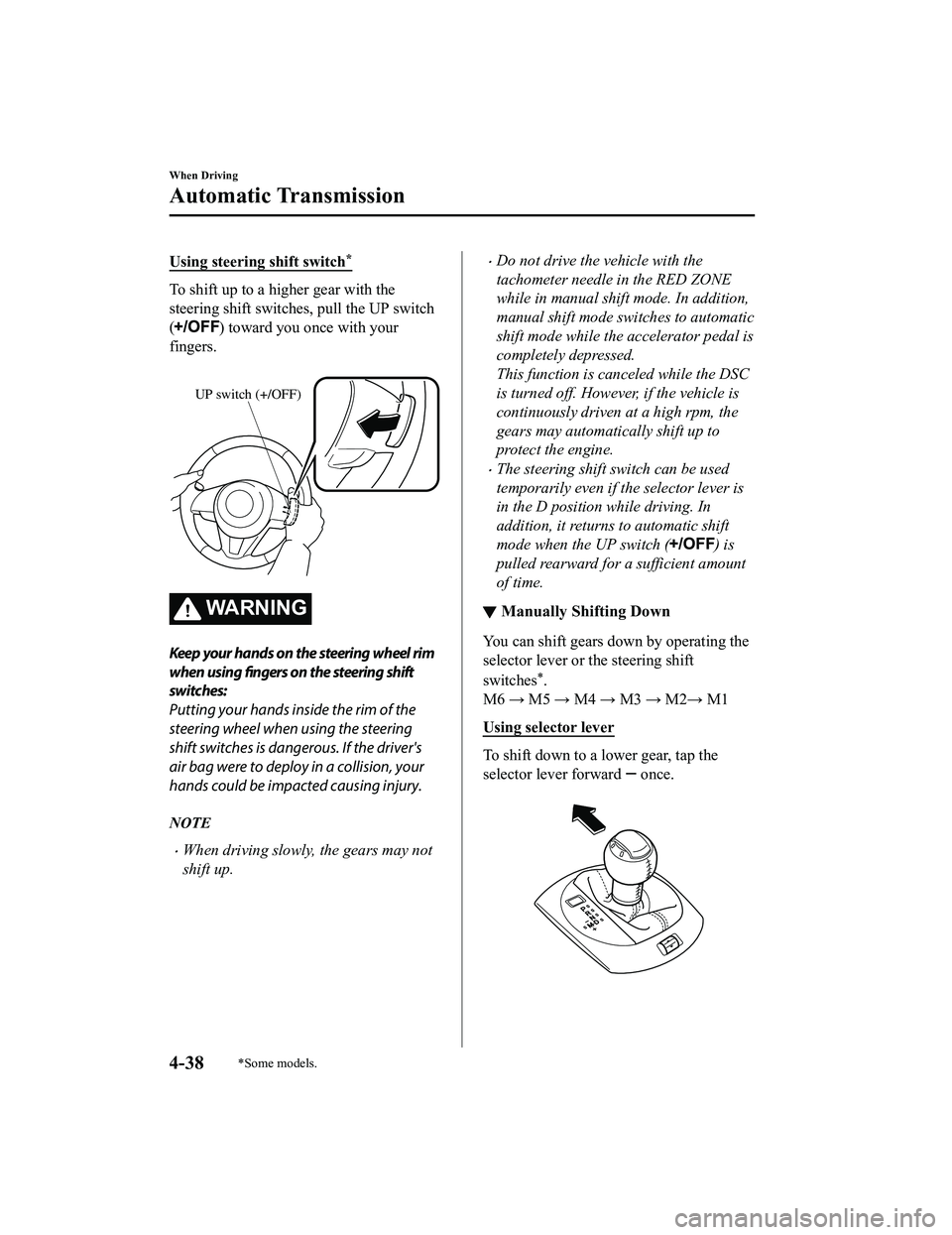
Using steering shift switch*
To shift up to a higher gear with the
steering shift switches, pull the UP switch
(
) toward you once with your
fingers.
UP switch (+/OFF)
WA R N I N G
Keep your hands on the steering wheel rim
when using fingers on the steering shift
switches:
Putting your hands inside the rim of the
steering wheel when using the steering
shift switches is dangerous. If the driver's
air bag were to deploy in a collision, your
hands could be impacted causing injury.
NOTE
When driving slowly, the gears may not
shift up.
Do not drive the vehicle with the
tachometer needle in the RED ZONE
while in manual shift mode. In addition,
manual shift mode switches to automatic
shift mode while the accelerator pedal is
completely depressed.
This function is canceled while the DSC
is turned off. Howeve r, if the vehicle is
continuously driven at a high rpm, the
gears may automatically shift up to
protect the engine.
The steering shift switch can be used
temporarily even if the selector lever is
in the D position while driving. In
addition, it returns to automatic shift
mode when the UP switch (
) is
pulled rearward for a sufficient amount
of time.
▼ Manually Shifting Down
You can shift gears down by operating the
selector lever or the steering shift
switches
*.
M6 → M5 → M4 → M3 → M2→ M1
Using selector lever
To shift down to a lower gear, tap the
selector lever forward
once.
When Driving
Automatic Transmission
4-38*Some models.
MX-5_8GF7-EA-17J_Edition2 2017-10-31 14:07:27
Page 155 of 576
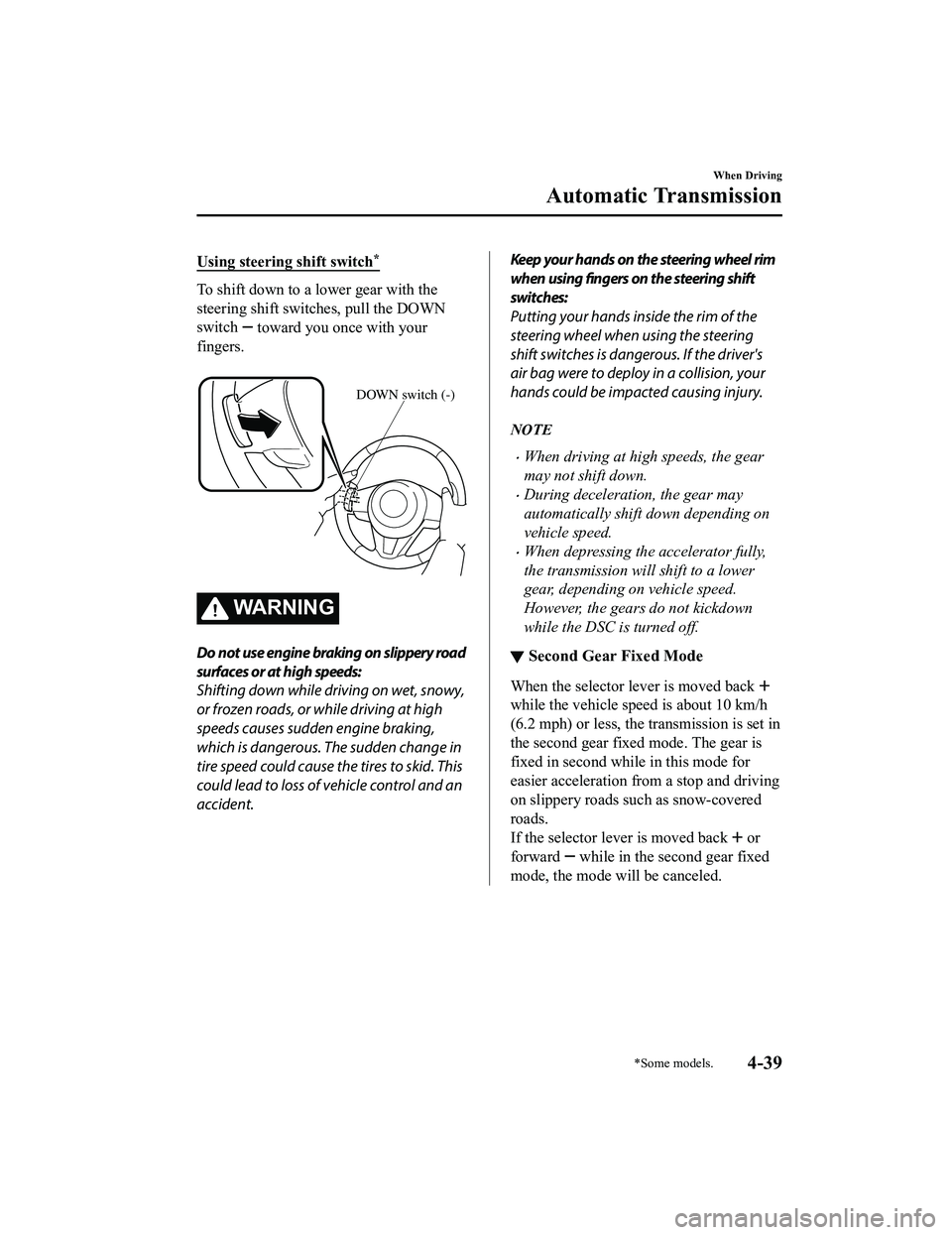
Using steering shift switch*
To shift down to a lower gear with the
steering shift switches, pull the DOWN
switch
toward you once with your
fingers.
DOWN switch (-)
WA R N I N G
Do not use engine braking on slippery road
surfaces or at high speeds:
Shifting down while driving on wet, snowy,
or frozen roads, or while driving at high
speeds causes sudden engine braking,
which is dangerous. The sudden change in
tire speed could cause the tires to skid. This
could lead to loss of vehicle control and an
accident.
Keep your hands on the steering wheel rim
when using fingers on the steering shift
switches:
Putting your hands inside the rim of the
steering wheel when using the steering
shift switches is dangerous. If the driver's
air bag were to deploy in a collision, your
hands could be impacted causing injury.
NOTE
When driving at high speeds, the gear
may not shift down.
During deceleration, the gear may
automatically shift down depending on
vehicle speed.
When depressing th e accelerator fully,
the transmission will shift to a lower
gear, depending on vehicle speed.
However, the gears do not kickdown
while the DSC is turned off.
▼ Second Gear Fixed Mode
When the selector lever is moved back
while the vehicle speed is about 10 km/h
(6.2 mph) or less, the t
ransmission is set in
the second gear fixed mode. The gear is
fixed in second while in this mode for
easier acceleration from a stop and driving
on slippery roads such as snow-covered
roads.
If the selector lever is moved back
or
forward
while in the second gear fixed
mode, the mode will be canceled.
When Driving
Automatic Transmission
*Some models.4-39
MX-5_8GF7-EA-17J_Edition2 2017-10-31 14:07:27
Page 171 of 576

Horn
To sound the horn, press the mark on
the steering wheel.
Hazard Warning Flasher
The hazard warning lights should always
be used when you stop on or near a
roadway in an emergency.
The hazard warning lights warn other
drivers that your vehicle is a traffic hazard
and that they must take extreme caution
when near it.
Depress the hazard warning flasher and all
the turn signals will flash. The hazard
warning indicator lights in the instrument
cluster flash simultaneously.
NOTE
The turn signals do not work when the
hazard warning lights are on.
Check local regulations about the use of
hazard warning lights while the vehicle
is being towed to verify that it is not in
violation of the law.
When Driving
Switches and Controls
4-55
MX-5_8GF7-EA-17J_Edition2 2017-10-31 14:07:27
Page 180 of 576

Antilock Brake System(ABS)
The ABS control unit continuously
monitors the speed o f each wheel. If one
wheel is about to lock up, the ABS
responds by automatically releasing and
reapplying that wheel's brake.
The driver will feel a slight vibration in
the brake pedal and may hear a chattering
noise from the brake system. This is
normal ABS system operation. Continue
to depress the brak e pedal without
pumping the brakes.
The warning light turns on when the
system has a malfunction.
Refer to Warning Indication/Warning
Lights on page 4-26.
WA R N I N G
Do not rely on ABS as a substitute for safe
driving:
The ABS cannot compensate for unsafe
and reckless driving, excessive speed,
tailgating (following another vehicle too
closely), driving on ice and snow, and
hydroplaning (reduced tire friction and
road contact because of water on the road
surface). You can still have an accident.
NOTE
Braking distances may be longer on
loose surfaces (snow or gravel, for
example) which usually have a hard
foundation. A vehicle with a normal
braking system may require less
distance to stop under these conditions
because the tires wi ll build up a wedge
of surface layer when the wheels skid.
The sound of the ABS operating may be
heard when starting the engine or
immediately after starting the vehicle,
however, it does not indicate a
malfunction.
When Driving
ABS/TCS/DSC
4-64
MX-5_8GF7-EA-17J_Edition2 2017-10-31 14:07:27
Page 181 of 576

Traction Control System(TCS)
The Traction Control System (TCS)
enhances traction and safety by controlling
engine torque and braking. When the TCS
detects driving wheel slippage, it lowers
engine torque and operates the brakes to
prevent loss of traction.
This means that on a slick surface, the
engine adjusts automatically to provide
optimum power to the drive wheels,
limiting wheel spin and loss of traction.
The warning light turns on when the
system has a malfunction.
Refer to Warning Indication/Warning
Lights on page 4-26.
WA R N I N G
Do not rely on the Traction Control System
(TCS) as a substitute for safe driving:
The Traction Control System (TCS) cannot
compensate for unsafe and reckless
driving, excessive speed, tailgating
(following another vehicle too closely), and
hydroplaning (reduced tire friction and
road contact because of water on the road
surface). You can still have an accident.
Use snow tires or tire chains and drive at
reduced speeds when roads are covered
with ice and/or snow:
Driving without proper traction devices on
snow and/or ice-covered roads is
dangerous. The Traction Control System
(TCS) alone cannot provide adequate
traction and you co uld still have an
accident.
NOTE
To turn off the TCS, press the DSC OFF
switch (page 4-67).
▼ TCS/DSC Indicator Light
This indicator light stays on for a few
seconds when the ignition is switched ON.
If the TCS or DSC
is operating, the
indicator light flashes.
If the light stays on, the TCS, DSC or the
brake assist system may have a
malfunction and they may not operate
correctly. Take your vehicle to an
Authorized Mazda Dealer.
NOTE
In addition to the indicator light
flashing, a slight lugging sound will
come from the engine. This indicates
that the TCS/DSC is operating properly.
On slippery surfaces, such as fresh
snow, it will be impossible to achieve
high rpm when the TCS is on.
When Driving
ABS/TCS/DSC
4-65
MX-5_8GF7-EA-17J_Edition2 2017-10-31 14:07:27
Page 182 of 576

Dynamic Stability Control(DSC)
The Dynamic Stability Control (DSC)
automatically controls braking and engine
torque in conjunction with systems such as
ABS and TCS to help control side slip
when driving on slippery surfaces, or
during sudden or evasive maneuvering,
enhancing vehicle safety.
Refer to ABS (page 4-64) and TCS (page
4-65).
DSC operation is possible at speeds
greater than 20 km/h (12 mph).
The warning light turns on when the
system has a malfunction.
Refer to Warning Indication/Warning
Lights on page 4-26.
WA R N I N G
Do not rely on the Dynamic Stability
Control as a substitute for safe driving:
The Dynamic Stability Control (DSC)
cannot compensate for unsafe and reckless
driving, excessive speed, tailgating
(following another vehicle too closely), and
hydroplaning (reduced tire friction and
road contact because of water on the road
surface). You can still have an accident.
CAUTION
The DSC may not operate correctly
unless the following are observed:
Use tires of the correct size
specified for
your Mazda on all four wheels.
Use tires of the same manufacturer,
brand and tread pattern on all four
wheels.
Do not mix worn tires.
The DSC may not operate correctly when
tire chains are used or a temporary spare
tire is installed because the tire diameter
changes.
▼ TCS/DSC Indicator Light
This indicator light stays on for a few
seconds when the ignition is switched ON.
If the TCS or DSC is operating, the
indicator light flashes.
If the light stays on, the TCS, DSC or the
brake assist system may have a
malfunction and they may not operate
correctly. Take your vehicle to an
Authorized Mazda Dealer.
When Driving
ABS/TCS/DSC
4-66
MX-5_8GF7-EA-17J_Edition2
2017-10-31 14:07:27
Page 187 of 576

Drive Selection*
Drive selection is a system to switch the vehicle's drive mode. When the sport mode is
selected, vehicle's response against accelerator operation is enhanced. This provides
additional quick acceleration which may be needed to safely mak e maneuvers such as lane
changes, merging onto freeways, or passing other vehicles.
CAUTION
Do not use the sport mode when driving on slip pery roads such as wet or snow-covered roads.
It may cause tire slipping.
NOTE
When the sport mode is selected, driving at higher engine speeds increases and it may
increase fuel consumption. Mazda recommends that you cancel the sport mode on normal
driving.
Drive mode cannot be switched in the following conditions:
ABS/TCS/DSC is operating
Cruise control is operating.
Steering wheel is being operated abruptly
▼ Drive Selection Switch
Press the drive selection switch forward
(“
”) to select the sport mode.
Pull the drive selection switch back
(“
”) to cancel the sport mode.
NOTE
When the ignition is switched off, the
sport mode is canceled.
Depending on the driving conditions
when sport mode is selected, the vehicle
may perform shift-down or slightly
accelerate.
When Driving
Drive Selection
*Some models.4-71
MX-5_8GF7-EA-17J_Edition2 2017-10-31 14:07:27
Page 189 of 576

Power Steering
Power steering is only operable when
the engine is running. If the engine is off
or if the power steering system is
inoperable, you can still steer, but it
requires more physical effort.
If the steering feels stiffer than usual
during normal driving or the steering
vibrates, consult an Authorized Mazda
Dealer.
The warning light notifies the driver of
system abnormalities and operation
conditions.
Refer to Warning Indication/Warning
Lights on page 4-26.
CAUTION
Never hold the steering wheel to the
extreme left or right for more than 5
seconds with the engine running. This
could damage the power steering system.
When Driving
Power Steering
4-73
MX-5_8GF7-EA-17J_Edition22017-10-31 14:07:27
Page 191 of 576

Adaptive Front Lighting System (AFS)*
The adaptive front lighting system (AFS) automatically adjusts the headlight beams to the
left or right in conjunction with the operation of the steering wheel after the headlights have
been turned on.
A system malfunction or operation conditions are indicated by a warning.
Refer to Warning/Indicator Lights on page 4-26.
NOTE
Headlights do not blind drivers approaching in the opposite direction no matter what side
of the road you must drive your vehicle (left- hand or right-hand traffic). Therefore, it is
not necessary to adjust the optical axis of the headlights when switching temporarily to
driving on the opposite side of the road (left-hand or right-hand traffic).
The Adaptive Front Lighting System (AFS) function can be switched to operable/
inoperable using the personalization function.
Refer to Personalization Features on page 9-9.
When Driving
i-ACTIVSENSE
*Some models.4-75
MX-5_8GF7-EA-17J_Edition2 2017-10-31 14:07:27
Page 196 of 576

The functions of the LDWS have limitations:
Always stay on course using the steering wheel and drive with care. The system is not
designed to compensate for a driver’s lack of caution and if you rely too much on the LDWS it
could lead to an accident. The driver is res ponsible for assuring lane changes and other
maneuvers. Always pay attention to the direction in which the vehicle is traveling and the
vehicle’s surroundings.
CAUTION
Do not modify the suspension. If the vehicle height or the damping force of the suspensions is
changed, the LDWS may not operate correctly.
NOTE
If your vehicle deviates from its traffi c lane, the LDWS operates (warning sound and
indicator light). Steer the vehicle adequately to drive the vehicle to the center of the lane.
When the turn signal lever is operated for a lane change, the LDWS warning is
automatically canceled. The LDWS warning becomes operable when the turn signal lever
is returned and the system detects the white or yellow lines.
If the steering wheel, accelerator pedal, or brake pedal is operated abruptly and the
vehicle moves close to a white or yellow line, the system determines that the driver is
making a lane change and the LDWS warning is automatically canceled.
The LDWS may not operate during the period immediately after the vehicle has deviated
from its lane and the LDWS has operated, or the vehicle deviates from its lane repeatedly
within a short period of time.
The LDWS does not operate if it does not dete ct the white or yellow lines of the traffic
lane.
Under the following conditions, the LDWS may not be able to detect white or yellow lines
correctly and the LDWS may not operate correctly.
If an object placed on the dashboard is reflected in the windshield and picked up by the
camera.
Heavy luggage is loaded in the luggage compartment the vehicle is inclined.
The tire pressures are not adjusted to the specified pressure.
When the vehicle is driven on the entry and exit to or from the rest area or tollgate of a
highway.
The white or yellow lines are less visible because of dirt or paint flaking.
The vehicle ahead is running near a white or yellow line and the line is less visible.
A white or yellow line is less visible because of bad weather (rain, fog, or snow).
The vehicle is driven on a temporary lane or section with a closed lane due to
construction.
When Driving
i-ACTIVSENSE
4-80
MX-5_8GF7-EA-17J_Edition2 2017-10-31 14:07:27