ad blue MAZDA MODEL MX-5 MIATA 2018 Owners Manual
[x] Cancel search | Manufacturer: MAZDA, Model Year: 2018, Model line: MODEL MX-5 MIATA, Model: MAZDA MODEL MX-5 MIATA 2018Pages: 576, PDF Size: 55.37 MB
Page 137 of 576

▼Engine Coolant Temperature Gauge
Displays the engine coolant temperature.
The blue gauge indicates that the engine
coolant temperature is low, and the red
gauge indicates that the engine coolant
temperature is high and overheating.
The engine coolant temperature gauge can
be switched to indicate only the high
engine coolant temperature range by
pressing the panel light control switch.
CAUTION
If the high engine coolant temperature
warning light (red) turns on, there is a
possibility of overheating. Park the vehicle
in a safe place i
mmediately and take
appropriate measures. If the vehicle
continues to be driven, it could cause
damage to the engine.
Refer to Overheating on page 7-27.
NOTE
The temperature unit (Centigrade/
Fahrenheit) of the engine coolant gauge
display changes in conjunction with the
temperature unit of the outside
temperature display.
Refer to Personalization Features on
page 9-9.
During normal driving, the engine
coolant temperature stabilizes at 100 °C
(210 °F) or less, and the gauge indicates
a range lower than 100 °C (210 °F).
▼ Fuel Gauge
The fuel gauge shows approximately how
much fuel is remaining in the tank when
the ignition is switched ON. We
recommend keeping the tank over 1/4 full.
Full
1/4 Full
Empty
If the fuel level is low, () and () turn an
amber color. Refuel as soon as possible.
Refer to Taking Action on page 7-41.
NOTE
After refueling, it may require some time
for the indicator to stabilize. In addition,
the indicator may deviate while driving
on a slope or curve since the fuel moves
in the tank.
When Driving
Instrument Cluster and Display
4-21
MX-5_8GF7-EA-17J_Edition2 2017-10-31 14:07:27
Page 144 of 576

SignalWarning Lights Page
*Door-Ajar Warning Indication 7-41
*Trunk lid-Ajar Wa
rning Indication 7-41
*Low Fuel Warning Indication/Warning Light
7-41
Check Fuel Cap Warning Light*17-41
*Low Washer Fluid Level Warni
ng Indication/Warning Light 7-41
*1 The light turns on when the ignition is switched on for an ope
ration check, and turns off a few seconds later or
when the engine is started. If the light does not turn on or remains turned on, have the vehicle inspected at an
Authorized Mazda Dealer.
*2 The light turns on continuously when the parking brake is applied.
▼Indication/Indicator Lights
These lights turn on or flash to notify the user of the system
operation status or a system
malfunction.
Signal Indicator Lights Page
*Passenger Air Bag Deactivation Indicator Light*12-40
(White/Green)
*KEY Indicator/Indicator Light 3-9
Security Indicator Light*13-47
*Retractable Hardtop Operation Indicator Light3-42
*Wrench Indication/Indicator Light*14-30
(Blue)Low Engine Coolant Temperature Indicator Light 4-30
*Shift Position Indication
4-36
Lights-On Indicator Light
4-44
When Driving
Instrument Cluster and Display
4-28*Some models.
MX-5_8GF7-EA-17J_Edition2 2017-10-31 14:07:27
Page 146 of 576

▼Wrench Indication/Indicator Light*
Type A instrument cluster
Perform maintenance in accordance with
the message.
Type B instrument cluster
When the ignition is switched ON, the
wrench indicator light is illuminated and
then turns off after a few seconds.
The wrench indicator light turns on when
the preset maintenance period arrives.
Verify the content and perform
maintenance.
Refer to Maintenance Monitor on page 6-
15.
▼ Low Engine Coolant Temperature
Indicator Light (Blue)
The light illuminates continuously when
the engine coolant temperature is low and
turns off after the engine is warm.
If the low engine c
oolant temperature
indicator light remains illuminated after
the engine has been sufficiently warmed
up, the temperature sensor could have a
malfunction. Consult an Authorized
Mazda Dealer.
When Driving
Instrument Cluster and Display
4-30*Some models.
MX-5_8GF7-EA-17J_Edition2 2017-10-31 14:07:27
Page 223 of 576

5Interior Features
Use of various features for ride comfort, including air-conditioning and
audio system.
Climate Control System.................... 5-4 Operating Tips.............................. 5-4
Vent Operation.............................. 5-5
Manual Type................................. 5-7
Fully Automatic Type................. 5-12
Before Using the Audio System...... 5-16 Audio Control Swit ch................. 5-16
AUX/USB mode.........................5-17
Antenna.......................................5-19
Audio Set [Type A (non-
touchscreen)].................................... 5-21 Power/Volume/Sound
Controls...................................... 5-21
Clock...........................................5-23
Operating the Radio....................5-24
Operating the Compact Disc (CD)
Player.......................................... 5-26
How to use AUX m ode.............. 5-29
How to use USB mode ............... 5-30
How to use iPod mode................5-33
Error Indications......................... 5-35
Bluetooth
®.................................. 5-36
Bluetooth
® Preparation.............. 5-39
Available Language.. .................. 5-48
Security Setting..... ..................... 5-49
Bluetooth
® Audio....................... 5-51
Bluetooth
® Hands-Free.............. 5-53
Voice Recognition.................. .....5-60
Voice Recognition Learning
Function (Speaker
Enrollment)................................. 5-62
Troubleshooting.......................... 5-64
5-1
MX-5_8GF7-EA-17J_Edition2 2017-10-31 14:07:27
Page 224 of 576
![MAZDA MODEL MX-5 MIATA 2018 Owners Manual Audio Set [Type B
(touchscreen)]...................................5-68Basic Operation Method............. 5-68
Home screen............................... 5-73
Volume/Display/Sound
Controls...........](/img/28/40991/w960_40991-223.png "MAZDA MODEL MX-5 MIATA 2018 Owners Manual Audio Set [Type B
(touchscreen)]...................................5-68Basic Operation Method............. 5-68
Home screen............................... 5-73
Volume/Display/Sound
Controls...........")
Audio Set [Type B
(touchscreen)]...................................5-68Basic Operation Method............. 5-68
Home screen............................... 5-73
Volume/Display/Sound
Controls...................................... 5-74
Operating the Radio. ...................5-76
Operating the Satellite Radio
*...........
.................................................... 5-80
Operating the Compact Disc (CD)
Player
*........................................ 5-84
How to use AUX mode.............. 5-87
How to use USB mode............... 5-88
Bluetooth
®.................................. 5-93
Bluetooth
® Preparation.............. 5-97
Available Language.................... 5-99
Bluetooth
® Audio.....................5-100
How to Use Pandora
®*............ 5-103
How to Use Aha™................... 5-105
How to Use Stitcher ™ Radio... 5-108
Bluetooth
® Hands-Free............ 5-110
Voice Recognition... ................. 5-120
Settings..................................... 5-123
Applications..............................5-125
Troubleshooting. ....................... 5-126
Appendix........................................ 5-131
Things You Need to Know....... 5-131
Interior Equipment....................... 5-139 Sunvisors.................................. 5-139
Interior Lights...........................5-139
Accessory Sockets.................... 5-140
Cup Holder............................... 5-142
Storage Compartmen ts............. 5-146
Windblocker............................. 5-148
5-2*Some models.
MX-5_8GF7-EA-17J_Edition2 2017-10-31 14:07:27
Page 238 of 576

Audio Control Switch
▼Adjusting the Volume
To increase the volume, press up the
volume switch (
).
To decrease the volume, press down the
volume switch (
).
▼ Seek Switch
AM/FM radio
Press the seek switch (, ). The radio
switches to the next/previous stored
station in the order that it was stored.
Press and hold the seek switch (
, ) to
seek all usable stations at a higher or lower
frequency whether programmed or not.
Radio stations which have been previously
stored in the auto memory tuning (Type
A)/favorite radio (Type B) can be called
up by pressing the seek switch (
, )
while any radio station stored in the auto
memory tuning (Type A)/favorite radio
(Type B) is being received. Radio stations
can be called up in the order they were
stored with each press of the switch (
,
).
USB Audio/Bluetooth® Audio/CD*
Press the seek switch () to skip forward
to the beginning of the next track.
Press the seek switch (
) within a few
seconds after playba ck begins to track
down to the beginning of the previous
track.
Press the seek switch (
) after a few
seconds have elapsed to start playback
from the beginning of the current track.
Press and hold the seek switch (
, ) to
continuously switch th e tracks up or down.
Pandora
®/Aha™/Stitcher™ Radio
(Type B)
Press the seek switch () to skip forward
to the beginning of the next track.
Press and hold the seek switch (
) to
evaluate the playback of the current song
as “Like”.
Press and hold the seek switch (
) to
evaluate the playback of the current song
as “Dislike”.
Interior Features
Before Using the Audio System
5-16*Some models.
MX-5_8GF7-EA-17J_Edition2 2017-10-31 14:07:27
Page 244 of 576
ALC (Automatic volume adjustment)
The automatic level control (ALC)
changes the audio volume automatically
according to the vehicle speed. The faster
the vehicle speed, the higher the volume
increases. ALC has ALC OFF and ALC
LEVEL 1 to 7 modes. At ALC LEVEL 7,
the amount that the volume can increase is
at the maximum. Select the mode
according to the driving conditions.
BEEP (Audio operation sound)
The setting for the operation sound when
pressing and holding a button can be
changed. The initial setting is ON. Set to
OFF to mute the operation sound.
BT SETUP mode
Music and other audio such as voice data
recorded on portable audio devices and
mobile phones available on the market
which are equipped with the Bluetooth
®
transmission function can be listened to
via wireless transmission over the
vehicle's speakers. Using the BT SETUP
mode, these devices can be programmed
to the Bluetooth
® unit or changed (page
5-39).
12Hr
24Hr (12 Hr/24 Hr time
adjustment)
Rotating the audio control dial switches
the display between 12 and 24-hour clock
time (page 5-23).
Interior Features
Audio Set [Type A (non-touchscreen)]
5-22
MX-5_8GF7-EA-17J_Edition2 2017-10-31 14:07:27
Page 258 of 576

Bluetooth®
▼Introduction
Bluetooth® Hands-Free outline
When a Bluetooth® device (mobile phone) is connected to the vehicle's Bluetooth® unit, a
call can be made or received by pressing the talk button, pick-up button, or hang-up button
on the audio remote control switch. For example, even if a devi ce (mobile phone) is in your
coat pocket, a call can be made without taking the device (mobi le phone) out and operating
it directly.
Bluetooth
® audio outline
When a portable audio unit equipped with the Bluetooth® communication function is paired
to the vehicle, you can listen to music stored on the paired po rtable audio device from the
vehicle's speakers. It is not necessary to connect the portable audio device to the vehicle's
external input terminal. After p rogramming, operate the vehicle audio control panel to play/
stop the audio.
NOTE
For your safety, a device can be paired only when the vehicle is parked. If the vehicle
starts to move, the pairing procedure will end. Park the vehicle in a safe place before
pairing.
The communication range of a Bluetooth® equipped device is about 10 meters (32 ft) or
less.
Basic audio operation is av ailable using voice commands even if Bluetooth® is not
connected.
CAUTION
Some Bluetooth® mobile devices are not compatible wi th the vehicle. Consult an Authorized
Mazda Dealer, Mazda's call center or Web support center for information regarding
Bluetooth
® mobile device compatibility:
U.S.A.
Phone: 800-430-0153
Web: www.mazdausa.com/mazdaconnect
Canada
Phone: 800-430-0153
Web: www.mazdahandsfree.ca
Interior Features
Audio Set [Type A (non-touchscreen)]
5-36
MX-5_8GF7-EA-17J_Edition2 2017-10-31 14:07:27
Page 259 of 576
Mexico
Center of Attention to Client (CAC)
Phone: 01-800-01-MAZDA
Web: www.mazdamexico.com.mx
Applicable Bluetooth
® specification (Recommended)
Ve r . 2 . 0
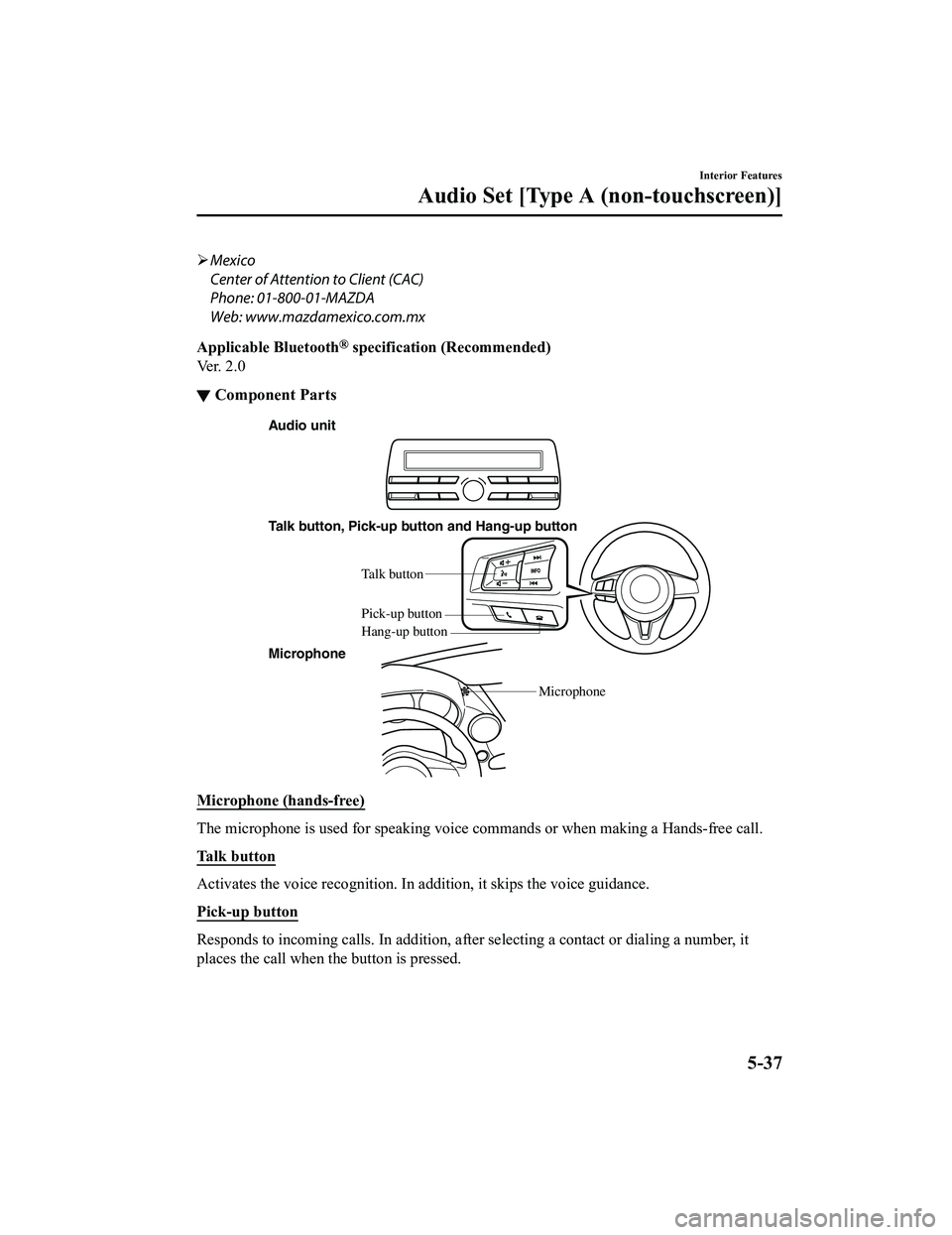
▼ Component Parts
Audio unit
Talk button, Pick-up button and Hang-up button
Microphone Microphone
Talk b
utton
Hang-up b utton
Pick-up b
utton
Microphone (hands-free)
The microphone is used for speaking voice commands or when maki ng a Hands-free call.
Talk button
Activates the voice recognition. In addition, it skips the voice guidance.
Pick-up button
Responds to incoming c alls. In addition, after selecting a cont act or dialing a number, it
places the call when the button is pressed.
Interior Features
Audio Set [Type A (non-touchscreen)]
5-37
MX-5_8GF7-EA-17J_Edition2 2017-10-31 14:07:27
Page 261 of 576

Bluetooth® Preparation
▼Bluetooth® Hands-Free Preparation
Pairing code setting
The 4-digit pairing code setting for
registration of your cell phone (pairing)
can be set beforehand.
NOTE
The initial setting value is “0000”.
1. Press the pick-up
button or talk button
with a short press.
2. Say: [Beep] “Setup”
3. Prompt: “Select one of the following:
Pairing options, confirmation prompts,
language, passcode, select phone or
select music player.”
4. Say: [Beep] “Pairing options”
5. Prompt: “Select one of the following:
Pair, Edit, Delete, L ist, or Set Pairing
Code.”
6. Say: [Beep] “Set pairing code”
7. Prompt: “Your current pairing code is
XXXX. Do you want to change it to a
different pairing code?”
8. Say: [Beep] “Yes”
9. Prompt: “Please say a 4-digit pairing
code.”
10. Say: [Beep] “YYYY”
11. Prompt: “YYYY is this correct?”
12. Say: [Beep] “Yes” or “No”
13. If “Yes”, go to Step 14. If “No”, the procedure returns to Step 9.
14. Prompt: “Your new pairing code is
YYYY. Use this pairing code when
pairing devices to the Hands free
system. Do you want to pair a device
now?”
15. Say: [Beep] “Yes” or “No”
16. If “Yes”, the syste m switches to the
device registration mode. If “No”, the
system returns to standby status.
▼ Device pairing (Bluetooth®
Hands-Free)
To use Bluetooth® Hands-Free, the device
equipped with Bluetooth
® has to be paired
to the Bluetooth
® unit using the following
procedure.
A maximum of seven devices including
hands-free mobile phones and Bluetooth
®
audio devices can be paired to one vehicle.
NOTE
If a Bluetooth® device has already been
paired to the vehicle as a Bluetooth
®
audio device, it does not need to be paired
again when using the device as a
hands-free mobile phone. Conversely, it
does not need to be paired again as a
Bluetooth
® audio device if it has already
been paired as a hands-free mobile phone.
1. Activate the Bluetooth
® application of
the device.
NOTE
For the operation of the device, refer
to its instruction manual.
2. Press the pick-up button or talk button
with a short press.
3. Say: [Beep] “Setup”
4. Prompt: “Select one of the following:
Pairing options, confirmation prompts,
language, passcode, select phone or
select music player.”
5. Say: [Beep] “Pairing options”
6. Prompt: “Select one of the following:
Pair, Edit, Delete, List, or Set Pairing
Code.”
7. Say: [Beep] “Pair”
Interior Features
Audio Set [Type A (non-touchscreen)]
5-39
MX-5_8GF7-EA-17J_Edition2 2017-10-31 14:07:27