filler lid MAZDA MODEL MX-5 MIATA 2019 User Guide
[x] Cancel search | Manufacturer: MAZDA, Model Year: 2019, Model line: MODEL MX-5 MIATA, Model: MAZDA MODEL MX-5 MIATA 2019Pages: 553, PDF Size: 59 MB
Page 77 of 553
▼Locking, Unlocking with Auxiliary
Key
Both doors and the fuel-filler lid lock
automatically when th
e driver's door is
locked using the auxiliary key.
Both doors and the fuel-filler lid unlock
when the driver's door is unlocked and the
auxiliary key is held i n the unlock position
for one second or longer.
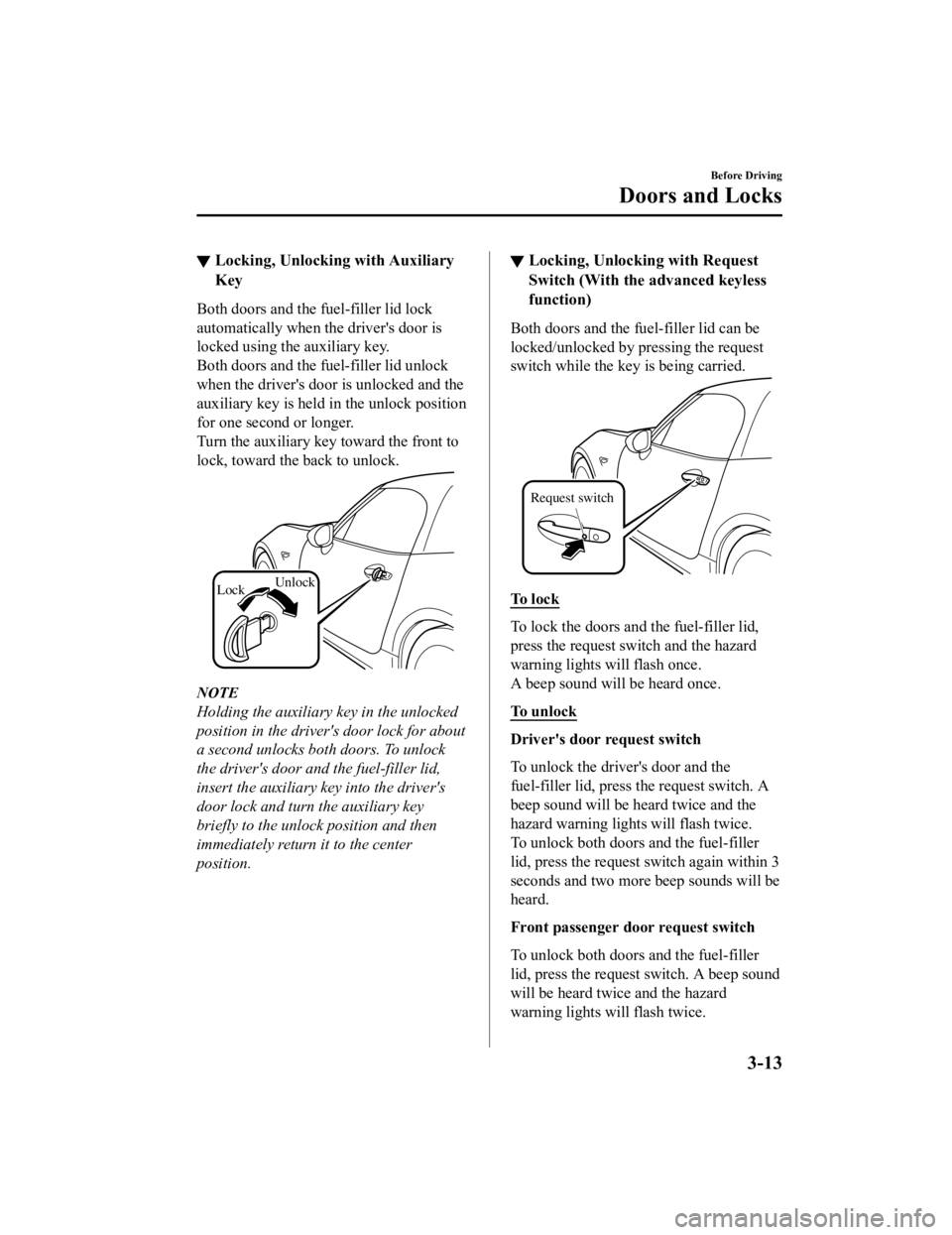
Turn the auxiliary key toward the front to
lock, toward the back to unlock.
Lock Unlock
NOTE
Holding the auxiliary
key in the unlocked
position in the driver's door lock for about
a second unlocks both doors. To unlock
the driver's door and the fuel-filler lid,
insert the auxiliary key into the driver's
door lock and turn the auxiliary key
briefly to the unlock position and then
immediately return it to the center
position.
▼ Locking, Unlocking with Request
Switch (With the advanced keyless
function)
Both doors and the fu
el-filler lid can be
locked/unlocked by pressing the request
switch while the key is being carried.
Request switch
To l o c k
To lock the doors and the fuel-filler lid,
press the request switch and the hazard
warning lights will flash once.
A beep sound will be heard once.
To unlock
Driver's door request switch
To unlock the driver's door and the
fuel-filler lid, press the request switch. A
beep sound will be heard twice and the
hazard warning lights will flash twice.
To unlock both doors and the fuel-filler
lid, press the request switch agai n within 3
seconds and two more beep sounds will be
heard.
Front passenger doo r request switch
To unlock both doors and the fuel-filler
lid, press the request switch. A beep sound
will be heard twice and the hazard
warning lights will flash twice.
Before Driving
Doors and Locks
3-13
MX-5_8GV5-EA-18E_Edition3 2018-7-17 15:48:16
Page 78 of 553

NOTE
The system can be set to unlock both
doors and the fuel-filler lid by
performing a single operation.
Refer to Personalization Features on
page 9-9.
Use the following procedure to change
the setting.
1. Switch the ignition off and close bothof the doors and the trunk lid.
2. Open the driver's door.
3. Within 30 seconds of opening the driver's door, press and hold the
UNLOCK button on the key for 5
seconds or longer (the sound of the
doors locking/unlocking can be
heard).
After this, the system switches the
setting of pressing the driver's
request switch once or twice to
unlock both doors each time the
UNLOCK button is pressed (the
sound of the doors locking/unlocking
can be heard).
4. The setting change is completed by
doing any one of the following:
Switching the ignition to ACC or
ON.
Closing the driver's door.
Opening the trunk lid.
Not operating the key for 10
seconds.
Pressing any button except the
UNLOCK button on the key.
Pressing a request switch.
Confirm that both doors and the
fuel-filler lid are securely locked.
Both doors and the fuel-filler lid cannot
be locked when any door is open.
It may require a few seconds for the
doors to unlock after the request switch
is pressed.
A beep sound is heard for confirmation
when the doors and the fuel-filler lid are
locked/unlocked using the request
switch. If you prefer, the beep sound can
be turned off.
The volume of the beep sound can also
be changed. Refer to Personalization
Features on page 9-9.
Use the following procedure to change
the setting.
1. Switch the ignition off and close bothof the doors and the trunk lid.
2. Open the driver's door.
3. Within 30 seconds of opening the
driver's door, press and hold the
LOCK button on the key for 5
seconds or longer (Both of the doors
and the fuel-filler lid are locked and
unlocked when the LOCK button on
the key is pressed and held for five
seconds.).
The beep sound activates at the
currently set volume. The setting
changes each time the LOCK button
on the key is pressed and the beep
sound activates at the set volume. (If
the beep sound has been set to not
activate, it will not activate.)
4. The setting change is completed by doing any one of the following:
Switching the igni tion to ACC or
ON.
Closing the driver's door.
Opening the trunk lid.
Not operating the key for 10
seconds.
Pressing any button except the
LOCK button on the key.
Before Driving
Doors and Locks
3-14
MX-5_8GV5-EA-18E_Edition3 2018-7-17 15:48:16
Page 79 of 553

Pressing a request switch.
(With theft-deterrent system)
The hazard warning lights flash when
the theft-deterrent system is armed or
turned off.
Refer to Theft-Deterrent System on page
3-46.
The setting can be changed so that the
doors and the fuel-filler lid are locked
automatically without pressing the
request switch.
Refer to Personalization Features on
page 9-9.
(Walk-away auto lock function)
A beep sound is heard when both doors
are closed while the advanced key is
being carried. Both doors and the
fuel-filler lid are locked automatically
after about three seconds when the
advanced key is out of the operational
range. Also, the hazard warning lights
flash once. (Even if the driver is in the
operational range, both doors and the
fuel-filler lid are locked automatically
after about 30 seconds.) If you are out of
the operational range before the doors
and the trunk lid are completely closed
or another key is left in the vehicle, the
walk-away auto lock function will not
work. Always make sure that both doors
and the trunk lid are closed and locked
before leaving the vehicle. The
walk-away auto lock function does not
close the power windows.
(Auto re-lock function)
After unlocking with the request switch,
both doors and the fuel-filler lid will
automatically lock if any of the
following operations are not performed
within about 60 seconds. If your vehicle
has a theft-deterrent system, the hazard
warning lights will flash for
confirmation.
The time required for the doors and the
fuel-filler lid to lock automatically can
be changed.
Refer to Personalization Features on
page 9-9.
Opening a door or the trunk lid.
Switching the ignition to any position
other than off.
▼ Locking, Unlocking with
Transmitter
Both doors and the fu
el-filler lid can be
locked/unlocked by operating the keyless
entry system transmitt er, refer to Keyless
Entry System (page 3-3).
▼ Locking, Unlocking with Door-Lock
Switch
Both doors and the fu
el-filler lid lock
automatically when the lock side is
pressed. They unlock when the unlock
side is pressed.
Before Driving
Doors and Locks
3-15
MX-5_8GV5-EA-18E_Edition3 2018-7-17 15:48:16
Page 80 of 553

Driver's door
Unlock
Lock
Front passenger's door
UnlockLock
To lock both the doors and the fuel-filler
lid from an open door
, press the lock side
of the door lock switch and then close the
door.
NOTE
When locking the doors this way, be
careful not to leave the key inside the
vehicle.
▼ Auto Lock/Unlock Function
WA R N I N G
Do not pull the inner handle on a door:
Pulling the inner handle on a door while
the vehicle is moving is dangerous.
Passengers can fall out of the vehicle if the
door opens accidentally , which could
result in death or
serious injury.
When the vehicle speed exceeds 20
km/h (12 mph), both doors and the
fuel-filler lid lock automatically.
When the ignition is switched off, both
doors and the fuel-filler lid unlock
automatically.
These functions can also be disabled so
that they do not operate.
Auto lock/unlock f unction setting
change using door-lock switch
The doors and the fuel-filler lid can be set
to lock or unlock automatically by
selecting any one of the functions from the
following table and using the driver's
door-lock switch on the interior door
panel.
Before Driving
Doors and Locks
3-16
MX-5_8GV5-EA-18E_Edition3 2018-7-17 15:48:16
Page 81 of 553
NOTE
Function number 3 in the following
table is the factory setting for your
vehicle.
There are only a total of six auto lock/
unlock settings available for automatic
transmission vehicles, and three for
manual transmission vehicles. Be sure to
press the unlock side of the driver's
door-lock switch the correct number of
times according to the selected function
number. If the switch is mistakenly
pressed seven times on an automatic
transmission vehicle or four times on a
manual transmission, the procedure will
be cancelled. If this occurs, start the
procedure from the beginning.
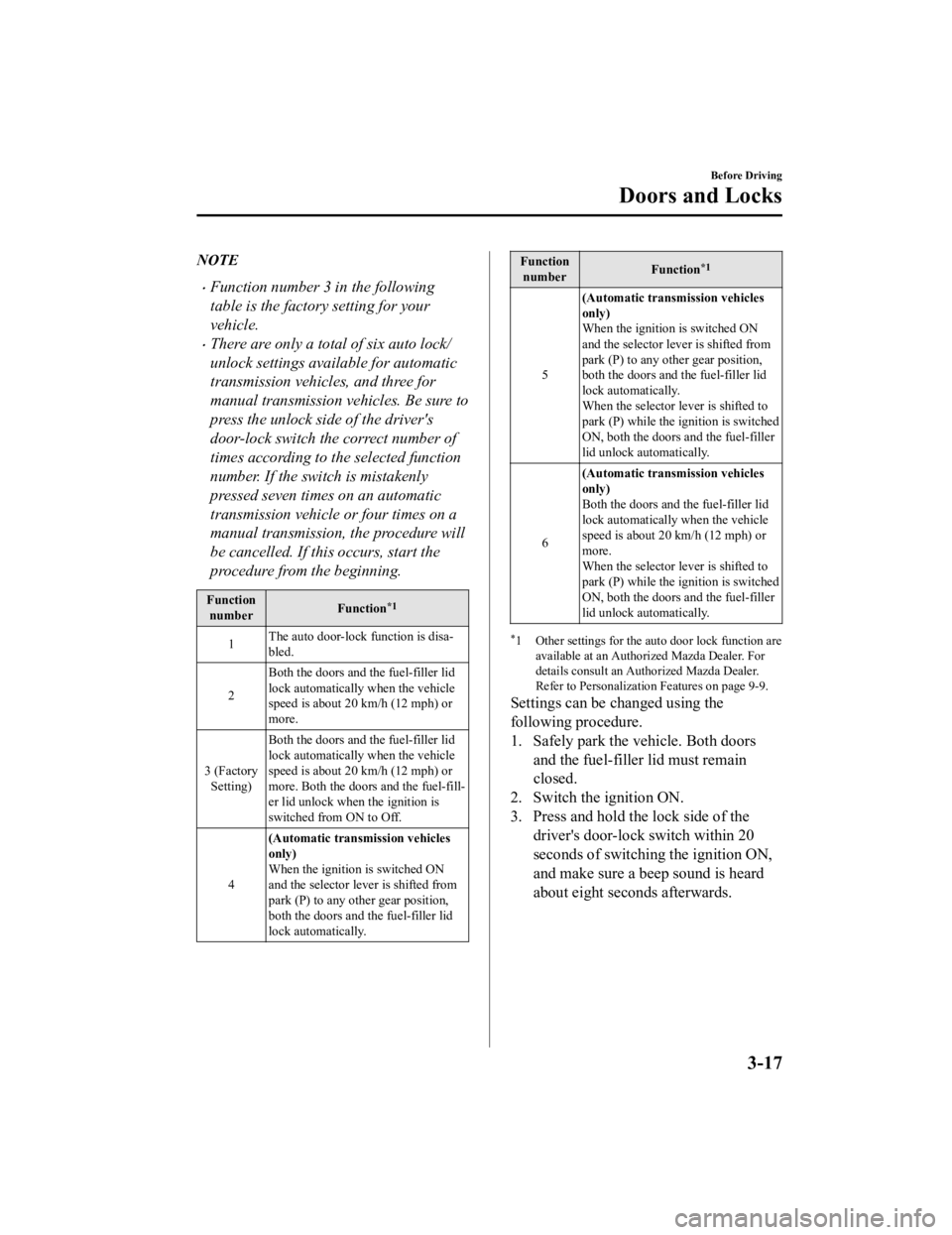
Functionnumber Function*1
1The auto door-lock function is disa‐
bled.
2 Both the doors and the fuel-filler lid
lock automatically when the vehicle
speed is about 20 km/h (12 mph) or
more.
3 (Factory Setting) Both the doors and the fuel-filler lid
lock automatically when the vehicle
speed is about 20 km/h (12 mph) or
more. Both the door
s and the fuel-fill‐
er lid unlock when the ignition is
switched from ON to Off.
4 (Automatic transmission vehicles
only)
When the ignition is switched ON
and the selector lever is shifted from
park (P) to any ot
her gear position,
both the doors and the fuel-filler lid
lock automatically.
Function number Function*1
5(Automatic transmission vehicles
only)
When the ignition is switched ON
and the selector lever is shifted from
park (P) to any other gear position,
both the doors and
the fuel-filler lid
lock automatically.
When the selector lever is shifted to
park (P) while the i gnition is switched
ON, both the doors and the fuel-filler
lid unlock automatically.
6 (Automatic transmission vehicles
only)
Both the doors and the fuel-filler lid
lock automatically when the vehicle
speed is about 20 km/h (12 mph) or
more.
When the selector lever is shifted to
park (P) while the i
gnition is switched
ON, both the doors and the fuel-filler
lid unlock automatically.
*1 Other settings for the au to door lock function are
available at an Authorized Mazda Dealer. For
details consult an Authorized Mazda Dealer.
Refer to Personalization Features on page 9-9.
Settings can be changed using the
following procedure.
1. Safely park the vehicle. Both doors
and the fuel-filler lid must remain
closed.
2. Switch the ignition ON.
3. Press and hold the lock side of the driver's door-lock switch within 20
seconds of switching the ignition ON,
and make sure a beep sound is heard
about eight seconds afterwards.
Before Driving
Doors and Locks
3-17
MX-5_8GV5-EA-18E_Edition3 2018-7-17 15:48:16
Page 82 of 553

4. Refer to the auto lock/unlock function
setting table, determine the function
number for the desired setting. Press
the unlock side of the driver's
door-lock switch the same number of
times as the selected function number
(Ex. If you select function 2, press the
unlock side of the switch only 2 times).
5. Three seconds after the function
setting has been changed, a beep sound
will beep in the amount of the selected
function number. (Ex. Function
number 3 = 3 beep sounds)
(Manual transmission vehicles)
Press 2 times
Press 3 times
Current Function Number
Function Number 1
Function Number 2
Function Number 3 Press 4 times
Press unlock side of
lock switch once
Cancel setting Cancel setting
Function set (The
number of beeps
heard is the same as
the selected function
number)
Press lock side of
lock switch
Wait for 3 second
(Automatic transmission vehicles)
Press unlock side of
lock switch once
Press 2 times
Press 3 times
Current Function Number
Function Number 1
Function Number 2
Press 4 times
Function Number 3
Press 5 times
Function Number 4
Press 7 times
Function Number 5
Press 6 times
Function Number 6
Cancel setting Cancel setting
Function set (The
number of beeps
heard is the same as
the selected function
number)
Press lock side of
lock switch
Wait for 3 second
NOTE
The doors and the fuel-filler lid cannot
be locked or unlocked while the setting
function is being performed.
The procedure can be cancelled by
pressing the lock side of the driver's
door-lock switch.
▼ Locking, Unlocking with Door-Lock
Knob
Operation from inside
To lock any door from the inside, press the
door-lock knob.
To unlock, pull it outward.
Before Driving
Doors and Locks
3-18
MX-5_8GV5-EA-18E_Edition3
2018-7-17 15:48:16
Page 90 of 553
Fuel-Filler Lid and Cap
WA R N I N G
When removing the fuel-filler cap, loosen
the cap slightly and wait for any hissing to
stop, then remove it:
Fuel spray is dangerous. Fuel can burn skin
and eyes and cause illness if ingested. Fuel
spray is released when there is pressure in
the fuel tank and the fuel-filler cap is
removed too quickly.
Before refueling, stop the engine, and
always keep sparks and flames away from
the filler neck:
Fuel vapor is dangerous. It could be ignited
by sparks or flames causing serious burns
and injuries.
Additionally, use of the incorrect fuel-filler
cap or not using a fuel-filler cap may result
in a fuel leak, which could result in serious
burns or death in an accident.
Do not continue refueling after the fuel
pump nozzle shuts off automatically:
Continuing to add fuel after the fuel pump
nozzle has shut off automatically is
dangerous because overfilling the fuel tank
may cause fuel overflow or leakage. Fuel
overflow and leakage could damage the
vehicle and if the fuel ignites it could cause
a fire and explosion resulting in serious
injury or death.
CAUTION
Always use only a ge nuine Mazda fuel-filler
cap or an approved equivalent, available
at an Authorized Mazda Dealer. The wrong
cap can result in a serious malfunction of
the fuel and emission control systems.
(U.S.A. and Canada)
It may also cause the check engine light in
the instrument cluster to illuminate.
▼ Refueling
Before refueling, close both the doors,
windows, and the trunk lid, and switch the
ignition OFF.
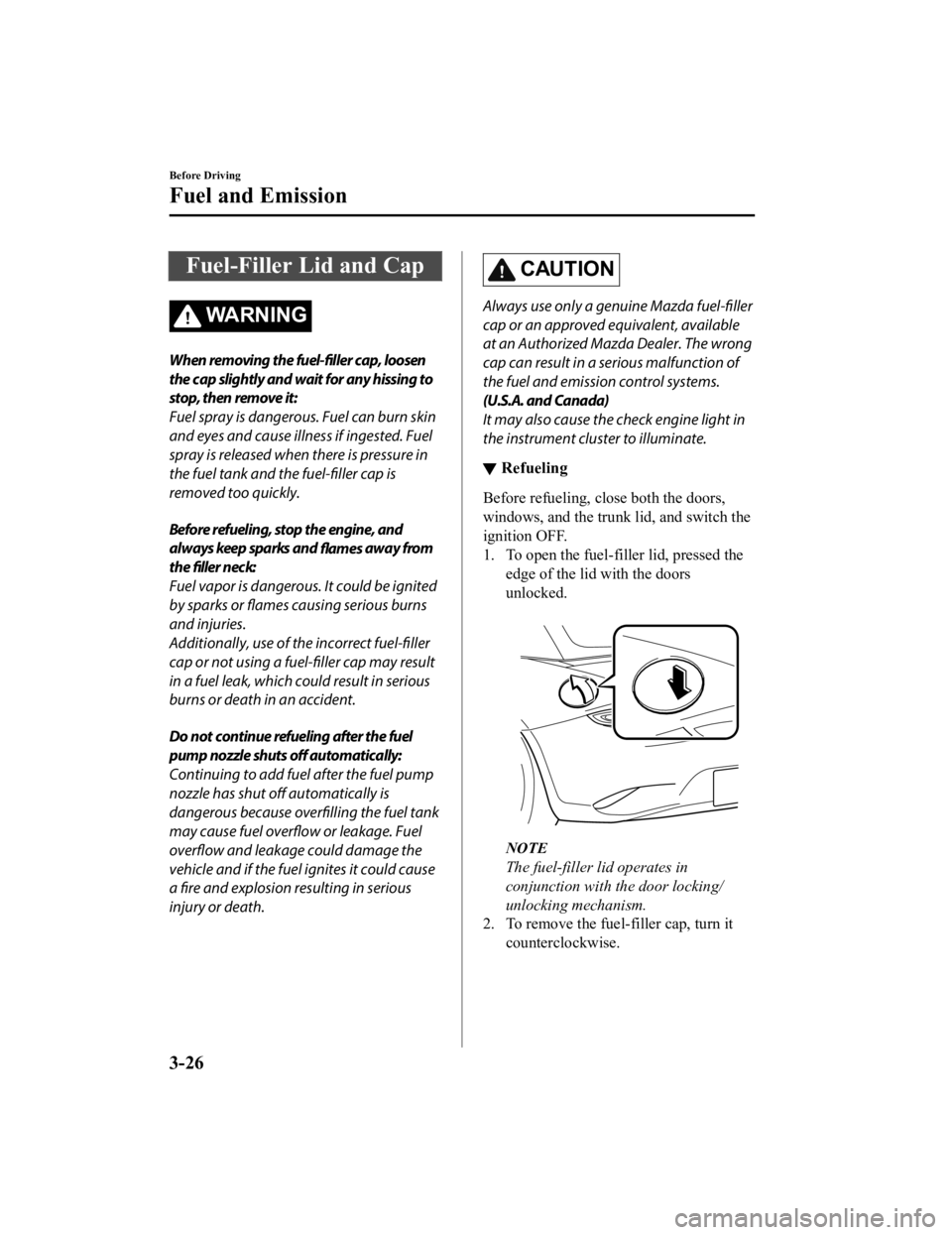
1. To open the fuel-filler lid, pressed the
edge of the lid with the doors
unlocked.
NOTE
The fuel-filler lid operates in
conjunction with the door locking/
unlocking mechanism.
2. To remove the fuel-filler cap, turn it
counterclockwise.
Before Driving
Fuel and Emission
3-26
MX-5_8GV5-EA-18E_Edition3 2018-7-17 15:48:16
Page 91 of 553
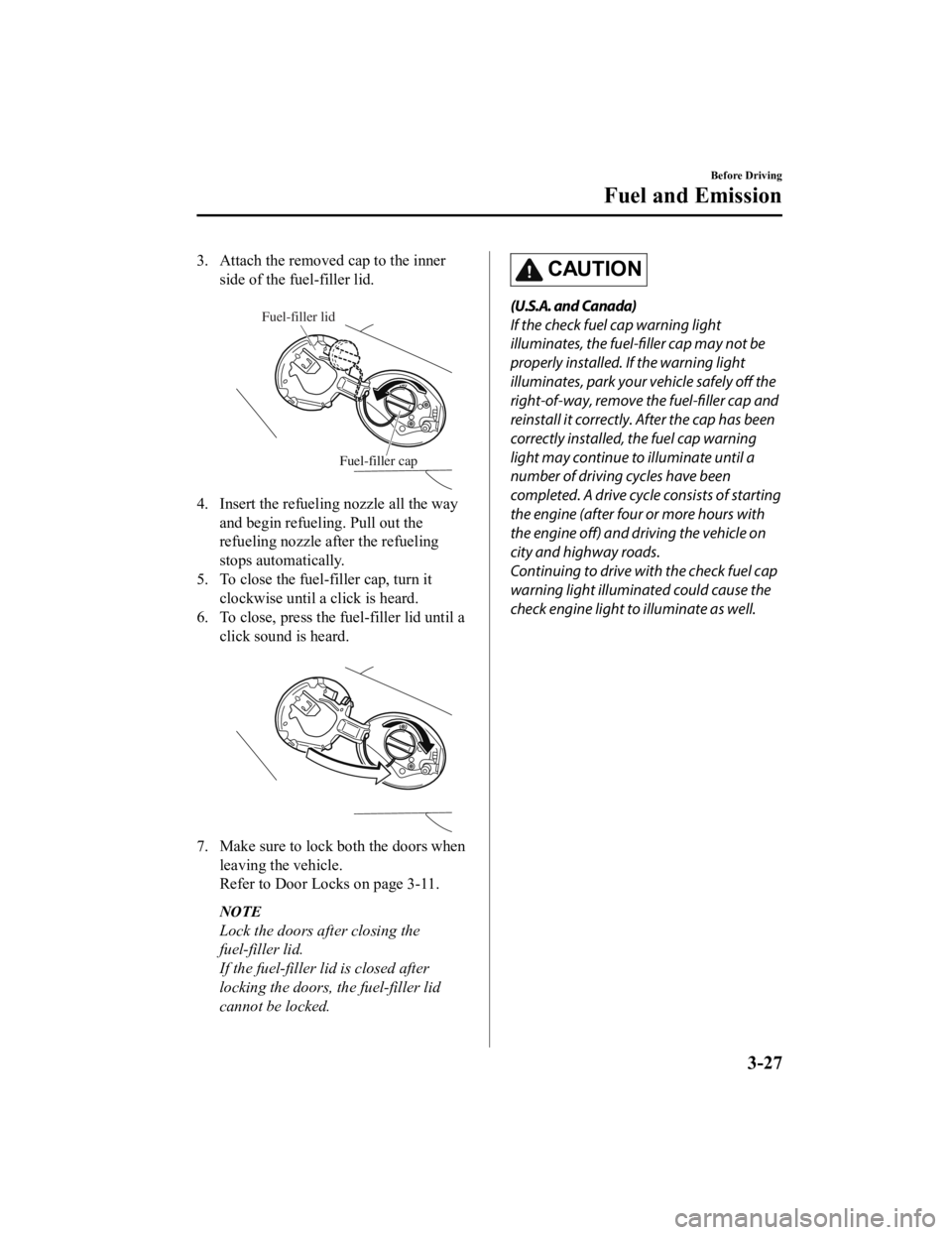
3. Attach the removed cap to the innerside of the fuel-filler lid.
Fuel-filler lid
Fuel-filler cap
4. Insert the refuelin g nozzle all the way
and begin refueling. Pull out the
refueling nozzle after the refueling
stops automatically.
5. To close the fuel-filler cap, turn it clockwise until a click is heard.
6. To close, press the fuel-filler lid until a
click sound is heard.
7. Make sure to lock both the doors whenleaving the vehicle.
Refer to Door Locks on page 3-11.
NOTE
Lock the doors after closing the
fuel-filler lid.
If the fuel-filler lid is closed after
locking the doors, the fuel-filler lid
cannot be locked.
CAUTION
(U.S.A. and Canada)
If the check fuel cap warning light
illuminates, the fuel-filler cap may not be
properly installed. If the warning light
illuminates, park your vehicle safely off the
right-of-way, remove th e fuel-filler cap and
reinstall it correctly. After the cap has been
correctly installed, the fuel cap warning
light may continue to illuminate until a
number of driving cycles have been
completed. A drive cycle consists of starting
the engine (after four or more hours with
the engine off) and driving the vehicle on
city and highway roads.
Continuing to drive with the check fuel cap
warning light illuminated could cause the
check engine light to illuminate as well.
Before Driving
Fuel and Emission
3-27
MX-5_8GV5-EA-18E_Edition3 2018-7-17 15:48:16
Page 135 of 553

The direction of the arrow () indicates
that the fuel-filler lid is on the left side
of the vehicle.
▼ Dashboard Illumination
(Without auto-light control)
When the position lights are turned on
with the ignition switched ON, the
brightness of the dashboard illumination is
dimmed.
(With auto-light control)
When the position lights are turned on
with the ignition switched ON, the
brightness of the dashboard illumination is
dimmed. However, when the light sensor
detects that the surrounding area is bright
such as when the position lights are turned
on in the daytime, the dashboard
illumination does not dim.
NOTE
(With auto-light control)
When the ignition is
switched ON in the
early evening or at dusk, the dashboard
illumination is dimmed for several
seconds until the light sensor detects the
brightness of the surrounding area,
however, the dimmer may cancel after
the brightness is detected.
When the position lights are turned on,
the position lights i ndicator light in the
instrument cluster turns on.
Refer to Headlights on page 4-44.
The brightness of the instrument cluster
and dashboard illuminations can be
adjusted by rotating the knob.
The brightness decreases by rotating the
knob to the left. A beep sound will be
heard when the knob has been rotated to
the maximum dim position.
The brightness increases by rotating the
knob to the right.
Dim
Bright
Function for cancelling illumination
dimmer
The illumination dimmer can be canceled
by rotating the dashboard illumination
knob to the right until a beep sound is
heard while the instrument cluster is
dimmed with the ignition switched ON. If
the instrument clust er's visibility is
reduced due to glare from surrounding
brightness, cancel the illumination
dimmer.
NOTE
When the illumination dimmer is
canceled, the instrument cluster cannot
be dimmed even if the position lights are
turned on.
When the illumination dimmer is
canceled, the screen in the center
display switches to constant display of
the daytime screen.
When Driving
Instrument Cluster and Display
4-15
MX-5_8GV5-EA-18E_Edition3 2018-7-17 15:48:16
Page 141 of 553

▼Engine Coolant Temperature Gauge
Displays the engine coolant temperature.
The blue gauge indicates that the engine
coolant temperature is low, and the red
gauge indicates that the engine coolant
temperature is high and overheating.
The engine coolant temperature gauge can
be switched to indicate only the high
engine coolant temperature range by
pressing the panel light control switch.
CAUTION
If the high engine coolant temperature
warning light (red) flashes, there is a
possibility of overheating. Drive slowly to
reduce engine load until you can
find a safe
place to stop the vehicle and wait for the
engine to cool down.
Refer to Overheating on page 7-27.
NOTE
The temperature unit (Centigrade/
Fahrenheit) of the engine coolant gauge
display changes in conjunction with the
temperature unit of the outside
temperature display.
Refer to Personalization Features on
page 9-9.
During normal driving, the engine
coolant temperature stabilizes at 100 °C
(210 °F) or less, and the gauge indicates
a range lower than 100 °C (210 °F).
▼ Fuel Gauge
The fuel gauge shows approximately how
much fuel is remaining in the tank when
the ignition is switched ON. We
recommend keeping the tank over 1/4 full.
Full
1/4 Full
Empty
If the fuel level is low, () and () turn an
amber color. Refuel as soon as possible.
Refer to Taking Action on page 7-40.
NOTE
After refueling, it may require some time
for the indicator to stabilize. In addition,
the indicator may deviate while driving
on a slope or curve since the fuel moves
in the tank.
The display indicating a quarter or less
remaining fuel has more segments to
show the remaining fuel level in greater
detail.
The direction of the arrow () indicates
that the fuel-filler lid is on the left side
of the vehicle.
When Driving
Instrument Cluster and Display
4-21
MX-5_8GV5-EA-18E_Edition3 2018-7-17 15:48:16