fuse MAZDA MODEL TRIBUTE 2003 Owners Manual (in English)
[x] Cancel search | Manufacturer: MAZDA, Model Year: 2003, Model line: MODEL TRIBUTE, Model: MAZDA MODEL TRIBUTE 2003Pages: 248, PDF Size: 2.5 MB
Page 2 of 248
Driving 120
Starting 120
Brakes 124
Transmission operation 128
Vehicle loading 147
Trailer towing 149
Roadside Emergencies 155
Hazard flasher switch 155
Fuses and relays 156
Overheating 162
Jump starting 169
Wrecker towing 174
Customer Assistance 176
Reporting safety defects (U.S. only) 186
Cleaning 187
Maintenance and Specifications 192
Engine compartment 200
Engine oil 203
Battery 207
Fuel information 214
Air filter(s) 228
Refill capacities 234
Engine data 236
Accessories 239
Index 240
All rights reserved. Reproduction by any means, electronic or mechanical
including photocopying, recording or by any information storage and retrieval
system or translation in whole or part is not permitted without written
authorization from Mazda Motor Corporation. Mazda may change the contents
without notice and without incurring obligation.
Copyright 2002 Mazda Motor Corporation
Table of Contents
2
Page 6 of 248
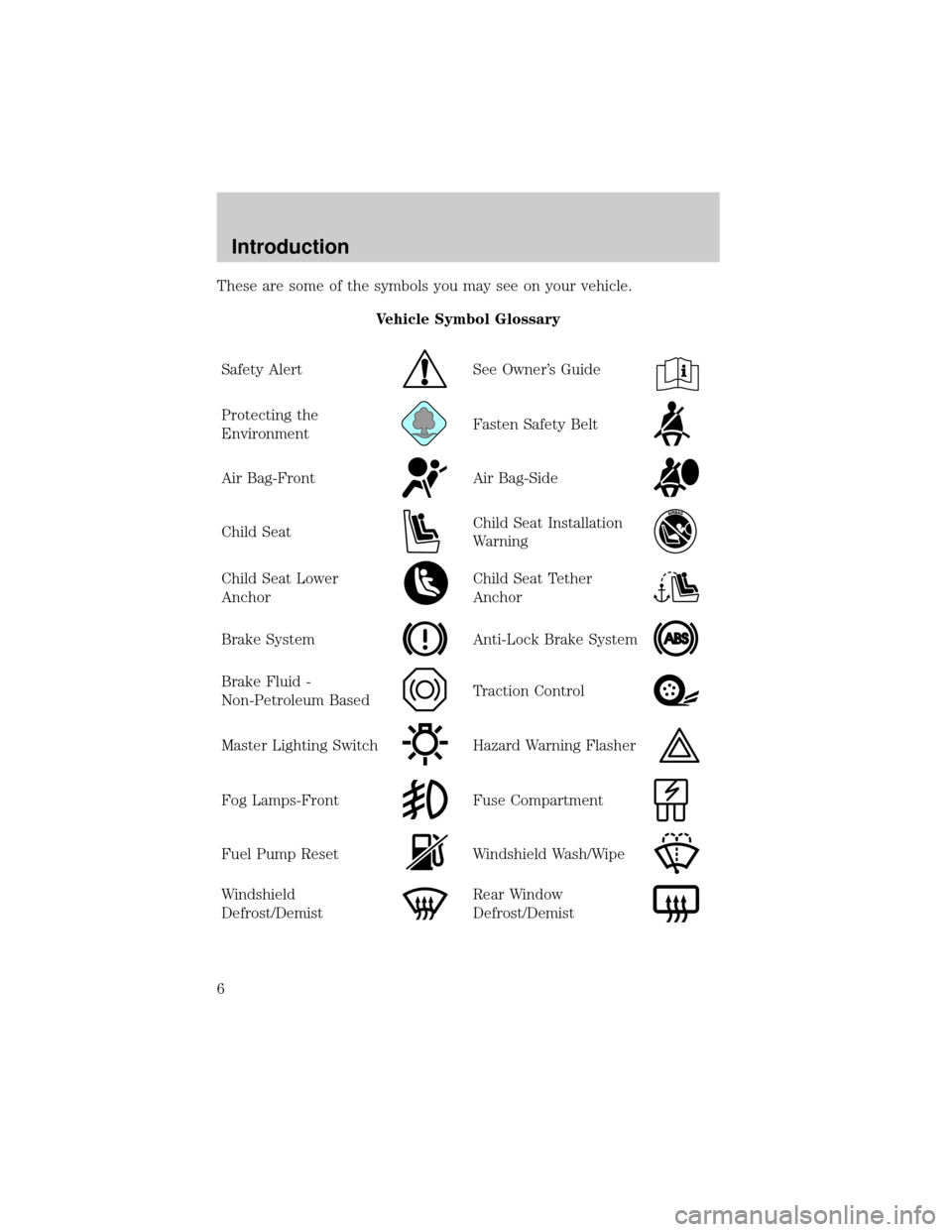
These are some of the symbols you may see on your vehicle.
Vehicle Symbol Glossary
Safety Alert
See Owner's Guide
Protecting the
EnvironmentFasten Safety Belt
Air Bag-FrontAir Bag-Side
Child SeatChild Seat Installation
Warning
Child Seat Lower
AnchorChild Seat Tether
Anchor
Brake SystemAnti-Lock Brake System
Brake Fluid -
Non-Petroleum BasedTraction Control
Master Lighting SwitchHazard Warning Flasher
Fog Lamps-FrontFuse Compartment
Fuel Pump ResetWindshield Wash/Wipe
Windshield
Defrost/DemistRear Window
Defrost/Demist
Introduction
6
Page 23 of 248
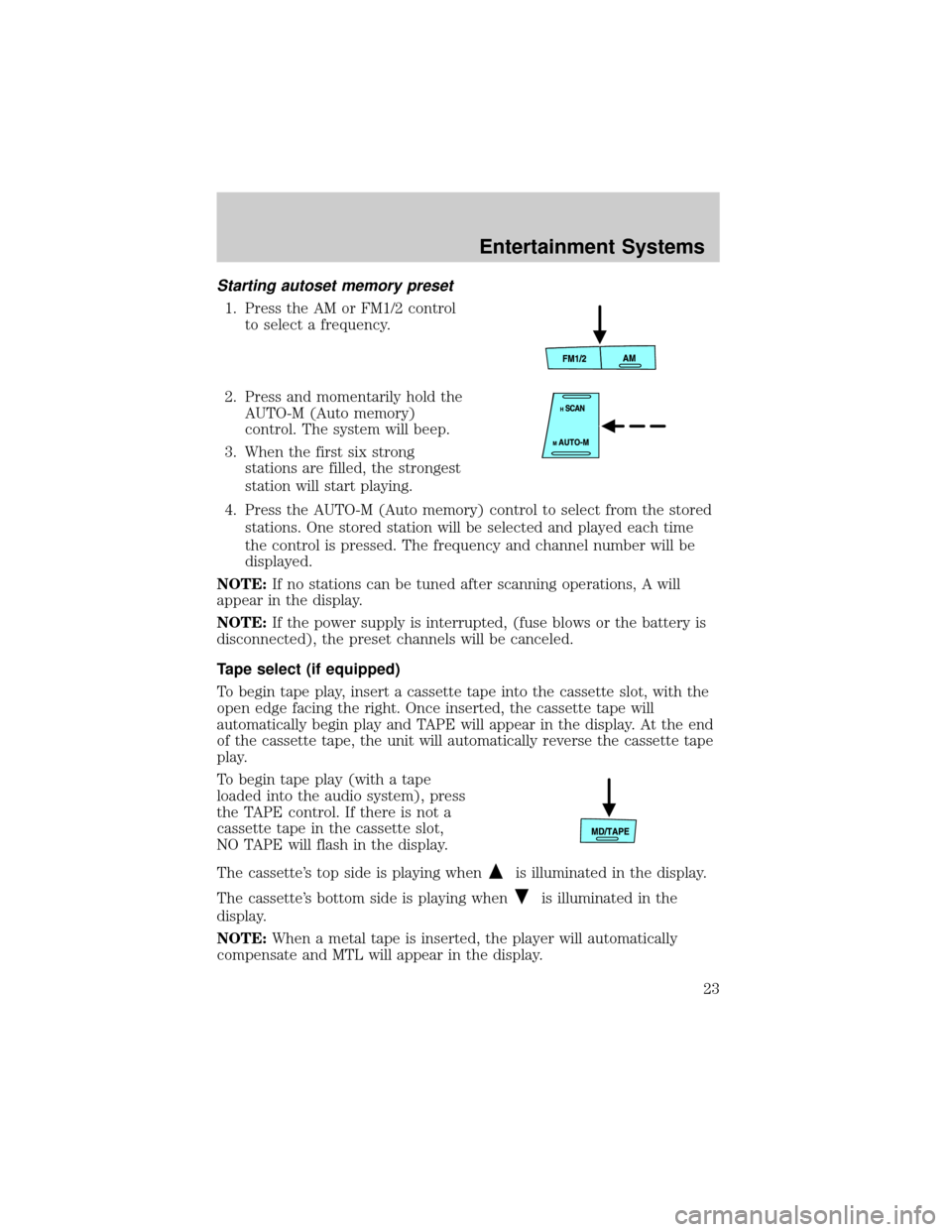
Starting autoset memory preset
1. Press the AM or FM1/2 control
to select a frequency.
2. Press and momentarily hold the
AUTO-M (Auto memory)
control. The system will beep.
3. When the first six strong
stations are filled, the strongest
station will start playing.
4. Press the AUTO-M (Auto memory) control to select from the stored
stations. One stored station will be selected and played each time
the control is pressed. The frequency and channel number will be
displayed.
NOTE:If no stations can be tuned after scanning operations, A will
appear in the display.
NOTE:If the power supply is interrupted, (fuse blows or the battery is
disconnected), the preset channels will be canceled.
Tape select (if equipped)
To begin tape play, insert a cassette tape into the cassette slot, with the
open edge facing the right. Once inserted, the cassette tape will
automatically begin play and TAPE will appear in the display. At the end
of the cassette tape, the unit will automatically reverse the cassette tape
play.
To begin tape play (with a tape
loaded into the audio system), press
the TAPE control. If there is not a
cassette tape in the cassette slot,
NO TAPE will flash in the display.
The cassette's top side is playing when
is illuminated in the display.
The cassette's bottom side is playing when
is illuminated in the
display.
NOTE:When a metal tape is inserted, the player will automatically
compensate and MTL will appear in the display.
Entertainment Systems
23
Page 26 of 248
Random play in CD mode
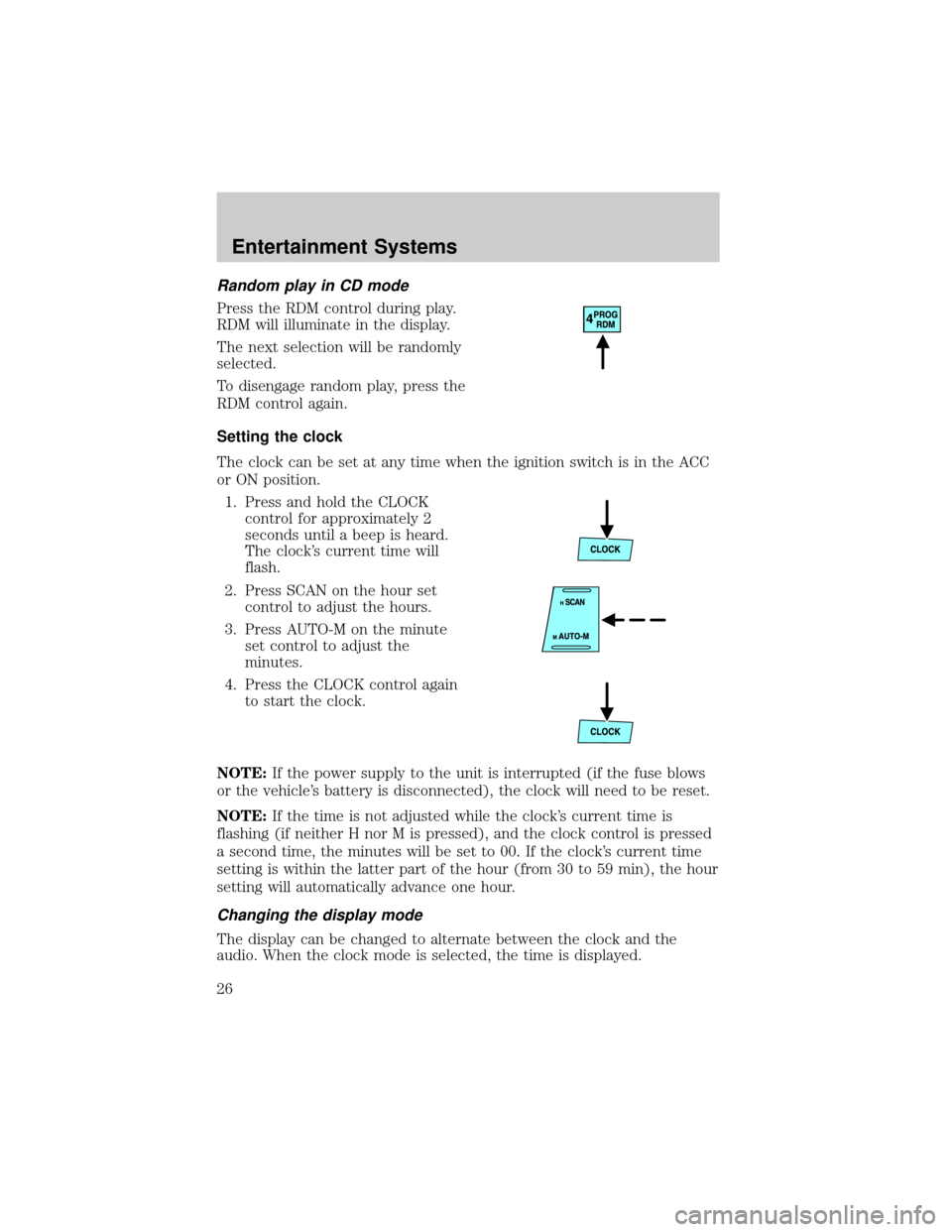
Press the RDM control during play.
RDM will illuminate in the display.
The next selection will be randomly
selected.
To disengage random play, press the
RDM control again.
Setting the clock
The clock can be set at any time when the ignition switch is in the ACC
or ON position.
1. Press and hold the CLOCK
control for approximately 2
seconds until a beep is heard.
The clock's current time will
flash.
2. Press SCAN on the hour set
control to adjust the hours.
3. Press AUTO-M on the minute
set control to adjust the
minutes.
4. Press the CLOCK control again
to start the clock.
NOTE:If the power supply to the unit is interrupted (if the fuse blows
or the vehicle's battery is disconnected), the clock will need to be reset.
NOTE:If the time is not adjusted while the clock's current time is
flashing (if neither H nor M is pressed), and the clock control is pressed
a second time, the minutes will be set to 00. If the clock's current time
setting is within the latter part of the hour (from 30 to 59 min), the hour
setting will automatically advance one hour.
Changing the display mode
The display can be changed to alternate between the clock and the
audio. When the clock mode is selected, the time is displayed.
Entertainment Systems
26
Page 34 of 248
NOTE:If the power supply is interrupted, (fuse blows or the battery is
disconnected), the preset channels will be canceled.
Tape select (if equipped)
To begin tape play, insert a cassette tape into the cassette slot, with the
open edge facing the right. Once inserted, the cassette tape will
automatically begin play and TAPE will appear in the display. At the end
of the cassette tape, the unit will automatically reverse the cassette tape
play.
To begin tape play (with a tape
loaded into the audio system), press
the TAPE control. If there is not a
cassette tape in the cassette slot,
NO TAPE will flash in the display.
The cassette's top side is playing when
is illuminated in the display.
The cassette's bottom side is playing when
is illuminated in the
display.
NOTE:When a metal tape is inserted, the player will automatically
compensate and MTL will appear in the display.
Press the VOL (Volume) control to
stop cassette play.
CD select
To begin CD play:
1. Insert a CD into the slot, label
side up. The system will
auto-load the CD and begin play
after a short pause. The disc
number and the track number will illuminate in the display.
Entertainment Systems
34
Page 40 of 248

2. Press SCAN on the hour set
control to adjust the hours.
3. Press AUTO-M on the minute
set control to adjust the
minutes.
4. Press the CLOCK control again
to start the clock.
NOTE:If the power supply to the unit is interrupted (if the fuse blows
or the vehicle's battery is disconnected), the clock will need to be reset.
NOTE:If the time is not adjusted while the clock's current time is
flashing (if neither H nor M is pressed), and the clock control is pressed
a second time, the minutes will be set to 00. If the clock's current time
setting is within the latter part of the hour (from 30 to 59 min), the hour
setting will automatically advance one hour.
Changing the display mode
The display can be changed to alternate between the clock and the
audio. When the clock mode is selected, the time is displayed.
Press the CLOCK control to
alternate the display.
NOTE:If the audio operation is
selected while the clock mode is on,
the selected audio mode will be
displayed for ten seconds, then the display will revert to the clock mode.
TROUBLESHOOTING THE CD CHANGER (IF EQUIPPED)
If sound skips:
²You may be traveling on a rough road, playing badly scratched discs or
the disc may be dirty. Skipping will not scratch the discs or damage
the player.
If your changer does not work, it may be that:
²A disc is already loaded where you want to insert a disc.
²The disc is inserted with the label surface downward.
²The disc is dusty or defective.
²The player's internal temperature is above 60ÉC (140ÉF). Allow the
player to cool down before operating.
Entertainment Systems
40
Page 100 of 248

WARNING: National Highway Traffic Safety Administration
(NHTSA) recommends a minimum distance of at least 25 cm
(10 inches) between an occupant's chest and the driver air bag
module.
WARNING: Never place your arm over the air bag module as a
deploying air bag can result in serious arm fractures or other
injuries.
Steps you can take to properly position yourself away from the air bag:
²Move your seat to the rear as far as you can while still reaching the
pedals comfortably.
²Recline the seat slightly (one or two degrees) from the upright
position.
WARNING: Do not put anything on or over the air bag module
including hands or feet. Placing objects on or over the air bag
inflation area may cause those objects to be propelled by the
air bag into your face and torso causing serious injury.
WARNING: Do not attempt to service, repair, or modify the Air
Bag Supplemental Restraint Systems or its fuses. See your
authorized Mazda dealership.
WARNING: Modifications to the front end of the vehicle,
including frame, bumper, front end body structure, tow hooks,
B-pillar surrounding parts, and snow plows may effect the
performance of the air bag sensors increasing the risk of injury.
Do not modify the front end of the vehicle.
WARNING: Additional equipment may effect the performance
of the air bag sensors increasing the risk of injury. Consult your
authorized Mazda dealership before installation of additional
equipment.
Seating and Safety Restraints
100
Page 105 of 248

WARNING: Seating Position with Side Air Bags
Sitting too close to the side air bag storage compartments or
placing hands on them is extremely dangerous. A side air bag
inflates with great force and speed directly out of the outboard
shoulder of the front seat and expands along the front door on
the side the car is hit. Serious injury could occur if someone is
sitting too close to the door or leaning against a window in the
front seats or if rear seat occupants grab the sides of the front
seatbacks. Furthermore, sleeping up against the door or
hanging out the driver's-side window while driving could block
the side air bag and eliminate the advantages of supplemental
protection. Give the side air bags room to work by sitting in the
center of the seat while the vehicle is moving with seat belts
worn properly.
WARNING: Modification of the Supplemental Restraint System
Modifying the components or wiring of the supplemental
restraint system is dangerous. You could accidentally activate it
or make it inoperable. Don't make any modifications to the
supplemental restraint system. This includes installing trim,
badges, or anything else over the air bag storage areas. It also
includes installing extra electric equipment on or near system
components or wiring.
An Authorized Mazda Dealer can provide the special care
needed in the removal and installation of front seats. It is
important to protect the side air bag wiring and connections to
assure that the bags do not accidently deploy and that the seats
retain an undamaged air bag connection.
WARNING: Disposing of an air bag can be dangerous. Unless all
safety procedures are followed, injury can result. Ask an
Authorized Mazda Dealer how to safely dispose of an air bag or
how to scrap an air bag equipped vehicle.
WARNING: Do not attempt to service, repair, or modify the air
bag Supplemental Restraint System, its fuses or the seat cover
on a seat containing an air bag. See your authorized Mazda
dealer.
Seating and Safety Restraints
105
Page 129 of 248

If you cannot move the gearshift lever out of P (Park) with ignition in
the ON position and the brake pedal depressed:
1. Apply the parking brake, turn ignition key to LOCK, then remove the
key.
2. Locate the access cover plate to
the brake-shift interlock
override. It is located on the top
of the steering column.
3. Insert a tool (or a screwdriver)
into the right-hand side of the
brake-shift interlock access
cover and remove the cover.
4. Insert a tool (or screw driver)
into the access hole to override
the brake-shift interlock. Apply
the brake and shift into Neutral
while holding down the override
tab.
If it is necessary to use the above procedure to move the gearshift lever,
it is possible that a fuse has blown or the vehicle's brakelamps are not
operating properly. Refer toFuses and relaysin theRoadside
emergencieschapter.
Driving
129
Page 156 of 248

FUSES AND RELAYS
Fuses
If electrical components in the
vehicle are not working, a fuse may
have blown. Blown fuses are
identified by a broken wire within
the fuse. Check the appropriate
fuses before replacing any electrical
components.
Note:Always replace a fuse with one that has the specified amperage
rating. Using a fuse with a higher amperage rating can cause severe wire
damage and could start a fire.
Standard fuse amperage rating and color
COLOR
Fuse
ratingMini
fusesStandard
fusesMaxi
fusesCartridge
maxi
fusesFuse link
cartridge
2A Grey Grey Ð Ð Ð
3A Violet Violet Ð Ð Ð
4A Pink Pink Ð Ð Ð
5A Tan Tan Ð Ð Ð
7.5A Brown Brown Ð Ð Ð
10A Red Red Ð Ð Ð
15A Blue Blue Ð Ð Ð
20A Yellow Yellow Yellow Blue Blue
25A Natural Natural Ð Ð Ð
30A Green Green Green Pink Pink
40A Ð Ð Orange Green Green
50A Ð Ð Red Red Red
60A Ð Ð Blue Ð Yellow
70A Ð Ð Tan Ð Brown
80A Ð Ð Natural Ð Black
Passenger compartment fuse panel
The fuse panel is located below and to the left of the steering wheel by
the brake pedal. Remove the panel cover to access the fuses.
15
Roadside Emergencies
156