steering wheel MAZDA MODEL TRIBUTE 2004 Owners Manual (in English)
[x] Cancel search | Manufacturer: MAZDA, Model Year: 2004, Model line: MODEL TRIBUTE, Model: MAZDA MODEL TRIBUTE 2004Pages: 256, PDF Size: 2.64 MB
Page 1 of 256
Introduction 3
Instrument Cluster 10
Warning and control lights 10
Gauges 15
Entertainment Systems 17
AM/FM stereo with CD 17
AM/FM stereo with cassette and in-dash six CD 27
Climate Controls 44
Manual heating and air conditioning 44
Lights 48
Headlamps 48
Turn signal control 50
Bulb replacement 51
Driver Controls 56
Windshield wiper/washer control 56
Steering wheel adjustment 58
Power windows 61
Mirrors 62
Speed control 63
Locks and Security 70
Keys 70
Locks 70
Anti-theft system 75
Seating and Safety Restraints 80
Seating 80
Safety restraints 90
Air bags 100
Child restraints 110
Driving 121
Starting 121
Table of Contents
Table of Contents
1
Page 58 of 256

Changing the wiper blades
1. Pull the wiper arm away from
the vehicle. Turn the blade at an
angle from the wiper arm. Push
the lock pin manually to release
the blade and pull the wiper
blade down toward the
windshield to remove it from
the arm.
2. Attach the new wiper to the
wiper arm and press it into
place until a click is heard.
3. Replace wiper blades every 6
months for optimum
performance.
MANUAL TILT STEERING COLUMN
To adjust the steering wheel:
1. Pull down and hold the steering
wheel release control toward
you.
2. Move the steering wheel up or
down until you find the desired
location.
3. Pull the steering wheel release
control up. This will lock the
steering wheel in position.
WARNING: Adjusting the steering wheel while the vehicle is
moving is dangerous. Moving it can very easily cause the driver
to abruptly turn to the left or right. This can lead to loss of
control or an accident. Never adjust the steering wheel while
the vehicle is moving.
OVERHEAD CONSOLE (IF EQUIPPED)
The appearance of your vehicle's overhead console will vary according to
your option package.
Driver Controls
58
Page 64 of 256
WARNING: Using cruise control in the following conditions
could cause you to lose control of the vehicle:
²Heavy or unsteady traffic
²Slippery or winding roads
²Similar restrictions that require inconsistent speed
Don't use cruise control in these situations.
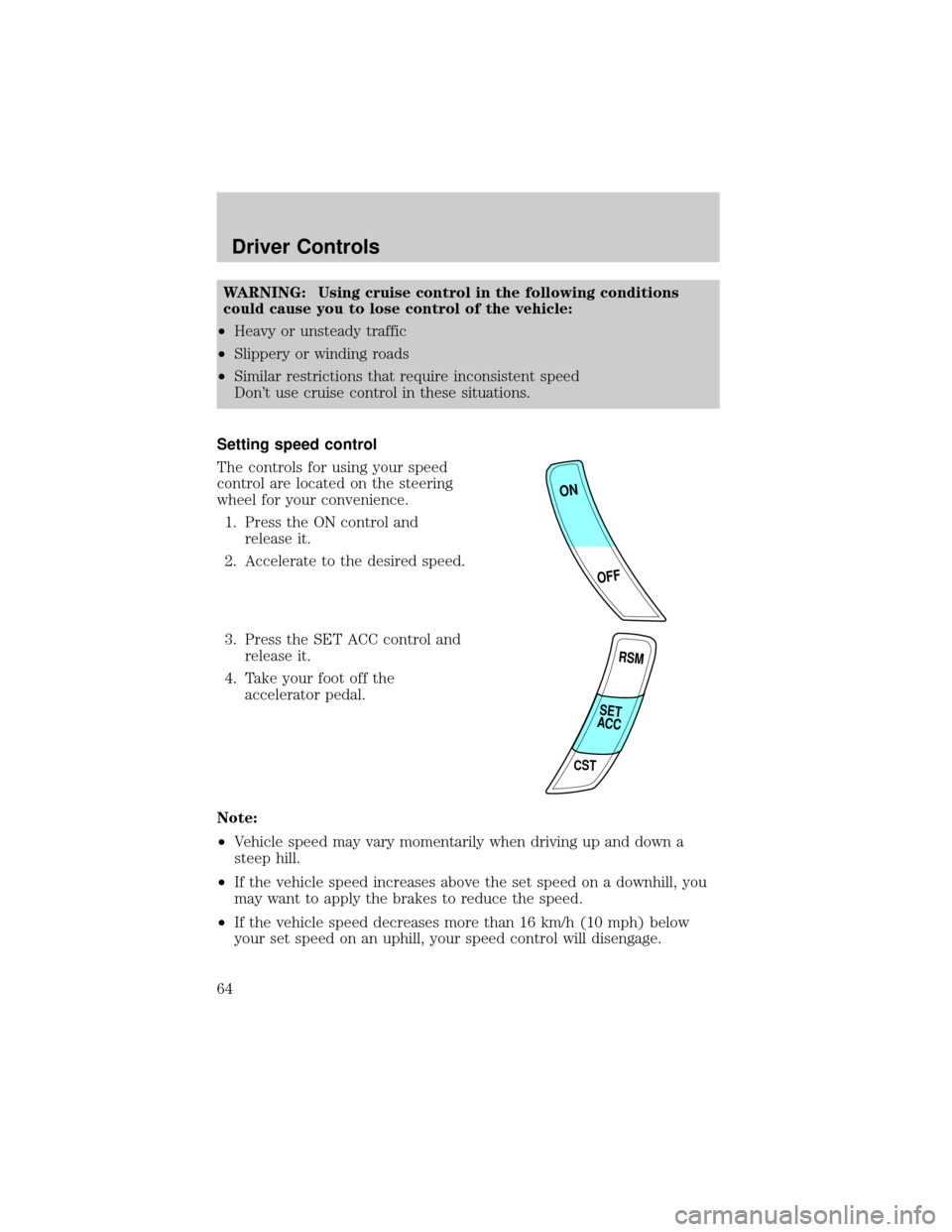
Setting speed control
The controls for using your speed
control are located on the steering
wheel for your convenience.
1. Press the ON control and
release it.
2. Accelerate to the desired speed.
3. Press the SET ACC control and
release it.
4. Take your foot off the
accelerator pedal.
Note:
²Vehicle speed may vary momentarily when driving up and down a
steep hill.
²If the vehicle speed increases above the set speed on a downhill, you
may want to apply the brakes to reduce the speed.
²If the vehicle speed decreases more than 16 km/h (10 mph) below
your set speed on an uphill, your speed control will disengage.
ON
OFF
RSM
CST
SET
ACC
Driver Controls
64
Page 101 of 256

Important supplemental restraint system (SRS) precautions
The supplemental restraint system
is designed to work with the safety
belt to help protect the driver and
right front passenger from certain
upper body injuries.
WARNING: Air bags DO NOT
inflate slowly or gently and the
risk of injury from a deploying
air bag is greatest close to the
trim covering the air bag
module.
WARNING: All occupants of the vehicle, including the driver,
should always properly wear their safety belts, even when an
air bag (SRS) is provided.
WARNING: Always transport children 12 years old and under
in the back seat and always properly use appropriate child
restraint systems.
WARNING: National Highway Traffic Safety Administration
(NHTSA) recommends a minimum distance of at least 25 cm (10
inches) between an occupant's chest and the driver air bag
module.
WARNING: The driver should always hold onto only the rim of
the steering wheel. Never place your arm over the air bag
module as a deploying air bag can result in serious arm
fractures or other injuries.
Steps you can take to properly position yourself away from the air bag:
²Move your seat to the rear as far as you can while still reaching the
pedals comfortably.
²Recline the seat slightly (one or two degrees) from the upright
position.
Seating and Safety Restraints
101
Page 126 of 256
Four-wheel anti-lock brake system (ABS) (if equipped)
If the vehicle is equipped with an anti-lock braking system (ABS), a
noise from the hydraulic pump motor and pulsation in the pedal may be
observed during ABS braking events. Pedal pulsation coupled with noise
while braking under panic conditions or on loose gravel, bumps, wet or
snowy roads is normal and indicates proper functioning of the vehicle's
anti-lock brake system.
NOTE:The ABS performs a self-check after you start the engine and
begin to drive away.
A brief mechanical noise may be heard during this test. This is normal. If
a malfunction is found, the ABS warning light will come on. If the vehicle
has continuous vibration or shudder in the steering wheel while braking,
the vehicle should be inspected by an authorized Mazda dealership.
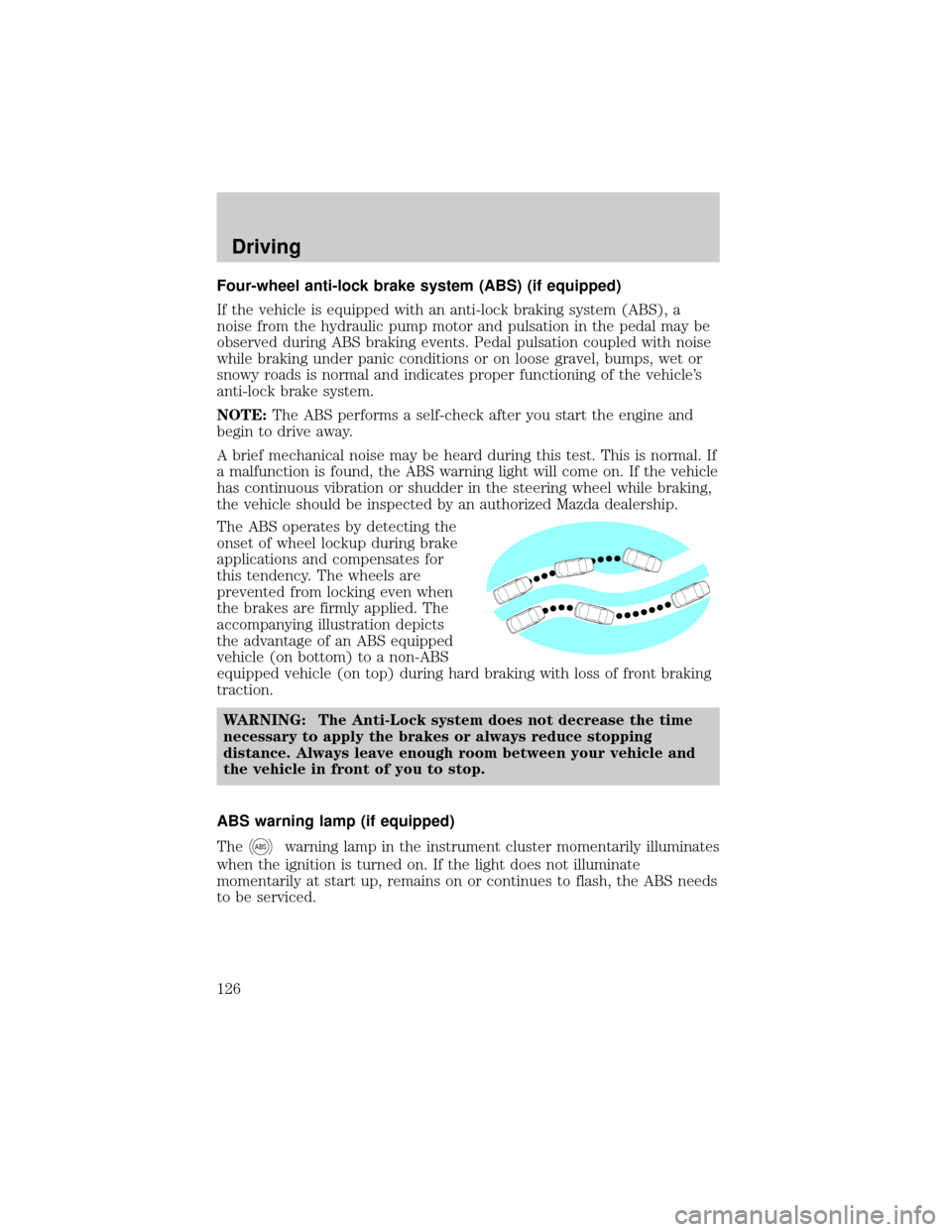
The ABS operates by detecting the
onset of wheel lockup during brake
applications and compensates for
this tendency. The wheels are
prevented from locking even when
the brakes are firmly applied. The
accompanying illustration depicts
the advantage of an ABS equipped
vehicle (on bottom) to a non-ABS
equipped vehicle (on top) during hard braking with loss of front braking
traction.
WARNING: The Anti-Lock system does not decrease the time
necessary to apply the brakes or always reduce stopping
distance. Always leave enough room between your vehicle and
the vehicle in front of you to stop.
ABS warning lamp (if equipped)
The
ABSwarning lamp in the instrument cluster momentarily illuminates
when the ignition is turned on. If the light does not illuminate
momentarily at start up, remains on or continues to flash, the ABS needs
to be serviced.
Driving
126
Page 127 of 256
With the ABS light on, the anti-lock
brake system is disabled and normal
braking is still effective unless the
brake warning light also remains
illuminated with parking brake
released. (If your brake warning lamp illuminates, have your vehicle
serviced immediately by an authorized Mazda dealership.)
Using four wheel ABS (if equipped)
²In an emergency or when maximum efficiency from the ABS is
required, apply continuous force on the brake. The ABS will be
activated immediately, thus allowing you to retain full steering control
of your vehicle and, providing there is sufficient space, will enable you
to avoid obstacles and bring the vehicle to a controlled stop.
WARNING: The Anti-Lock system does not decrease the time
necessary to apply the brakes or always reduce stopping
distance. Always leave enough room between your vehicle and
the vehicle in front of you to stop.
NOTE:We recommend that you familiarize yourself with this braking
technique. However, avoid taking any unnecessary risks.
Parking brake
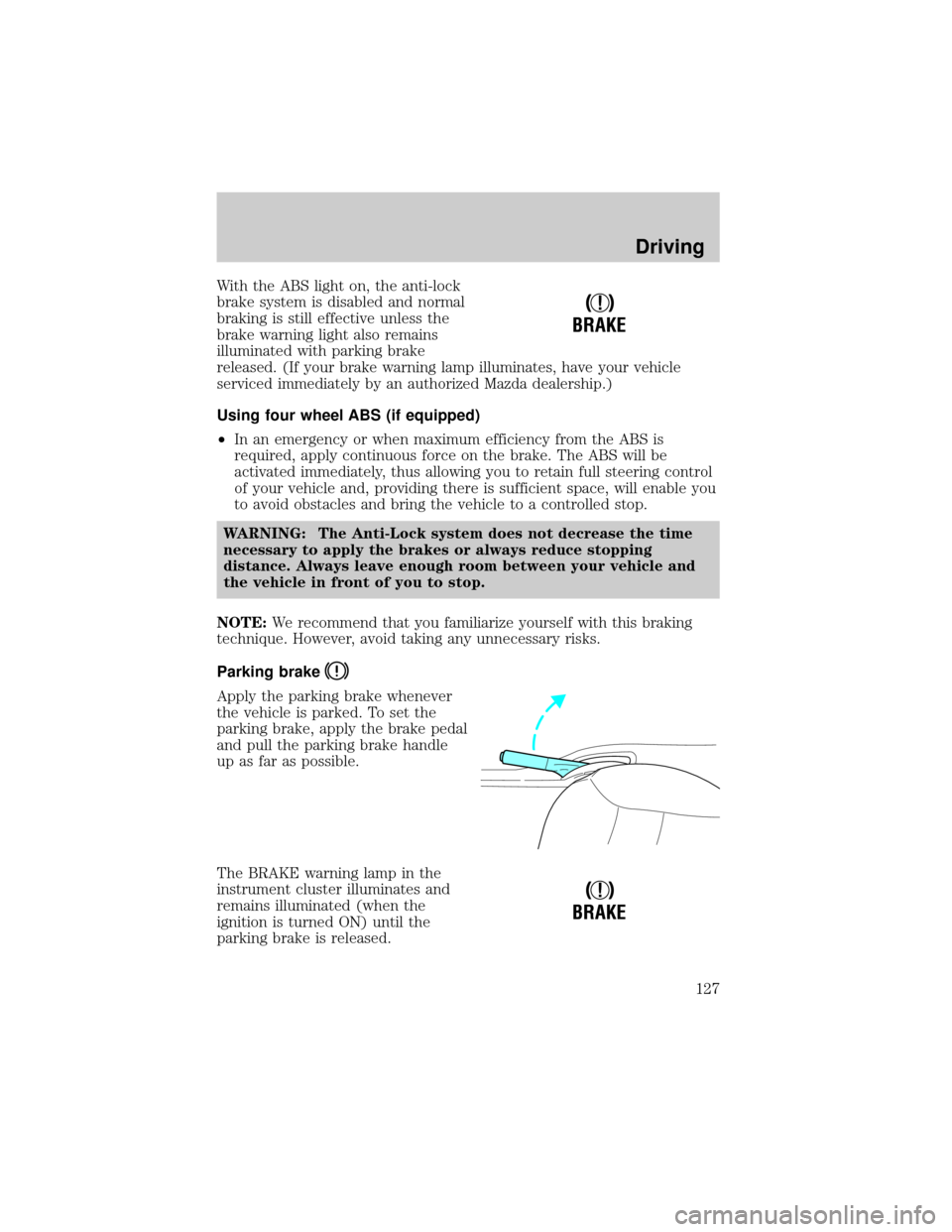
Apply the parking brake whenever
the vehicle is parked. To set the
parking brake, apply the brake pedal
and pull the parking brake handle
up as far as possible.
The BRAKE warning lamp in the
instrument cluster illuminates and
remains illuminated (when the
ignition is turned ON) until the
parking brake is released.
!
BRAKE
!
BRAKE
Driving
127
Page 128 of 256
WARNING: Always set the parking brake fully and make sure
that the gearshift is securely latched in P (Park) (automatic
transmission) or in 1 (First Gear) (manual transmission).
NOTE:The parking brake is not recommended to stop a moving vehicle.
However, if the normal brakes fail, the parking brake can be used to stop
your vehicle in an emergency. Since the parking brake applies only the
rear brakes, the vehicle's stopping distance will increase greatly and the
handling of your vehicle will be adversely affected.
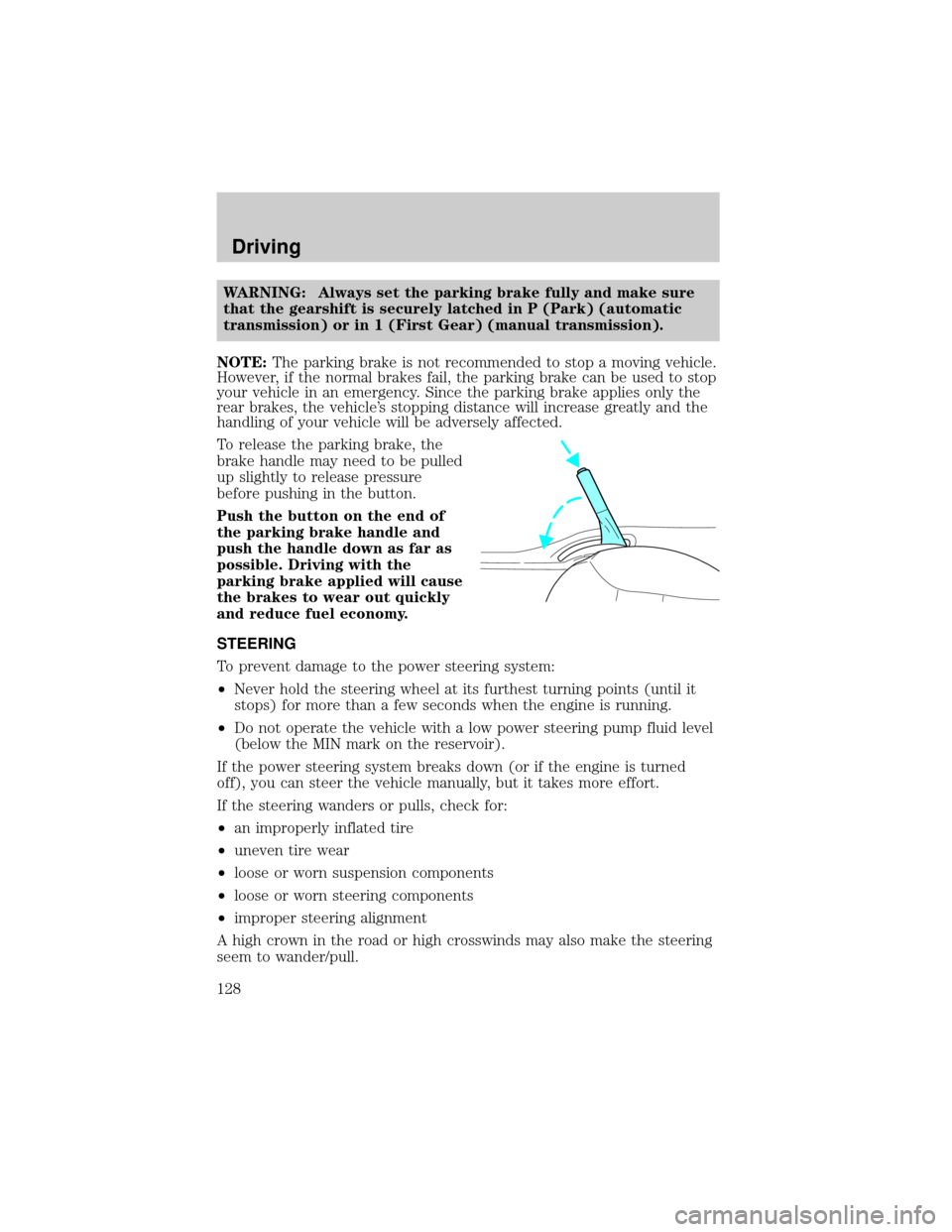
To release the parking brake, the
brake handle may need to be pulled
up slightly to release pressure
before pushing in the button.
Push the button on the end of
the parking brake handle and
push the handle down as far as
possible. Driving with the
parking brake applied will cause
the brakes to wear out quickly
and reduce fuel economy.
STEERING
To prevent damage to the power steering system:
²Never hold the steering wheel at its furthest turning points (until it
stops) for more than a few seconds when the engine is running.
²Do not operate the vehicle with a low power steering pump fluid level
(below the MIN mark on the reservoir).
If the power steering system breaks down (or if the engine is turned
off), you can steer the vehicle manually, but it takes more effort.
If the steering wanders or pulls, check for:
²an improperly inflated tire
²uneven tire wear
²loose or worn suspension components
²loose or worn steering components
²improper steering alignment
A high crown in the road or high crosswinds may also make the steering
seem to wander/pull.
Driving
128
Page 140 of 256

The indicator light illuminates when the 4x4 ON mode is engaged.
Shifting between 4x4 Auto and ON modes
Press the four-wheel drive control to
apply power to both axles. When
you activate the control, the
indicator light will illuminate in the
instrument cluster.
When you press the control again,
4x4 AUTO is activated and, the indicator light will turn off.
Either shift can be done at a stop or while driving at any speed.
Driving off-road with truck and utility vehicles
4x4 vehicles are specially equipped for driving on sand, snow, mud and
rough terrain and have operating characteristics that are somewhat
different from conventional vehicles, both on and off the road.
How your vehicle differs from other vehicles
Truck and utility vehicles can differ from some other vehicles. Your
vehicle may be higher to allow it to travel over rough terrain without
getting hung up or damaging underbody components.
The differences that make your vehicle so versatile also make it handle
differently than an ordinary passenger car.
Maintain steering wheel control at all times, especially in rough
terrain. Since sudden changes in terrain can result in abrupt
steering wheel motion, make sure you grip the steering wheel
from the outside. Do not grip the spokes.
Drive cautiously to avoid vehicle damage from concealed objects
such as rocks and stumps.
You should either know the terrain or examine maps of the area before
driving. Map out your route before driving in the area. To maintain
steering and braking control of your vehicle, you must have all four
wheels on the ground and they must be rolling, not sliding or spinning.
Basic operating principles
²Drive slower in strong crosswinds which can affect the normal steering
characteristics of your vehicle.
²Be extremely careful when driving on pavement made slippery by
loose sand, water, gravel, snow or ice.
If your vehicle goes off the edge of the pavement
²If your vehicle goes off the edge of the pavement, slow down, but
avoid severe brake application, ease the vehicle back onto the
LOCK
Driving
140
Page 141 of 256

pavement only after reducing your speed. Do not turn the steering
wheel too sharply while returning to the road surface.
²It may be safer to stay on the apron or shoulder of the road and slow
down gradually before returning to the pavement. You may loose
control if you do not slow down or if you turn the steering wheel too
sharply or abruptly.
²It often may be less risky to strike small objects, such as highway
reflectors, with minor damage to your vehicle rather than attempt a
sudden return to the pavement which could cause the vehicle to slide
sideways out of control or rollover. Remember, your safety and the
safety of others should be your primary concern.
WARNING: Vehicles with a higher center of gravity such as
utility and four-wheel drive vehicles handle differently than
vehicles with a lower center of gravity. Utility and four-wheel
drive vehicles are not designed for cornering at speeds as high
as passenger cars any more than low-slung sports cars are
designed to perform satisfactorily under off-road conditions.
Avoid sharp turns, excessive speed and abrupt maneuvers in
these vehicles. Failure to drive cautiously could result in an
increased risk of loss of vehicle control, vehicle rollover,
personal injury and death.
If your vehicle gets stuck
If your vehicle gets stuck in mud or snow it may be rocked out by
shifting between forward and reverse gears, stopping between shifts, in a
steady pattern. Press lightly on the accelerator in each gear.
Do not rock the vehicle if the engine is not at normal operating
temperature or damage to the transmission may occur.
Do not rock the vehicle for more than a few minutes or damage
to the transmission and tires may occur or the engine may
overheat.
WARNING: Always set the parking brake fully and make sure
the gearshift is latched in 1st gear or R (Reverse) (manual
transaxles) or P (Park) (automatic transaxles). Turn the
ignition to the LOCK position and remove the key whenever
you leave your vehicle.
Driving
141
Page 142 of 256
WARNING: If the parking brake is fully released, but the brake
warning lamp remains illuminated, the brakes may not be
working properly. See your authorized Mazda dealership.
Do not rock the vehicle if the engine is not at normal operating
temperature or damage to the transaxle may occur.
WARNING: Do not spin the wheels at over 56 km/h (35 mph).
The tires may fail and injure a passenger or bystander.
Emergency maneuvers
²In an unavoidable emergency situation where a sudden sharp turn
must be made, remember to avoid ªover-drivingº your vehicle, i.e.,
turn the steering wheel only as rapidly and as far as required to avoid
the emergency. Excessive steering will result in less vehicle control,
not more. Additionally, smooth variations of the accelerator and/or
brake pedal pressure should be utilized if changes in vehicle speed are
called for. Avoid abrupt steering, acceleration or braking which could
result in an increased risk of loss of vehicle control, vehicle rollover
and/or personal injury. Use all available road surface to return the
vehicle to a safe direction of travel.
²In the event of an emergency stop, avoid skidding the tires and do not
attempt any sharp steering wheel movements.
WARNING: Vehicles with a higher center of gravity such as
utility and four-wheel drive vehicles handle differently than
vehicles with a lower center of gravity. Utility and four-wheel
drive vehicles are not designed for cornering at speeds as high
as passenger cars any more than low-slung sports cars are
designed to perform satisfactorily under off-road conditions.
Avoid sharp turns, excessive speed and abrupt maneuvers in
these vehicles. Failure to drive cautiously could result in an
increased risk of loss of vehicle control, vehicle rollover,
personal injury and death.
²If the vehicle goes from one type of surface to another (i.e., from
concrete to gravel) there will be a change in the way the vehicle
responds to a maneuver (steering, acceleration or braking). Again,
avoid these abrupt inputs.
Driving
142