audio MAZDA MX5 MIATA 2016 Owners Manual
[x] Cancel search | Manufacturer: MAZDA, Model Year: 2016, Model line: MX5 MIATA, Model: MAZDA MX5 MIATA 2016Pages: 526, PDF Size: 10.44 MB
Page 319 of 526

5–119
Interior Features
Bluetooth®
How to Use Pandora®
What is Pandora®?
Pandora
®*1 is free personalized Internet radio. Simply enter a favorite artist, tr\
ack, genre,
and Pandora® will create a personalized station that plays their music and more like\
it.
Rate songs by giving thumbs-up and thumbs-down feedback to further refine your station,
discover new music and help Pandora
® play only music you like.
*1 Pandora®, the Pandora® logo, and the Pandora® trade dress are trademarks or registered
trademarks of Pandora Media, Inc., used with permission.
NOTE
To operate Pandora® from your Bluetooth® device, perform the following in advance:
Create Pandora® account on the Web. Create Pandora® station using Pandora® application. Install Pandora® application on your device.
Playback
Select the
icon on the home screen to display the Entertainment screen. When is
selected, the following icons are indicated in the bottom part of the ce\
nter display.
Icon Function
Displays the Entertainment menu. Use to switch to a different audio source.
Displays the station list.
Use to switch to other stations.
Thumbs-Down
Press the icon to tell Pandora® not to play this track.
Thumbs-Up
Press the icon to tell Pandora® “you like this track” and it helps to bring in more tracks
like it to your station.
Bookmarking
Bookmarks the song or artist currently being played.
Plays the track. When selected again, playback is temporarily stopped.
Goes to the next song.
MX-5_8EU4-EA-15D_Edition4.indb 1192016/01/20 11:06:38
Page 320 of 526
5–120
Interior Features
Bluetooth®
IconFunction
Displays sound settings to adjust audio quality level.
Refer to Volume/Display/Sound Controls on page 5-40.
NOTE
The skip function may not be available depending on the device. The number of skips is limited by Pandora®.
If the icon is selected when the skip song function is running, the next song \
is skipped.
Selection from station list
Selection can be made from a programmed
radio station list.
1. Select the icon.
2. Select the desired radio station.
NOTE
When is selected, songs randomly
selected from the radio station list are
played.
Selecting the sort method
The displayed order of the station list can
be changed.
1. Select the icon.
2. Select .
3. Select to display in the order
starting from the newly created station.
4. Select to display in alphabetical
order.
NOTE
The displayed order of cannot be
changed.
Bookmarking
You can bookmark song or artist to check
out later on the Web.
1. Select the icon.
2. Select to bookmark the
song.
3. Select to bookmark the
artist.
MX-5_8EU4-EA-15D_Edition3.indb 1202015/10/21 16:54:52
Page 321 of 526

5–121
Interior Features
Bluetooth®
How to Use Aha™
Aha*1 is an application which can be used to enjoy various Internet content s\
uch as Internet
radio and podcasts.
Stay connected to your friends activities by getting updates from Facebo\
ok and Twitter.
Using the location-based service, nearby services and destinations can b\
e searched or real-
time local information can be obtained.
For details on Aha, refer to “http://www.aharadio.com/”.
*1 Aha, the Aha logo, and the Aha trade dress are trademarks or registered trademarks of Harman International Industries, Inc., used with permission.
NOTE
The service content pr ovided by Aha varies depending on the country in which the user
resides. In addition, the service is not available in some countries. To operate Aha from your Bluetooth® device, perform the following in advance:
Install the Aha application to your device. Create an Aha account for your device. Log onto Aha using your device. Select the preset station on your device.
Playback
Select the
icon on the home screen to display the Entertainment screen. When is
selected, the following icons are displayed at the bottom of the center \
display. The displayed
icon differs depending on the selected station.
In addition, icons other than the following icons may be displayed.
Icon Function
Displays the Entertainment menu. Use to switch to a different audio source.
Displays the main menu.
Use to switch to other stations.
Displays the content list.Use to switch to other desired content on the station.
ShoutRecords voice.
Records voice and posts it as playable audio to Facebook and other social stations.
Like*2
Evaluates the current content as “Like”.
MX-5_8EU4-EA-15D_Edition4.indb 1212016/01/20 11:06:41
Page 322 of 526

5–122
Interior Features
Bluetooth®
IconFunction
Dislike*2
Evaluates the current content as “Dislike”.
Reverses for 15 seconds.
Map (vehicles with navigation system)Displays the destination searched by the location based services on the \
navigation system.
CallA call can be made to the telephone number of a shop searched using the Location Based
Services. Available when a device is connected as a Hands-Free.
Returns to the previous content.
Pauses playback of the content. When selected again, playback resumes.
Goes to the next content.
Fast-forwards for 30 seconds.
Displays sound settings to adjust audio quality level.
Refer to Volume/Display/Sound Controls on page 5-40.
*2 Some stations may use alternate variations of Like and Dislike, based\
on station type or provider.
MX-5_8EU4-EA-15D_Edition4.indb 1222016/01/20 11:06:41
Page 325 of 526

5–125
Interior Features
Bluetooth®
How to Use Stitcher™ Radio
What is Stitcher™ Radio?
Stitcher™
*1 radio is an application which can be used to listen to Internet radio o\
r stream
podcasts.
Recommended content is automatically selected by registering content which you put into
your favorites, or by pressing the Like or Dislike button.
For details on Stitcher™ Radio, refer to “http://stitcher.com/”.
*1 Stitcher™, the Stitcher™ logo, and the Stitcher™ trade dress ar e trademarks or
registered trademarks of Stitcher, Inc., used with permission.
NOTE
To operate Stitcher™ Radio from your Bluetooth® device, perform the following in advance:
Install the Stitcher™ Radio application to your device. Create a Stitcher™ Radio account for your device. Log onto Stitcher™ Radio using your device.
Playback
Select the
icon on the home screen to display the Entertainment screen. When is
selected, the following icons are indicated in the bottom part of the ce\
nter display.
IconFunction
Displays the Entertainment menu. Use to switch to a different audio source.
Displays the station list.
Use to switch to other stations.
DislikeEvaluates the current program as “Dislike”.
LikeEvaluates the current program as “Like”.
Adds the current station to your favorites or deletes the current statio\
n from your favorites.
Reverses for 30 seconds.
MX-5_8EU4-EA-15D_Edition4.indb 1252016/01/20 11:06:44
Page 326 of 526
5–126
Interior Features
Bluetooth®
IconFunction
Plays the station. Select it again to pause playback.
Goes to the next station.
Displays sound settings to adjust audio quality level.
Refer to Volume/Display/Sound Controls on page 5-40.
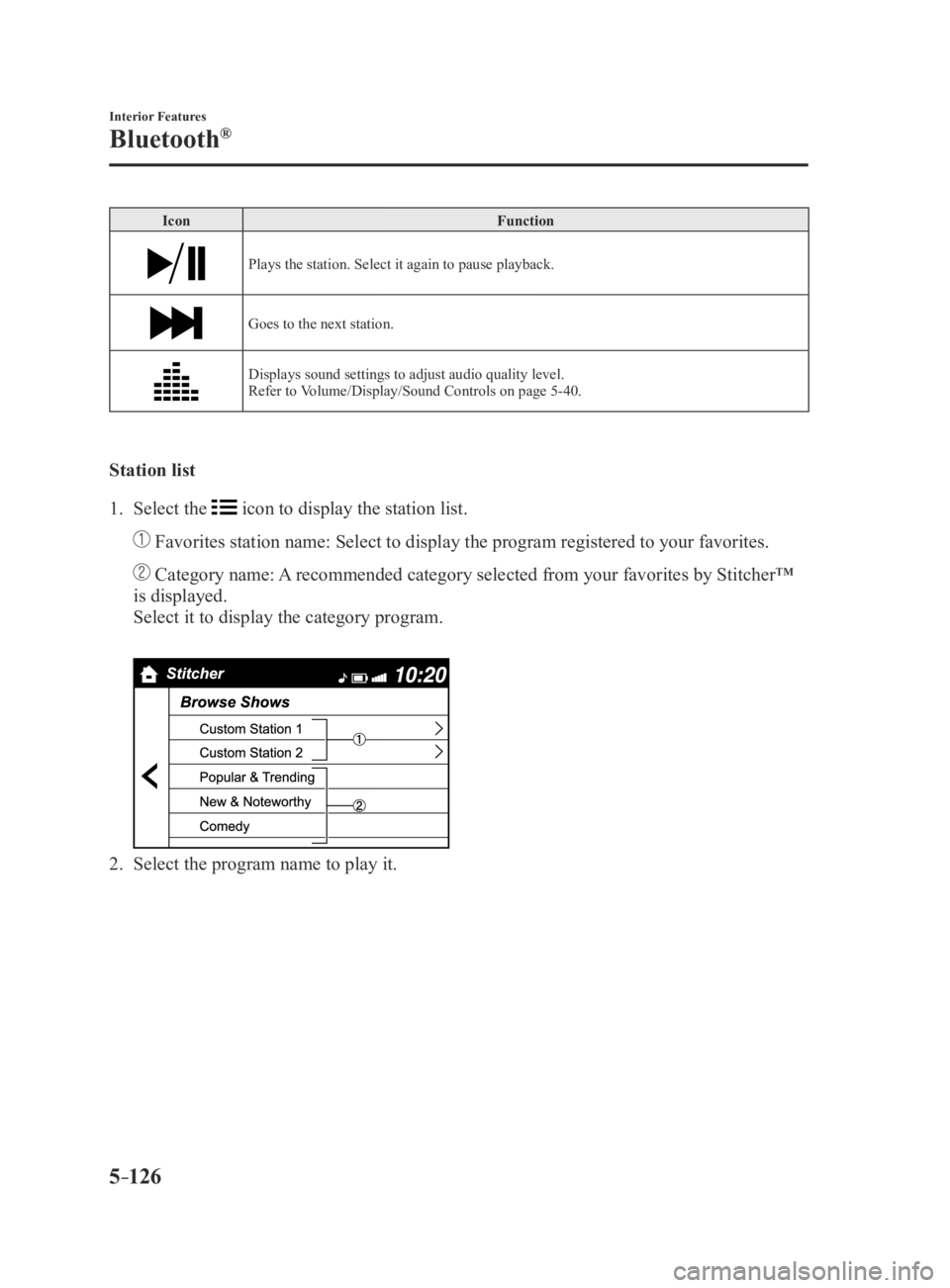
Station list
1. Select the icon to display the station list.
Favorites station name: Select to display the program registered to you\
r favorites.
Category name: A recommended category selected from your favorites by Stitcher™
is displayed.
Select it to display the category program.
2. Select the program name to play it.
MX-5_8EU4-EA-15D_Edition3.indb 1262015/10/21 16:54:56
Page 329 of 526

5–129
Interior Features
Bluetooth®
NOTE
When the OS of the device is updated, the pairing information may be del\
eted. If this
happens, reprogram the pairing information to the Bluetooth® unit. If you pair your phone which has already been paired to your vehicle more than once in
the past, you need to delete “Mazda” on your mobile device. Then, \
execute the Bluetooth®
search on your mobile device once again, and pair to a newly detected “Ma\
zda”.
Before you pair your device, make sure that Bluetooth® is “ON”, both on your phone and
on the vehicle.
Voice recognition related problems
Symptom CauseSolution method
Poor voice recognition
Excessive, slow speech. Excessive, forceful speech (shouting).
Speaking before the beep sound has ended.
Loud noise (speaking or noise from outside/inside vehicle).
Airflow from A/C is blowing against the microphone.
Speaking in off-standard expressions (dialect). Regarding the causes indicated
on the left, be careful with how
you speak. In addition, when
numbers are spoken in a sequence,
recognition ability will improve
if no stop is placed between the
numbers.
False recognition of numbers
Poor voice recognition
There is a malfunction in the
microphone.A poor connection or malfunction
with the microphone may have
occurred. Consult an Authorized
Mazda Dealer.
Phone-related voice recognition is
disabled There is a problem with the
connection between the Bluetooth
®
unit and the device. If there is any malfunction after
checking the pairing situation, check
for device pairing or connection
problems.
Names in the phonebook are not
easily recognized The Bluetooth
® system is under a
condition in which recognition is
difficult. By carrying out the following
measures, the rate of recognition
will improve.Clear memory from the phonebook
which is not used very often.
Avoid shortened names, use full names. (Recognition improves the
longer the name is. By not using
names such as “Mom”, “Dad”,
recognition will improve.)
When operating the audio, a song
name is not recognized Song names cannot be recognized
by voice.
—
You want to skip guidance —Guidance can be skipped by quickly
pressing and releasing the Talk
button.
MX-5_8EU4-EA-15D_Edition3.indb 1292015/10/21 16:54:56
Page 333 of 526

5–133
Interior Features
Interior Equipment
Accessory Sockets
The accessory socket is located deep in the
back of the footwell on the passenger side.
Only use genuine Mazda accessories or
the equivalent requiring no greater than
120 W (DC 12 V, 10 A).
The ignition must be switched to ACC or
ON.
CAUTION
To prevent accessory socket damage or
electrical failure, pay attention to the
following:
Do not use accessories that require
more than 120 W (DC 12 V, 10 A). Do not use accessories that are not
genuine Mazda accessories or the
equivalent.
Close the cover when the accessory
socket is not in use to prevent foreign
objects and liquids from getting into
the accessory socket.
Correctly insert the plug into the
accessory socket. Do not insert the cigarette lighter into
the accessory socket.
Noise may occur on the audio playback
depending on the device connected to
the accessory socket.
Depending on the device connected
to the accessory socket, the vehicle's
electrical system may be affected,
which could cause the warning light to
illuminate. Disconnect the connected
device and make sure that the problem
is resolved. If the problem is resolved,
disconnect the device from the socket
and switch the ignition off. If the
problem is not resolved, consult an
Authorized Mazda Dealer.
NOTE
To prevent discharging of the battery, do
not use the socket for long periods with the
engine off or idling.
MX-5_8EU4-EA-15D_Edition3.indb 1332015/10/21 16:54:59
Page 358 of 526
6–20
Maintenance and Care
Scheduled Maintenance
Maintenance Monitor
Maintenance Monitor (Type A audio)
“Oil Change” with a flexible setting*1 is available. Consult your Authorized Mazda Dealer
when you want to change the setting*2. Once the system turns on, the wrench indicator light
in the instrument cluster will be illuminated when remaining oil life be\
comes less than 500
km (300 mile), or remaining days are less than 15 (whichever comes first).
Reset method
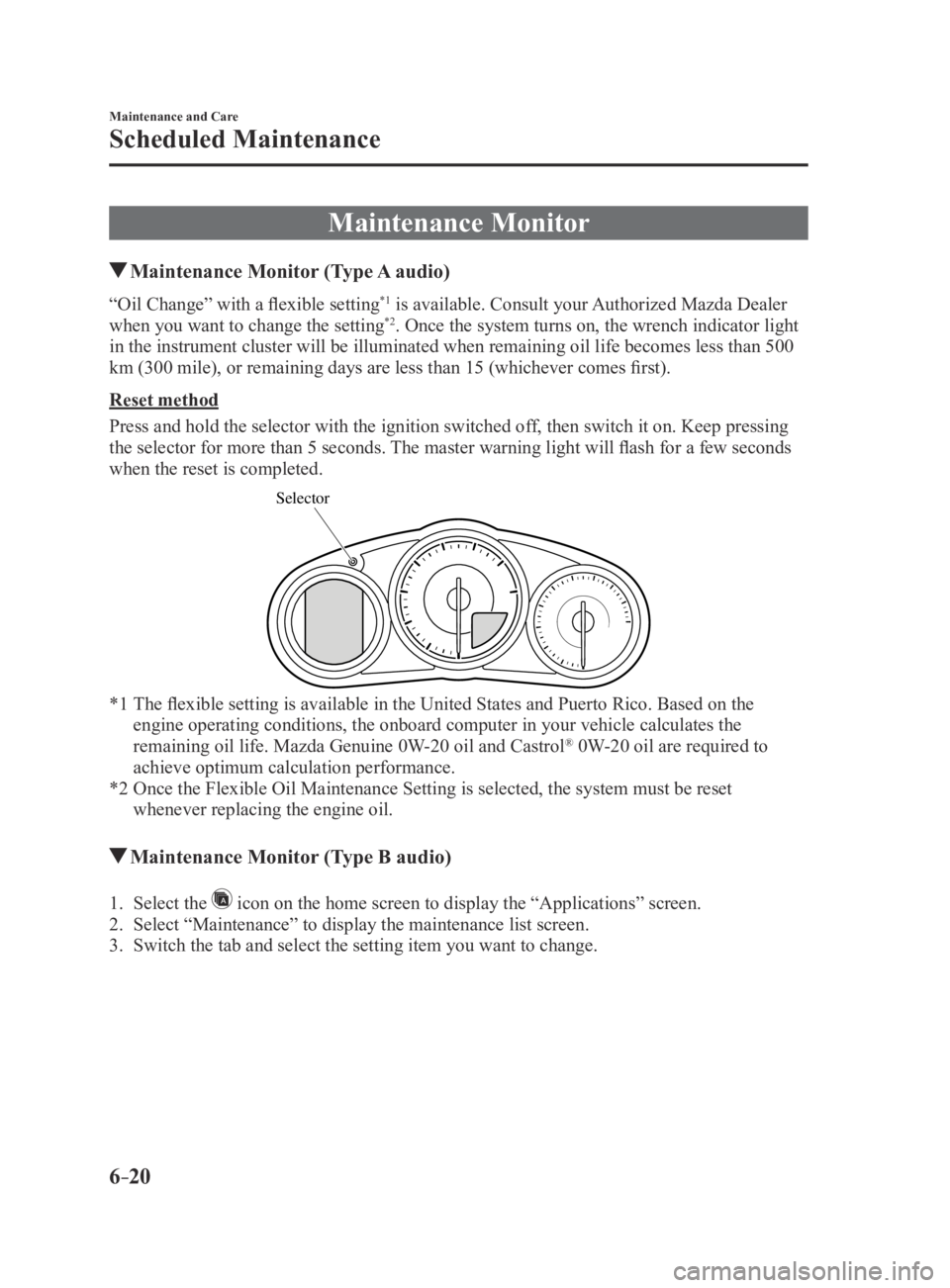
Press and hold the selector with the ignition switched off, then switch it on. Keep pressing
the selector for more than 5 seconds. The master warning light will flash for a few seconds
when the reset is completed.
Selector
*1 The flexible setting is available in the United States and Puerto Rico. Based on the
engine operating conditions, the onboard computer in your vehicle calcul\
ates the
remaining oil life. Mazda Genuine 0W-20 oil and Castrol® 0W-20 oil are required to
achieve optimum calculation performance.
*2 Once the Flexible Oil Maintenance Setting is selected, the system must b\
e reset
whenever replacing the engine oil.
Maintenance Monitor (Type B audio)
1. Select the icon on the home screen to display the “Applications” screen.
2. Select “Maintenance” to display the maintenance list screen.
3. Switch the tab and select the setting item you want to change.
MX-5_8EU4-EA-15D_Edition3.indb 202015/10/21 16:55:06
Page 392 of 526

6–54
Maintenance and Care
Owner Maintenance
Fuses
Your vehicle's electrical system is
protected by fuses.
If any lights, accessories, or controls do
not work, inspect the appropriate circuit
protector. If a fuse has blown, the inside
element will be melted.
If the same fuse blows again, avoid using
that system and consult an Authorized
Mazda Dealer as soon as possible.
Fuse Replacement
Replacing the fuses on the vehicle's left
side
If the electrical system does not work, first
inspect the fuses on the vehicle's left side.
1. Make sure the ignition is switched off,
and other switches are off.
2. Open the fuse panel cover.
3. Pull the fuse straight out with the
fuse puller provided on the fuse block
located in the engine compartment.
4. Inspect the fuse and replace it if it is
blown.
NormalBlown
5. Insert a new fuse of the same amperage
rating, and make sure it fits tightly. If
it does not fit tightly, have an expert
install it. We recommend an Authorized
Mazda Dealer.
If you have no spare fuses, borrow one
of the same rating from a circuit not
essential to vehicle operation, such as
the AUDIO or OUTLET circuit.
CAUTION
Always replace a fuse with a genuine
Mazda fuse or equivalent of the same
rating. Otherwise you may damage
the electric system.
6. Reinstall the cover and make sure that
it is securely installed.
MX-5_8EU4-EA-15D_Edition3.indb 542015/10/21 16:55:29