ABS MAZDA MX5 MIATA 2017 User Guide
[x] Cancel search | Manufacturer: MAZDA, Model Year: 2017, Model line: MX5 MIATA, Model: MAZDA MX5 MIATA 2017Pages: 568, PDF Size: 16.58 MB
Page 219 of 568

4 –105 When Driving
Tire Pressure Monitoring System
*Some models.Tire Pressure Monitoring System *
The Tire Pressure Monitoring System (TPMS) monitors the air pressure of all four tires. If
the air pressure of one or more tires is too low, the system warns the driver by indicating the
tire pressure monitoring system warning light in the instrument cluster and operating a beep
sound. The system monitors the tire pressures indirectly using the data sent from the ABS
wheel speed sensors.
To allow the system to operate correctly, the system needs to be initialized with the specified
tire pressure (value on the tire pressure label). Follow the pr ocedure and perform the
initialization.
Refer to Tire Pressure Monitoring System Initialization on page 4-108 .
The warning light flashes when the system has a malfunction.
Refer to Warning Indication/Warning Lights on page 4-26 .
ABS wheel speed sensor
MX-5_8FR4-EA-16J_Edition1.indb 105 2016/08/11 20:29:05
Page 397 of 568

6 –35 Maintenance and Care
Owner Maintenance
CAUTION To prevent damage to the windshield
let the wiper arm down easily, do not
let it slap down on the windshield.
2. Hold the end of the rubber and pull
until the tabs are free of the metal
support. Metal support
Ta b
3. Remove the metal stiffeners from each
blade rubber and install them in the
new blade. CAUTION
Do not bend or discard the stiffeners. You
need to use them again.
If the metal stiffeners are switched,
the blade's wiping efficiency could be
reduced.
So do not use the driver's side metal
stiffeners on the passenger's side, or vice
versa.
Be sure to reinstall the metal stiffeners in
the new blade rubber so that the curve
is the same as it was in the old blade
rubber.
4. Carefully insert the new blade rubber.
Then install the blade assembly in the
reverse order of removal.
NOTE
Install the blade so that the tabs are
toward the bottom of the wiper arm.
MX-5_8FR4-EA-16J_Edition1.indb 35 2016/08/11 20:29:45
Page 419 of 568

6 –57 Maintenance and Care
Owner Maintenance
*Some models.DESCRIPTION FUSE
RATING PROTECTED COMPONENT
18 A/C MAG 7.5 A Air conditioner
19 AT PUMP
H/L HI 20 A Transmission control system *
20 AT 15 A Transmission control system *
21 D LOCK 25 A Power door locks
22 H/L RH 20 A Headlight (RH)
23
ENG
B2 7.5 A Engine control system
24 TAIL 20 A Taillights, License plate lights, Parking lights
25 DRL 15 A —
26 ROOM 25 A Overhead light
27 FOG 15 A —
28 H/CLEAN 20 A —
29 STOP 10 A Brake lights
30 HORN 15 A Horn
31 H/L LH 20 A Headlight (LH)
32 ABS/DSC S 30 A ABS, Dynamic stability control system
33 HAZARD 15 A Hazard warning flashers, Turn signal lights
34 FUEL PUMP 15 A Fuel system
35
ENG B3 5 A —
36 WIPER 20 A Windshield wipers
37
CABIN
B 50 A For protection of various circuits
38 — — —
39 — — —
40 ABS/DSC M 50 A ABS, Dynamic stability control system
41 EVVT
A/R PUMP 20 A Engine control system
42 EVPS 30 A Brake control system
43 FAN1 30 A Cooling fan
44 FAN2 40 A —
45 ENG.MAIN 40 A Engine control system
46 EPS 60 A Power steering system
47 DEFOG 30 A Rear window defogger
48 IG2 30 A For protection of various circuits
49 INJECTOR 30 A Engine control system
50 HEATER 40 A Air conditioner
51 — — —
52 — — —
MX-5_8FR4-EA-16J_Edition1.indb 57 2016/08/11 20:29:50
Page 438 of 568
7 –4 If Trouble Arises
Flat Tire
*Some models. Jack *
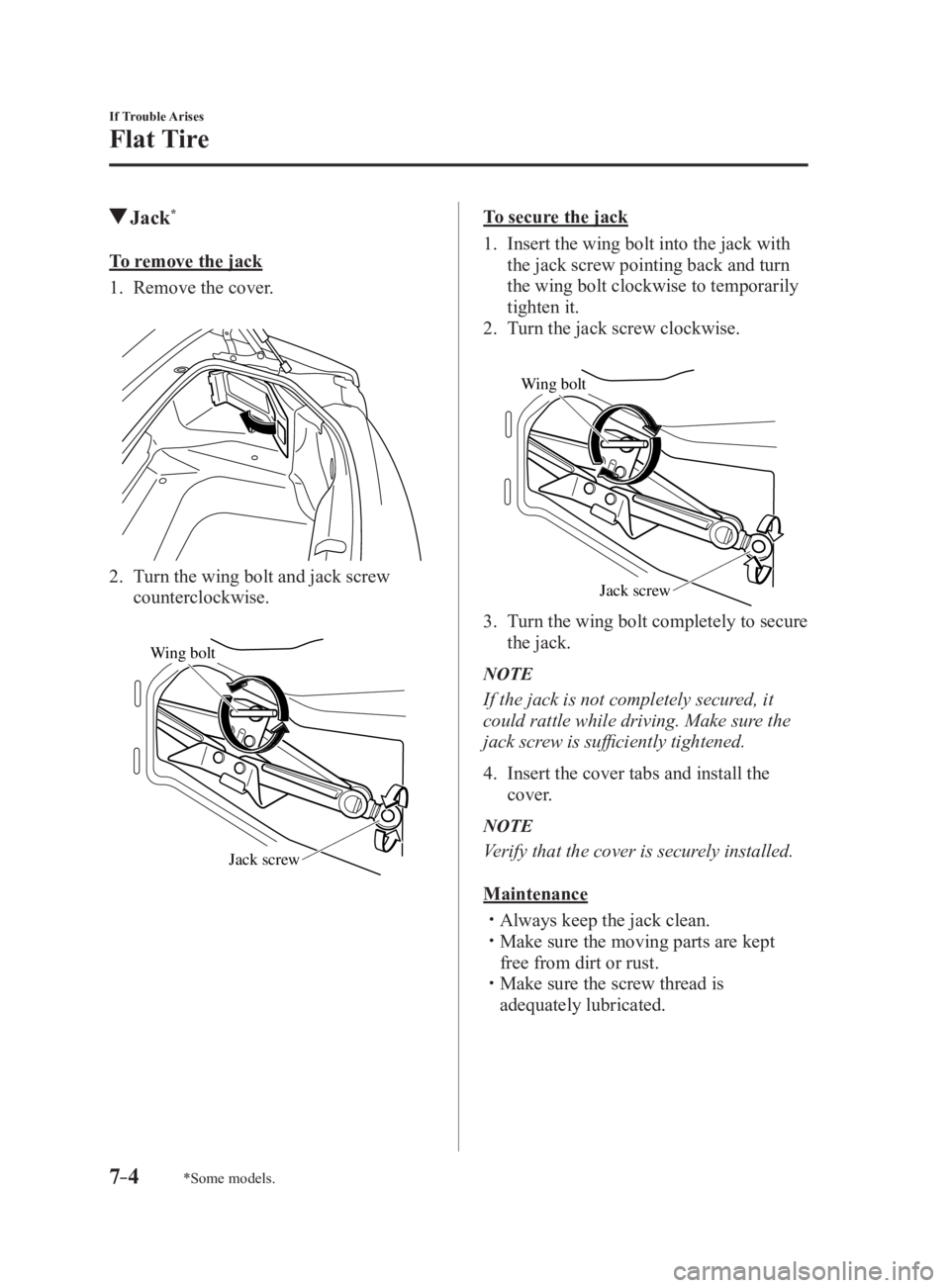
To remove the jack
1. Remove the cover.
2. Turn the wing bolt and jack screw
counterclockwise.
Wing bolt
Jack screw To secure the jack
1. Insert the wing bolt into the jack with
the jack screw pointing back and turn
the wing bolt clockwise to temporarily
tighten it.
2. Turn the jack screw clockwise.
Wing bolt
Jack screw
3. Turn the wing bolt completely to secure
the jack.
NOTE
If the jack is not completely secured, it
could rattle while driving. Make sure the
jack screw is sufficiently tightened.
4. Insert the cover tabs and install the
cover.
NOTE
Verify that the cover is securely installed.
Maintenance
Always keep the jack clean.
Make sure the moving parts are kept
free from dirt or rust.
Make sure the screw thread is
adequately lubricated.
MX-5_8FR4-EA-16J_Edition1.indb 4 2016/08/11 20:29:56
Page 442 of 568

7 –8 If Trouble Arises
Flat Tire 10. Install the bottle to the air compressor
and press it in until the left and right
tabs are engaged securely. Tabs
11. Insert the air compressor plug into the
accessory socket inside the vehicle and
switch the ignition to ACC.
Refer to Accessory Sockets on page
5-134 .
CompressorCompressor plug
CAUTION When inserting the air compressor
plug into or removing it from the
accessory socket, make sure that the
air compressor switch is off. When
turning the air compressor on/off, use
the air compressor switch. 12. The sealant is injected into the tire
when the air compressor is switched
on. After the sealant is injected
completely, wait until the tire inflation
pressure increases to the specified tire
inflation pressure.
NOTE
The inflation pressure may increase to
about 300 kPa (3.1 kgf/cm 2
, 3 bar, 43.5
psi) temporarily to inject the sealant
through the valve. Normally, the inflation
pressure decreases gradually and it
reaches the actual inflation pressure after
about 30 seconds.
WARNING Never use the air compressor above 300
kPa (3.1 kgf/cm 2
, 3 bar, 43.5 psi):
Using the air compressor at an
inflation pressure above 300 kPa (3.1
kgf/cm 2
, 3 bar, 43.5 psi) continuously
is dangerous. If the air compressor
overheats, hot air will be exhausted
and you could get burned.
MX-5_8FR4-EA-16J_Edition1.indb 8 2016/08/11 20:29:57
Page 468 of 568

7 –34 If Trouble Arises
Warning/Indicator Lights and Warning Sounds Signal Warning
Electronic Brake Force
Distribution System
Warning If the electronic brake force distribution control unit determines that some components
are operating incorrectly, the control unit may illuminate the brake system warning
light and the ABS warning light simultaneously. The problem is likely to be the
electronic brake force distribution system.
WARNING Do not drive with both the ABS warning light and brake warning light illuminated.
Have the vehicle towed to an Authorized Mazda Dealer to have the brakes
inspected as soon as possible:
Driving when the brake system warning light and ABS warning light are
illuminated simultaneously is dangerous.
When both lights are illuminated, the rear wheels could lock more quickly in an
emergency stop than under normal circumstances.
Charging System
Warning Indication/
Warning Light If the warning light illuminates while driving, it indicates a malfunction of the
alternator or of the charging system.
Drive to the side of the road and park off the right-of-way. Consult an Authorized
Mazda Dealer.
CAUTION Do not continue driving when the charging system warning light is illuminated
because the engine could stop unexpectedly.
Engine Oil Warning
Light This warning light indicates low engine oil pressure.
CAUTION Do not run the engine if the oil pressure is low. Otherwise, it could result in extensive
engine damage.
If the light illuminates or the warning indication is displayed while driving:
1.Drive to the side of the road and park off the right-of-way on level ground.
2.Turn off the engine and wait 5 minutes for the oil to drain back into the oil pan.
3.Inspect the engine oil level 6-28 . If it's low, add the appropriate amount of engine
oil while being careful not to overfill.
CAUTION Do not run the engine if the oil level is low. Otherwise, it could result in extensive
engine damage.
4.Start the engine and check the warning light.
If the light remains illuminated even though the oil level is normal or after adding oil,
stop the engine immediately and have your vehicle towed to an Authorized Mazda
Dealer.
MX-5_8FR4-EA-16J_Edition1.indb 34 2016/08/11 20:30:02
Page 470 of 568
7 –36 If Trouble Arises
Warning/Indicator Lights and Warning Sounds
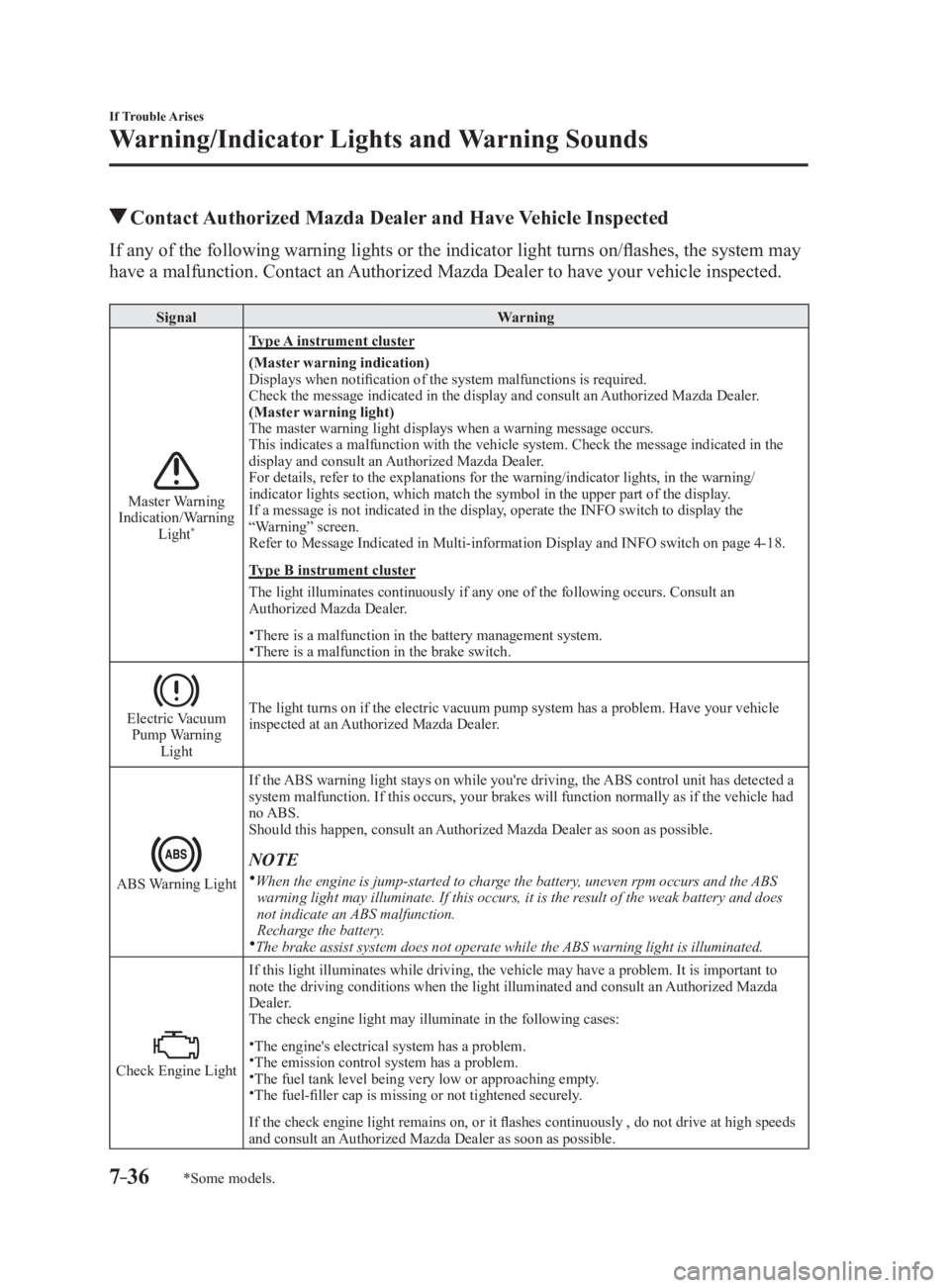
*Some models. Contact Authorized Mazda Dealer and Have Vehicle InspectedIf any of the following warning lights or the indicator light t urns on/flashes, the system may
have a malfunction. Contact an Authorized Mazda Dealer to have your vehicle inspected. Signal Warning
Master Warning
Indication/Warning
Light *
Type A instrument cluster
(Master warning indication)
Displays when notification of the system malfunctions is require d.
Check the message indicated in the display and consult an Authorized Mazda Dealer.
(Master warning light)
The master warning light displays when a warning message occurs.
This indicates a malfunction with the vehicle system. Check the message indicated in the
display and consult an Authorized Mazda Dealer.
For details, refer to the explanations for the warning/indicato r lights, in the warning/
indicator lights section, which match the symbol in the upper part of the display.
If a message is not indicated in the display, operate the INFO switch to display the
“Warning” screen.
Refer to Message Indicated in Multi-information Display and INF O switch on page 4-18 .
Type B instrument cluster
The light illuminates continuously if any one of the following occurs. Consult an
Authorized Mazda Dealer.
There is a malfunction in the battery management system.
There is a malfunction in the brake switch.
Electric Vacuum
Pump Warning
Light The light turns on if the electric vacuum pump system has a problem. Have your vehicle
inspected at an Authorized Mazda Dealer.
ABS Warning Light If the ABS warning light stays on while you're driving, the ABS control unit has detected a
system malfunction. If this occurs, your brakes will function normally as if the vehicle had
no ABS.
Should this happen, consult an Authorized Mazda Dealer as soon as possible.
NOTE
When the engine is jump-started to charge the battery, uneven rpm occurs and the ABS
warning light may illuminate. If this occurs, it is the result of the weak battery and does
not indicate an ABS malfunction.
Recharge the battery.
The brake assist system does not operate while the ABS warning light is illuminated.
Check Engine Light If this light illuminates while driving, the vehicle may have a problem. It is important to
note the driving conditions when the light illuminated and consult an Authorized Mazda
Dealer.
The check engine light may illuminate in the following cases:
The engine's electrical system has a problem.
The emission control system has a problem.
The fuel tank level being very low or approaching empty.
The fuel-filler cap is missing or not tightened securely.
If the check engine light remains on, or it flashes continuously , do not drive at high speeds
and consult an Authorized Mazda Dealer as soon as possible.
MX-5_8FR4-EA-16J_Edition1.indb 36 2016/08/11 20:30:03
Page 518 of 568

8 –18 Customer Information and Reporting Safety Defects
Warranty
Add-On Non-Genuine Parts and AccessoriesNon-genuine parts and accessories for Mazda vehicles can be fou nd in stores.
These may fit your vehicle, but they are not approved by Mazda f or use with Mazda
vehicles. When you install non-genuine parts or accessories, they could affect your vehicle's
performance or safety systems; the Mazda warranty doesn't cover this. Before you install
any non-genuine parts or accessories, consult an Authorized Mazda Dealer.
WARNINGAlways consult an Authorized Mazda Dealer before you install non-genuine parts or
accessories:
Improperly designed parts or accessories could seriously affect your vehicle's performance
or safety systems. This could cause you to have an accident or increase your chances of
injuries in an accident.
Be very careful in choosing and installing add-on electrical equipment, such as mobile
telephones, two-way radios, stereo systems, and car alarm systems:
Incorrectly choosing or installing improper add-on equipment or choosing an improper
installer is dangerous. Essential systems could be damaged, causing engine stalling, air-
bag (SRS) activation, ABS/TCS/DSC inactivation, or a fire in the vehicle.
Mazda assumes no responsibility for death, injury, or expenses that may result from the
installation of add-on non-genuine parts or accessories.
MX-5_8FR4-EA-16J_Edition1.indb 18 2016/08/11 20:30:14
Page 536 of 568
8 –36 Customer Information and Reporting Safety Defects
Tire Information (U.S.A.)
Vehicle LoadingWARNINGDo not tow a trailer with this vehicle:
Towing a trailer with this vehicle is dangerous because it has not been designed to tow a
trailer and doing so will affect the drive system which could result in vehicle damage.
This section will guide you in the proper loading of your vehicle, to keep your loaded
vehicle weight within its design rating capability. Properly loading your vehicle will provide
maximum return of vehicle design performance. Before loading yo ur vehicle, familiarize
yourself with the following terms for determining your vehicle's weight ratings, from the
vehicle's Safety Certification Label and Tire and Load Information Label:
WARNINGOverloaded Vehicle:
Overloading a vehicle is dangerous. The results of overloading can have serious
consequences in terms of passenger safety. Too much weight on a vehicle's suspension
system can cause spring or shock absorber failure, brake failure, handling or steering
problems, irregular tire wear, tire failure or other damage.
Overloading makes a vehicle harder to drive and control. It also increases the distance
required for stopping. In cases of serious overloading, brakes can fail completely,
particularly on steep grades. The load a tire will carry safely is a combination of the size of
the tire, its load range, and corresponding inflation pressure.
Never overload the vehicle and always observe the vehicle's weight ratings from the
vehicle's Safety Certification and Tire and Load Information labels.
MX-5_8FR4-EA-16J_Edition1.indb 36 2016/08/11 20:30:17
Page 562 of 568

10 –2 Index
A Accessory Socket .............................. 5-134
Adaptive Front Lighting System
(AFS) ................................................... 4-75
Add-On Non-Genuine Parts and
Accessories
......................................... 8-18
Advanced Key
Advanced keyless entry system
...... 3-8
Operational range
............................ 3-9
Air Bag/Seat Belt Pretensioner System
Warning Beep
...................................... 7-48
Air Bag Systems
................................. 2-24
Ambient Temperature Display
... 4-15, 4-22
Antilock Brake System (ABS)
............ 4-65
Audio Control Switch
Adjusting the volume
.................... 5-55
Seek switch .................................... 5-56
Audio System
...................................... 5-13
AUX/USB mode
........................... 5-57
Antenna
......................................... 5-13
Audio control switch
..................... 5-55
Audio set
[Type A (non-touchscreen)]
........... 5-22
Audio set
[Type B (touchscreen)]
................... 5-34
Operating tips for audio system
.... 5-14
Satellite radio
................................ 5-46
Automatic Transmission
..................... 4-34
Active Adaptive Shift (AAS)
........ 4-36
Direct mode
................................... 4-43
Driving tips .................................... 4-43
Manual shift mode ......................... 4-37
Shift-lock override
........................ 4-36
Shift-lock system
........................... 4-36
Shift position indication
................ 4-35
Transmission ranges
...................... 4-35
Warning light
................................. 4-35B Back Trim Storage Box ..................... 5-139
Battery
................................................. 6-36
Maintenance
.................................. 6-38
Replacement
.................................. 6-38
Specifications
.................................. 9-4
Battery Runs Out
................................. 7-23
Jump-starting
................................. 7-23
Blind Spot Monitoring (BSM)
............ 4-85
Blind Spot Monitoring (BSM) System
Warning Beep
...................................... 7-51
Bluetooth ®
........................................... 5-74
Bluetooth ®
audio (Type A) .......... 5-113
Bluetooth ®
audio (Type B) .......... 5-115
Bluetooth ®
Hands-Free (Type A) ... 5-97
Bluetooth ®
Hands-Free (Type B) ... 5-103
Troubleshooting
.......................... 5-129
Body Lubrication
................................ 6-32
Brakes
Brakes assist
.................................. 4-63
Foot brake ...................................... 4-61
Pad wear indicator
......................... 4-62
Parking brake
................................ 4-62
Warning light
................................. 4-62
Break-In Period
................................... 3-51
C Capacities .............................................. 9-5
Carbon Monoxide
............................... 3-24
Cell Phones
......................................... 8-19
Child Restraint
Child-restraint precautions
............ 2-15
Child-restraint system installation ... 2-20
Installing child-restraint systems ... 2-21
Climate Control System
........................ 5-2
Fully automatic type
........................ 5-9
Gas specifications
............................ 9-6
Manual type
..................................... 5-5
Operating tips
.................................. 5-2
Vent operation
................................. 5-3
Clock
................................................... 5-26
MX-5_8FR4-EA-16J_Edition1.indb 2 2016/08/11 20:30:24