mirror MAZDA MX5 MIATA 2017 User Guide
[x] Cancel search | Manufacturer: MAZDA, Model Year: 2017, Model line: MX5 MIATA, Model: MAZDA MX5 MIATA 2017Pages: 568, PDF Size: 16.58 MB
Page 170 of 568

4 –56 When Driving
Switches and Controls
*Some models. Mirror Defogger *
The mirror defoggers defrost the outside
mirrors.
The mirror defoggers operate in
conjunction with the rear window
defogger.
To turn on the mirror defoggers, switch
the ignition ON and press the rear window
defogger switch (page 4-55 ).
Manual Climate Control Indicator light
Fully Automatic Climate Control Indicator light Horn To sound the horn, press the mark on
the steering wheel.
MX-5_8FR4-EA-16J_Edition1.indb 56 2016/08/11 20:28:55
Page 171 of 568

4 –57 When Driving
Switches and Controls
*Some models.Hazard Warning Flasher The hazard warning lights should always
be used when you stop on or near a
roadway in an emergency.
The hazard warning lights warn other
drivers that your vehicle is a traffic hazard
and that they must take extreme caution
when near it.
Depress the hazard warning flasher and
all the turn signals will flash. The hazard
warning indicator lights in the instrument
cluster flash simultaneously.
NOTE
The turn signals do not work when the
hazard warning lights are on.
Check local regulations about the use of
hazard warning lights while the vehicle
is being towed to verify that it is not in
violation of the law. HomeLink Wireless
Control System *
NOTE
HomeLink and HomeLink house icon
are registered trademarks of Gentex
Corporation.
The HomeLink system replaces up to
3 hand-held transmitters with a single
built-in component in the auto-dimming
mirror. Pressing the HomeLink button on
the auto-dimming mirror activates garage
doors, gates and other devices surrounding
your home.
HomeLink button Indicator light
MX-5_8FR4-EA-16J_Edition1.indb 57 2016/08/11 20:28:55
Page 174 of 568

4 –60 When Driving
Switches and Controls 9. Return to the vehicle and firmly press,
hold for two seconds and release the
programmed HomeLink button. Repeat
the “ press/hold/release ” sequence a
second time, and, depending on the
brand of the garage door opener (or
other rolling code equipped device),
repeat this sequence a third time to
complete the programming process.
HomeLink should now activate your
rolling code equipped device.
NOTE
To program the remaining two HomeLink
buttons, begin with “Programming” —
step 1
For questions or comments, please contact
HomeLink at www.homelink.com or 1-
800-355-3515 .
Gate operator/Canadian
ProgrammingCanadian radio-frequency laws require
transmitter signals to “time-out” (or quit)
after several seconds of transmission
— which may not be long enough for
HomeLink to pick up the signal during
programming. Similar to this Canadian
law, some U.S. gate operators are designed
to “time-out” in the same manner.
If you live in Canada or you are having
difficulties programming a gate operator
by using the “Programming” procedures
(regardless of where you live), replace
“Programming HomeLink” step 3 with
the following:
NOTE
If programming a garage door opener or
gate operator, it is advised to unplug the
device during the “cycling” process to
prevent possible overheating. Continue to press and hold the HomeLink
button while you press and release
— every two seconds (“cycle”) your
hand-held transmitter until the frequency
signal has successfully been accepted by
HomeLink. (The indicator light will flash
slowly and then rapidly.)
Proceed with “Programming” step 4 to
complete.
Operating the HomeLink System Press the programmed HomeLink button
to operate a programmed device. The
code will continue being transmitted for a
maximum of 20 seconds.
Reprogramming the HomeLink
system To program a device to HomeLink using
a HomeLink button previously trained,
follow these steps:
1. Press and hold the desired HomeLink
button. DO NOT release the button.
2. The indicator light will begin to flash
after 20 seconds. Without releasing
the HomeLink button, proceed with
“Programming” - step 1.
Erasing Programmed HomeLink
Buttons
To erase the existing programming from
all three operating channels, press and
hold the two outside buttons (
, ) on
the auto-dimming mirror until the
HomeLink indicator light begins to flash
after approximately 10 seconds.
Verify that the programming has been
erased when you resell the vehicle.
MX-5_8FR4-EA-16J_Edition1.indb 60 2016/08/11 20:28:56
Page 188 of 568
4 –74 When Driving
i-ACTIVSENSE
*Some models. i-ACTIVSENSE *
i-ACTIVSENSE is a collective term covering a series of advanced safety and driver support
systems which make use of a Forward Sensing Camera (FSC) and ra dar sensors.
Because each system has its limitations, always drive carefully and do not rely solely on the
systems.
Driver awareness support systems
Nighttime visibility
Adaptive Front Lighting System (AFS)
.............................................................................. 4-75
High Beam Control System (HBC)
.................................................................................... 4-76
Left/right side and rear side detection
Lane Departure Warning System (LDWS) ......................................................................... 4-79
Blind Spot Monitoring (BSM) System
............................................................................... 4-85
Rear obstruction detection when leaving a parking space
Rear Cross Traffic Alert (RCTA) ........................................................................................ 4-92
Camera and SensorsForward sensing camera (FSC)
The Forward Sensing Camera (FSC) determines the conditions ahea d of the vehicle while
traveling at night and detects traffic lanes. The following systems also use the Forward
Sensing Camera (FSC).
High Beam Control system (HBC)
Lane Departure Warning System (LDWS)
The Forward Sensing Camera (FSC) is installed at the top of the windshield near the
rearview mirror.
Refer to Forward Sensing Camera (FSC) on page 4-95 .
Radar sensors (rear)
The radar sensors (rear) function by detecting the radio waves reflected off a vehicle
approaching from the rear or an obstruction sent from the radar sensors. The following
systems also use the radar sensors (rear).
Blind Spot Monitoring (BSM) System
Rear Cross Traffic Alert (RCTA)
The radar sensors (rear) are installed inside the rear bumper, one each on the left and right
sides.
Refer to Radar Sensors (Rear) on page 4-98 .
MX-5_8FR4-EA-16J_Edition1.indb 74 2016/08/11 20:29:00
Page 199 of 568

4 –85 When Driving
i-ACTIVSENSE
*Some models.Blind Spot Monitoring (BSM) System *
The Blind Spot Monitoring (BSM) is designed to assist the drive r in checking the area to the
rear of the vehicle on both sides during lane changes by alerting the driver to the presence of
vehicles approaching from the rear in an adjacent lane.
The Blind Spot Monitoring (BSM) detects vehicles approaching fr om the rear while
traveling in the forward direction at a speed of 10 km/h (6.3 mph) or faster and turns on the
Blind Spot Monitoring (BSM) warning lights equipped on the door mirrors depending on
the conditions. If the turn signal lever is operated to signal a lane change in the direction
in which the Blind Spot Monitoring (BSM) warning light is illum inated, the system warns
the driver of a vehicle in the detection area by flashing the Bl ind Spot Monitoring (BSM)
warning light and activating a beep sound.
The detection area on this system covers the driving lanes on both sides of the vehicle and
from the rear part of the doors to about 50 m (164 ft) behind the vehicle.
Detection areasYour vehicle
WARNING Always check the surrounding area visually before making an actual lane change:
The system is only designed to assist you in checking for vehicles at your rear when
making a lane change. Due to certain limitations with the operation of this system, the
Blind Spot Monitoring (BSM) warning light may not flash or it might be delayed even
though a vehicle is in an adjacent driving lane. Always make it your responsibility as a
driver to check the rear.
MX-5_8FR4-EA-16J_Edition1.indb 85 2016/08/11 20:29:02
Page 202 of 568

4 –88 When Driving
i-ACTIVSENSE
In the following cases, it may be difficult to view the illumina tion/flashing of the Blind
Spot Monitoring (BSM) warning lights equipped on the door mirrors.
Snow or ice is adhering to the door mirrors.
The door glass is fogged or covered in snow, frost or dirt.
The system switches to the Rear Cross Traffic Alert function when the shift lever (manual
transmission) or the selector lever (automatic transmission) is shifted to the reverse (R)
position.
Refer to Rear Cross Traffic Alert (RCTA) on page 4-92 .
Blind Spot Monitoring (BSM) Warning Lights/Blind Spot Monitoring (BSM)
Warning BeepThe Blind Spot Monitoring (BSM) or Rear Cross Traffic Alert (RCTA) system notifies the
driver of the presence of vehicles in adjacent lanes to the rear of your vehicle using the
Blind Spot Monitoring (BSM) warning lights and the warning beep while the systems are
operational.
Blind Spot Monitoring (BSM) warning lights
The Blind Spot Monitoring (BSM) warning lights are equipped on the left and right door
mirrors. The warning lights turn on when a vehicle approaching from the rear in an adjacent
lane is detected.
When the ignition is switched ON, the malfunction warning light turns on momentarily and
then turns off after a few seconds.
Forward driving (Blind Spot Monitoring (BSM) system operation)
The Blind Spot Monitoring (BSM) system detects vehicles approac hing from the rear and
turns on the Blind Spot Monitoring (BSM) warning lights equippe d on the door mirrors
according to the conditions. Additionally, while a Blind Spot Monitoring (BSM) warning
light is illuminated, if the turn signal lever is operated to signal a turn in the direction
in which the Blind Spot Monitoring (BSM) warning light is illum inated, the Blind Spot
Monitoring (BSM) warning light flashes.
MX-5_8FR4-EA-16J_Edition1.indb 88 2016/08/11 20:29:02
Page 208 of 568
4 –94 When Driving
i-ACTIVSENSE
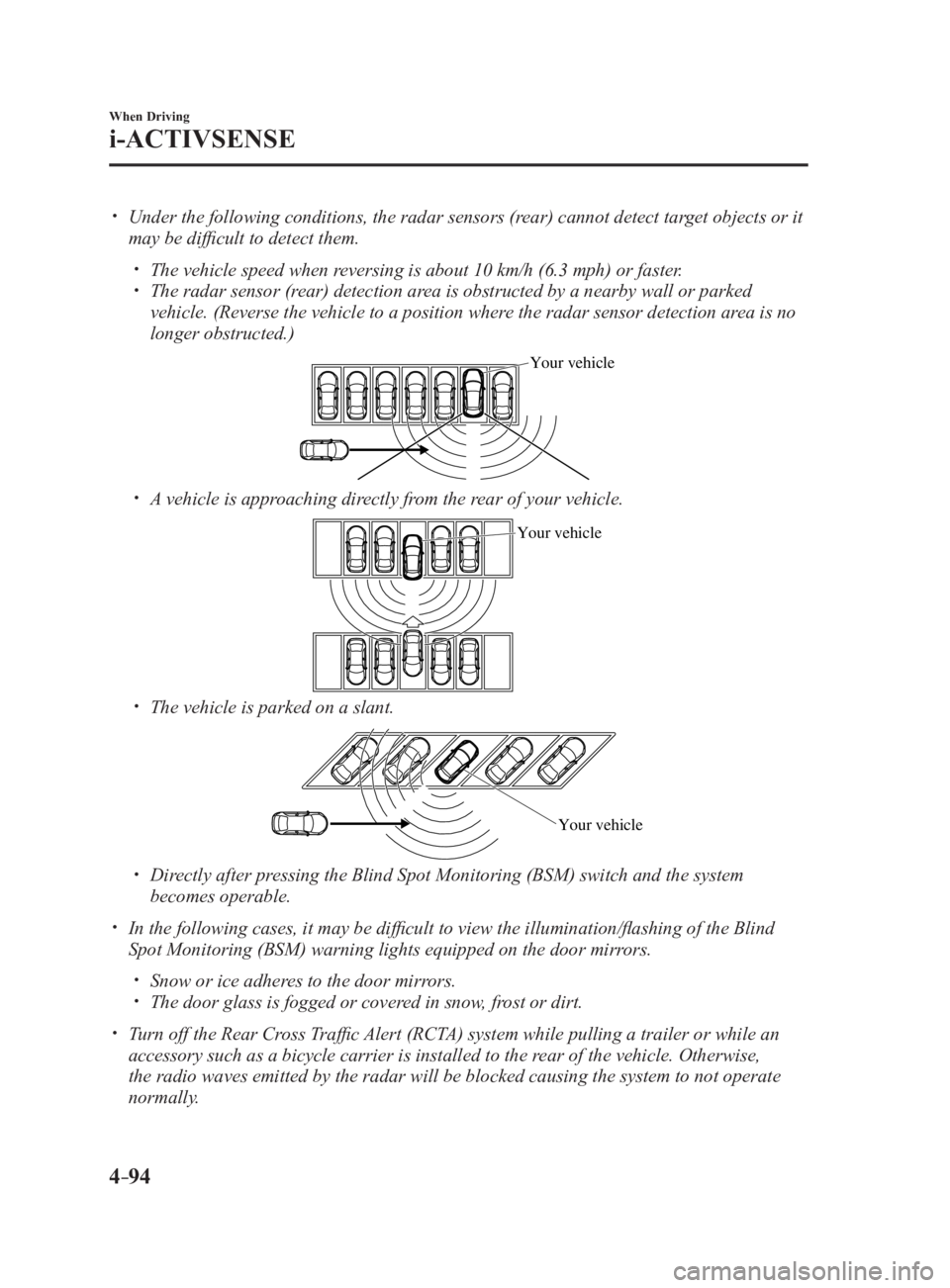
Under the following conditions, the radar sensors (rear) cannot detect target objects or it
may be difficult to detect them.
The vehicle speed when reversing is about 10 km/h (6.3 mph) or faster.
The radar sensor (rear) detection area is obstructed by a nearby wall or parked
vehicle. (Reverse the vehicle to a position where the radar sensor detection area is no
longer obstructed.) Your vehicle
A vehicle is approaching directly from the rear of your vehicle. Your vehicle
The vehicle is parked on a slant.
Your vehicle
Directly after pressing the Blind Spot Monitoring (BSM) switch and the system
becomes operable.
In the following cases, it may be difficult to view the illumina tion/flashing of the Blind
Spot Monitoring (BSM) warning lights equipped on the door mirrors.
Snow or ice adheres to the door mirrors.
The door glass is fogged or covered in snow, frost or dirt.
Turn off the Rear Cross Traffic Alert (RCTA) system while pulling a trailer or while an
accessory such as a bicycle carrier is installed to the rear of the vehicle. Otherwise,
the radio waves emitted by the radar will be blocked causing the system to not operate
normally.
MX-5_8FR4-EA-16J_Edition1.indb 94 2016/08/11 20:29:03
Page 209 of 568

4 –95 When Driving
i-ACTIVSENSE
*Some models.Forward Sensing Camera (FSC) *
Your vehicle is equipped with a Forward Sensing Camera (FSC). The Forward Sensing
Camera (FSC) is positioned near the rearview mirror and used by the following systems.
High Beam Control System (HBC)
Lane Departure Warning System (LDWS) Forward Sensing Camera (FSC)
The Forward Sensing Camera (FSC) determines the conditions ahea d of the vehicle while
traveling at night and detects traffic lanes. The distance in which the Forward Sensing
Camera (FSC) can detect objects varies depending on the surroun ding conditions.
MX-5_8FR4-EA-16J_Edition1.indb 95 2016/08/11 20:29:03
Page 210 of 568

4 –96 When Driving
i-ACTIVSENSE
CAUTION
Do not apply accessories, stickers or film to the windshield near the Forward Sensing
Camera (FSC).
If the area in front of the Forward Sensing Camera (FSC) lens is obstructed, it will cause
the system to not operate correctly. Consequently, each system may not operate normally
which could lead to an unexpected accident.
Do not disassemble or modify the Forward Sensing Camera (FSC).
Disassembly or modification of the Forward Sensing Camera (FSC) will cause a malfunction
or mistaken operation. Consequently, each system may not operate normally which could
lead to an unexpected accident.
Heed the following cautions to assure the correct operation of the Forward Sensing Camera
(FSC).
The direction of the Forward Sensing Camera (FSC) has been finely adjusted, therefore
do not change the installation position or remove the Forward Sensing Camera (FSC).
Be careful not to scratch the Forward Sensing Camera (FSC) lens or allow it to get dirty.
Do not remove the Forward Sensing Camera (FSC) cover.
Do not place objects on the dashboard which reflect light.
Always keep the windshield glass around the camera clean by removing dirt or fogging.
Use the windshield defroster to remove fogging on the windshield.
Consult an Authorized Mazda Dealer regarding cleaning the interior side of the
windshield around the Forward Sensing Camera (FSC).
Consult an Authorized Mazda Dealer before performing repairs around the Forward
Sensing Camera (FSC).
The Forward Sensing Camera (FSC) is installed to the windshield. Consult an Authorized
Mazda Dealer for windshield repair and replacement.
When performing repairs around the rearview mirror, consult an Authorized Mazda
Dealer.
Do not hit or apply strong force to the Forward Sensing Camera (FSC) or the area around
it. If strong force is applied, stop using the Lane Departure Warning System (LDWS), and
the High Beam Control System (HBC) and consult an Authorized Mazda Dealer.
The direction in which the Forward Sensing Camera (FSC) is pointed has been finely
adjusted. Do not change the installation position of the Forward Sensing Camera (FSC)
or remove it. Otherwise, it could result in damage or malfunction.
MX-5_8FR4-EA-16J_Edition1.indb 96 2016/08/11 20:29:03
Page 354 of 568
5 –132 Interior Features
Interior Equipment
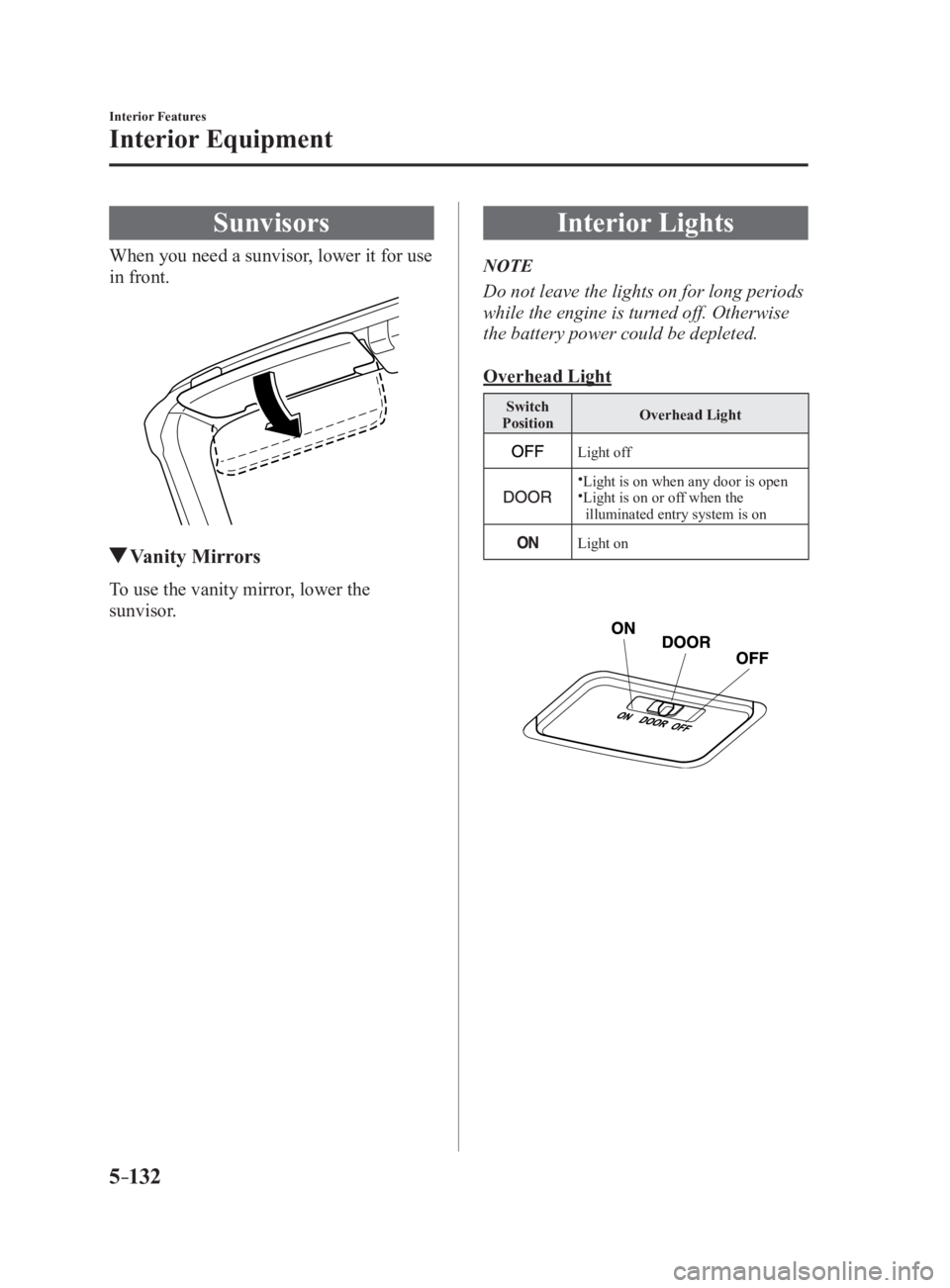
SunvisorsWhen you need a sunvisor, lower it for use
in front.
Vanity MirrorsTo use the vanity mirror, lower the
sunvisor. Interior Lights NOTE
Do not leave the lights on for long periods
while the engine is turned off. Otherwise
the battery power could be depleted.
Overhead Light Switch
Position Overhead Light
Light off
Light is on when any door is open
Light is on or off when the
illuminated entry system is on
Light on
MX-5_8FR4-EA-16J_Edition1.indb 132 2016/08/11 20:29:34