brakes MAZDA MX5 MIATA 2017 Owner's Manual
[x] Cancel search | Manufacturer: MAZDA, Model Year: 2017, Model line: MX5 MIATA, Model: MAZDA MX5 MIATA 2017Pages: 568, PDF Size: 16.58 MB
Page 424 of 568

6 –62 Maintenance and Care
Appearance Care To minimize scratches on the vehicle's
paint finish:
Rinse off any dirt or other foreign matter
using lukewarm or cold water before
washing.
Use plenty of lukewarm or cold water
and a soft cloth when washing the
vehicle. Do not use a nylon cloth.
Rub gently when washing or drying the
vehicle.
Take your vehicle only to a car wash
that keeps its brushes well maintained.
Do not use abrasive cleansers or wax
that contain abrasives.
CAUTION Do not use steel wool, abrasive
cleaners, or strong detergents
containing highly alkaline or caustic
agents on chrome-plated or anodized
aluminum parts. This may damage the
protective coating; also, cleaners and
detergents may discolor or deteriorate
the paint.
Pay special attention to removing salt, dirt,
mud, and other foreign material from the
underside of the fenders, and make sure
the drain holes in the lower edges of the
doors and rocker panels are clean.
Insects, tar, tree sap, bird droppings,
industrial fallout, and similar deposits
can damage the finish if not removed
immediately. When prompt washing with
plain water is ineffective, use a mild soap
made for use on vehicles.
Thoroughly rinse off all soap with
lukewarm or cold water. Do not allow
soap to dry on the finish. After washing the vehicle, dry it with a
clean chamois to prevent water spots from
forming.
WARNING Dry off brakes that have become
wet by driving slowly, releasing the
accelerator pedal and lightly applying
the brakes several times until the brake
performance returns to normal:
Driving with wet brakes is dangerous.
Increased stopping distance or the
vehicle pulling to one side when
braking could result in a serious
accident. Light braking will indicate
whether the brakes have been affected.
Waxing
Your vehicle needs to be waxed when
water no longer beads on the finish.
Always wash and dry the vehicle before
waxing it. In addition to the vehicle body,
wax the metal trim to maintain its luster.
1. Use wax which contains no abrasives.
Waxes containing abrasive will remove
paint and could damage bright metal
parts.
2. Use a good grade of natural wax for
metallic, mica, and solid colors.
3. When waxing, coat evenly with the
sponge supplied or a soft cloth.
4. Wipe off the wax with a soft cloth.
NOTE
A spot remover to remove oil, tar, and
similar materials will usually also take off
the wax. Rewax these areas even if the rest
of the vehicle does not need it.
MX-5_8FR4-EA-16J_Edition1.indb 62 2016/08/11 20:29:51
Page 425 of 568

6 –63 Maintenance and Care
Appearance Care Repairing Damage to the FinishDeep scratches or chips on the finish
should be repaired promptly. Exposed
metal quickly rusts and can lead to major
repairs.
CAUTION If your Mazda is damaged and needs
metal parts repaired or replaced,
make sure the body shop applies anti-
corrosion materials to all parts, both
repaired and new. This will prevent
them from rusting.
Bright-Metal Maintenance
Use tar remover to remove road tar and
insects. Never do this with a knife or
similar tool.
To prevent corrosion on bright-
metal surfaces, apply wax or chrome
preservative and rub it to a high luster.
During cold weather or in coastal areas,
cover bright-metal parts with a coating
of wax or preservative heavier than
usual. It would also help to coat them
with noncorrosive petroleum jelly or
some other protective compound.
CAUTION Do not use steel wool, abrasive
cleaners, or strong detergents
containing highly alkaline or caustic
agents on chrome-plated or anodized
aluminum parts. This may result in
damage to the protective coating
and cause discoloration or paint
deterioration. Underbody Maintenance Road chemicals and salt used for ice and
snow removal and solvents used for dust
control may collect on the underbody. If
not removed, they will speed up rusting
and deterioration of such underbody parts
as fuel lines, frame, floor pan, and exhaust
system, even though these parts may be
coated with anti-corrosive material.
Thoroughly flush the underbody and wheel
housings with lukewarm or cold water at
the end of each winter. Try also to do this
every month.
Pay special attention to these areas
because they easily hide mud and dirt.
It will do more harm than good to wet
down the road grime without removing
it.
The lower edges of doors, rocker panels,
and frame members have drain holes that
should not be clogged. Water trapped there
will cause rusting.
WARNING Dry off brakes that have become
wet by driving slowly, releasing the
accelerator pedal and lightly applying
the brakes several times until the brake
performance returns to normal:
Driving with wet brakes is dangerous.
Increased stopping distance or the
vehicle pulling to one side when
braking could result in a serious
accident. Light braking will indicate
whether the brakes have been affected.
MX-5_8FR4-EA-16J_Edition1.indb 63 2016/08/11 20:29:51
Page 467 of 568

7 –33 If Trouble Arises
Warning/Indicator Lights and Warning Sounds
If a Warning Light Turns On or FlashesIf any warning light turns on/flashes, take appropriate action f or each light. There is no
problem if the light turns off, however if the light does not turn off or turns on/flashes again,
consult an Authorized Mazda Dealer.
(Vehicles with type B audio)
The warning contents can be verified on the center display.
1. If the warning light is turned on, select icon on the home screen to display the
application screen.
2. Select “Vehicle Status Monitor”.
3. Select “Warning Guidance” to display the current warnings.
4. Select the applicable warning to view the warning details.
Stop Vehicle in Safe Place ImmediatelyIf any of the following warning lights turns on, the system may have a malfunction. Stop the
vehicle in a safe place immediately and contact an Authorized Mazda Dealer. Signal Warning
Brake System Warning
Light This warning has the following functions:
Parking brake warning/Warning light inspection
The light illuminates when the parking brake is applied with the ignition switched to
START or ON. It turns off when the parking brake is fully released.
Low brake fluid level warning
If the brake warning light remains illuminated even though the parking brake is
released, the brake fluid may be low or there could be a problem with the brake system.
Park the vehicle in a safe place immediately and contact an Authorized Mazda Dealer.
WARNING Do not drive with the brake system warning light illuminated. Contact an
Authorized Mazda Dealer to have the brakes inspected as soon as possible:
Driving with the brake system warning light illuminated is dangerous. It indicates
that your brakes may not work at all or that they could completely fail at any
time. If this light remains illuminated, after checking that the parking brake is fully
released, have the brakes inspected immediately.
CAUTION In addition, the effectiveness of the braking may diminish so you may need to
depress the brake pedal more strongly than normal to stop the vehicle.
MX-5_8FR4-EA-16J_Edition1.indb 33 2016/08/11 20:30:02
Page 468 of 568

7 –34 If Trouble Arises
Warning/Indicator Lights and Warning Sounds Signal Warning
Electronic Brake Force
Distribution System
Warning If the electronic brake force distribution control unit determines that some components
are operating incorrectly, the control unit may illuminate the brake system warning
light and the ABS warning light simultaneously. The problem is likely to be the
electronic brake force distribution system.
WARNING Do not drive with both the ABS warning light and brake warning light illuminated.
Have the vehicle towed to an Authorized Mazda Dealer to have the brakes
inspected as soon as possible:
Driving when the brake system warning light and ABS warning light are
illuminated simultaneously is dangerous.
When both lights are illuminated, the rear wheels could lock more quickly in an
emergency stop than under normal circumstances.
Charging System
Warning Indication/
Warning Light If the warning light illuminates while driving, it indicates a malfunction of the
alternator or of the charging system.
Drive to the side of the road and park off the right-of-way. Consult an Authorized
Mazda Dealer.
CAUTION Do not continue driving when the charging system warning light is illuminated
because the engine could stop unexpectedly.
Engine Oil Warning
Light This warning light indicates low engine oil pressure.
CAUTION Do not run the engine if the oil pressure is low. Otherwise, it could result in extensive
engine damage.
If the light illuminates or the warning indication is displayed while driving:
1.Drive to the side of the road and park off the right-of-way on level ground.
2.Turn off the engine and wait 5 minutes for the oil to drain back into the oil pan.
3.Inspect the engine oil level 6-28 . If it's low, add the appropriate amount of engine
oil while being careful not to overfill.
CAUTION Do not run the engine if the oil level is low. Otherwise, it could result in extensive
engine damage.
4.Start the engine and check the warning light.
If the light remains illuminated even though the oil level is normal or after adding oil,
stop the engine immediately and have your vehicle towed to an Authorized Mazda
Dealer.
MX-5_8FR4-EA-16J_Edition1.indb 34 2016/08/11 20:30:02
Page 470 of 568
7 –36 If Trouble Arises
Warning/Indicator Lights and Warning Sounds
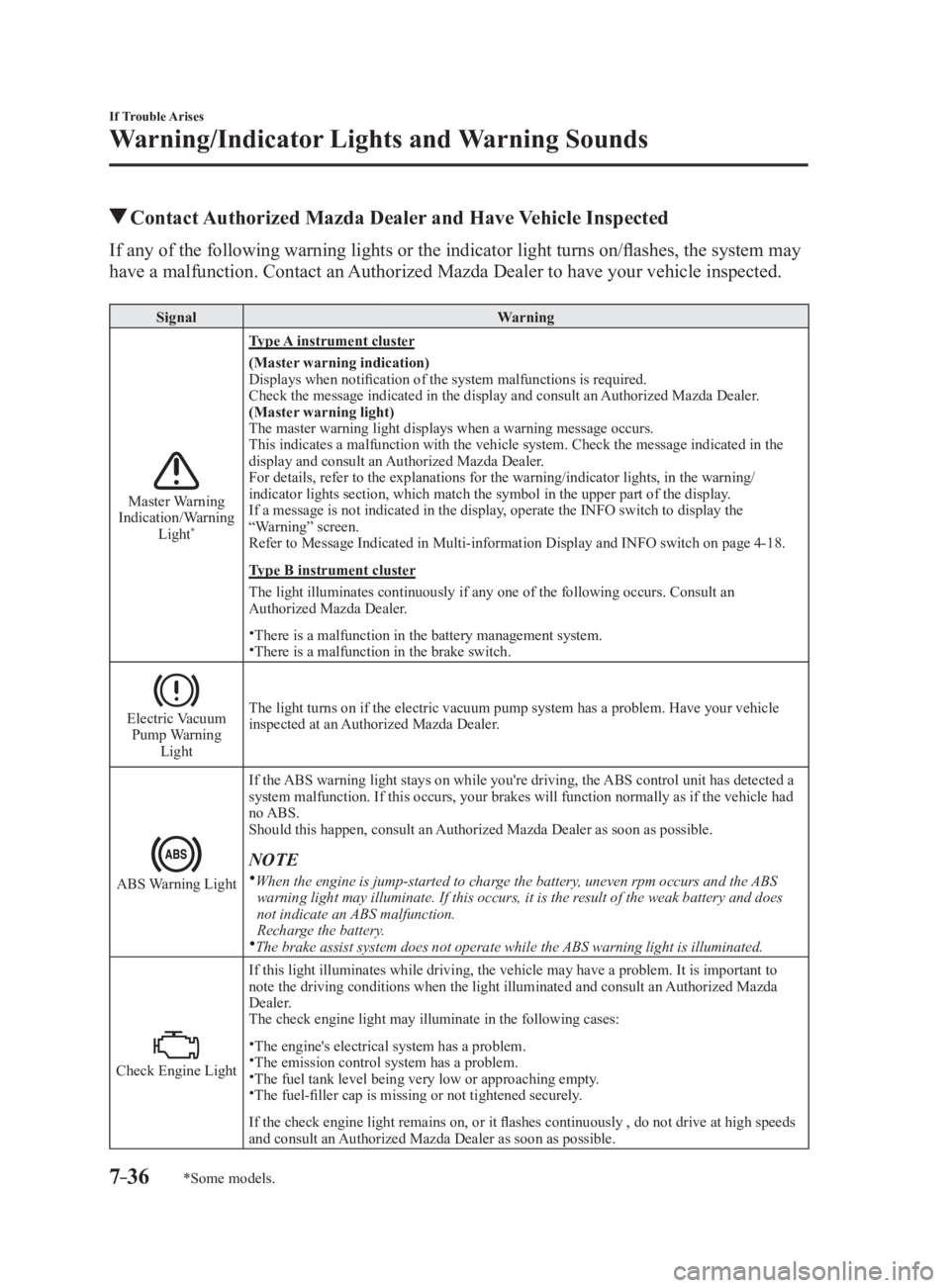
*Some models. Contact Authorized Mazda Dealer and Have Vehicle InspectedIf any of the following warning lights or the indicator light t urns on/flashes, the system may
have a malfunction. Contact an Authorized Mazda Dealer to have your vehicle inspected. Signal Warning
Master Warning
Indication/Warning
Light *
Type A instrument cluster
(Master warning indication)
Displays when notification of the system malfunctions is require d.
Check the message indicated in the display and consult an Authorized Mazda Dealer.
(Master warning light)
The master warning light displays when a warning message occurs.
This indicates a malfunction with the vehicle system. Check the message indicated in the
display and consult an Authorized Mazda Dealer.
For details, refer to the explanations for the warning/indicato r lights, in the warning/
indicator lights section, which match the symbol in the upper part of the display.
If a message is not indicated in the display, operate the INFO switch to display the
“Warning” screen.
Refer to Message Indicated in Multi-information Display and INF O switch on page 4-18 .
Type B instrument cluster
The light illuminates continuously if any one of the following occurs. Consult an
Authorized Mazda Dealer.
There is a malfunction in the battery management system.
There is a malfunction in the brake switch.
Electric Vacuum
Pump Warning
Light The light turns on if the electric vacuum pump system has a problem. Have your vehicle
inspected at an Authorized Mazda Dealer.
ABS Warning Light If the ABS warning light stays on while you're driving, the ABS control unit has detected a
system malfunction. If this occurs, your brakes will function normally as if the vehicle had
no ABS.
Should this happen, consult an Authorized Mazda Dealer as soon as possible.
NOTE
When the engine is jump-started to charge the battery, uneven rpm occurs and the ABS
warning light may illuminate. If this occurs, it is the result of the weak battery and does
not indicate an ABS malfunction.
Recharge the battery.
The brake assist system does not operate while the ABS warning light is illuminated.
Check Engine Light If this light illuminates while driving, the vehicle may have a problem. It is important to
note the driving conditions when the light illuminated and consult an Authorized Mazda
Dealer.
The check engine light may illuminate in the following cases:
The engine's electrical system has a problem.
The emission control system has a problem.
The fuel tank level being very low or approaching empty.
The fuel-filler cap is missing or not tightened securely.
If the check engine light remains on, or it flashes continuously , do not drive at high speeds
and consult an Authorized Mazda Dealer as soon as possible.
MX-5_8FR4-EA-16J_Edition1.indb 36 2016/08/11 20:30:03
Page 532 of 568

8 –32 Customer Information and Reporting Safety Defects
Tire Information (U.S.A.) Glossary of TermsTire Placard: A label indicating the OE tire sizes, recommended inflation pressure, and the
maximum weight the vehicle can carry.
Tire Identification Number (TIN): A number on the sidewall of each tire providing
information about the tire brand and manufacturing plant, tire size, and date of manufacture.
Inflation Pressure: A measure of the amount of air in a tire.
kPa: Kilopascal, the metric unit for air pressure.
psi: Pounds per square inch, the English unit for air pressure.
B-pillar: The structural member at the side of the vehicle behind the front door.
Original Equipment (OE): Describes components originally equipped on the vehicle.
Vehicle Load Limit: The maximum value of the combination weight of occupants and
cargo.
Bead Area of the Tire: Area of the tire next to the rim.
Sidewall Area of the Tire: Area between the bead area and the tread.
Tread Area of the Tire: Area on the perimeter of the tire that contacts the road when it's
mounted on the vehicle.
Seating capacity means the total allowable number of vehicle occupants. Seating capacity
is described on the tire label.
Production options weight is the combination weight of installed regular production
options weighing over 2.3 kilograms in excess of the standard items which they replace,
and not previously considered in the curb weight or accessory weight, including heavy duty
brakes, ride levelers, roof rack, heavy duty battery, and special trim.
Rim is the metal support (wheel) for a tire or a tire and tube assembly upon which the tire
beads are seated.
MX-5_8FR4-EA-16J_Edition1.indb 32 2016/08/11 20:30:17
Page 536 of 568
8 –36 Customer Information and Reporting Safety Defects
Tire Information (U.S.A.)
Vehicle LoadingWARNINGDo not tow a trailer with this vehicle:
Towing a trailer with this vehicle is dangerous because it has not been designed to tow a
trailer and doing so will affect the drive system which could result in vehicle damage.
This section will guide you in the proper loading of your vehicle, to keep your loaded
vehicle weight within its design rating capability. Properly loading your vehicle will provide
maximum return of vehicle design performance. Before loading yo ur vehicle, familiarize
yourself with the following terms for determining your vehicle's weight ratings, from the
vehicle's Safety Certification Label and Tire and Load Information Label:
WARNINGOverloaded Vehicle:
Overloading a vehicle is dangerous. The results of overloading can have serious
consequences in terms of passenger safety. Too much weight on a vehicle's suspension
system can cause spring or shock absorber failure, brake failure, handling or steering
problems, irregular tire wear, tire failure or other damage.
Overloading makes a vehicle harder to drive and control. It also increases the distance
required for stopping. In cases of serious overloading, brakes can fail completely,
particularly on steep grades. The load a tire will carry safely is a combination of the size of
the tire, its load range, and corresponding inflation pressure.
Never overload the vehicle and always observe the vehicle's weight ratings from the
vehicle's Safety Certification and Tire and Load Information labels.
MX-5_8FR4-EA-16J_Edition1.indb 36 2016/08/11 20:30:17
Page 562 of 568

10 –2 Index
A Accessory Socket .............................. 5-134
Adaptive Front Lighting System
(AFS) ................................................... 4-75
Add-On Non-Genuine Parts and
Accessories
......................................... 8-18
Advanced Key
Advanced keyless entry system
...... 3-8
Operational range
............................ 3-9
Air Bag/Seat Belt Pretensioner System
Warning Beep
...................................... 7-48
Air Bag Systems
................................. 2-24
Ambient Temperature Display
... 4-15, 4-22
Antilock Brake System (ABS)
............ 4-65
Audio Control Switch
Adjusting the volume
.................... 5-55
Seek switch .................................... 5-56
Audio System
...................................... 5-13
AUX/USB mode
........................... 5-57
Antenna
......................................... 5-13
Audio control switch
..................... 5-55
Audio set
[Type A (non-touchscreen)]
........... 5-22
Audio set
[Type B (touchscreen)]
................... 5-34
Operating tips for audio system
.... 5-14
Satellite radio
................................ 5-46
Automatic Transmission
..................... 4-34
Active Adaptive Shift (AAS)
........ 4-36
Direct mode
................................... 4-43
Driving tips .................................... 4-43
Manual shift mode ......................... 4-37
Shift-lock override
........................ 4-36
Shift-lock system
........................... 4-36
Shift position indication
................ 4-35
Transmission ranges
...................... 4-35
Warning light
................................. 4-35B Back Trim Storage Box ..................... 5-139
Battery
................................................. 6-36
Maintenance
.................................. 6-38
Replacement
.................................. 6-38
Specifications
.................................. 9-4
Battery Runs Out
................................. 7-23
Jump-starting
................................. 7-23
Blind Spot Monitoring (BSM)
............ 4-85
Blind Spot Monitoring (BSM) System
Warning Beep
...................................... 7-51
Bluetooth ®
........................................... 5-74
Bluetooth ®
audio (Type A) .......... 5-113
Bluetooth ®
audio (Type B) .......... 5-115
Bluetooth ®
Hands-Free (Type A) ... 5-97
Bluetooth ®
Hands-Free (Type B) ... 5-103
Troubleshooting
.......................... 5-129
Body Lubrication
................................ 6-32
Brakes
Brakes assist
.................................. 4-63
Foot brake ...................................... 4-61
Pad wear indicator
......................... 4-62
Parking brake
................................ 4-62
Warning light
................................. 4-62
Break-In Period
................................... 3-51
C Capacities .............................................. 9-5
Carbon Monoxide
............................... 3-24
Cell Phones
......................................... 8-19
Child Restraint
Child-restraint precautions
............ 2-15
Child-restraint system installation ... 2-20
Installing child-restraint systems ... 2-21
Climate Control System
........................ 5-2
Fully automatic type
........................ 5-9
Gas specifications
............................ 9-6
Manual type
..................................... 5-5
Operating tips
.................................. 5-2
Vent operation
................................. 5-3
Clock
................................................... 5-26
MX-5_8FR4-EA-16J_Edition1.indb 2 2016/08/11 20:30:24