light MAZDA MX5 MIATA 2017 Repair Manual
[x] Cancel search | Manufacturer: MAZDA, Model Year: 2017, Model line: MX5 MIATA, Model: MAZDA MX5 MIATA 2017Pages: 568, PDF Size: 16.58 MB
Page 122 of 568

4 –8 When Driving
Start/Stop Engine 8. After starting the engine, let it idle for
about ten seconds.NOTE
Whether the engine is cold or warm, it
should be started without the use of the
accelerator.
If the engine does not start the first
time, refer to Starting a Flooded Engine
under Emergency Starting. If the engine
still does not start, have your vehicle
inspected by an Authorized Mazda
Dealer (page 7-26 ).
Engine Start Function When Key
Battery is Dead
CAUTION When starting the engine by holding
the transmitter over the push button
start due to a dead key battery or a
malfunctioning key, be careful not
to allow the following, otherwise the
signal from the key will not be received
correctly and the engine may not start.
Metal parts of other keys or metal
objects touch the key.
Spare keys or keys for other
vehicles equipped with an
immobilizer system touch or come
near the key.
Devices for electronic purchases,
or security passage touch or come
near the key.
If the engine cannot be started due to a
dead key battery, the engine can be started
using the following procedure:
1. Continue to depress the brake pedal
firmly until the engine has completely
started.
2. (Manual transmission)
Continue to depress the clutch pedal
firmly until the engine has completely
started.
3. Verify that the push button start
indication light (green) flashes.
4. Touch the push button start using the
backside of the key (as shown) while
the push button start indicator light
(green) flashes.
Transmitter
MX-5_8FR4-EA-16J_Edition1.indb 8 2016/08/11 20:28:42
Page 123 of 568

4 –9 When Driving
Start/Stop EngineNOTE
When touching the push button start using
the backside of the key as shown in the
illustration, touch the push button start
with the lock switch side of the key facing
up.
5. Verify that the push button start
indicator light (green) turns on.
6. Press the push button start to start the
engine.
NOTE
The engine cannot be started unless the
clutch pedal is fully depressed (manual
transmission) or the brake pedal is fully
depressed (automatic transmission).
If there is a malfunction with the push
button start function, the push button
start indicator light (amber) flashes.
In this case, the engine may start,
however, have the vehicle checked at an
Authorized Mazda Dealer as soon as
possible.
If the push button start indicator light
(green) does not illuminate, perform the
operation from the beginning again. If
it does not illuminate, have the vehicle
checked at an Authorized Mazda Dealer.
To switch the ignition position without
starting the engine, perform the
following operations after the push
button start indicator light (green) turns
on.
1. Release the clutch pedal (manual
transmission) or brake pedal
(automatic transmission).
2. Press the push button start to switch
the ignition position. The ignition
switches in the order of ACC, ON,
and off each time the push button
start is pressed. To switch the
ignition position again, perform the
operation from the beginning. Emergency Operation for Starting
the Engine If the KEY warning light (red) illuminates,
or the push button start indicator light
(amber) flashes, this could indicate that
the engine may not start using the usual
starting method. Have your vehicle
inspected at an Authorized Mazda Dealer
as soon as possible. If this occurs, the
engine can be force-started. Press and hold
the push button start until the engine starts.
Other procedures necessary for starting
the engine such as having the key in the
cabin, and depressing the clutch pedal
(manual transmission) or the brake pedal
(automatic transmission) are required.
MX-5_8FR4-EA-16J_Edition1.indb 9 2016/08/11 20:28:42
Page 124 of 568

4 –10 When Driving
Start/Stop Engine
Turning the Engine Off WARNINGDo not stop the engine while the vehicle
is moving:
Stopping the engine while the vehicle
is moving for any reason other than in
an emergency is dangerous. Stopping
the engine while the vehicle is moving
will result in reduced braking ability
due to the loss of power braking, which
could cause an accident and serious
injury.
1. Stop the vehicle completely.
2. (Manual transmission)
Shift into neutral and set the parking
brake.
(Automatic transmission)
Shift the selector lever to the P position
and set the parking brake.
3. Press the push button start to turn off
the engine. The ignition position is off.
CAUTION When leaving the vehicle, make sure
the push button start is off. NOTE
The cooling fan in the engine
compartment could turn on for a few
minutes after the ignition is switched
from ON to OFF, whether or not the
A/C is on or off, to cool the engine
compartment quickly.
When the push button start is pressed
from ON to ACC or OFF, the KEY
indicator light (green) may flash for
approximately 30 seconds indicating
that the remaining battery power of the
key is low.
Replace with a new battery before the
key becomes unusable.
Refer to Key Battery Replacement on
page 6-38 .
(Automatic transmission)
If the engine is turned off while the
selector lever is in a position other than
P, the ignition switches to ACC.
Emergency Engine Stop Continuously pressing the push button
start or quickly pressing it any number of
times while the engine is running or the
vehicle is being driven will turn the engine
off immediately. The ignition switches to
ACC.
MX-5_8FR4-EA-16J_Edition1.indb 10 2016/08/11 20:28:42
Page 127 of 568

4 –13 When Driving
Instrument Cluster and DisplayNOTE
(Vehicles with type B audio)
If the fuel economy data is reset using
the fuel economy monitor, or trip A
is reset using the trip meter when the
function which synchronizes the fuel
economy monitor and the trip meter is
on, the fuel economy data and trip A are
reset simultaneously.
Refer to Fuel Economy Monitor on page
4-69 .
Only the trip meters record tenths of
kilometers (miles).
The trip record will be erased when:
The power supply is interrupted
(blown fuse or the battery is
disconnected).
The vehicle is driven over 9999.9 km
(mile).
TachometerThe tachometer shows engine speed in
thousands of revolutions per minute (rpm).
CAUTION Do not run the engine with the
tachometer needle in the RED ZONE.
This may cause severe engine damage. Striped zone
Red zone NOTE
When the tachometer needle enters the
STRIPED ZONE, this indicates to the
driver that the gears should be shifted
before entering the RED ZONE.
Engine Coolant Temperature
Gauge (Without Multi-information
Display) Indicates engine coolant temperature.
CAUTION If the high engine coolant temperature
warning light (red) turns on, there is
a possibility of overheating. Park the
vehicle in a safe place immediately
and take appropriate measures. If the
vehicle continues to be driven, it could
cause damage to the engine.
Refer to Overheating on page 7-27 .
MX-5_8FR4-EA-16J_Edition1.indb 13 2016/08/11 20:28:44
Page 128 of 568
4 –14 When Driving
Instrument Cluster and Display NOTE
The temperature unit (Centigrade/
Fahrenheit) of the engine coolant gauge
display changes in conjunction with
the temperature unit of the outside
temperature display.
Refer to Personalization Features on
page 9-9 .
During normal driving, the engine
coolant temperature stabilizes at
100 °C (210 °F) or less, and the gauge
indicates a range lower than 100 °C
(210 °F).
If the engine load increases and the
engine coolant temperature exceeds
100 °C (210 °F), the gauge indicates the
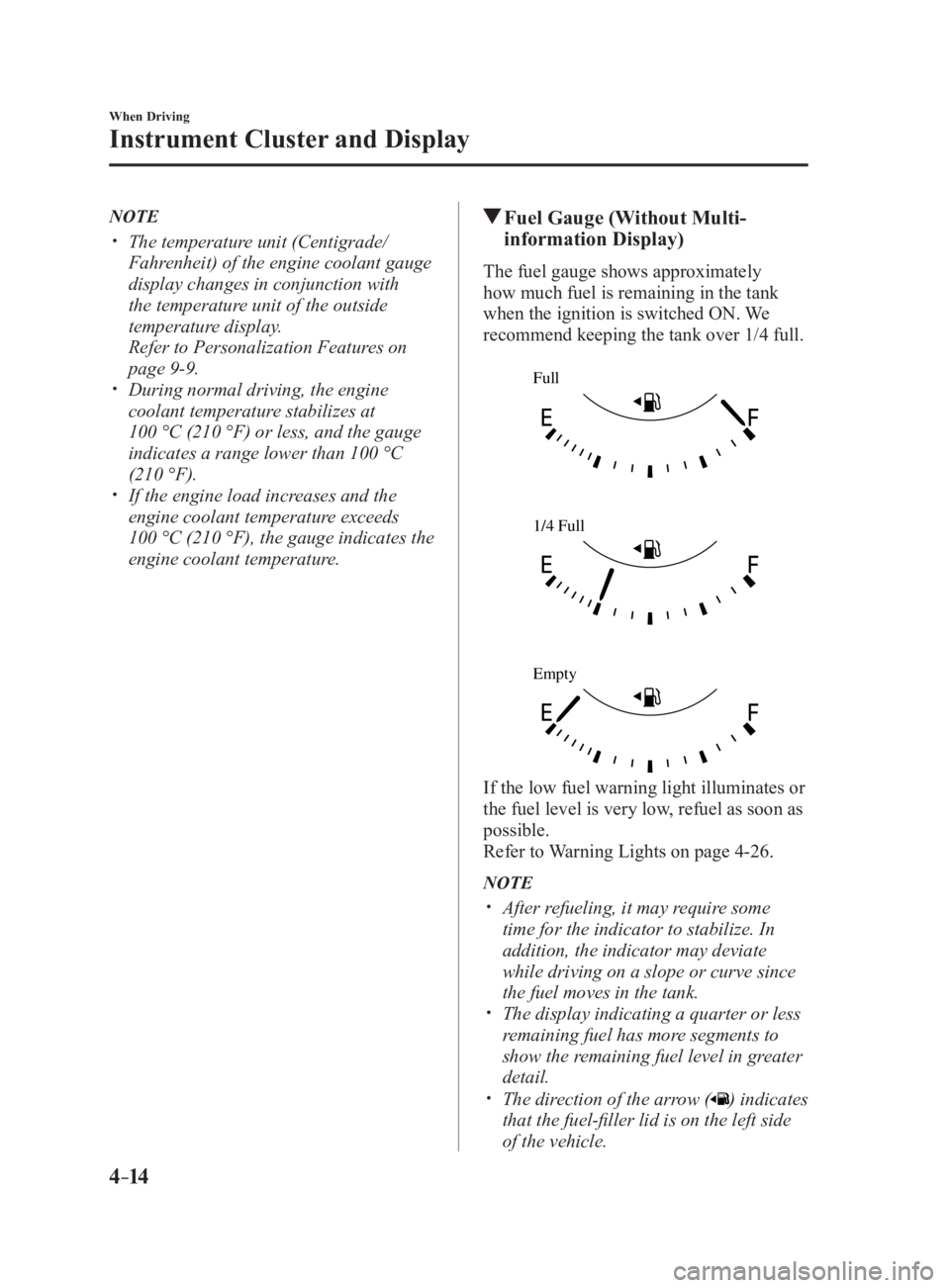
engine coolant temperature. Fuel Gauge (Without Multi-
information Display) The fuel gauge shows approximately
how much fuel is remaining in the tank
when the ignition is switched ON. We
recommend keeping the tank over 1/4 full. Full
1/4 Full
Empty
If the low fuel warning light illuminates or
the fuel level is very low, refuel as soon as
possible.
Refer to Warning Lights on page 4-26 .
NOTE
After refueling, it may require some
time for the indicator to stabilize. In
addition, the indicator may deviate
while driving on a slope or curve since
the fuel moves in the tank.
The display indicating a quarter or less
remaining fuel has more segments to
show the remaining fuel level in greater
detail.
The direction of the arrow ( ) indicates
that the fuel-filler lid is on the left side
of the vehicle.
MX-5_8FR4-EA-16J_Edition1.indb 14 2016/08/11 20:28:44
Page 129 of 568

4 –15 When Driving
Instrument Cluster and Display Dashboard IlluminationWhen the position lights are turned
on with the ignition switched ON,
the brightness of the instrument panel
illumination is dimmed. NOTE
When the position lights are turned on,
the position lights indicator light in the
instrument cluster turns on.
Refer to Headlights on page 4-45 .
The brightness of the instrument cluster
and dashboard illuminations can be
adjusted by rotating the knob.
The brightness decreases by rotating the
knob to the left. A beep sound will be
heard when the knob has been rotated to
the maximum dim position.
The brightness increases by rotating the
knob to the right. Dim
Bright Function for cancelling illumination
dimmer
The illumination dimmer can be canceled
by rotating the dashboard illumination
knob to the right until a beep sound is
heard while the instrument cluster is
dimmed with the ignition switched ON.
If the instrument cluster's visibility is
reduced due to glare from surrounding
brightness, cancel the illumination
dimmer.
NOTE
When the illumination dimmer is
canceled, the instrument cluster cannot
be dimmed even if the position lights are
turned on.
When the illumination dimmer is
canceled, the screen in the center
display switches to constant display of
the daytime screen.
Outside Temperature Display
(Without Multi-information
Display) When the ignition is switched ON, the
outside temperature is displayed.
NOTE
Under the following conditions, the
outside temperature display may differ
from the actual outside temperature
depending on the surroundings and vehicle
conditions:
Significantly cold or hot
temperatures.
Sudden changes in outside
temperature.
The vehicle is parked.
The vehicle is driven at low speeds.
MX-5_8FR4-EA-16J_Edition1.indb 15 2016/08/11 20:28:44
Page 131 of 568

4 –17 When Driving
Instrument Cluster and DisplayNOTE
Even though the distance-to-empty
display may indicate a sufficient amount
of remaining driving distance before
refueling is required, refuel as soon as
possible if the fuel level is very low or
the low fuel warning light illuminates.
The display may not change unless you
add more than approximately 9 L (2.3
US gal, 1.9 Imp gal) of fuel.
The distance-to-empty is the
approximate remaining distance the
vehicle can be driven until all the
graduation marks in the fuel gauge
(indicating the remaining fuel supply)
disappear.
If there is no past fuel economy
information such as after first
purchasing your vehicle or the
information is deleted when the battery
cables are disconnected, the actual
distance-to empty/range may differ from
the amount indicated.
Average fuel economy mode
This mode displays the average fuel
economy by calculating the total fuel
consumption and the total traveled
distance since purchasing the vehicle, re-
connecting the battery after disconnection,
or resetting the data. The average fuel
economy is calculated and displayed every
minute.
To clear the data being displayed, press the
INFO switch for more than 1.5 seconds.
After pressing the INFO switch, - - - L/100
km (- - - mpg) will be displayed for about
1 minute before the fuel economy is
recalculated and displayed. Current fuel economy mode
This mode displays the current fuel
economy by calculating the amount of fuel
consumption and the distance traveled.
Current fuel economy will be calculated
and displayed every 2 seconds.
When you've slowed to about 5 km/h (3
mph), - - - L/100 km (- - - mpg) will be
displayed.
Average vehicle speed mode
This mode displays the average vehicle
speed by calculating the distance and the
time traveled since connecting the battery
or resetting the data.
Average vehicle speed will be calculated
and displayed every 10 seconds.
To clear the data being displayed, press the
INFO switch for more than 1.5 seconds.
After pressing the INFO switch, - - - km/h
(- - - mph) will be displayed for about
1 minute before the vehicle speed is
recalculated and displayed.
MX-5_8FR4-EA-16J_Edition1.indb 17 2016/08/11 20:28:44
Page 135 of 568

4 –21 When Driving
Instrument Cluster and Display Engine Coolant Temperature
GaugeDisplays the engine coolant temperature.
The blue gauge indicates that the engine
coolant temperature is low, and the red
gauge indicates that the engine coolant
temperature is high and overheating.
CAUTION If the high engine coolant temperature
warning light (red) turns on, there is
a possibility of overheating. Park the
vehicle in a safe place immediately
and take appropriate measures. If the
vehicle continues to be driven, it could
cause damage to the engine.
Refer to Overheating on page 7-27 .
NOTE
The temperature unit (Centigrade/
Fahrenheit) of the engine coolant gauge
display changes in conjunction with
the temperature unit of the outside
temperature display.
Refer to Personalization Features on
page 9-9 .
During normal driving, the engine
coolant temperature stabilizes at
100 °C (210 °F) or less, and the gauge
indicates a range lower than 100 °C
(210 °F).
If the engine load increases and the
engine coolant temperature exceeds
100 °C (210 °F), the gauge indicates the
engine coolant temperature. Fuel Gauge The fuel gauge shows approximately
how much fuel is remaining in the tank
when the ignition is switched ON. We
recommend keeping the tank over 1/4 full. Full
1/4 Full
Empty
If the fuel level is low, ( ) and ( ) turn an
amber color. Refuel as soon as possible.
Refer to Taking Action on page 7-41 .
NOTE
After refueling, it may require some
time for the indicator to stabilize. In
addition, the indicator may deviate
while driving on a slope or curve since
the fuel moves in the tank.
The display indicating a quarter or less
remaining fuel has more segments to
show the remaining fuel level in greater
detail.
The direction of the arrow ( ) indicates
that the fuel-filler lid is on the left side
of the vehicle.
MX-5_8FR4-EA-16J_Edition1.indb 21 2016/08/11 20:28:46
Page 136 of 568

4 –22 When Driving
Instrument Cluster and Display Outside Temperature DisplayWhen the ignition is switched ON, the
outside temperature is displayed.
NOTE
Under the following conditions, the
outside temperature display may differ
from the actual outside temperature
depending on the surroundings and vehicle
conditions:
Significantly cold or hot temperatures.
Sudden changes in outside temperature.
The vehicle is parked.
The vehicle is driven at low speeds.
Changing the Temperature Unit of the
Outside Temperature Display
The outside temperature unit can be
switched between Celsius and Fahrenheit
using the following procedure.
(Vehicles with Type B)
Settings can be changed by operating the
center display screen.
Refer to Personalization Features on page
9-9 .
(Vehicles without Type B)
1. Press the INFO switch with the ignition
switched off and continue pressing the
INFO switch for 5 seconds or longer
while switching the ignition ON. The
outside temperature display flashes.
2. Press the INFO switch to change the
outside temperature unit.
3. Press and hold the INFO switch for
3 seconds or longer while the outside
temperature display is flashing. The
outside temperature display illuminates. NOTE
When the temperature unit indicated in the
outside temperature display is changed,
the temperature unit indicated in the
engine coolant gauge display changes in
conjunction with it.
Distance-to-empty This displays the approximate distance
you can travel on the remaining fuel based
on the fuel economy.
The distance-to-empty will be calculated
and displayed every second.
NOTE
Even though the distance-to-empty
display may indicate a sufficient amount
of remaining driving distance before
refueling is required, refuel as soon as
possible if the fuel level is very low or
the low fuel warning light illuminates.
The display will not change unless you
add more than approximately 9 L
(2.3 US gal, 1.9 Imp gal) of fuel.
The distance-to-empty is the
approximate remaining distance the
vehicle can be driven until all the
graduation marks in the fuel gauge
indicating the remaining fuel supply
disappear.
If there is no past fuel economy
information such as after first
purchasing your vehicle or the
information is deleted when the battery
cables are disconnected, the actual
distance-to empty/range may differ from
the amount indicated.
MX-5_8FR4-EA-16J_Edition1.indb 22 2016/08/11 20:28:46
Page 139 of 568

4 –25 When Driving
Instrument Cluster and Display Warning (Display Indication)A message is displayed to notify the
user of the system operation status and
malfunctions or abnormalities.
If the warning light turns on/flashes
simultaneously or a symbol is indicated
in the display, check the information
regarding the warning light or symbol.
(page 4-26 )
When only a message is displayed, refer
to Message Indicated in Multi-information
Display. (page 7-45 )
MX-5_8FR4-EA-16J_Edition1.indb 25 2016/08/11 20:28:47