windshield MAZDA MX5 MIATA 2023 User Guide
[x] Cancel search | Manufacturer: MAZDA, Model Year: 2023, Model line: MX5 MIATA, Model: MAZDA MX5 MIATA 2023Pages: 503, PDF Size: 6.98 MB
Page 182 of 503

If dirt or foreign matter (such as ice or
matter containing salt water) adheres to
the windshield above the rain sensor, or
if the windshield is iced, it could cause
the wipers to move automatically.
However, if the wipers cannot remove
this ice, dirt or foreign matter, the
auto-wiper control will stop operation.
In this case, set the wiper lever to the
low speed position or high speed
position for manual operation, or
remove the ice, dirt or foreign matter by
hand to restore the auto-wiper
operation.
If the auto-wiper lever is left in the
AUTO position, the wipers could
operate automatically from the effect of
strong light sources, electromagnetic
waves, or infrared light because the rain
sensor uses an optical sensor. It is
recommended that the auto-wiper lever
be switched to the OFF position other
than when driving the vehicle under
rainy conditions.
(With auto-wiper control (Except
Canada))
If the headlight switch and the
windshield wiper switch are in AUTO,
and the wipers are operated at low or
high speed by the auto wiper control for
several seconds, bad weather conditions
are determined and the headlights may
be turned on.
The auto-wiper control functions can be
turned off. Refer to the Settings section
in the Mazda Connect Owner's Manual.
▼ Windshield Washer
Pull the lever toward you and hold it to
spray washer fluid.
Washer
OFF
NOTE
If the windshield washer is turned on when
the windshield wipers are not operating,
the windshield wipers operate a few times.
If the washer does not work, inspect the
fluid level (page 6-24).
If the fluid level
is normal, consult an Authorized Mazda
Dealer.
When Driving
Switches and Controls
4-55
MX-5_8LE7-EA-22K_Edition1_old 2022-8-4 8:12:24
Page 201 of 503
▼Camera and Sensors
Forward sensing camera (FSC)
The Forward Sensing Camera (FSC) determines the conditions ahead of the vehicle while
traveling at night and detects traffic lanes. The following systems also use the Forward
Sensing Camera (FSC).
High Beam Control system (HBC)
Lane Departure Warning System (LDWS)
Traffic Sign Recognition System (TSR)
Smart City Brake Support (SCBS)
The Forward Sensing Camera (FSC) is installe d at the top of the windshield near the
rearview mirror.
Refer to Forward Sensing Camera (FSC) on page 4-103.
Radar sensors (rear)
The radar sensors (rear) function by detecting the radio waves reflected off a vehicle
approaching from the rear or an obstruction sent from the radar sensors. The following
systems also use the radar sensors (rear).
Blind Spot Monitoring (BSM)
Rear Cross Traffic Alert (RCTA)
The radar sensors (rear) are installed inside th e rear bumper, one each on the left and right
sides.
Refer to Radar Sensors (Rear) on page 4-107.
When Driving
i-ACTIVSENSE
4-74
MX-5_8LE7-EA-22K_Edition1_old 2022-8-4 8:12:24
Page 204 of 503
NOTE
The timing in which the system switches the headlights changes under the following
conditions. If the system does not switch the headlights appropriately, manually switch
between high and low beams according to the visibility as well as road and traffic
conditions.
When there are sources of light in the area such as streetlamps, illuminated signboards,
and traffic signals.
When there are reflective objects in the surrounding area such as reflective plates and
signs.
When visibility is reduced under rain, snow and foggy conditions.
When driving on roads with sharp turn or hilly terrain.
When the headlights/rear lamps of vehicles in front of you or in the opposite lane are dim
or not illuminated.
When there is sufficient darkness such as at dawn or dusk.
When the luggage compartment is loaded with heavy objects.
When visibility is reduced due to a vehicle in front of you spraying water from its tires
onto your windshield.
▼ To Operate the System
The HBC operates to switch the headlights
automatically between high and low
beams after the igniti
on is switched ON
and the headlight switch is in the AUTO
and high beam position.
The HBC determines that it is dark based
on the brightness of the surrounding area.
At the same time, the HBC indicator light
(green) in the in strument cluster
illuminates.
NOTE
When the vehicle speed is about 30 km/h
(19 mph) or more, the headlights
automatically switch to high beams
when there are no vehicles ahead or
approaching in the opposite direction.
When the vehicle speed is less than
about 20 km/h (12 mph), the HBC
switches the headlights to low beams.
The low beams may not switch to high
beams when cornering.
Operation of the HBC function can be
disabled. Refer to th e Settings section in
the Mazda Connect Owner's Manual.
When Driving
i-ACTIVSENSE
4-77
MX-5_8LE7-EA-22K_Edition1_old 2022-8-4 8:12:24
Page 207 of 503

The functions of the LDWS have limitations:
Always stay on course using the steering wheel and drive with care. The system is not
designed to compensate for a driver’s lack of caution and if you rely too much on the LDWS it
could lead to an accident. The driver is res ponsible for assuring lane changes and other
maneuvers. Always pay attention to the direction in which the vehicle is traveling and the
vehicle’s surroundings.
CAUTION
Do not modify the suspension. If the vehicle height or the damping force of the suspensions is
changed, the LDWS may not operate correctly.
NOTE
If your vehicle deviates from its traffi c lane, the LDWS operates (warning sound and
indicator light). Steer the vehicle adequately to drive the vehicle to the center of the lane.
When the turn signal lever is operated for a lane change, the LDWS warning is
automatically canceled. The LDWS warning becomes operable when the turn signal lever
is returned and the system detects the white or yellow lines.
If the steering wheel, accelerator pedal, or brake pedal is operated abruptly and the
vehicle moves close to a white or yellow line, the system determines that the driver is
making a lane change and the LDWS warning is automatically canceled.
The LDWS may not operate during the period immediately after the vehicle has deviated
from its lane and the LDWS has operated, or the vehicle deviates from its lane repeatedly
within a short period of time.
The LDWS does not operate if it does not dete ct the white or yellow lines of the traffic
lane.
Under the following conditions, the LDWS may not be able to detect white or yellow lines
correctly and the LDWS may not operate correctly.
If an object placed on the dashboard is reflected in the windshield and picked up by the
camera.
Heavy luggage is loaded in the luggage compartment the vehicle is inclined.
The tire pressures are not adjusted to the specified pressure.
When the vehicle is driven on the entry and exit to or from the rest area or tollgate of a
highway.
The white or yellow lines are less visible because of dirt or paint flaking.
The vehicle ahead is running near a white or yellow line and the line is less visible.
A white or yellow line is less visible because of bad weather (rain, fog, or snow).
The vehicle is driven on a temporary lane or section with a closed lane due to
construction.
When Driving
i-ACTIVSENSE
4-80
MX-5_8LE7-EA-22K_Edition1_old 2022-8-4 8:12:24
Page 208 of 503

A misleading line is picked up on the road such as a temporary line for construction, or
because of shade, lingering snow, or grooves filled with water.
The surrounding brightness suddenly changes such as when entering or exiting a
tunnel.
The illumination of the headlights is weakened because of dirt or the optical axis is
deviated.
The windshield is dirty or foggy.
Back-light is reflecting from the road surface.
The road surface is wet and shiny after rain, or there are puddles on the road.
The shade of a guardrail parallel to a white or yellow line is on the road.
The width of a lane is excessively narrow or wide.
The road is excessively uneven.
The vehicle is shaken after hitting a road bump.
There are two or more adjace nt white or yellow lines.
There are various road markings or lane markings of various shapes near an
intersection.
When Driving
i-ACTIVSENSE
4-81
MX-5_8LE7-EA-22K_Edition1_old 2022-8-4 8:12:24
Page 210 of 503

Auto cancel
In the following cases, the LDWS cancels
automatically and the LDWS warning
light in the instrument cluster turns on.
The temperature inside the camera is
high or low.
The windshield around the camera is
foggy.
The windshield around the camera is
blocked by an obstruction, causing poor
forward visibility.
The LDWS is enabled automatically when
the operation conditions are met, and the
LDWS warning light turns off.
Auto cancel warning
When the following operations are
performed, the LDWS de termines that the
driver intends to make a lane change and
the LDWS warning is canceled
automatically. The LDWS is enabled
automatically after the driver performs the
operation.
The steering wheel is operated abruptly.
The brake pedal is depressed abruptly.
The accelerator pedal is depressed
abruptly.
The turn signal lever is operated (after
the turn signal lever is returned, the
LDWS may not operate for about 3
seconds which is the period of time
required to make a lane correction).
NOTE
After about 30 seconds have elapsed with
the turn signal lever left operating, the
LDWS warning may operate if the vehicle
is close to a white or yellow line.
▼ Canceling the System
Press the LDWS OFF switch to cancel the
LDWS. The LDWS OFF indicator light
turns on.
Vehicle lane display (vehicles with
multi-information display)
The vehicle lane lines are no longer
indicated in the multi-information display
when the LDWS is canceled.
NOTE
When the ignition is
switched OFF, the
system status before it was turned off is
maintained. For exampl e, if the ignition is
switched OFF with the LDWS operable,
the system will be operable when the
ignition is switched ON the next time.
When Driving
i-ACTIVSENSE
4-83
MX-5_8LE7-EA-22K_Edition1_old 2022-8-4 8:12:24
Page 218 of 503

Stop sign
Sign recognized and
displayed at same time
Instrument cluster
WA R N I N G
Always check the traffic signs visually while driving.
The TSR helps prevent the driver from overlookin g traffic signs and provides support for safer
driving. Depending on the weath er conditions or problems with
traffic signs, a
traffic sign
may not be recognized or a traffic sign different from the actual traffic sign may be displayed.
Always make it your responsibility as a driver to check the actual
traffic signs. Otherwise, it
could result in an accident.
NOTE
The TSR does not operate if there is a malf unction in the Forward Sensing Camera (FSC).
Under the following conditions, the TSR may not operate normally.
An object placed on the dashboard is reflected in the windshield and picked up by the
camera.
Heavy luggage is loaded in the luggage compartment or on the rear seat and the
vehicle is tilted.
The tire pressures are not adjusted to the specified pressure.
Tires other than standard tires are equipped.
The vehicle is driven on the ramp and surrounding area to or from a rest area or a
tollgate on a highway.
When surrounding brightness suddenly changes such as when entering or exiting a
tunnel.
When Driving
i-ACTIVSENSE
4-91
MX-5_8LE7-EA-22K_Edition1_old 2022-8-4 8:12:24
Page 219 of 503

The illumination of the headlights is weakened because of dirt or the optical axis is
deviated.
The windshield is dirty or foggy.
The windshield and camera are fogged (water droplets).
Strong light is directed at the front of the vehicle (such as backlight or high-beam
headlights of on-coming vehicles).
The vehicle is making a sharp turn.
Strong light reflects off the road.
A traffic sign is in a position which makes it difficult to reflect the light from the
vehicle's headlights, such as when the vehicle is driven at night or in a tunnel.
The vehicle is driven under weather conditions such as rain, fog, or snow.
The stored map data for the navigation system is not current.
A traffic sign is obscured by mud or snow.
A traffic sign is concealed by trees or a vehicle.
A traffic sign is partially shaded.
A traffic sign is bent or warped.
A traffic sign is too low or too high.
A traffic sign is too bright or too da rk (including electronic traffic signs).
A traffic sign is too big or too small.
There is an object similar to the traffic sign being read (such as another traffic sign or
other signs resembling it).
The TSR can be set to inoperable.
Refer to Settings section in the Mazda Connect Owner's Manual.
▼Traffic Sign Display Indication
The following traffic signs are displa
yed on the multi-information display.
Speed limit signs
Do not enter signs
Stop signs
When Driving
i-ACTIVSENSE
4-92
MX-5_8LE7-EA-22K_Edition1_old 2022-8-4 8:12:24
Page 230 of 503
Forward Sensing Camera (FSC)*
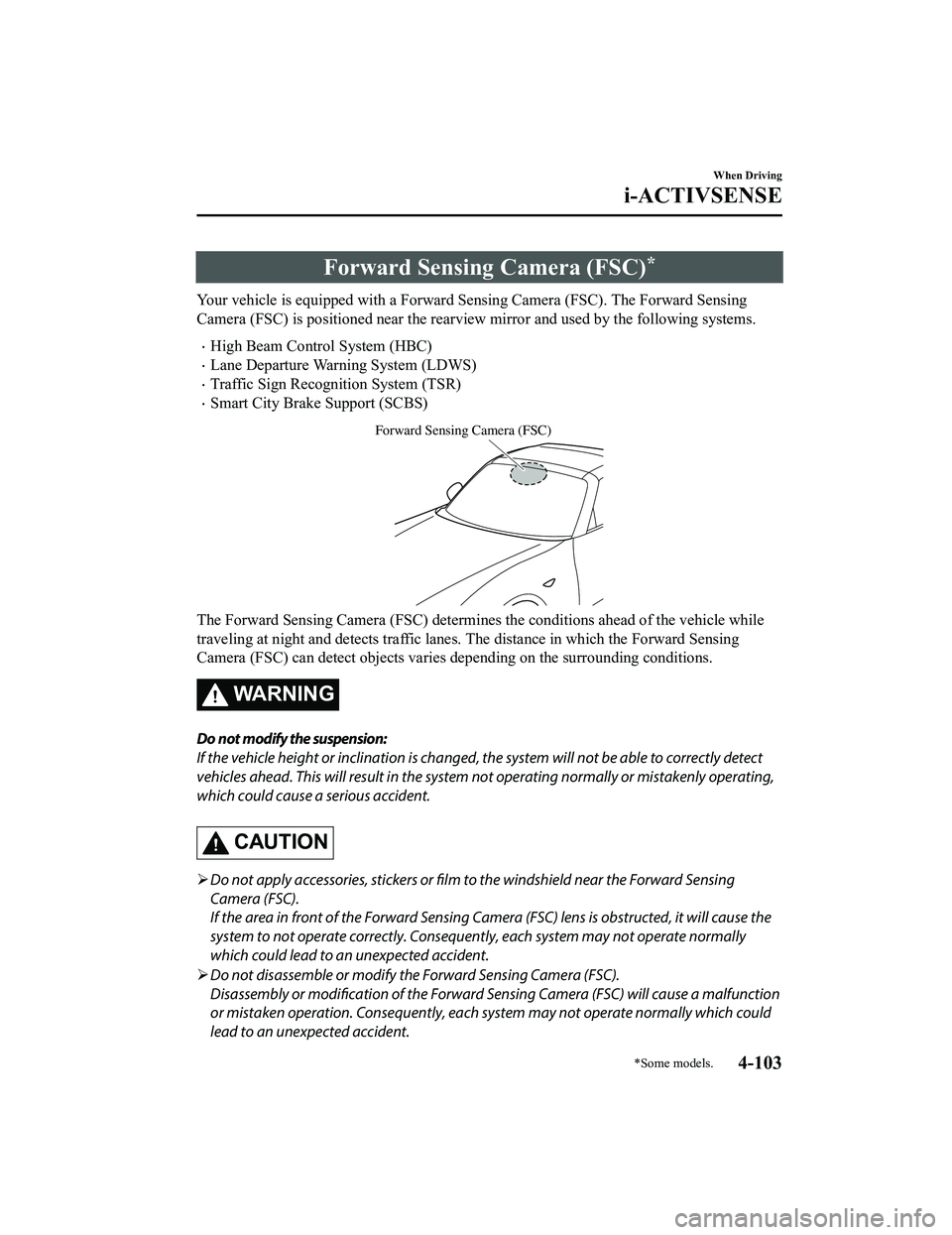
Your vehicle is equipped with a Forward Sensing Camera (FSC). The Forward Sensing
Camera (FSC) is positioned near the rearvi ew mirror and used by the following systems.
High Beam Control System (HBC)
Lane Departure Warning System (LDWS)
Traffic Sign Recognition System (TSR)
Smart City Brake Support (SCBS)
Forward Sensing Camera (FSC)
The Forward Sensing Camera (FSC) determines the conditions ahead of the vehicle while
traveling at night and detects traffic lanes. The distance in which the Forward Sensing
Camera (FSC) can detect objects varies depending on the surrounding conditions.
WA R N I N G
Do not modify the suspension:
If the vehicle height or inclination is changed, the system will not be able to correctly detect
vehicles ahead. This will result in the system not operating normally or mistakenly operating,
which could cause a serious accident.
CAUTION
Do not apply accessories, stickers or film to the windshield near the Forward Sensing
Camera (FSC).
If the area in front of the Forward Sensing Came ra (FSC) lens is obstructed, it will cause the
system to not operate correctly. Consequently, each system may not operate normally
which could lead to an unexpected accident.
Do not disassemble or modify th e Forward Sensing Camera (FSC).
Disassembly or modification of the Forward Sensing Camera (FSC) will cause a malfunction
or mistaken operation. Consequently, each sy stem may not operate normally which could
lead to an unexpected accident.
When Driving
i-ACTIVSENSE
*Some models.4-103
MX-5_8LE7-EA-22K_Edition1_old 2022-8-4 8:12:24
Page 231 of 503

Heed the following cautions to assure the correct operation of the Forward Sensing Camera
(FSC).
Be careful not to scratch the Forward Sensing Camera (FSC) lens or allow it to get dirty.
Do not remove the Forward Sensing Camera (FSC) cover.
Do not place objects on the dashboard which reflect light.
Always keep the windshield glass around the camera clean by removing dirt or fogging.
Use the windshield defroster to remove fogging on the windshield.
Consult an Authorized Mazda Dealer regardi ng cleaning the interior side of the
windshield around the Forw ard Sensing Camera (FSC).
Consult an Authorized Mazda Dealer before performing repairs around the Forward
Sensing Camera (FSC).
The Forward Sensing Camera (FSC) is installe d to the windshield. Consult an Authorized
Mazda Dealer for windshield repair and replacement.
When cleaning the wind shield, do not allow glass cleaners or similar cleaning fluids to
get on the Forward Sensing Camera (FSC) le ns. In addition, do not touch the Forward
Sensing Camera (FSC) lens.
When performing repairs around the rearv iew mirror, consult an Authorized Mazda
Dealer.
Consult an Authorized Mazda Dealer regarding cleaning of the camera lens.
Do not hit or apply strong force to the Forward Sensing Camera (FSC) or the area around
it. If the Forward Sensing Camera (FSC) is severely hit or if there are cracks or damage
caused by flying gravel or debris in the area around it, stop using the following systems
and consult an Authorized Mazda Dealer.
High Beam Control System (HBC)
Lane Departure Warning System (LDWS)
Traffic Sign Recognition System (TSR)
Smart City Brake Support (SCBS)
The direction in which the Forward Sensing Camera (FSC) is pointed has been finely
adjusted. Do not change the installation posi tion of the Forward Sensing Camera (FSC) or
remove it. Otherwise, it could result in damage or malfunction.
Always use tires for all wheels that are of the specified size, and the same manufacturer,
brand, and tread pattern. In addition, do no t use tires with significantly different wear
patterns on the same vehicle as the system may not operate normally.
The Forward Sensing Camera (FSC) includes a function for detecting a soiled windshield
and informing the driver, however, depending on the conditions, it may not detect plastic
shopping bags, ice or snow on the windshield. In such cases, the system cannot accurately
determine a vehicle ahead and may not be able to operate normally. Always drive carefully
and pay attention to the road ahead.
When Driving
i-ACTIVSENSE
4-104
MX-5_8LE7-EA-22K_Edition1_old 2022-8-4 8:12:24