lock MERCEDES-BENZ A CLASS 2012 Owners Manual
[x] Cancel search | Manufacturer: MERCEDES-BENZ, Model Year: 2012, Model line: A CLASS, Model: MERCEDES-BENZ A CLASS 2012Pages: 356, PDF Size: 4.96 MB
Page 190 of 356
When driving at speeds below 30 km/h, you
will see parking symbol
; as a status indi-
cator
in the instrument cluster. When a park-
ing space has been detected, an arrow
towards the right or the left also appears.
Active Parking Assist only displays parking
spaces on the front-passenger side as stand-
ard. Parking spaces on the driver's side are
displayed as soon as the turn signal on the
driver's side is activated. When parking on the
driver's side, this must remain switched on
until you acknowledge the use of Active Park-
ing Assist by pressing the a button on the
multifunction steering wheel.
A parking space is displayed while you are
driving past it, and until you are approx-
imately 15 m away from it.
Parking G
WARNING
Active Parking Assist merely aids you by inter-
vening
actively in the steering. There is a risk
of accident if you do not apply the brakes
yourself.
Always apply the brakes yourself when park-
ing and manoeuvring.
Active Parking Assist does not support you
with parking spaces parallel to the direction
of travel if:
R the parking space is on a kerbstone
R the parking space is apparently blocked,
for example by foliage or grass paving
blocks
R the range of movement is too small
R the parking space is bordered by an obsta-
cle which is not clearly defined such as a
tree or a trailer
X Stop the vehicle when the parking symbol
shows the desired parking space in the
instrument cluster.
X Vehicles with manual transmission: shift to
reverse gear. Vehicles with automatic transmission: shift
into position R.
The Start Park Assist? Yes: OK No:
%
message appears in the multifunction
display.
X To cancel the procedure: press the
% button on the multifunction steering
wheel or pull away.
or
X To park using Active Parking Assist:
press
the a button on the multifunction
steering wheel.
The Park Assist active Accelerate
and brake Observe surroundings mes-
sage appears in the multifunction display.
X Release the multifunction steering wheel.
X Reverse the vehicle, being ready to brake
at all times. Do not exceed a maximum
speed of approximately
10 km/h when
reversing. Otherwise, Active Parking Assist
will be cancelled.
i In tight parking spaces, you will achieve
the best parking results by backing up as
far as possible. When doing so, also
observe the PARKTRONIC messages.
X Stop as soon as PARKTRONIC sounds the
continuous warning tone, if not before.
Manoeuvring
may be required in tight park-
ing spaces.
Vehicles with manual transmission: the Park
Assist active Engage forward gear
Observe
surroundings message appears in
the multifunction display.
Vehicles with automatic transmission: the
Park Assist active Select D Observe
surroundings message appears in the mul-
tifunction display.
X Vehicles with manual transmission: while
the vehicle is stationary, shift to first gear.
Vehicles with automatic transmission:
select transmission position D while the
vehicle is stationary.
Active
Parking Assist immediately steers in
the other direction. 188
Driving systems
Driving and parking
Page 193 of 356
Reversing camera
Important safety notes The reversing camera is only an aid. It is not
a substitute for your attention to the imme-
diate
surroundings. The responsibility for safe
manoeuvring and parking remains with you.
Make sure that there are no persons, animals
or objects in range while manoeuvring and
parking.
Under the following circumstances, the
reversing camera will not function, or will
function in a limited manner:
R if the tailgate is open
R in heavy rain, snow or fog
R at night or in very dark places
R if the camera is exposed to very bright light
R if the area is lit by fluorescent light or LED
lighting (the display may flicker)
R if there is a sudden change in temperature,
e.g. when driving into a heated garage in
winter
R if the camera lens is dirty or obstructed
R if the rear of your vehicle is damaged. In
this event, have the camera position and
setting checked at a qualified specialist
workshop.
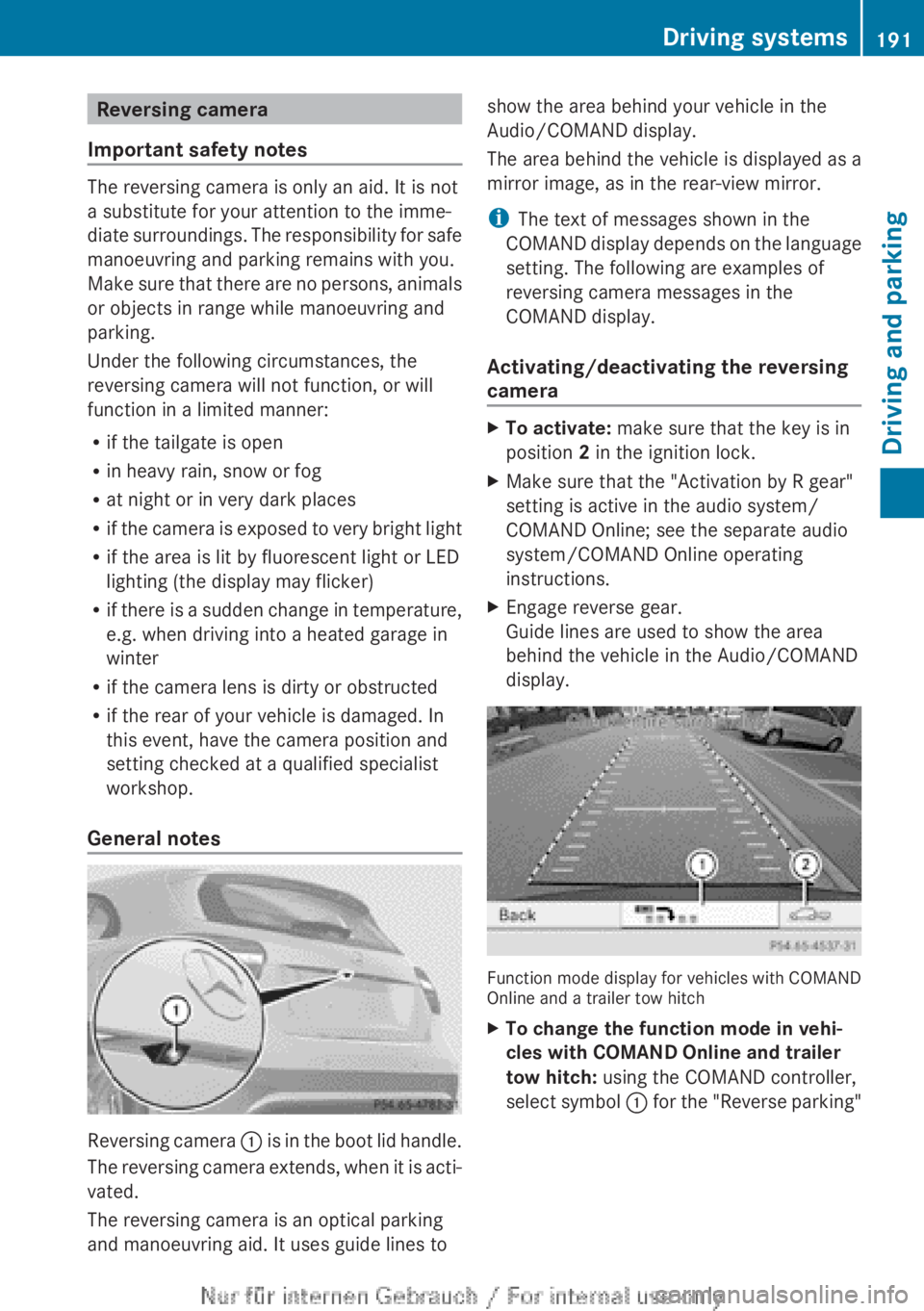
General notes Reversing camera
:
is in the boot lid handle.
The reversing camera extends, when it is acti-
vated.
The reversing camera is an optical parking
and manoeuvring aid. It uses guide lines to show the area behind your vehicle in the
Audio/COMAND display.
The area behind the vehicle is displayed as a
mirror image, as in the rear-view mirror.
i
The text of messages shown in the
COMAND
display depends on the language
setting. The following are examples of
reversing camera messages in the
COMAND display.
Activating/deactivating the reversing
camera X
To activate: make sure that the key is in
position 2 in the ignition lock.
X Make sure that the "Activation by R gear"
setting is active in the audio system/
COMAND Online; see the separate audio
system/COMAND Online operating
instructions.
X Engage reverse gear.
Guide lines are used to show the area
behind the vehicle in the Audio/COMAND
display. Function mode display for vehicles with COMAND
Online and a trailer tow hitch
X
To change the function mode in vehi-
cles with COMAND Online and trailer
tow hitch: using the COMAND controller,
select
symbol : for the "Reverse parking" Driving systems
191
Driving and parking Z
Page 201 of 356
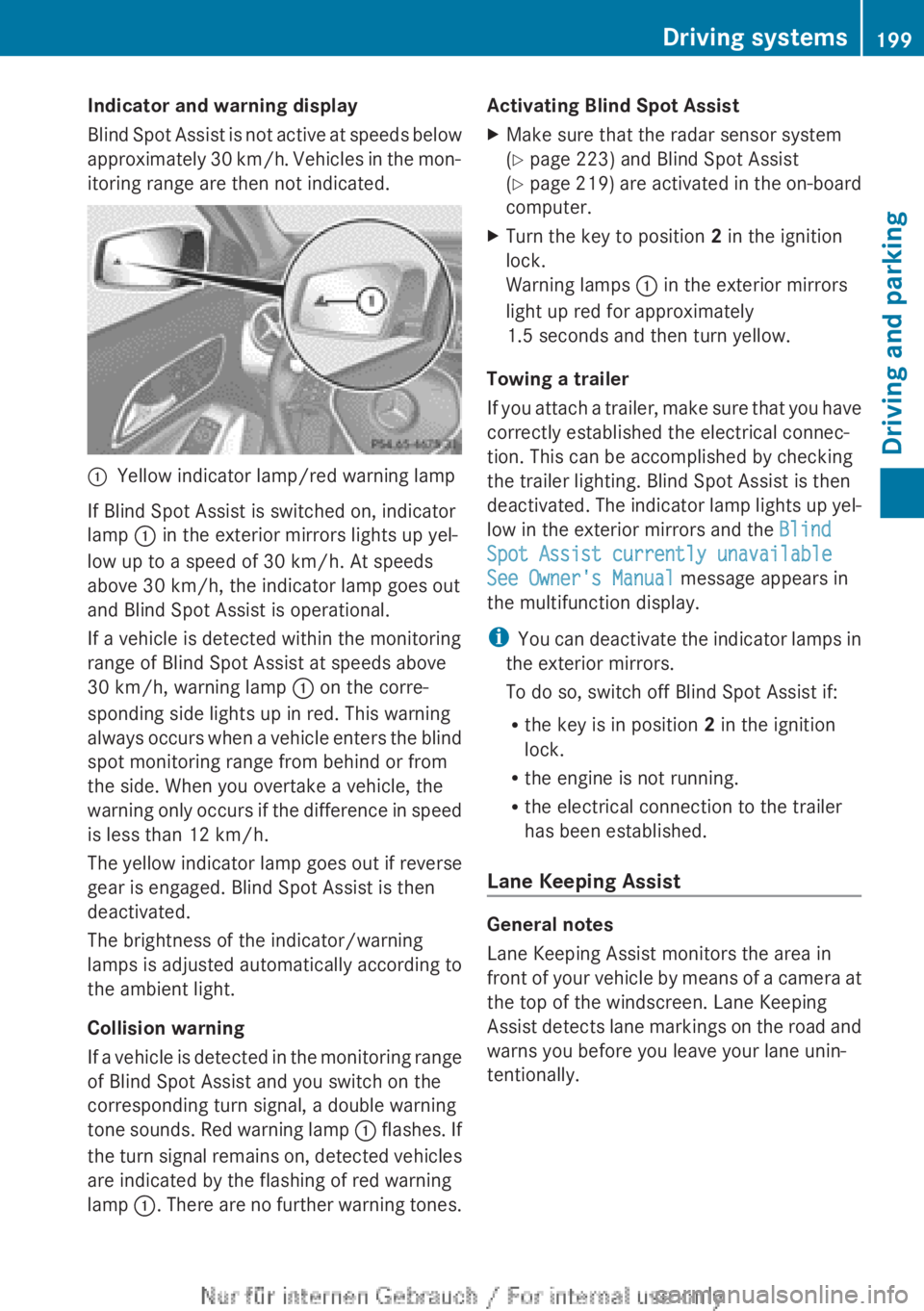
Indicator and warning display
Blind
Spot Assist is not active at speeds below
approximately 30 km/h. Vehicles in the mon-
itoring range are then not indicated. :
Yellow indicator lamp/red warning lamp
If Blind Spot Assist is switched on, indicator
lamp : in the exterior mirrors lights up yel-
low up to a speed of
30 km/h. At speeds
above 30 km/h, the indicator lamp goes out
and Blind Spot Assist is operational.
If a vehicle is detected within the monitoring
range of Blind Spot Assist at speeds above
30 km/h, warning lamp : on the corre-
sponding side lights up in red. This warning
always occurs when a vehicle enters the blind
spot monitoring range from behind or from
the side. When you overtake a vehicle, the
warning only occurs if the difference in speed
is less than 12 km/h.
The yellow indicator lamp goes out if reverse
gear is engaged. Blind Spot Assist is then
deactivated.
The brightness of the indicator/warning
lamps is adjusted automatically according to
the ambient light.
Collision warning
If a vehicle is detected in the monitoring range
of Blind Spot Assist and you switch on the
corresponding turn signal, a double warning
tone sounds. Red warning lamp : flashes. If
the turn signal remains on, detected vehicles
are indicated by the flashing of red warning
lamp :. There are no further warning tones. Activating Blind Spot Assist
X
Make sure that the radar sensor system
(Y page 223) and Blind Spot Assist
(Y page
219) are activated in the on-board
computer.
X Turn the key to position 2 in the ignition
lock.
Warning lamps : in the exterior mirrors
light up red for approximately
1.5 seconds
and then turn yellow.
Towing a trailer
If
you attach a trailer, make sure that you have
correctly established the electrical connec-
tion. This can be accomplished by checking
the trailer lighting. Blind Spot Assist is then
deactivated. The indicator lamp lights up yel-
low in the exterior mirrors and the Blind
Spot Assist currently unavailable
See Owner's Manual message appears in
the multifunction display.
i You can deactivate the indicator lamps in
the exterior mirrors.
To do so, switch off Blind Spot Assist if:
R the key is in position 2 in the ignition
lock.
R the engine is not running.
R the electrical connection to the trailer
has been established.
Lane Keeping Assist General notes
Lane Keeping Assist monitors the area in
front
of your vehicle by means of a camera at
the top of the windscreen. Lane Keeping
Assist detects lane markings on the road and
warns you before you leave your lane unin-
tentionally. Driving systems
199
Driving and parking Z
Page 206 of 356
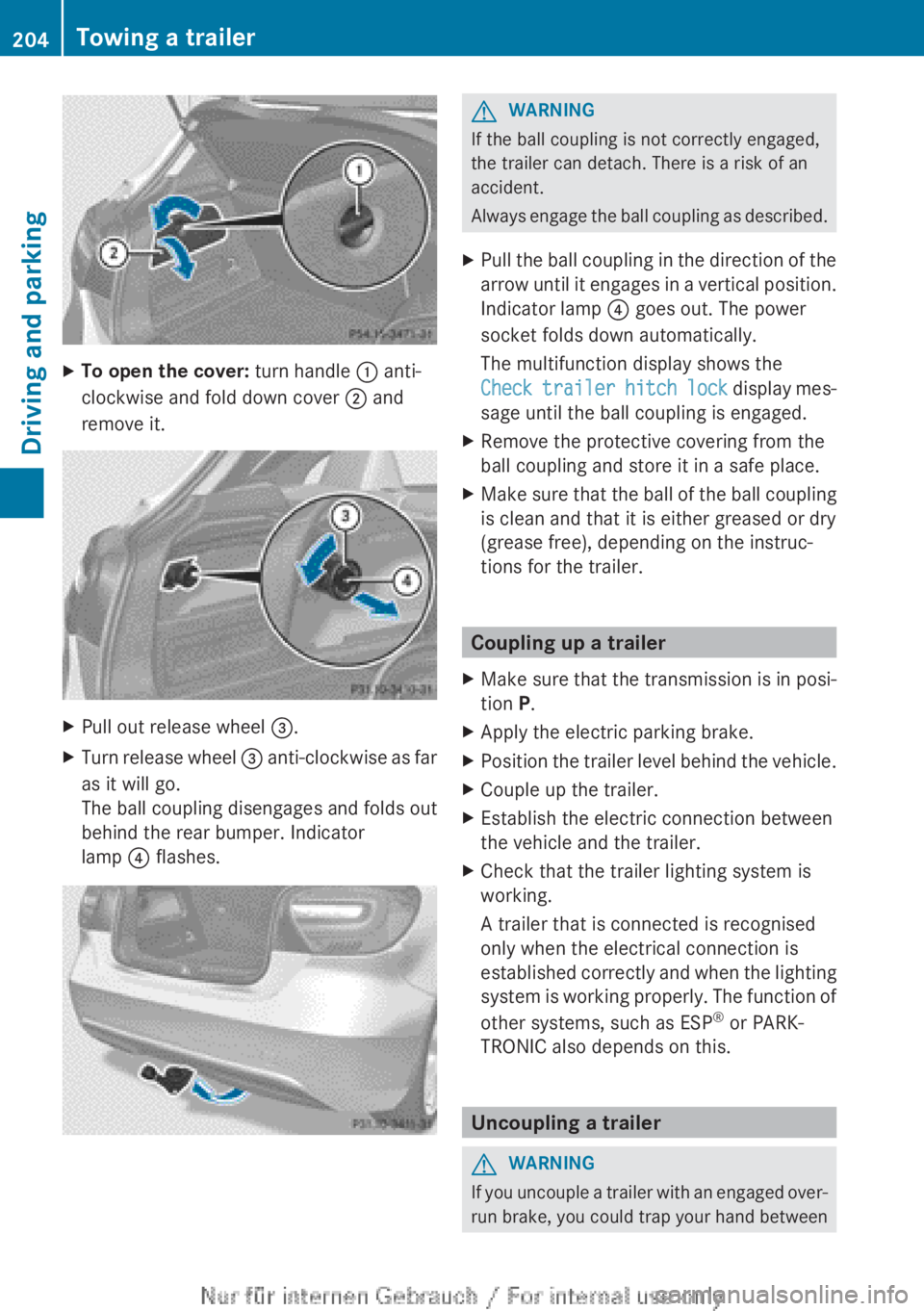
X
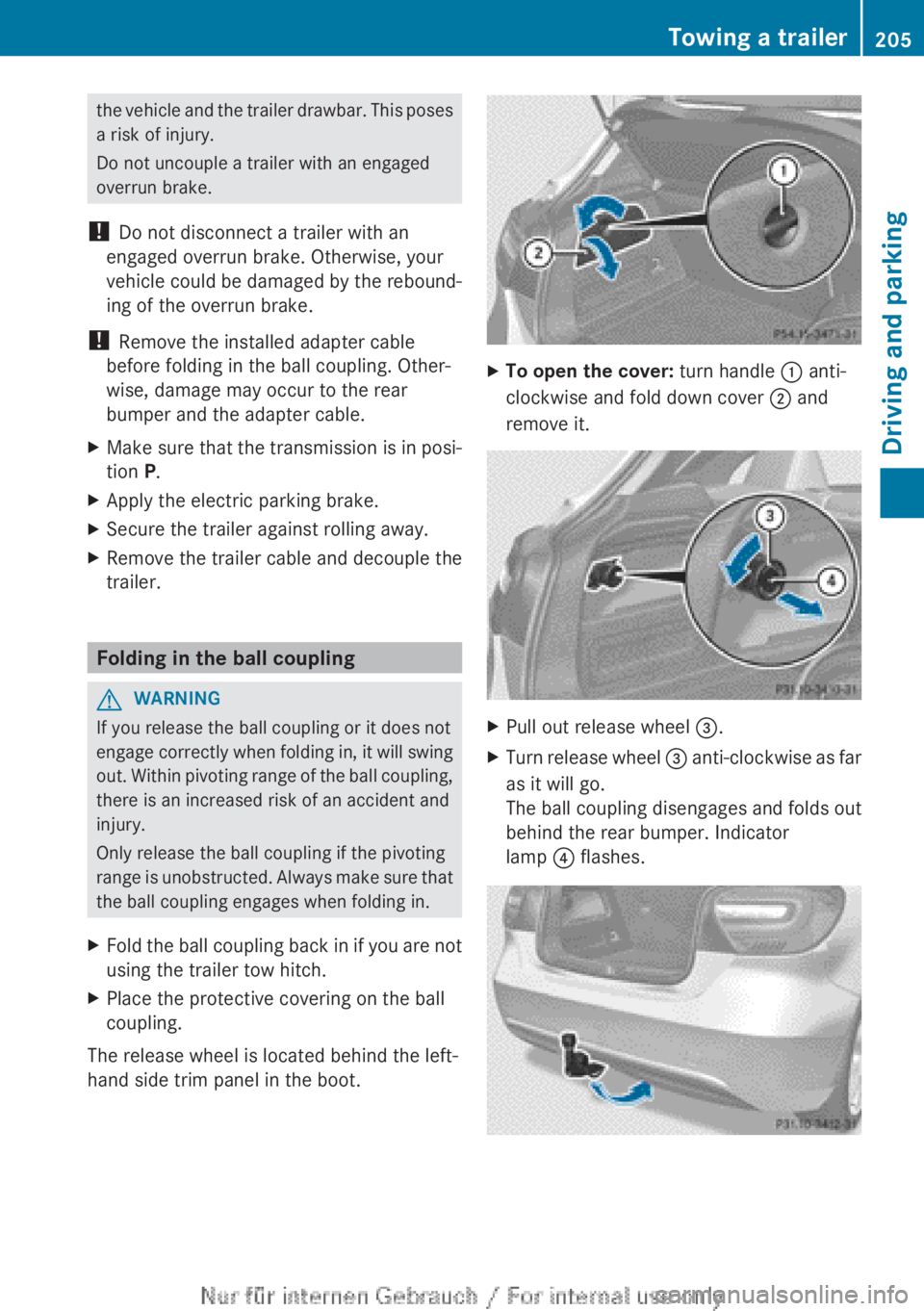
To open the cover: turn handle : anti-
clockwise and fold down cover ; and
remove it. X
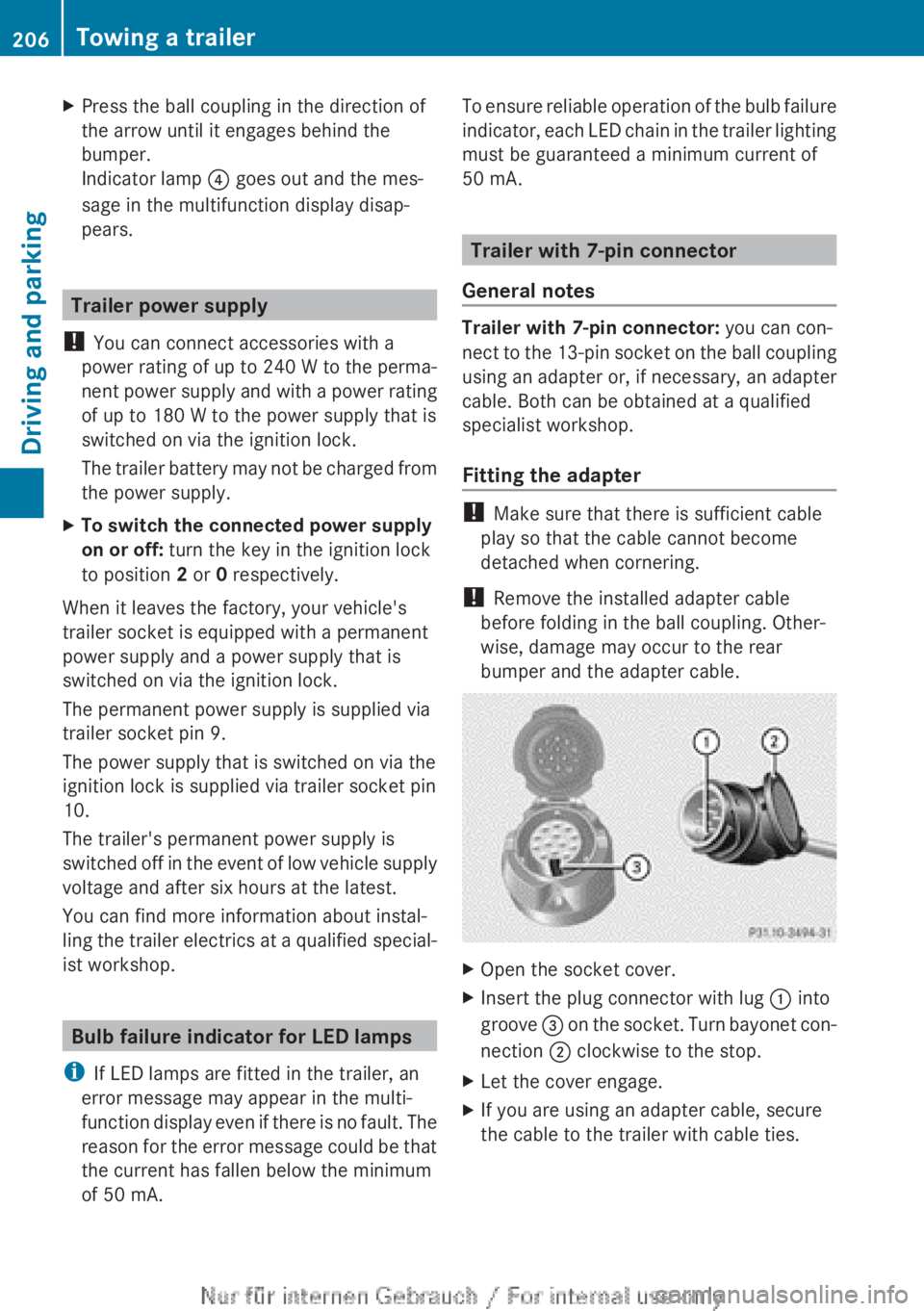
Pull out release wheel =.
X Turn release wheel = anti-clockwise as far
as it will go.
The ball coupling disengages and folds out
behind the rear bumper. Indicator
lamp ? flashes. G
WARNING
If the ball coupling is not correctly engaged,
the trailer can detach. There is a risk of an
accident.
Always
engage the ball coupling as described.
X Pull the ball coupling in the direction of the
arrow
until it engages in a vertical position.
Indicator lamp ? goes out. The power
socket folds down automatically.
The multifunction display shows the
Check trailer hitch lock display mes-
sage until the ball coupling is engaged.
X Remove the protective covering from the
ball coupling and store it in a safe place.
X Make sure that the ball of the ball coupling
is clean and that it is either greased or dry
(grease free), depending on the instruc-
tions for the trailer. Coupling up a trailer
X Make sure that the transmission is in posi-
tion P.
X Apply the electric parking brake.
X Position the trailer level behind the vehicle.
X Couple up the trailer.
X Establish the electric connection between
the vehicle and the trailer.
X Check that the trailer lighting system is
working.
A trailer that is connected is recognised
only when the electrical connection is
established
correctly and when the lighting
system is working properly. The function of
other systems, such as ESP ®
or PARK-
TRONIC also depends on this. Uncoupling a trailer
G
WARNING
If you uncouple a trailer with an engaged over-
run
brake, you could trap your hand between204
Towing a trailer
Driving and parking
Page 207 of 356
the vehicle and the trailer drawbar. This poses
a risk of injury.
Do not uncouple a trailer with an engaged
overrun brake.
! Do not disconnect a trailer with an
engaged overrun brake. Otherwise, your
vehicle
could be damaged by the rebound-
ing of the overrun brake.
! Remove the installed adapter cable
before folding in the ball coupling. Other-
wise, damage may occur to the rear
bumper and the adapter cable.
X Make sure that the transmission is in posi-
tion P.
X Apply the electric parking brake.
X Secure the trailer against rolling away.
X Remove the trailer cable and decouple the
trailer. Folding in the ball coupling
G
WARNING
If you release the ball coupling or it does not
engage
correctly when folding in, it will swing
out. Within pivoting range of the ball coupling,
there is an increased risk of an accident and
injury.
Only release the ball coupling if the pivoting
range is unobstructed. Always make sure that
the ball coupling engages when folding in.
X Fold the ball coupling back in if you are not
using the trailer tow hitch.
X Place the protective covering on the ball
coupling.
The release wheel is located behind the left-
hand side trim panel in the boot. X
To open the cover: turn handle : anti-
clockwise and fold down cover ; and
remove it. X
Pull out release wheel =.
X Turn release wheel =
anti-clockwise as far
as it will go.
The ball coupling disengages and folds out
behind the rear bumper. Indicator
lamp ? flashes. Towing a trailer
205
Driving and parking Z
Page 208 of 356
X
Press the ball coupling in the direction of
the arrow until it engages behind the
bumper.
Indicator lamp ? goes out and the mes-
sage in the multifunction display disap-
pears. Trailer power supply
! You can connect accessories with a
power rating of up to 240 W to the perma-
nent
power supply and with a power rating
of up to 180 W to the power supply that is
switched on via the ignition lock.
The trailer battery may not be charged from
the power supply.
X To switch the connected power supply
on or off: turn the key in the ignition lock
to position 2 or 0 respectively.
When it leaves the factory, your vehicle's
trailer socket is equipped with a permanent
power supply and a power supply that is
switched on via the ignition lock.
The permanent power supply is supplied via
trailer socket pin 9.
The power supply that is switched on via the
ignition lock is supplied via trailer socket pin
10.
The trailer's permanent power supply is
switched
off in the event of low vehicle supply
voltage and after six hours at the latest.
You can find more information about instal-
ling the trailer electrics at a qualified special-
ist workshop. Bulb failure indicator for LED lamps
i If LED lamps are fitted in the trailer, an
error message may appear in the multi-
function
display even if there is no fault. The
reason for the error message could be that
the current has fallen below the minimum
of 50 mA. To ensure reliable operation of the bulb failure
indicator,
each LED chain in the trailer lighting
must be guaranteed a minimum current of
50 mA. Trailer with 7-pin connector
General notes Trailer with 7-pin connector: you can con-
nect
to the 13-pin socket on the ball coupling
using an adapter or, if necessary, an adapter
cable. Both can be obtained at a qualified
specialist workshop.
Fitting the adapter !
Make sure that there is sufficient cable
play so that the cable cannot become
detached when cornering.
! Remove the installed adapter cable
before folding in the ball coupling. Other-
wise, damage may occur to the rear
bumper and the adapter cable. X
Open the socket cover.
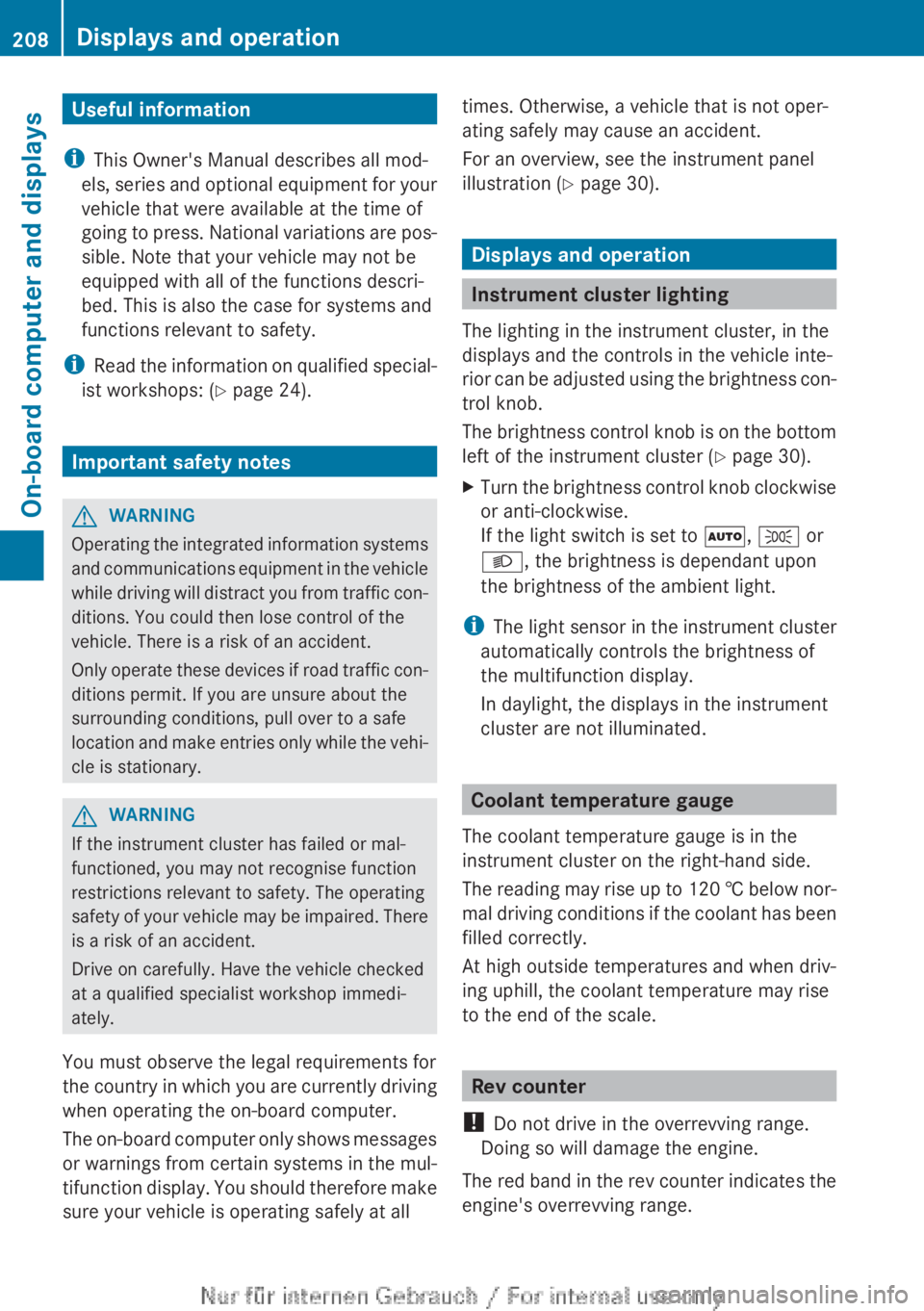
X Insert the plug connector with lug : into
groove =
on the socket. Turn bayonet con-
nection ; clockwise to the stop.
X Let the cover engage.
X If you are using an adapter cable, secure
the cable to the trailer with cable ties.206
Towing a trailer
Driving and parking
Page 210 of 356
Useful information
i This Owner's Manual describes all mod-
els,
series and optional equipment for your
vehicle that were available at the time of
going to press. National variations are pos-
sible. Note that your vehicle may not be
equipped with all of the functions descri-
bed. This is also the case for systems and
functions relevant to safety.
i Read the information on qualified special-
ist workshops: (Y page 24). Important safety notes
G
WARNING
Operating the integrated information systems
and
communications equipment in the vehicle
while driving will distract you from traffic con-
ditions. You could then lose control of the
vehicle. There is a risk of an accident.
Only operate these devices if road traffic con-
ditions permit. If you are unsure about the
surrounding conditions, pull over to a safe
location and make entries only while the vehi-
cle is stationary. G
WARNING
If the instrument cluster has failed or mal-
functioned, you may not recognise function
restrictions relevant to safety. The operating
safety
of your vehicle may be impaired. There
is a risk of an accident.
Drive on carefully. Have the vehicle checked
at a qualified specialist workshop immedi-
ately.
You must observe the legal requirements for
the country in which you are currently driving
when operating the on-board computer.
The on-board computer only shows messages
or warnings from certain systems in the mul-
tifunction display. You should therefore make
sure your vehicle is operating safely at all times. Otherwise, a vehicle that is not oper-
ating safely may cause an accident.
For an overview, see the instrument panel
illustration (
Y page 30). Displays and operation
Instrument cluster lighting
The lighting in the instrument cluster, in the
displays and the controls in the vehicle inte-
rior
can be adjusted using the brightness con-
trol knob.
The brightness control knob is on the bottom
left of the instrument cluster ( Y page 30).
X Turn the brightness control knob clockwise
or anti-clockwise.
If the light switch is set to Ã, T or
L, the brightness is dependant upon
the brightness of the ambient light.
i The
light sensor in the instrument cluster
automatically controls the brightness of
the multifunction display.
In daylight, the displays in the instrument
cluster are not illuminated. Coolant temperature gauge
The coolant temperature gauge is in the
instrument cluster on the right-hand side.
The
reading may rise up to 120 † below nor-
mal driving conditions if the coolant has been
filled correctly.
At high outside temperatures and when driv-
ing uphill, the coolant temperature may rise
to the end of the scale. Rev counter
! Do not drive in the overrevving range.
Doing so will damage the engine.
The
red band in the rev counter indicates the
engine's overrevving range. 208
Displays and operation
On-board computer and displays
Page 211 of 356
The fuel supply is interrupted to protect the
engine when the red band is reached.
Outside temperature display
You should pay special attention to road con-
ditions when temperatures are around the
freezing point.
The outside temperature display is in the mul-
tifunction display.
Changes in the outside temperature are dis-
played after a short delay. Speedometer with segments
The segments in the speedometer indicate
which speed range is available.
R Cruise control activated ( Y page 168):
The segments light up from the stored
speed to the maximum speed.
R Variable SPEEDTRONIC activated
(Y page 171):
The
segments light up from the start of the
scale to the selected limit speed.
R DISTRONIC PLUS activated (Y page 173):
One or two segments in the set speed
range light up.
R DISTRONIC PLUS detects a vehicle in front:
The segments between the speed of the
vehicle in front and the stored speed light
up. Operating the on-board computer
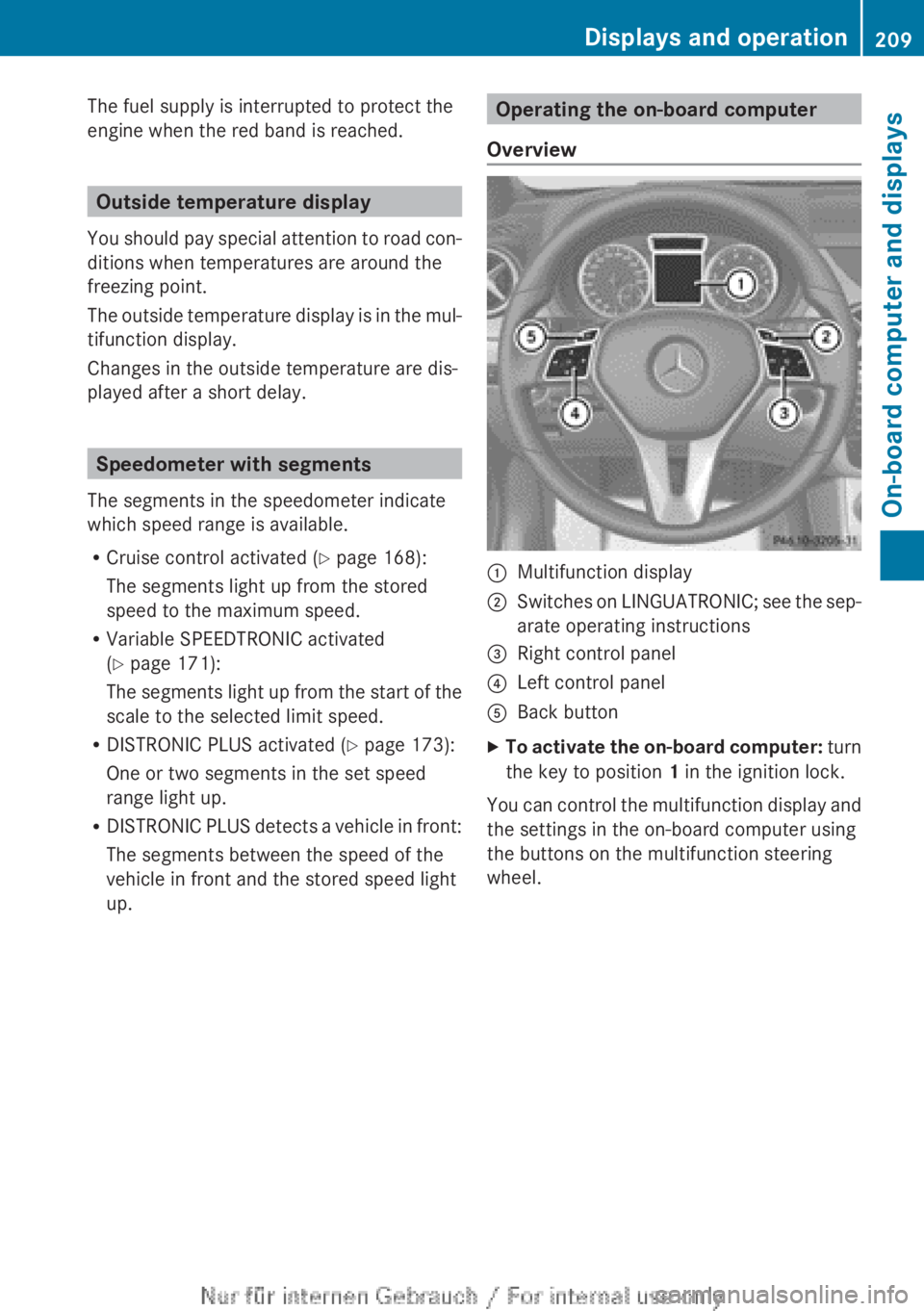
Overview :
Multifunction display
; Switches on LINGUATRONIC; see the sep-
arate operating instructions
= Right control panel
? Left control panel
A Back button
X To activate the on-board computer:
turn
the key to position 1 in the ignition lock.
You can control the multifunction display and
the settings in the on-board computer using
the buttons on the multifunction steering
wheel. Displays and operation
209
On-board computer and displays Z
Page 224 of 356
qualified specialist workshop, e.g. a
Mercedes-Benz Service Centre.
Switching Adaptive Highbeam Assist on/
off
This
function is only available on vehicles with
the Intelligent Light System.
X Press the =
or ; button on the steer-
ing wheel to select the Settings menu.
X Press the :
or 9 button to select the
Lights submenu.
X Press a to confirm.
X Press the :
or 9 button to select the
Adapt. main beam function.
If the Adapt. main beam function has
been switched on, the cone of light and the
_ symbol in the multifunction display
are shown in orange.
X Press the a button to save the setting.
For further information about Adaptive High-
beam Assist, see ( Y page 110).
Setting the brightness of the ambient
lighting
X Press the =
or ; button on the steer-
ing wheel to select the Settings menu.
X Press the :
or 9 button to select the
Lights submenu.
X Press a to confirm.
X Press the :
or 9 button to select the
Amb. light +/- function.
You will see the selected setting.
X Press a to confirm.
X Press the :
or 9 button to adjust the
brightness to any level from Off toLevel
5 (bright).
X Press the a or %
button to save the
setting.
Activating/deactivating the surround
lighting and exterior lighting delayed
switch-off
If you have activated the Surround light‐
ing function and the light switch is set to Ã, the following functions are activated
when it is dark:
R
surround lighting: the exterior lighting
remains lit for 40 seconds after unlocking
with the key. If you start the engine, the
surround lighting is switched off and auto-
matic headlamp mode is activated
(Y page 105).
R exterior lighting delayed switch-off: the
exterior lighting remains lit for
60
seconds after the engine is switched off.
If you close all the doors and the tailgate,
the exterior lighting goes off after
15 seconds.
X Press the =
or ; button on the steer-
ing wheel to select the Settings menu.
X Press the :
or 9 button to select the
Lights submenu.
X Press a to confirm.
X Press the :
or 9 button to select the
Surround lighting function.
When the Surround lighting function is
activated, the light cone and the area
around the vehicle are displayed in orange
in the multifunction display.
X Press the a button to save the setting.
Deactivating delayed switch-off of the exte-
rior lighting temporarily:
X Before leaving the vehicle, turn the key to
position 0 in the ignition lock.
X Turn the key to position 2 in the ignition
lock.
The exterior lighting delayed switch-off is
deactivated.
Delayed switch-off of the exterior lighting is
reactivated the next time you start the
engine.
i Depending on your vehicle's equipment,
when the surround lighting and delayed
switch-off exterior lighting are on, the fol-
lowing light up:
R side lamps
R foglamps222
Menus and submenus
On-board computer and displays
Page 225 of 356
R
dipped-beam headlamps
R daytime driving lights
R surround lighting in the exterior mirrors
Activating/deactivating
the interior light-
ing delayed switch-off
If you activate the Lighting delayed sw.-
off function, the interior lighting remains on
for 20 seconds after you remove the key from
the ignition lock.
X Press the =
or ; button on the steer-
ing wheel to select the Settings menu.
X Press the :
or 9 button to select the
Lights submenu.
X Press a to confirm.
X Press the :
or 9 button to select the
Lighting delayed sw.-off function.
If the Lighting delayed sw.-off func-
tion has been switched on, the vehicle inte-
rior is displayed in orange in the multifunc-
tion display.
X Press the a button to save the setting.
Vehicle Setting permanent SPEEDTRONIC
X
Press the =
or ; button on the steer-
ing wheel to select the Settings menu.
X Press the :
or 9 button to select the
Vehicle submenu.
X Press a to confirm.
X Press the :
or 9 button to select the
Limit speed (winter tyres): function.
You will see the current setting.
X Press a to confirm.
X Press the : or 9 button to adjust
permanent
SPEEDTRONIC in increments of
ten (230 km/h to 160 km/h). The Off set-
ting switches permanent SPEEDTRONIC
off.
X Press the a button to store the entry.
Using the Limit speed (winter tyres)
function, you can set permanent SPEED-
TRONIC ( Y page 172). Switching the automatic locking feature
on/off
X
Press the =
or ; button on the steer-
ing wheel to select the Settings menu.
X Press the :
or 9 button to select the
Vehicle submenu.
X Press a to confirm.
X Press the :
or 9 button to select the
Automatic door locks function.
When the Automatic door locks func-
tion is activated, the vehicle doors are dis-
played in orange in the multifunction dis-
play.
X Press the a button to save the setting.
If you activate the Automatic door locks
function,
the vehicle is centrally locked above
a speed of around 15 km/h.
For further information on the automatic lock-
ing feature, see ( Y page 81).
Activating/deactivating the acoustic
locking confirmation
If you switch on the Acoustic Lock function,
an acoustic signal sounds when you lock the
vehicle.
X Press the =
or ; button on the steer-
ing wheel to select the Settings menu.
X Press the :
or 9 button to select the
Vehicle submenu.
X Press a to confirm.
X Press the :
or 9 button to select the
Acoustic Lock function.
If the Acoustic Lock function is activated,
the & symbol in the multifunction dis-
play lights up orange.
X Press the a button to save the setting.
Activating/deactivating the radar sensor
system
X Press the =
or ; button on the steer-
ing wheel to select the Settings menu.
X Press the :
or 9 button to select the
Vehicle submenu.
X Press a to confirm. Menus and submenus
223
On-board computer and displays Z