Table MERCEDES-BENZ A CLASS 2012 User Guide
[x] Cancel search | Manufacturer: MERCEDES-BENZ, Model Year: 2012, Model line: A CLASS, Model: MERCEDES-BENZ A CLASS 2012Pages: 356, PDF Size: 4.96 MB
Page 60 of 356
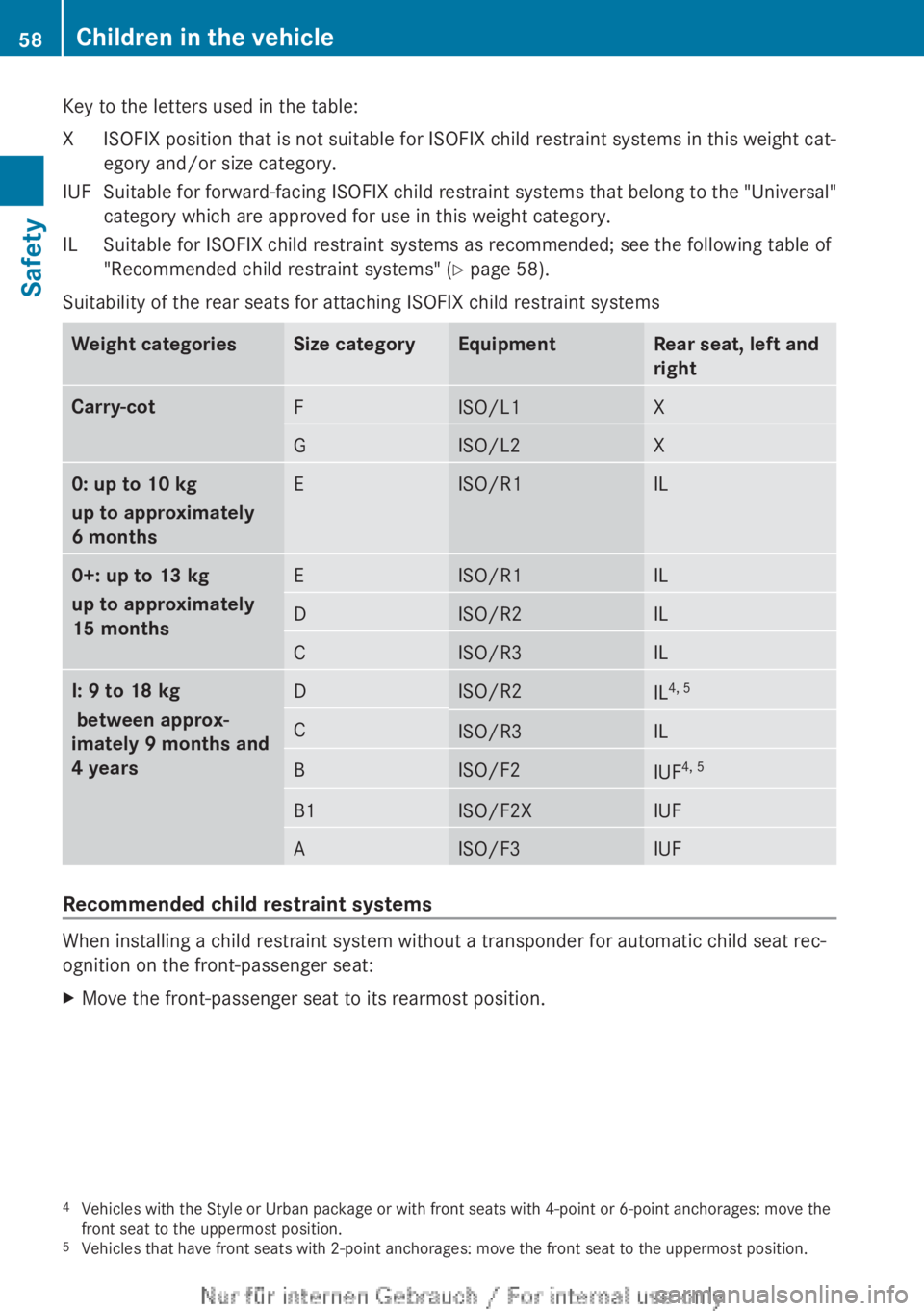
Key to the letters used in the table:
X ISOFIX position that is not suitable for ISOFIX child restraint systems in this weight cat-
egory and/or size category.
IUF Suitable for forward-facing ISOFIX child restraint systems that belong to the "Universal" category which are approved for use in this weight category.
IL Suitable for ISOFIX child restraint systems as recommended; see the following table of "Recommended child restraint systems" (Y page 58).
Suitability of the rear seats for attaching ISOFIX child restraint systems Weight categories Size category Equipment Rear seat, left and
right
Carry-cot
F ISO/L1 X
G ISO/L2 X
0: up to 10 kg
up to approximately
6 months
E ISO/R1 IL
0+: up to 13 kg
up to approximately
15 months
E ISO/R1 IL
D ISO/R2 IL
C ISO/R3 IL
I: 9 to 18 kg
between approx-
imately 9 months and
4 years
D ISO/R2
IL
4, 5 C
ISO/R3 IL
B ISO/F2
IUF
4, 5 B1 ISO/F2X IUF
A ISO/F3 IUF
Recommended child restraint systems
When installing a child restraint system without a transponder for automatic child seat rec-
ognition on the front-passenger seat:
X
Move the front-passenger seat to its rearmost position.
4 Vehicles with the Style or Urban package or with front seats with 4-point or 6-point anchorages: move the
front seat to the uppermost position.
5 Vehicles that have front seats with 2-point anchorages: move the front seat to the uppermost position.58
Children in the vehicle
Safety
Page 66 of 356
Adaptive Brake Assist
i
Observe the "Important safety notes" sec-
tion for driving safety systems
(Y page 61). G
WARNING
Adaptive Brake Assist cannot always clearly
identify objects and complex traffic situa-
tions. In these cases, Adaptive Brake Assist
may not intervene. There is a risk of an acci-
dent.
Always
pay careful attention to the traffic sit-
uation and be ready to brake. G
WARNING
Adaptive Brake Assist does not react:
R to people or animals
R to oncoming vehicles
R to crossing traffic
R to stationary obstacles
R when cornering
As a result, Adaptive Brake Assist may not
intervene in all critical conditions. There is a
risk of an accident.
Always
pay careful attention to the traffic sit-
uation and be ready to brake.
Adaptive Brake Assist aids you in braking dur-
ing hazardous situations at speeds above
30 km/h and uses the radar sensor system
to evaluate the traffic situation.
With the help of a sensor system, adaptive
Brake Assist can detect obstacles that are in
the path of your vehicle for an extended
period of time.
Should you approach an obstacle and adap-
tive Brake Assist has detected a risk of colli-
sion, adaptive Brake Assist calculates the
braking force necessary to avoid a collision.
Should you apply the brakes forcefully, adap-
tive Brake Assist will automatically increase
the braking force to a level suitable for the
traffic conditions. X
Keep the brake pedal depressed until the
emergency braking situation is over.
ABS prevents the wheels from locking.
The brakes will work normally again if:
R you release the brake pedal
R there
is no longer any danger of a collision
R no obstacle is detected in front of your
vehicle
Adaptive Brake Assist is then deactivated.
Vehicles with PRE-SAFE ®
: if adaptive Brake
Assist requires particularly high brake pres-
sure, preventative passenger protection
measures (PRE-SAFE ®
) are deployed simul-
taneously.
Up to vehicle speeds of around 250 km/h,
adaptive Brake Assist is capable of reacting
to moving objects that have already been rec-
ognised as such at least once over the period
of observation. Adaptive Brake Assist does
not react to stationary obstacles.
If adaptive Brake Assist is not available due
to a malfunction in the radar sensor system,
the brake system remains available with full
brake boosting effect and BAS.
In particular, the detection of obstacles can
be impaired if there is:
R dirt on the sensors or anything else cover-
ing the sensors
R snow or heavy rain
R interference by other radar sources
R the possibility of strong radar reflections,
for example, in multi-storey car parks
R a narrow vehicle travelling in front, e.g. a
motorcycle
R a vehicle travelling in front on a different
line
Following damage to the front end of the vehi-
cle, have the configuration and operation of
the radar sensor checked at a qualified spe-
cialist workshop. This also applies to colli-
sions at slow speeds where there is no visible
damage to the front of the vehicle. 64
Driving safety systems
Safety
Page 118 of 356
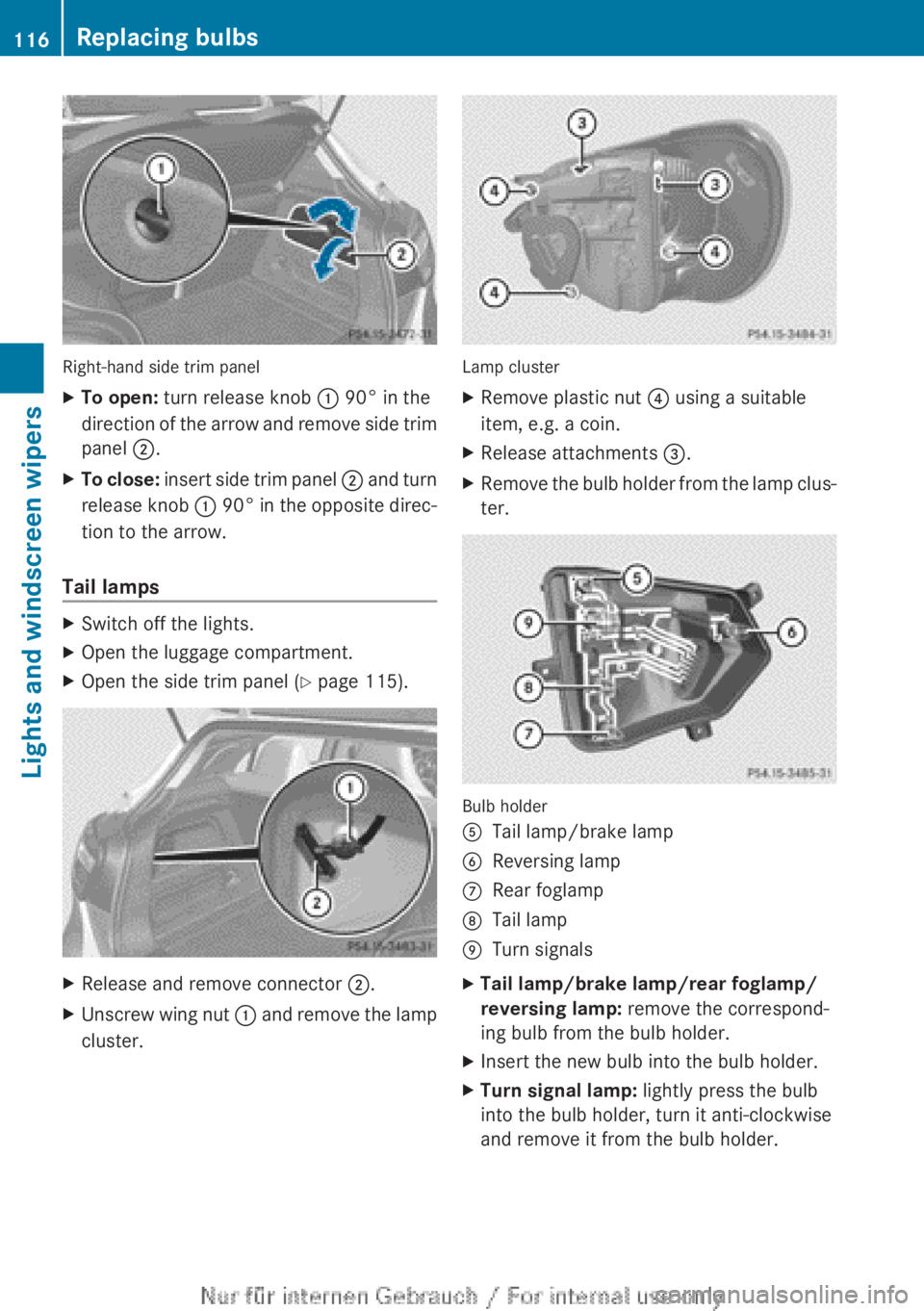
Right-hand side trim panel
X
To open: turn release knob : 90° in the
direction
of the arrow and remove side trim
panel ;.
X To close:
insert side trim panel ; and turn
release knob : 90° in the opposite direc-
tion to the arrow.
Tail lamps X
Switch off the lights.
X Open the luggage compartment.
X Open the side trim panel ( Y page 115).X
Release and remove connector ;.
X Unscrew wing nut :
and remove the lamp
cluster. Lamp cluster
X
Remove plastic nut ? using a suitable
item, e.g. a coin.
X Release attachments =.
X Remove the bulb holder from the lamp clus-
ter. Bulb holder
A
Tail lamp/brake lamp
B Reversing lamp
C Rear foglamp
D Tail lamp
E Turn signals
X Tail lamp/brake lamp/rear foglamp/
reversing lamp: remove the correspond-
ing bulb from the bulb holder.
X Insert the new bulb into the bulb holder.
X Turn signal lamp: lightly press the bulb
into the bulb holder, turn it anti-clockwise
and remove it from the bulb holder. 116
Replacing bulbs
Lights and windscreen wipers
Page 144 of 356
Useful information
i This Owner's Manual describes all mod-
els,
series and optional equipment for your
vehicle that were available at the time of
going to press. National variations are pos-
sible. Note that your vehicle may not be
equipped with all of the functions descri-
bed. This is also the case for systems and
functions relevant to safety.
i Read the information on qualified special-
ist workshops: (Y page 24). Running-in notes
Important safety notes
New brake pads/linings and discs that have
been
replaced only achieve optimum braking
effect after several hundred kilometres of
driving. Compensate for the reduced braking
effect by applying greater force to the brake
pedal. The first 1500 km
If you treat the engine with sufficient care
from
the very start, you will be rewarded with
excellent performance for the remainder of
the engine's life.
R Drive at varying vehicle speeds and engine
speeds for the first 1500 km.
R Avoid overstraining the vehicle during this
period, e.g. driving at full throttle.
R Change gear in good time, before the rev
counter needle is Ô of the way to the red
area of the rev counter.
R Do not shift down a gear manually in order
to brake.
Vehicles with automatic transmission:
R Try to avoid depressing the accelerator
pedal beyond the point of resistance (kick-
down).
After 1,500 km, you may gradually bring the
vehicle up to full road and engine speeds. Additional running-in notes for AMG vehicles:
R
Do
not drive at speeds above 140 km/h for
the first 1,500 km.
R Only allow the engine to reach a maximum
engine speed of 4,500 rpm briefly.
i You should also observe these notes on
running-in if the engine or parts of the drive
train on your vehicle have been replaced. Driving
Important safety notes
G
WARNING
Objects in the driver's footwell may restrict
the clearance around the pedals or block a
depressed pedal. This jeopardises the oper-
ating and road safety of the vehicle. There is
a risk of an accident.
Stow
all objects securely in the vehicle so that
they do not get into the driver's footwell.
Always fit the floormats securely and as pre-
scribed in order to ensure that there is always
sufficient room for the pedals. Do not use
loose floormats and do not place several floor-
mats on top of one another. G
WARNING
Unsuitable footwear can hinder correct usage
of the pedals, e.g.:
R shoes with thick soles
R shoes with high heels
R slippers
There is a risk of an accident.
Wear suitable footwear to ensure correct
usage of the pedals. G
WARNING
If you switch off the ignition while driving,
safety-relevant functions are only available
with
limitations, or not at all. This could affect,
for example, the power steering and the brake
boosting effect. You will require considerably 142
Driving
Driving and parking
Page 145 of 356
more effort to steer and brake. There is a risk
of an accident.
Do not switch off the ignition while driving.
G
WARNING
If the parking brake has not been fully
released when driving, the parking brake can:
R overheat and cause a fire
R lose its hold function.
There is a risk of fire and an accident. Release
the parking brake fully before driving off.
! Warm up the engine quickly. Do not use
the engine's full performance until it has
reached operating temperature.
Only set the automatic transmission to the
respective drive positions when the vehicle
is stationary.
Where possible, avoid spinning the drive
wheels when pulling away on slippery
roads. Otherwise, you could damage the
drive train.
! AMG vehicles: avoid full-load operation
and engine speeds greater than 5000 rpm
when the engine is cold. This helps to pro-
tect the engine and avoids uncomfortable
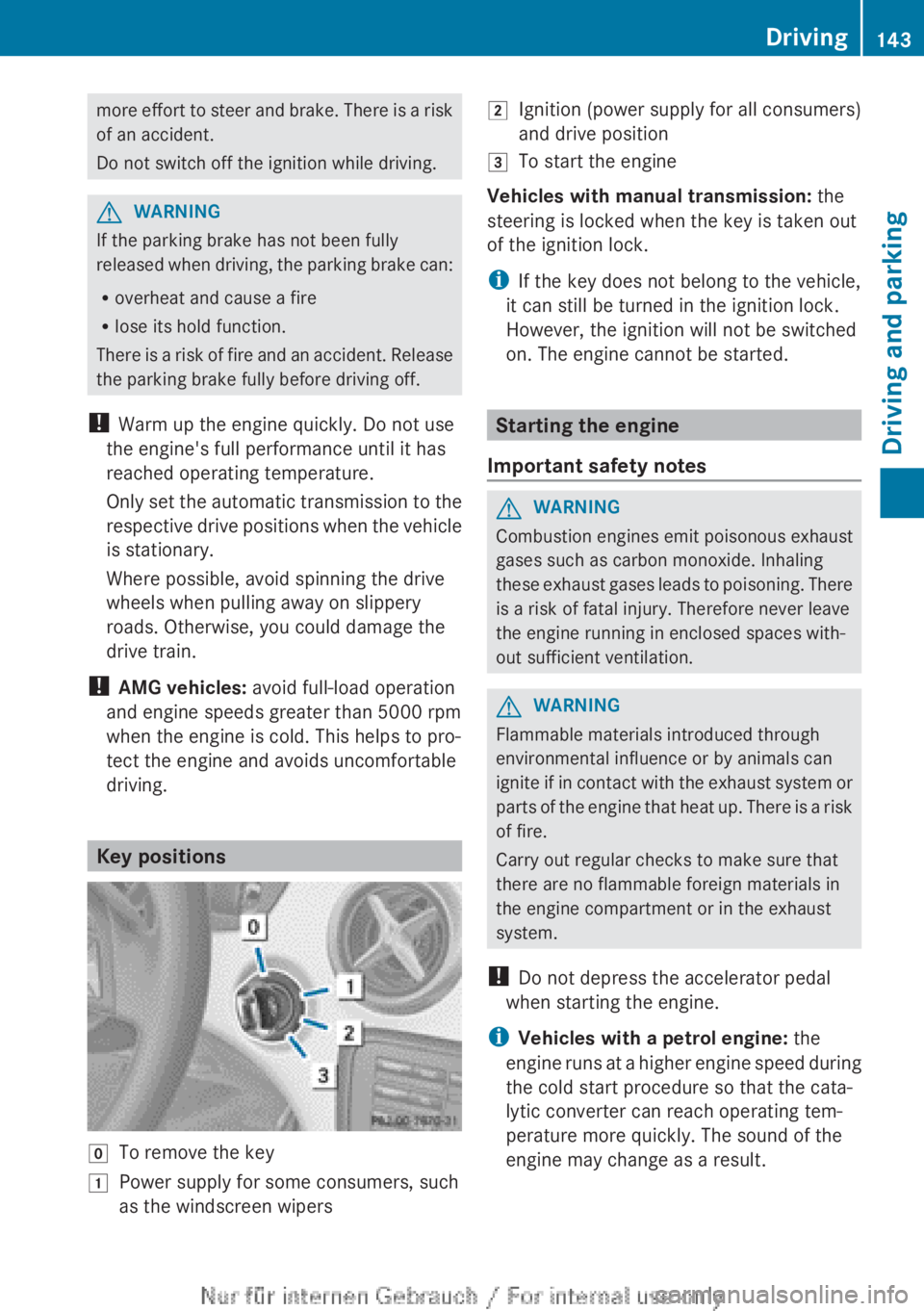
driving. Key positions
g
To remove the key
1 Power supply for some consumers, such
as the windscreen wipers 2
Ignition (power supply for all consumers)
and drive position
3 To start the engine
Vehicles with manual transmission: the
steering is locked when the key is taken out
of the ignition lock.
i If the key does not belong to the vehicle,
it can still be turned in the ignition lock.
However, the ignition will not be switched
on. The engine cannot be started. Starting the engine
Important safety notes G
WARNING
Combustion engines emit poisonous exhaust
gases such as carbon monoxide. Inhaling
these
exhaust gases leads to poisoning. There
is a risk of fatal injury. Therefore never leave
the engine running in enclosed spaces with-
out sufficient ventilation. G
WARNING
Flammable materials introduced through
environmental influence or by animals can
ignite
if in contact with the exhaust system or
parts of the engine that heat up. There is a risk
of fire.
Carry out regular checks to make sure that
there are no flammable foreign materials in
the engine compartment or in the exhaust
system.
! Do not depress the accelerator pedal
when starting the engine.
i Vehicles with a petrol engine: the
engine runs at a higher engine speed during
the cold start procedure so that the cata-
lytic converter can reach operating tem-
perature more quickly. The sound of the
engine may change as a result. Driving
143
Driving and parking Z
Page 148 of 356
Important safety notes
G
WARNING
If the engine is switched off automatically and
you exit the vehicle, the engine is restarted
automatically.
The vehicle may begin moving.
There is a risk of accident and injury.
If you wish to exit the vehicle, always turn off
the ignition and secure the vehicle against
rolling away.
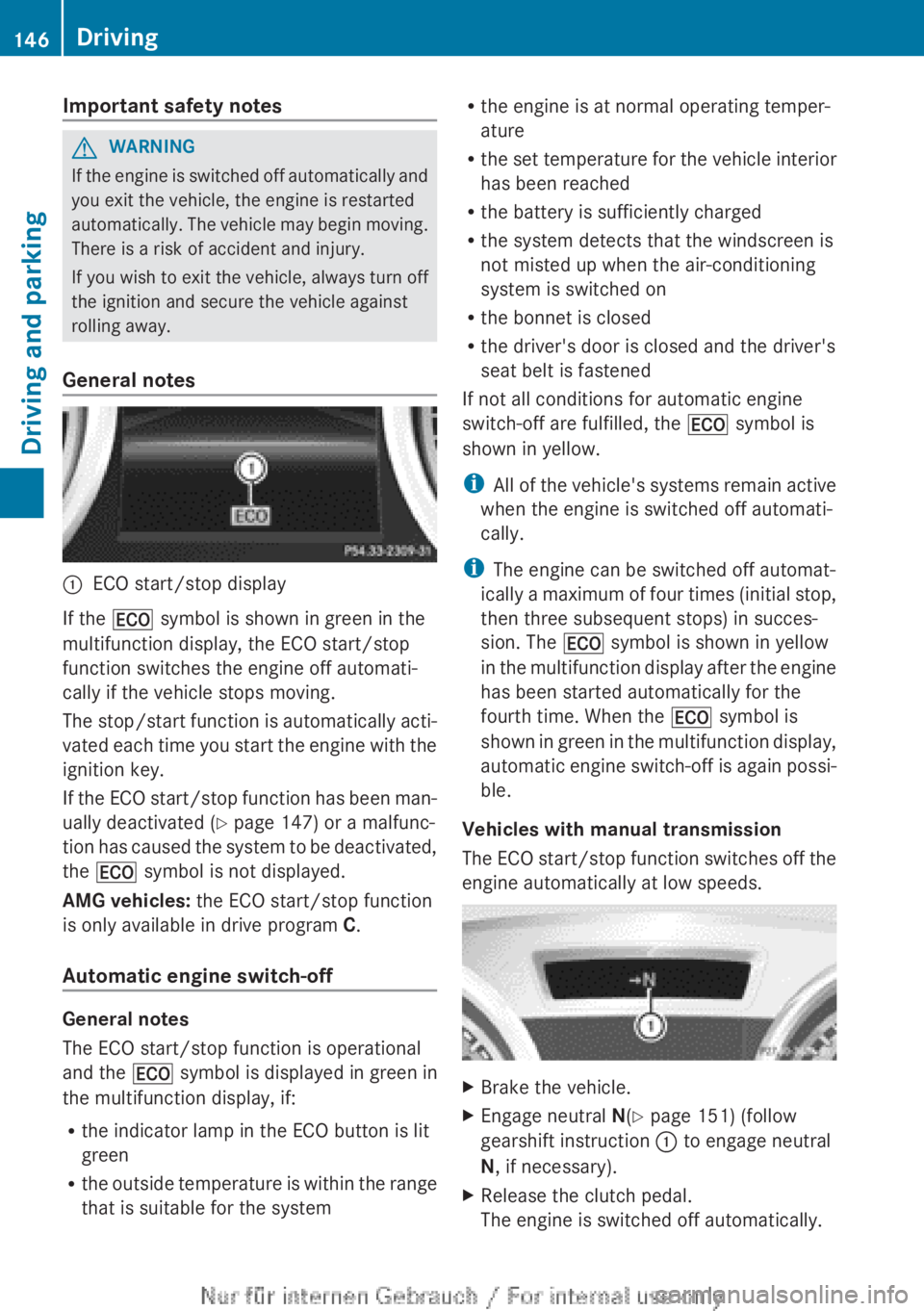
General notes :
ECO start/stop display
If the ¤ symbol is shown in green in the
multifunction display, the ECO start/stop
function switches the engine off automati-
cally if the vehicle stops moving.
The
stop/start function is automatically acti-
vated each time you start the engine with the
ignition key.
If the ECO start/stop function has been man-
ually deactivated ( Y page 147) or a malfunc-
tion has caused the system to be deactivated,
the ¤ symbol is not displayed.
AMG vehicles: the ECO start/stop function
is only available in drive program C.
Automatic engine switch-off General notes
The ECO start/stop function is operational
and the
¤ symbol is displayed in green in
the multifunction display, if:
R the indicator lamp in the ECO button is lit
green
R the
outside temperature is within the range
that is suitable for the system R
the engine is at normal operating temper-
ature
R the
set temperature for the vehicle interior
has been reached
R the battery is sufficiently charged
R the system detects that the windscreen is
not misted up when the air-conditioning
system is switched on
R the bonnet is closed
R the driver's door is closed and the driver's
seat belt is fastened
If not all conditions for automatic engine
switch-off are fulfilled, the ¤ symbol is
shown in yellow.
i All of the vehicle's systems remain active
when the engine is switched off automati-
cally.
i The engine can be switched off automat-
ically a maximum of four times (initial stop,
then three subsequent stops) in succes-
sion. The ¤ symbol is shown in yellow
in the multifunction display after the engine
has been started automatically for the
fourth time. When the ¤ symbol is
shown in green in the multifunction display,
automatic engine switch-off is again possi-
ble.
Vehicles with manual transmission
The ECO start/stop function switches off the
engine automatically at low speeds. X
Brake the vehicle.
X Engage neutral N(Y page 151) (follow
gearshift instruction : to engage neutral
N, if necessary).
X Release the clutch pedal.
The engine is switched off automatically.146
Driving
Driving and parking
Page 157 of 356
Towing a trailer
Trailer towing is not permissible on the fol-
lowing models:
R
A 45 AMG 4MATIC
R Vehicles with the AMG Sports package
X Drive in the middle of the engine speed
range on uphill gradients.
X Depending on the uphill or downhill gradi-
ent,
select a lower gear (Y page 166), even
if cruise control, DISTRONIC PLUS, or
SPEEDTRONIC are activated. Program selector button
General notes The program selector button allows you to
choose between drive programs with differ-
ent driving characteristics.
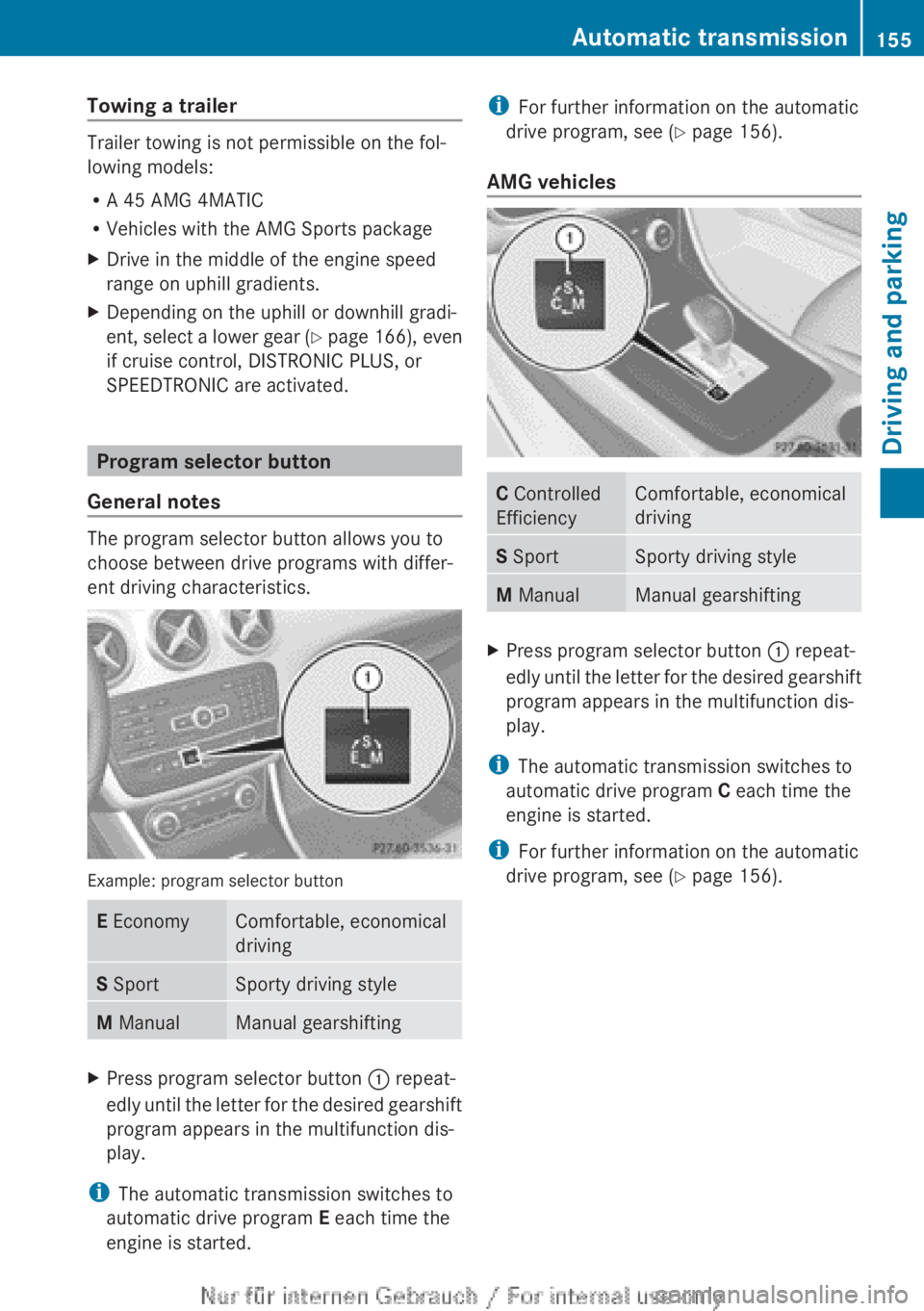
Example: program selector button
E Economy Comfortable, economical
driving
S Sport Sporty driving style
M Manual Manual gearshifting
X
Press program selector button : repeat-
edly
until the letter for the desired gearshift
program appears in the multifunction dis-
play.
i The automatic transmission switches to
automatic drive program E each time the
engine is started. i
For further information on the automatic
drive program, see
(Y page 156).
AMG vehicles C Controlled
Efficiency Comfortable, economical
driving
S Sport Sporty driving style
M Manual Manual gearshifting
X
Press program selector button : repeat-
edly
until the letter for the desired gearshift
program appears in the multifunction dis-
play.
i The automatic transmission switches to
automatic drive program C each time the
engine is started.
i For further information on the automatic
drive program, see
(Y page 156). Automatic transmission
155
Driving and parking Z
Page 162 of 356
on the ignition if you accidentally refuel
with
the wrong fuel. Otherwise, the fuel will
enter the fuel system. Even small amounts
of the wrong fuel could result in damage to
the fuel system and the engine. The repair
costs are high. Notify a qualified specialist
workshop and have the fuel tank and fuel
lines drained completely.
! Overfilling the fuel tank could damage the
fuel system.
! Take care not to spill any fuel on painted
surfaces. You could otherwise damage the
paintwork.
! Use a filter when adding fuel from a fuel
can. The fuel lines and/or the diesel injec-
tion system could otherwise be blocked by
particles from the fuel can.
Do not get into the vehicle again during the
refuelling process. Otherwise, electrostatic
charge could build up again.
If you overfill the fuel tank, some fuel may
spray out when you remove the fuel pump
nozzle.
For further information on fuel and fuel quality
(Y page 339). Refuelling
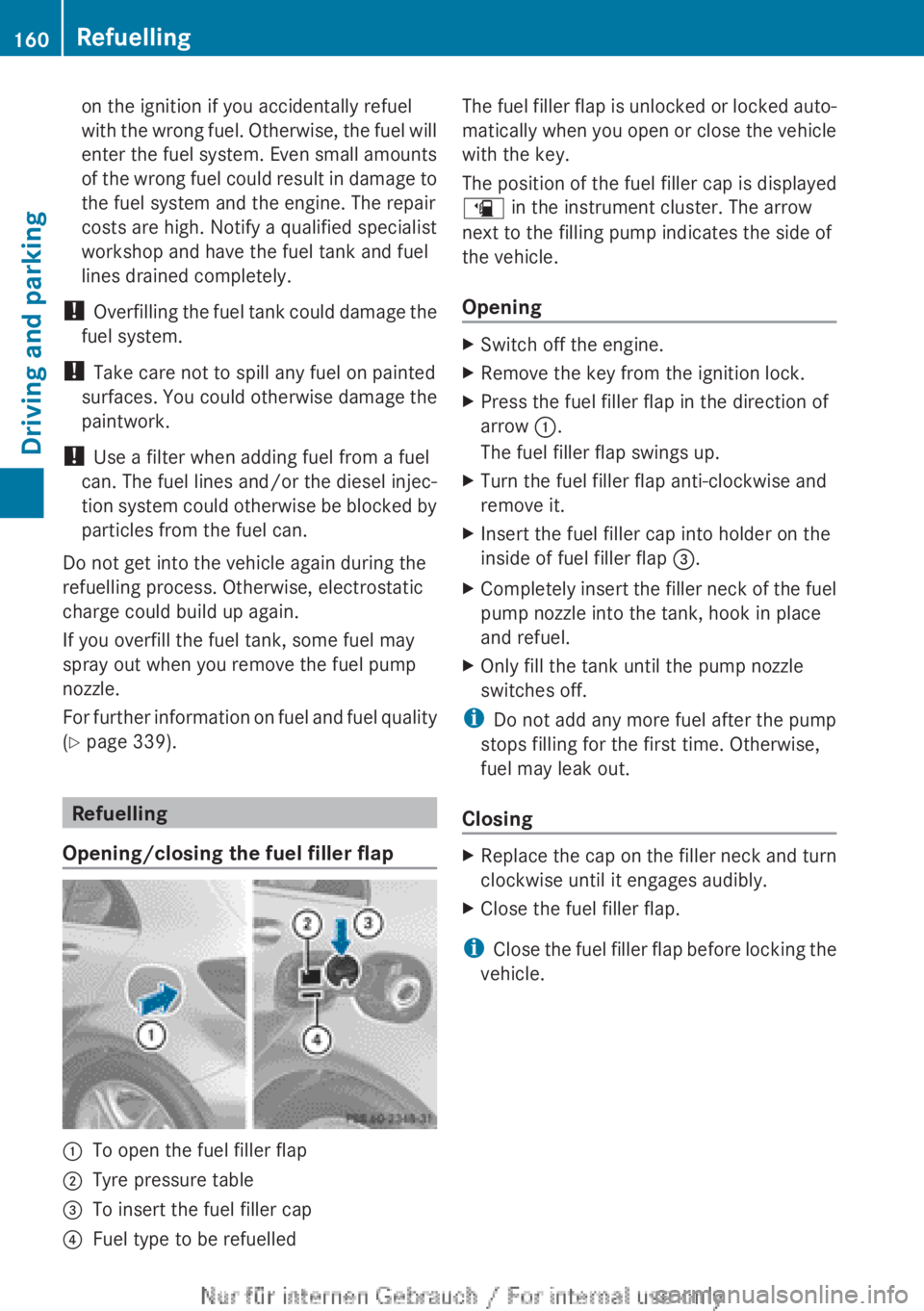
Opening/closing the fuel filler flap :
To open the fuel filler flap
; Tyre pressure table
= To insert the fuel filler cap
? Fuel type to be refuelled The fuel filler flap is unlocked or locked auto-
matically
when you open or close the vehicle
with the key.
The position of the fuel filler cap is displayed
æ in the instrument cluster. The arrow
next to the filling pump indicates the side of
the vehicle.
Opening X
Switch off the engine.
X Remove the key from the ignition lock.
X Press the fuel filler flap in the direction of
arrow :.
The fuel filler flap swings up.
X Turn the fuel filler flap anti-clockwise and
remove it.
X Insert the fuel filler cap into holder on the
inside of fuel filler flap =.
X Completely insert the filler neck of the fuel
pump nozzle into the tank, hook in place
and refuel.
X Only fill the tank until the pump nozzle
switches off.
i Do not add any more fuel after the pump
stops filling for the first time. Otherwise,
fuel may leak out.
Closing X
Replace the cap on the filler neck and turn
clockwise until it engages audibly.
X Close the fuel filler flap.
i Close
the fuel filler flap before locking the
vehicle. 160
Refuelling
Driving and parking
Page 170 of 356
Have your vehicle winterproofed at a qualified
specialist workshop at the onset of winter.
Observe the notes in the "Winter operation"
section (
Y page 320).
Driving with summer tyres Observe the notes in the "Winter operation"
section (
Y page 320).
Slippery road surfaces G
WARNING
If you shift down on a slippery road surface in
an attempt to increase the engine's braking
effect, the drive wheels could lose their grip.
This
increases the risk of skidding and having
an accident.
Do not shift down for additional engine brak-
ing on a slippery road surface.
If the vehicle threatens to skid or cannot be
stopped when moving at low speed:
X Vehicles with manual transmission:
shift to neutral.
X Vehicles with automatic transmission:
shift the transmission to position N.
X Try to bring the vehicle under control by
using corrective steering.
You should drive particularly carefully on slip-
pery road surfaces. Avoid sudden accelera-
tion, steering and braking manoeuvres.
The outside temperature indicator is not
designed to serve as an ice-warning device
and is therefore unsuitable for that purpose.
Changes in the outside temperature are dis-
played after a short delay.
Indicated temperatures just above the freez-
ing point do not guarantee that the road sur-
face is free of ice. The road may still be icy,
especially
in wooded areas or on bridges. You
should pay special attention to road condi-
tions when temperatures are around freezing
point.
i For more information on driving with
snow chains, see ( Y page 321). Driving systems
Cruise control
Important safety notes If you fail to adapt your driving style, cruise
control
can neither reduce the risk of an acci-
dent nor override the laws of physics. Cruise
control cannot take into account road,
weather or traffic conditions. Cruise control
is only an aid. You are responsible for the dis-
tance to the vehicle in front, for vehicle speed,
for braking in good time, and for staying in the
lane.
Do not use cruise control:
R in road and traffic conditions which do not
allow you to maintain a constant speed
(e.g. in heavy traffic or on winding roads).
R on smooth or slippery roads. Braking or
accelerating can cause the drive wheels to
lose traction and the vehicle could then
skid.
R when there is poor visibility, e.g. due to fog,
heavy rain or snow.
If there is a change of drivers, advise the new
driver of the speed stored.
General notes Cruise control maintains a constant road
speed
for you. It brakes automatically in order
to avoid exceeding the set speed. You must
select a lower gear in good time on long and
steep downhill gradients, especially if the
vehicle is laden or towing a trailer. For vehi-
cles with automatic transmission, you need
to have selected manual drive program
M(Y page 156). By doing so, you will make
use of the braking effect of the engine. This
relieves the load on the brake system and
prevents the brakes from overheating and
wearing too quickly.
Use cruise control only if road and traffic con-
ditions make it appropriate to maintain a
steady speed for a prolonged period. You can
store any road speed above 30 km/h. 168
Driving systems
Driving and parking
Page 178 of 356
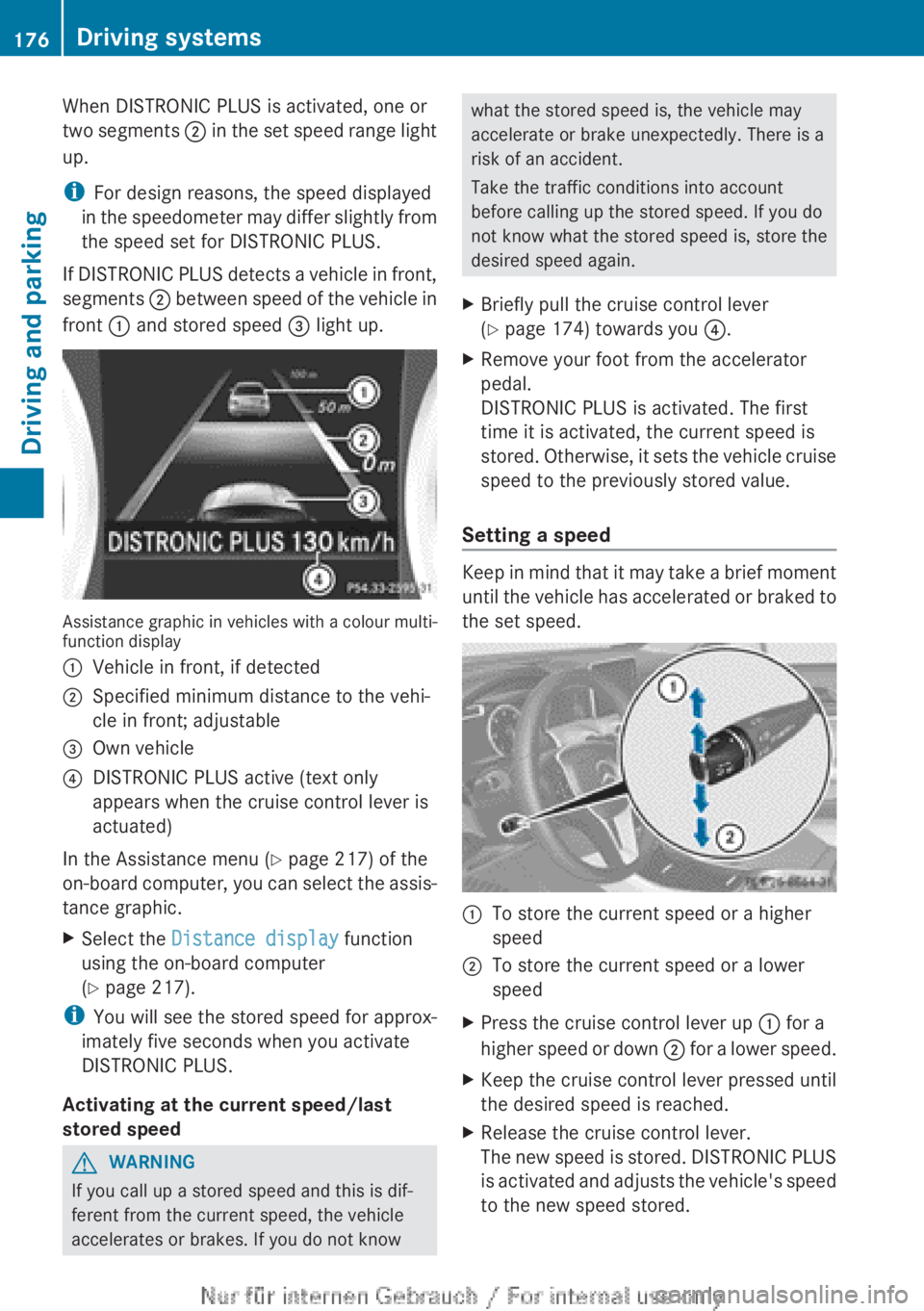
When DISTRONIC PLUS is activated, one or
two
segments ; in the set speed range light
up.
i For design reasons, the speed displayed
in the speedometer may differ slightly from
the speed set for DISTRONIC PLUS.
If DISTRONIC PLUS detects a vehicle in front,
segments ; between speed of the vehicle in
front : and stored speed = light up.Assistance graphic in vehicles with a colour multi-
function display
:
Vehicle in front, if detected
; Specified minimum distance to the vehi-
cle in front; adjustable
= Own vehicle
? DISTRONIC PLUS active (text only
appears when the cruise control lever is
actuated)
In the Assistance menu (Y page 217) of the
on-board
computer, you can select the assis-
tance graphic.
X Select the Distance display function
using the on-board computer
(Y page 217).
i You
will see the stored speed for approx-
imately five seconds when you activate
DISTRONIC PLUS.
Activating at the current speed/last
stored speed G
WARNING
If you call up a stored speed and this is dif-
ferent from the current speed, the vehicle
accelerates or brakes. If you do not know what the stored speed is, the vehicle may
accelerate or brake unexpectedly. There is a
risk of an accident.
Take the traffic conditions into account
before calling up the stored speed. If you do
not know what the stored speed is, store the
desired speed again.
X Briefly pull the cruise control lever
(Y page 174) towards you ?.
X Remove your foot from the accelerator
pedal.
DISTRONIC PLUS is activated. The first
time it is activated, the current speed is
stored.
Otherwise, it sets the vehicle cruise
speed to the previously stored value.
Setting a speed Keep in mind that it may take a brief moment
until
the vehicle has accelerated or braked to
the set speed. :
To store the current speed or a higher
speed
; To store the current speed or a lower
speed
X Press the cruise control lever up : for a
higher
speed or down ; for a lower speed.
X Keep the cruise control lever pressed until
the desired speed is reached.
X Release the cruise control lever.
The
new speed is stored. DISTRONIC PLUS
is activated and adjusts the vehicle's speed
to the new speed stored. 176
Driving systems
Driving and parking