brake MERCEDES-BENZ A CLASS 2012 User Guide
[x] Cancel search | Manufacturer: MERCEDES-BENZ, Model Year: 2012, Model line: A CLASS, Model: MERCEDES-BENZ A CLASS 2012Pages: 356, PDF Size: 4.96 MB
Page 24 of 356
Do not install accessories such as audio
systems in these areas. Do not carry out
repairs or welding. You could impair the
operating efficiency of the restraint sys-
tems.
Have accessories retrofitted at a qualified
specialist workshop.
If you use parts, tyres and wheels as well as
accessories
relevant to safety which have not
been approved by Mercedes, the operating
safety of the vehicle could be jeopardised.
This could lead to malfunctions in safety-rel-
evant systems, e.g. the brake system. Only
use genuine Mercedes-Benz parts or parts of
equal quality. Only use tyres, wheels and
accessories that have been specifically
approved for your vehicle.
Mercedes-Benz tests genuine parts and con-
version parts and accessories that have been
specifically approved for your vehicle for their
reliability, safety and suitability. Despite
ongoing market research, Mercedes-Benz is
unable to assess other parts. Mercedes-Benz
accepts no responsibility for the use of such
parts in Mercedes-Benz vehicles, even if they
have been independently or officially
approved.
In Germany, certain parts are only officially
approved for installation or modification if
they comply with legal requirements. This
also applies to some other countries. All gen-
uine Mercedes-Benz parts meet the approval
requirements. The use of non-approved parts
may invalidate the vehicle's general operating
permit.
This is the case:
R if they cause a change of the vehicle type
from that for which the vehicle's general
operating permit was granted
R if other road users could be endangered
R if the emission or noise levels are adversely
affected
Always specify the vehicle identification num-
ber (VIN) ( Y page 338) and the engine num-
ber ( Y page 338) when ordering genuine
Mercedes-Benz parts. Owner's Manual
General notes
Before you first drive off, read this Owner's
Manual
carefully and familiarise yourself with
your vehicle.
For your own safety and a longer vehicle life,
follow the instructions and warning notices in
this manual. Disregarding them may lead to
damage to the vehicle or personal injury. Vehicle equipment
This Owner's Manual describes all models
and all standard and optional equipment
available for your vehicle at the time of pub-
lication
of the Owner's Manual. Country-spe-
cific differences are possible. Note that your
vehicle may not be fitted with all features
described. This is also the case for systems
and functions relevant to safety. Therefore,
the equipment on your vehicle may differ from
that in the descriptions and illustrations.
The original purchase contract documenta-
tion for your vehicle contains a list of all of the
systems in your vehicle.
Should you have any questions concerning
equipment and operation, please consult a
Mercedes-Benz Service Centre.
The Owner's Manual and Service Booklet are
important documents and should kept in the
vehicle. Operating safety
Important safety notes
G
WARNING
If you do not have the prescribed service/
maintenance work or necessary repairs car-
ried out, this could result in malfunctions or
system
failures. There is a risk of an accident.
Always have the prescribed service/mainte-
nance work as well as necessary repairs car-
ried out at a qualified specialist workshop. 22
Introduction
Page 25 of 356
G
WARNING
If you switch off the ignition while driving,
safety-relevant functions are only available
with
limitations, or not at all. This could affect,
for example, the power steering and the brake
boosting effect. You will require considerably
more effort to steer and brake. There is a risk
of an accident.
Do not switch off the ignition while driving. G
WARNING
Modifications to electronic components, their
software as well as wiring could effect their
function and/or the operation of other net-
worked components. This could in particular
also be the case for systems relevant to
safety. They might not function properly any
more and/or jeopardise the operational
safety of the vehicle. There is an increased
risk of an accident and injury.
Do
not attempt to modify the wiring as well as
electronic components or their software.
Always have work on electrical and electronic
components carried out at a qualified special-
ist workshop.
There is a risk of damage to the vehicle if:
R the vehicle becomes stuck, e.g. on a high
kerb or an unpaved road
R you drive too fast over an obstacle, e.g. a
kerb or a hole in the road
R a heavy object strikes the undercarriage or
parts of the chassis.
In situations like this, the body, the undercar-
riage, chassis parts, wheels or tyres could be
damaged without the damage being visible.
Components damaged in this way can unex-
pectedly fail or, in the case of an accident, no
longer withstand the strain they are designed
to.
If the underbody panelling is damaged, com-
bustible materials such as leaves, grass or
twigs can gather between the underbody and
the underbody panelling. If these materials
come in contact with hot parts of the exhaust system for an extended period, they can
catch fire.
Have
the vehicle checked and repaired imme-
diately at a qualified specialist workshop. If
on continuing your journey you notice that
driving safety is impaired, pull over and stop
the vehicle immediately, paying attention to
road and traffic conditions. In such cases,
visit a qualified specialist workshop. Declarations of conformity
Wireless vehicle components The following information applies to all com-
ponents
of the vehicle and the COMAND sys-
tem which receive and/or transmit radio
waves:
The components of this vehicle which receive
and/or transmit radio waves are compliant
with the basic requirements and other rele-
vant provisions of Directive 1999/5/EC. You
can obtain further information from any
Mercedes-Benz Service Centre.
Electromagnetic compatibility The electromagnetic compatibility of the vehi-
cle
components has been checked and certi-
fied according to the currently valid version
of Directive 72/245/EEC or the equivalent
ECE Regulation ECE-R 10. Diagnostics connection
The diagnostics connection is only intended
for
the connection of diagnostic equipment at
a qualified specialist workshop. G
WARNING
If you connect equipment to a diagnostics
connection in the vehicle, it can affect the
operation of the vehicle systems. This may
affect the operating safety of the vehicle.
There is a risk of an accident.
Do not connect any equipment to a diagnos-
tics connection in the vehicle. Introduction
23 Z
Page 27 of 356
Data stored in the vehicle
A number of electronic components in your
vehicle contain data memories.
These data memories temporarily or perma-
nently store technical information about:
R the vehicle's operating state
R events
R faults
This technical information generally docu-
ments the condition of a component, a mod-
ule, a system or an environment.
These are, for example:
R operating conditions of system compo-
nents. This includes, e.g. fluid levels.
R status
messages from the vehicle and from
individual vehicle components. This
includes, e.g. number of wheel revolu-
tions/speed, deceleration, lateral acceler-
ation.
R malfunctions and faults in important sys-
tem components. This includes, e.g. lights,
brakes.
R reactions of the vehicle in special driving
situations. This includes, e.g. deployment
of an airbag, intervention of stability control
systems.
R environmental conditions. This includes,
e.g. the outside temperature.
This data is exclusively technical in nature
and is used to:
R assist in the detection and rectification of
faults and defects
R optimise vehicle functions
The data cannot be used to trace the vehicle's
movements over distances travelled.
When your vehicle is serviced, this technical
information can be read out from the event
and fault memory.
Services include:
R repairs
R service processes R
warranty claims
R quality assurance
The information is read out by authorised
employees of the service network (including
manufacturers)
using special diagnostic devi-
ces. You can find more information there if
necessary.
After a fault has been rectified, the informa-
tion in the fault memory is deleted or consec-
utively overwritten.
In normal vehicle operation, situations may
arise in which this technical data could
become personal in nature in conjunction
with other information and, if necessary, on
consultation of an approval official.
Examples include:
R accident reports
R vehicle damage
R witness testimonies
Further additional features which are con-
tractually agreed with the customer likewise
allow specific vehicle data to be obtained
from the vehicle. Such additional features
include vehicle locating in an emergency, for
example. Copyright information
General notes
You can find information on licences for free
and open-source software used in your vehi-
cle
and its electronic components on the fol-
lowing website:
http://www.mercedes-benz.com/
opensource Introduction
25 Z
Page 30 of 356
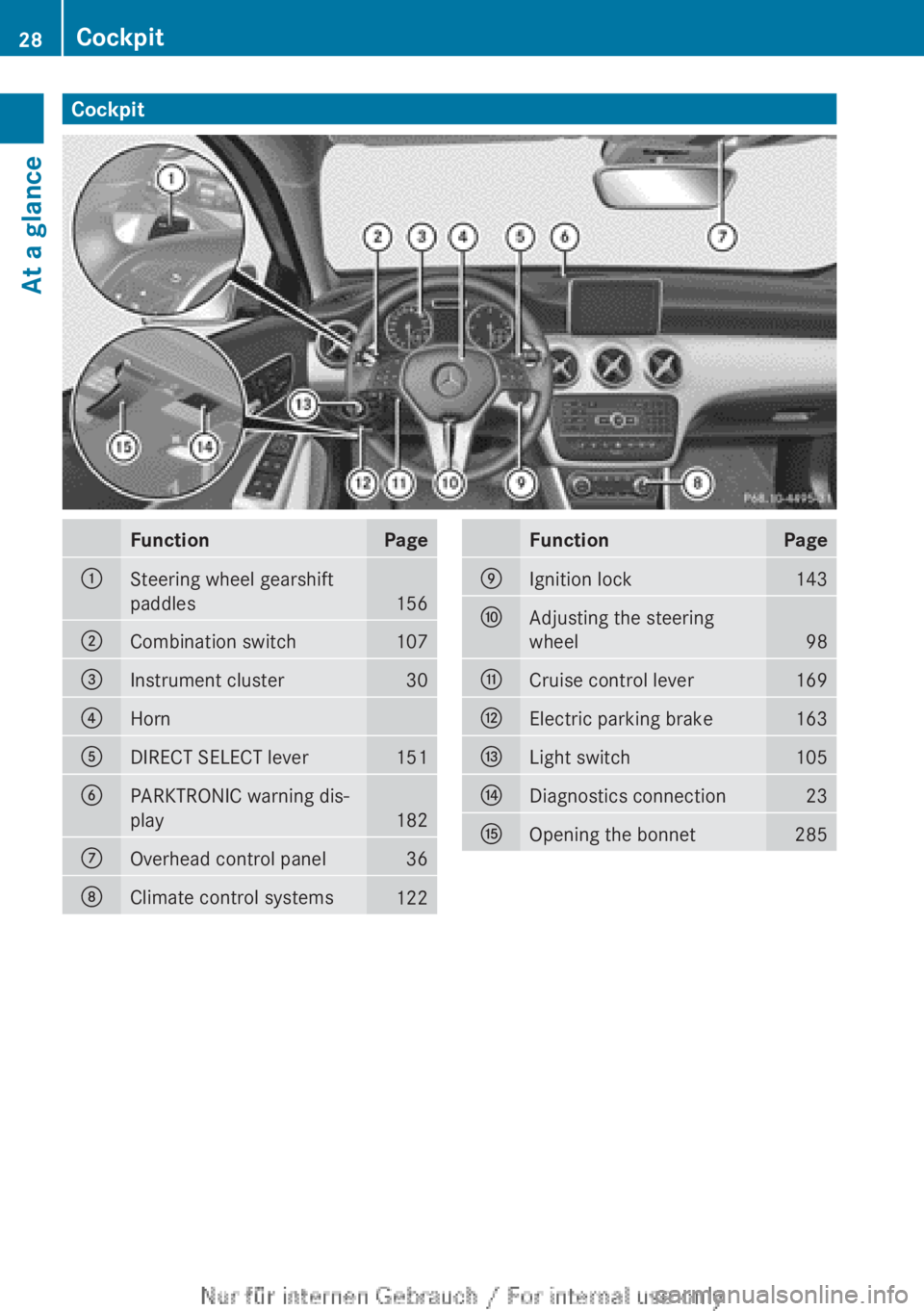
Cockpit
Function Page
:
Steering wheel gearshift
paddles
156
;
Combination switch 107
=
Instrument cluster 30
?
Horn
A
DIRECT SELECT lever 151
B
PARKTRONIC warning dis-
play
182
C
Overhead control panel 36
D
Climate control systems
122 Function Page
E
Ignition lock 143
F
Adjusting the steering
wheel
98
G
Cruise control lever 169
H
Electric parking brake 163
I
Light switch 105
J
Diagnostics connection 23
K
Opening the bonnet 28528
CockpitAt a glance
Page 31 of 356
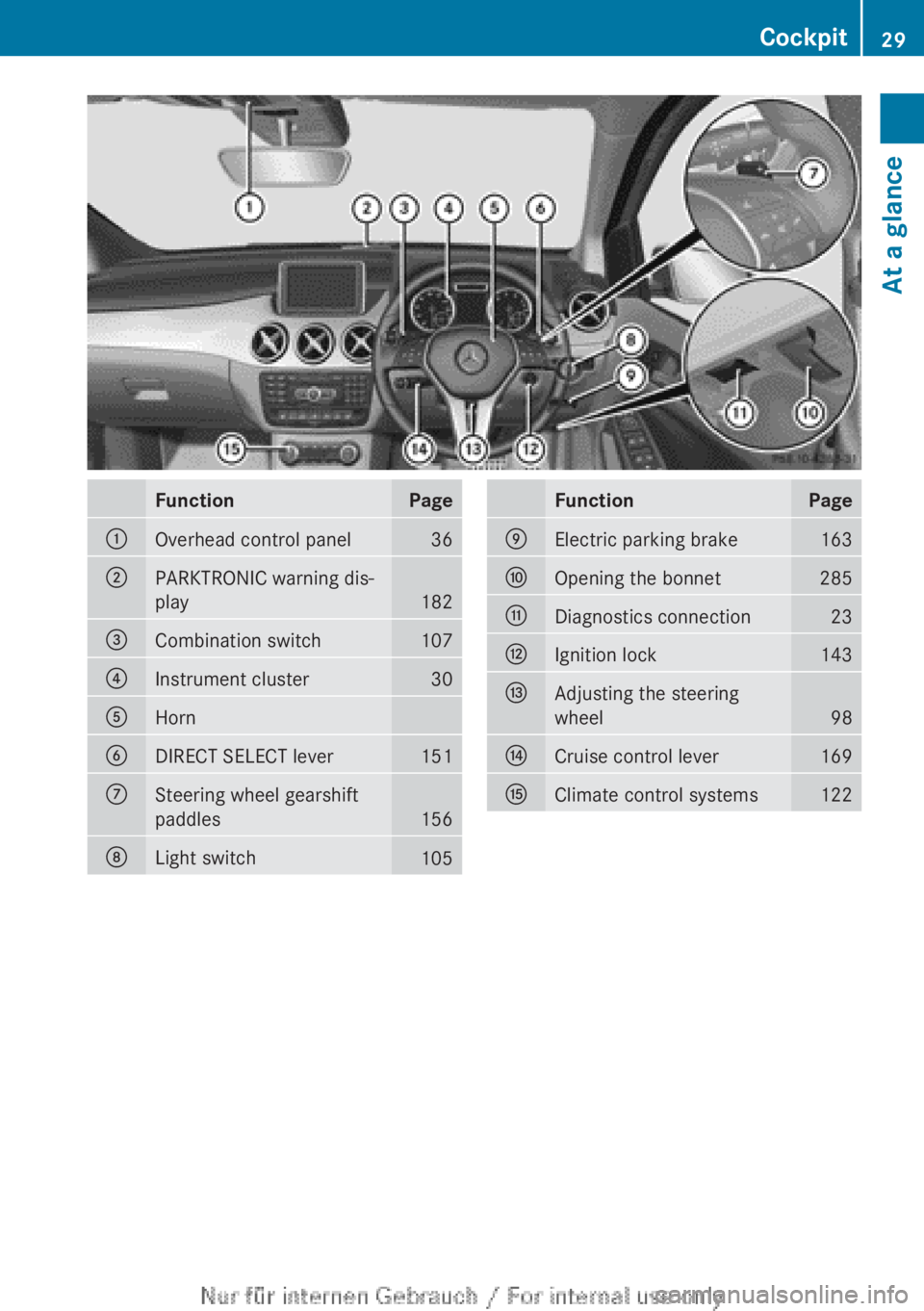
Function Page
:
Overhead control panel 36
;
PARKTRONIC warning dis-
play
182
=
Combination switch 107
?
Instrument cluster 30
A
Horn
B
DIRECT SELECT lever 151
C
Steering wheel gearshift
paddles
156
D
Light switch
105 Function Page
E
Electric parking brake 163
F
Opening the bonnet 285
G
Diagnostics connection 23
H
Ignition lock 143
I
Adjusting the steering
wheel
98
J
Cruise control lever 169
K
Climate control systems 122Cockpit
29At a glance
Page 34 of 356
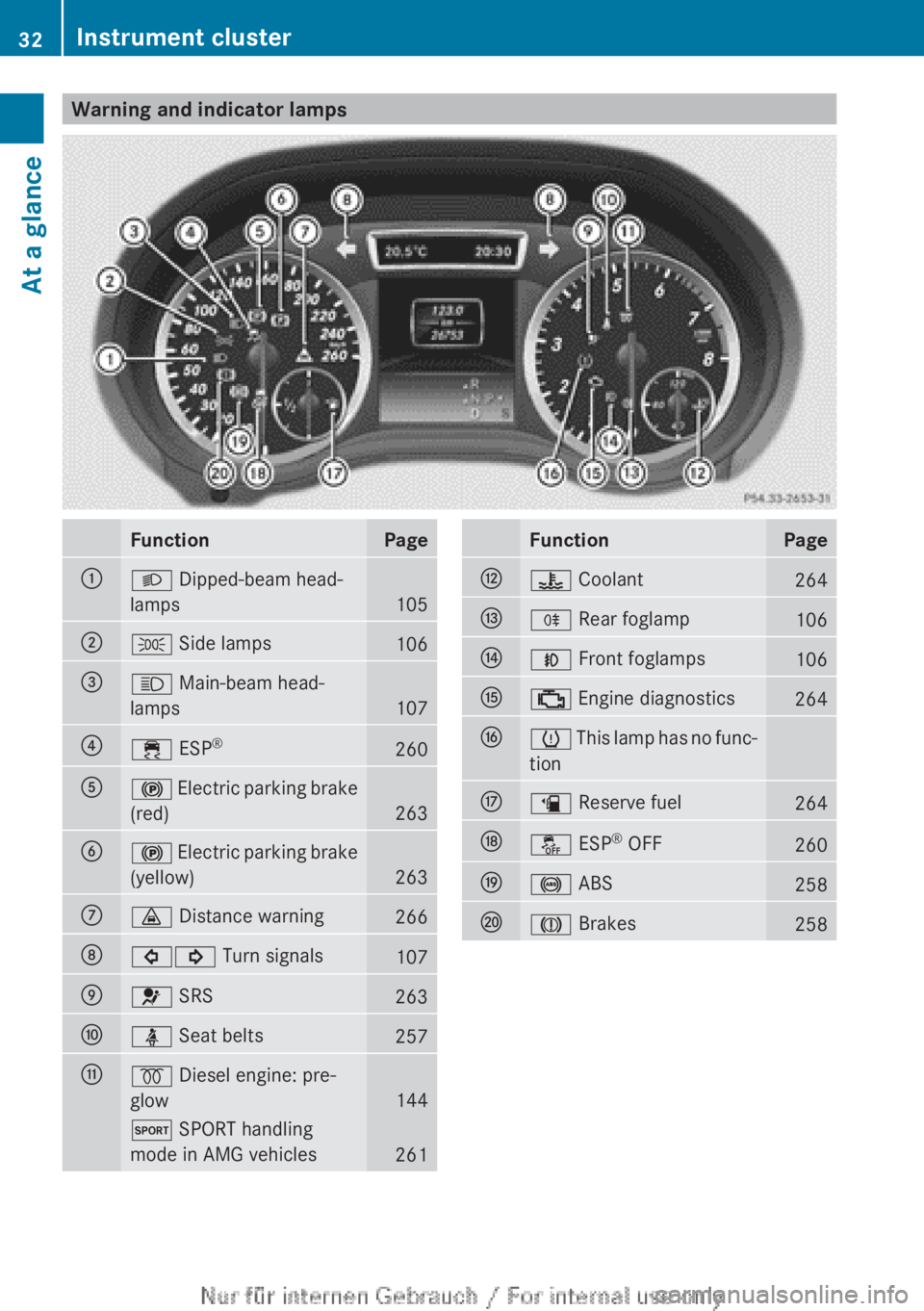
Warning and indicator lamps
Function Page
:
L Dipped-beam head-
lamps
105
;
T Side lamps
106
=
K Main-beam head-
lamps
107
?
÷ ESP
® 260
A
! Electric parking brake
(red)
263
B
!
Electric parking brake
(yellow)
263
C
· Distance warning
266
D
#! Turn signals
107
E
6 SRS
263
F
ü Seat belts
257
G
% Diesel engine: pre-
glow
144
M SPORT handling
mode in AMG vehicles
261 Function Page
H
? Coolant
264
I
R Rear foglamp
106
J
N Front foglamps
106
K
; Engine diagnostics
264
L
h
This lamp has no func-
tion
M
æ Reserve fuel
264
N
å ESP
®
OFF 260
O
! ABS
258
P
J Brakes
25832
Instrument cluster
At a glance
Page 48 of 356
PRE-SAFE
®
takes pre-emptive measures to
protect occupants in certain hazardous sit-
uations.
PRE-SAFE ®
intervenes:
R when BAS activates, e.g. in emergency
braking situations
R when adaptive Brake Assist intervenes
powerfully on vehicles with DISTRONIC
PLUS
R in
critical driving situations, e.g. when phys-
ical limits are exceeded and the vehicle
understeers or oversteers severely
PRE-SAFE ®
takes the following measures
depending on the hazardous situation detec-
ted:
R the front seat belts are pre-tensioned.
R vehicles with the memory function: the
front-passenger seat is adjusted if it is in an
unfavourable position.
R if the vehicle skids, the panorama sliding
sunroof and the side windows are closed so
that only a small gap remains.
If the hazardous situation passes without
resulting in an accident, PRE-SAFE ®
slackens
the belt pretensioning. All settings made by
PRE-SAFE ®
can then be reversed.
If the seat belts are not released:
X Move the backrest or seat back slightly, but
only when the vehicle is stationary.
The belt pretensioning is reduced and the
locking mechanism is released.
More information about seat belt adjustment,
a convenience function integrated into PRE-
SAFE
(Y page 47). Seat belts
Important safety notes G
WARNING
A seat belt which is not worn correctly, or
which has not been engaged in the seat belt
buckle
correctly, cannot provide the intended
level of protection. Under certain circumstan- ces, this could cause severe or even fatal inju-
ries in the event of an accident.
Therefore, make sure that all occupants — in
particular,
pregnant women — wear their seat
belts correctly at all times.
R The seat belt must fit snugly on your body
and must not be twisted.Therefore, avoid
wearing bulky clothing, e.g. a winter coat.
The shoulder section of the belt must be
routed across the centre of your shoulder
— on no account across your neck or under
your arm — and pulled tight against your
upper body. The lap belt must always pass
across your lap as low down as possible, i.e.
over your hip joints — not across your abdo-
men. If necessary, push the seat belt
slightly downwards and adjust it by pulling
it in the direction the seat belt retracts.
R Do not route the seat belt strap over sharp
or fragile objects. Please make sure that
such objects are not on or in your clothing,
e.g. spectacles, pens or keys etc. The seat
belt strap could become damaged and tear
during an accident and you or other vehicle
occupants could be injured.
R Only one person should use each seat belt
at any one time. Children must never travel
sitting on the lap of another occupant. The
child will not be secured in the event of an
accident, heavy braking or sudden change
of direction. This may result in the child or
other occupants being seriously or fatally
injured.
R Persons under 1.50 m tall cannot wear the
seat belts correctly. For this reason secure
persons less than 1.50 m tall in specially
designed, suitable restraint systems.
R Children under 1.50 m tall and younger
than twelve years of age cannot wear the
seat belts correctly. For this reason secure
them in special suitable child restraint sys-
tems installed on a suitable seat. Additional
information can be found in the Operating
Instructions in the chapter "Safety", "Chil-
dren in the Vehicle". Observe the installa-46
Occupant safety
Safety
Page 63 of 356
opened from inside the vehicle. When the
vehicle is unlocked, the door can be opened
from the outside.
X
To activate: press the child-proof lock
lever up in the direction of arrow :.
X Make sure that the child-proof locks are
working properly.
X To deactivate: press the child-proof lock
lever down in the direction of arrow ;.
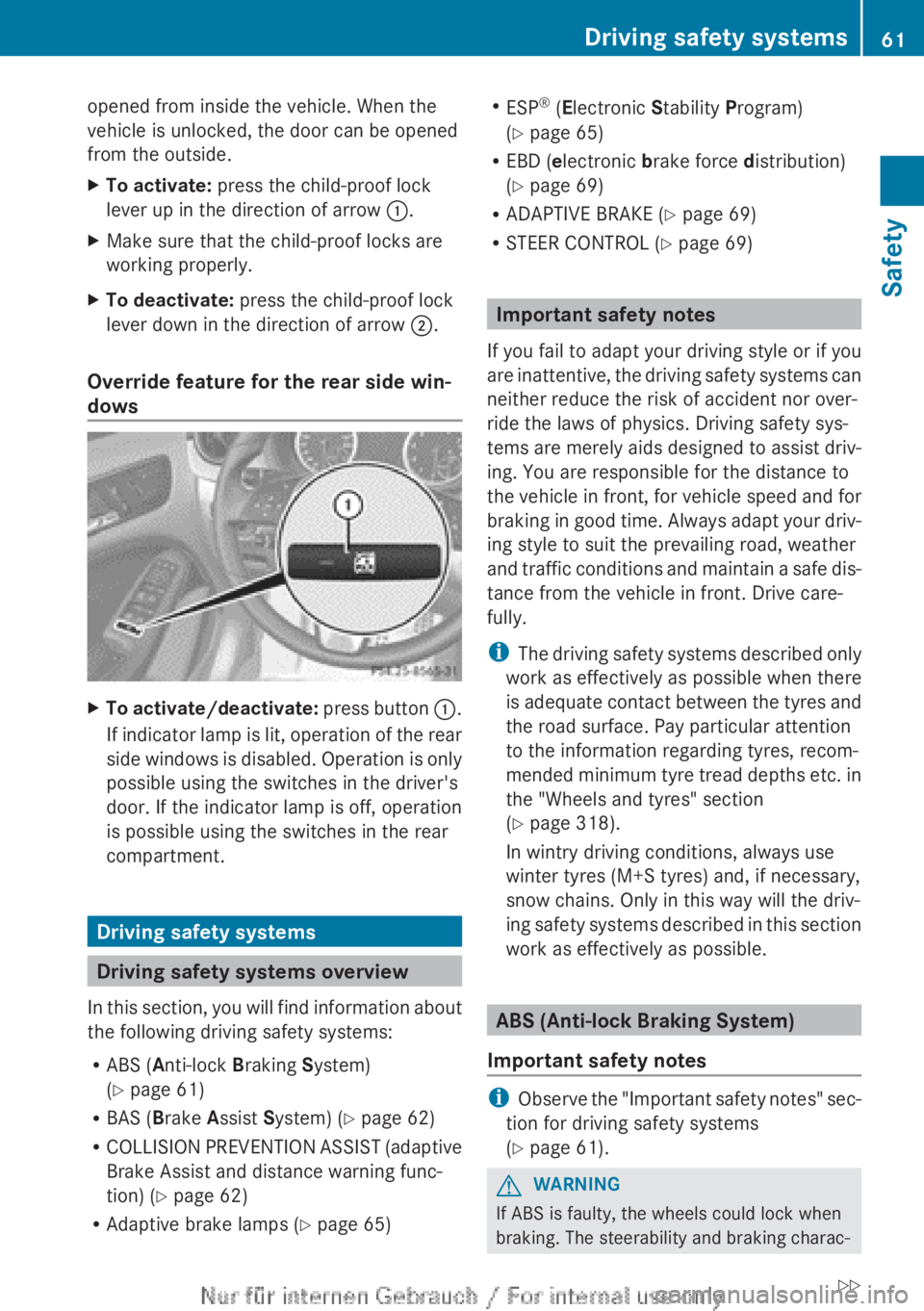
Override feature for the rear side win-
dows X
To activate/deactivate: press button :.
If indicator lamp is lit, operation of the rear
side windows is disabled. Operation is only
possible using the switches in the driver's
door. If the indicator lamp is off, operation
is possible using the switches in the rear
compartment. Driving safety systems
Driving safety systems overview
In
this section, you will find information about
the following driving safety systems:
R ABS ( Anti-lock Braking System)
(Y page 61)
R BAS ( Brake Assist System) ( Y page 62)
R COLLISION PREVENTION ASSIST (adaptive
Brake Assist and distance warning func-
tion) (Y page 62)
R Adaptive brake lamps ( Y page 65)R
ESP ®
(Electronic Stability Program)
(Y page 65)
R EBD ( electronic brake force distribution)
(Y page 69)
R ADAPTIVE BRAKE
(Y page 69)
R STEER CONTROL ( Y page 69) Important safety notes
If you fail to adapt your driving style or if you
are
inattentive, the driving safety systems can
neither reduce the risk of accident nor over-
ride the laws of physics. Driving safety sys-
tems are merely aids designed to assist driv-
ing. You are responsible for the distance to
the vehicle in front, for vehicle speed and for
braking in good time. Always adapt your driv-
ing style to suit the prevailing road, weather
and traffic conditions and maintain a safe dis-
tance from the vehicle in front. Drive care-
fully.
i The driving safety systems described only
work as effectively as possible when there
is adequate contact between the tyres and
the road surface. Pay particular attention
to the information regarding tyres, recom-
mended minimum tyre tread depths etc. in
the "Wheels and tyres" section
(Y page 318).
In wintry driving conditions, always use
winter tyres (M+S tyres) and, if necessary,
snow chains. Only in this way will the driv-
ing safety systems described in this section
work as effectively as possible. ABS (Anti-lock Braking System)
Important safety notes i
Observe
the "Important safety notes" sec-
tion for driving safety systems
(Y page 61). G
WARNING
If ABS is faulty, the wheels could lock when
braking. The steerability and braking charac- Driving safety systems
61
Safety
Z
Page 64 of 356
teristics may be severely impaired. Addition-
ally, further driving safety systems are deac-
tivated.
There is an increased danger of skid-
ding and accidents.
Drive on carefully. Have ABS checked imme-
diately at a qualified specialist workshop.
If ABS is malfunctioning, other systems,
including driving safety systems, will also
become inoperative. Observe the information
on the ABS warning lamp ( Y page 258) and
display messages which may be shown in the
instrument cluster (Y page 230).
ABS regulates brake pressure in such a way
that the wheels do not lock when you brake.
This allows you to continue steering the vehi-
cle when braking.
ABS works from a speed of about 8 km/h
upwards, regardless of road-surface condi-
tions. ABS works on slippery surfaces, even
when you only brake gently.
The ! ABS warning lamp in the instrument
cluster lights up when the ignition is switched
on. It goes out when the engine is running.
Braking X
If ABS intervenes:
continue to depress the
brake pedal with force until the braking sit-
uation is over.
X To make a full brake application:
depress the brake pedal with full force.
If ABS intervenes when braking, you will feel
a pulsing in the brake pedal.
The pulsating brake pedal can be an indica-
tion of hazardous road conditions, and func-
tions as a reminder to take extra care while
driving. BAS (Brake Assist)
i Observe
the "Important safety notes" sec-
tion (Y page 61). G
WARNING
If BAS is malfunctioning, the braking distance
in an emergency braking situation is
increased. There is a risk of accident.
In an emergency braking situation, depress
the brake pedal with full force. ABS prevents
the wheels from locking.
BAS operates in emergency braking situa-
tions.
If you depress the brake pedal quickly,
BAS automatically boosts the braking force,
thus shortening the stopping distance.
The brakes will function as usual once you
release the brake pedal. BAS is deactivated. COLLISION PREVENTION ASSIST
General notes COLLISION PREVENTION ASSIST consists of
the adaptive Brake Assist and the distance
warning signal, which are described in the
following.
Distance warning function
Important safety notes
i
Observe
the "Important safety notes" sec-
tion for driving safety systems
(Y page 61). G
WARNING
The distance warning function does not react:
R to people or animals
R to oncoming vehicles
R to crossing traffic
R when cornering
Thus, the distance warning function cannot
provide a warning in all critical situations.
There is a risk of an accident.
Always
pay careful attention to the traffic sit-
uation and be ready to brake. 62
Driving safety systems
Safety
Page 65 of 356
G
WARNING
The distance warning function cannot always
clearly identify objects and complex traffic
situations.
In such cases, the distance warning function
may:
R give an unnecessary warning
R not give a warning
There is a risk of an accident.
Always
pay careful attention to the traffic sit-
uation; do not rely on the distance warning
function alone.
Function
X To activate/deactivate:
activate or deac-
tivate the distance warning function in the
on-board computer (Y page 218).
Vehicles with a black and white multi-
function
display: when the distance warning
function is activated, the Ä symbol
appears in the status overview in the multi-
function display.
Vehicles with a colour multifunction dis-
play: when the distance warning function is
deactivated, the æ symbol appears in the
assistance graphics in the multifunction dis-
play.
The distance warning function can help you
to minimise the risk of a front-end collision
with a vehicle ahead or reduce the effects of
such a collision. If the distance warning func-
tion detects that there is a risk of a collision,
you will be warned visually and acoustically.
Without your intervention, the distance warn-
ing function cannot prevent a collision.
The distance warning function issues a warn-
ing at speeds:
R of around 30 km/h or more, if, over several
seconds, the distance maintained to the
vehicle travelling in front is insufficient. The
· distance warning lamp then lights up
in the instrument cluster.
R of around 7 km/h or higher, if you very
quickly approach a vehicle in front. An
intermittent warning tone will then sound, and the · distance warning lamp will
light up in the instrument cluster.
X Brake immediately in order to increase the
distance from the vehicle in front.
or
X Take evasive action provided it is safe to do
so.
Due to the nature of the system, particularly
complicated but non-critical driving condi-
tions
may also cause the system to display a
warning.
With the help of the radar sensor system, the
distance warning function can detect obsta-
cles that are in the path of your vehicle for an
extended period of time.
Up to a speed of around 70 km/h, the dis-
tance warning function can also react to sta-
tionary obstacles, such as stopped or parked
vehicles.
If you approach an obstacle and the distance
warning function detects a risk of a collision,
the system will alert you both visually and
acoustically.
In particular, the detection of obstacles can
be impaired in the case of:
R dirt on the sensors or obscured sensors
R snow or heavy rain
R interference by other radar sources
R strong radar reflections, for example, in
multi-storey car parks
R a narrow vehicle travelling in front, e.g. a
motorcycle
R a vehicle travelling in front on a different
line
Following damage to the front end of the vehi-
cle, have the configuration and operation of
the radar sensor checked at a qualified spe-
cialist workshop. This also applies to colli-
sions at slow speeds where there is no visible
damage to the front of the vehicle. Driving safety systems
63Safety Z