bulb MERCEDES-BENZ A CLASS 2012 User Guide
[x] Cancel search | Manufacturer: MERCEDES-BENZ, Model Year: 2012, Model line: A CLASS, Model: MERCEDES-BENZ A CLASS 2012Pages: 356, PDF Size: 4.96 MB
Page 116 of 356
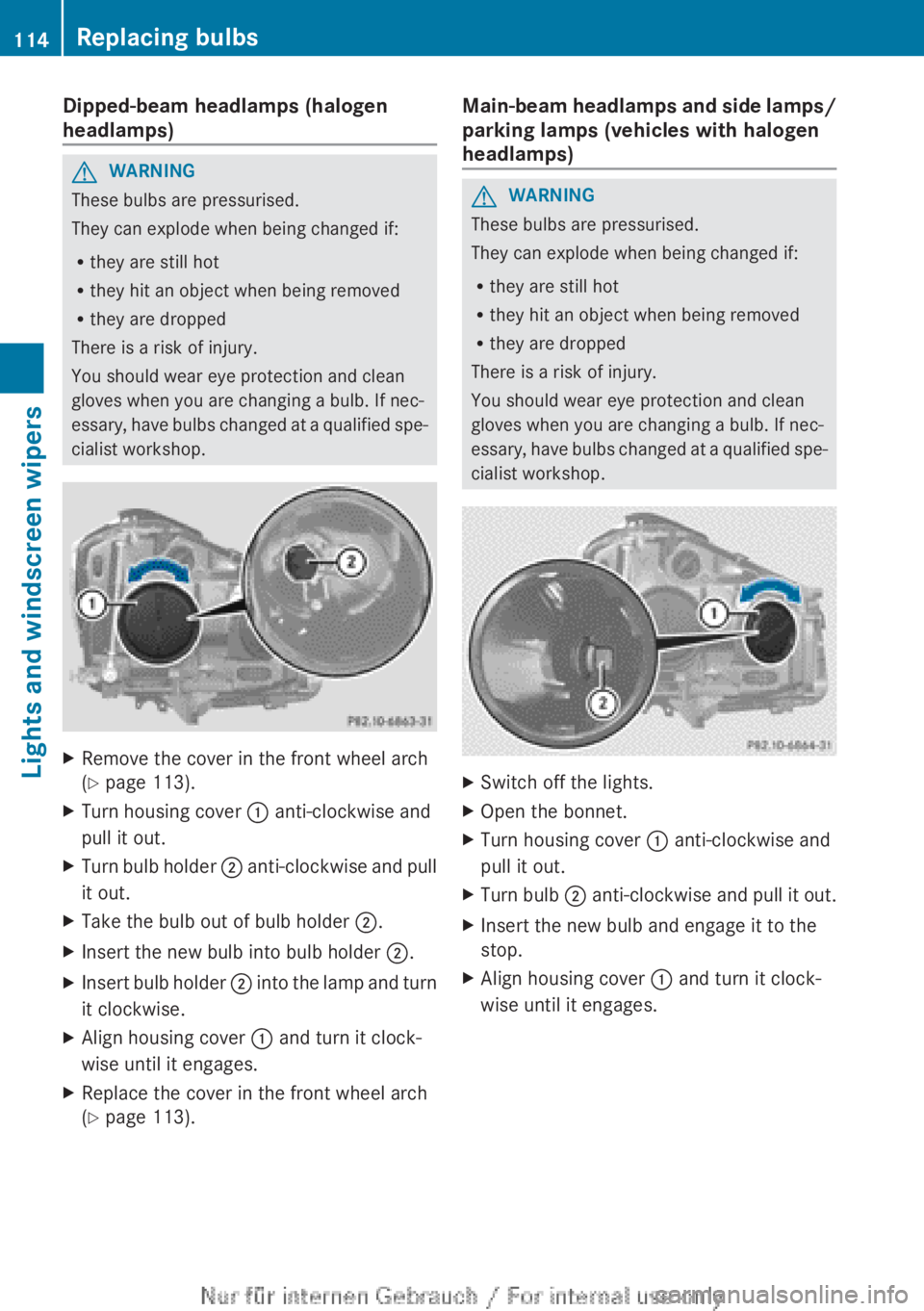
Dipped-beam headlamps (halogen
headlamps)
G
WARNING
These bulbs are pressurised.
They can explode when being changed if:
R they are still hot
R they hit an object when being removed
R they are dropped
There is a risk of injury.
You should wear eye protection and clean
gloves when you are changing a bulb. If nec-
essary,
have bulbs changed at a qualified spe-
cialist workshop. X
Remove the cover in the front wheel arch
(Y page 113).
X Turn housing cover : anti-clockwise and
pull it out.
X Turn bulb holder ;
anti-clockwise and pull
it out.
X Take the bulb out of bulb holder ;.
X Insert the new bulb into bulb holder ;.
X Insert bulb holder ;
into the lamp and turn
it clockwise.
X Align housing cover : and turn it clock-
wise until it engages.
X Replace the cover in the front wheel arch
(Y page 113). Main-beam headlamps and side lamps/
parking lamps (vehicles with halogen
headlamps) G
WARNING
These bulbs are pressurised.
They can explode when being changed if:
R they are still hot
R they hit an object when being removed
R they are dropped
There is a risk of injury.
You should wear eye protection and clean
gloves when you are changing a bulb. If nec-
essary,
have bulbs changed at a qualified spe-
cialist workshop. X
Switch off the lights.
X Open the bonnet.
X Turn housing cover : anti-clockwise and
pull it out.
X Turn bulb ;
anti-clockwise and pull it out.
X Insert the new bulb and engage it to the
stop.
X Align housing cover : and turn it clock-
wise until it engages.114
Replacing bulbs
Lights and windscreen wipers
Page 117 of 356
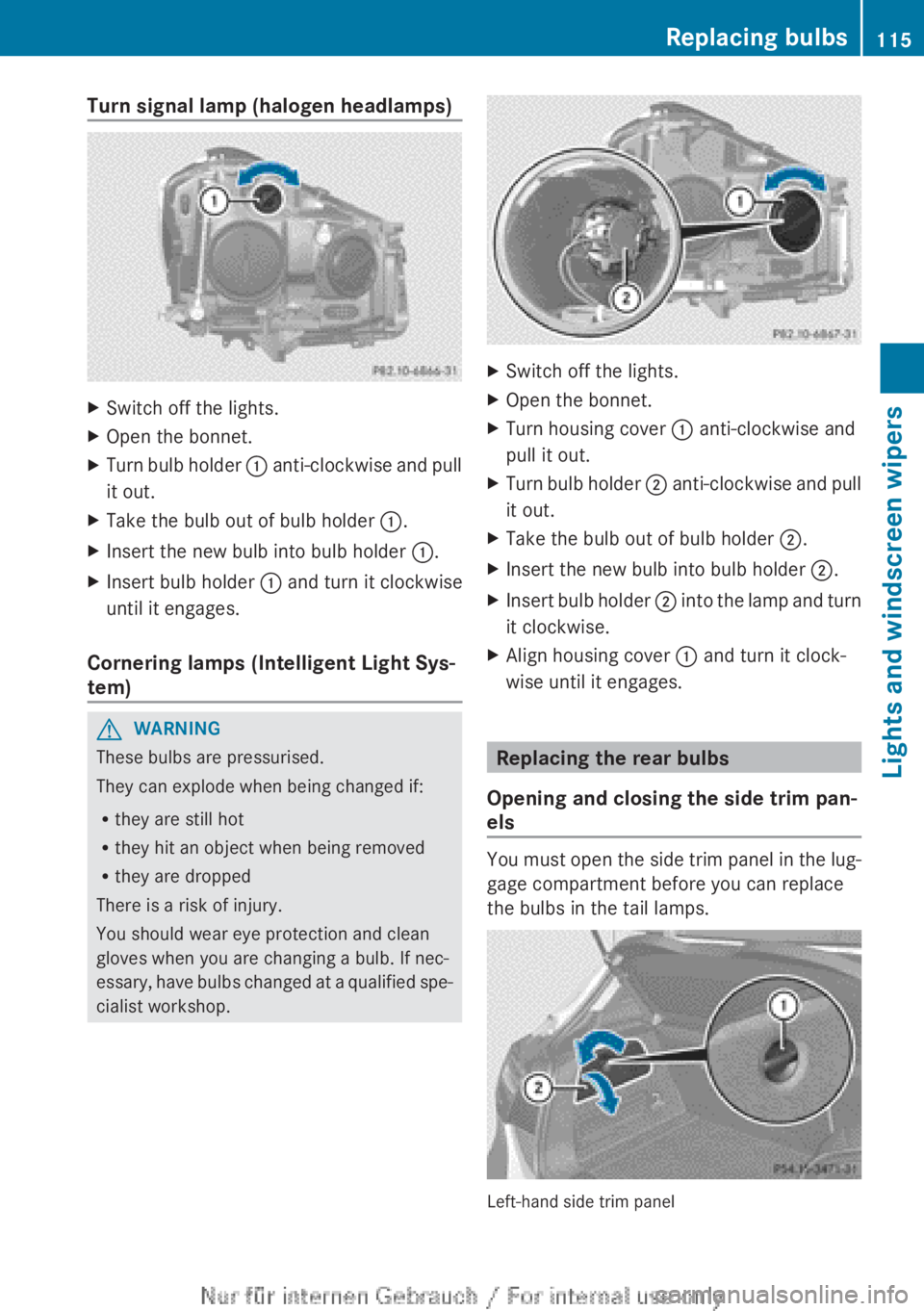
Turn signal lamp (halogen headlamps)
X
Switch off the lights.
X Open the bonnet.
X Turn bulb holder : anti-clockwise and pull
it out.
X Take the bulb out of bulb holder :.
X Insert the new bulb into bulb holder :.
X Insert bulb holder : and turn it clockwise
until it engages.
Cornering lamps (Intelligent Light Sys-
tem) G
WARNING
These bulbs are pressurised.
They can explode when being changed if:
R they are still hot
R they hit an object when being removed
R they are dropped
There is a risk of injury.
You should wear eye protection and clean
gloves when you are changing a bulb. If nec-
essary,
have bulbs changed at a qualified spe-
cialist workshop. X
Switch off the lights.
X Open the bonnet.
X Turn housing cover : anti-clockwise and
pull it out.
X Turn bulb holder ;
anti-clockwise and pull
it out.
X Take the bulb out of bulb holder ;.
X Insert the new bulb into bulb holder ;.
X Insert bulb holder ;
into the lamp and turn
it clockwise.
X Align housing cover : and turn it clock-
wise until it engages. Replacing the rear bulbs
Opening and closing the side trim pan-
els You must open the side trim panel in the lug-
gage compartment before you can replace
the bulbs in the tail lamps.
Left-hand side trim panel Replacing bulbs
115
Lights and windscreen wipers Z
Page 118 of 356
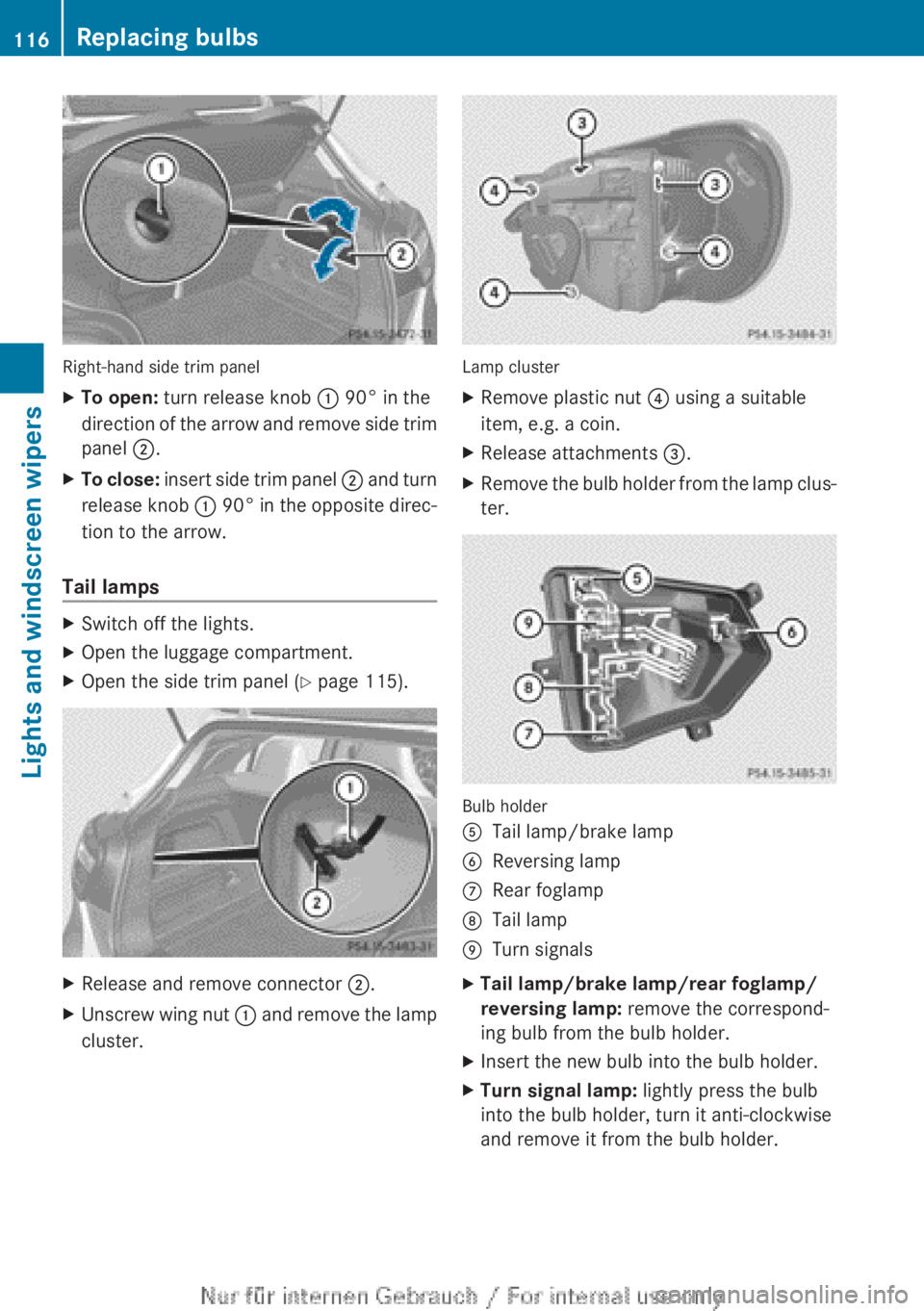
Right-hand side trim panel
X
To open: turn release knob : 90° in the
direction
of the arrow and remove side trim
panel ;.
X To close:
insert side trim panel ; and turn
release knob : 90° in the opposite direc-
tion to the arrow.
Tail lamps X
Switch off the lights.
X Open the luggage compartment.
X Open the side trim panel ( Y page 115).X
Release and remove connector ;.
X Unscrew wing nut :
and remove the lamp
cluster. Lamp cluster
X
Remove plastic nut ? using a suitable
item, e.g. a coin.
X Release attachments =.
X Remove the bulb holder from the lamp clus-
ter. Bulb holder
A
Tail lamp/brake lamp
B Reversing lamp
C Rear foglamp
D Tail lamp
E Turn signals
X Tail lamp/brake lamp/rear foglamp/
reversing lamp: remove the correspond-
ing bulb from the bulb holder.
X Insert the new bulb into the bulb holder.
X Turn signal lamp: lightly press the bulb
into the bulb holder, turn it anti-clockwise
and remove it from the bulb holder. 116
Replacing bulbs
Lights and windscreen wipers
Page 119 of 356
X
Insert the new bulb into the bulb holder and
turn it clockwise.
X Secure the bulb holder to attachments =
on the lamp cluster and tighten plastic
nuts ?. X
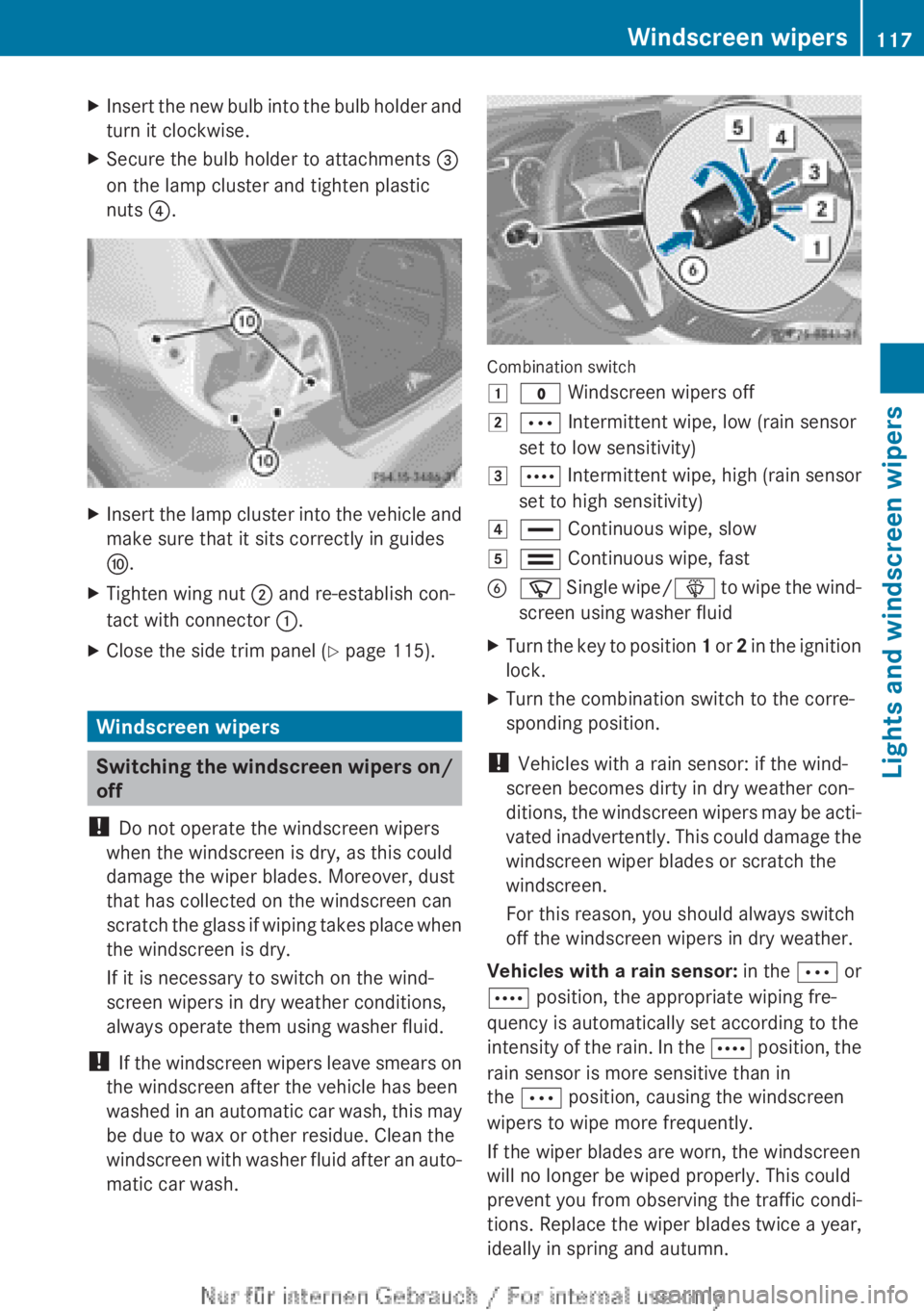
Insert the lamp cluster into the vehicle and
make sure that it sits correctly in guides
F.
X Tighten wing nut ; and re-establish con-
tact with connector :.
X Close the side trim panel ( Y page 115).Windscreen wipers
Switching the windscreen wipers on/
off
! Do not operate the windscreen wipers
when the windscreen is dry, as this could
damage the wiper blades. Moreover, dust
that has collected on the windscreen can
scratch
the glass if wiping takes place when
the windscreen is dry.
If it is necessary to switch on the wind-
screen wipers in dry weather conditions,
always operate them using washer fluid.
! If the windscreen wipers leave smears on
the windscreen after the vehicle has been
washed in an automatic car wash, this may
be due to wax or other residue. Clean the
windscreen with washer fluid after an auto-
matic car wash. Combination switch
1
$ Windscreen wipers off
2 Ä Intermittent wipe, low (rain sensor
set to low sensitivity)
3 Å
Intermittent wipe, high (rain sensor
set to high sensitivity)
4 ° Continuous wipe, slow
5 ¯ Continuous wipe, fast
B í
Single wipe/ î to wipe the wind-
screen using washer fluid
X Turn the key to position 1
or 2 in the ignition
lock.
X Turn the combination switch to the corre-
sponding position.
! Vehicles with a rain sensor: if the wind-
screen becomes dirty in dry weather con-
ditions,
the windscreen wipers may be acti-
vated inadvertently. This could damage the
windscreen wiper blades or scratch the
windscreen.
For this reason, you should always switch
off the windscreen wipers in dry weather.
Vehicles with a rain sensor: in the Ä or
Å position, the appropriate wiping fre-
quency is automatically set according to the
intensity of the rain. In the Å position, the
rain sensor is more sensitive than in
the Ä position, causing the windscreen
wipers to wipe more frequently.
If the wiper blades are worn, the windscreen
will no longer be wiped properly. This could
prevent you from observing the traffic condi-
tions. Replace the wiper blades twice a year,
ideally in spring and autumn. Windscreen wipers
117Lights and windscreen wipers Z
Page 208 of 356
X
Press the ball coupling in the direction of
the arrow until it engages behind the
bumper.
Indicator lamp ? goes out and the mes-
sage in the multifunction display disap-
pears. Trailer power supply
! You can connect accessories with a
power rating of up to 240 W to the perma-
nent
power supply and with a power rating
of up to 180 W to the power supply that is
switched on via the ignition lock.
The trailer battery may not be charged from
the power supply.
X To switch the connected power supply
on or off: turn the key in the ignition lock
to position 2 or 0 respectively.
When it leaves the factory, your vehicle's
trailer socket is equipped with a permanent
power supply and a power supply that is
switched on via the ignition lock.
The permanent power supply is supplied via
trailer socket pin 9.
The power supply that is switched on via the
ignition lock is supplied via trailer socket pin
10.
The trailer's permanent power supply is
switched
off in the event of low vehicle supply
voltage and after six hours at the latest.
You can find more information about instal-
ling the trailer electrics at a qualified special-
ist workshop. Bulb failure indicator for LED lamps
i If LED lamps are fitted in the trailer, an
error message may appear in the multi-
function
display even if there is no fault. The
reason for the error message could be that
the current has fallen below the minimum
of 50 mA. To ensure reliable operation of the bulb failure
indicator,
each LED chain in the trailer lighting
must be guaranteed a minimum current of
50 mA. Trailer with 7-pin connector
General notes Trailer with 7-pin connector: you can con-
nect
to the 13-pin socket on the ball coupling
using an adapter or, if necessary, an adapter
cable. Both can be obtained at a qualified
specialist workshop.
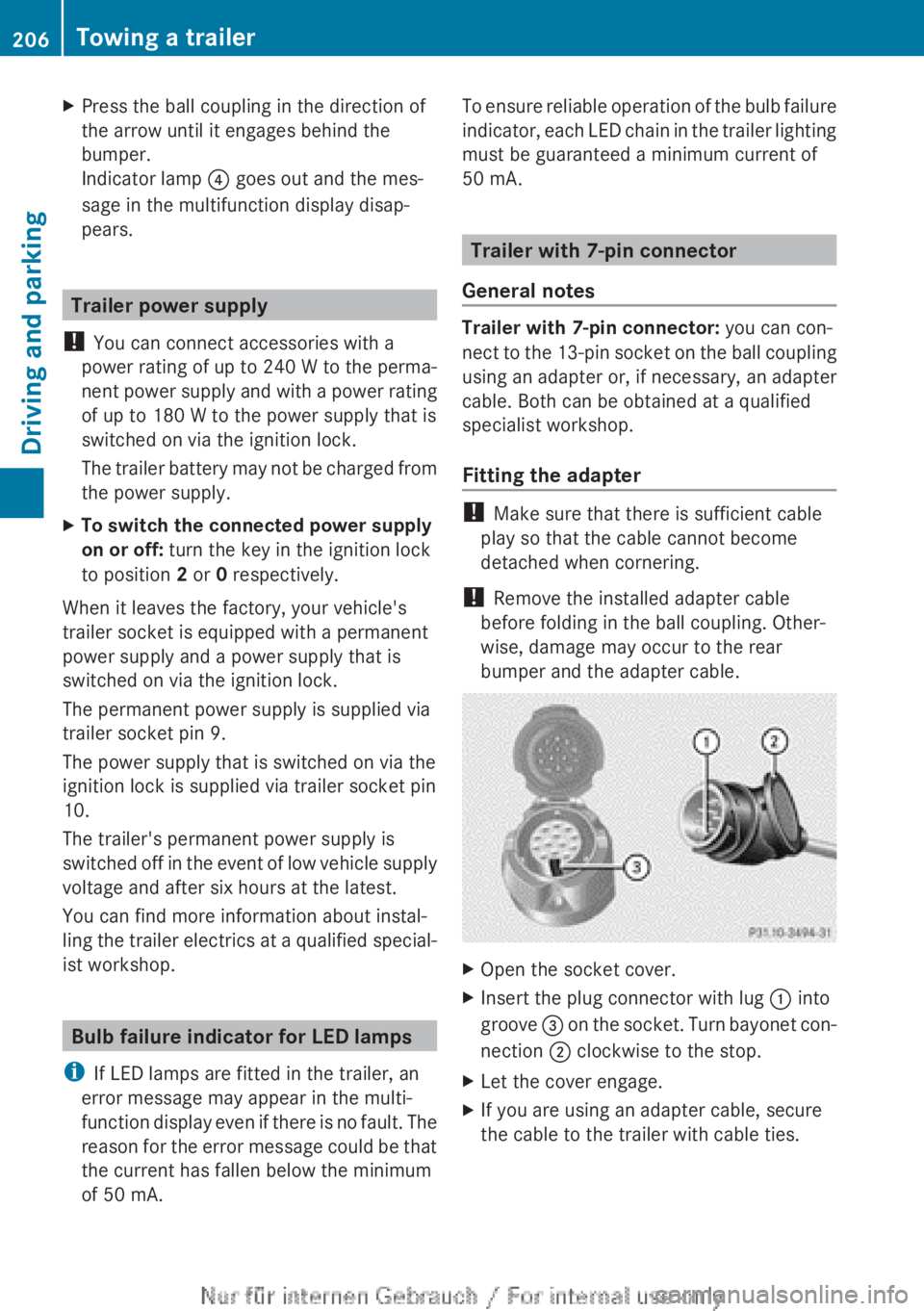
Fitting the adapter !
Make sure that there is sufficient cable
play so that the cable cannot become
detached when cornering.
! Remove the installed adapter cable
before folding in the ball coupling. Other-
wise, damage may occur to the rear
bumper and the adapter cable. X
Open the socket cover.
X Insert the plug connector with lug : into
groove =
on the socket. Turn bayonet con-
nection ; clockwise to the stop.
X Let the cover engage.
X If you are using an adapter cable, secure
the cable to the trailer with cable ties.206
Towing a trailer
Driving and parking
Page 241 of 356
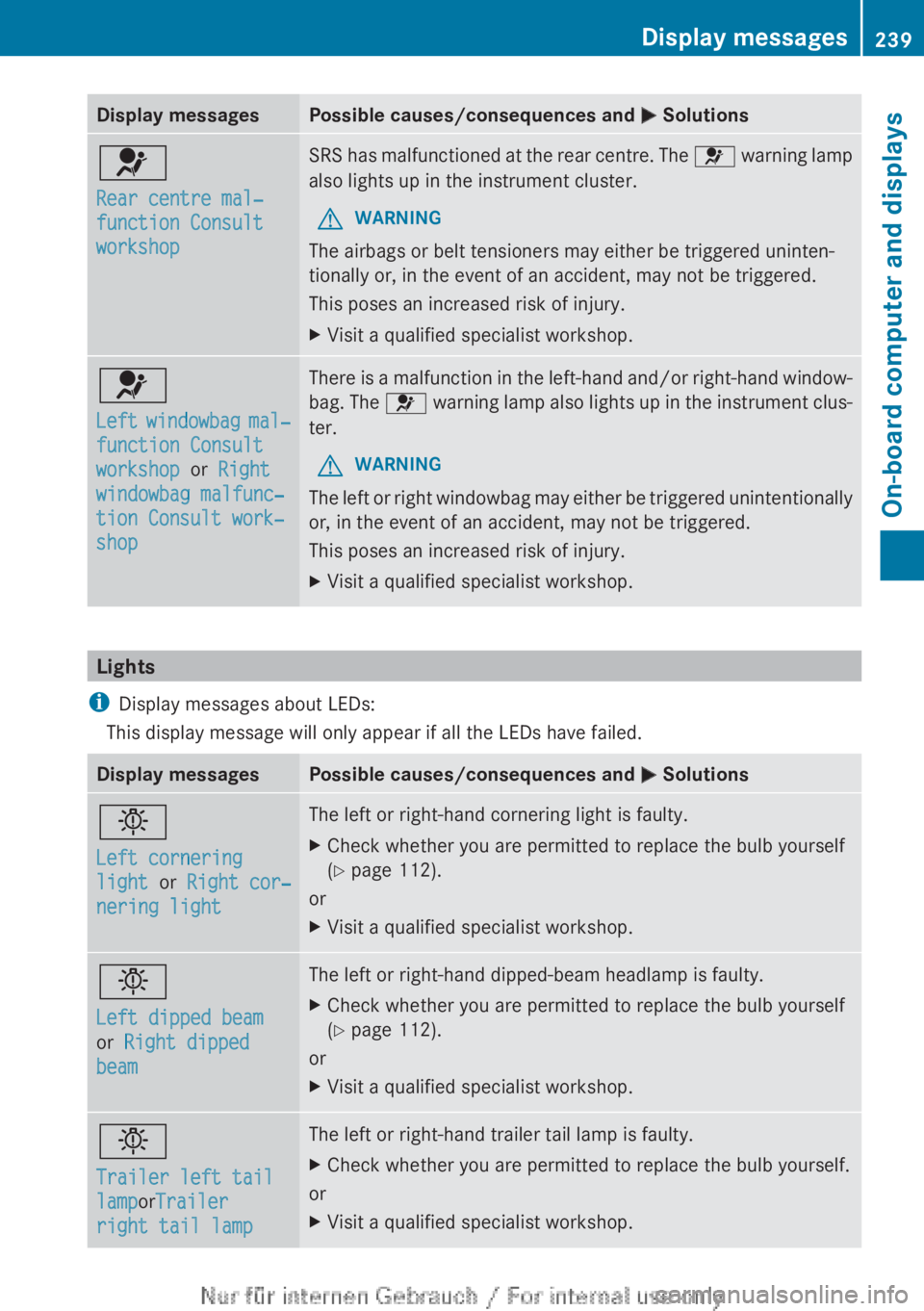
Display messages Possible causes/consequences and
M Solutions6
Rear centre mal‐
function Consult
workshop SRS has malfunctioned at the rear centre. The
6 warning lamp
also lights up in the instrument cluster.
G WARNING
The airbags or belt tensioners may either be triggered uninten-
tionally or, in the event of an accident, may not be triggered.
This poses an increased risk of injury.
X Visit a qualified specialist workshop. 6
Left
windowbag mal‐
function Consult
workshop or Right
windowbag malfunc‐
tion Consult work‐
shop There is a malfunction in the left-hand and/or right-hand window-
bag.
The 6 warning lamp also lights up in the instrument clus-
ter.
G WARNING
The left or right windowbag may either be triggered unintentionally
or, in the event of an accident, may not be triggered.
This poses an increased risk of injury.
X Visit a qualified specialist workshop. Lights
i Display messages about LEDs:
This display message will only appear if all the LEDs have failed. Display messages Possible causes/consequences and
M Solutionsb
Left cornering
light or Right cor‐
nering light The left or right-hand cornering light is faulty.
X
Check whether you are permitted to replace the bulb yourself
(Y page 112).
or
X Visit a qualified specialist workshop. b
Left dipped beam
or Right dipped
beam The left or right-hand dipped-beam headlamp is faulty.
X
Check whether you are permitted to replace the bulb yourself
(Y page 112).
or
X Visit a qualified specialist workshop. b
Trailer left tail
lamporTrailer
right tail lamp The left or right-hand trailer tail lamp is faulty.
X
Check whether you are permitted to replace the bulb yourself.
or
X Visit a qualified specialist workshop. Display messages
239
On-board computer and displays Z
Page 242 of 356
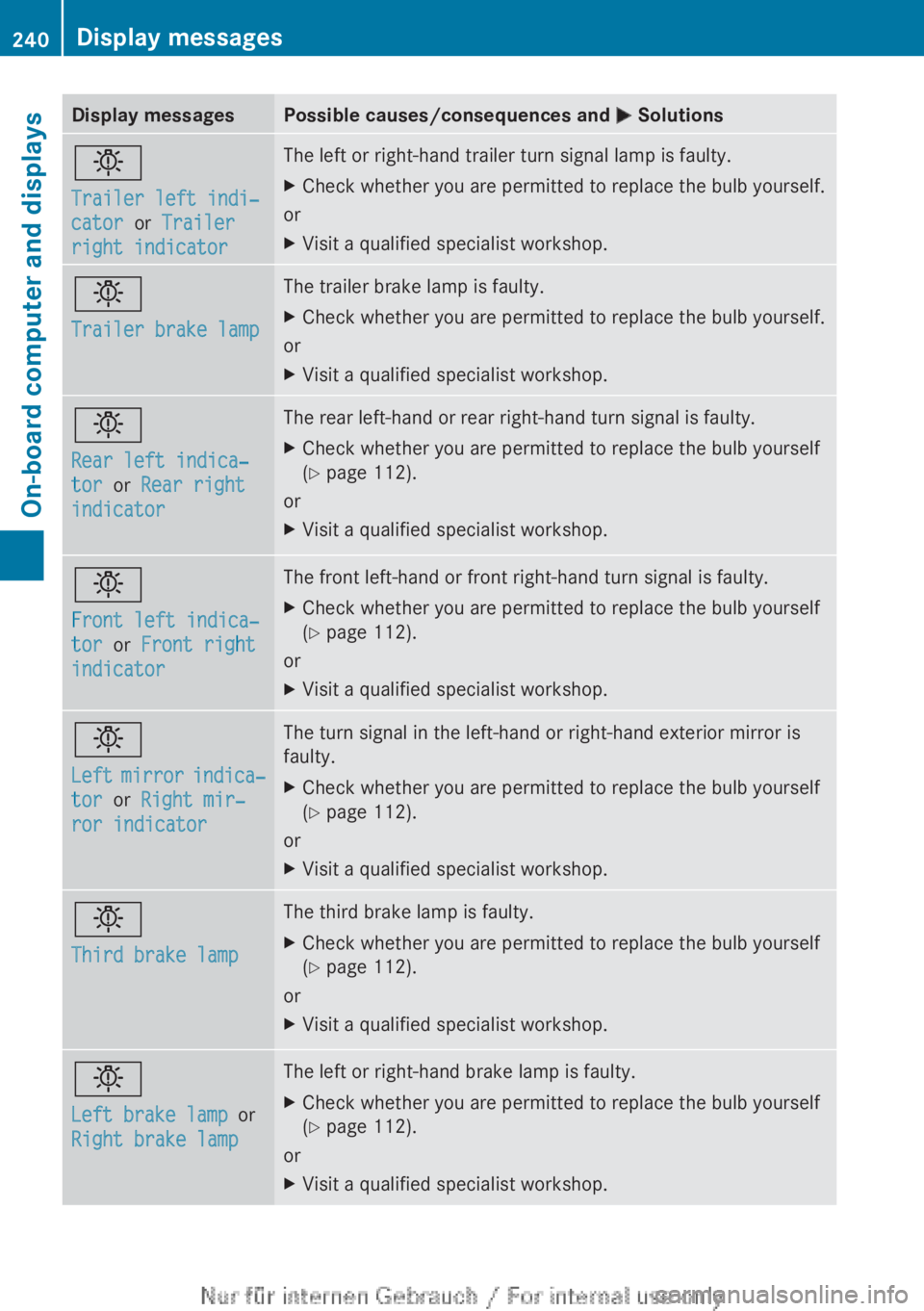
Display messages Possible causes/consequences and
M Solutionsb
Trailer left indi‐
cator or Trailer
right indicator The left or right-hand trailer turn signal lamp is faulty.
X
Check whether you are permitted to replace the bulb yourself.
or
X Visit a qualified specialist workshop. b
Trailer brake lamp The trailer brake lamp is faulty.
X
Check whether you are permitted to replace the bulb yourself.
or
X Visit a qualified specialist workshop. b
Rear left indica‐
tor or Rear right
indicator The rear left-hand or rear right-hand turn signal is faulty.
X
Check whether you are permitted to replace the bulb yourself
(Y page 112).
or
X Visit a qualified specialist workshop. b
Front left indica‐
tor or Front right
indicator The front left-hand or front right-hand turn signal is faulty.
X
Check whether you are permitted to replace the bulb yourself
(Y page 112).
or
X Visit a qualified specialist workshop. b
Left
mirror indica‐
tor or Right mir‐
ror indicator The turn signal in the left-hand or right-hand exterior mirror is
faulty.
X
Check whether you are permitted to replace the bulb yourself
(Y page 112).
or
X Visit a qualified specialist workshop. b
Third brake lamp The third brake lamp is faulty.
X
Check whether you are permitted to replace the bulb yourself
(Y page 112).
or
X Visit a qualified specialist workshop. b
Left brake lamp
or
Right brake lamp The left or right-hand brake lamp is faulty.
X
Check whether you are permitted to replace the bulb yourself
(Y page 112).
or
X Visit a qualified specialist workshop.240
Display messages
On-board computer and displays
Page 243 of 356
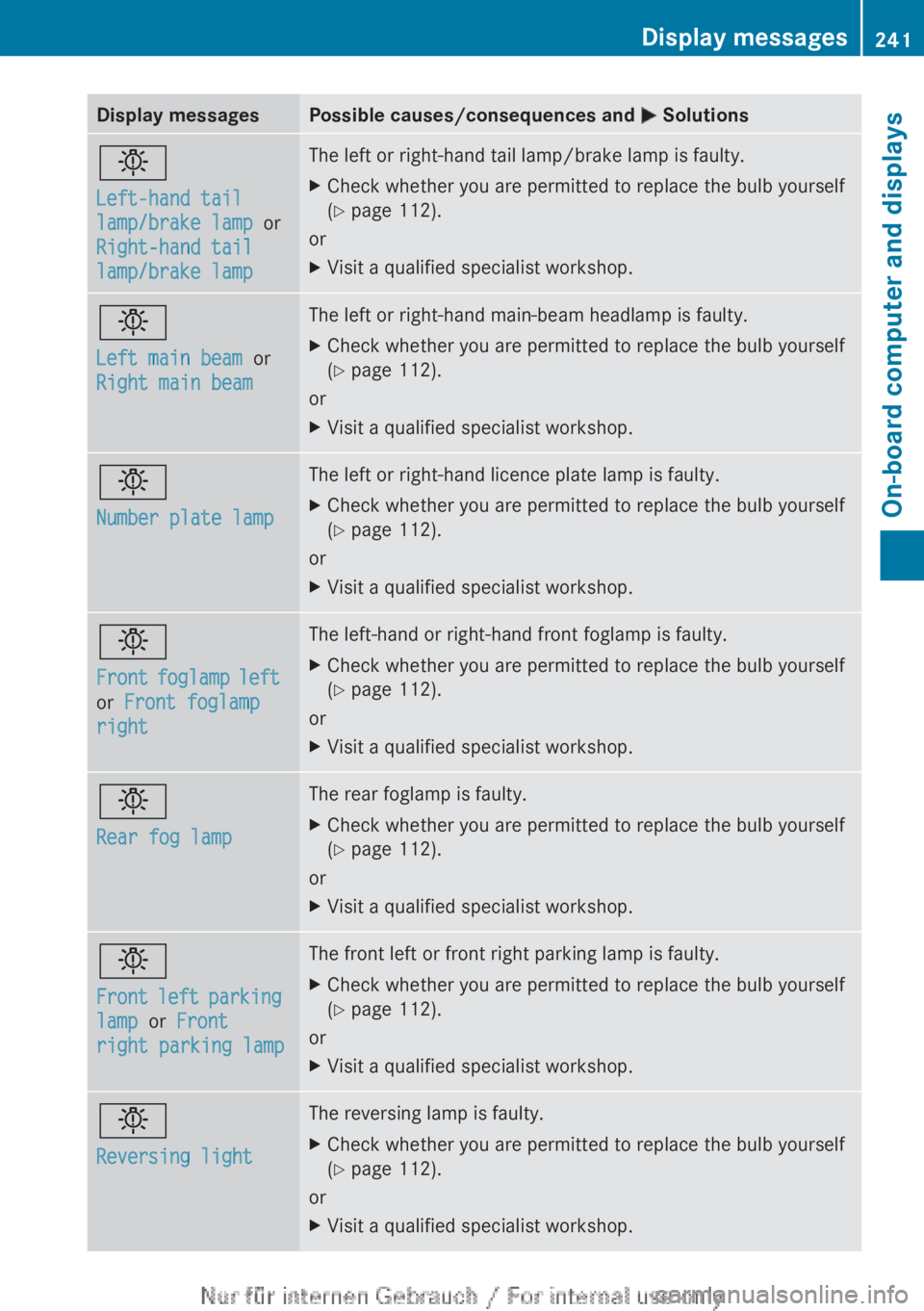
Display messages Possible causes/consequences and
M Solutionsb
Left-hand tail
lamp/brake lamp
or
Right-hand tail
lamp/brake lamp The left or right-hand tail lamp/brake lamp is faulty.
X
Check whether you are permitted to replace the bulb yourself
(Y page 112).
or
X Visit a qualified specialist workshop. b
Left main beam or
Right main beam The left or right-hand main-beam headlamp is faulty.
X
Check whether you are permitted to replace the bulb yourself
(Y page 112).
or
X Visit a qualified specialist workshop. b
Number plate lamp The left or right-hand licence plate lamp is faulty.
X
Check whether you are permitted to replace the bulb yourself
(Y page 112).
or
X Visit a qualified specialist workshop. b
Front
foglamp left
or Front foglamp
right The left-hand or right-hand front foglamp is faulty.
X
Check whether you are permitted to replace the bulb yourself
(Y page 112).
or
X Visit a qualified specialist workshop. b
Rear fog lamp The rear foglamp is faulty.
X
Check whether you are permitted to replace the bulb yourself
(Y page 112).
or
X Visit a qualified specialist workshop. b
Front
left parking
lamp or Front
right parking lamp The front left or front right parking lamp is faulty.
X
Check whether you are permitted to replace the bulb yourself
(Y page 112).
or
X Visit a qualified specialist workshop. b
Reversing light The reversing lamp is faulty.
X
Check whether you are permitted to replace the bulb yourself
(Y page 112).
or
X Visit a qualified specialist workshop. Display messages
241
On-board computer and displays Z
Page 244 of 356
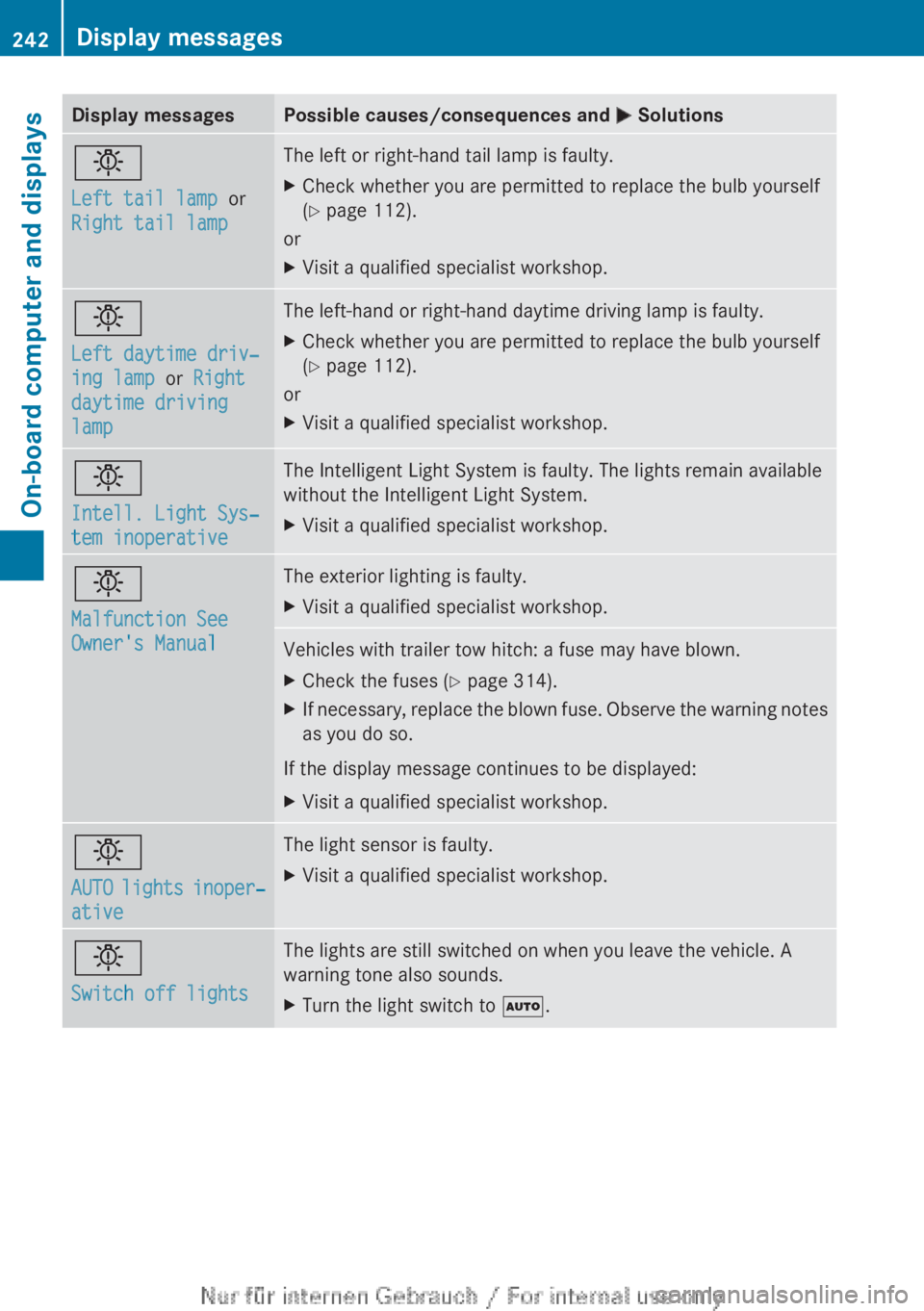
Display messages Possible causes/consequences and
M Solutionsb
Left tail lamp or
Right tail lamp The left or right-hand tail lamp is faulty.
X
Check whether you are permitted to replace the bulb yourself
(Y page 112).
or
X Visit a qualified specialist workshop. b
Left daytime driv‐
ing lamp or Right
daytime driving
lamp The left-hand or right-hand daytime driving lamp is faulty.
X
Check whether you are permitted to replace the bulb yourself
(Y page 112).
or
X Visit a qualified specialist workshop. b
Intell. Light Sys‐
tem inoperative The Intelligent Light System is faulty. The lights remain available
without the Intelligent Light System.
X
Visit a qualified specialist workshop. b
Malfunction See
Owner's Manual The exterior lighting is faulty.
X
Visit a qualified specialist workshop. Vehicles with trailer tow hitch: a fuse may have blown.
X
Check the fuses (Y page 314).
X If necessary, replace the blown fuse. Observe the warning notes
as you do so.
If the display message continues to be displayed:
X Visit a qualified specialist workshop. b
AUTO
lights inoper‐
ative The light sensor is faulty.
X
Visit a qualified specialist workshop. b
Switch off lights The lights are still switched on when you leave the vehicle. A
warning tone also sounds.
X
Turn the light switch to Ã.242
Display messages
On-board computer and displays