tailgate MERCEDES-BENZ A CLASS 2012 User Guide
[x] Cancel search | Manufacturer: MERCEDES-BENZ, Model Year: 2012, Model line: A CLASS, Model: MERCEDES-BENZ A CLASS 2012Pages: 356, PDF Size: 4.96 MB
Page 120 of 356
Switching the rear window wiper on/
off
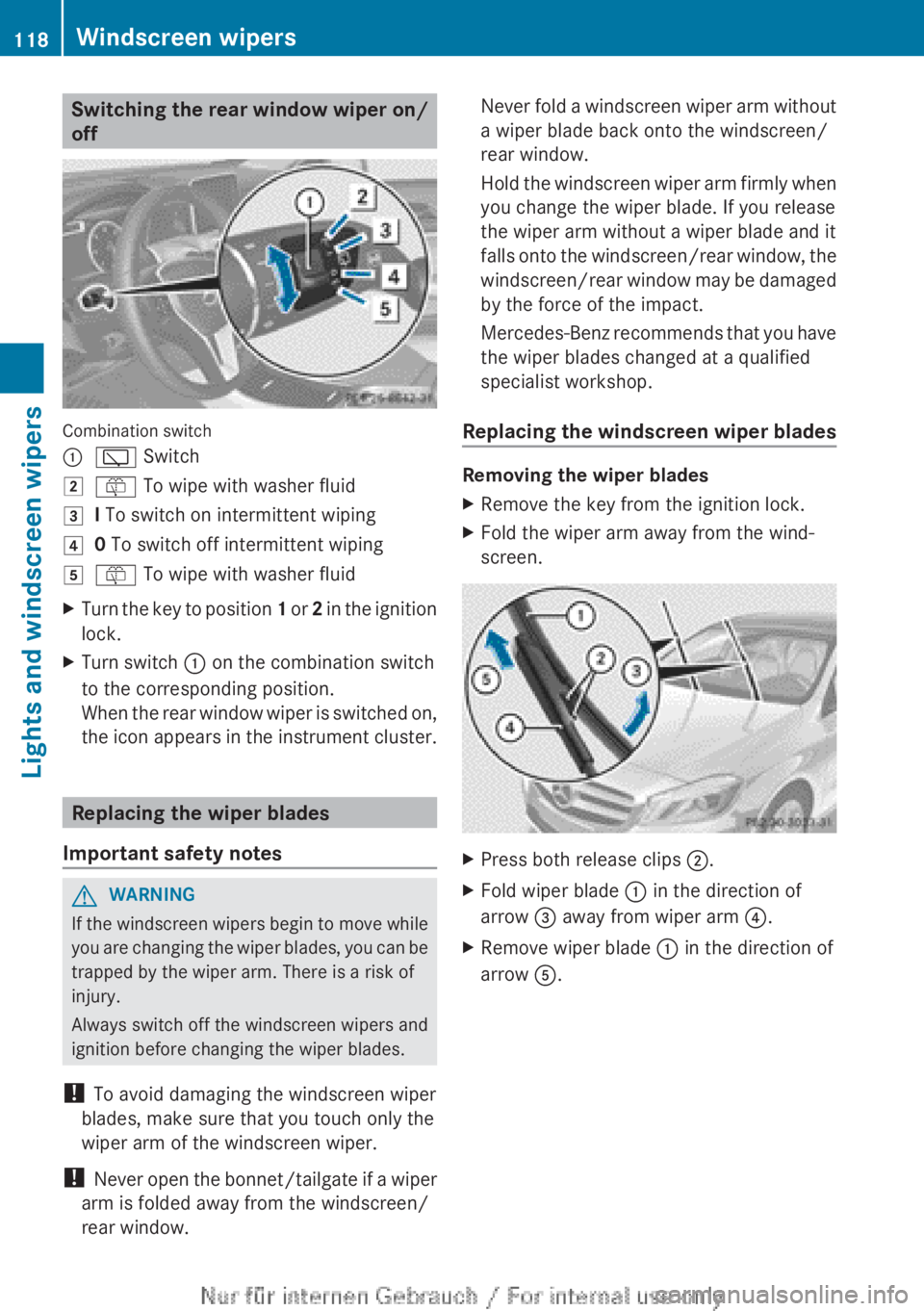
Combination switch
:
è Switch
2 ô To wipe with washer fluid
3 I To switch on intermittent wiping
4 0 To switch off intermittent wiping
5 ô To wipe with washer fluid
X Turn the key to position 1 or 2 in the ignition
lock.
X Turn switch : on the combination switch
to the corresponding position.
When
the rear window wiper is switched on,
the icon appears in the instrument cluster. Replacing the wiper blades
Important safety notes G
WARNING
If the windscreen wipers begin to move while
you
are changing the wiper blades, you can be
trapped by the wiper arm. There is a risk of
injury.
Always switch off the windscreen wipers and
ignition before changing the wiper blades.
! To avoid damaging the windscreen wiper
blades, make sure that you touch only the
wiper arm of the windscreen wiper.
! Never open the bonnet/tailgate if a wiper
arm is folded away from the windscreen/
rear window. Never fold a windscreen wiper arm without
a wiper blade back onto the windscreen/
rear window.
Hold
the windscreen wiper arm firmly when
you change the wiper blade. If you release
the wiper arm without a wiper blade and it
falls onto the windscreen/rear window, the
windscreen/rear window may be damaged
by the force of the impact.
Mercedes-Benz recommends that you have
the wiper blades changed at a qualified
specialist workshop.
Replacing the windscreen wiper blades Removing the wiper blades
X
Remove the key from the ignition lock.
X Fold the wiper arm away from the wind-
screen. X
Press both release clips ;.
X Fold wiper blade : in the direction of
arrow = away from wiper arm ?.
X Remove wiper blade : in the direction of
arrow A.118
Windscreen wipers
Lights and windscreen wipers
Page 166 of 356
Releasing
X
Pull handle :.
The red ! indicator lamp in the instru-
ment cluster goes out.
i You can only release the electric parking
brake when the key is in position 1 or 2 in
the ignition lock.
Applying automatically The electric parking brake is applied auto-
matically:
R
if DISTRONIC PLUS brings the vehicle to a
standstill (vehicles with automatic trans-
mission) or
R if
the HOLD function is keeping the vehicle
stationary.
In addition, at least one of the following con-
ditions must be fulfilled:
R the engine is switched off
R the driver's door is open and the seat belt
is not fastened
R there is a system malfunction
R the power supply is insufficient
R the vehicle is stationary for a lengthy
period.
The red ! indicator lamp in the instrument
cluster lights up.
i The electric parking brake is not automat-
ically applied if the engine is switched off
by the ECO start/stop function.
Releasing automatically i
The electric parking brake can only be
released automatically in vehicles with
automatic transmission.
The electric parking brake of your vehicle is
released
automatically when all of the follow-
ing conditions are fulfilled:
R the engine is running.
R the transmission is in position D or R.
R the seat belt is fastened.
R you depress the accelerator pedal. If the transmission is in position
R,
the tailgate
must be closed.
If your seat belt is not fastened, the following
conditions must be fulfilled to automatically
release the electric parking brake:
R the driver's door is closed.
R you have shifted out of transmission posi-
tion P or you have previously driven faster
than 3 km/h.
Emergency braking The vehicle can also be braked during an
emergency using the electric parking brake.
X
While driving, push handle :
of the electric
parking brake ( Y page 163).
i The vehicle is braked for as long as han-
dle : of the electric parking brake
pressed. The longer the electric parking
brake handle : is depressed, the greater
the braking force.
During braking:
R a warning tone sounds
R the Release parking brake message
appears
R the red ! indicator lamp in the instru-
ment cluster flashes
When
the vehicle has been braked to a stand-
still, the electric parking brake is engaged. Parking up the vehicle
If you leave the vehicle parked up for longer
than
four weeks, the battery may be damaged
by exhaustive discharging.
If you leave the vehicle parked up for longer
than six weeks, the vehicle may suffer dam-
age as a result of lack of use.
X Visit a qualified specialist workshop and
seek advice.
i You can obtain information about trickle
chargers from a qualified specialist work-
shop. 164
Parking
Driving and parking
Page 183 of 356
The electric parking brake secures the vehicle
automatically if the HOLD function is activa-
ted and:
R
the driver's door is open and the driver's
seat belt is unfastened
R the
engine is switched off, unless it is auto-
matically switched off by the ECO start/
stop function
R a system fault occurs
R the power supply is not sufficient
Vehicles with automatic transmission
If a fault occurs, then the transmission may
also be shifted into position P automatically.
Vehicles with manual transmission
The Brake immediately message can also
appear in the multifunction display.
X Immediately depress the brake pedal firmly
until
the warning message in the multifunc-
tion display goes out.
The HOLD function is deactivated.
A horn will sound at regular intervals if you
turn off the engine, take off your seat belt or
open the driver's door when the HOLD func-
tion is activated. The horn alerts you to the
fact that the HOLD function is still activated.
If you attempt to lock the vehicle, the tone
becomes louder. The vehicle cannot be
locked until you have deactivated the HOLD
function.
i Once you have switched off the engine,
you cannot restart it until you have deacti-
vated the HOLD function. RACE START
Important safety notes RACE START enables optimum acceleration
from a standing start. The precondition for
this is a suitable high-grip road surface.
Only
activate RACE START on dedicated race
circuits. i
RACE
START is only available in AMG vehi-
cles.
Activation conditions You can activate RACE START if:
R
the doors, the bonnet and the tailgate are
closed
R the
engine is running and the transmission,
traction control and engine are at operating
temperature
R SPORT handling mode is activated
(Y page 66)
R the steering wheel is in the straight-ahead
position.
R the vehicle is stationary and the brake
pedal is depressed (left foot)
R the transmission is in position D.
R drive program M is selected ( Y page 155).
Activating RACE START X
Depress the brake pedal with your left foot
and keep it depressed.
X Pull and hold both steering wheel gearshift
paddles.
X The RACE START Confirm: Paddle UP
Cancel: Paddle DOWN message appears
in the multifunction display.
X Release both steering wheel gearshift pad-
dles.
i If the activation conditions are no longer
fulfilled, RACE START is cancelled. The
RACE START not possible See Own‐
er's
Manual message appears in the mul-
tifunction display.
X To cancel:
pull the left steering wheel shift
paddle (Y page 156).
or
X To confirm: pull the right steering wheel
shift paddle
(Y page 156).
The RACE START available Depress
accelerator message appears in the mul-
tifunction display. Driving systems
181
Driving and parking Z
Page 193 of 356
Reversing camera
Important safety notes The reversing camera is only an aid. It is not
a substitute for your attention to the imme-
diate
surroundings. The responsibility for safe
manoeuvring and parking remains with you.
Make sure that there are no persons, animals
or objects in range while manoeuvring and
parking.
Under the following circumstances, the
reversing camera will not function, or will
function in a limited manner:
R if the tailgate is open
R in heavy rain, snow or fog
R at night or in very dark places
R if the camera is exposed to very bright light
R if the area is lit by fluorescent light or LED
lighting (the display may flicker)
R if there is a sudden change in temperature,
e.g. when driving into a heated garage in
winter
R if the camera lens is dirty or obstructed
R if the rear of your vehicle is damaged. In
this event, have the camera position and
setting checked at a qualified specialist
workshop.
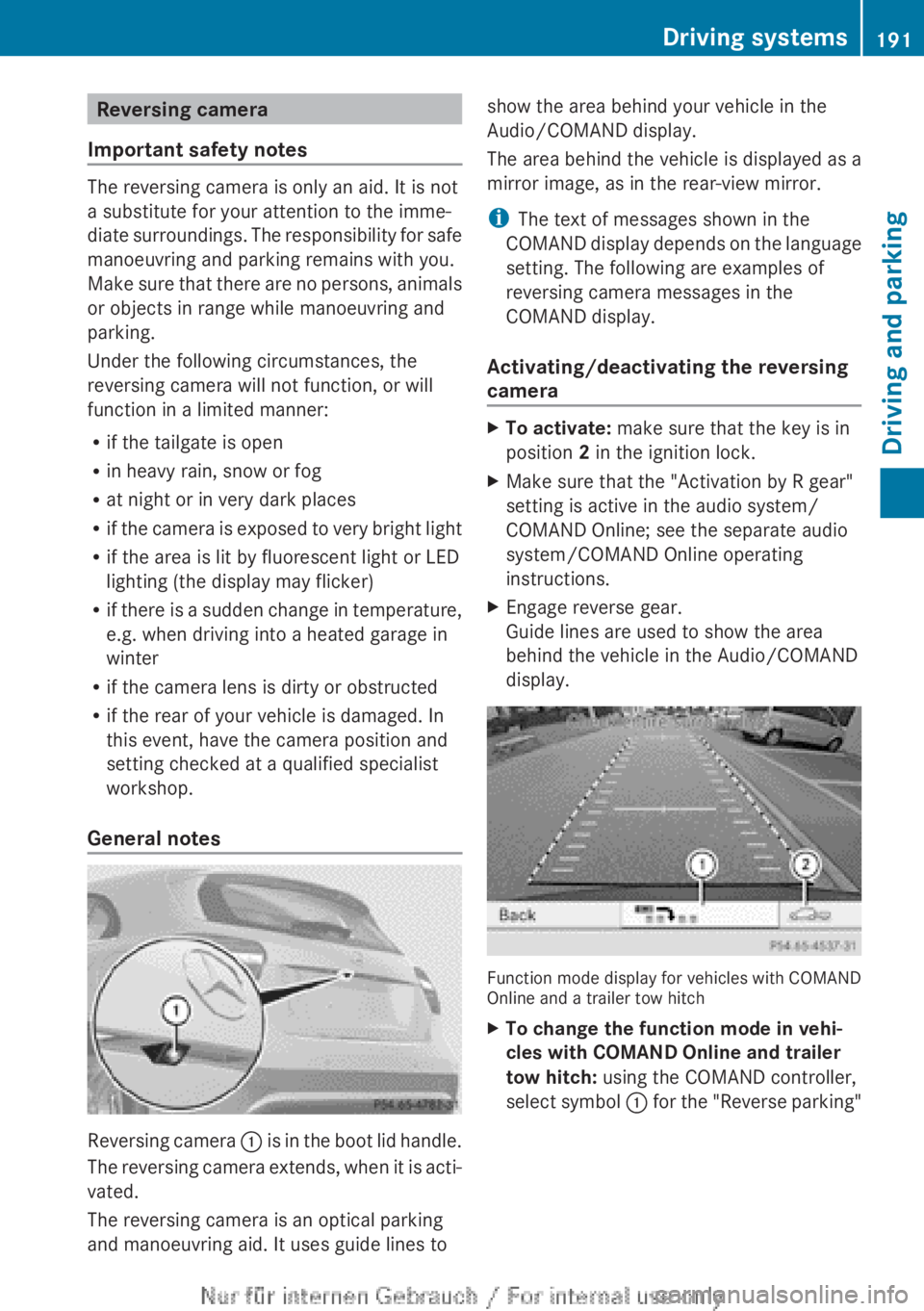
General notes Reversing camera
:
is in the boot lid handle.
The reversing camera extends, when it is acti-
vated.
The reversing camera is an optical parking
and manoeuvring aid. It uses guide lines to show the area behind your vehicle in the
Audio/COMAND display.
The area behind the vehicle is displayed as a
mirror image, as in the rear-view mirror.
i
The text of messages shown in the
COMAND
display depends on the language
setting. The following are examples of
reversing camera messages in the
COMAND display.
Activating/deactivating the reversing
camera X
To activate: make sure that the key is in
position 2 in the ignition lock.
X Make sure that the "Activation by R gear"
setting is active in the audio system/
COMAND Online; see the separate audio
system/COMAND Online operating
instructions.
X Engage reverse gear.
Guide lines are used to show the area
behind the vehicle in the Audio/COMAND
display. Function mode display for vehicles with COMAND
Online and a trailer tow hitch
X
To change the function mode in vehi-
cles with COMAND Online and trailer
tow hitch: using the COMAND controller,
select
symbol : for the "Reverse parking" Driving systems
191
Driving and parking Z
Page 194 of 356
function; see the separate COMAND Online
operating instructions.
or
X Select symbol ; for the coupling up a
trailer
function (see the separate COMAND
Online operating instructions).
The symbol of the selected function is high-
lighted.
To deactivate:
the reversing camera is deac-
tivated if you:
R select transmission position P (vehicles
with automatic transmission)
R drive forward ten metres
R for vehicles with an automatic transmis-
sion, shift the transmission from R to
another position after 15 seconds
R shift out of reverse gear (vehicles with man-
ual transmission) after 15 seconds
R drive forwards at a speed of over
10 km/h
Displays in the Audio/COMAND display The reversing camera may show a distorted
view of obstacles, show them incorrectly or
not at all. Obstacles are not shown by the
reversing camera in the following locations:
R
very close to the rear bumper
R under the rear bumper
R in the area immediately above the tailgate
handle
! Objects
not at ground level may appear to
be further away than they actually are, e.g.:
R the bumper of a parked vehicle
R the drawbar of a trailer
R the ball coupling of a trailer tow hitch
R the rear section of an HGV
R a slanted post
Use the guidelines only for orientation.
Approach objects no further than the bot-
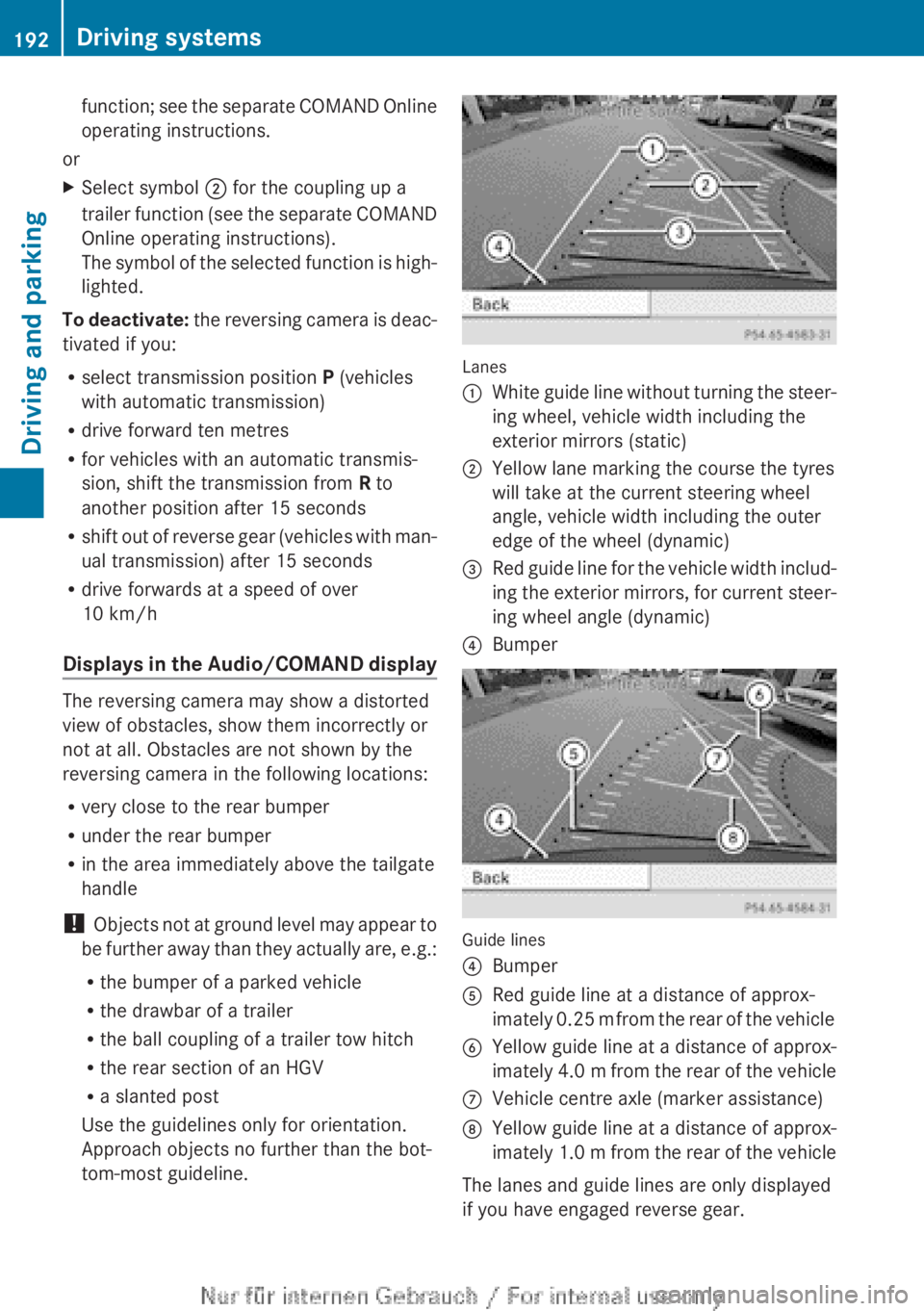
tom-most guideline. Lanes
:
White guide line without turning the steer-
ing wheel, vehicle width including the
exterior mirrors (static)
; Yellow lane marking the course the tyres
will take at the current steering wheel
angle, vehicle width including the outer
edge of the wheel (dynamic)
= Red guide line for the vehicle width includ-
ing
the exterior mirrors, for current steer-
ing wheel angle (dynamic)
? Bumper Guide lines
?
Bumper
A Red guide line at a distance of approx-
imately
0.25 m from the rear of the vehicle
B Yellow guide line at a distance of approx-
imately
4.0 m from the rear of the vehicle
C Vehicle centre axle (marker assistance)
D Yellow guide line at a distance of approx-
imately
1.0 m from the rear of the vehicle
The lanes and guide lines are only displayed
if you have engaged reverse gear. 192
Driving systems
Driving and parking
Page 224 of 356
qualified specialist workshop, e.g. a
Mercedes-Benz Service Centre.
Switching Adaptive Highbeam Assist on/
off
This
function is only available on vehicles with
the Intelligent Light System.
X Press the =
or ; button on the steer-
ing wheel to select the Settings menu.
X Press the :
or 9 button to select the
Lights submenu.
X Press a to confirm.
X Press the :
or 9 button to select the
Adapt. main beam function.
If the Adapt. main beam function has
been switched on, the cone of light and the
_ symbol in the multifunction display
are shown in orange.
X Press the a button to save the setting.
For further information about Adaptive High-
beam Assist, see ( Y page 110).
Setting the brightness of the ambient
lighting
X Press the =
or ; button on the steer-
ing wheel to select the Settings menu.
X Press the :
or 9 button to select the
Lights submenu.
X Press a to confirm.
X Press the :
or 9 button to select the
Amb. light +/- function.
You will see the selected setting.
X Press a to confirm.
X Press the :
or 9 button to adjust the
brightness to any level from Off toLevel
5 (bright).
X Press the a or %
button to save the
setting.
Activating/deactivating the surround
lighting and exterior lighting delayed
switch-off
If you have activated the Surround light‐
ing function and the light switch is set to Ã, the following functions are activated
when it is dark:
R
surround lighting: the exterior lighting
remains lit for 40 seconds after unlocking
with the key. If you start the engine, the
surround lighting is switched off and auto-
matic headlamp mode is activated
(Y page 105).
R exterior lighting delayed switch-off: the
exterior lighting remains lit for
60
seconds after the engine is switched off.
If you close all the doors and the tailgate,
the exterior lighting goes off after
15 seconds.
X Press the =
or ; button on the steer-
ing wheel to select the Settings menu.
X Press the :
or 9 button to select the
Lights submenu.
X Press a to confirm.
X Press the :
or 9 button to select the
Surround lighting function.
When the Surround lighting function is
activated, the light cone and the area
around the vehicle are displayed in orange
in the multifunction display.
X Press the a button to save the setting.
Deactivating delayed switch-off of the exte-
rior lighting temporarily:
X Before leaving the vehicle, turn the key to
position 0 in the ignition lock.
X Turn the key to position 2 in the ignition
lock.
The exterior lighting delayed switch-off is
deactivated.
Delayed switch-off of the exterior lighting is
reactivated the next time you start the
engine.
i Depending on your vehicle's equipment,
when the surround lighting and delayed
switch-off exterior lighting are on, the fol-
lowing light up:
R side lamps
R foglamps222
Menus and submenus
On-board computer and displays
Page 256 of 356
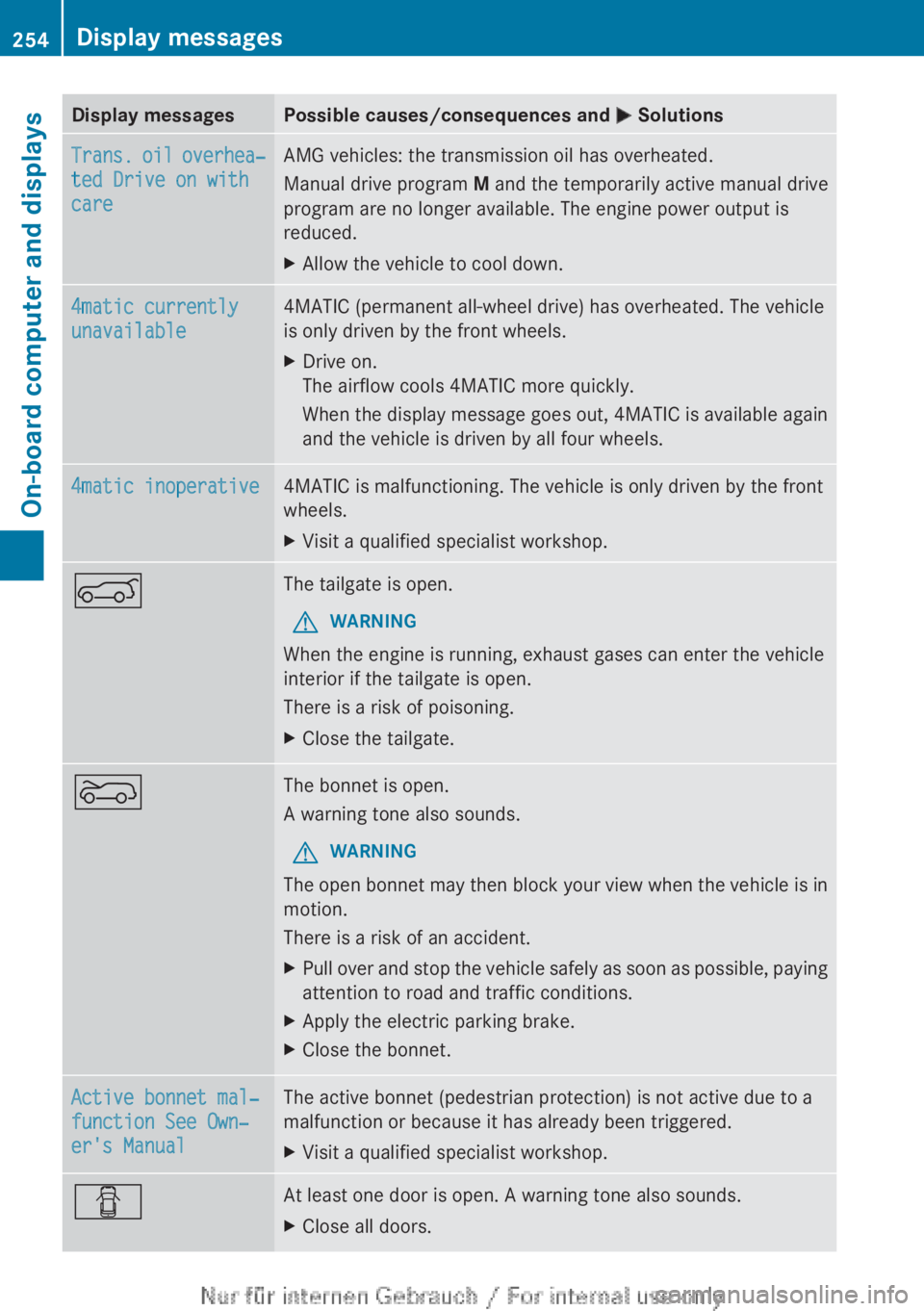
Display messages Possible causes/consequences and
M SolutionsTrans. oil overhea‐
ted Drive on with
care AMG vehicles: the transmission oil has overheated.
Manual drive program
M and the temporarily active manual drive
program are no longer available. The engine power output is
reduced.
X Allow the vehicle to cool down. 4matic currently
unavailable 4MATIC (permanent all-wheel drive) has overheated. The vehicle
is only driven by the front wheels.
X
Drive on.
The airflow cools 4MATIC more quickly.
When
the display message goes out, 4MATIC is available again
and the vehicle is driven by all four wheels. 4matic inoperative 4MATIC is malfunctioning. The vehicle is only driven by the front
wheels.
X
Visit a qualified specialist workshop. A The tailgate is open.
G WARNING
When the engine is running, exhaust gases can enter the vehicle
interior if the tailgate is open.
There is a risk of poisoning.
X Close the tailgate. ? The bonnet is open.
A warning tone also sounds.
G WARNING
The open bonnet may then block your view when the vehicle is in
motion.
There is a risk of an accident.
X Pull over and stop the vehicle safely as soon as possible, paying
attention to road and traffic conditions.
X Apply the electric parking brake.
X Close the bonnet. Active bonnet mal‐
function See Own‐
er's Manual The active bonnet (pedestrian protection) is not active due to a
malfunction or because it has already been triggered.
X
Visit a qualified specialist workshop. C At least one door is open. A warning tone also sounds.
X
Close all doors.254
Display messages
On-board computer and displays
Page 270 of 356
Useful information
i This Owner's Manual describes all mod-
els,
series and optional equipment for your
vehicle that were available at the time of
going to press. National variations are pos-
sible. Note that your vehicle may not be
equipped with all of the functions descri-
bed. This is also the case for systems and
functions relevant to safety.
i Read the information on qualified special-
ist workshops: (Y page 24). Loading guidelines
G
WARNING
If objects, luggage or loads are not secured or
not secured sufficiently, they could slip, tip
over
or be flung around and thereby hit vehicle
occupants. There is a risk of injury, especially
when braking or abruptly changing directions.
Always store objects so that they cannot be
flung around. Secure objects, luggage or
loads against slipping or tipping before the
journey. G
WARNING
Combustion engines emit poisonous exhaust
gases
such as carbon monoxide. If the tailgate
is open when the engine is running, particu-
larly if the vehicle is moving, exhaust fumes
could enter the passenger compartment.
There is a risk of poisoning.
Turn off the engine before opening the tail-
gate. Never drive with the tailgate open.
The handling characteristics of a laden vehi-
cle are dependent on the distribution of the
load within the vehicle. For this reason, you
should observe the following notes when
transporting a load:
R when transporting a load, never exceed the
maximum permissible gross vehicle weight or the permissible axle loads for the vehicle
(including occupants).
R the luggage compartment is the preferred
place to carry objects.
R position
heavy loads as far forwards as pos-
sible and as low down in the luggage com-
partment as possible.
R the load must not protrude above the upper
edge of the seat backrests.
R always place the load against the rear or
front seat backrests. Make sure that the
seat backrests are securely locked into
place.
R always place the load behind unoccupied
seats if possible.
R use the lashing eyelets and the luggage
nets to transport loads and luggage.
R only use lashing eyelets and fastening com-
ponents that are suitable for the weight and
size of the load.
R the maximum load capacity of the stowage
well under the luggage compartment floor
is 25 kg.
R secure the load with sufficiently strong and
wear-resistant lashing material. Pad sharp
edges for protection.
i Lashing material is available at any quali-
fied specialist workshop.
! Do not position the load on one part of the
folding luggage compartment floor only.
The maximum load capacity of the folding
luggage compartment floor is 100 kg.
Spread the weight evenly to avoid damag-
ing the luggage compartment floor. Place a
solid board under the load if necessary.
Please note that the load on the luggage
compartment floor will be increased when
the load is lashed down. 268
Loading guidelines
Stowing and features
Page 275 of 356
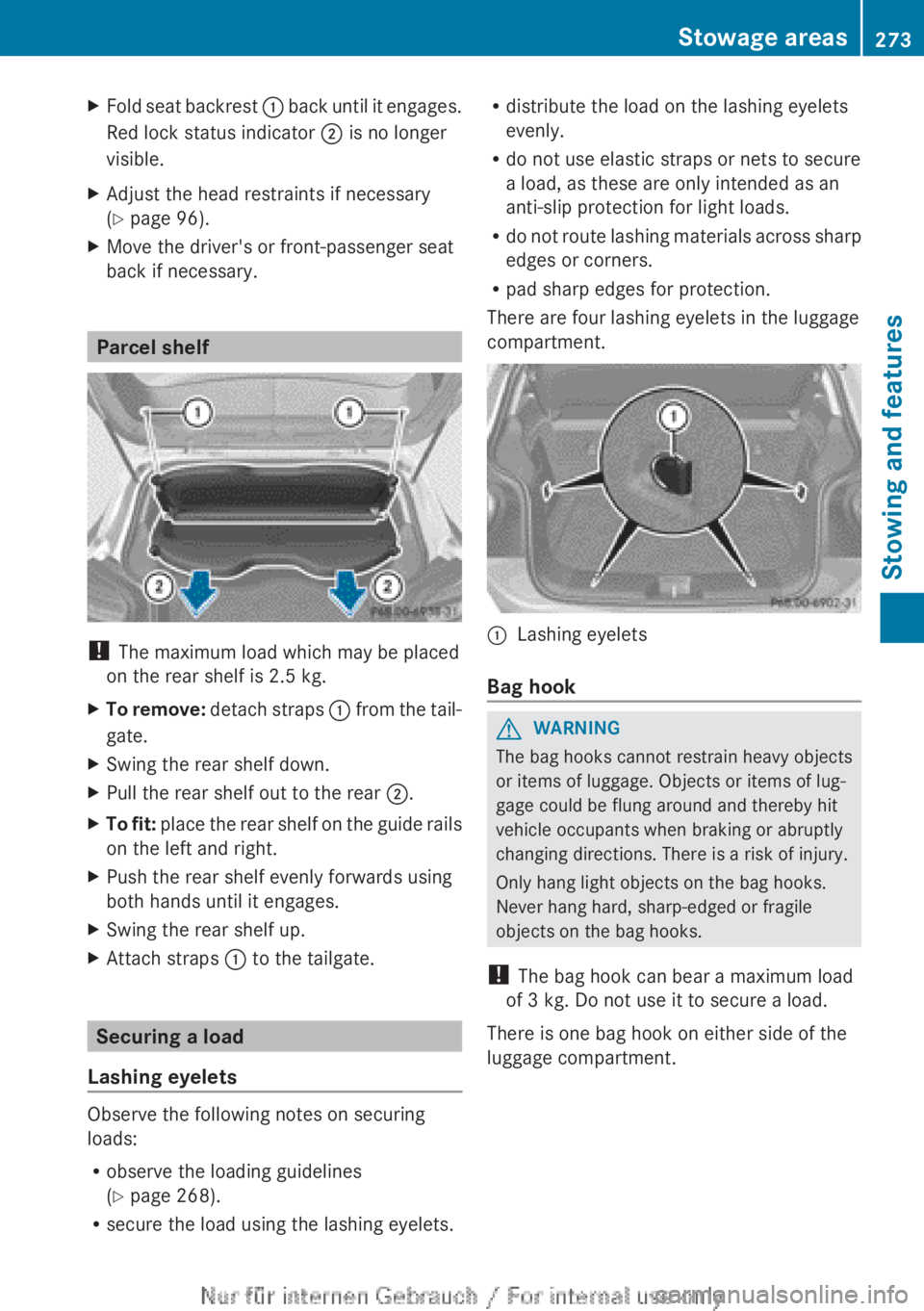
X
Fold seat backrest : back until it engages.
Red lock status indicator ; is no longer
visible.
X Adjust the head restraints if necessary
(Y page 96).
X Move the driver's or front-passenger seat
back if necessary. Parcel shelf
!
The maximum load which may be placed
on the rear shelf is 2.5 kg.
X To remove:
detach straps : from the tail-
gate.
X Swing the rear shelf down.
X Pull the rear shelf out to the rear ;.
X To fit:
place the rear shelf on the guide rails
on the left and right.
X Push the rear shelf evenly forwards using
both hands until it engages.
X Swing the rear shelf up.
X Attach straps : to the tailgate.Securing a load
Lashing eyelets Observe the following notes on securing
loads:
R
observe the loading guidelines
(Y page 268).
R secure the load using the lashing eyelets. R
distribute the load on the lashing eyelets
evenly.
R do not use elastic straps or nets to secure
a load, as these are only intended as an
anti-slip protection for light loads.
R do
not route lashing materials across sharp
edges or corners.
R pad sharp edges for protection.
There are four lashing eyelets in the luggage
compartment. :
Lashing eyelets
Bag hook G
WARNING
The bag hooks cannot restrain heavy objects
or items of luggage. Objects or items of lug-
gage could be flung around and thereby hit
vehicle occupants when braking or abruptly
changing directions. There is a risk of injury.
Only hang light objects on the bag hooks.
Never hang hard, sharp-edged or fragile
objects on the bag hooks.
! The bag hook can bear a maximum load
of 3 kg. Do not use it to secure a load.
There is one bag hook on either side of the
luggage compartment. Stowage areas
273
Stowing and features Z
Page 276 of 356
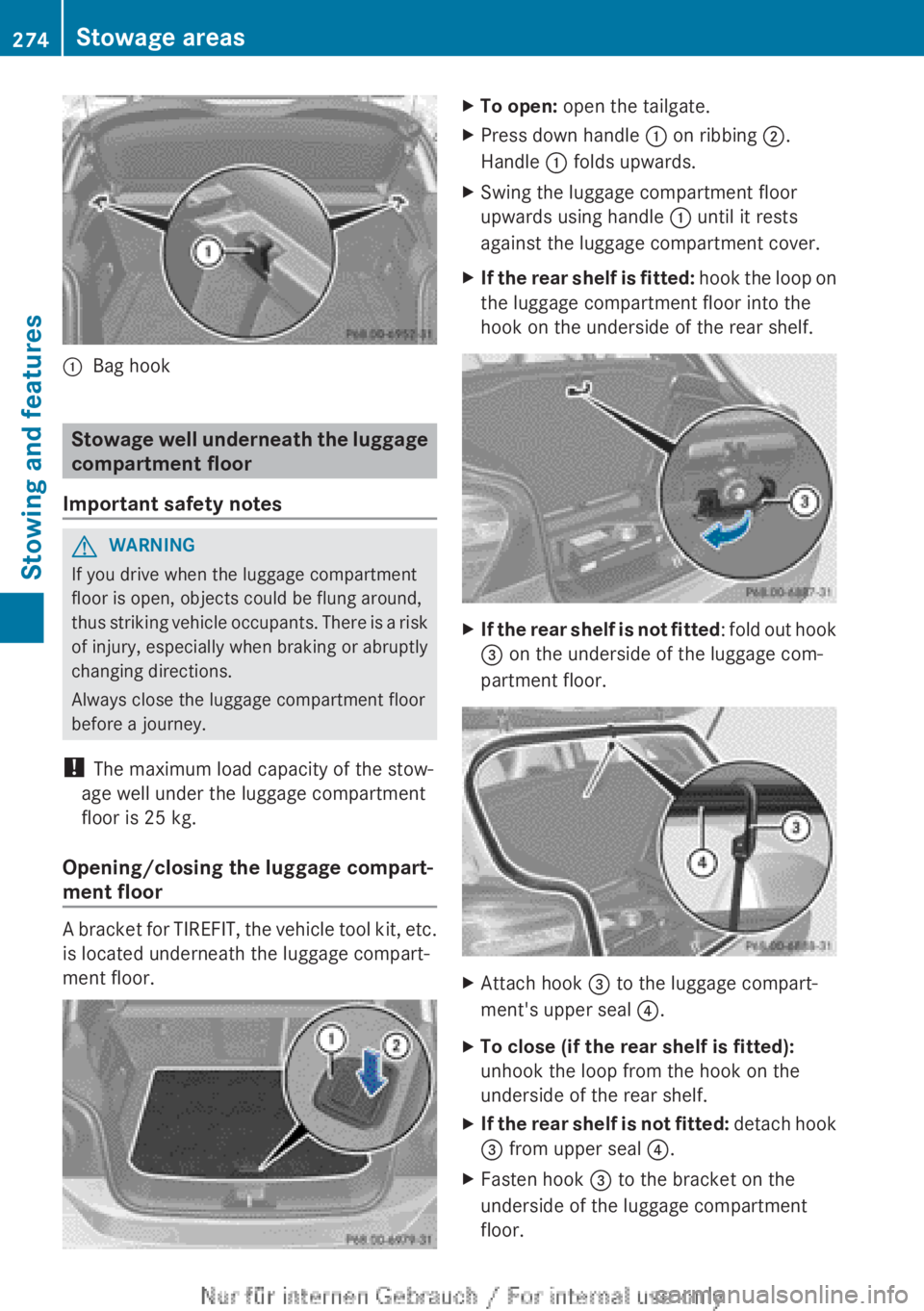
:
Bag hook Stowage well underneath the luggage
compartment floor
Important safety notes G
WARNING
If you drive when the luggage compartment
floor is open, objects could be flung around,
thus
striking vehicle occupants. There is a risk
of injury, especially when braking or abruptly
changing directions.
Always close the luggage compartment floor
before a journey.
! The maximum load capacity of the stow-
age well under the luggage compartment
floor is 25 kg.
Opening/closing the luggage compart-
ment floor A bracket for TIREFIT, the vehicle tool kit, etc.
is located underneath the luggage compart-
ment floor. X
To open: open the tailgate.
X Press down handle : on ribbing ;.
Handle : folds upwards.
X Swing the luggage compartment floor
upwards using handle : until it rests
against the luggage compartment cover.
X If the rear shelf is fitted:
hook the loop on
the luggage compartment floor into the
hook on the underside of the rear shelf. X
If the rear shelf is not fitted :
fold out hook
= on the underside of the luggage com-
partment floor. X
Attach hook = to the luggage compart-
ment's upper seal ?.
X To close (if the rear shelf is fitted):
unhook the loop from the hook on the
underside of the rear shelf.
X If the rear shelf is not fitted:
detach hook
= from upper seal ?.
X Fasten hook = to the bracket on the
underside of the luggage compartment
floor. 274
Stowage areas
Stowing and features