belt MERCEDES-BENZ A CLASS 2012 Owner's Manual
[x] Cancel search | Manufacturer: MERCEDES-BENZ, Model Year: 2012, Model line: A CLASS, Model: MERCEDES-BENZ A CLASS 2012Pages: 356, PDF Size: 4.96 MB
Page 59 of 356
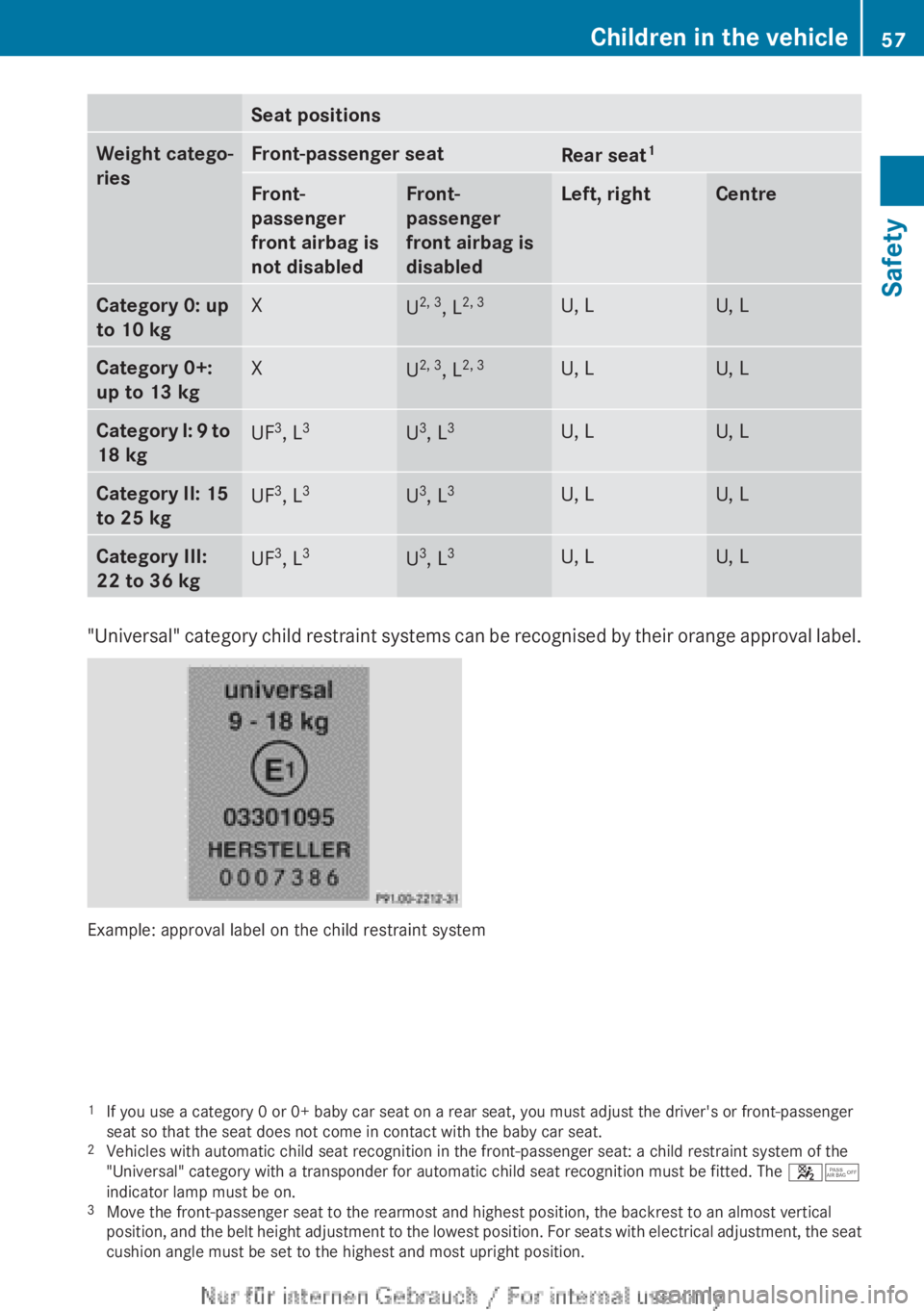
Seat positions
Weight catego-
ries Front-passenger seat
Rear seat
1 Front-
passenger
front airbag is
not disabled Front-
passenger
front airbag is
disabled Left, right Centre
Category 0: up
to 10 kg
X
U
2, 3
, L2, 3 U, L U, L
Category 0+:
up to 13 kg
X
U
2, 3
, L2, 3 U, L U, L
Category I: 9
to
18 kg UF
3
, L 3 U
3
, L 3 U, L U, L
Category II: 15
to 25 kg
UF
3
, L 3 U
3
, L 3 U, L U, L
Category III:
22 to 36 kg
UF
3
, L 3 U
3
, L 3 U, L U, L
"Universal"
category child restraint systems can be recognised by their orange approval label.
Example: approval label on the child restraint system
1
If you use a category 0 or 0+ baby car seat on a rear seat, you must adjust the driver's or front-passenger
seat so that the seat does not come in contact with the baby car seat.
2 Vehicles with automatic child seat recognition in the front-passenger seat: a child restraint system of the
"Universal" category with a transponder for automatic child seat recognition must be fitted. The 45
indicator lamp must be on.
3 Move the front-passenger seat to the rearmost and highest position, the backrest to an almost vertical
position,
and the belt height adjustment to the lowest position. For seats with electrical adjustment, the seat
cushion angle must be set to the highest and most upright position. Children in the vehicle
57
Safety Z
Page 94 of 356
Useful information
i This Owner's Manual describes all mod-
els,
series and optional equipment for your
vehicle that were available at the time of
going to press. National variations are pos-
sible. Note that your vehicle may not be
equipped with all of the functions descri-
bed. This is also the case for systems and
functions relevant to safety.
i Read the information on qualified special-
ist workshops: (Y page 24). Correct driver's seat position
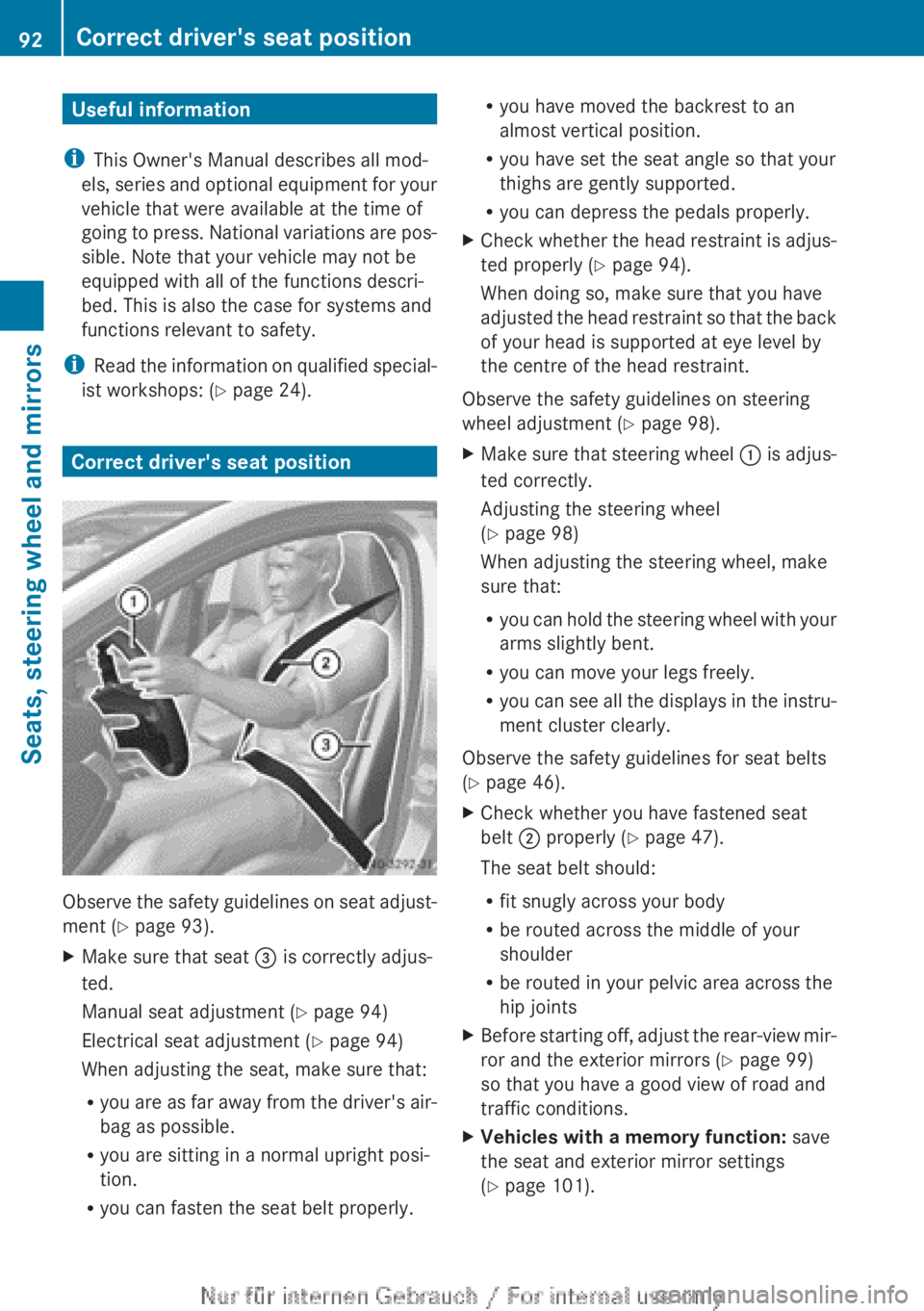
Observe the safety guidelines on seat adjust-
ment (
Y page 93).
X Make sure that seat = is correctly adjus-
ted.
Manual seat adjustment ( Y page 94)
Electrical seat adjustment ( Y page 94)
When adjusting the seat, make sure that:
R you
are as far away from the driver's air-
bag as possible.
R you are sitting in a normal upright posi-
tion.
R you can fasten the seat belt properly. R
you have moved the backrest to an
almost vertical position.
R you have set the seat angle so that your
thighs are gently supported.
R you can depress the pedals properly.
X Check whether the head restraint is adjus-
ted properly
(Y page 94).
When doing so, make sure that you have
adjusted the head restraint so that the back
of your head is supported at eye level by
the centre of the head restraint.
Observe the safety guidelines on steering
wheel adjustment ( Y page 98).
X Make sure that steering wheel :
is adjus-
ted correctly.
Adjusting the steering wheel
(Y page 98)
When adjusting the steering wheel, make
sure that:
R you can hold the steering wheel with your
arms slightly bent.
R you can move your legs freely.
R you can see all the displays in the instru-
ment cluster clearly.
Observe the safety guidelines for seat belts
(Y page 46).
X Check whether you have fastened seat
belt ; properly
(Y page 47).
The seat belt should:
R fit snugly across your body
R be routed across the middle of your
shoulder
R be routed in your pelvic area across the
hip joints
X Before starting off, adjust the rear-view mir-
ror and the exterior mirrors ( Y page 99)
so that you have a good view of road and
traffic conditions.
X Vehicles with a memory function: save
the seat and exterior mirror settings
(Y page 101). 92
Correct driver's seat position
Seats, steering wheel and mirrors
Page 95 of 356
Seats
Important safety notes
G
WARNING
If children adjust the seats, they could
become trapped, especially if they are unat-
tended. There is a risk of injury.
When
leaving the vehicle, always take the key
with you and lock the vehicle. Never leave
children unattended in the vehicle. G
WARNING
You could lose control of the vehicle while
driving if you:
R adjust the driver's seat, steering wheel or
mirrors
R fasten the seat belt
There is a risk of an accident.
Adjust
the driver's seat, head restraint, steer-
ing wheel and mirrors and fasten your seat
belt before starting the engine. G
WARNING
If you adjust the seat height carelessly, you or
other
vehicle occupants could be trapped and
thereby injured. Children in particular could
accidentally press the electrical seat adjust-
ment buttons and become trapped. There is
a risk of injury.
While moving the seats, make sure that your
hands or other body parts do not get under
the lever assembly of the seat adjustment
system. G
WARNING
When adjusting a seat, you or another vehicle
occupant
could become trapped by the guide
rail of the seat, for instance. There is a risk of
injury.
Make sure that no one has any part of their
body within the sweep of the seat when
adjusting it. G
WARNING
The seat belt does not offer the intended level
of protection if the backrest is not in the
upright
position. When braking or in the event
of an accident, you could slide underneath the
seat belt and sustain abdomen or neck inju-
ries, for example. This poses an increased risk
of injury or even fatal injury.
Adjust the seat properly before beginning
your journey. Always make sure that the seat
is in the upright position. G
WARNING
The head restraints cannot provide the inten-
ded protection unless they are fitted and
adjusted
correctly. There is an increased risk
of injury to the head and neck in the event of
an accident or sudden braking, for example.
Always drive with the head restraints fitted.
Ensure that the centre of the head restraints
support the back of each vehicle occupant's
head at eye level before driving off.
! To avoid damage to the seats and the seat
heating, observe the following information:
R do not spill any liquids on the seats. If
liquid is spilled on the seats, dry them as
soon as possible.
R if the seat covers are damp or wet, do not
switch on the seat heating. The seat
heating should also not be used to dry
the seats.
R clean the seat covers as recommended;
see the "Interior care" section.
R do not transport heavy loads on the
seats. Do not place sharp objects on the
seat cushions, e.g. knives, nails or tools.
The seats should only be occupied by
passengers, if possible.
R when the seat heating is in operation, do
not cover the seats with insulating mate-
rials, e.g. blankets, coats, bags, seat cov-
ers, child seats or booster seats.
! Make sure that there are no objects in the
footwell or behind the seats when moving Seats
93
Seats, steering wheel and mirrors Z
Page 96 of 356
the seat back. There is a risk that the seats
and/or the objects could be damaged.
i The head restraints in the front and rear
seats can be removed. 7
For more information, contact a qualified
specialist workshop.
i Further related subjects:
R Luggage compartment enlargement
(folding down the rear seats)
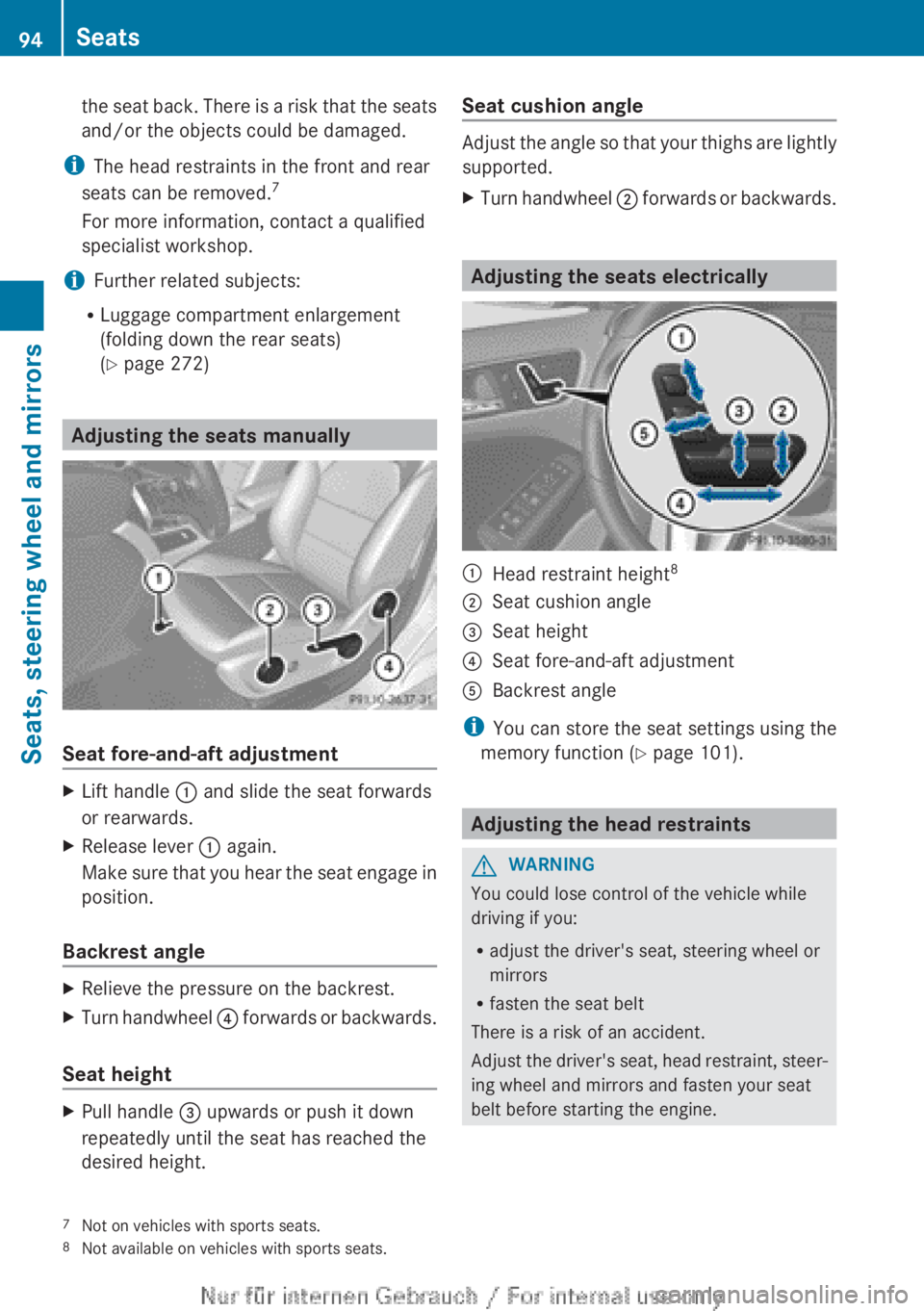
(Y page 272) Adjusting the seats manually
Seat fore-and-aft adjustment
X
Lift handle : and slide the seat forwards
or rearwards.
X Release lever : again.
Make sure that you hear the seat engage in
position.
Backrest angle X
Relieve the pressure on the backrest.
X Turn handwheel ?
forwards or backwards.
Seat height X
Pull handle = upwards or push it down
repeatedly until the seat has reached the
desired height. Seat cushion angle Adjust the angle so that your thighs are lightly
supported.
X
Turn handwheel ;
forwards or backwards. Adjusting the seats electrically
:
Head restraint height 8
; Seat cushion angle
= Seat height
? Seat fore-and-aft adjustment
A Backrest angle
i You can store the seat settings using the
memory function ( Y page 101). Adjusting the head restraints
G
WARNING
You could lose control of the vehicle while
driving if you:
R adjust the driver's seat, steering wheel or
mirrors
R fasten the seat belt
There is a risk of an accident.
Adjust
the driver's seat, head restraint, steer-
ing wheel and mirrors and fasten your seat
belt before starting the engine.
7 Not on vehicles with sports seats.
8 Not available on vehicles with sports seats.94
Seats
Seats, steering wheel and mirrors
Page 100 of 356
Adjusting the seat backrest side bol-
sters
X
To set the side bolsters of the seat
backrest narrower: press button A.
X To set the side bolsters of the seat
backrest wider: press button B. Steering wheel
Important safety notes
G
WARNING
You could lose control of the vehicle while
driving if you:
R adjust the driver's seat, steering wheel or
mirrors
R fasten the seat belt
There is a risk of an accident.
Adjust
the driver's seat, head restraint, steer-
ing wheel and mirrors and fasten your seat
belt before starting the engine. G
WARNING
Children could become trapped by the steer-
ing wheel if they adjust it. There is a risk of
injury.
When
leaving the vehicle, always take the key
with you and lock the vehicle. Never leave
children unattended in the vehicle. Adjusting the steering wheel
G
WARNING
The steering wheel may move unexpectedly if
you adjust it while driving. This could cause
you to lose control of the vehicle. There is a
risk of an accident.
Make sure that the steering wheel is locked
before driving off. Never unlock the steering
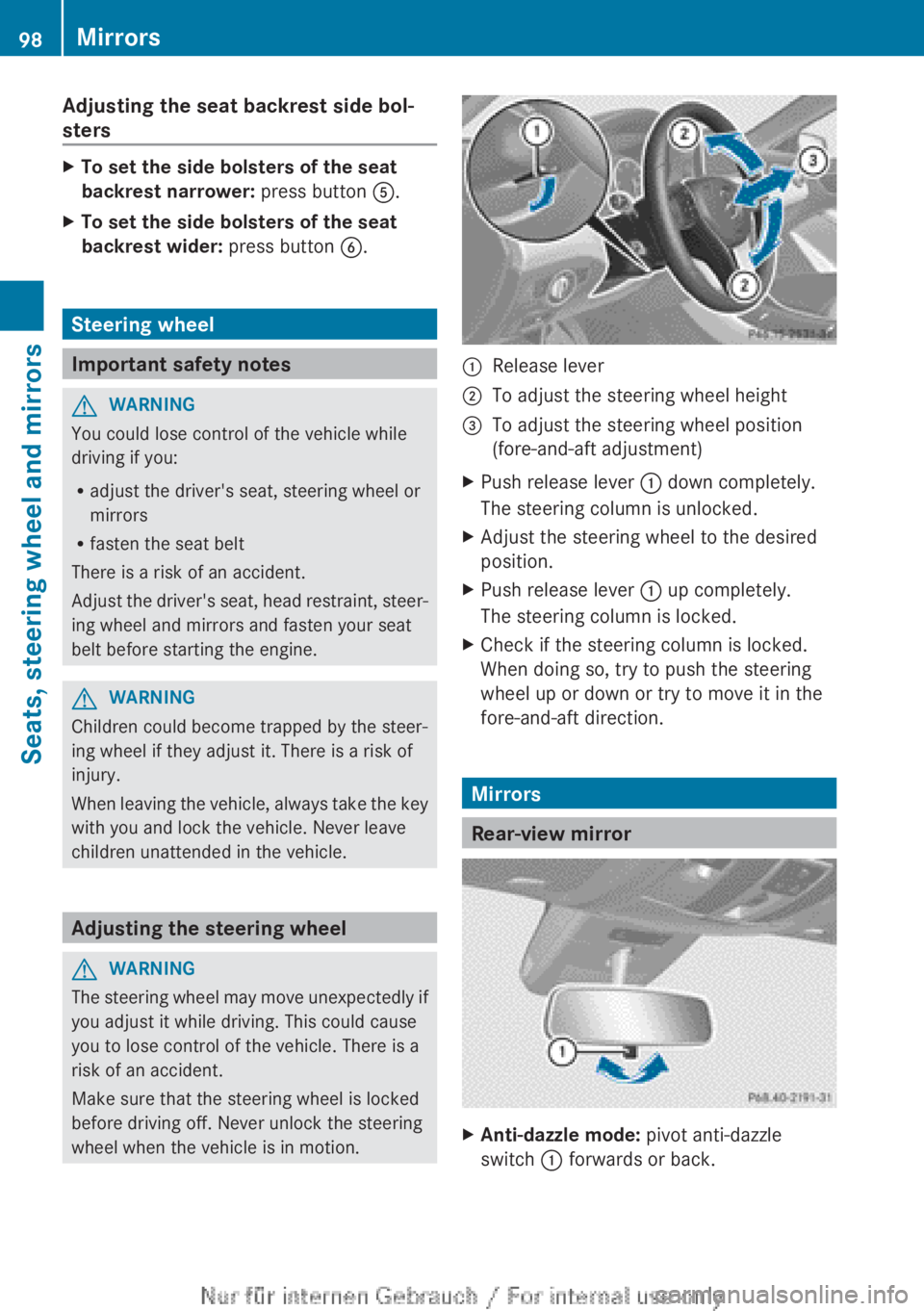
wheel when the vehicle is in motion. :
Release lever
; To adjust the steering wheel height
= To adjust the steering wheel position
(fore-and-aft adjustment)
X Push release lever : down completely.
The steering column is unlocked.
X Adjust the steering wheel to the desired
position.
X Push release lever : up completely.
The steering column is locked.
X Check if the steering column is locked.
When doing so, try to push the steering
wheel up or down or try to move it in the
fore-and-aft direction. Mirrors
Rear-view mirror
X
Anti-dazzle mode: pivot anti-dazzle
switch : forwards or back. 98
Mirrors
Seats, steering wheel and mirrors
Page 148 of 356
Important safety notes
G
WARNING
If the engine is switched off automatically and
you exit the vehicle, the engine is restarted
automatically.
The vehicle may begin moving.
There is a risk of accident and injury.
If you wish to exit the vehicle, always turn off
the ignition and secure the vehicle against
rolling away.
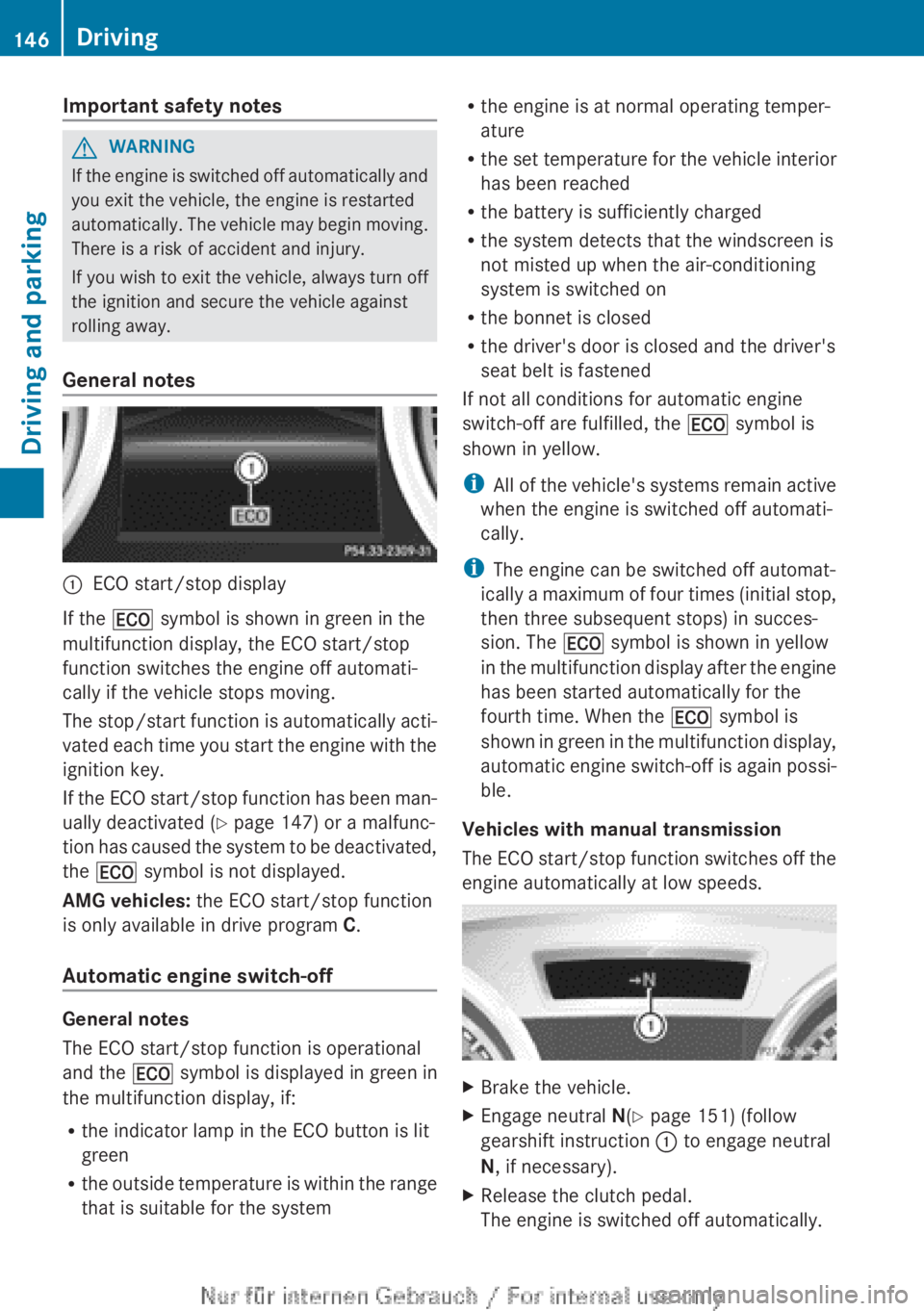
General notes :
ECO start/stop display
If the ¤ symbol is shown in green in the
multifunction display, the ECO start/stop
function switches the engine off automati-
cally if the vehicle stops moving.
The
stop/start function is automatically acti-
vated each time you start the engine with the
ignition key.
If the ECO start/stop function has been man-
ually deactivated ( Y page 147) or a malfunc-
tion has caused the system to be deactivated,
the ¤ symbol is not displayed.
AMG vehicles: the ECO start/stop function
is only available in drive program C.
Automatic engine switch-off General notes
The ECO start/stop function is operational
and the
¤ symbol is displayed in green in
the multifunction display, if:
R the indicator lamp in the ECO button is lit
green
R the
outside temperature is within the range
that is suitable for the system R
the engine is at normal operating temper-
ature
R the
set temperature for the vehicle interior
has been reached
R the battery is sufficiently charged
R the system detects that the windscreen is
not misted up when the air-conditioning
system is switched on
R the bonnet is closed
R the driver's door is closed and the driver's
seat belt is fastened
If not all conditions for automatic engine
switch-off are fulfilled, the ¤ symbol is
shown in yellow.
i All of the vehicle's systems remain active
when the engine is switched off automati-
cally.
i The engine can be switched off automat-
ically a maximum of four times (initial stop,
then three subsequent stops) in succes-
sion. The ¤ symbol is shown in yellow
in the multifunction display after the engine
has been started automatically for the
fourth time. When the ¤ symbol is
shown in green in the multifunction display,
automatic engine switch-off is again possi-
ble.
Vehicles with manual transmission
The ECO start/stop function switches off the
engine automatically at low speeds. X
Brake the vehicle.
X Engage neutral N(Y page 151) (follow
gearshift instruction : to engage neutral
N, if necessary).
X Release the clutch pedal.
The engine is switched off automatically.146
Driving
Driving and parking
Page 149 of 356
Vehicles with automatic transmission
If the vehicle is braked to a standstill in
D or
N, the ECO start/stop function switches off
the engine automatically.
i The
HOLD function can be activated if the
engine has been switched off automati-
cally. It is then not necessary to continue
applying the brakes during the automatic
stop phase. When you depress the accel-
erator pedal, the engine starts automati-
cally and the braking effect of the HOLD
function is deactivated.
Automatic engine start General notes
The engine is started automatically if:
R
you
switch off the ECO start/stop function
by pressing the ECO button
R you engage reverse gear R
R the vehicle starts to roll
R the brake system requires this
R the temperature in the vehicle interior devi-
ates from the set range
R the system detects moisture on the wind-
screen when the air-conditioning system is
switched on
R the battery's charge status is too low
R the driver's seat belt is released or the driv-
er's door is opened
Vehicles with manual transmission
! Only engage gear when the clutch pedal
is depressed.
The engine is started automatically if you:
R depress the clutch pedal fully
R depress the accelerator pedal Vehicles with automatic transmission
The engine is started automatically if you:
R
release the brake pedal when HOLD is not
activated and the transmission is in posi-
tion D or N
R depress the accelerator pedal
R move the transmission out of position P
i Shifting the transmission to position P
does not start the engine.
i If you shift the transmission from R to D,
the ECO start/stop function is available
again once the ¤ symbol reappears in
green in the multifunction display.
Deactivating/activating the ECO start/
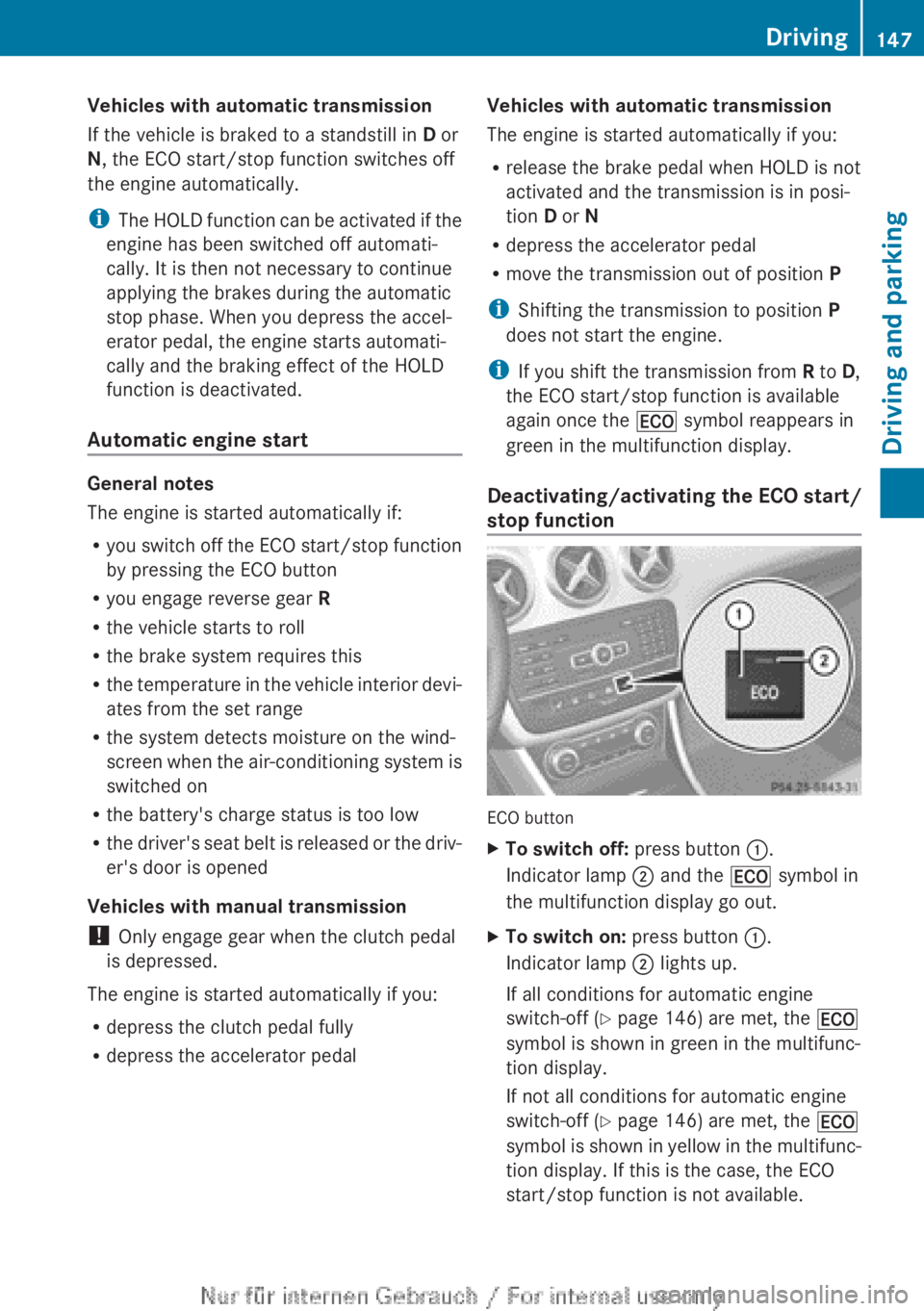
stop function ECO button
X
To switch off: press button :.
Indicator lamp ; and the ¤ symbol in
the multifunction display go out.
X To switch on: press button :.
Indicator lamp ; lights up.
If all conditions for automatic engine
switch-off ( Y page 146) are met, the ¤
symbol is shown in green in the multifunc-
tion display.
If not all conditions for automatic engine
switch-off ( Y page 146) are met, the ¤
symbol
is shown in yellow in the multifunc-
tion display. If this is the case, the ECO
start/stop function is not available. Driving
147
Driving and parking Z
Page 166 of 356
Releasing
X
Pull handle :.
The red ! indicator lamp in the instru-
ment cluster goes out.
i You can only release the electric parking
brake when the key is in position 1 or 2 in
the ignition lock.
Applying automatically The electric parking brake is applied auto-
matically:
R
if DISTRONIC PLUS brings the vehicle to a
standstill (vehicles with automatic trans-
mission) or
R if
the HOLD function is keeping the vehicle
stationary.
In addition, at least one of the following con-
ditions must be fulfilled:
R the engine is switched off
R the driver's door is open and the seat belt
is not fastened
R there is a system malfunction
R the power supply is insufficient
R the vehicle is stationary for a lengthy
period.
The red ! indicator lamp in the instrument
cluster lights up.
i The electric parking brake is not automat-
ically applied if the engine is switched off
by the ECO start/stop function.
Releasing automatically i
The electric parking brake can only be
released automatically in vehicles with
automatic transmission.
The electric parking brake of your vehicle is
released
automatically when all of the follow-
ing conditions are fulfilled:
R the engine is running.
R the transmission is in position D or R.
R the seat belt is fastened.
R you depress the accelerator pedal. If the transmission is in position
R,
the tailgate
must be closed.
If your seat belt is not fastened, the following
conditions must be fulfilled to automatically
release the electric parking brake:
R the driver's door is closed.
R you have shifted out of transmission posi-
tion P or you have previously driven faster
than 3 km/h.
Emergency braking The vehicle can also be braked during an
emergency using the electric parking brake.
X
While driving, push handle :
of the electric
parking brake ( Y page 163).
i The vehicle is braked for as long as han-
dle : of the electric parking brake
pressed. The longer the electric parking
brake handle : is depressed, the greater
the braking force.
During braking:
R a warning tone sounds
R the Release parking brake message
appears
R the red ! indicator lamp in the instru-
ment cluster flashes
When
the vehicle has been braked to a stand-
still, the electric parking brake is engaged. Parking up the vehicle
If you leave the vehicle parked up for longer
than
four weeks, the battery may be damaged
by exhaustive discharging.
If you leave the vehicle parked up for longer
than six weeks, the vehicle may suffer dam-
age as a result of lack of use.
X Visit a qualified specialist workshop and
seek advice.
i You can obtain information about trickle
chargers from a qualified specialist work-
shop. 164
Parking
Driving and parking
Page 177 of 356
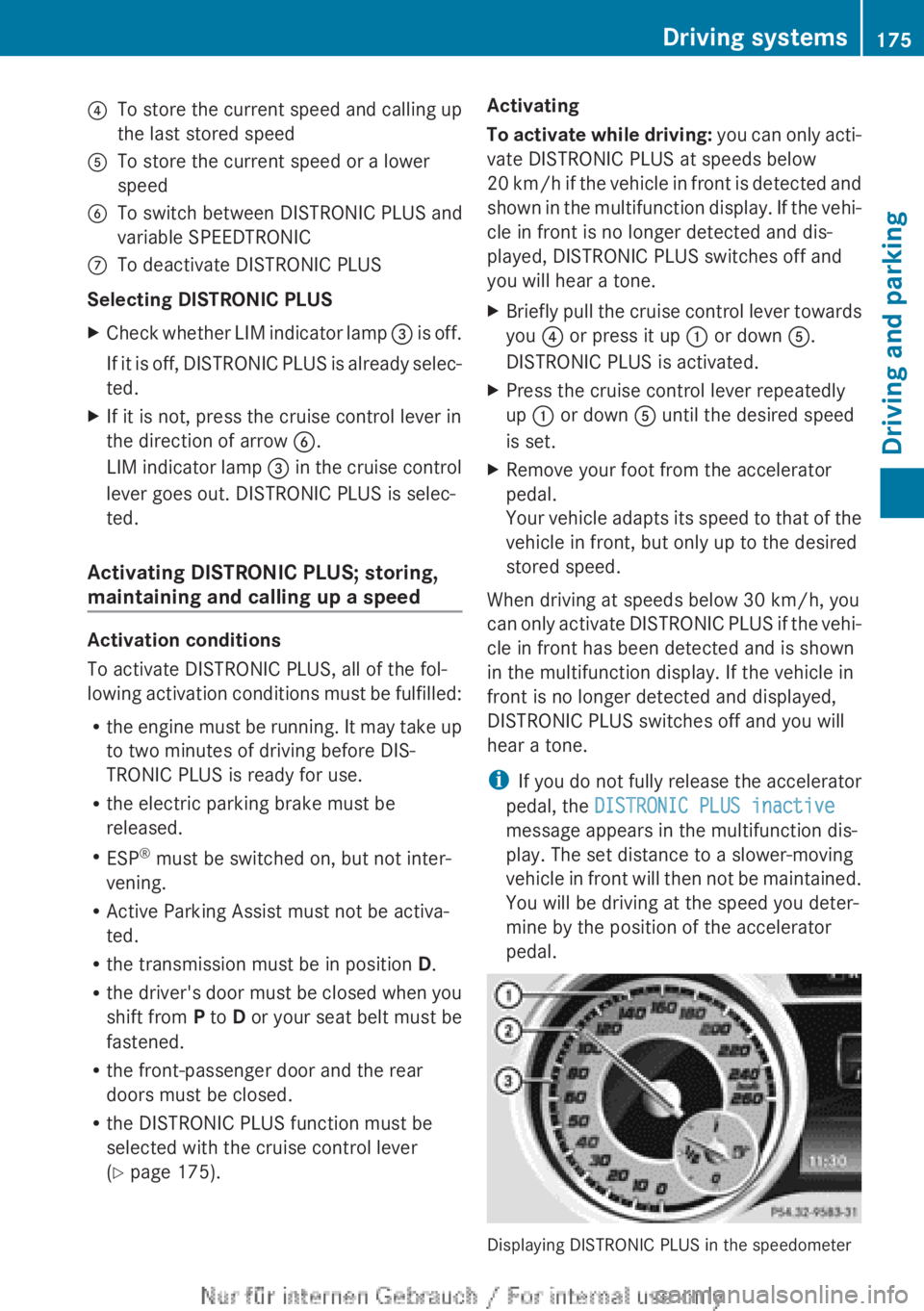
?
To store the current speed and calling up
the last stored speed
A To store the current speed or a lower
speed
B To switch between DISTRONIC PLUS and
variable SPEEDTRONIC
C To deactivate DISTRONIC PLUS
Selecting DISTRONIC PLUS
X Check whether LIM indicator lamp = is off.
If it is off, DISTRONIC PLUS is already selec-
ted.
X If it is not, press the cruise control lever in
the direction of arrow B.
LIM
indicator lamp = in the cruise control
lever goes out. DISTRONIC PLUS is selec-
ted.
Activating DISTRONIC PLUS; storing,
maintaining and calling up a speed Activation conditions
To activate DISTRONIC PLUS, all of the fol-
lowing
activation conditions must be fulfilled:
R the engine must be running. It may take up
to two minutes of driving before DIS-
TRONIC PLUS is ready for use.
R the electric parking brake must be
released.
R ESP ®
must be switched on, but not inter-
vening.
R Active Parking Assist must not be activa-
ted.
R the transmission must be in position D.
R the driver's door must be closed when you
shift from P to D or your seat belt must be
fastened.
R the front-passenger door and the rear
doors must be closed.
R the DISTRONIC PLUS function must be
selected with the cruise control lever
(Y page 175). Activating
To
activate while driving: you can only acti-
vate DISTRONIC PLUS at speeds below
20 km/h if the vehicle in front is detected and
shown in the multifunction display. If the vehi-
cle in front is no longer detected and dis-
played, DISTRONIC PLUS switches off and
you will hear a tone.
X Briefly pull the cruise control lever towards
you ? or press it up : or down A.
DISTRONIC PLUS is activated.
X Press the cruise control lever repeatedly
up : or down A until the desired speed
is set.
X Remove your foot from the accelerator
pedal.
Your
vehicle adapts its speed to that of the
vehicle in front, but only up to the desired
stored speed.
When driving at speeds below 30 km/h, you
can
only activate DISTRONIC PLUS if the vehi-
cle in front has been detected and is shown
in the multifunction display. If the vehicle in
front is no longer detected and displayed,
DISTRONIC PLUS switches off and you will
hear a tone.
i If you do not fully release the accelerator
pedal, the DISTRONIC PLUS inactive
message appears in the multifunction dis-
play. The set distance to a slower-moving
vehicle in front will then not be maintained.
You will be driving at the speed you deter-
mine by the position of the accelerator
pedal. Displaying DISTRONIC PLUS in the speedometer Driving systems
175
Driving and parking Z
Page 182 of 356
!
If DISTRONIC PLUS or the HOLD function
is activated, the vehicle brakes automati-
cally in certain situations. To prevent dam-
age to the vehicle, deactivate DISTRONIC
PLUS and the HOLD function in the follow-
ing or other similar situations:
R when towing the vehicle
R in the car wash
Deactivate the HOLD function (Y page 180).
General notes The HOLD function can assist the driver in the
following situations:
R
when pulling away, especially on steep
slopes
R when manoeuvring on steep slopes
R when waiting in traffic
The vehicle is kept stationary without the
driver having to depress the brake pedal.
The
braking effect is cancelled and the HOLD
function is deactivated when you depress the
accelerator pedal to pull away.
Activation conditions You can activate the HOLD function if:
R
the vehicle is stationary
R the
engine is running or if it has been auto-
matically switched off by the ECO start/
stop function
R the driver's door is closed or if your seat
belt is fastened
R the electric parking brake is released
R the transmission is in position D, R or N on
vehicles with automatic transmission
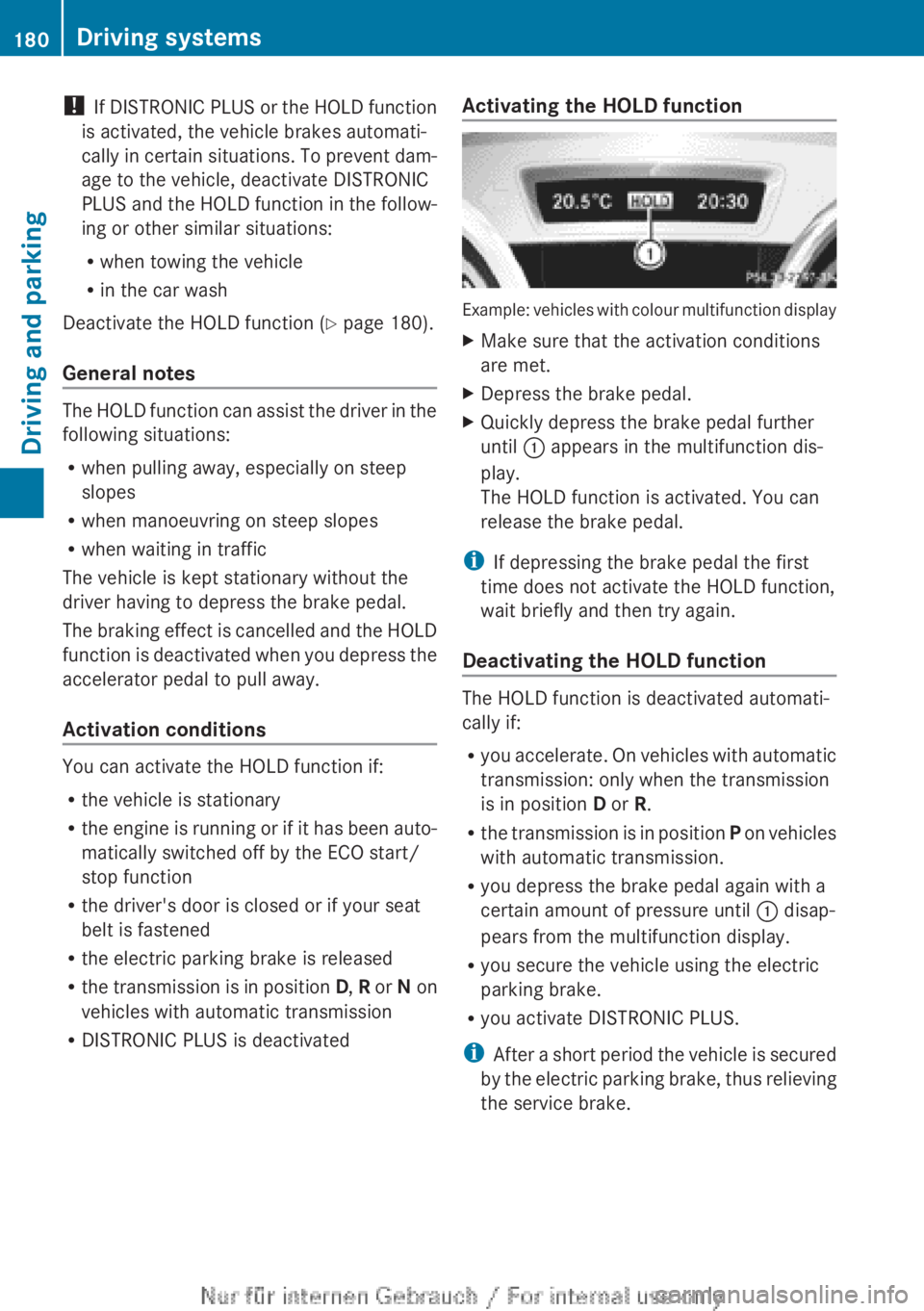
R DISTRONIC PLUS is deactivated Activating the HOLD function Example: vehicles with colour multifunction display
X
Make sure that the activation conditions
are met.
X Depress the brake pedal.
X Quickly depress the brake pedal further
until : appears in the multifunction dis-
play.
The HOLD function is activated. You can
release the brake pedal.
i If depressing the brake pedal the first
time does not activate the HOLD function,
wait briefly and then try again.
Deactivating the HOLD function The HOLD function is deactivated automati-
cally if:
R
you
accelerate. On vehicles with automatic
transmission: only when the transmission
is in position D or R.
R the transmission is in position P on vehicles
with automatic transmission.
R you depress the brake pedal again with a
certain amount of pressure until : disap-
pears from the multifunction display.
R you secure the vehicle using the electric
parking brake.
R you activate DISTRONIC PLUS.
i After a short period the vehicle is secured
by the electric parking brake, thus relieving
the service brake. 180
Driving systems
Driving and parking