warning lights MERCEDES-BENZ A CLASS 2012 Owner's Manual
[x] Cancel search | Manufacturer: MERCEDES-BENZ, Model Year: 2012, Model line: A CLASS, Model: MERCEDES-BENZ A CLASS 2012Pages: 356, PDF Size: 4.96 MB
Page 107 of 356
Setting the exterior lighting
Setting options Exterior lighting can be set using the:
R
light switch
R headlamp range control (vehicles with hal-
ogen headlamps only)
(Y page 107)
R combination switch (Y page 107)
R on-board computer (Y page 221)
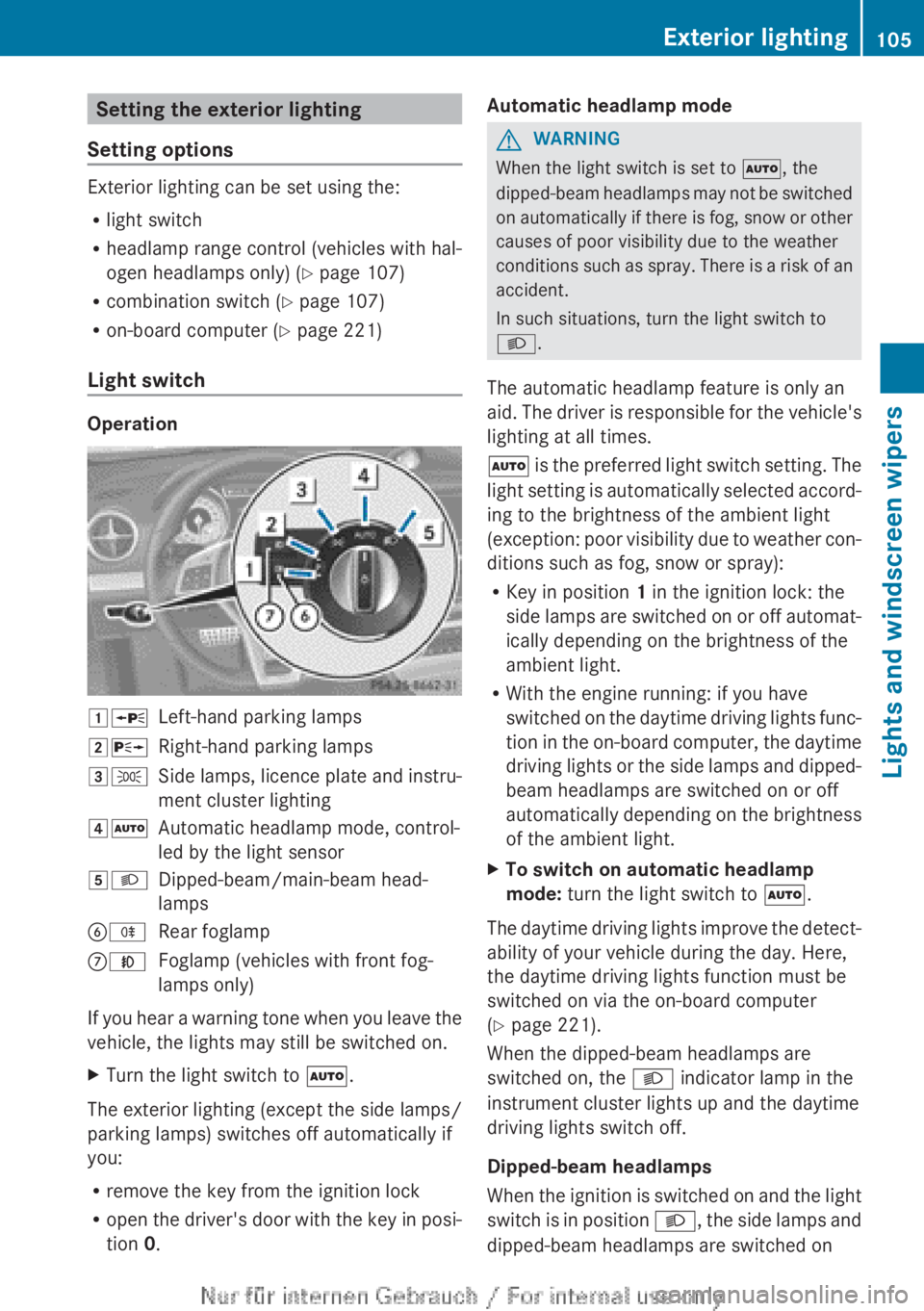
Light switch Operation
1W
Left-hand parking lamps
2X Right-hand parking lamps
3T Side lamps, licence plate and instru-
ment cluster lighting
4Ã Automatic headlamp mode, control-
led by the light sensor
5L Dipped-beam/main-beam head-
lamps
BR Rear foglamp
CN Foglamp (vehicles with front fog-
lamps only)
If you hear a warning tone when you leave the
vehicle, the lights may still be switched on.
X Turn the light switch to Ã.
The exterior lighting (except the side lamps/
parking lamps) switches off automatically if
you:
R remove the key from the ignition lock
R open
the driver's door with the key in posi-
tion 0. Automatic headlamp mode G
WARNING
When the light switch is set to Ã, the
dipped-beam
headlamps may not be switched
on automatically if there is fog, snow or other
causes of poor visibility due to the weather
conditions such as spray. There is a risk of an
accident.
In such situations, turn the light switch to
L.
The automatic headlamp feature is only an
aid. The driver is responsible for the vehicle's
lighting at all times.
à is the preferred light switch setting. The
light setting is automatically selected accord-
ing to the brightness of the ambient light
(exception: poor visibility due to weather con-
ditions such as fog, snow or spray):
R Key in position 1 in the ignition lock: the
side lamps are switched on or off automat-
ically depending on the brightness of the
ambient light.
R With the engine running: if you have
switched on the daytime driving lights func-
tion in the on-board computer, the daytime
driving lights or the side lamps and dipped-
beam headlamps are switched on or off
automatically depending on the brightness
of the ambient light.
X To switch on automatic headlamp
mode: turn the light switch to Ã.
The daytime driving lights improve the detect-
ability of your vehicle during the day. Here,
the daytime driving lights function must be
switched on via the on-board computer
(Y page 221).
When the dipped-beam headlamps are
switched on, the L indicator lamp in the
instrument cluster lights up and the daytime
driving lights switch off.
Dipped-beam headlamps
When
the ignition is switched on and the light
switch is in position L, the side lamps and
dipped-beam headlamps are switched on Exterior lighting
105
Lights and windscreen wipers Z
Page 110 of 356
The blue
K indicator lamp in the instru-
ment cluster lights up when the main-beam
headlamps are switched on.
X To switch off the main-beam head-
lamps:
move the combination switch back
to its normal position.
The blue K indicator lamp in the instru-
ment cluster goes out.
i Vehicles with Adaptive Highbeam Assist:
when Adaptive Highbeam Assist is active,
it controls activation of the main-beam
headlamps
(Y page 110).
Headlamp flasher X
To switch on: turn the key in the ignition
lock to position 1 or 2,
or start the engine.
X Pull the combination switch in the direction
of arrow =. Hazard warning lamps
The hazard warning lamps switch on auto-
matically if:
R
an airbag is deployed or
R the vehicle decelerates rapidly from a
speed
of more than 70 km/h and comes to
a standstill
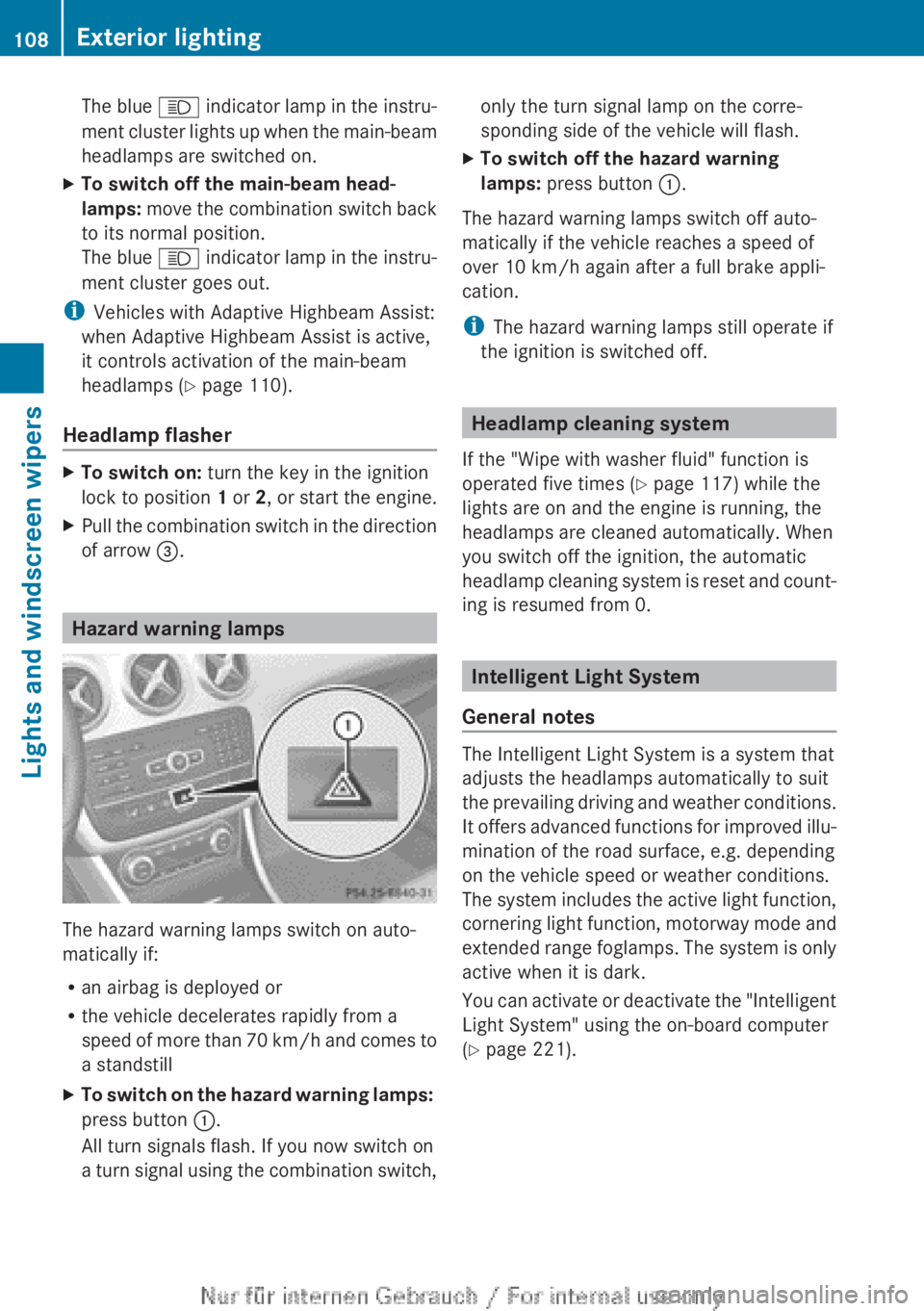
X To switch on the hazard warning lamps:
press button :.
All turn signals flash. If you now switch on
a
turn signal using the combination switch, only the turn signal lamp on the corre-
sponding side of the vehicle will flash.
X To switch off the hazard warning
lamps: press button :.
The hazard warning lamps switch off auto-
matically if the vehicle reaches a speed of
over 10 km/h
again after a full brake appli-
cation.
i The hazard warning lamps still operate if
the ignition is switched off. Headlamp cleaning system
If the "Wipe with washer fluid" function is
operated five times ( Y page 117) while the
lights are on and the engine is running, the
headlamps are cleaned automatically. When
you switch off the ignition, the automatic
headlamp
cleaning system is reset and count-
ing is resumed from 0. Intelligent Light System
General notes The Intelligent Light System is a system that
adjusts the headlamps automatically to suit
the
prevailing driving and weather conditions.
It offers advanced functions for improved illu-
mination of the road surface, e.g. depending
on the vehicle speed or weather conditions.
The system includes the active light function,
cornering light function, motorway mode and
extended range foglamps. The system is only
active when it is dark.
You can activate or deactivate the "Intelligent
Light System" using the on-board computer
(Y page 221). 108
Exterior lightingLights and windscreen wipers
Page 112 of 356
the illumination of the edge of the carriage-
way.
Active:
if you are driving at speeds below
70
km/h and you switch on the rear foglamp.
Not active: if you are driving at speeds above
100 km/h or if you switch off the rear foglamp
following activation. Adaptive Highbeam Assist
G
WARNING
Adaptive Highbeam Assist does not recognise
road users:
R who have no lights, e.g. pedestrians
R who have poor lighting, e.g. cyclists
R whose lighting is blocked, e.g. by a barrier
In
very rare cases, Adaptive Highbeam Assist
recognises road users too late or not at all. In
this, or in similar situations, the automatic
main-beam headlamps will not be deactivated
or activated regardless. There is a risk of an
accident.
Always carefully observe the traffic conditions
and switch off the main-beam headlamps in
good time.
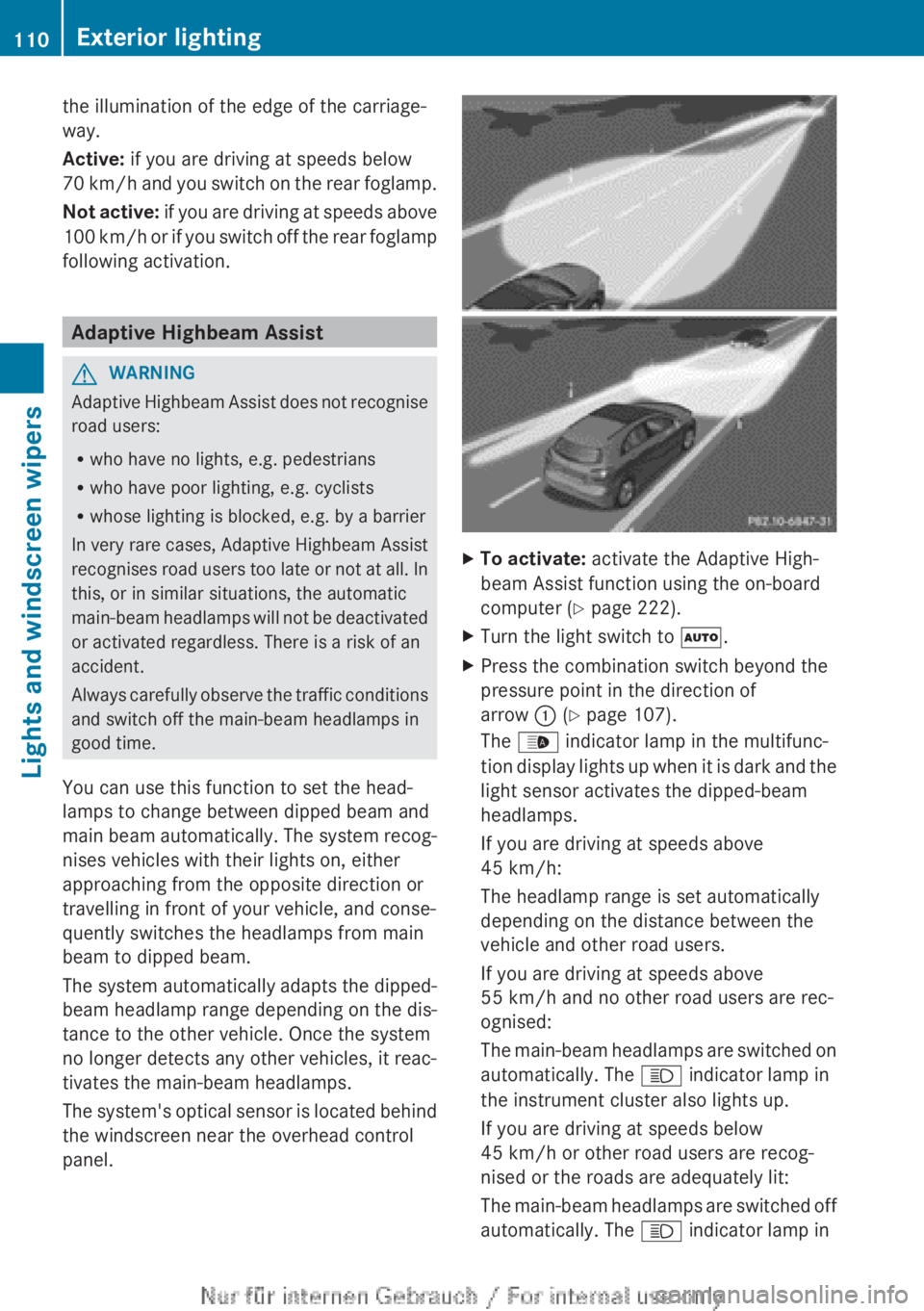
You can use this function to set the head-
lamps to change between dipped beam and
main beam automatically. The system recog-
nises vehicles with their lights on, either
approaching from the opposite direction or
travelling in front of your vehicle, and conse-
quently switches the headlamps from main
beam to dipped beam.
The system automatically adapts the dipped-
beam headlamp range depending on the dis-
tance to the other vehicle. Once the system
no longer detects any other vehicles, it reac-
tivates the main-beam headlamps.
The system's optical sensor is located behind
the windscreen near the overhead control
panel. X
To activate: activate the Adaptive High-
beam Assist function using the on-board
computer (Y page 222).
X Turn the light switch to Ã.
X Press the combination switch beyond the
pressure point in the direction of
arrow : (Y page 107).
The _ indicator lamp in the multifunc-
tion
display lights up when it is dark and the
light sensor activates the dipped-beam
headlamps.
If you are driving at speeds above
45 km/h:
The headlamp range is set automatically
depending on the distance between the
vehicle and other road users.
If you are driving at speeds above
55 km/h and no other road users are rec-
ognised:
The main-beam headlamps are switched on
automatically. The K indicator lamp in
the instrument cluster also lights up.
If you are driving at speeds below
45 km/h or other road users are recog-
nised or the roads are adequately lit:
The main-beam headlamps are switched off
automatically. The K indicator lamp in110
Exterior lighting
Lights and windscreen wipers
Page 114 of 356
The interior lighting is activated for a short
time when the key is removed from the igni-
tion lock. You can activate this delayed
switch-off using the on-board computer
(Y page 223).
Manual interior lighting control
X
To switch the front interior lighting on:
set the switch to the c position.
X To switch off the interior lighting: set the
switch to the | position or (if the door
is closed) to the centre position.
X To switch the rear interior lighting on/
off: press the u button.
X To switch the reading lamps on/off:
press the p button. Crash-responsive emergency lighting
The
interior lighting is activated automatically
if the vehicle is involved in an accident.
X To switch off the crash-responsive
emergency lighting: press the hazard
warning lamp button.
or
X Lock and then unlock the vehicle using the
key. Replacing bulbs
Important safety notes
Xenon bulbs G
DANGER
Xenon bulbs are under high voltage. You can
get
an electric shock if you remove the cover
of the xenon bulb and touch the electrical
contacts. There is a risk of fatal injury.
Never touch the parts or the electrical con-
tacts of the xenon bulb. Always have work on
the xenon bulbs carried out at a qualified spe-
cialist workshop. If your vehicle is equipped with xenon bulbs,
you can recognise this by the following: the
cone of light from the xenon bulbs moves
from the top to the bottom and back again
when you start the engine. For this to be
observed, the lights must be switched on
before starting the engine.
Bulbs and lamps are an important aspect of
vehicle
safety. You must therefore make sure
that these function correctly at all times.
Have the headlamp setting checked regularly.
Other bulbs G
WARNING
Bulbs, lamps and plug connectors can
become very hot during use. When replacing
a
bulb, you could burn yourself on these com-
ponents. There is a risk of injury.
Allow these components to cool down before
replacing the bulb.
There are bulbs other than the xenon bulbs
that you cannot replace. Replace only the
bulbs listed (Y page 113). Have the bulbs that
you cannot replace yourself replaced at a
qualified specialist workshop.
If you require assistance replacing bulbs, con-
sult a qualified specialist workshop.
Do not touch the glass tube of new bulbs with
your bare hands. Even minor contamination
can burn into the glass surface and reduce
the service life of the bulbs. Always use a lint-
free cloth or only touch the base of the bulb
when fitting.
Only use bulbs of the correct type.
If the new bulb still does not light up, consult
a qualified specialist workshop.
Bulbs and lamps are an important aspect of
vehicle safety. You must therefore make sure
that these function correctly at all times.
Have the headlamp setting checked regularly. 112
Replacing bulbs
Lights and windscreen wipers
Page 116 of 356
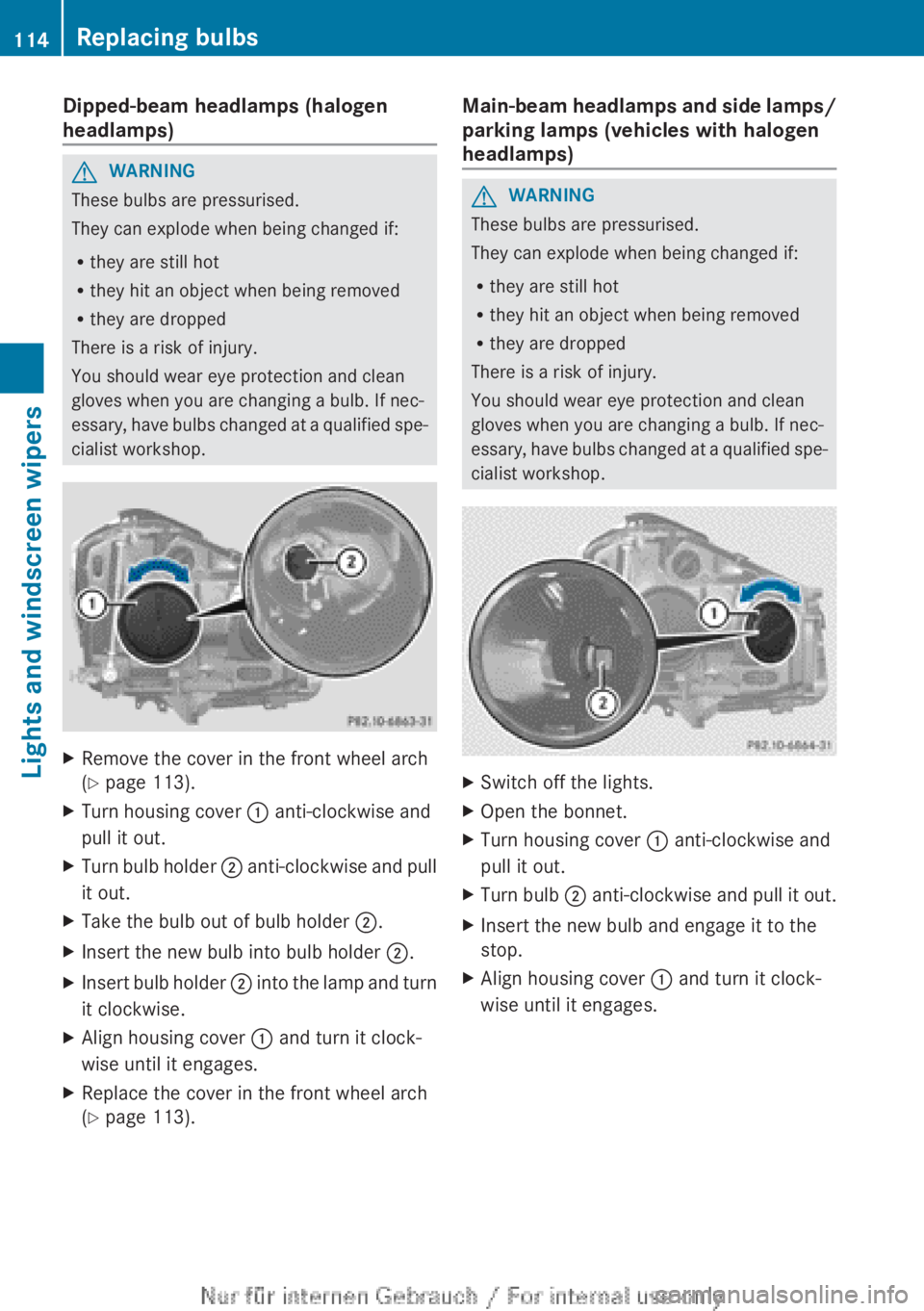
Dipped-beam headlamps (halogen
headlamps)
G
WARNING
These bulbs are pressurised.
They can explode when being changed if:
R they are still hot
R they hit an object when being removed
R they are dropped
There is a risk of injury.
You should wear eye protection and clean
gloves when you are changing a bulb. If nec-
essary,
have bulbs changed at a qualified spe-
cialist workshop. X
Remove the cover in the front wheel arch
(Y page 113).
X Turn housing cover : anti-clockwise and
pull it out.
X Turn bulb holder ;
anti-clockwise and pull
it out.
X Take the bulb out of bulb holder ;.
X Insert the new bulb into bulb holder ;.
X Insert bulb holder ;
into the lamp and turn
it clockwise.
X Align housing cover : and turn it clock-
wise until it engages.
X Replace the cover in the front wheel arch
(Y page 113). Main-beam headlamps and side lamps/
parking lamps (vehicles with halogen
headlamps) G
WARNING
These bulbs are pressurised.
They can explode when being changed if:
R they are still hot
R they hit an object when being removed
R they are dropped
There is a risk of injury.
You should wear eye protection and clean
gloves when you are changing a bulb. If nec-
essary,
have bulbs changed at a qualified spe-
cialist workshop. X
Switch off the lights.
X Open the bonnet.
X Turn housing cover : anti-clockwise and
pull it out.
X Turn bulb ;
anti-clockwise and pull it out.
X Insert the new bulb and engage it to the
stop.
X Align housing cover : and turn it clock-
wise until it engages.114
Replacing bulbs
Lights and windscreen wipers
Page 117 of 356
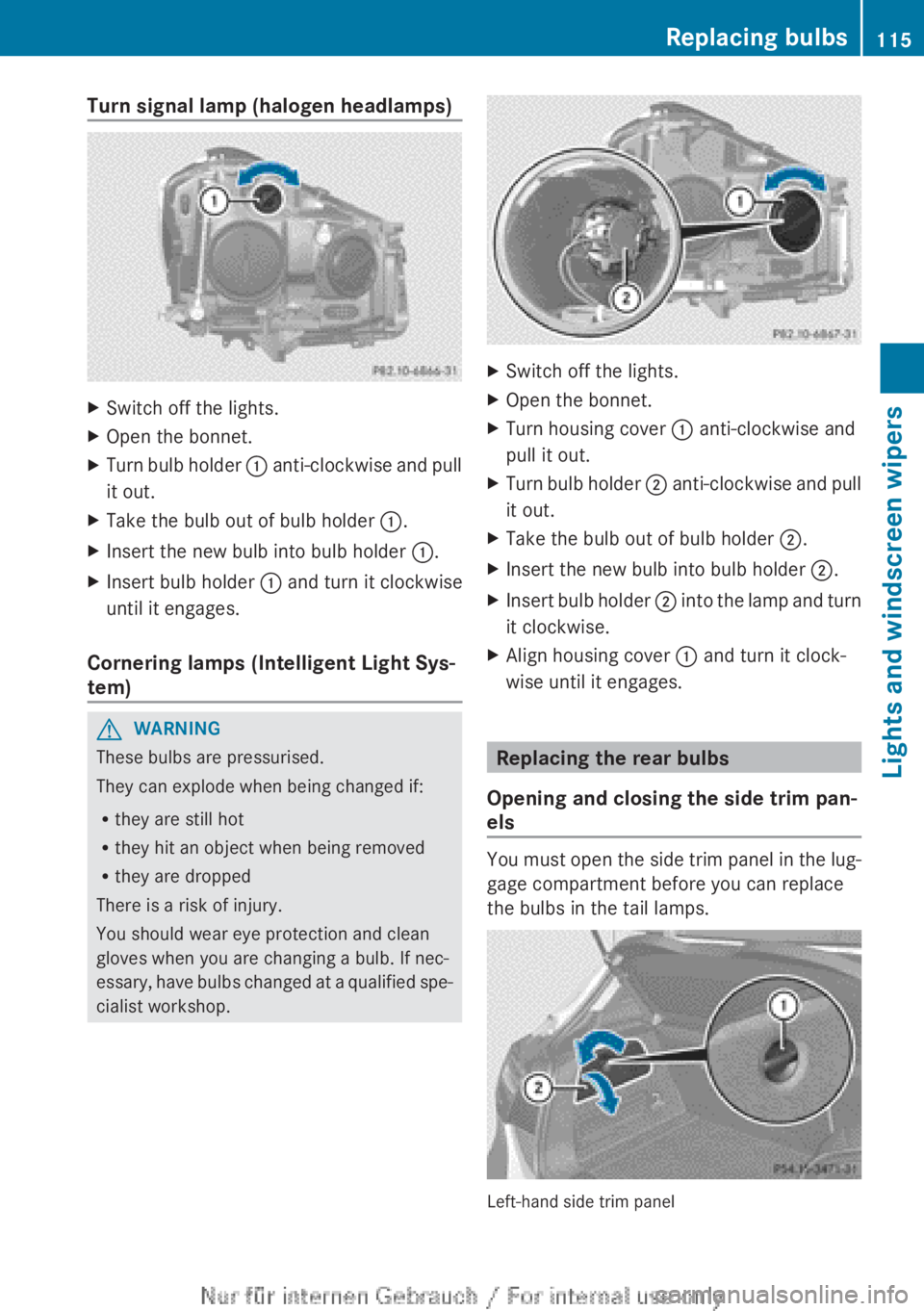
Turn signal lamp (halogen headlamps)
X
Switch off the lights.
X Open the bonnet.
X Turn bulb holder : anti-clockwise and pull
it out.
X Take the bulb out of bulb holder :.
X Insert the new bulb into bulb holder :.
X Insert bulb holder : and turn it clockwise
until it engages.
Cornering lamps (Intelligent Light Sys-
tem) G
WARNING
These bulbs are pressurised.
They can explode when being changed if:
R they are still hot
R they hit an object when being removed
R they are dropped
There is a risk of injury.
You should wear eye protection and clean
gloves when you are changing a bulb. If nec-
essary,
have bulbs changed at a qualified spe-
cialist workshop. X
Switch off the lights.
X Open the bonnet.
X Turn housing cover : anti-clockwise and
pull it out.
X Turn bulb holder ;
anti-clockwise and pull
it out.
X Take the bulb out of bulb holder ;.
X Insert the new bulb into bulb holder ;.
X Insert bulb holder ;
into the lamp and turn
it clockwise.
X Align housing cover : and turn it clock-
wise until it engages. Replacing the rear bulbs
Opening and closing the side trim pan-
els You must open the side trim panel in the lug-
gage compartment before you can replace
the bulbs in the tail lamps.
Left-hand side trim panel Replacing bulbs
115
Lights and windscreen wipers Z
Page 120 of 356
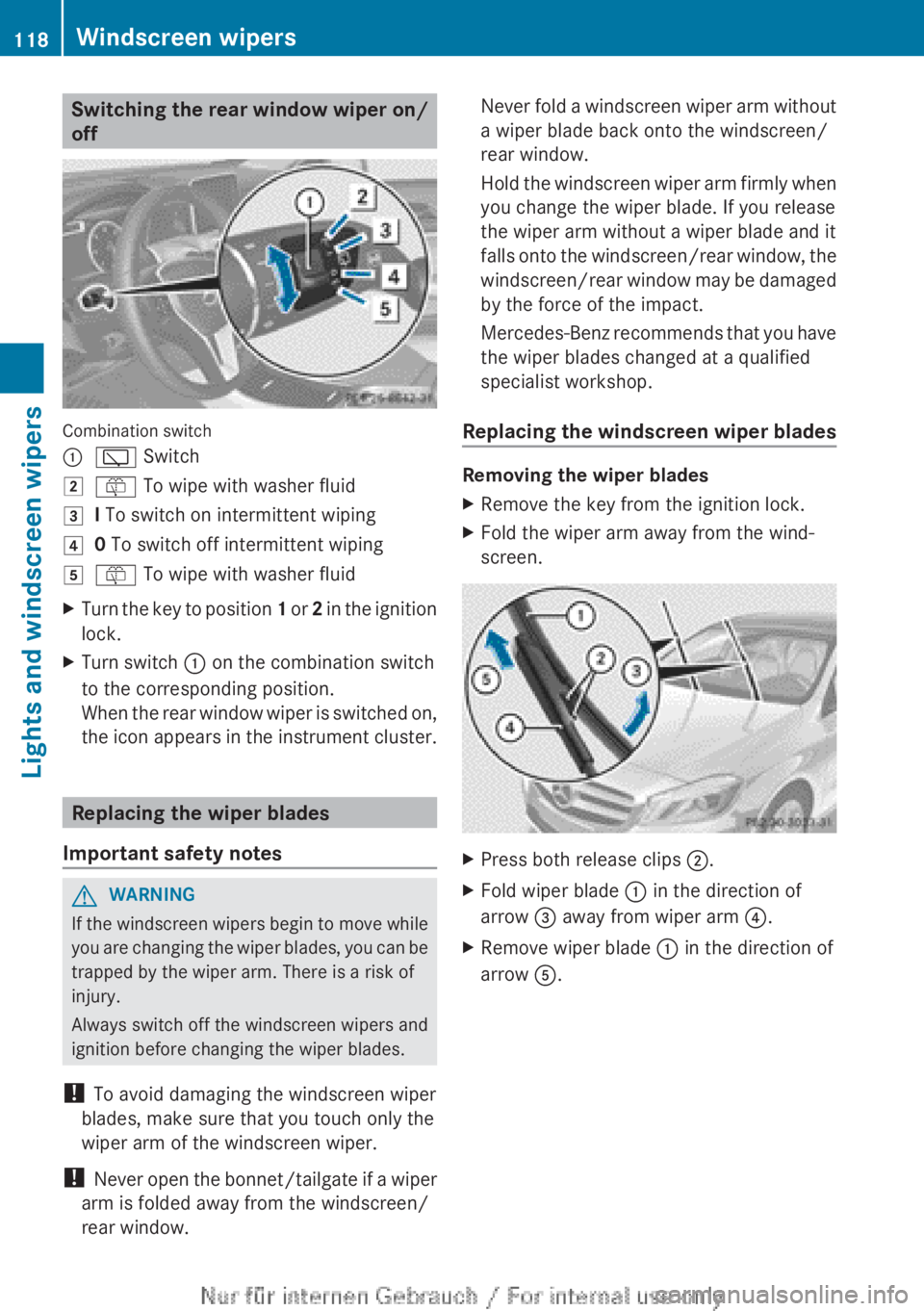
Switching the rear window wiper on/
off
Combination switch
:
è Switch
2 ô To wipe with washer fluid
3 I To switch on intermittent wiping
4 0 To switch off intermittent wiping
5 ô To wipe with washer fluid
X Turn the key to position 1 or 2 in the ignition
lock.
X Turn switch : on the combination switch
to the corresponding position.
When
the rear window wiper is switched on,
the icon appears in the instrument cluster. Replacing the wiper blades
Important safety notes G
WARNING
If the windscreen wipers begin to move while
you
are changing the wiper blades, you can be
trapped by the wiper arm. There is a risk of
injury.
Always switch off the windscreen wipers and
ignition before changing the wiper blades.
! To avoid damaging the windscreen wiper
blades, make sure that you touch only the
wiper arm of the windscreen wiper.
! Never open the bonnet/tailgate if a wiper
arm is folded away from the windscreen/
rear window. Never fold a windscreen wiper arm without
a wiper blade back onto the windscreen/
rear window.
Hold
the windscreen wiper arm firmly when
you change the wiper blade. If you release
the wiper arm without a wiper blade and it
falls onto the windscreen/rear window, the
windscreen/rear window may be damaged
by the force of the impact.
Mercedes-Benz recommends that you have
the wiper blades changed at a qualified
specialist workshop.
Replacing the windscreen wiper blades Removing the wiper blades
X
Remove the key from the ignition lock.
X Fold the wiper arm away from the wind-
screen. X
Press both release clips ;.
X Fold wiper blade : in the direction of
arrow = away from wiper arm ?.
X Remove wiper blade : in the direction of
arrow A.118
Windscreen wipers
Lights and windscreen wipers
Page 134 of 356
Problems with the rear window heating
Problem Possible causes/consequences and
M SolutionsThe rear window heat-
ing has switched off
prematurely or cannot
be activated. The battery has not been sufficiently charged.
X
Switch off any consumers that are not required, e.g. reading
lamps, interior lighting or the seat heating.
When
the battery is sufficiently charged, the rear window heat-
ing can be activated again. Activating/deactivating air-recircula-
tion mode
If you switch on air-recirculation mode, the
windows can mist up more quickly, in partic-
ular at low temperatures. Only use air-recir-
culation
mode briefly to prevent the windows
misting up.
You can deactivate the flow of fresh air if
unpleasant odours are entering the vehicle
from outside. The air already inside the vehi-
cle will then be recirculated.
The operation of air-recirculation mode is the
same for all control panels.
X Turn the key to position 2 in the ignition
lock (Y page 143).
X To activate: press the e button.
The
indicator lamp in the e button lights
up.
i Air-recirculation mode is activated auto-
matically at high outside temperatures.
When air-recirculation mode is activated
automatically, the indicator lamp in the
e button is not lit.
Outside air is added after about
30 minutes.
X To deactivate: press the e button.
The
indicator lamp in the e button goes
out. i
Air-recirculation mode deactivates auto-
matically:
R after approximately five minutes at out-
side temperatures below approximately
5 †.
R after approximately five minutes if the
"Cooling
with air dehumidification" func-
tion is deactivated.
R after approximately 30 minutes at out-
side temperatures above approximately
5 † and when the "Cooling with air dehu-
midification function" is activated. Convenience opening/closing using
the air-recirculation button
G
WARNING
When the convenience closing feature is oper-
ating,
parts of the body could become trapped
in the closing area of the side window and the
sliding sunroof. There is a risk of injury.
Observe the complete closing procedure
when the convenience closing feature is oper-
ating. When closing make sure that no parts
of the body are in the closing area. G
WARNING
During convenience opening parts of the body
could be drawn in or become trapped
between
the side window and window frame.
There is a risk of injury.
When opening, make sure that nobody is
touching the side window. If someone
becomes trapped, press the W switch132
Operating the climate control system
Climate control
Page 165 of 356
cle from rolling away by applying the parking
brake.
Vehicles with manual transmission X
Shift to either first gear or reverse gear R.
X Turn the key to position 0 in the ignition
lock and remove it.
The immobiliser is activated.
X Apply the electric parking brake.
Vehicles with automatic transmission All vehicles (except AMG vehicles)
X
Apply the electric parking brake.
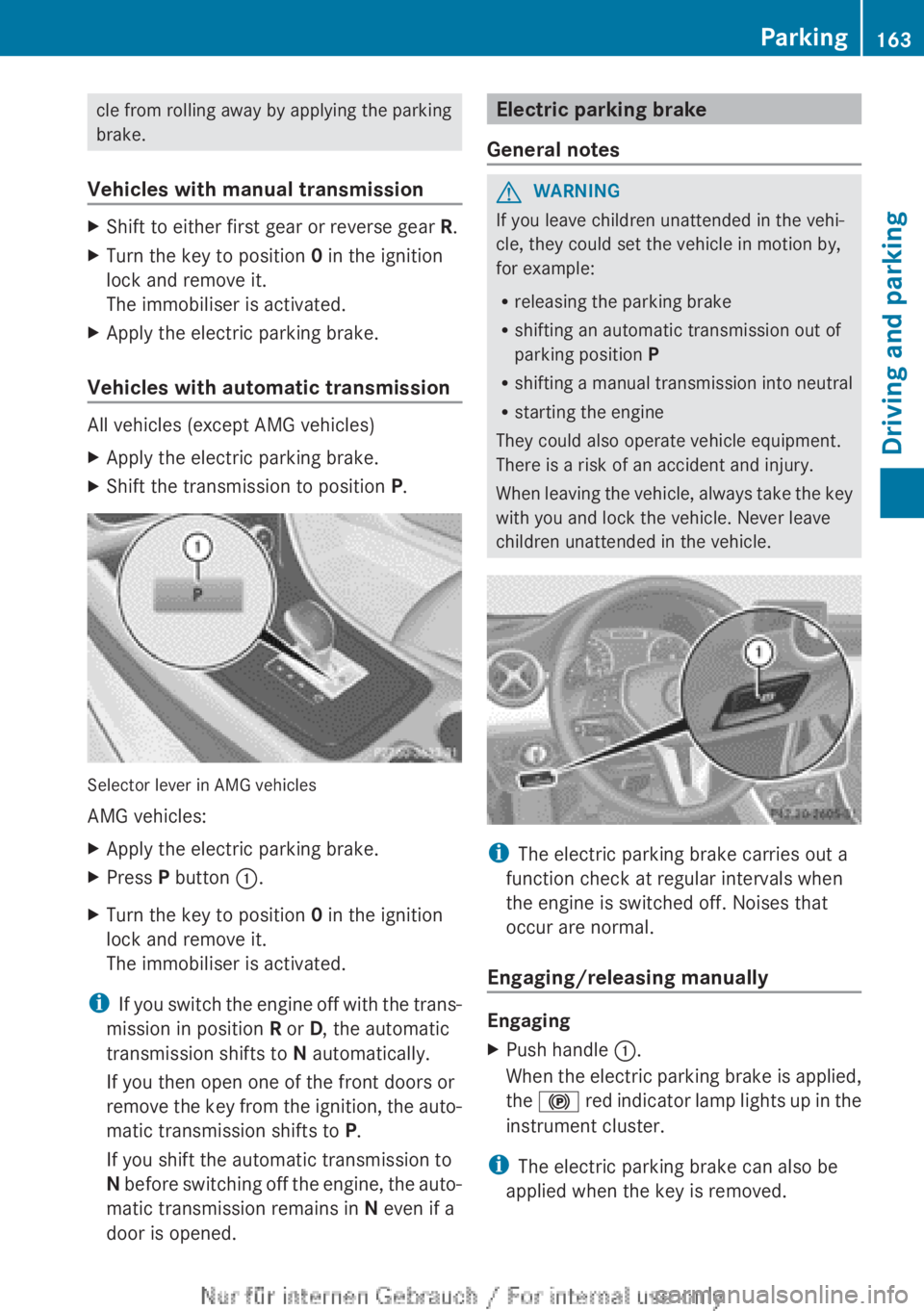
X Shift the transmission to position P.Selector lever in AMG vehicles
AMG vehicles:
X
Apply the electric parking brake.
X Press P button :.
X Turn the key to position 0 in the ignition
lock and remove it.
The immobiliser is activated.
i If you switch the engine off with the trans-
mission in position R or D, the automatic
transmission shifts to N automatically.
If you then open one of the front doors or
remove the key from the ignition, the auto-
matic transmission shifts to P.
If you shift the automatic transmission to
N before switching off the engine, the auto-
matic transmission remains in N even if a
door is opened. Electric parking brake
General notes G
WARNING
If you leave children unattended in the vehi-
cle, they could set the vehicle in motion by,
for example:
R releasing the parking brake
R shifting an automatic transmission out of
parking position P
R shifting
a manual transmission into neutral
R starting the engine
They could also operate vehicle equipment.
There is a risk of an accident and injury.
When leaving the vehicle, always take the key
with you and lock the vehicle. Never leave
children unattended in the vehicle. i
The electric parking brake carries out a
function check at regular intervals when
the engine is switched off. Noises that
occur are normal.
Engaging/releasing manually Engaging
X
Push handle :.
When
the electric parking brake is applied,
the ! red indicator lamp lights up in the
instrument cluster.
i The electric parking brake can also be
applied when the key is removed. Parking
163
Driving and parking Z
Page 166 of 356
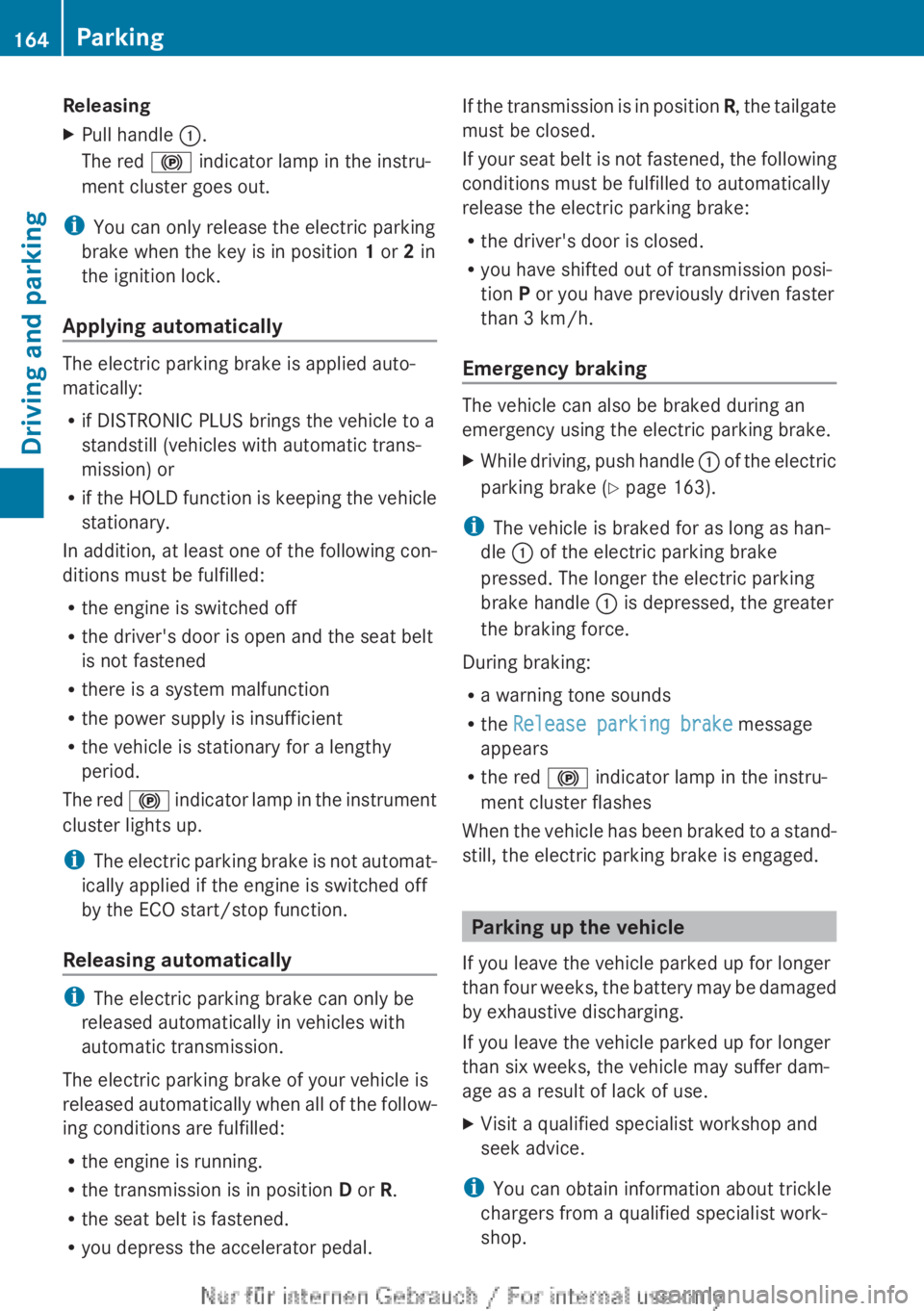
Releasing
X
Pull handle :.
The red ! indicator lamp in the instru-
ment cluster goes out.
i You can only release the electric parking
brake when the key is in position 1 or 2 in
the ignition lock.
Applying automatically The electric parking brake is applied auto-
matically:
R
if DISTRONIC PLUS brings the vehicle to a
standstill (vehicles with automatic trans-
mission) or
R if
the HOLD function is keeping the vehicle
stationary.
In addition, at least one of the following con-
ditions must be fulfilled:
R the engine is switched off
R the driver's door is open and the seat belt
is not fastened
R there is a system malfunction
R the power supply is insufficient
R the vehicle is stationary for a lengthy
period.
The red ! indicator lamp in the instrument
cluster lights up.
i The electric parking brake is not automat-
ically applied if the engine is switched off
by the ECO start/stop function.
Releasing automatically i
The electric parking brake can only be
released automatically in vehicles with
automatic transmission.
The electric parking brake of your vehicle is
released
automatically when all of the follow-
ing conditions are fulfilled:
R the engine is running.
R the transmission is in position D or R.
R the seat belt is fastened.
R you depress the accelerator pedal. If the transmission is in position
R,
the tailgate
must be closed.
If your seat belt is not fastened, the following
conditions must be fulfilled to automatically
release the electric parking brake:
R the driver's door is closed.
R you have shifted out of transmission posi-
tion P or you have previously driven faster
than 3 km/h.
Emergency braking The vehicle can also be braked during an
emergency using the electric parking brake.
X
While driving, push handle :
of the electric
parking brake ( Y page 163).
i The vehicle is braked for as long as han-
dle : of the electric parking brake
pressed. The longer the electric parking
brake handle : is depressed, the greater
the braking force.
During braking:
R a warning tone sounds
R the Release parking brake message
appears
R the red ! indicator lamp in the instru-
ment cluster flashes
When
the vehicle has been braked to a stand-
still, the electric parking brake is engaged. Parking up the vehicle
If you leave the vehicle parked up for longer
than
four weeks, the battery may be damaged
by exhaustive discharging.
If you leave the vehicle parked up for longer
than six weeks, the vehicle may suffer dam-
age as a result of lack of use.
X Visit a qualified specialist workshop and
seek advice.
i You can obtain information about trickle
chargers from a qualified specialist work-
shop. 164
Parking
Driving and parking